Page 153 of 518

3. Push the appropriate edge of theadjustment switch to move the
mirror right, left, up, or down.
4. When you finish, move the selector switch to the center (off)
position. This turns the adjustment
switch off to keep your setting. Outside mirror positions can be
stored in the driving position
memory system (see page 148).
Reverse Tilt Door Mirror
The passenger's outside mirror has a
reverse tilt feature. When in reverse,
the mirror will tilt down slightly to
improve your view as you parallel
park. Shifting out of reverse will
return the mirror to its original
position.
●To tilt the passenger mirror, place
the selector switch in the right
position.●To turn the feature off, place the
switch in the center or left
position.
Heated Mirrors
The outside mirrors are heated to
remove fog and frost. With the
ignition switch in the ON (II)
position, turn on the heaters by
pressing the button. The indicator in
the button comes on as a reminder.
Press the button again to turn the
heaters off. Pressing this button also
turns the rear window defogger on
and off.
ADJUSTMENT SWITCH
HEATED MIRROR BUTTON
CONTINUEDMirrors
147
Instruments and Controls
11/06/16 17:42:51 12 ACURA RDX MMC North America Owner's M 50 31STK650 enu
Page 154 of 518
This heated mirror function has a
timer (see page 121 ).Driving Position Memory System
Your vehicle has a memory feature
for the driver's seat and outside
mirror positions.
Seat, except for power lumbar, and
outside mirror positions, can be
stored in separate memories. You
select a memorized position by
pushing the appropriate button or
using the appropriate remote
transmitter (Memory 1 or Memory
2).Storing a Driving Position in
Memory
Store a driving position only when
the vehicle is parked.
1. Turn the ignition switch to the ON
(II) position. You cannot add a new
driving position to the memory
unless the ignition switch is in the
ON (II) position. You can recall a
memorized position with the
ignition switch in any position.
2. Adjust the seat to a comfortable position (see page 134).
Adjust the outside mirrors for best
visibility (see page 146).Mirrors, Driving Position Memory System14811/06/16 17:42:51 12 ACURA RDX MMC North America Owner's M 50 31STK650 enu
Page 155 of 518

3. Press and release the SET buttonon the driver's door. You will hear
a beep. Immediately press and
hold one of the memory buttons (1
or 2) until you hear two beeps. The
indicator in the memory button
will come on. The current
positions of the driver's seat and
outside mirrors are now stored. To cancel the storing procedure after
pressing the SET button, do any of
the following:
●Fail to press a memory button
within 5 seconds.●Readjust the seat position.●Readjust the outside mirror
position.
Each memory button stores only one
driving position. Storing a new
position erases the previous setting
stored in that button's memory. If
you want to add a new position while
retaining the current one, use the
other memory button. Selecting a Memorized Position
To select a memorized position, do
this:
1. Make sure the vehicle is parked.
2. Press the desired memory button
(1 or 2) until you hear a beep, then
release the button.
The system will move the seat and
outside mirrors to the memorized
positions. The indicator in the
selected memory button will flash
during movement. When the
adjustments are complete, you will
hear two beeps, and the indicator will
remain on.
SET BUTTON
MEMORY BUTTONS
CONTINUED
Driving Position Memory System
149
Instruments and Controls
11/06/16 17:42:51 12 ACURA RDX MMC North America Owner's M 50 31STK650 enu
Page 156 of 518
To stop the system's automatic
adjustment, do any of these actions:●Press any button on the control
panel: SET, 1, or 2.●Push any of the adjustment
switches for the seat.●Shift out of Park.●Adjust the outside mirrors.
If desired, you can use the
adjustment switches to change the
positions of the seat or outside
mirrors after they are in their
memorized positions. If you change
the memorized position, the indicator
in the memory button will go out. To
keep this driving position for later
use, you must store it in the driving
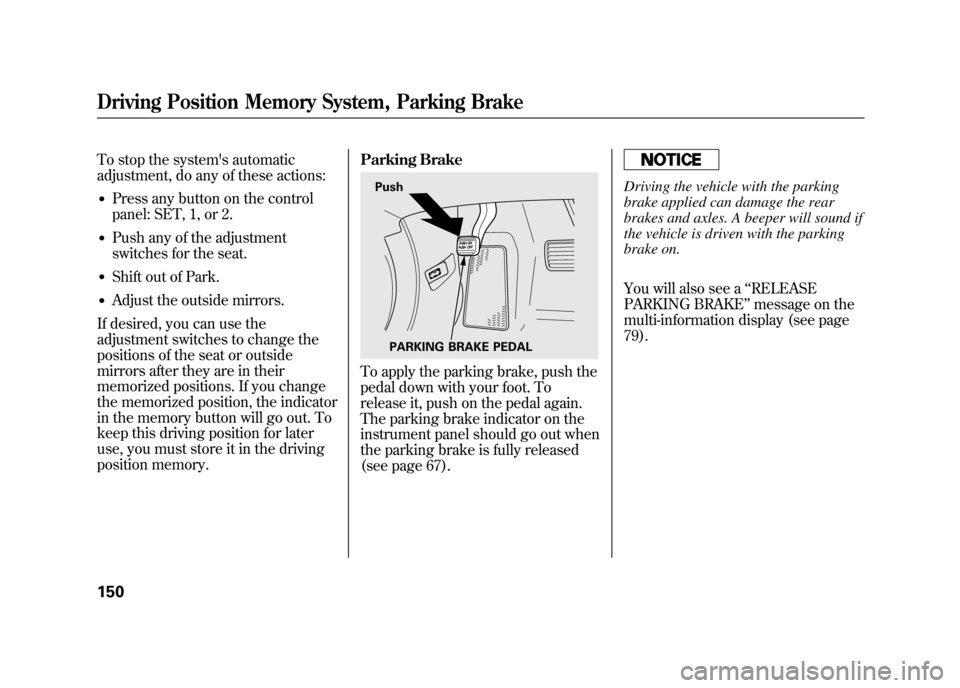
position memory. Parking Brake
To apply the parking brake, push the
pedal down with your foot. To
release it, push on the pedal again.
The parking brake indicator on the
instrument panel should go out when
the parking brake is fully released
(see page 67).
Driving the vehicle with the parking
brake applied can damage the rear
brakes and axles. A beeper will sound if
the vehicle is driven with the parking
brake on.
You will also see a
‘‘RELEASE
PARKING BRAKE ’’message on the
multi-information display (see page
79).
Push
PARKING BRAKE PEDAL
Driving Position Memory System, Parking Brake15011/06/16 17:42:51 12 ACURA RDX MMC North America Owner's M 50 31STK650 enu
Page 160 of 518
CARGO AREA COVERBEVERAGE HOLDERS in
REAR SEAT ARMREST CENTER CONSOLE ACCESSORY
POWER SOCKETSGLOVE BOX
CENTER
POCKET
SUN VISOR/VANITY
MIRROR
BEVERAGE
HOLDERS
FRONT DOOR
POCKET
DOOR LINING
POCKETS
COAT HOOK
AUXILIARY
INPUT JACK
USB ADAPTER CABLEInterior Convenience Items15411/06/16 17:42:51 12 ACURA RDX MMC North America Owner's M 50 31STK650 enu
Page 164 of 518
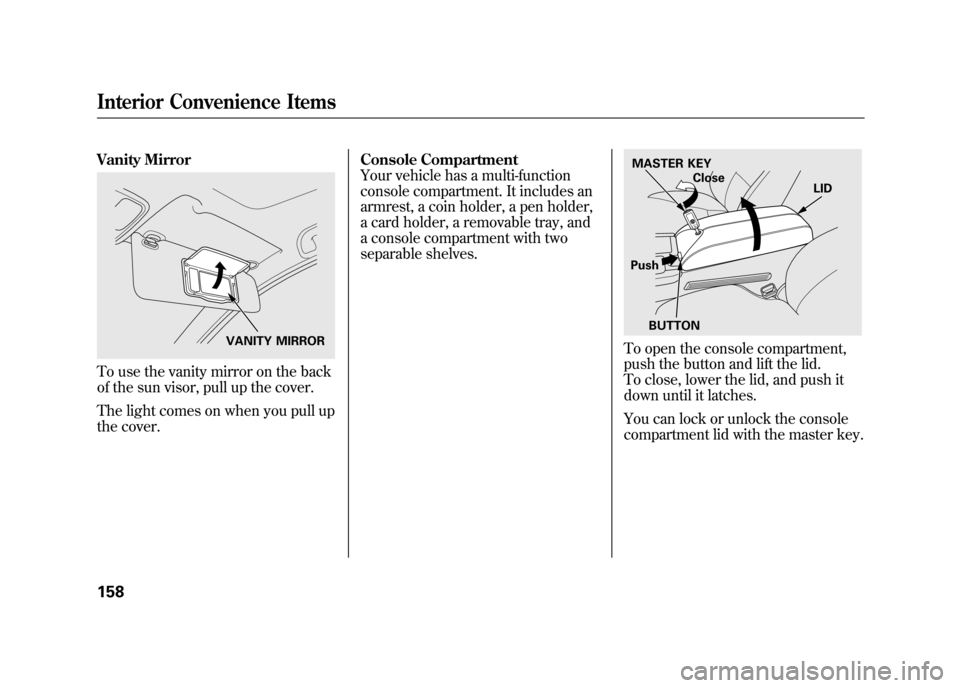
Vanity MirrorTo use the vanity mirror on the back
of the sun visor, pull up the cover.
The light comes on when you pull up
the cover.Console Compartment
Your vehicle has a multi-function
console compartment. It includes an
armrest, a coin holder, a pen holder,
a card holder, a removable tray, and
a console compartment with two
separable shelves.
To open the console compartment,
push the button and lift the lid.
To close, lower the lid, and push it
down until it latches.
You can lock or unlock the console
compartment lid with the master key.
VANITY MIRROR
MASTER KEY
Close LID
Push BUTTON
Interior Convenience Items15811/06/16 17:42:51 12 ACURA RDX MMC North America Owner's M 50 31STK650 enu
Page 169 of 518

The climate control system in your vehicle
provides a comfortable driving
environment in all weather conditions.
The standard audio system has many
features. This section describes those
features and how to use them.
Your vehicle has an anti-theft audio system
that requires a code number to enable it.
The security system helps to discourage
vandalism and theft of your vehicle.On models with navigation systemThe climate control system and the audiosystem have a voice control feature. Referto the navigation system manual for more
information.Climate Control System
....................
164
Dual Temperature Control
.............
169
Climate Control Sensors
................
171
Audio System
..................................
172
Playing the FM/AM Radio (Models without navigation system)
........
174
To Play the Radio
.........................
174
Adjusting the Sound
.....................
177
Playing the XM
®Radio (Models
without navigation system)
............
179
Playing Discs (Models without navigation system)
.......................
185 Disc Changer Error Messages
(Models without navigationsystem)
..................................
195
Playing an iPod
®(Models without
navigation system)
.......................
197
iPod
®Error Messages (Models
without navigation system)
............
203
Playing a USB Flash Memory Device (Models without navigationsystem)
..................................
204
USB Flash Memory Device Error Messages (Models without
navigation system)
...................
211
Bluetooth
®Audio System (Models
without navigation system)
............
212
Audio System (Models with navigation system)
..................................
216
Interface Dial
..............................
216
Playing the FM/AM Radio (Models
with navigation system)
.............
217
Adjusting the Sound
.....................
224
Playing the XM
®Radio (Models with
navigation system)
.......................
228
Playing Discs (Models with navigation system)
......................................
239
Disc Changer Error Messages
(Models with navigationsystem)
..................................
255 Protecting Your Discs
.......................
257
Playing an iPod
®(Models with
navigation system)
.......................
260
iPod
®Error Messages (Models with
navigation system)
.......................
269
Playing a USB Flash Memory Device (Models with navigation
system)
..................................
270
USB Flash Memory Device Error Messages (Models with navigation
system)
..................................
279
Bluetooth
®Audio System (Models with
navigation system)
.......................
280
FM/AM Radio Reception
..................
287
Remote Audio Controls
.....................
289
Auxiliary Input Jack
..........................
291
Radio Theft Protection
......................
291
Setting the Clock
.............................
293
Security System
...............................
294
Compass
........................................
295
Compass Operation
....................
295
Cruise Control
.................................
300
HomeLink
®Universal Transceiver
......
303
Bluetooth
®HandsFreeLink
®..............
306
AcuraLink
®(U.S. models only)
...........
332
Rearview Mirror with Rearview
Camera Display
...........................
348
Features
163
Features
11/06/16 17:42:51 12 ACURA RDX MMC North America Owner's M 50 31STK650 enu
Page 170 of 518
OFF BUTTON
DUAL BUTTON
FAN CONTROL BUTTONS Models without navigation system
AUTO BUTTON
DRIVER'S SIDE
TEMPERATURE
DISPLAY
RECIRCULATION BUTTON
DRIVER'S SIDE
TEMPERATURE
CONTROL BUTTONS
U.S. model is shown. AIR CONDITIONING (A/C) BUTTONPASSENGER'S SIDE
TEMPERATURE
CONTROL BUTTONS
PASSENGER'S SIDE
TEMPERATURE DISPLAY
PASSENGER
’S SIDE
TEMPERATURE DISPLAY
MODE INDICATOR DRIVER'S SIDE
TEMPERATURE DISPLAY
Models with navigation system
MODE INDICATOR
REAR WINDOW DEFOGGER/HEATED MIRROR BUTTON
WINDSHIELD DEFROSTER BUTTON
MODE BUTTON
Climate Control System16411/06/16 17:42:51 12 ACURA RDX MMC North America Owner's M 50 31STK650 enu