Page 317 of 382

315
06
Enter the same code on the telephone then accept
the connection.
Then accept automatic connection on the telephone to allow the
te
lephone to reconnect automatically every time the vehicle is started.
The abilit
y of the system to connect in only one mode depends on
the telephone. The two modes may both connect by default.
USING THE TELEPHONE
The "Hands-free mode
" should be used in preference if "Streaming" is not desired.
The services available depend on the network, the
SIM card and the compatibility of the Bluetooth telephone used. Check the telephone manual and with your network provider for details of the services available to you.
Select a code for the connection thenconfi rm "OK".
Depending on the type of telephone, the system will ask you to
accept or not the transfer of your contacts.
On return to the vehicle,the last telephone connected
automatically reconnects, within around 30 seconds after switching on the ignition (Bluetooth activated and visible).
To modi
fy the automatic connection mode, remove the pairingand pair the telephone again with the desired mode.
Page 318 of 382
316
06USING THE TELEPHONE
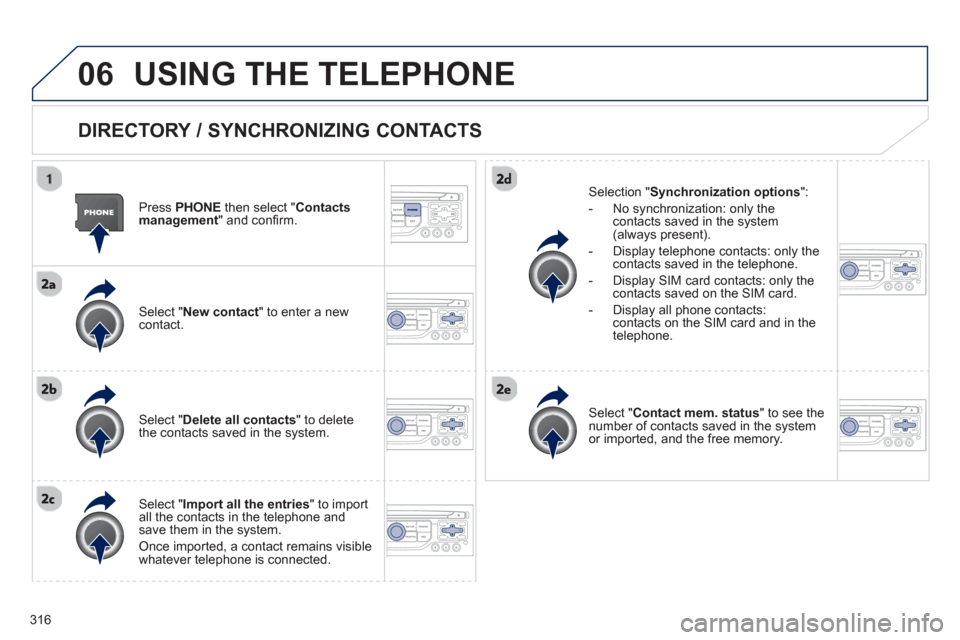
DIRECTORY / SYNCHRONIZING CONTACTS
Press PHONE
then select " Contacts
management " and confi rm.
Select "New contact
" to enter a new contact.
Select "Delete all contacts" to delete
the contacts saved in the system.
Select "Import all the entries
" to import
all the contacts in the telephone and
save them in the system.
Once imported, a contact remains visible whatever telephone is connected.
Selection "Synchronization options":
- No s
ynchronization: only the contacts saved in the system (always present).
- Displa
y telephone contacts: only the contacts saved in the telephone.
- Displa
y SIM card contacts: only thecontacts saved on the SIM card.
- Display all phone contacts:
contacts on the SIM card and in thetelephone.
Select "Contact mem. status" to see thenumber of contacts saved in the systemor imported, and the free memory.
Page 319 of 382
317
06
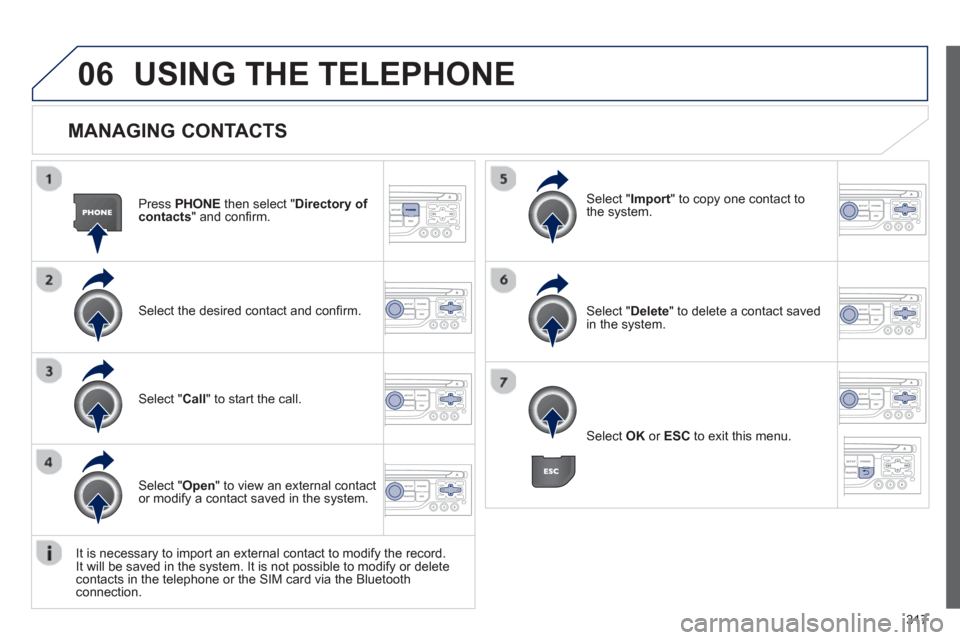
MANAGING CONTACTS
Press PHONEthen select "Directory of contacts" and confi rm.
Select the desired contact and confi rm.
Select " Import" to copy one contact to
the system.
Select " Call" to start the call.
Select " Open
" to view an external contact
or modify a contact saved in the system.
Select OK
or ESC
to exit this menu.
Select " Delete" to delete a contact savedin the system.
It is necessar
y to import an external contact to modify the record.
It will be saved in the system. It is not possible to modify or delete contacts in the telephone or the SIM card via the Bluetoothconnection.
USING THE TELEPHONE
Page 320 of 382
318
06
Press PHONEtwice.
Select " Dial" then confi rm.
Select " Directory of contacts" thenconfi rm.
Dial the telephone number usin
g the
virtual keypad selecting each number in turn.
Confi rm " OK " to make the call.
Press TELor twice on PHONE.
CALLING A NEW NUMBER CALLING A CONTACT
Select the desired contact and confi rm.
If
access was via the PHONEbutton, select "Call" and confi rm.
Select the number and confi rm to start
the call.
MAKING A CALL Use of the telephone is not recommended while driving. Werecommended that you park safely or make use of the steering mounted controls.
Page 321 of 382
319
06USING THE TELEPHONE
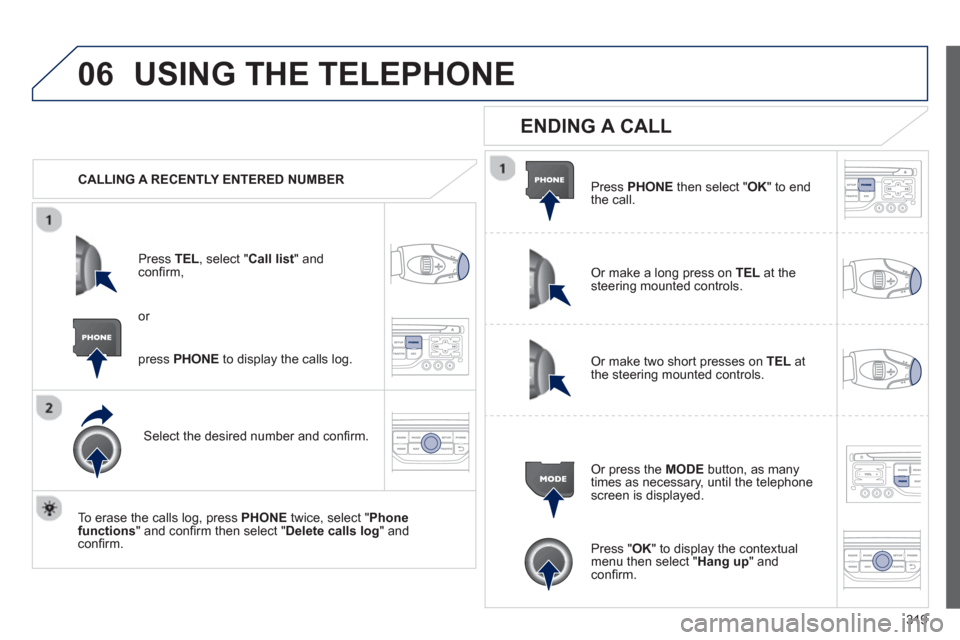
CALLING A RECENTLY ENTERED NUMBER
Pr
ess TEL, select "Call list" andconfi rm,
Select the desired number and confi rm.
To erase the calls lo
g, press PHONE
twice, select " Phone functions" and confi rm then select " Delete calls log" andconfi rm.
ENDING A CALL
Press PHONEthen select "OK" to end
the call.
Or make a long press on TELat the
steering mounted controls.
Or make two short presses on TELat
the steering mounted controls.
Or press the MODE
button, as many
times as necessary, until the telephone
screen is displayed.
press PHONE
to display the calls log.
or
Press "OK" to display the contextualmenu then select " Hang up" andconfi rm.
Page 322 of 382
320
06USING THE TELEPHONE
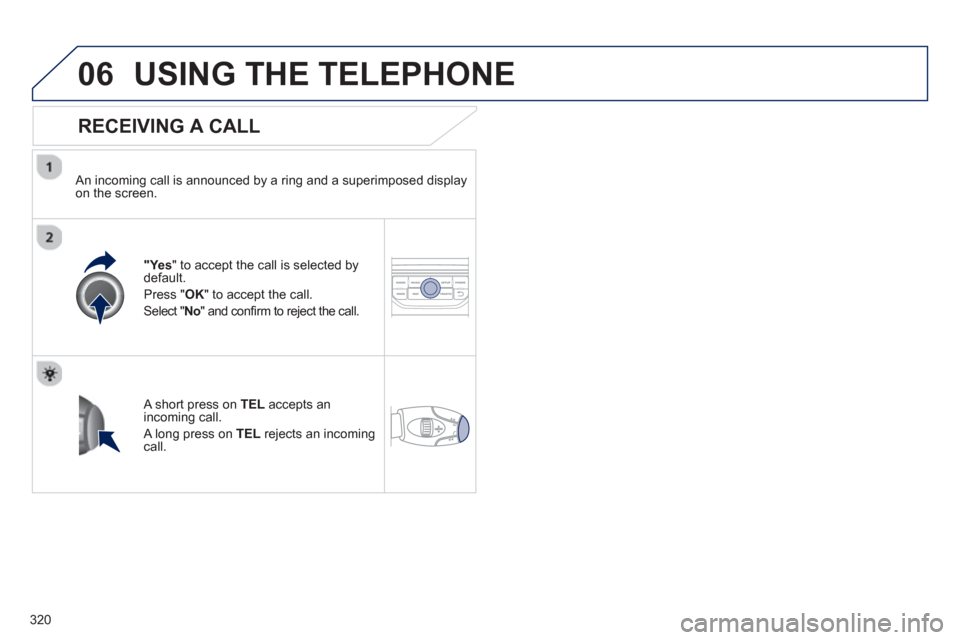
RECEIVING A CALL
An incoming call is announced by a ring and a superimposed displayon the screen.
"Ye s" to accept the call is selected bydefault.
Press "
OK" to accept the call.
Select "No" and confi rm to reject the call.
A short press on TELaccepts an incoming call.
A long press on TEL
rejects an incomingcall.
Page 323 of 382
321
06USING THE TELEPHONE
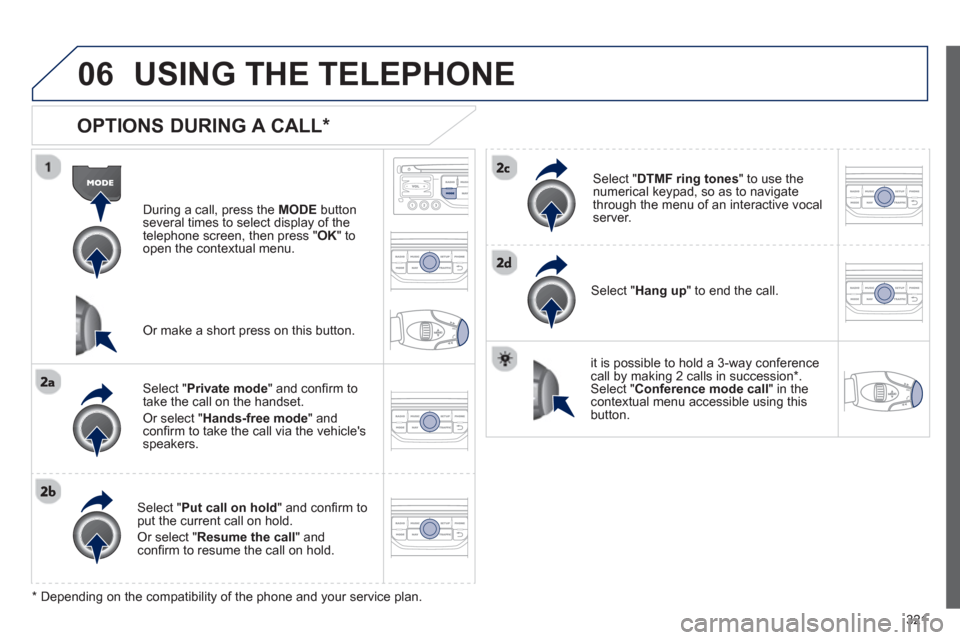
OPTIONS DURING A CALL *
During a call, press the MODE
button
several times to select display of the
telephone screen, then press " OK " to
open the contextual menu.
Select " Private mode
" and confi rm totake the call on the handset.
Or select " Hands-free mode" andconfi rm to take the call via the vehicle's
speakers.
Select " Put call on hold" and confi rm to put the current call on hold.
Or select " Resume the call" andconfi rm to resume the call on hold.
Select " DTMF ring tones
" to use thenumerical keypad, so as to navigate
through the menu of an interactive vocal server.
Select " Hang up " to end the call.
*
Depending on the compatibility of the phone and your service plan.
it is possible to hold a 3-wa
y conferencecall by making 2 calls in succession*. Select "Conferencemode call" in the contextual menu accessible using thisbutton.
Or make a short press on this button.
Page 324 of 382
322
06
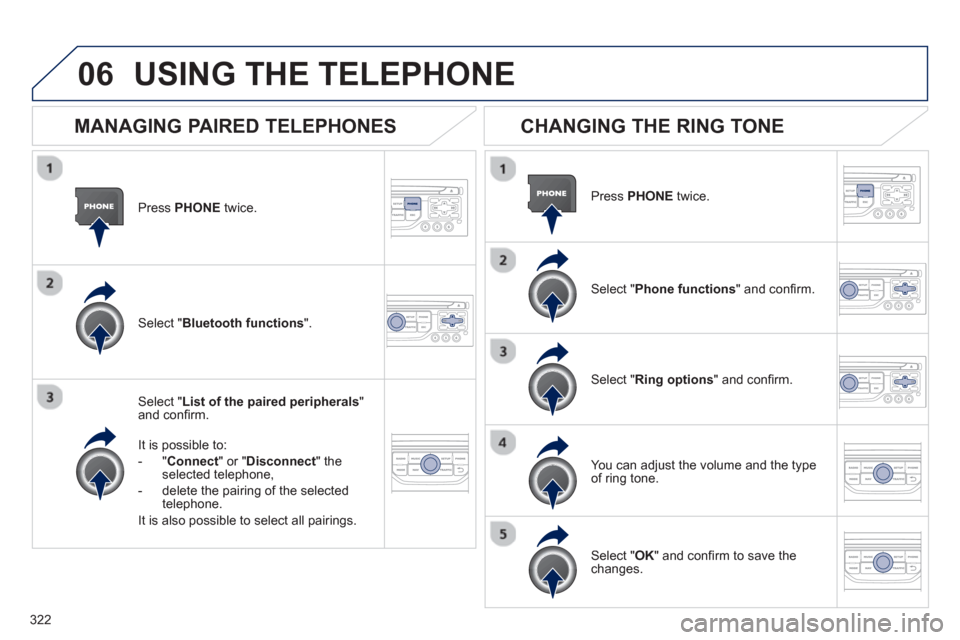
Press PHONEtwice.
Select " List of the paired peripherals"and confi rm.
It is
possible to:
-"Connec
t" or " Disconnect
" theselected telephone,
- delete the pairin
g of the selected
telephone.
It is also possible to select all pairings.
USING THE TELEPHONE
MANAGING PAIRED TELEPHONES
CHANGING THE RING TONE
Press PHONEtwice.
Select " Phone functions
" and confi rm.
Select " Ring options" and confi rm.
You can ad
just the volume and the type
of ring tone.
Select " Bluetooth functions".
Select " OK
" and confi rm to save thechanges.