Page 264 of 382

262
04
NAV2ABC3DEF5JKL4GHI6MNO8TUV7PQRS9WXYZ0*#
1RADIO MEDIANAV ESC TRAFFIC
SETUPADDR
BOOK
2ABC3DEF5JKL4GHI6MNO8TUV7PQRS9WXYZ0*#
1RADIO MEDIANAV ESC TRAFFIC
SETUPADDR
BOOK
2ABC3DEF5JKL4GHI6MNO8TUV7PQRS9WXYZ0*#
1RADIO MEDIANAV ESC TRAFFIC
SETUPADDR
BOOK
2ABC3DEF5JKL4GHI6MNO8TUV7PQRS9WXYZ0*#
1RADIO MEDIANAV ESC TRAFFIC
SETUPADDR
BOOK
2ABC3DEF5JKL4GHI6MNO8TUV7PQRS9WXYZ0*#
1RADIO MEDIANAV ESC TRAFFIC
SETUPADDR
BOOK
2ABC3DEF5JKL4GHI6MNO8TUV7PQRS9WXYZ0*#
1RADIO MEDIANAV ESC TRAFFIC
SETUPADDR
BOOK
2ABC3DEF5JKL4GHI6MNO8TUV7PQRS9WXYZ0*#
1RADIO MEDIANAV ESC TRAFFIC
SETUPADDR
BOOK
ADDING A STOPOVER
Enter a new address, for example.
Once the new address has
been entered, select "Start route guidance" and press OK to confi rm.
Position the stopover on the list and
press OK to confi rm. Pr
ess the NAV button.
Press the NAV button a
gain or select
the "Navigation" Menu function and
press OK to confi rm.
Select the "Add stopover" function(5 stopovers maximum) and pressOK to confi rm. Select the "Sto
povers" function and
press OK to confi rm.
Address inputp
Add stopoverp
Stopoversp
"Navigation" Menug
Start route guidanceg
To change the stopovers, repeat operations 1 to 3 and select
"Rearrange route" (select a stopover, delete it or move it on the
list using the ring to change the order, confi rm its new position and
fi nish with "Recalculate").
Stopovers can be added to or deleted from the route once the destinationhas been selected.
Repeat operations 1 to 7 as man
y times as necessary then select"Recalculate" and press OK to confi rm.
NAVIGATION - GUIDANCE
Page 274 of 382

272
07
MEDIA
2ABC3DEF5JKL4GHI6MNO8TUV7PQRS9WXYZ0*#
1RADIO MEDIANAV ESC TRAFFIC
SETUPADDR
BOOK
2ABC3DEF5JKL4GHI6MNO8TUV7PQRS9WXYZ0*#
1RADIO MEDIANAV ESC TRAFFIC
SETUPADDR
BOOK
2ABC3DEF5JKL4GHI6MNO8TUV7PQRS9WXYZ0*#
1RADIO MEDIANAV ESC TRAFFIC
SETUPADDR
BOOK
2ABC3DEF5JKL4GHI6MNO8TUV7PQRS9WXYZ0*#
1RADIO MEDIANAV ESC TRAFFIC
SETUPADDR
BOOK
2ABC3DEF5JKL4GHI6MNO8TUV7PQRS9WXYZ0*#
1RADIO MEDIANAV ESC TRAFFIC
SETUPADDR
BOOK
2ABC3DEF5JKL4GHI6MNO8TUV7PQRS9WXYZ0*#
1RADIO MEDIANAV ESC TRAFFIC
SETUPADDR
BOOK
2ABC3DEF5JKL4GHI6MNO8TUV7PQRS9WXYZ0*#
1RADIO MEDIANAV ESC TRAFFIC
SETUPADDR
BOOK
2ABC3DEF5JKL4GHI6MNO8TUV7PQRS9WXYZ0*#
1RADIO MEDIANAV ESC TRAFFIC
SETUPADDR
BOOK
RADIONAV ESC TRAFFICMEDIA
Select "Jukebox management" then"Add fi les" and press OK at each step
to confi rm. Pr
ess the MEDIA button. Press theMEDIA button again or select MediaMenu and press OK to confi rm.
Insert an audio
/ MP3 CD, a USBmemory stick or an SD card.
JUKEBOX
Add fi les
Check that the active MEDIA source is that of the medium used(CD, USB or SD card).
Select "Add fi les from MP3-Disc" for example and press OK to validate.
Select the tracks required then "Rip
selection" or select all of the tracks using "Rip all".
Select "[New folder]" to create a new folder or select an existing folder (created previously).
Add fi les from MP3-Disc
[New folder]
"Do you want to change the names of the tracks that
will be ripped?": select "Yes" to change them or "No".
To copy an MP3 CD, then select "Real
time ripping", "Fast ripping" / "High
quality (192 kbit/sec)" or "Standard
quality (128 kbit/sec)" then select "Startripping".
Confi rm the warning message bypressing "OK" to start the copy.
OK
Yes No When cop
ying is in progress, switching off the ignition will interrupt the
process but it will resume directly when the ignition is switched on again.
MUSIC MEDIA PLAYERS
COPYING A CD, A USB MEMORY STICK OR AN SD CARD
ONTO THE HARD DISK
Page 276 of 382

274
07
MEDIA
2ABC3DEF5JKL4GHI6MNO8TUV7PQRS9WXYZ0*#
1RADIO MEDIANAV ESC TRAFFIC
SETUPADDR
BOOK
MEDIA
2ABC3DEF5JKL4GHI6MNO8TUV7PQRS9WXYZ0*#
1RADIO MEDIANAV ESC TRAFFIC
SETUPADDR
BOOK
2ABC3DEF5JKL4GHI6MNO8TUV7PQRS9WXYZ0*#
1RADIO MEDIANAV ESC TRAFFIC
SETUPADDR
BOOK
2ABC3DEF5JKL4GHI6MNO8TUV7PQRS9WXYZ0*#
1RADIO MEDIANAV ESC TRAFFIC
SETUPADDR
BOOK
RADIONAV ESC TRAFFICMEDIA
RADIONAV ESC TRAFFICMEDIA
Connect the portable device (MP3 player, camcorder, camera…) to
the RCA sockets (white and red for audio; yellow for video) in the glove box using a JACK/RCA audio cable.
Press the MEDIA button then press
it again or select the Media Menu function and press OK to confi rm.
Select the AUX music source and press OK to confi rm. Play begins
automatically.
Select "Select media" then "External
device (AV)" and press OK to activate it.
External device
The display and management of the controls is via the portable device.
USING AN EXTERNAL DEVICE (AUX)
If the external input is not activated, select "Ext. Device (Aux)management" to activate it.
VIEWING A VIDEO DVD
Select the video source required ("DVD-Video", "External device(AV)"). Press OK to confi rm. Play begins.
Press the MEDIA button to gainaccess to the DVD menu at any time,or to the functions of the Media Menuwhich adjust the video (brightness/contrast, image format...). If the DVD does not a
ppear on thescreen, press the MODE button to gain access to the "MEDIA" screen
which displays the DVD screen.
Insert the DVD in the pla
yer. Play begins
automatically.
The 4-direction navi
gator and the chromed ring allow you to move
the DVD selection cursor. Change chapter by pressing the � or � button.
MUSIC MEDIA PLAYERS
AUDIO / VIDEO / RCA CABLE NOT SUPPLIED
Page 285 of 382
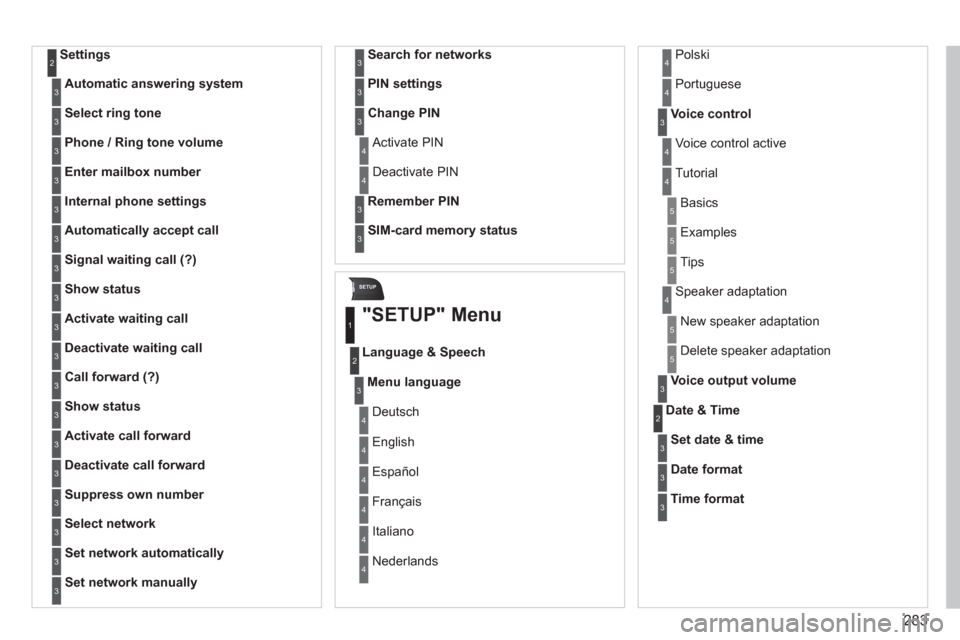
283
SETUP
Settings2
Automatic answering system3
Select ring tone3
Phone / Ring tone volume3
Enter mailbox number3
Internal phone settings3
Automatically accept call3
Signal waiting call (?)3
Show status3
Activate waiting call3
Deactivate waiting call3
Call forward (?)3
Show status3
Activate call forward3
Deactivate call forward3
Suppress own number3
Select network3
Set network automatically3
Set network manually3
Search for networks3
PIN settings3
Change PIN3
Activate PIN4
Deactivate PIN 4
Remember PIN3
SIM-card memory status3
"SETUP" Menu
Menu language
Language & Speech
1
2
3
Deutsch 4
English4
Español4
Français4
Italiano4
Nederlands 4
Polski4
Voice control3
Voice control active 4
Tutorial4
Portuguese 4
Basics5
Examples5
Tips5
Speaker adaptation 4
New speaker adaptation 5
Delete speaker adaptation 5
Voice output volume3
Date & Time2
Set date & time3
Date format3
Time format3
Page 330 of 382
328
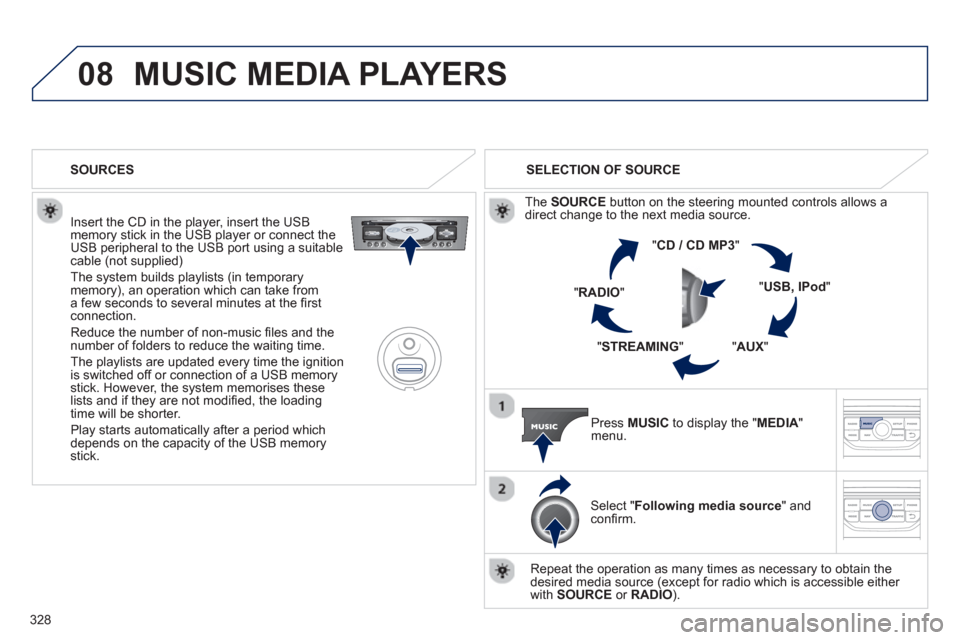
08MUSIC MEDIA PLAYERS
Insert the CD in the player, insert the USBmemory stick in the USB player or connect theUSB peripheral to the USB port using a suitablecable (not supplied)
The system builds playlists (in temporarymemory), an operation which can take froma few seconds to several minutes at the fi rstconnection.
R
educe the number of non-music fi les and the number of folders to reduce the waiting time.
The pla
ylists are updated every time the ignition
is switched off or connection of a USB memory stick. However, the system memorises these
lists and if they are not modifi ed, the loadingtime will be shorter.
Pla
y starts automatically after a period which
depends on the capacity of the USB memory stick. SELECTION OF SOURCE
Th
e SOURCE
button on the steering mounted controls allows adirect change to the next media source.
" CD / CD MP
3
"
"
USB, IPod"
"AUX
" "
STREAMING
" "RADIO
"
Pr
ess MUSICto display the "MEDIA
" menu.
Select "Following media source " and confi rm.
Repeat the operation as many times as necessary to obtain the
desired media source (except for radio which is accessible either
with SOURCE
or RADIO). SOURCES
Page 351 of 382

349
04 AUDIO
Press the SOURCE button several
times in succession and select theradio.
Press the BAND A
ST button to select
a waveband: FM1, FM2, FMast, AM.
Briefl
y press one of the buttons tocarry out an automatic search of theradio stations.
Press one o
f the buttons to carry out
a manual search up / down for radiofrequencies.
Press the LI
ST REFRESH button to
display the list of stations received
locally (30 stations maximum).
To update this list, press for more
t
han two seconds.
The external environment
(hills, buildings, tunnels, basement car parks, ...) may
block reception, including in RDS mode. This is a normal effect of the way in
which radio waves are transmitted and does not indicate any failure of the audiosystem.
RDS
RADIO
SELECTING A STATION
Press the MENU button.
Select AUDIO FUNCTIONS thenpress OK.
Select the FM WAVEBANDPREFERENCES function then pressOK.
Select ACTIVATE RDS then pressOK. RDS appears on the screen.
In radio mode, press
OK directly to activate / deactivate RDSmode.
The RDS, if displayed, enables you to continue listening to the samestation by automatic retuning to alternative frequencies. However, in certainconditions, coverage of an RDS station may not be assured throughout thecountry as radio stations do not cover 100 % of the territory. Under conditionsof very weak reception, the system may change to a regional station.
Page:
< prev 1-8 9-16 17-24