2011 YAMAHA EC-03 key battery
[x] Cancel search: key batteryPage 41 of 78

CHARGING THE BATTERY
6-7
2
3
4
567
8
9 pears in the display during charg-
ing. The display goes off if the
charging plug is unplugged during
charging.
Even if the key is turned to “ON”,
the vehicle does not enter thestandby mode during charging.
Completing charging
When the battery is fully charged, the
display goes off automatically after a
few minutes.
1. Grasp the charging plug, and then
unplug it from the electrical outlet.
NOTICE: Do not pull the charg-
ing cord to unplug the charging
plug from the electrical outlet.
This could damage the charging
cord.
[ECA17470]
2. Open the seat. (See page 4-12 for
more information.)
3. Hold the charging plug, and while
pressing the charging cord into the
groove, wind it clockwise as
shown. NOTICE: If the charging
cord is not wound properly, the
vehicle, charging cord or charg-ing plug can be damaged when
closing the seat.
[ECA17480]
4. Secure the charging cord by plac-
ing it in the holder as shown.
1. Charging plug
1
1. Charging plug
2. Groove
3. Charging cord
1. Holder
12
3
1
1CB-9-E0.book 7 ページ 2010年10月15日 金曜日 午前10時19分
Page 42 of 78

CHARGING THE BATTERY
6-8
1
2
3
4
56
7
8
95. Close the seat, and push down on
the back to lock it in position.
TIP
Before closing the seat, make sure
that nothing is left under the seat.
Make sure that the seat is securelylocked before riding.
6. Remove the key.WARNING
EWA15900
When not in use, do not leave the
charging plug plugged into an out-
let. Dust or foreign objects could
build up and cause a fire. Be sure to
unplug the charging plug from theoutlet after use.
EAU50402
Charging time Normal charging
Charging time varies depending on the
riding conditions before charging, re-
maining battery level, and ambient tem-
perature. It takes approximately seven
hours to charge the battery from a 0%
charged level in the optimum ambient
temperature range of 15 C – 25 C.TIPWhen the charging process is complet-
ed, the power from the built-in batterycharger is cut off automatically.
Waiting mode for charging
The vehicle enters a waiting mode if thetemperature is not suitable for charging
as follows:
The battery may be above the
maximum 50 C immediately after
riding. In this case, the charger en-
ters a waiting mode and “HEAT”
flashes until the battery and bat-
tery charger reach the specified
temperature.
If ambient temperature is below
–5 C, “COOL” flashes until the
battery and battery charger reach
the specified temperature.
When the temperature is suitable for
charging, charging starts automatically.
100
50
0
2.0 4.0 7.0
Charging time (hours) Battery
level (%)
1CB-9-E0.book 8 ページ 2010年10月15日 金曜日 午前10時19分
Page 47 of 78

OPERATION AND IMPORTANT RIDING POINTS
7-3
2
3
4
5
678
9
TIPWhen the vehicle enters the riding
mode, the beeper sounds. The beeper
stops sounding when either brake lever
is squeezed or the vehicle starts mov-ing.
If the entered security number is
incorrect, the buzzer sounds, “NG”
flashes for a few seconds, and the
vehicle returns to the standby
mode.
If this occurs, repeat the procedure
from the step 6.TIPIf an incorrect security number is en-
tered three times in succession, the se-curity lock cannot be unlocked even if
the correct security number is entered.
Repeat the procedure after first turning
the key to “OFF” and then back to “ON”
again.
8. Check the battery level indicator to
make sure that the remaining
charged level is sufficient. (See
page 3-4 for more information
about the charge level.)
EAU50103
Starting off 1. Check that the operating status in-
dicator “RUN” is displayed, and
that the vehicle is in the riding
mode.TIPIf the vehicle is set to the power mode,
the power mode indicator “POWER” is
displayed. (See page 3-1 for more in-
formation about switching the display
between the standard mode and thepower mode.)
2. Switch the turn signal on.
1. Incorrect number indicator “NG”
1
1. Battery level indicator
1
1. Operating status indicator “RUN”
2. Power mode indicator “POWER”
1
2
1CB-9-E0.book 3 ページ 2010年10月15日 金曜日 午前10時19分
Page 48 of 78
OPERATION AND IMPORTANT RIDING POINTS
7-4
1
2
3
4
5
67
8
9
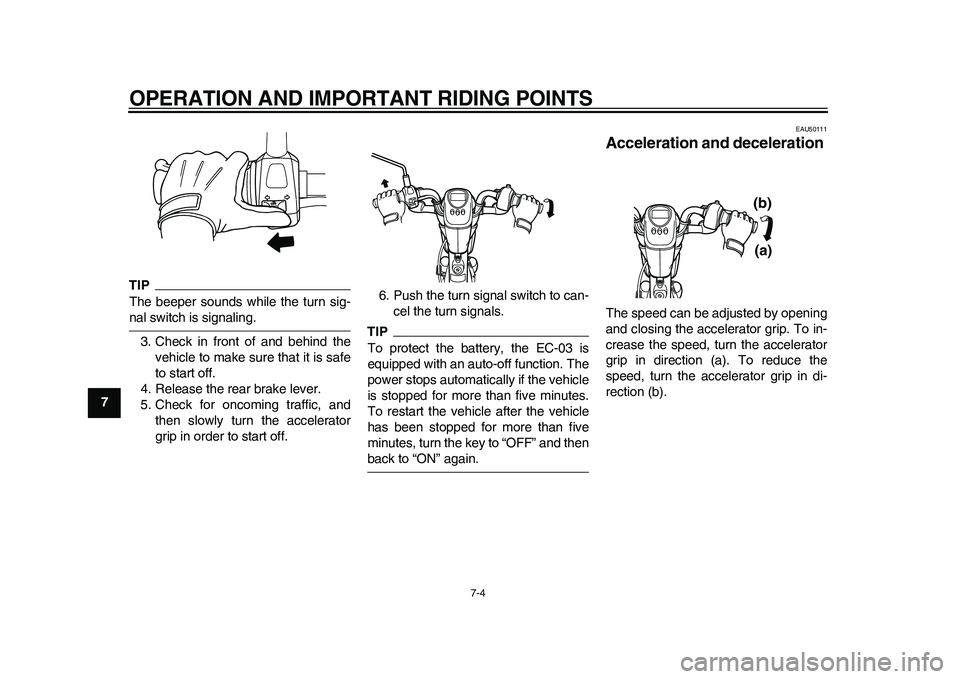
TIPThe beeper sounds while the turn sig-nal switch is signaling.
3. Check in front of and behind the
vehicle to make sure that it is safe
to start off.
4. Release the rear brake lever.
5. Check for oncoming traffic, and
then slowly turn the accelerator
grip in order to start off.6. Push the turn signal switch to can-
cel the turn signals.
TIPTo protect the battery, the EC-03 is
equipped with an auto-off function. The
power stops automatically if the vehicle
is stopped for more than five minutes.
To restart the vehicle after the vehicle
has been stopped for more than five
minutes, turn the key to “OFF” and thenback to “ON” again.
EAU50111
Acceleration and deceleration The speed can be adjusted by opening
and closing the accelerator grip. To in-
crease the speed, turn the accelerator
grip in direction (a). To reduce the
speed, turn the accelerator grip in di-
rection (b).
(a) (b)
1CB-9-E0.book 4 ページ 2010年10月15日 金曜日 午前10時19分
Page 65 of 78

PERIODIC MAINTENANCE AND ADJUSTMENT
8-16
2
3
4
5
6
789
NOTICE
ECA11981
Do not use a bulb of a wattage other
than specified to avoid causing ex-
tensive damage to the electrical sys-tem and possibly a fire.
The motor stops while riding
Check the following:
1. Is the battery sufficiently charged?
Check the battery level indicator. If
the remaining charge is insuffi-
cient, charge the battery before
continuing to ride.
2. Is “HEAT” flashing and did “RUN”
go off?
The temperature protection func-tion has been activated. Turn the
key to “OFF”, and allow the vehicle
to cool down before continuing to
ride.
After checking the above, if the motor
still does not run, have a Yamaha deal-
er check the vehicle.
WARNING
EWA15630
Before pushing or moving the
EC-03, be sure to turn the key to
“OFF”. The vehicle may suddenly
start to move if the accelerator grip
is turned while the key is turned to“ON”.
The display and headlight go off
when the key is turned to “ON”
Check the following:
1. Has the vehicle been stopped for
more than five minutes?
To protect the battery, the EC-03 is
equipped with an auto-off function.
If the vehicle has been stopped for
more than five minutes, the power
is cut to save the battery charge.
2. Is the battery sufficiently charged?
If the remaining charge is insuffi-cient, charge the battery before
continuing to ride.
After checking the above, turn the key
to “ON” again. If the display and head-
light do not come on, have a Yamaha
dealer check the vehicle.
WARNING
EWA15630
Before pushing or moving the
EC-03, be sure to turn the key to
“OFF”. The vehicle may suddenly
start to move if the accelerator grip
is turned while the key is turned to“ON”.
The security lock cannot be un-
locked
If an incorrect security number is en-
tered three times in succession, the se-
curity lock cannot be unlocked even if
the correct security number is entered
after that.
Turn the key to “OFF” and then back to
“ON”, then try entering the correct se-
curity number again.
1. Temperature indicator “HEAT”
1
1CB-9-E0.book 16 ページ 2010年10月15日 金曜日 午前10時19分
Page 66 of 78

PERIODIC MAINTENANCE AND ADJUSTMENT
8-17
1
2
3
4
5
6
78
9The warning light comes on, and
“CHG” and the warning mark “ ”
flash during charging
If a problem occurs during charging, the
charging automatically stops. The
warning light comes on and both “CHG”
and the warning mark “ ” flash.
TIPIf this continues for five minutes, the
warning light goes off, along with all in-dicators in the display.
Unplug the charging plug from the out-
let to stop charging, and then start
charging again after waiting a few min-utes. If charging automatically stops
again, there may be a malfunction with
the vehicle. Stop charging and have a
Yamaha dealer check the vehicle.
When the key is turned to “ON”, the
warning light comes on and both
“CHG” and the warning mark “ ”
flash in the display
The battery is not charged properly.
Turn the key “OFF” and then back to
“ON” in order to reset charging. Turn
the key to “OFF” and then charge the
battery again.
After charging, if the above still occurs,there may be a malfunction with the ve-
hicle. Have a Yamaha dealer check the
vehicle.
“– – – – –” flashes in the display
during charging
If the battery voltage is below the spec-
ified level, the display shows this indi-
cator. Continue charging.
If the warning light comes on and both
“CHG” and “ ” flash in the display af-
ter charging for one hour, there may be
a malfunction with the vehicle. Have a
Yamaha dealer check the vehicle.1. Warning light
2. Battery condition indicator “CHG”
3. Warning mark “ ”
3
2
1
1. Warning light
2. Battery condition indicator “CHG”
3. Warning mark “ ”
3
2
1
1. Charging error indicator “– – – – –”
1
1CB-9-E0.book 17 ページ 2010年10月15日 金曜日 午前10時19分
Page 67 of 78

PERIODIC MAINTENANCE AND ADJUSTMENT
8-18
2
3
4
5
6
789 “HEAT” flashes in the display dur-
ing charging
This is not a malfunction.The charging process is in the standby
mode because the battery temperature
is higher than 50 C. Allow the battery
to cool down.
When the battery temperature falls to
the specified temperature, “HEAT”
goes off and charging starts automati-
cally. (See page 6-1 for more informa-
tion about “Battery charging place”.)
“COOL” flashes in the display dur-
ing charging
This is not a malfunction.
The charging process is in the standby
mode because the battery temperature
is lower than –5 C.
If this occurs, start recharging in awarm place.
When the battery temperature reaches
the specified temperature, “COOL”
goes off and charging starts automati-
cally. (See page 6-1 for more informa-
tion about “Battery charging place”.)
When the key is turned to “ON”, the
beeper sounds and the following
occurs
The warning light flashes
The warning mark “ ” comes on
The battery level indicator seg-
ments move from side to side
“PUSH” indicator and “OLD” indi-
cator alternately appear
1. Warning light
2. Battery condition indicator “CHG”
3. Warning mark “ ”
1. Temperature indicator “HEAT”
3
2
1
1
1. Temperature indicator “COOL”
1
1CB-9-E0.book 18 ページ 2010年10月15日 金曜日 午前10時19分