Page 27 of 78

INSTRUMENT AND CONTROL FUNCTIONS
4-8
2
345
6
7
8
9 The display shows that the vehicle
is in the riding mode.
TIP
When the security lock is locked,
after changing to the riding
mode, enter the security numberto unlock the security lock. (See
page 7-1 for more information
about unlocking the security
lock.)
When the vehicle enters the riding
mode, the beeper sounds. The
beeper stops sounding when ei-
ther brake lever is squeezed or thevehicle starts moving.
3. Press buttons 2 and 3 simulta-
neously.
The display changes to the securi-
ty lock registration mode.
Registering the security numberfor the first timeProceed to step 5.
Changing the security number“OLD” and “– – – – –” are dis-
played.4. Use the buttons to enter the regis-
tered security number.
Proceed to step 5 if the correct se-
curity number is entered.
If an incorrect number is entered,
the beeper sounds, “NG” flashes
1. Button 1 “POWER”
2. Button 2 “SET”
3. Button 3 “SELECT”
12
3
1. Input number indicator “– – – – –”
2. Registered number indicator “OLD”
2
1
1CB-9-E0.book 8 ページ 2010年10月15日 金曜日 午前10時19分
Page 28 of 78
INSTRUMENT AND CONTROL FUNCTIONS
4-9
1
2
34
5
6
7
8
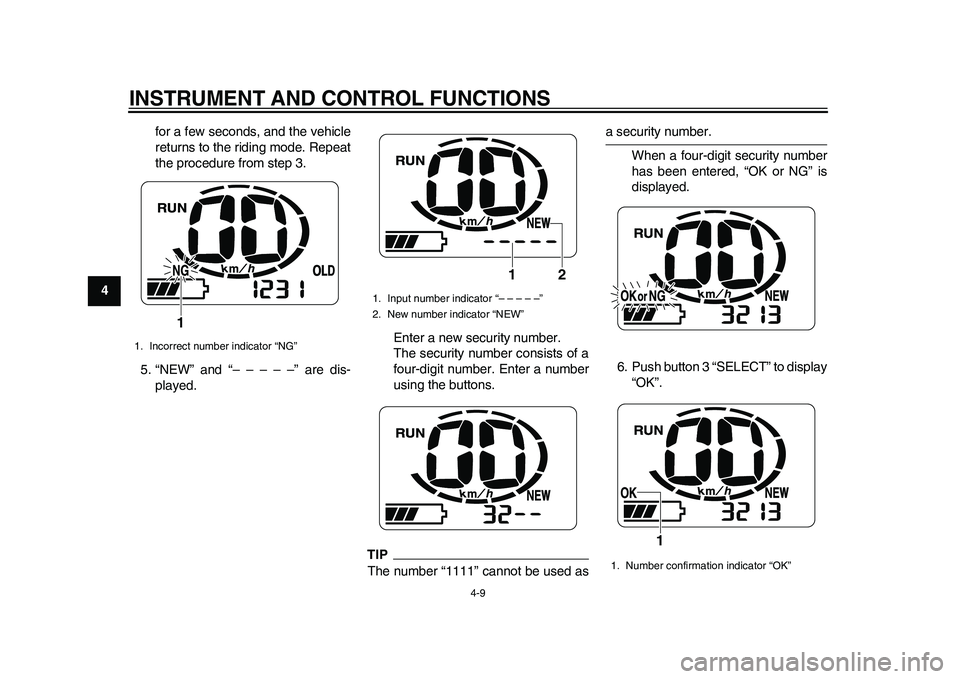
9for a few seconds, and the vehicle
returns to the riding mode. Repeat
the procedure from step 3.
5. “NEW” and “– – – – –” are dis-
played.Enter a new security number.
The security number consists of a
four-digit number. Enter a number
using the buttons.
TIPThe number “1111” cannot be used as
a security number.
When a four-digit security number
has been entered, “OK or NG” is
displayed.
6. Push button 3 “SELECT” to display
“OK”.
1. Incorrect number indicator “NG”
1
1. Input number indicator “– – – – –”
2. New number indicator “NEW”
2 1
1. Number confirmation indicator “OK”
1
1CB-9-E0.book 9 ページ 2010年10月15日 金曜日 午前10時19分
Page 29 of 78

INSTRUMENT AND CONTROL FUNCTIONS
4-10
2
345
6
7
8
9 7. Push button 2 “SET”. The security
number flashes for a few seconds,
and then the vehicle enters the
riding mode.
TIP
Be sure to record the security
number and keep it in a safe place.
Pushing button 3 “SELECT”
switches the display between “OK”
and “NG”.
To change the registered security
number, switch the display to “NG”
by pushing button 3 “SELECT”,
and then push button 2 “SET”. Re-peat the procedure from step 5.Locking and unlocking the security
lock
Locking the security lock
Push button 2 “SET” for a few seconds.
When the security lock is locked, the
security lock indicator “ LOCK” is dis-
played.TIPDo not lock the security lock when hav-
ing a Yamaha dealer perform service orrepairs on the vehicle.
Unlocking the security lockChange to the standby mode by push-
ing one of the buttons, then enter thesecurity number. (See “Preparations
for starting off” on page 7-1.)1. Security lock indicator “ LOCK”
1
1CB-9-E0.book 10 ページ 2010年10月15日 金曜日 午前10時19分
Page 31 of 78
INSTRUMENT AND CONTROL FUNCTIONS
4-12
2
345
6
7
8
9
EAUT3170
Seat To open the seat
1. Place the vehicle on the center-
stand.
2. Insert the key in the lock, and then
turn it clockwise.
3. Fold the seat up.To close the seat
1. Fold the seat down, and then push
it down to lock it in place.
2. Remove the key.
TIPMake sure that the seat is properly se-cured before riding.
EAU50060
Helmet holder The helmet holder is located under the
seat. A helmet holding cable is provid-
ed under the seat to secure a helmet to
the helmet holder.
To secure a helmet to the helmet
holder
1. Open the seat. (See page 4-12.)
2. Pass the helmet holding cable
through the buckle on the helmet
strap as shown, and then hook the
end of the helmet holding cable
over the helmet holder.
3. Securely close the seat.
WARNING! Never ride with a
1. Unlock.
1
1. Helmet holding cable
2. Helmet holder
1
2
1CB-9-E0.book 12 ページ 2010年10月15日 金曜日 午前10時19分
Page 38 of 78

CHARGING THE BATTERY
6-4
1
2
3
4
56
7
8
9dow.
Do not pull or apply excessive
force to the charging cord.
Do not drop the charging cord
or charging plug or expose it to
strong impact.
Do not secure the charging cord
or charging plug in a place with
sharp objects such as a nail.
Do not step on the charging
cord or charging plug or place
any object on them.
Do not leave the charging cord
or charging plug near a heater
or other source of heat.
Do not modify the charging cord
or charging plug.
Park the vehicle carefully so the
charging cord cannot be
pinched, stepped on, or pulled
accidentally. Also be sure the
vehicle cannot be knocked over
which could stretch or damage
the charging cord or charging
plug.
Do not pull the charging cord to
unplug the charging plug from
the electrical outlet. Pull only
the charging plug.
Starting charging
1. Place the vehicle on the center-
stand.
2. Turn the key to “OFF”.
3. Open the seat. (See page 4-12 for
more information.)
4. Grasp the charging plug, and then
unwrap the charging cord from itsstoring place as shown.
5. Place the charging cord in one of
the grooves. NOTICE: The charg-
ing cord may be damaged if not
placed into a groove before
closing the seat.
[ECA17460]
1. Charging plug
2. Charging cord
1. Groove
1
21
1CB-9-E0.book 4 ページ 2010年10月15日 金曜日 午前10時19分
Page 41 of 78

CHARGING THE BATTERY
6-7
2
3
4
567
8
9 pears in the display during charg-
ing. The display goes off if the
charging plug is unplugged during
charging.
Even if the key is turned to “ON”,
the vehicle does not enter thestandby mode during charging.
Completing charging
When the battery is fully charged, the
display goes off automatically after a
few minutes.
1. Grasp the charging plug, and then
unplug it from the electrical outlet.
NOTICE: Do not pull the charg-
ing cord to unplug the charging
plug from the electrical outlet.
This could damage the charging
cord.
[ECA17470]
2. Open the seat. (See page 4-12 for
more information.)
3. Hold the charging plug, and while
pressing the charging cord into the
groove, wind it clockwise as
shown. NOTICE: If the charging
cord is not wound properly, the
vehicle, charging cord or charg-ing plug can be damaged when
closing the seat.
[ECA17480]
4. Secure the charging cord by plac-
ing it in the holder as shown.
1. Charging plug
1
1. Charging plug
2. Groove
3. Charging cord
1. Holder
12
3
1
1CB-9-E0.book 7 ページ 2010年10月15日 金曜日 午前10時19分
Page 42 of 78

CHARGING THE BATTERY
6-8
1
2
3
4
56
7
8
95. Close the seat, and push down on
the back to lock it in position.
TIP
Before closing the seat, make sure
that nothing is left under the seat.
Make sure that the seat is securelylocked before riding.
6. Remove the key.WARNING
EWA15900
When not in use, do not leave the
charging plug plugged into an out-
let. Dust or foreign objects could
build up and cause a fire. Be sure to
unplug the charging plug from theoutlet after use.
EAU50402
Charging time Normal charging
Charging time varies depending on the
riding conditions before charging, re-
maining battery level, and ambient tem-
perature. It takes approximately seven
hours to charge the battery from a 0%
charged level in the optimum ambient
temperature range of 15 C – 25 C.TIPWhen the charging process is complet-
ed, the power from the built-in batterycharger is cut off automatically.
Waiting mode for charging
The vehicle enters a waiting mode if thetemperature is not suitable for charging
as follows:
The battery may be above the
maximum 50 C immediately after
riding. In this case, the charger en-
ters a waiting mode and “HEAT”
flashes until the battery and bat-
tery charger reach the specified
temperature.
If ambient temperature is below
–5 C, “COOL” flashes until the
battery and battery charger reach
the specified temperature.
When the temperature is suitable for
charging, charging starts automatically.
100
50
0
2.0 4.0 7.0
Charging time (hours) Battery
level (%)
1CB-9-E0.book 8 ページ 2010年10月15日 金曜日 午前10時19分
Page 46 of 78

OPERATION AND IMPORTANT RIDING POINTS
7-2
1
2
3
4
5
67
8
95. Turn the key to “ON”.
After all displays come on for a few
seconds, the vehicle enters the
standby mode.
TIP
When the security lock is locked,
the security lock indicator“ LOCK” comes on.
If the accelerator grip is turned
while the vehicle is in the standbymode, the beeper sounds.
6. Cancel the standby mode by
pressing one of the buttons.
The vehicle enters the security
lock unlocking mode.
“– – – – –” is displayed.
TIPIf the security lock is not locked, after
canceling the standby mode, the vehi-
cle enters the riding mode. When the
vehicle is in the riding mode, the beeper
sounds. The beeper stops sounding
when either brake lever is squeezed or
the vehicle starts moving. Proceed tostep 8.
7. Enter the security number using
the buttons.
Entering the correct number un-
locks the security lock and the ve-
hicle enters the riding mode.
1. Security lock indicator “ LOCK”
1
1. Button 1 “POWER”
2. Button 2 “SET”
3. Button 3 “SELECT”
12
3
1. Input number indicator “– – – – –”
1
1CB-9-E0.book 2 ページ 2010年10月15日 金曜日 午前10時19分