Page 222 of 302

09 Maintenance and servicing
Battery 09
222
5. Disconnect the positive cable and pull the
ventilation hose from the battery.
6. Lift out the old battery and put a new bat-
tery into place.
7. Connect the positive cable first.
8. Connect the negative (ground) cable.
9. Be sure that the ventilation hose is securely
connected to the battery and that the other
end of the hose is properly routed through
the ventilation opening in the floor of the
battery compartment.
G030884
Ventilation hose
10. Reinstall the cover and retaining bracket
and screw it securely in place.
NOTE
After the battery has been disconnected or
replaced, lock and unlock the vehicle with
the central locking system's remote key to
reactivate such features as the power win-
dows, moonroof, courtesy lighting, etc.
WARNING
•The battery generates hydrogen gas,
which is flammable and explosive. The
battery is fitted with a ventilation hose
which vents hydrogen gas out of the
battery compartment through a ventila-
tion opening in the bottom of this com-
partment. If the battery must be
replaced, it is essential that the ventila-
tion hose is properly connected to the
battery and that it is routed through the
ventilation opening provided (see illus-
tration).
•Be sure the ventilation hose is free of
debris.
•Only use replacement batteries equip-
ped with a ventilation hose. Consult a
trained and qualified Volvo service tech-
nician.
Page 223 of 302

09 Maintenance and servicing
Replacing bulbs09
��
* Option/accessory, for more information, see Introduction.223
When replacing bulbs, keep the following
points in mind:
•Never touch the glass of bulbs with your
fingers. Grease and oils from your fingers
vaporize in the heat and will leave a deposit
on the reflector, which will damage it.
•The optional Active Bending Light bulbs
contain trace amounts of mercury. These
bulbs should always be disposed of by an
authorized Volvo retailer.
The following bulbs should only be replaced by
a trained and qualified Volvo service techni-
cian:
•Active Bending Lights
•Courtesy (dome) lighting
•Reading lights
•Glove compartment lights
•Turn signals and courtesy lights in the side
door mirrors
•High-mounted brake lights
Replacing high/low beams/turn signal/
parking light bulbs
WARNING
•The engine should not be running when
changing bulbs.
•If the engine has been running just prior
to replacing bulbs in the headlight hous-
ing, please keep in mind that compo-
nents in the engine compartment will be
hot.
G027081
The entire lamp housing must be lifted out
when replacing these bulbs.To lift out the lamp housing:
1. Switch off the ignition.
2. Open the hood.
3. Pull up the retaining pins (see the illustra-
tion).
4. Lift out the lamp housing.
G027083
WARNING
Active Bending Lights* - due to the high
voltage used by these headlights, these
bulbs should only be replaced by a trained
and qualified Volvo service technician.
Page 231 of 302
09 Maintenance and servicing
Fuses09
��
231
WARNING
Never use metal objects or fuses with higher
amperage than those stated on the follow-
ing pages. Doing so could seriously damage
or overload the vehicle's electrical system.
Page 257 of 302

10 Audio
Sirius satellite radio
10
��
257 Radio text
The text that is displayed about the song cur-
rently playing can be changed. Use the AUTO
button to switch between Artist, Title, Com-
poser, or to switch radio text off, or use the
menu to display and select among these cate-
gories.
Advanced settings
This menu function enables you to make set-
tings on certain Sirius satellite radio functions.
To access this menu:
1.
Press MENU.
2.
Select
Adv. settings.
WARNING
Settings should be made when the vehicle
is at a standstill.
The following settings can be made in the Sir-
ius menu.
•Songs can be added to the song list
•Channel skip settings can be made
•Channel lock settings can be made
•The channel access code can be displayed
or changed
•Your Sirius ID can be displayed
Skip optionsThis function is used to remove a channel from
the list of available channels.
Skip current channel1.
Select CHANNEL SKIP LIST and press
ENTER.
2.
Select a category in the list and press
ENTER.
3. Skip channels in the list presented by
pressing ENTER.
Unskip all channelsThis permanently removes all channels from
the skip list and makes them available for
selection.
Temp. unskip all ch.This function will temporarily unskip all chan-
nels and make them available for selection. The
channels remain on the skip list and will again
be skipped the next time the ignition is
switched on.
Channel lockAccess to specific channels can be restricted
(locked). A locked channel will not provide
audio, song titles, or artist information.
NOTE
All channels are initially unlocked at deliv-
ery.
Locking a channel:
1.
Select "
Adv. settings" in the menu and
select LOCK OPTIONS and press
ENTER.
2.
Select
CHANNEL LOCK LIST and press
ENTER
3.
Enter the channel access code
1 and press
ENTER.
4.
Select a category in the list and press
ENTER.
5. Lock channels in the list presented by
pressing ENTER.
The channel is now locked and a checked box
will be displayed to indicate this. It will be nec-
essary to enter the channel access code. See
the section "Unlocking a channel" in order to
listen to a locked channel.
Unlocking a channel
A channel's access code1 is required to unlock
a channel.
1The default code is 0000. If you have changed the code and forgotten it, see the section "If you have forgotten the access code."
Page 265 of 302
10 Audio
Bluetooth® hands-free connection
10
��
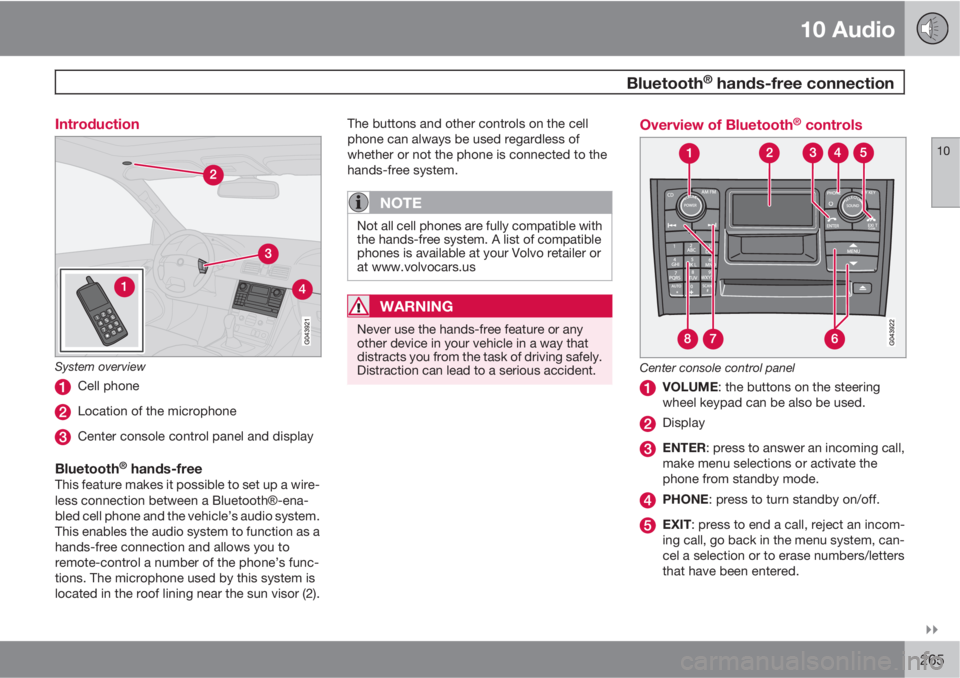
265 Introduction
System overview
Cell phone
Location of the microphone
Center console control panel and display
Bluetooth® hands-freeThis feature makes it possible to set up a wire-
less connection between a BluetoothŸ-ena-
bled cell phone and the vehicle’s audio system.
This enables the audio system to function as a
hands-free connection and allows you to
remote-control a number of the phone’s func-
tions. The microphone used by this system is
located in the roof lining near the sun visor (2).The buttons and other controls on the cell
phone can always be used regardless of
whether or not the phone is connected to the
hands-free system.
NOTE
Not all cell phones are fully compatible with
the hands-free system. A list of compatible
phones is available at your Volvo retailer or
at www.volvocars.us
WARNING
Never use the hands-free feature or any
other device in your vehicle in a way that
distracts you from the task of driving safely.
Distraction can lead to a serious accident.
Overview of Bluetooth® controls
Center console control panel
VOLUME: the buttons on the steering
wheel keypad can be also be used.
Display
ENTER: press to answer an incoming call,
make menu selections or activate the
phone from standby mode.
PHONE: press to turn standby on/off.
EXIT: press to end a call, reject an incom-
ing call, go back in the menu system, can-
cel a selection or to erase numbers/letters
that have been entered.
Page 274 of 302

274
Label information.................................................................................. 276
Dimensions .......................................................................................... 278
Weights ................................................................................................ 280
Fluids..................................................................................................... 282
Suspension........................................................................................... 284
Engine oil............................................................................................... 285
Engine specifications............................................................................ 286
Electrical system................................................................................... 287
Three-way catalytic converter............................................................... 289
Overview of information and warning symbols .................................... 290
Volvo programs..................................................................................... 292
Page 281 of 302
11 Specifications
Weights
11
281
CategoryUSACanada
Trailer weights, with brakesSee the table on page 158See the table on page 158
Max. tongue weightSee the table on page 158See the table on page 158
APermissible axle weight or gross vehicle weight must never be exceeded.BFront Wheel DriveCAll Wheel Drive
CAUTION
The maximum permissible axle loads and/
or the gross vehicle weight must not be
exceeded.
WARNING
When adding accessories, equipment, lug-
gage and other cargo to your vehicle, the
total capacity weight must not be exceeded.
Page 287 of 302

11 Specifications
Electrical system
11
��
* Option/accessory, for more information, see Introduction.287 General information
12-volt system with voltage controlled gener-
ator. Single wire system in which the chassis
and engine block are used as conductors,
grounded on the chassis.
Battery
Battery3.2 6-cyl.V8
Voltage12 V12 V
Cold start
capacity
(CCA)520 A600 A
Battery3.2 6-cyl.V8
Reserve
capacity
(RC)100 min120 min
Capacity
(Ah)6070
If you must replace your battery, be sure to
replace it with a battery of the same cold start
capacity and reserve capacity as the original.
(See the decal on the battery).
WARNING
PROPOSITION 65 WARNING!
Battery posts, terminals, and related acces-
sories contain lead and lead compounds,
chemicals known to the state of California
to cause cancer and reproductive harm.
Wash hands after handling.
Bulbs
BulbTypeSocket
High beamH7 65W–
Low beamH11 55W–
Active Bending Lights - low beam*D1S 35W
Active Bending Lights - high beam*H9
65W
Front fog lightsH1 55W

