Page 38 of 312

01 Safety
Child restraint systems 01
38
Child restraints
G022840
Infant seat
There are three main types of child restraint
systems: infant seats, convertible seats, and
booster cushions. They are classified accord-
ing to the child's age and size.
The following section provides general infor-
mation on securing a child restraint using a
three-point seat belt. Refer to page 45–46
for information on securing a child restraint
using ISOFIX/LATCH lower anchors and/or top
tether anchorages.
G022847
Convertible seat
WARNING
A child seat should never be used in the
front passenger seat of any vehicle with a
front passenger airbag – not even if the
"Passenger airbag off" symbol near the
rear-view mirror is illuminated (on vehicles
equipped with Occupant Weight Sensor). If
the severity of an accident were to cause the
airbag to inflate, this could lead to serious
injury or death to a child seated in this posi-
tion.
G023269
Booster cushion
WARNING
Always refer to the child restraint manufac-
turer's instructions for detailed information
on securing the restraint.
Page 40 of 312
01 Safety
Infant seats 01
40
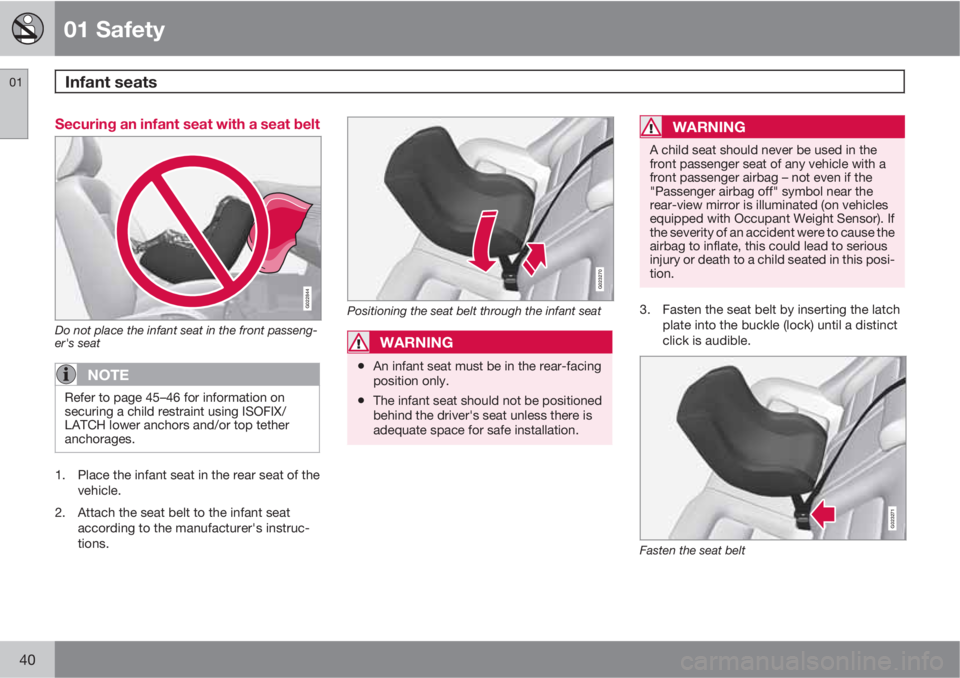
Securing an infant seat with a seat belt
G022844
Do not place the infant seat in the front passeng-
er's seat
NOTE
Refer to page 45–46 for information on
securing a child restraint using ISOFIX/
LATCH lower anchors and/or top tether
anchorages.
1. Place the infant seat in the rear seat of the
vehicle.
2. Attach the seat belt to the infant seat
according to the manufacturer's instruc-
tions.
G023270
Positioning the seat belt through the infant seat
WARNING
•An infant seat must be in the rear-facing
position only.
•The infant seat should not be positioned
behind the driver's seat unless there is
adequate space for safe installation.
WARNING
A child seat should never be used in the
front passenger seat of any vehicle with a
front passenger airbag – not even if the
"Passenger airbag off" symbol near the
rear-view mirror is illuminated (on vehicles
equipped with Occupant Weight Sensor). If
the severity of an accident were to cause the
airbag to inflate, this could lead to serious
injury or death to a child seated in this posi-
tion.
3. Fasten the seat belt by inserting the latch
plate into the buckle (lock) until a distinct
click is audible.
G023271
Fasten the seat belt
Page 43 of 312
01 Safety
Convertible seats01
43
G022848
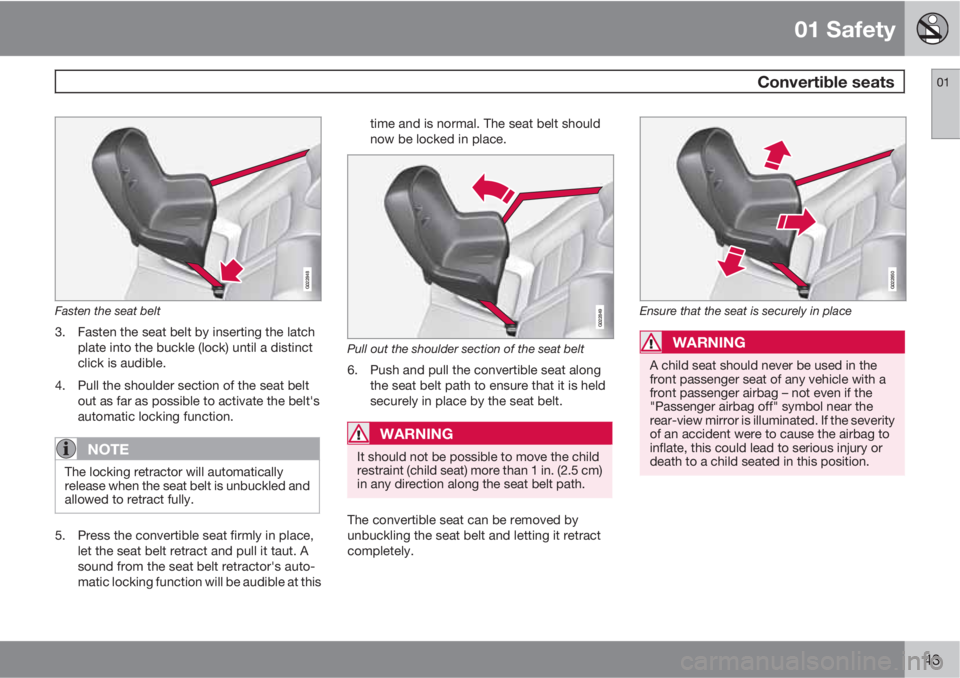
Fasten the seat belt
3. Fasten the seat belt by inserting the latch
plate into the buckle (lock) until a distinct
click is audible.
4. Pull the shoulder section of the seat belt
out as far as possible to activate the belt's
automatic locking function.
NOTE
The locking retractor will automatically
release when the seat belt is unbuckled and
allowed to retract fully.
5. Press the convertible seat firmly in place,
let the seat belt retract and pull it taut. A
sound from the seat belt retractor's auto-
matic locking function will be audible at thistime and is normal. The seat belt should
now be locked in place.
G022849
Pull out the shoulder section of the seat belt
6. Push and pull the convertible seat along
the seat belt path to ensure that it is held
securely in place by the seat belt.
WARNING
It should not be possible to move the child
restraint (child seat) more than 1 in. (2.5 cm)
in any direction along the seat belt path.
The convertible seat can be removed by
unbuckling the seat belt and letting it retract
completely.
G022850
Ensure that the seat is securely in place
WARNING
A child seat should never be used in the
front passenger seat of any vehicle with a
front passenger airbag – not even if the
"Passenger airbag off" symbol near the
rear-view mirror is illuminated. If the severity
of an accident were to cause the airbag to
inflate, this could lead to serious injury or
death to a child seated in this position.
Page 71 of 312

03 Your driving environment
Instruments and controls
03
��
* Option/accessory, for more information, see Introduction.71
FunctionPage
Menus and mes-
sages, turn signals,
high/low beams,
trip computer122, 92,
89, 154
Cruise control159
Horn, airbag88, 22
Main instrument
panel71
Audio system/Blue-
tooth hands-free
controls134, 148
Ignition slot78
START/STOP
ENGINE button78
Hazard warning
flashers91
Door handle–
FunctionPage
In-door control pan-
els (power win-
dows, mirrors,
power child safety
locks, central lock-
ing button)98, 100,
48, 63
Menu controls,
audio and climate
control systems122, 135,
128
Center console but-
tons122
Gear selector112
Controls for active
chassis (Four-C)
Controls for active
chassis (Four-C) -
certain models only158
Wipers and washers95, 96
Steering wheel
adjustment88
Parking brake117
Hood opening con-
trol255
FunctionPage
Power seat* adjust-
ment controls80
Lighting panel, but-
tons for opening
fuel filler door and
unlocking and
opening the trunk89, 210,
64
Information displays
Information displays in the instrument panel
The information displays (1) show information
on some of the vehicle's functions, such as
cruise control, the trip computer and mes-
sages. The information is shown with text and
symbols.
Page 74 of 312

03 Your driving environment
Instruments and controls
03
74
necessary information about one of the vehi-
cle's systems. The message can be erased and
the symbol can be turned off by pressing the
READ button (see page 124 for information) or
this will take place automatically after a short
time (the length of time varies, depending on
the function affected).
The information symbol may also illuminate
together with other symbols.
High beam indicator
This symbol illuminates when the high beam
headlights are on, or if the high beam flash
function is used.
Left turn signal indicator
Right turn signal indicator
NOTE
•Both turn signal indicators will flash
when the hazard warning flashers are
used.
•If either of these indicators flash faster
than normal, the direction indicators are
not functioning properly.
Indicator and warning symbols
SymbolDescription
Low oil pressure
Parking brake applied
SRS airbags
Seat belt reminder
Generator not charging
Fault in the brake system
Warning symbol
Low oil pressure
If the light comes on while driving, stop the
vehicle, stop the engine immediately, and
check the engine oil level. If the oil level is nor-
mal and the light stays on after restart, have the
vehicle towed to the nearest trained and quali-
fied Volvo service technician. This is normal,
provided it goes off when the engine speed is
increased.
Parking brake applied
This symbol illuminates when the parking
brake is applied. On models equipped with the
electric parking brake, this symbol flashes
while the brake is being applied and then glows
steadily.
A flashing symbol means that a fault has been
detected. See the message in the information
display.
Canadian models are equipped with this
symbol.
See page 117 for more information about
using the parking brake.
Airbags – SRS
If this light comes on while the vehicle is being
driven, or remains on for longer than approxi-
mately 10 seconds after the vehicle has been
started, the SRS system's diagnostic functions
have detected a fault in a seat belt lock or pre-
tensioner, a front airbag, side impact airbag,
and/or an inflatable curtain. Have the system(s)
inspected by a trained and qualified Volvo
service technician as soon as possible.
See page 21 for more information about the
airbag system.
Page 92 of 312

03 Your driving environment
Lighting
03
92
NOTE
•Regulations regarding the use of the
hazard warning flasher may vary,
depending on where you live.
•The hazard warning flashers will be acti-
vated automatically if an airbag
deploys.
Turn signals
Turn signals
When changing lanes
The driver can automatically flash the turn
signals 3 times by moving the turn signal lever
up or down to the first position and releasing it.
When turning
Move the lever as far up or down as possi-
ble to start the turn signals. The turn signals will
be cancelled automatically by the movement of
the steering wheel, or the lever can be returned
to its initial position by hand.
NOTE
•This automatic flashing sequence can
be interrupted by immediately moving
the lever in the opposite direction.
•If the turn signal indicator flashes faster
than normal, check for a burned-out
turn signal bulb.
Interior lighting, front
G021149
Light switches, front roof lighting
Drivers side front reading light, on/off
Passenger's side front reading light, on/off
Overhead courtesy lighting.
The lighting in the front part of the passenger
compartment is controlled with the buttons (1)
and (2) in the roof console.
Switch (3) has three positions for all passenger
compartment lighting:
•Off: right side depressed, automatic light-
ing off.
•Neutral position: automatic lighting is on.
•On – left side depressed, passenger com-
partment lighting on.
Page 278 of 312
07 Maintenance and specifications
Fuses
07
278* Option/accessory, for more information, see Introduction.
PosFunctionA
-
Airbag system, Occupant
weight system10
Adaptive cruise control
front radar*5
Accelerator pedal, power
door mirrors, Heated rear
seats*7.5
Audio system, CD and
radio15
Brake lights5
Power moonroof*20
Immobilizer5
Page 298 of 312

08 Specifications
Overview of information and warning symbols
08
298* Option/accessory, for more information, see Introduction.
Introduction
The symbols in the vehicle's various displays
are divided into three main categories:
•Warning symbols
•Indicator symbols
•Information symbols
The following tables list the most common
symbols, their meaning and the pages in this
manual that provide more detailed information.
Warning symbol
The red warning symbol lights up to
indicate a problem related to safety and/or
drivability. A message will also appear in the
main instruments panel's display.
Information symbol
The information symbol lights up and a
text message is displayed to provide the driver
with necessary information about one of the
vehicle's systems.
Symbols in the main instrument panel
Warning symbols
SymbolDescriptionPag
e
Low oil pressure74
A
Parking brake74
SRS airbags74
Seat belt reminder75
Generator not charg-
ing75
A
Fault in the brake
system75
Warning symbol75
ACanadian models
Indicator symbols
SymbolDescriptionPag
e
Fault in the Active
Bending Light
(ABL)*system73
A
Malfunction indicator
light73
A
Anti-lock brake sys-
tem (ABS)73
Rear fog light on73
Stability system
(DSTC)73
Tire pressure monitor-
ing sensor (TPMS)73
Low fuel level73
Information symbol,
see text in information
display73
