2011 TOYOTA VERSO S roof
[x] Cancel search: roofPage 204 of 664
2044-1. Key information
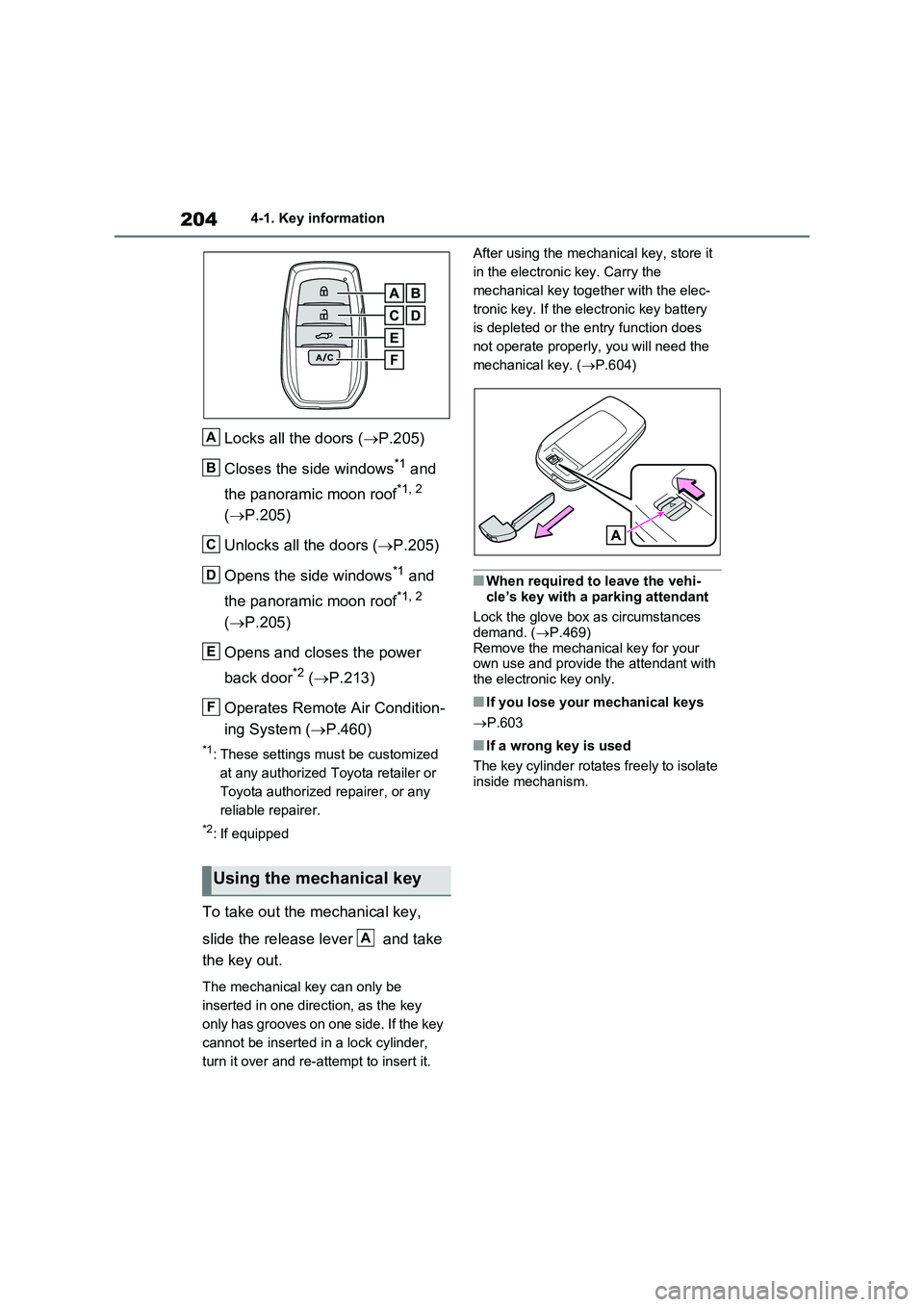
Locks all the doors (P.205)
Closes the side windows*1 and
the panoramic moon roof*1, 2
( P.205)
Unlocks all the doors ( P.205)
Opens the side windows*1 and
the panoramic moon roof*1, 2
( P.205)
Opens and closes the power
back door*2 ( P.213)
Operates Remote Air Condition-
ing System ( P.460)
*1: These settings must be customized
at any authorized Toyota retailer or
Toyota authorized repairer, or any
reliable repairer.
*2: If equipped
To take out the mechanical key,
slide the release lever and take
the key out.
The mechanical key can only be
inserted in one direction, as the key
only has grooves on one side. If the key
cannot be inserted in a lock cylinder,
turn it over and re-attempt to insert it.
After using the mechanical key, store it
in the electronic key. Carry the
mechanical key together with the elec-
tronic key. If the electronic key battery
is depleted or the entry function does
not operate properly, you will need the
mechanical key. ( P.604)
■When required to leave the vehi-
cle’s key with a parking attendant
Lock the glove box as circumstances demand. ( P.469)
Remove the mechanical key for your own use and provide the attendant with the electronic key only.
■If you lose your mechanical keys
P.603
■If a wrong key is used
The key cylinder rotates freely to isolate inside mechanism.
Using the mechanical key
A
B
C
D
E
F
A
Page 205 of 664

205
4
4-2. Opening, closing and locking the doors
Before driving
4-2.Opening, closing and lo cking th e d oors
■Using the entry function
Carry the electronic key to enable
this function.
1 Grip the front door handle to
unlock the doors.
Make sure to touch the sensor on the
back of the handle.
The doors cannot be unlocked for 3
seconds after the doors are locked.
2 Touch the lock sensor (the
indentation on the upper part of
the door handle) to lock the
doors.
Check that the door is securely locked.
■Using the wireless remote
control
1 Locks all the doors
Check that the door is securely locked.
Press and hold to close the side win-
dows and panoramic moon roof (if
equipped).*
2 Unlocks all the doors
Press and hold to open the side win-
dows and panoramic moon roof (if
equipped).*
*: These settings must be customized
at any authorized Toyota retailer or
Toyota authorized repairer, or any
reliable repairer.
■Switching the door unlock function
It is possible to set which doors the entry function unlocks using the wireless
remote control. Operate the switching operation in the vehicle or within approx-imately 1 m (3.2 ft.) of the vehicle.
1 Turn the power switch to OFF.
2 Cancel the intrusion sensor and tilt
sensor of the alarm system to pre- vent unintended triggering of the
alarm while changing the settings. (if equipped) ( P.79)
3 When the indicator light on the key surface is not on, press and hold
or for approximately
5 seconds while pressing and hold-
ing .
Side doors
The vehicle can be locked and
unlocked using the entry func-
tion, wireless remote control,
door lock switches or inside
lock buttons.
Charging port lid and charging
connector will also be locked and
unlocked. ( P.121)
Unlocking and locking the
doors from the outside
Page 206 of 664

2064-2. Opening, closing and locking the doors
The setting changes each time an oper-
ation is performed, as shown below.
(When changing the setting continu-
ously, release the buttons, wait for at
least 5 seconds, and repeat step 3.)
Vehicles with alarm: To prevent unin-
tended triggering of the alarm, unlock
the doors using the wireless remote
control and open and close a door once
after the settings have been changed. (If
a door is not opened within 30 seconds
after is pressed, the doors will
be locked again and the alarm will auto-
matically be set.)
In a case that the alarm is triggered,
immediately stop the alarm. (P.78)
■Impact detection door lock release
system
In the event that the vehicle is subject to
a strong impact, all the doors are
unlocked. Depending on the force of the
impact or the type of accident, however,
the system may not operate.
■Operation signals
Doors: The emergency flashers flash to
indicate that the doors have been
locked/unlocked. (Locked: Once;
Unlocked: Twice)
Side windows and panoramic moon roof
(if equipped): A buzzer sounds to indi-
cate that the side windows and pan-
oramic moon roof are operating.
■Security feature
If a door is not opened within approxi-
mately 30 seconds after the vehicle is
unlocked, the security feature automati-
cally locks the vehicle again. (However,
depending on the location of the elec-
tronic key, the key may be detected as
being in the vehicle. In this case, vehicle
may be unlocked.)
■When the door cannot be locked by
the lock sensor on the upper part of
the door handle
If the door will not lock even when the
topside sensor area is touched, try
touching both the topside and underside
sensor areas at the same time.
When gloves are being worn, remove
the gloves.
■Door lock buzzer
A buzzer sounds continuously for 5 sec-
onds in the following situations. Fully
close all the doors and lock the vehicle
once more.
●If an attempt to lock the doors using
the smart entry & start system is made
when a door other than the door you
are locking is open.
●If an attempt to lock the doors using
the wireless remote control is made
when a door is open.
Multi-information
display/BeepUnlocking function
(Left-hand drive
vehicles)
(Right-hand drive
vehicles)
Exterior: Beeps 3
times
Holding the driver’s
door handle
unlocks only the
driver’s door.
Holding the front
passenger’s door
handle or pressing
the back door
opener switch
unlocks all the
doors.
Exterior: Beeps
twice
Holding either front
door handle or
pressing the back
door opener switch
unlocks all the
doors.
Page 208 of 664
2084-2. Opening, closing and locking the doors
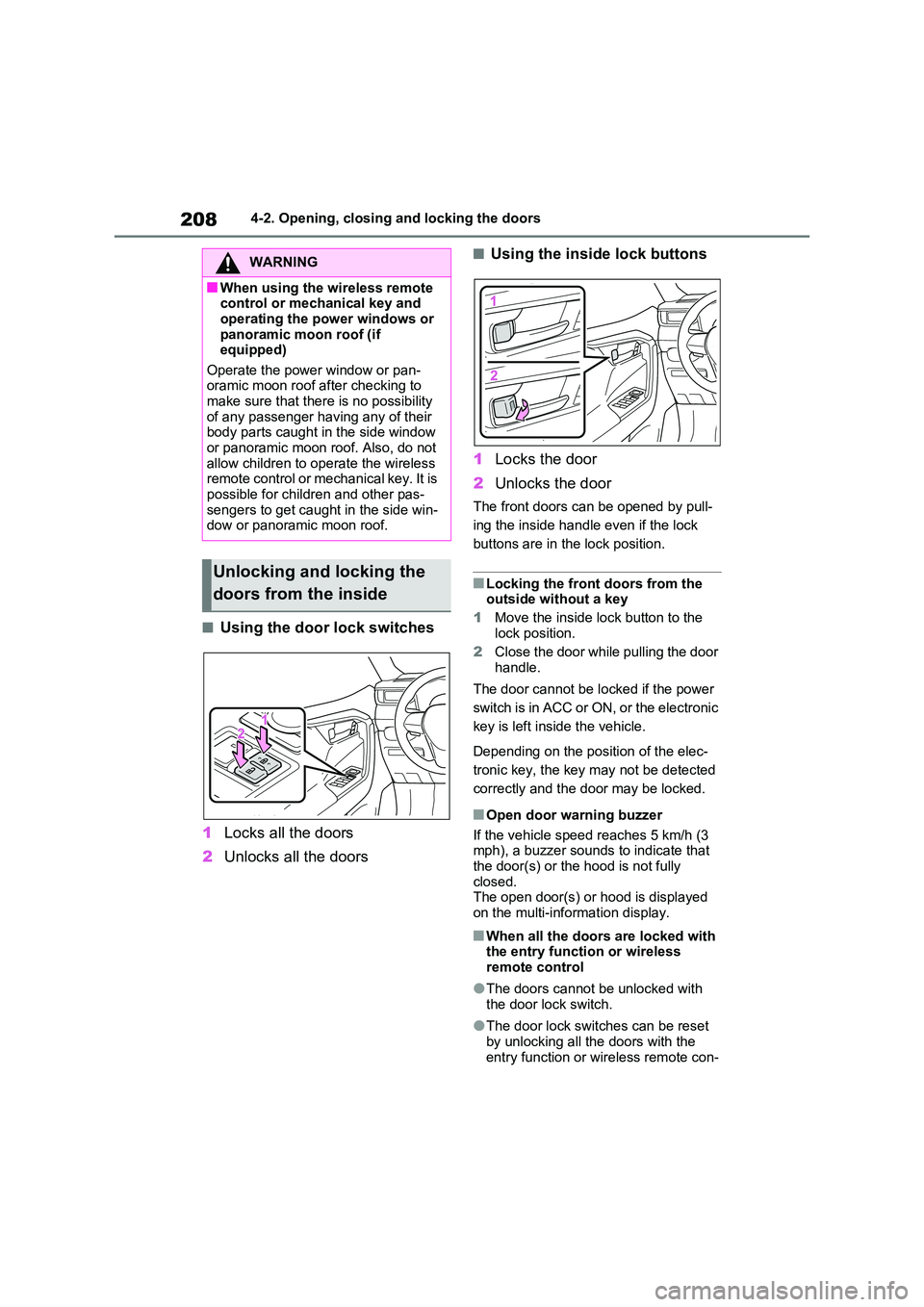
■Using the door lock switches
1 Locks all the doors
2 Unlocks all the doors
■Using the inside lock buttons
1 Locks the door
2 Unlocks the door
The front doors can be opened by pull-
ing the inside handle even if the lock
buttons are in the lock position.
■Locking the front doors from the outside without a key
1 Move the inside lock button to the
lock position.
2 Close the door while pulling the door handle.
The door cannot be locked if the power
switch is in ACC or ON, or the electronic
key is left inside the vehicle.
Depending on the position of the elec-
tronic key, the key may not be detected
correctly and the door may be locked.
■Open door warning buzzer
If the vehicle speed reaches 5 km/h (3 mph), a buzzer sounds to indicate that
the door(s) or the hood is not fully closed.The open door(s) or hood is displayed
on the multi-information display.
■When all the doors are locked with the entry function or wireless remote control
●The doors cannot be unlocked with the door lock switch.
●The door lock switches can be reset by unlocking all the doors with the
entry function or wireless remote con-
WARNING
■When using the wireless remote control or mechanical key and
operating the power windows or panoramic moon roof (if equipped)
Operate the power window or pan- oramic moon roof after checking to make sure that there is no possibility
of any passenger having any of their body parts caught in the side window or panoramic moon roof. Also, do not
allow children to operate the wireless remote control or mechanical key. It is possible for children and other pas-
sengers to get caught in the side win- dow or panoramic moon roof.
Unlocking and locking the
doors from the inside
Page 281 of 664
281
4
4-4. Adjusting the steering wheel and mirrors
Before driving
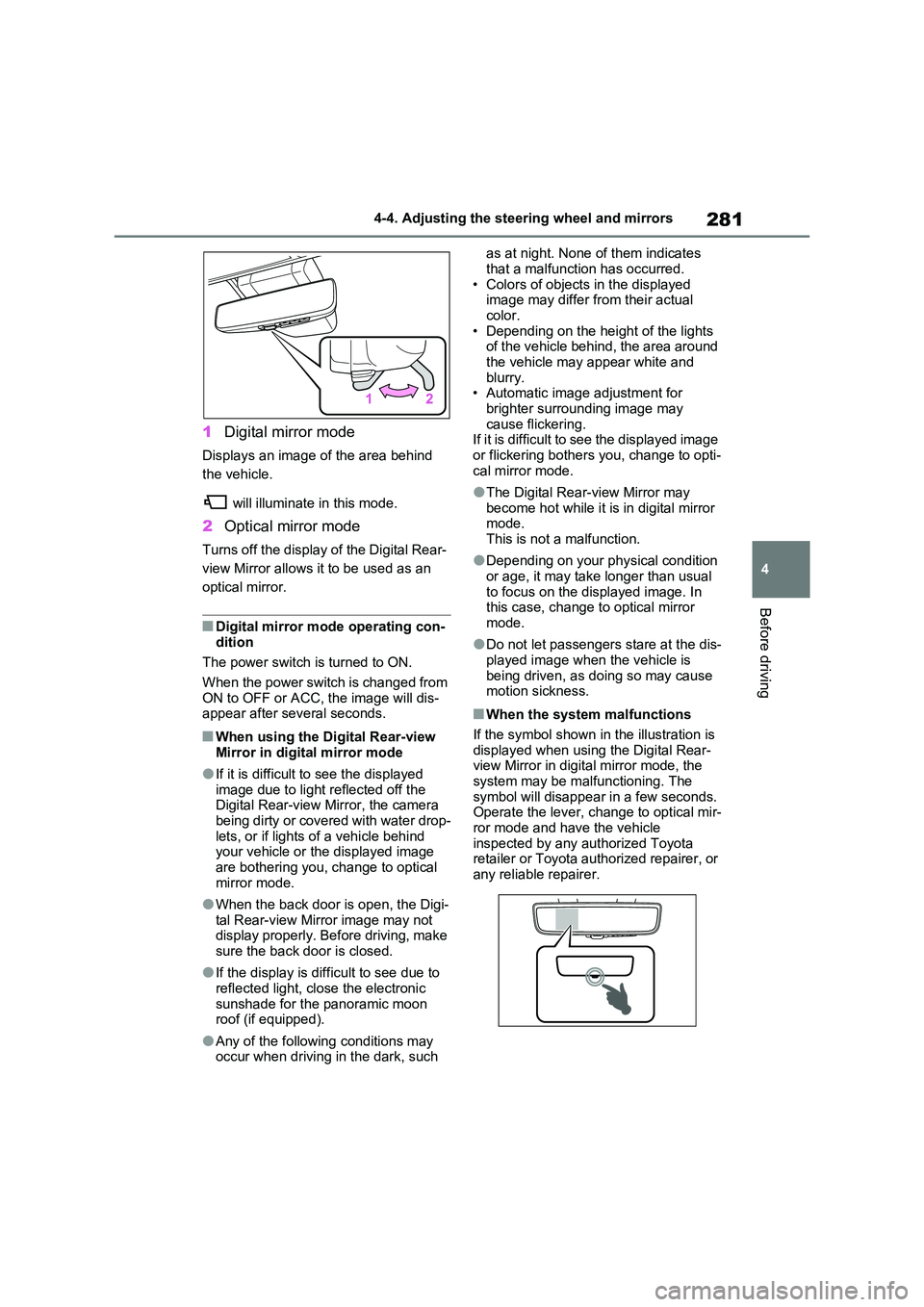
1 Digital mirror mode
Displays an image of the area behind
the vehicle.
will illuminate in this mode.
2 Optical mirror mode
Turns off the display of the Digital Rear-
view Mirror allows it to be used as an
optical mirror.
■Digital mirror mode operating con- dition
The power switch is turned to ON.
When the power switch is changed from ON to OFF or ACC, the image will dis-appear after several seconds.
■When using the Digital Rear-view
Mirror in digital mirror mode
●If it is difficult to see the displayed
image due to light reflected off the Digital Rear-view Mirror, the camera being dirty or covered with water drop-
lets, or if lights of a vehicle behind your vehicle or the displayed image are bothering you, change to optical
mirror mode.
●When the back door is open, the Digi-
tal Rear-view Mirror image may not display properly. Before driving, make sure the back door is closed.
●If the display is difficult to see due to reflected light, close the electronic
sunshade for the panoramic moon roof (if equipped).
●Any of the following conditions may occur when driving in the dark, such
as at night. None of them indicates
that a malfunction has occurred. • Colors of objects in the displayed image may differ from their actual
color. • Depending on the height of the lights of the vehicle behind, the area around
the vehicle may appear white and blurry.• Automatic image adjustment for
brighter surrounding image may cause flickering.If it is difficult to see the displayed image
or flickering bothers you, change to opti- cal mirror mode.
●The Digital Rear-view Mirror may become hot while it is in digital mirror mode.
This is not a malfunction.
●Depending on your physical condition
or age, it may take longer than usual to focus on the displayed image. In this case, change to optical mirror
mode.
●Do not let passengers stare at the dis-
played image when the vehicle is being driven, as doing so may cause motion sickness.
■When the system malfunctions
If the symbol shown in the illustration is displayed when using the Digital Rear-view Mirror in digital mirror mode, the
system may be malfunctioning. The symbol will disappear in a few seconds. Operate the lever, change to optical mir-
ror mode and have the vehicle inspected by any authorized Toyota retailer or Toyota authorized repairer, or
any reliable repairer.
Page 286 of 664
2864-4. Adjusting the steering wheel and mirrors
SymptomLikely causeSolution
The image is dif-
ficult to see.
The mirror surface is dirty.Clean the mirror surface gently,
using a soft dry cloth.
Sunlight or headlights are shin-
ing directly into the Digital Rear-
view Mirror.
Change to optical mirror mode.
(If the light is coming through
the panoramic moon roof [if
equipped], close the electronic
sunshade.)
• The vehicle is in a dark area.
• The vehicle is near a TV
tower, broadcasting station,
electric power plant, or other
location where strong radio
waves or electrical noise may
be present.
• The temperature around the
camera is extremely high/low.
• The ambient temperature is
extremely low.
• It is raining or humid.
• Sunlight or headlights are
shining directly into the cam-
era lens.
• The vehicle is under fluores-
cent lights, sodium lights,
mercury lights, etc.
• Exhaust gas is obstructing the
camera.
Change to optical mirror mode.
(Change back to digital mirror
mode when the conditions have
improved.)
Foreign matters such as water
droplets or dust is on the cam-
era lens.Wipe the camera lens with a
damp soft cloth.
Page 291 of 664
291
4
4-5. Opening, closing the windows and moon roof
Before driving
4-5.Opening, closing the windows an d moo n roof
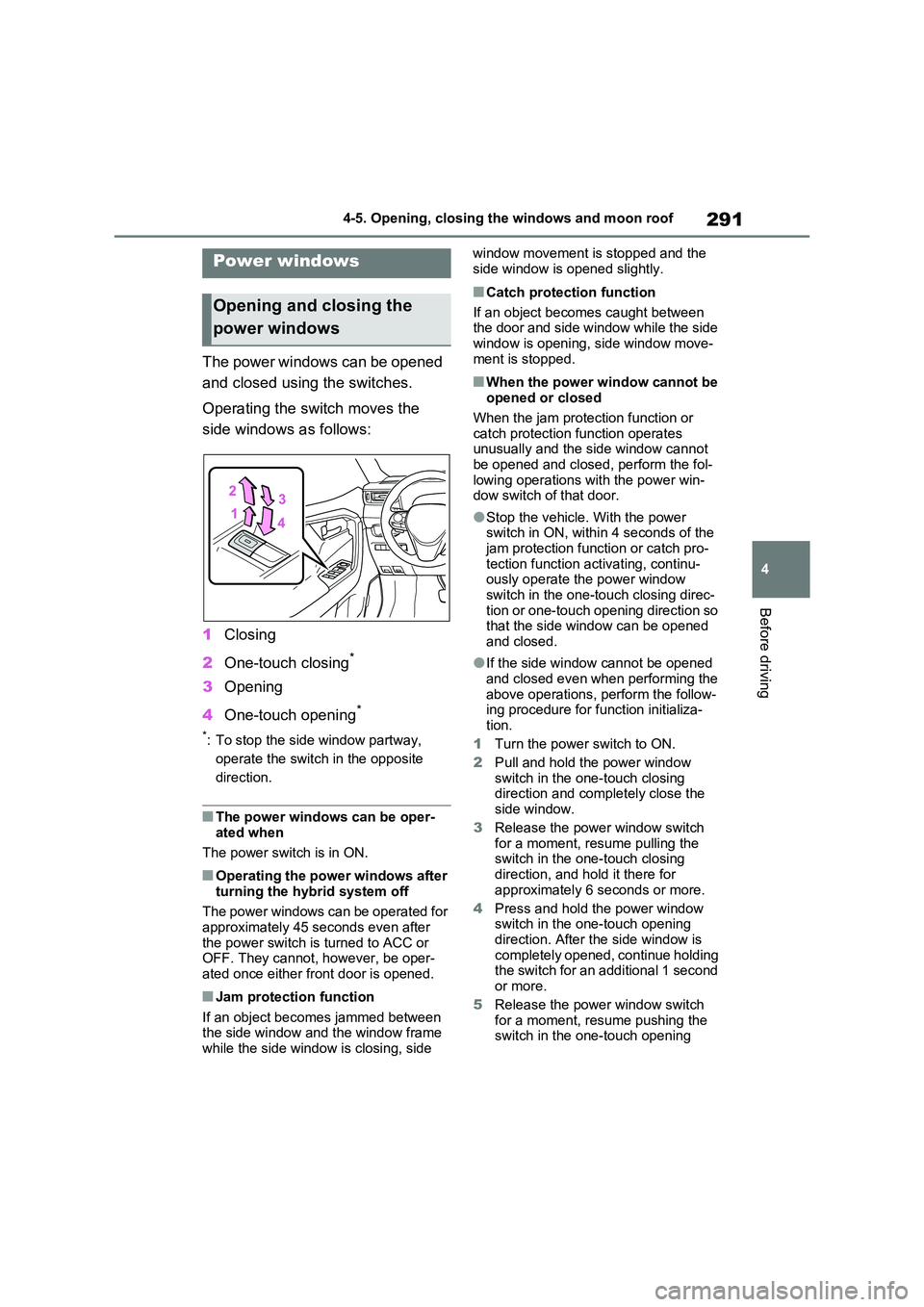
The power windows can be opened
and closed using the switches.
Operating the switch moves the
side windows as follows:
1 Closing
2 One-touch closing*
3Opening
4 One-touch opening*
*: To stop the side window partway,
operate the switch in the opposite
direction.
■The power windows can be oper- ated when
The power switch is in ON.
■Operating the power windows after
turning the hybrid system off
The power windows can be operated for approximately 45 seconds even after
the power switch is turned to ACC or OFF. They cannot, however, be oper-ated once either front door is opened.
■Jam protection function
If an object becomes jammed between the side window and the window frame while the side window is closing, side
window movement is stopped and the
side window is opened slightly.
■Catch protection function
If an object becomes caught between the door and side window while the side
window is opening, side window move- ment is stopped.
■When the power window cannot be opened or closed
When the jam protection function or catch protection function operates unusually and the side window cannot
be opened and closed, perform the fol- lowing operations with the power win-dow switch of that door.
●Stop the vehicle. With the power switch in ON, within 4 seconds of the
jam protection function or catch pro- tection function activating, continu-ously operate the power window
switch in the one-touch closing direc- tion or one-touch opening direction so that the side window can be opened
and closed.
●If the side window cannot be opened
and closed even when performing the above operations, perform the follow-ing procedure for function initializa-
tion.
1 Turn the power switch to ON.
2 Pull and hold the power window switch in the one-touch closing direction and completely close the
side window.
3 Release the power window switch for a moment, resume pulling the switch in the one-touch closing
direction, and hold it there for approximately 6 seconds or more.
4 Press and hold the power window switch in the one-touch opening
direction. After the side window is completely opened, continue holding the switch for an additional 1 second
or more.
5 Release the power window switch for a moment, resume pushing the switch in the one-touch opening
Power windows
Opening and closing the
power windows
Page 292 of 664
2924-5. Opening, closing the windows and moon roof
direction, and hold it there for
approximately 4 seconds or more.
6 Pull and hold the power window switch in the one-touch closing direction again. After the side win-
dow is completely closed, continue holding the switch for a further 1 sec-ond or more.
If you release the switch while the side window is moving, start again from the beginning.
If the side window reverses and cannot be fully closed or opened, have the vehi-cle inspected by any authorized Toyota
retailer or Toyota authorized repairer, or any reliable repairer.
■Door lock linked power window operation
●The power windows can be opened
and closed using the mechanical key.*
( P.605)
●The power windows can be opened
and closed using the wireless remote
control.* ( P.205)
●Vehicles with alarm: The alarm may be triggered if the alarm is set and the
power window is closed using the door lock linked power window opera-tion function. ( P.78)*: These settings must be customized at
any authorized Toyota retailer or
Toyota authorized repairer, or any reli-
able repairer.
■Power window open reminder func-
tion
The buzzer sounds and a message is shown on the multi-information display
when the power switch is turned to OFF and the driver’s door is opened with the power windows open.
■Customization
Settings (e.g. linked door lock operation) can be changed. (Customizable fea-tures: P.636)
WARNING
Observe the following precautions. Failing to do so may result in death or
serious injury.
■Closing the power windows
●The driver is responsible for all the power window operations, including the operation for the passengers. In
order to prevent accidental opera- tion, especially by a child, do not let a child operate the power windows.
It is possible for children and other passengers to have body parts caught in the power window. Also,
when riding with a child, it is recom- mended to use the window lock switch. ( P.293)
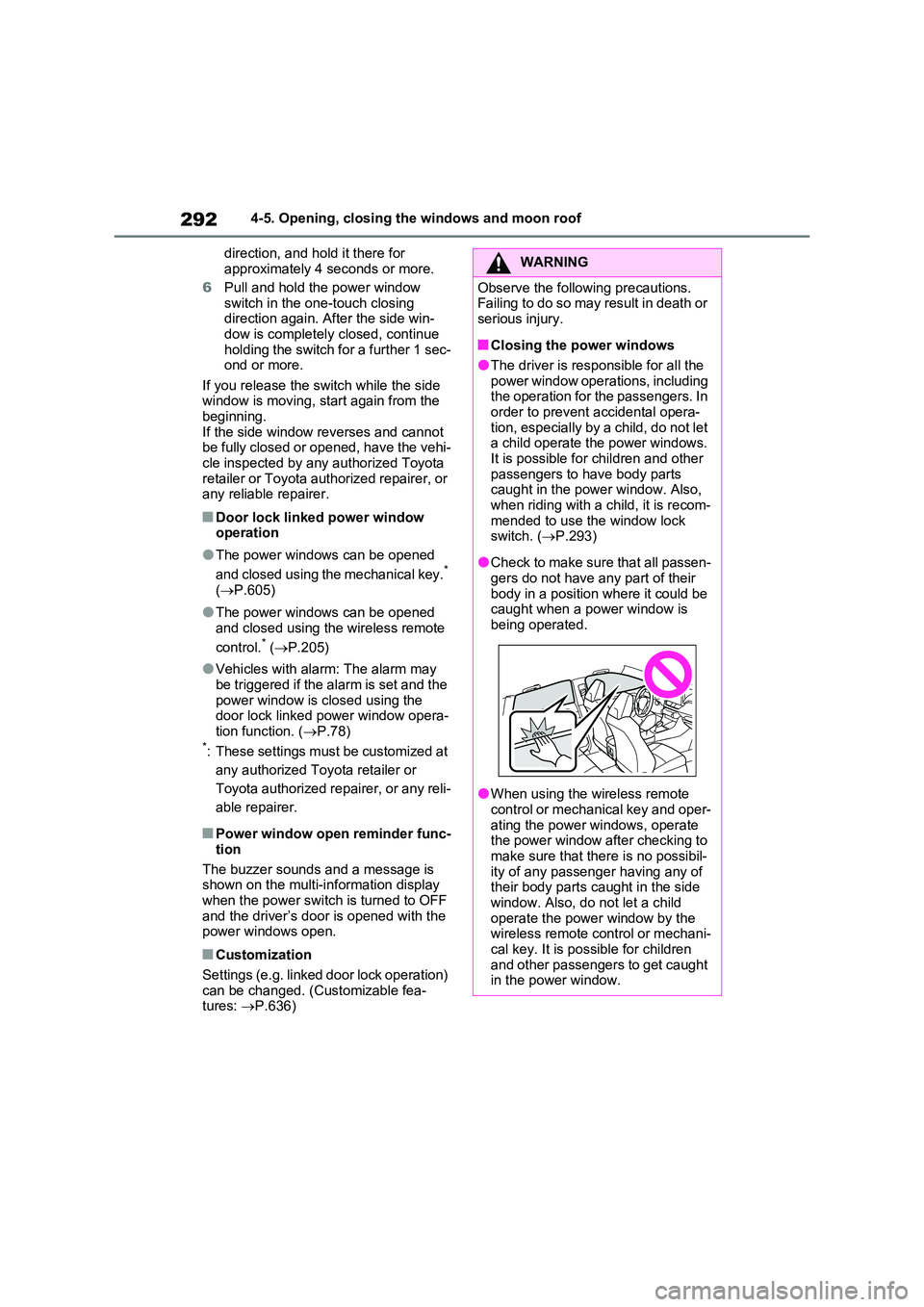
●Check to make sure that all passen- gers do not have any part of their
body in a position where it could be caught when a power window is being operated.
●When using the wireless remote control or mechanical key and oper-
ating the power windows, operate the power window after checking to make sure that there is no possibil-
ity of any passenger having any of their body parts caught in the side window. Also, do not let a child
operate the power window by the wireless remote control or mechani-cal key. It is possible for children
and other passengers to get caught in the power window.