2011 TOYOTA VERSO S traction control
[x] Cancel search: traction controlPage 153 of 664
153
2 2-2. Charging
Plug-in hybrid system
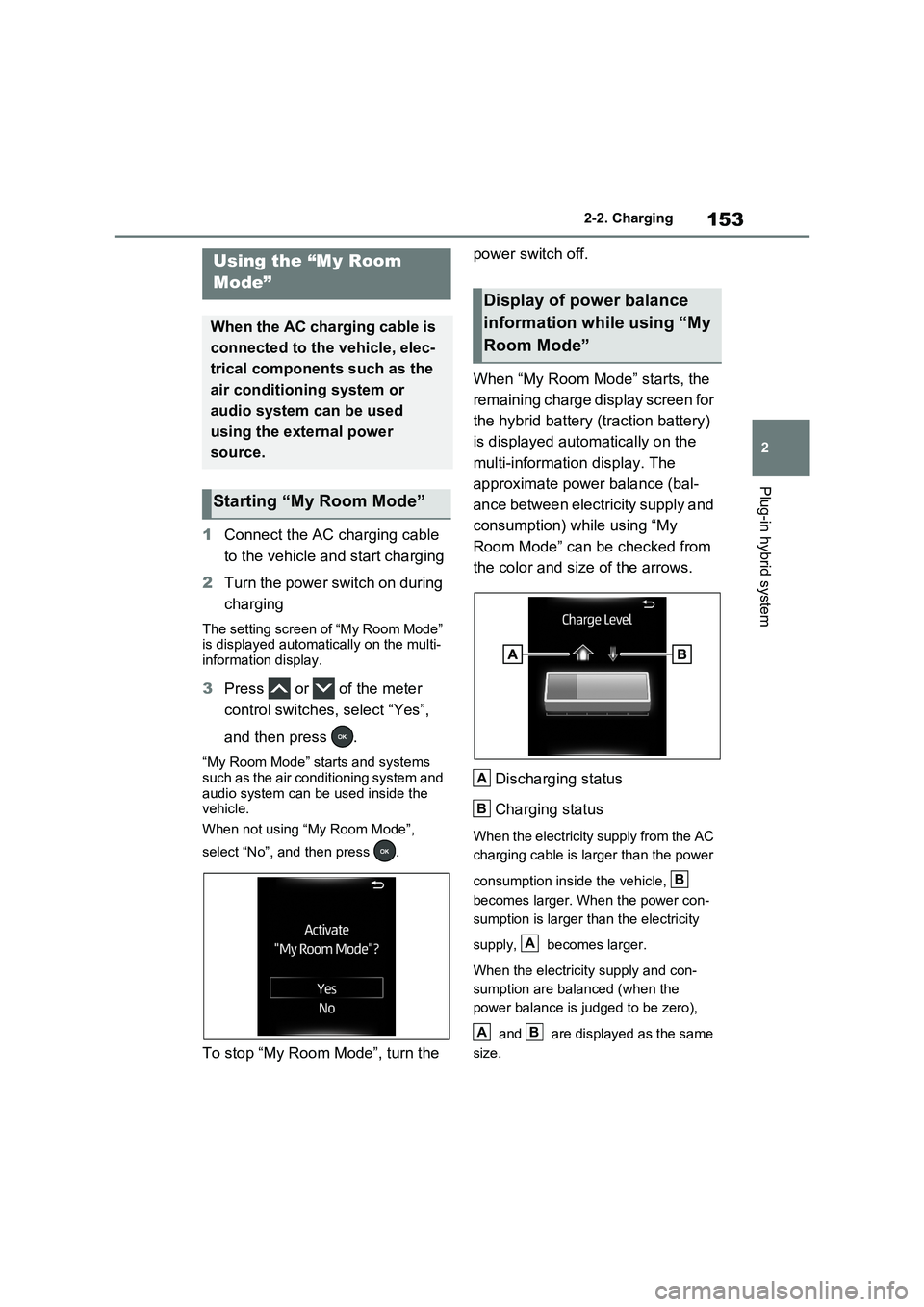
1Connect the AC charging cable
to the vehicle and start charging
2Turn the power switch on during
charging
The setting screen of “My Room Mode”
is displayed automatically on the multi-
information display.
3Press or of the meter
control switches, select “Yes”,
and then press .
“My Room Mode” starts and systems
such as the air conditioning system and
audio system can be used inside the
vehicle.
When not using “My Room Mode”,
select “No”, and then press .
To stop “My Room Mode”, turn the power switch off.
When “My Room Mode” starts, the
remaining charge display screen for
the hybrid battery (traction battery)
is displayed automatically on the
multi-information display. The
approximate power balance (bal-
ance between electricity supply and
consumption) while using “My
Room Mode” can be checked from
the color and size of the arrows.
Discharging status
Charging status
When the electricity supply from the AC
charging cable is larger than the power
consumption inside the vehicle,
becomes larger. When the power con-
sumption is larger than the electricity
supply, becomes larger.
When the electricity supply and con-
sumption are balanced (when the
power balance is judged to be zero),
and are displayed as the same
size.
Using the “My Room
Mode”
When the AC charging cable is
connected to the vehicle, elec-
trical components such as the
air conditioning system or
audio system can be used
using the external power
source.
Starting “My Room Mode”
Display of power balance
information while using “My
Room Mode”
A
B
B
A
AB
Page 154 of 664
1542-2. Charging
■When a door is unlocked while
using “My Room Mode”
The charging connector unlocks,
charging stops and “My Room Mode”
stops. In order to use “My Room Mode”
again, reconnect the AC charging cable
and start “My Room Mode” (P.153).
When using “My Room Mode” with pub-
lic charging station, operation to start
charging using the charger may be
required again before starting “My Room
Mode”.
■Meter display during charging
If “My Room Mode” is not turned on for
approximately 100 seconds after the
power switch is turned on during
charging, the power switch will automat-
ically turn off.
■While using “My Room Mode”
Any of the following may occur.
●When the remaining charge of the
hybrid battery (traction battery)
reaches the lower limit, the air condi-
tioning system automatically turns off.
In this situation, the air conditioning
system cannot be used until the
remaining charge of the hybrid battery
(traction battery) increases. Turn the
power switch off and use “My Room
Mode” after the remaining charge of
the hybrid battery (traction battery) is
restored.
●When the outside temperature is low,
the heater output may be limited due
to the air conditioning system opera-
tion being restricted.
●Warning lights and indicators such as
electric power steering system warn-
ing light (yellow) and malfunction indi-
cator lamp may turn on, but this is not
a malfunction.
Also, when the surrounding area is
dark, the headlights are turned on.
(P.332)
■When a charging schedule is regis-
tered
When “My Room Mode” starts while the
charging schedule is on standby, charging schedules are ignored and
charging starts.
■When “My Room Mode” is used
while the hybrid battery (traction
battery) is fully charged
When the power switch is turned on
while the hybrid battery (traction battery)
is fully charged and the charging con-
nector that supplies power is connected,
“Charging Port Lid is Open” is displayed
on the multi-information display. In this
case, press of the meter control
switches to display the setting screen of
“My Room Mode”, and then select “My
Room Mode”.
When “My Room Mode” is used while
the hybrid battery (traction battery) is
fully charged, the electric power of the
hybrid battery (traction battery) may be
consumed. In this case, charging may
be performed again.
■When a message related to “My
Room Mode” is displayed
When a message is displayed on the
multi-information display while using or
attempting to start “My Room Mode”,
take the following correction proce-
dures.
●“Traction battery is too low for “My
Room Mode””
There is insufficient remaining charge in
the hybrid battery (traction battery) for
starting “My Room Mode”.
Wait until the charge of the hybrid bat-
tery (traction battery) increases, then
start “My Room Mode”.
●““My Room Mode” has stopped due to
low traction battery”
The remaining charge in the hybrid bat-
tery (traction battery) is insufficient.
Stop using “My Room Mode” and
charge the hybrid battery (traction bat-
tery).
●““My Room Mode” will stop when trac-
tion battery is too low Reduce power
usage to continue using “My Room
Page 159 of 664
159
2 2-2. Charging
Plug-in hybrid system
■Charging starts, even though charging schedule is registered
Likely causeCorrection procedure
“Charge Now” is set to on
When charging according to the charging
schedule, set “Charge Now” to off.
(P.150)
charging schedule is set to offCheck that charging schedule is not set
to off. (P.149)
Charging mode is set to “Departure” and
schedule departure time is close to cur-
rent timeWhen the system determines that there
is no time to finish charging by the set
scheduled departure time, it starts
charging. Check the charging schedules.
AC charging cable was removed and
reinserted while charging indicator of the
charging port was flashing
If the AC charging cable is removed and
reinserted while the charging indicator is
flashing, the charging schedule is can-
celed (P.138).
Temporarily remove the AC charging
cable, and then reconnect it.
The Remote Air Conditioning System
was operated
When the Remote Air Conditioning Sys-
tem is operated, the system will start
charging, even if the charging schedule
is registered. To carry out charging using
the charging schedule, stop the Remote
Air Conditioning System, and then recon-
nect the AC charging cable.
“Battery Heater” (P.128) operated
When the charging mode is set to
“Departure”, “Battery Heater” may oper-
ate before charging starts. Check the
status of the charging indicator of the
charging port. (P.106)
Outside temperature is low and hybrid
battery (traction battery) warming control
(P.129) operated (Greenland only)
When hybrid battery (traction battery)
warming control operates, the charging
schedules are ignored and charging
starts. In order to protect the hybrid bat-
tery (traction battery), allow charging to
continue.
Page 165 of 664
165
2 2-2. Charging
Plug-in hybrid system
■If “Charging Stopped High Energy Use See Owner’s Manual” is
shown
■If “Charging System Malfunction See Owner’s Manual” is shown
■If “The Traction Battery Temp is low System put priority on
charging to preserve battery condition” is shown (Greenland only)
Likely causeCorrection procedure
Power is being consumed by electrical
components of vehicle
Check the following items, and then carry
out charging again.
If the headlights and audio are turned
on, turn them off.
Turn the power switch off.
If charging cannot be carried out, even
after performing the above, the auxiliary
battery may not be sufficiently charged.
Operate the hybrid system for approxi-
mately 15 minutes or more to charge the
auxiliary battery.
Likely causeCorrection procedure
Malfunction occurred in charging system
Have the vehicle inspected by any autho-
rized Toyota retailer or Toyota authorized
repairer, or any reliable repairer.
Likely causeCorrection procedure
The Hybrid battery (traction battery)
warming control was operated (P.129)
When the hybrid battery (traction battery)
warming control operates, the charging
schedule is not used and charging is per-
formed.
This is a control to protect the hybrid bat-
tery (traction battery), and not a malfunc-
tion.
Page 175 of 664
175
3 3-1. Instrument cluster
Vehicle status information and indicators
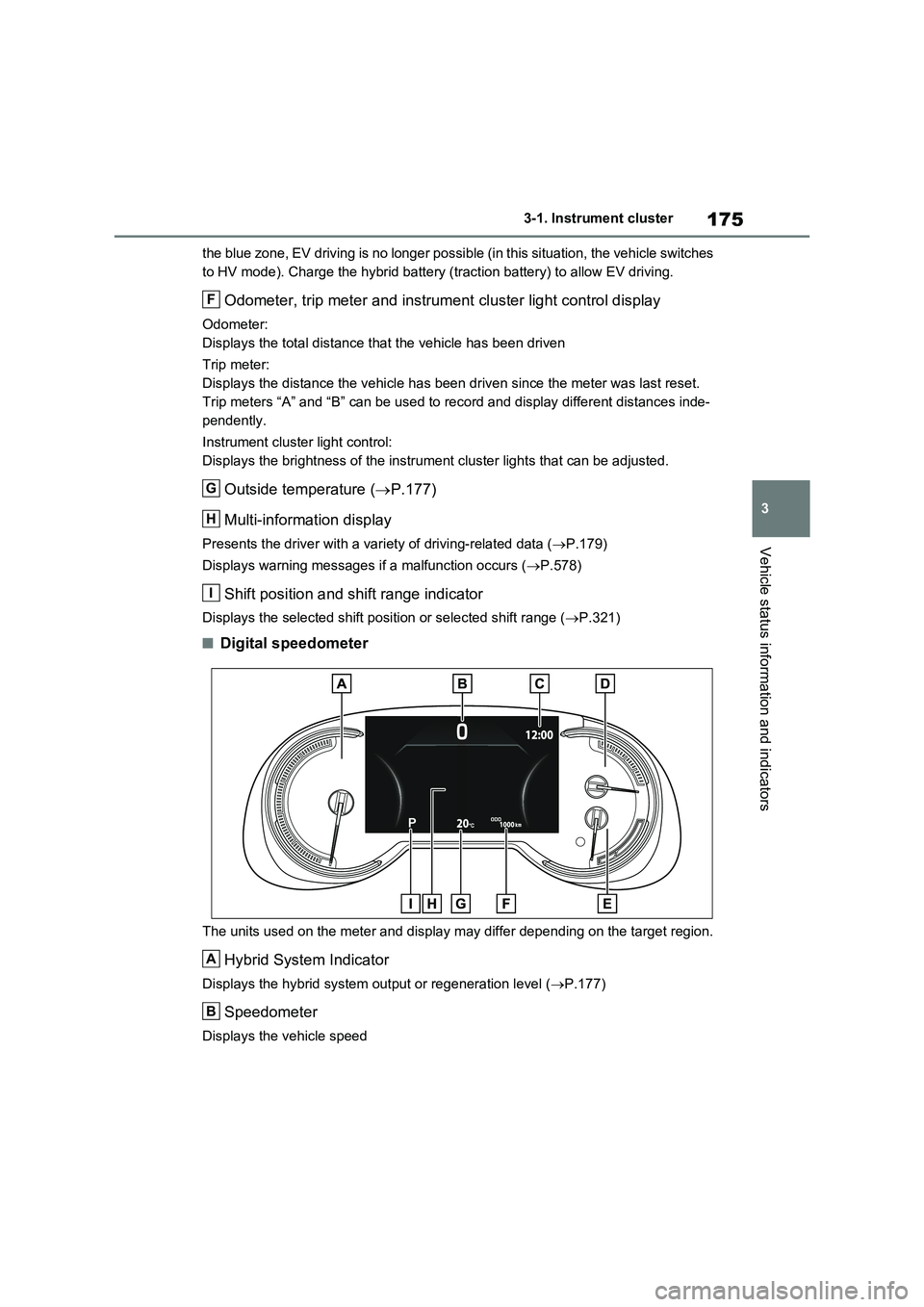
the blue zone, EV driving is no longer possible (in this situation, the vehicle switches
to HV mode). Charge the hybrid battery (traction battery) to allow EV driving.
Odometer, trip meter and instrument cluster light control display
Odometer:
Displays the total distance that the vehicle has been driven
Trip meter:
Displays the distance the vehicle has been driven since the meter was last reset.
Trip meters “A” and “B” can be used to record and display different distances inde-
pendently.
Instrument cluster light control:
Displays the brightness of the instrument cluster lights that can be adjusted.
Outside temperature (P.177)
Multi-information display
Presents the driver with a variety of driving-related data (P.179)
Displays warning messages if a malfunction occurs (P.578)
Shift position and shift range indicator
Displays the selected shift position or selected shift range (P.321)
■Digital speedometer
The units used on the meter and display may differ depending on the target region.
Hybrid System Indicator
Displays the hybrid system output or regeneration level (P.177)
Speedometer
Displays the vehicle speed
F
G
H
I
A
B
Page 176 of 664
1763-1. Instrument cluster
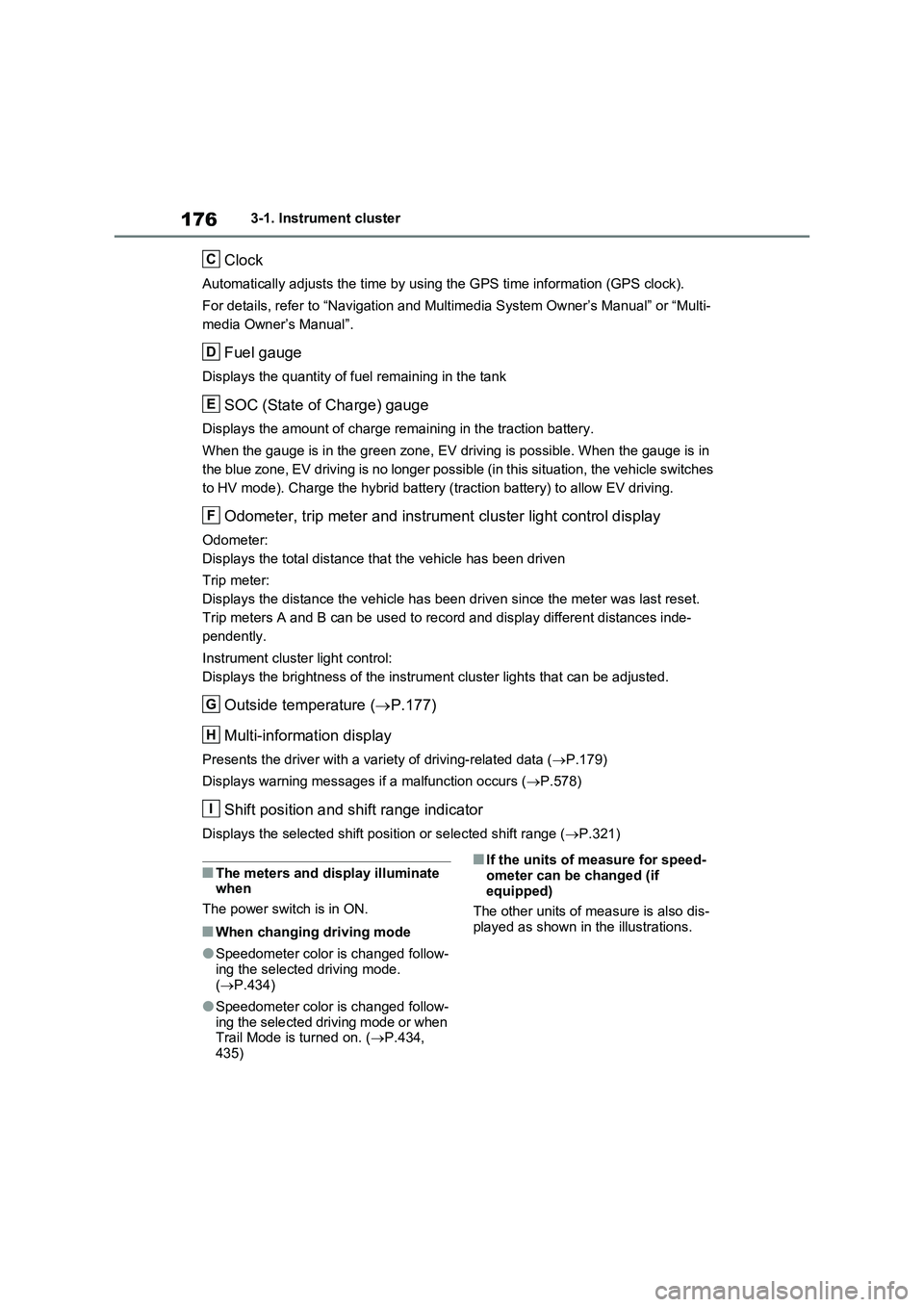
Clock
Automatically adjusts the time by using the GPS time information (GPS clock).
For details, refer to “Navigation and Multimedia System Owner’s Manual” or “Multi-
media Owner’s Manual”.
Fuel gauge
Displays the quantity of fuel remaining in the tank
SOC (State of Charge) gauge
Displays the amount of charge remaining in the traction battery.
When the gauge is in the green zone, EV driving is possible. When the gauge is in
the blue zone, EV driving is no longer possible (in this situation, the vehicle switches
to HV mode). Charge the hybrid battery (traction battery) to allow EV driving.
Odometer, trip meter and instrument cluster light control display
Odometer:
Displays the total distance that the vehicle has been driven
Trip meter:
Displays the distance the vehicle has been driven since the meter was last reset.
Trip meters A and B can be used to record and display different distances inde-
pendently.
Instrument cluster light control:
Displays the brightness of the instrument cluster lights that can be adjusted.
Outside temperature (P.177)
Multi-information display
Presents the driver with a variety of driving-related data (P.179)
Displays warning messages if a malfunction occurs (P.578)
Shift position and shift range indicator
Displays the selected shift position or selected shift range (P.321)
■The meters and display illuminate
when
The power switch is in ON.
■When changing driving mode
●Speedometer color is changed follow-
ing the selected driving mode.
(P.434)
●Speedometer color is changed follow-
ing the selected driving mode or when
Trail Mode is turned on. (P.434,
435)
■If the units of measure for speed-
ometer can be changed (if
equipped)
The other units of measure is also dis-
played as shown in the illustrations.
C
D
E
F
G
H
I
Page 302 of 664
3025-1. Before driving
■Operating your vehicle in a foreign
country
Comply with the relevant vehicle regis- tration laws and confirm the availability
of the correct fuel. ( P.620)
WARNING
Observe the following precautions. Failure to do so may result in death or
serious injury.
■When starting the vehicle
Always keep your foot on the brake pedal while stopped with the “READY” indicator is illuminated. This
prevents the vehicle from creeping.
■When driving the vehicle
●Do not drive if you are unfamiliar with the location of the brake and accelerator pedals to avoid
depressing the wrong pedal.
• Accidentally depressing the accel- erator pedal instead of the brake
pedal will result in sudden accelera- tion that may lead to an accident.
• When backing up, you may twist
your body around, leading to a diffi- culty in operating the pedals. Make sure to operate the pedals properly.
• Make sure to keep a correct driving posture even when moving the vehicle only slightly. This allows
you to depress the brake and accel- erator pedals properly.
• Depress the brake pedal using your
right foot. Depressing the brake pedal using your left foot may delay response in an emergency, result-
ing in an accident.
●The driver should pay extra atten- tion to pedestrians when the vehicle is powered only by the electric
motor (traction motor). As there is no engine noise, the pedestrians may misjudge the vehicle’s move-
ment. Even though the vehicle is equipped with the Acoustic Vehicle Alerting System, drive with care as
pedestrians in the vicinity may still not notice the vehicle if the sur-rounding area is noisy.
●Do not drive the vehicle over or stop the vehicle near flammable
materials such as leaves, paper or rags.The exhaust system and exhaust
gases can be extremely hot. These hot parts may cause a fire if there is any flammable material nearby.
●During normal driving, do not turn off the hybrid system. Turning the
hybrid system off while driving will not cause loss of steering or brak-ing control, however, power assist
to the steering will be lost. This will make it more difficult to steer smoothly, so you should pull over
and stop the vehicle as soon as it is safe to do so. In the event of an emergency, such
as if it becomes impossible to stop the vehicle in the normal way: P.560
●Use engine braking (downshift) to maintain a safe speed when driving
down a steep hill. Using the brakes continuously may cause the brakes to overheat and
lose effectiveness. ( P.321)
●Do not adjust the position of the
steering wheel, the seat, or the inside or outside rear view mirrors while driving.
Doing so may result in a loss of vehicle control.
Page 322 of 664
3225-2. Driving procedures
shifting to 5 or 4. ( P.323, 324)
●When switching the driving mode to sport mode while driving in D position.
( P.434)
■Restraining sudden start (Drive- Start Control)
P.301
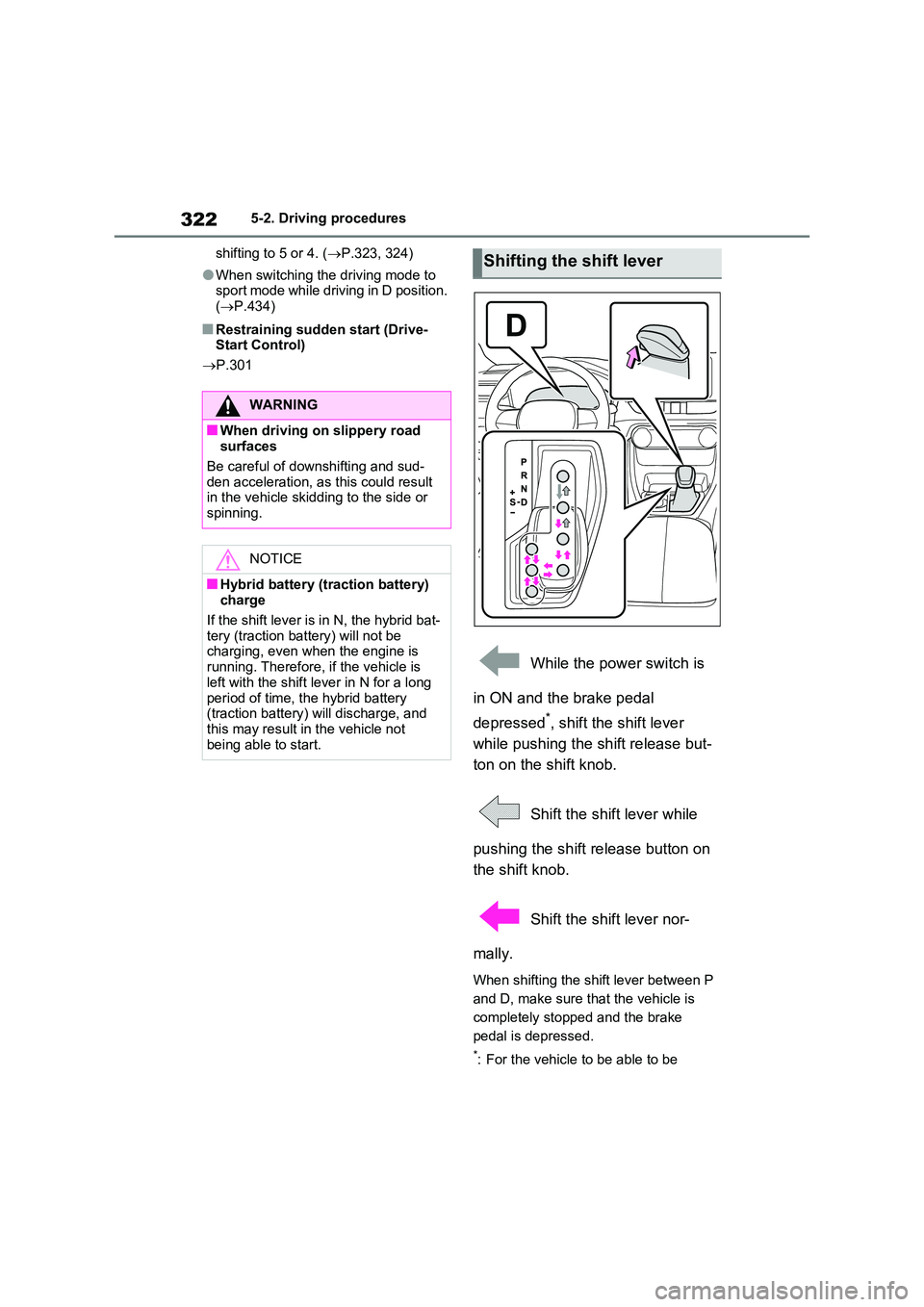
While the power switch is
in ON and the brake pedal
depressed*, shift the shift lever
while pushing the shift release but-
ton on the shift knob.
Shift the shift lever while
pushing the shift release button on
the shift knob.
Shift the shift lever nor-
mally.
When shifting the shift lever between P
and D, make sure that the vehicle is
completely stopped and the brake
pedal is depressed.
*: For the vehicle to be able to be
WARNING
■When driving on slippery road surfaces
Be careful of downshifting and sud-
den acceleration, as this could result in the vehicle skidding to the side or spinning.
NOTICE
■Hybrid battery (traction battery) charge
If the shift lever is in N, the hybrid bat- tery (traction battery) will not be charging, even when the engine is
running. Therefore, if the vehicle is left with the shift lever in N for a long
period of time, the hybrid battery (traction battery) will discharge, and this may result in the vehicle not
being able to start.
Shifting the shift lever