Page 453 of 664
453
6
6-1. Using the air conditioning system and defogger
Interior features
■Adjusting the temperature set-
ting
Turn driver’s side temperature con-
trol dial clockwise to increases the
temperature and turn the dial coun-
terclockwise to decreases the tem-
perature.
The air conditioning system switches
between individual and simultaneous
modes each time the “DUAL” switch is
pressed.
Simultaneous mode (the indicator on
the “DUAL” switch is off):
The driver’s side temperature control
dial can be used to adjust the tempera-
ture for the driver’s and passenger’s
side. At this time, operate the passen-
ger’s side temperature control dial to
enter individual mode.
Individual mode (the indicator on the
“DUAL” switch is on):
The temperature for the driver’s and
passenger’s side can be adjusted sepa-
rately.
■Setting the fan speed
Press the fan speed increase
switch to increase the fan speed
and the fan speed decrease switch
to decrease the fan speed.
Pressing the “OFF” switch to turns off
the fan.
■Change the airflow mode
Press the airflow mode control
switch.
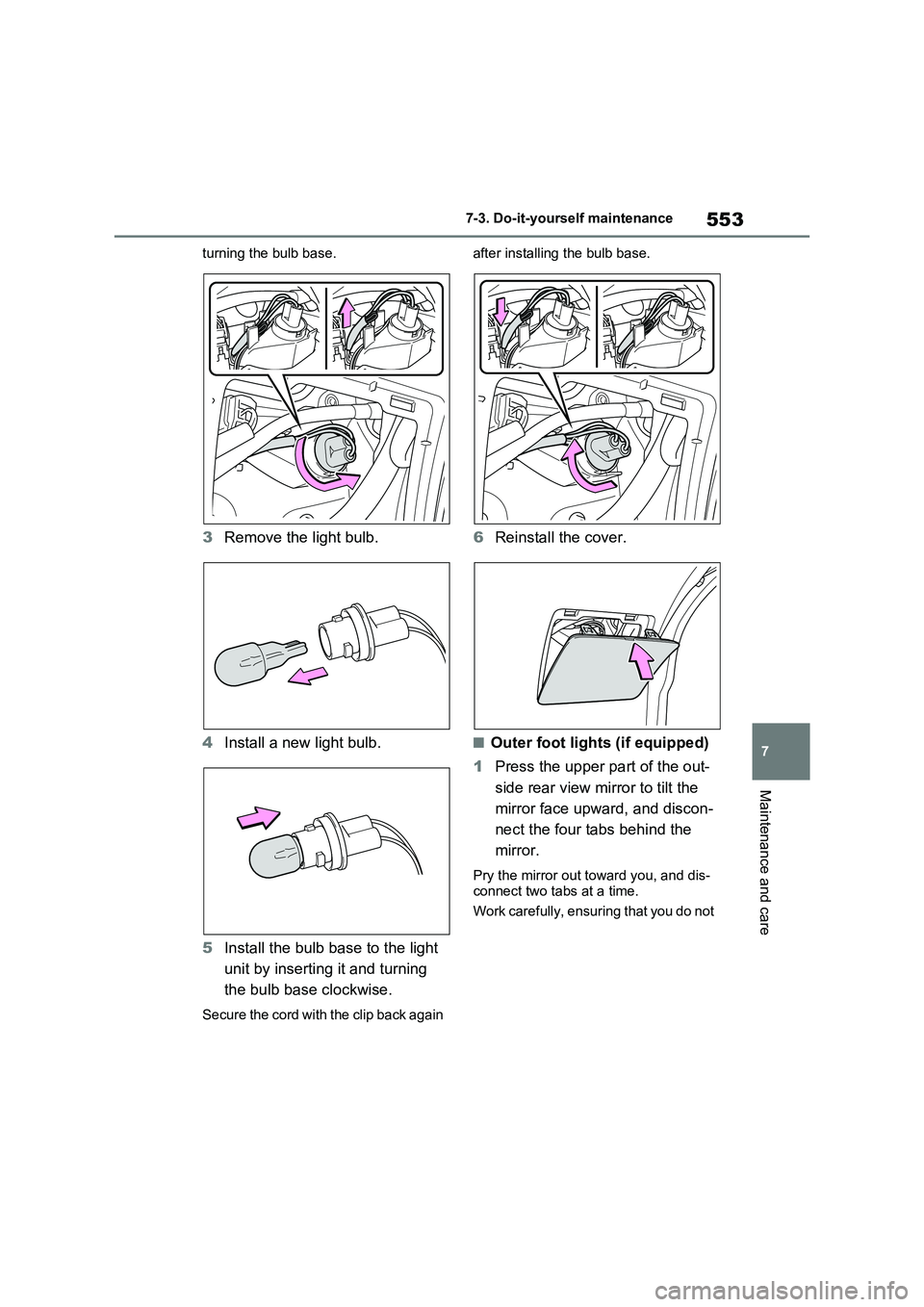
The airflow mode changes as follows
each time the switch is pressed.
1 Upper body
2 Upper body and feet
3 Feet
4 Feet and the windshield defog-
ger operates
■Switching between outside air
and recirculated air modes
Press the outside/recirculated air
mode switch.
The mode switches between outside air
mode (the indicator is off) and recircu-
lated air mode (the indicator is on) each
time the button is pressed.
■Set cooling and dehumidifica-
tion function
Press the “A/C” switch.
When the function is on, the indicator
illuminates on the “A/C” switch.
■Defogging the windshield
Defoggers are used to defog the
windshield and front side windows.
Press the windshield defogger
switch.
Set the outside/recirculated air mode
112233
44
Page 502 of 664
5027-3. Do-it-yourself maintenance
oil level on the dipstick.
■Checking the engine oil
1Park the vehicle on level
ground. After warming up the
engine and turning off the hybrid
system, wait more than 5 min-
utes for the oil to drain back into
the bottom of the engine.
2Holding a rag under the end,
pull the dipstick out.
3Wipe the dipstick clean.
4Reinsert the dipstick fully.
5Holding a rag under the end,
pull the dipstick out and check
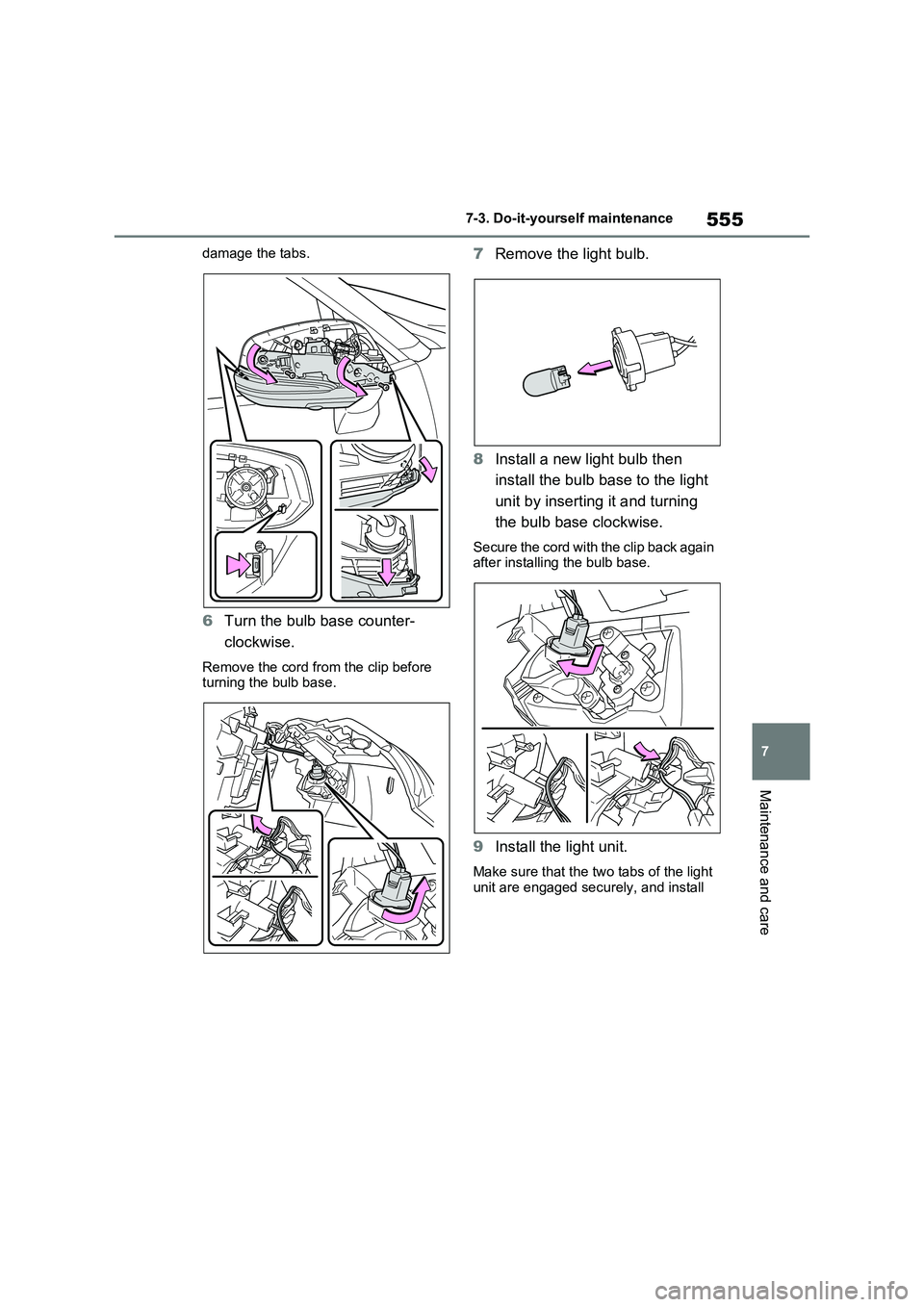
the oil level.
Low
Normal
Excessive
The shape of the dipstick may differ depending on the type of vehicle or
engine.
6Wipe the dipstick and reinsert it
fully.
■Checking the oil type and pre-
paring the items needed
Make sure to check the oil type and
prepare the items needed before
adding oil.
Engine oil selection
P.621
Oil quantity (Low Full)
1.5 L (1.6 qt., 1.3 Imp. qt.)
Item
Clean funnel
■Adding engine oil
If the oil level is below or near the
low level mark, add engine oil of the
same type as that already in the
engine.
1Remove the oil filler cap by turn-
ing it counterclockwise.
2Add engine oil slowly, checking
the dipstick.
3Install the oil filler cap by turning
it clockwise.
A
B
C
Page 549 of 664
549
7 7-3. Do-it-yourself maintenance
Maintenance and care
●Back-up lights
●Outer foot lights (if equipped)
■Condensation build-up on the
inside of the lens
Temporary condensation build-up on
the inside of the light lens does not indi-
cate a malfunction. Contact any autho-
rized Toyota retailer or Toyota
authorized repairer, or any reliable
repairer for more information in the fol-
lowing situations:
●Large drops of water have built up on
the inside of the lens.
●Water has built up inside the light.
■When replacing an electronic com-
ponent, such as a lights, etc.
P.547
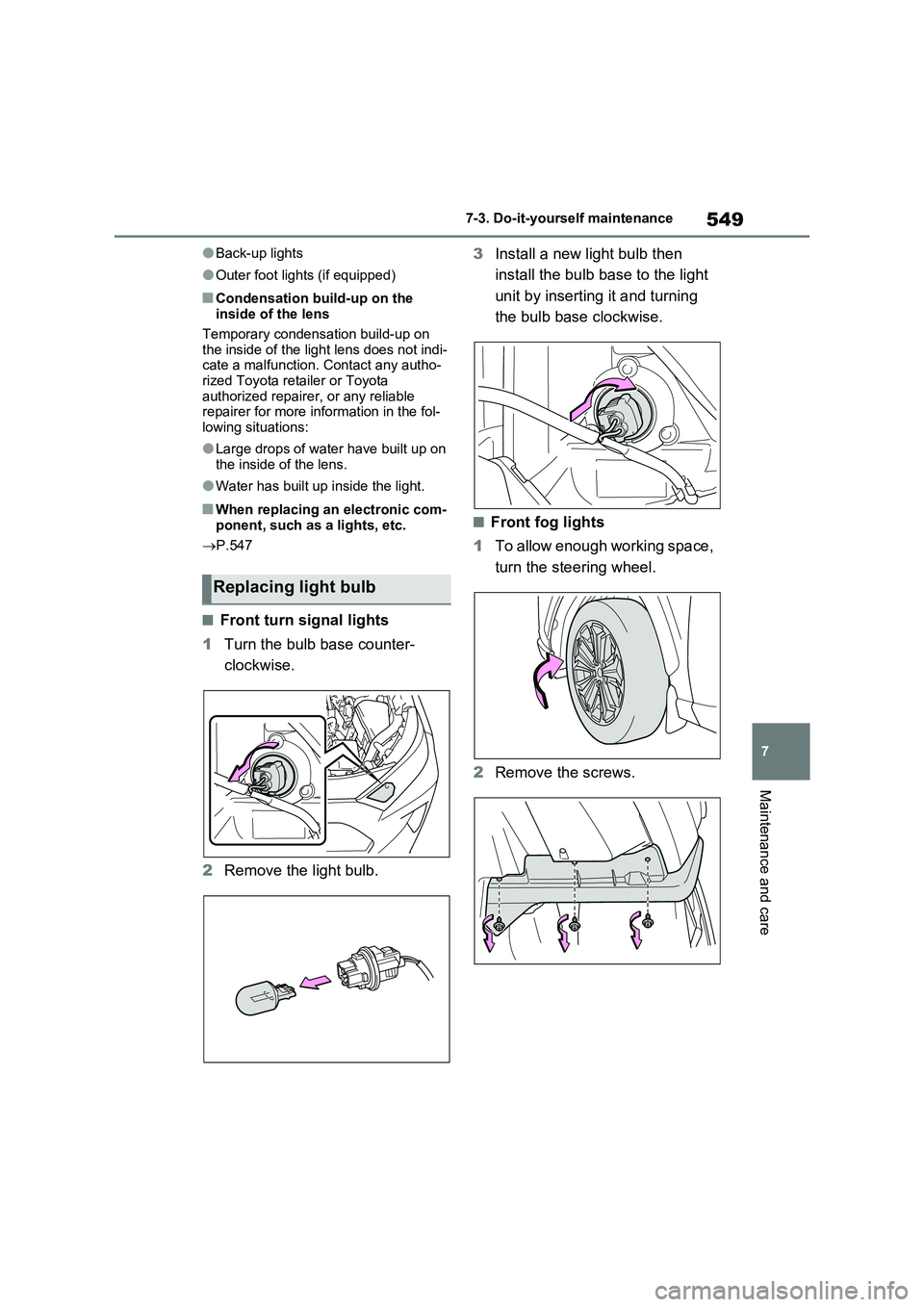
■Front turn signal lights
1Turn the bulb base counter-
clockwise.
2Remove the light bulb.3Install a new light bulb then
install the bulb base to the light
unit by inserting it and turning
the bulb base clockwise.
■Front fog lights
1To allow enough working space,
turn the steering wheel.
2Remove the screws.
Replacing light bulb
Page 550 of 664
5507-3. Do-it-yourself maintenance
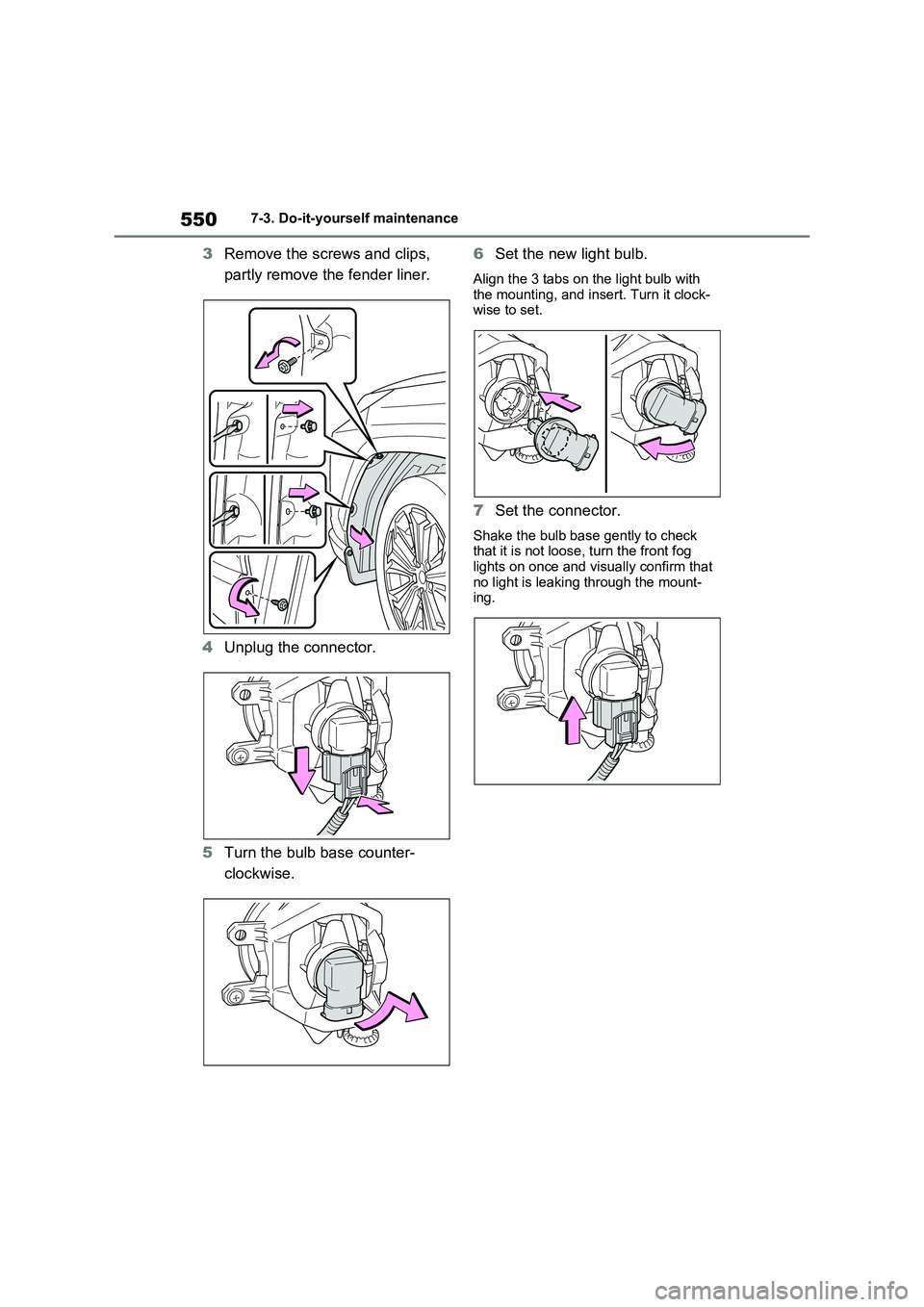
3Remove the screws and clips,
partly remove the fender liner.
4Unplug the connector.
5Turn the bulb base counter-
clockwise.6Set the new light bulb.
Align the 3 tabs on the light bulb with
the mounting, and insert. Turn it clock-
wise to set.
7Set the connector.
Shake the bulb base gently to check
that it is not loose, turn the front fog
lights on once and visually confirm that
no light is leaking through the mount-
ing.
Page 551 of 664
551
7 7-3. Do-it-yourself maintenance
Maintenance and care
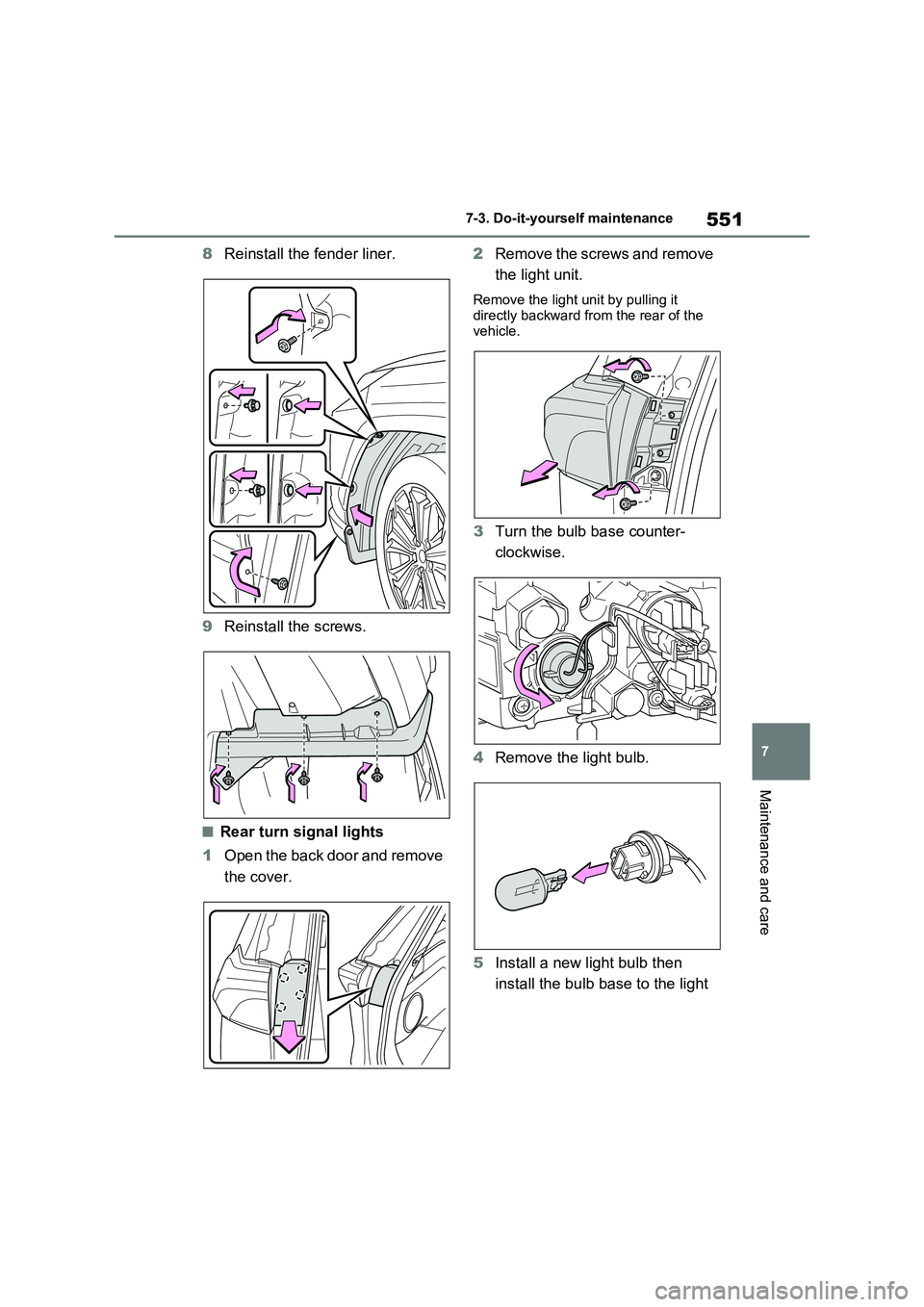
8Reinstall the fender liner.
9Reinstall the screws.
■Rear turn signal lights
1Open the back door and remove
the cover.2Remove the screws and remove
the light unit.
Remove the light unit by pulling it
directly backward from the rear of the
vehicle.
3Turn the bulb base counter-
clockwise.
4Remove the light bulb.
5Install a new light bulb then
install the bulb base to the light
Page 552 of 664
5527-3. Do-it-yourself maintenance
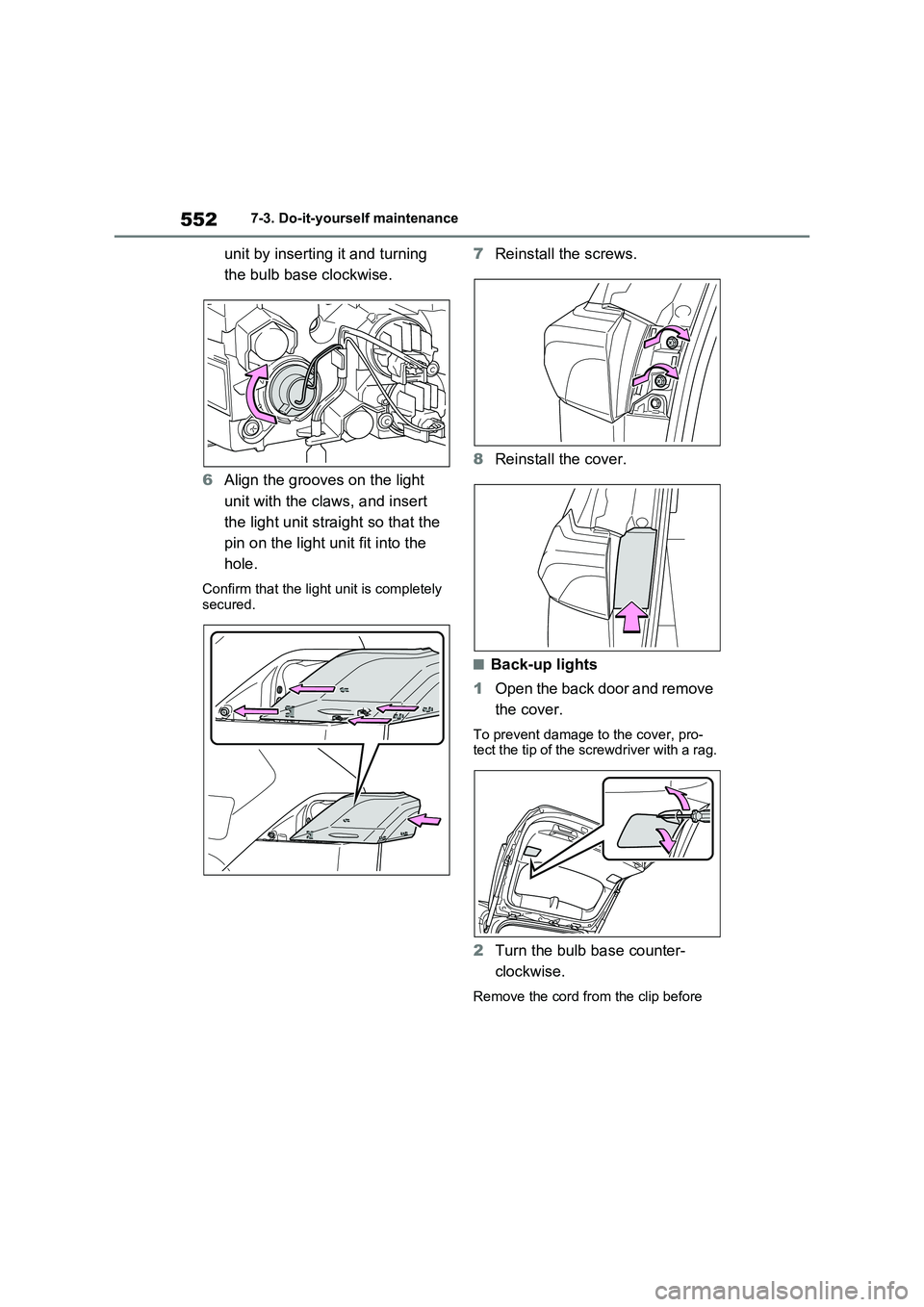
unit by inserting it and turning
the bulb base clockwise.
6Align the grooves on the light
unit with the claws, and insert
the light unit straight so that the
pin on the light unit fit into the
hole.
Confirm that the light unit is completely
secured.
7Reinstall the screws.
8Reinstall the cover.
■Back-up lights
1Open the back door and remove
the cover.
To prevent damage to the cover, pro-
tect the tip of the screwdriver with a rag.
2Turn the bulb base counter-
clockwise.
Remove the cord from the clip before
Page 553 of 664
553
7 7-3. Do-it-yourself maintenance
Maintenance and care
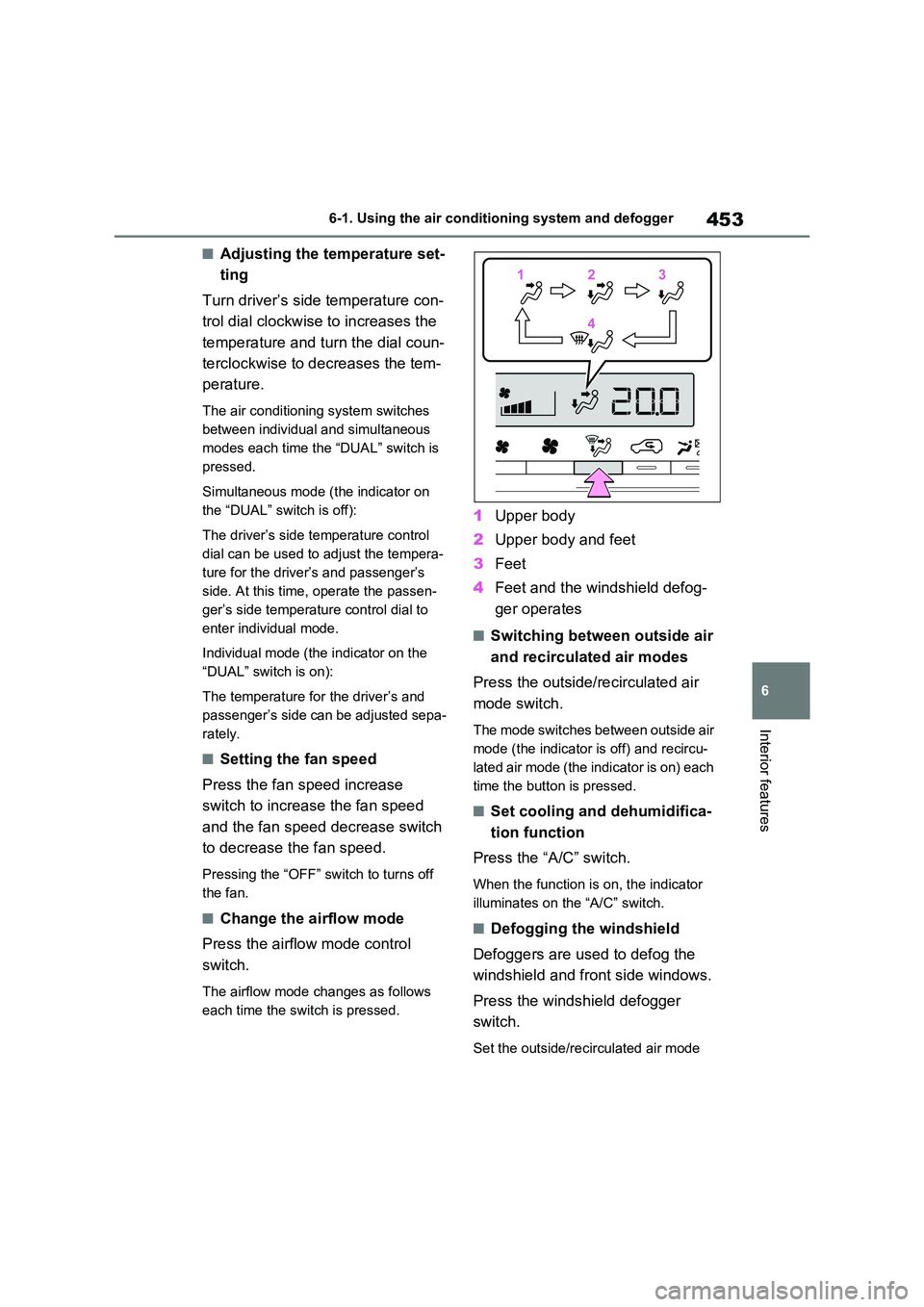
turning the bulb base.
3Remove the light bulb.
4Install a new light bulb.
5Install the bulb base to the light
unit by inserting it and turning
the bulb base clockwise.
Secure the cord with the clip back again after installing the bulb base.
6Reinstall the cover.
■Outer foot lights (if equipped)
1Press the upper part of the out-
side rear view mirror to tilt the
mirror face upward, and discon-
nect the four tabs behind the
mirror.
Pry the mirror out toward you, and dis-
connect two tabs at a time.
Work carefully, ensuring that you do not
Page 555 of 664
555
7 7-3. Do-it-yourself maintenance
Maintenance and care
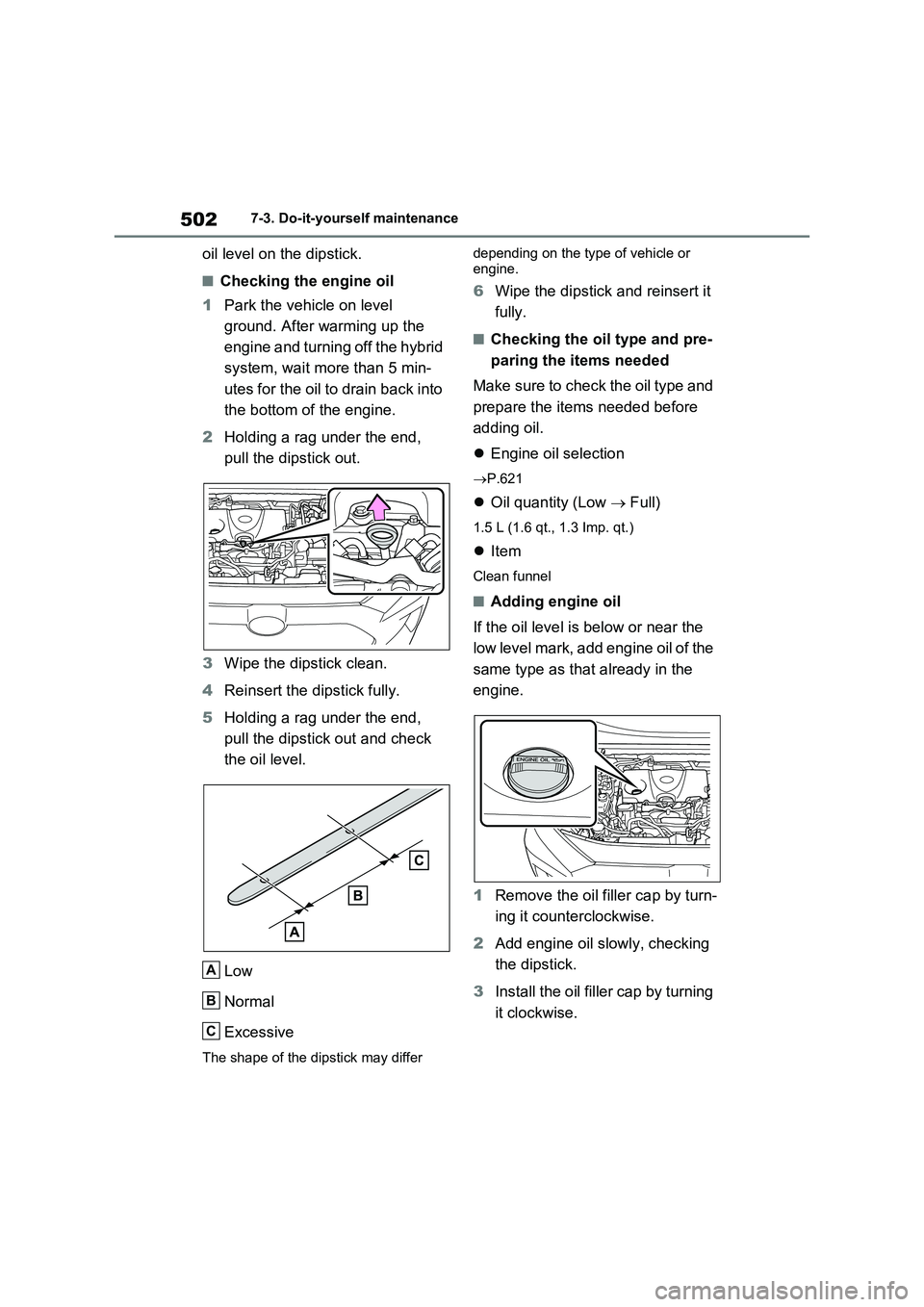
damage the tabs.
6Turn the bulb base counter-
clockwise.
Remove the cord from the clip before
turning the bulb base.
7Remove the light bulb.
8Install a new light bulb then
install the bulb base to the light
unit by inserting it and turning
the bulb base clockwise.
Secure the cord with the clip back again
after installing the bulb base.
9Install the light unit.
Make sure that the two tabs of the light
unit are engaged securely, and install