Page 241 of 732
241
2-4. Using other
driving systems
2
When driving
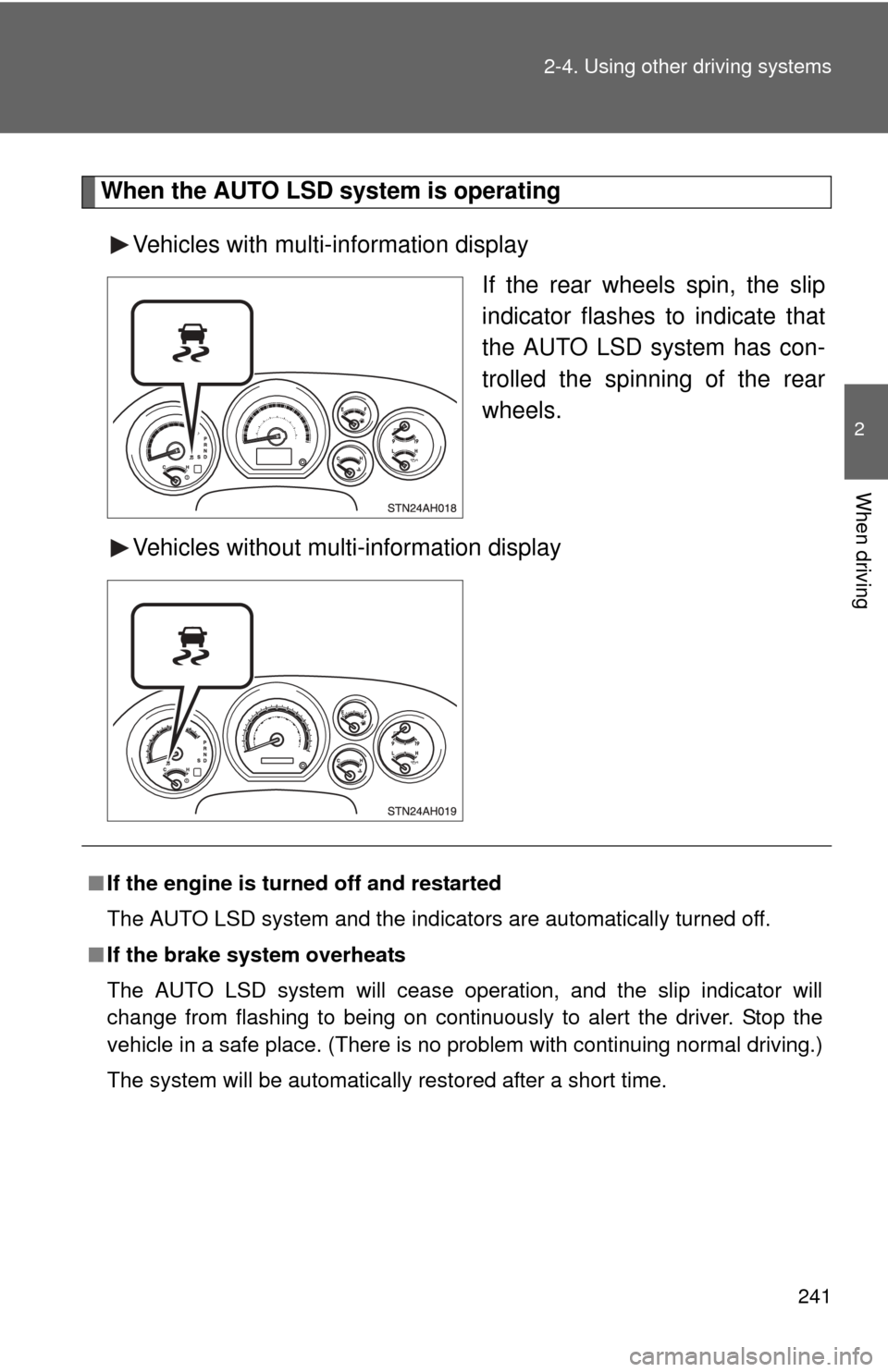
When the AUTO LSD system is operating
Vehicles with multi-information display If the rear wheels spin, the slip
indicator flashes to indicate that
the AUTO LSD system has con-
trolled the spinning of the rear
wheels.
Vehicles without multi-information display
■ If the engine is turned off and restarted
The AUTO LSD system and the indicators are automatically turned off.
■ If the brake system overheats
The AUTO LSD system will cease operation, and the slip indicator will
change from flashing to being on continuously to alert the driver. Stop the
vehicle in a safe place. (There is no problem with continuing normal driving.)
The system will be automatically restored after a short time.
Page 243 of 732
243
2-4. Using other driving systems
2
When driving
Driving assist systems
To help enhance driving safety and performance, the following sys-
tems operate automatically in res ponse to various driving situations.
Be aware, however, that these systems are supplementary and
should not be relied upon too heavi ly when operating the vehicle.
■ABS (Anti-lock Brake System)
Helps to prevent wheel lock when the brakes are applied suddenly, or if
the brakes are applied while driving on a slippery road surface.
■Brake Assist
Generates an increased level of braking force after the brake pedal is
depressed, when the system detects a panic stop situation.
■VSC (Vehicle Stability Control)
Helps the driver to control skidding when swerving suddenly or turning
on slippery road surfaces.
■Trailer Sway Control
Helps the driver to control trailer sway by selectively applying brake
pressure for individual wheels and reducing engine torque when trailer
sway is detected.
Trailer Sway Control is part of the VSC system and will not operate if
VSC is turned off or experiences a malfunction.
■ TRAC (Traction Control) for 2WD models and 2WD mode on
4WD models
Maintains drive power and prevents the rear wheels from spinning
when starting the vehicle or accelerating on slippery roads.
■A-TRAC (Active Traction Control) for 4WD mode on 4WD
models
Maintains drive power and prevents all wheels from spinning when
starting the vehicle or accelerating on slippery roads.
Page 248 of 732

248 2-4. Using other driving systems
■Automatic reactivation of TRAC, A-TRAC, VSC and Trailer Sway Con-
trol
Turning the engine switch off after turning off the TRAC, A-TRAC, VSC and
Trailer Sway Control systems will automatically re-enable them.
■ Sounds and vibrations caused by the ABS, TRAC, A-TRAC, VSC,
Trailer Sway Control and Brake Assist system
● A sound may be heard from the engine compartment when the engine is
started and just after the vehicle begins to move. This sound does not
indicate that a malfunction has occurred in any of these systems.
● Any of the following conditions may occur when the above systems are
operating. None of these indicates that a malfunction has occurred.
• Vibrations may be felt through the vehicle body and steering.
• A motor sound may be heard after the vehicle comes to a stop.
• The brake pedal may pulsate slightly after the ABS is activated.
• The brake pedal may move down slightly after the ABS is activated.
■ If the brake system overheats
TRAC or A-TRAC will cease operation, and the slip indicator will change
from flashing to being on continuously to alert the driver. Stop the vehicle in
a safe place. (There is no problem with continuing normal driving.)
■ Shifting to 4L
VSC and Trailer Sway Control are automatically turned off.
Page 281 of 732

281
2-5. Driving information
2
When driving
●
Practice turning, stopping and reve rsing with the trailer attached in
an area away from traffic until you become accustomed to the feel
of the vehicle-trailer combination.
● Reversing with a trailer attached is difficult and requires practice.
Grip the bottom of the steering wheel and move your hand to the
left to move the trailer to the left. Move your hand to the right to
move the trailer to the right. (Thi s is generally opposite to reversing
without a trailer attached.) Avoid sharp or prolonged turning. Have
someone guide you when reversing to reduce the risk of an acci-
dent.
● As stopping distance is increased when towing a trailer, vehicle-to-
vehicle distance should be increased. For each 10 mph (16 km/h)
of speed, allow at least o ne vehicle and trailer length.
● Avoid sudden braking as you may skid, resulting in the trailer jack-
knifing and a loss of vehicle control. This is especially true on wet
or slippery surfaces.
● Avoid jerky starts or sudden acceleration.
● Avoid jerky steering and sharp turns, and slow down before mak-
ing a turn.
● Note that when making a turn, th e trailer wheels will be closer than
the vehicle wheels to the inside of the turn. Compensate by making
a wider than normal turning radius.
● Slow down before making a turn, in cross winds, on wet or slippery
surfaces, etc.
Increasing vehicle speed can destabilize the trailer.
● Take care when passing other vehicles. Passing requires consider-
able distance. After passing a vehicle, do not forget the length of
your trailer, and be sure you hav e plenty of room before changing
lanes.
Page 283 of 732
283
2-5. Driving information
2
When driving
●
When restarting after parking on a slope:
With the transmission in P, start the engine. Be sure to keep
the brake pedal pressed.
Shift into D or R (if reversing).
Release the parking brake and brake pedal, and slowly pull or
back away from the wheel blocks. Stop and apply the brakes.
Have someone retrieve the blocks.
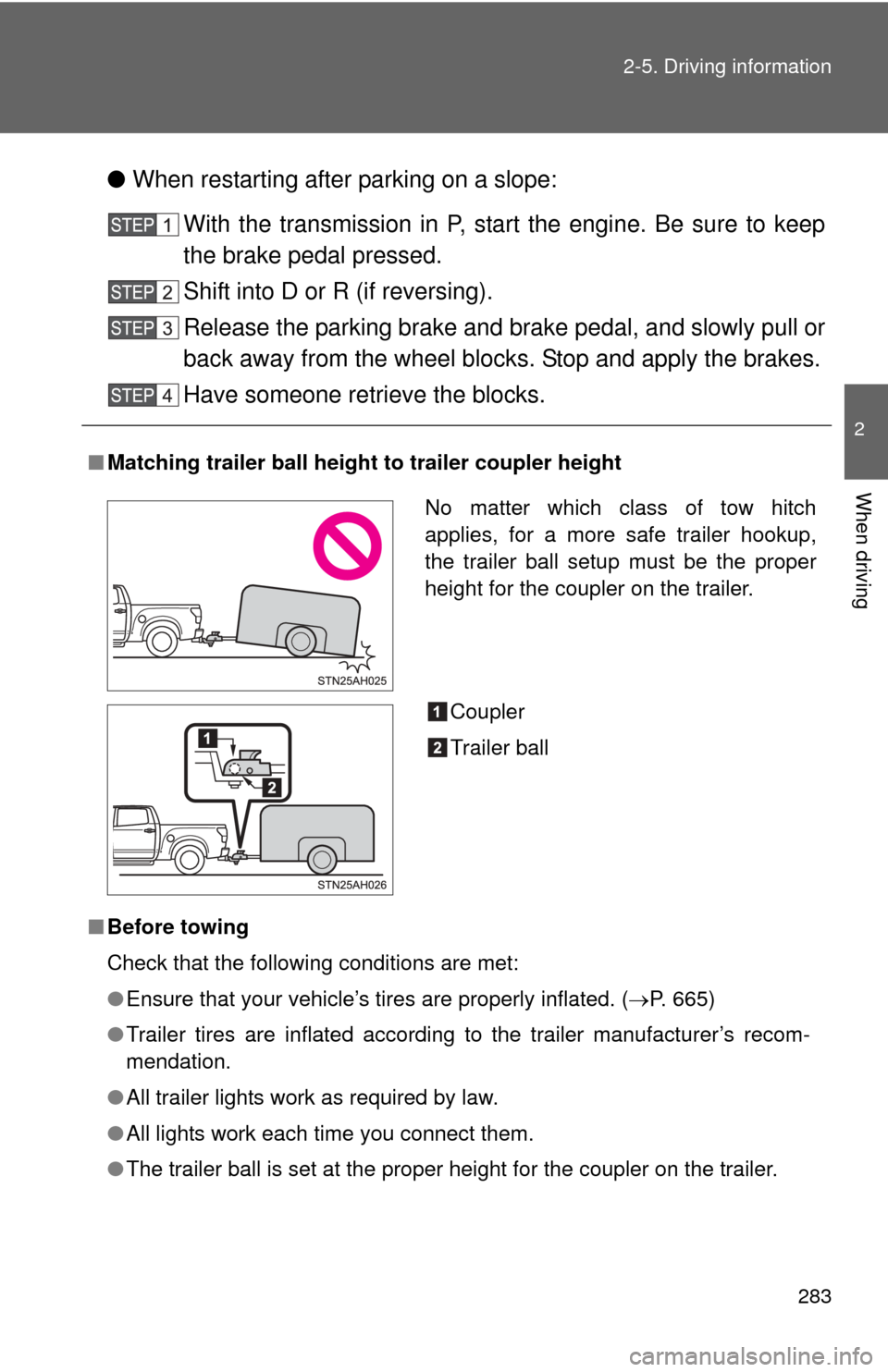
■ Matching trailer ball height to trailer coupler height
■ Before towing
Check that the following conditions are met:
●Ensure that your vehicle’s tires are properly inflated. ( P. 665)
● Trailer tires are inflated according to the trailer manufacturer’s recom-
mendation.
● All trailer lights work as required by law.
● All lights work each time you connect them.
● The trailer ball is set at the proper height for the coupler on the trai\
ler.
No matter which class of tow hitch
applies, for a more safe trailer hookup,
the trailer ball setup must be the proper
height for the coupler on the trailer.
Coupler
Trailer ball
Page 300 of 732
300 3-1. Using the air conditioning system and defogger
• The start timing of the blower may be delayed for a short period of time
immediately after the air conditioning system is started in automatic
mode.
CAUTION
■ To prevent the windshield from fogging up
Do not use during cool air operation in extremely humid weather. The
difference between the temperature of the outside air and that of the wind-
shield can cause the outer surface of the windshield to fog up, blocking your
vision.
NOTICE
■To prevent battery discharge
Do not leave the air conditioning system on longer than necessary when the
engine is stopped.
Page 393 of 732
393
3-4. Using the rear audio/video system
3
Interior and exterior features
Turning on/off the control icon screen
Press or to turn on the control icon screen.
Press or once again or select to turn off the control
icon screen.
NOTICE
■ Cleaning the screen
Wipe the screen with a dry soft cloth.
If the screen is wiped with a rough cloth, the surface of the screen may be
scratched.
■ To prevent damage to the remote controller
●Keep the remote controller away from direct sunlight, heat and high
humidity.
● Do not drop or knock the remote controller against hard objects.
● Do not sit on or place heavy objects on the remote controller.
■ DVD player
Never try to disassemble or oil any part of the DVD player. Do not insert any-
thing other than a disc into the slot.
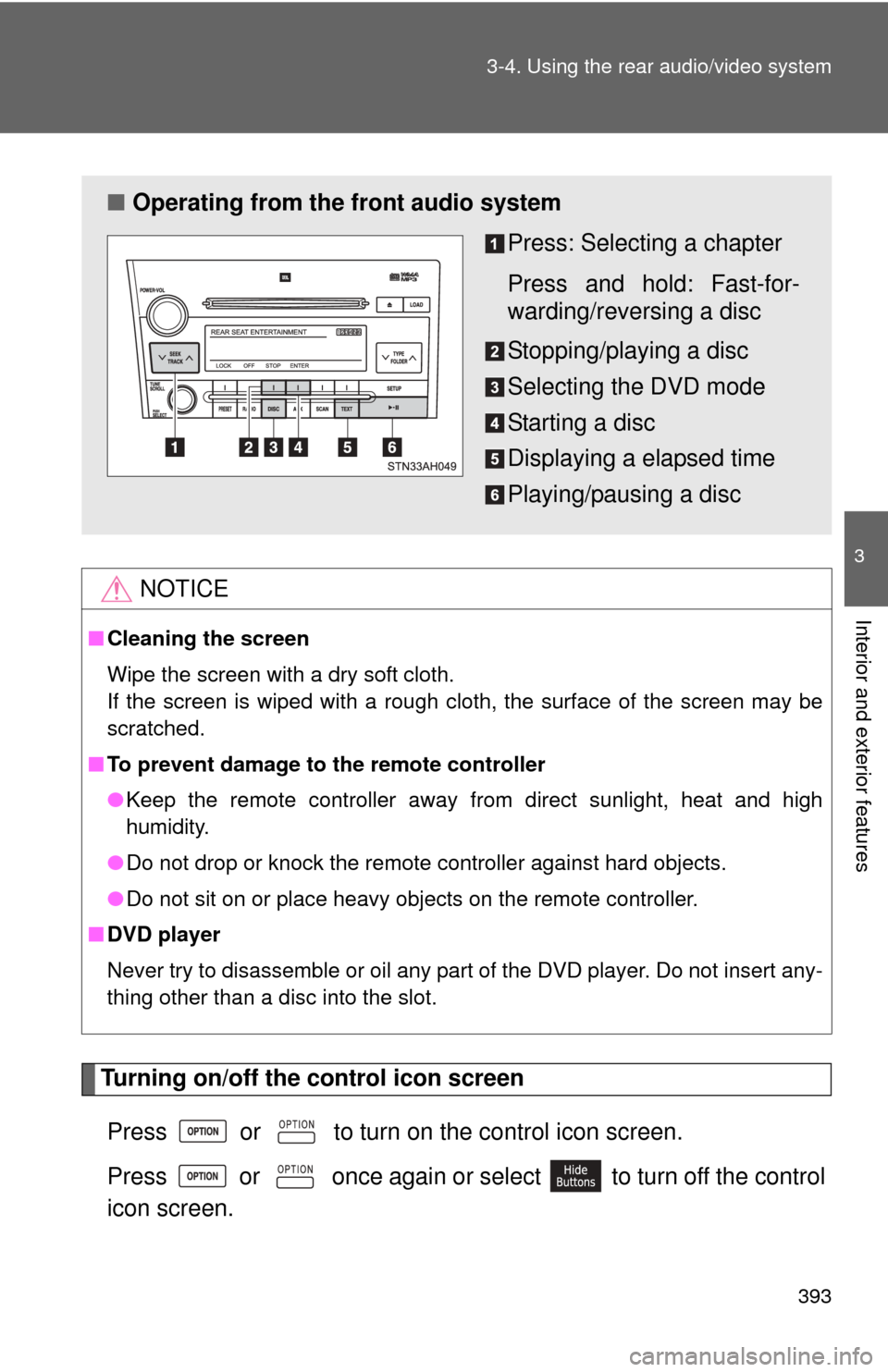
■ Operating from the front audio system
Press: Selecting a chapter
Press and hold: Fast-for-
warding/reversing a disc
Stopping/playing a disc
Selecting the DVD mode
Starting a disc
Displaying a elapsed time
Playing/pausing a disc
Page 401 of 732
401
3-4. Using the rear audio/video system
3
Interior and exterior features
Selecting a disc menu number
Select
to display the disc menu number search screen.
Select the disc menu number, and press or to input it.
Select to return to the previous screen.
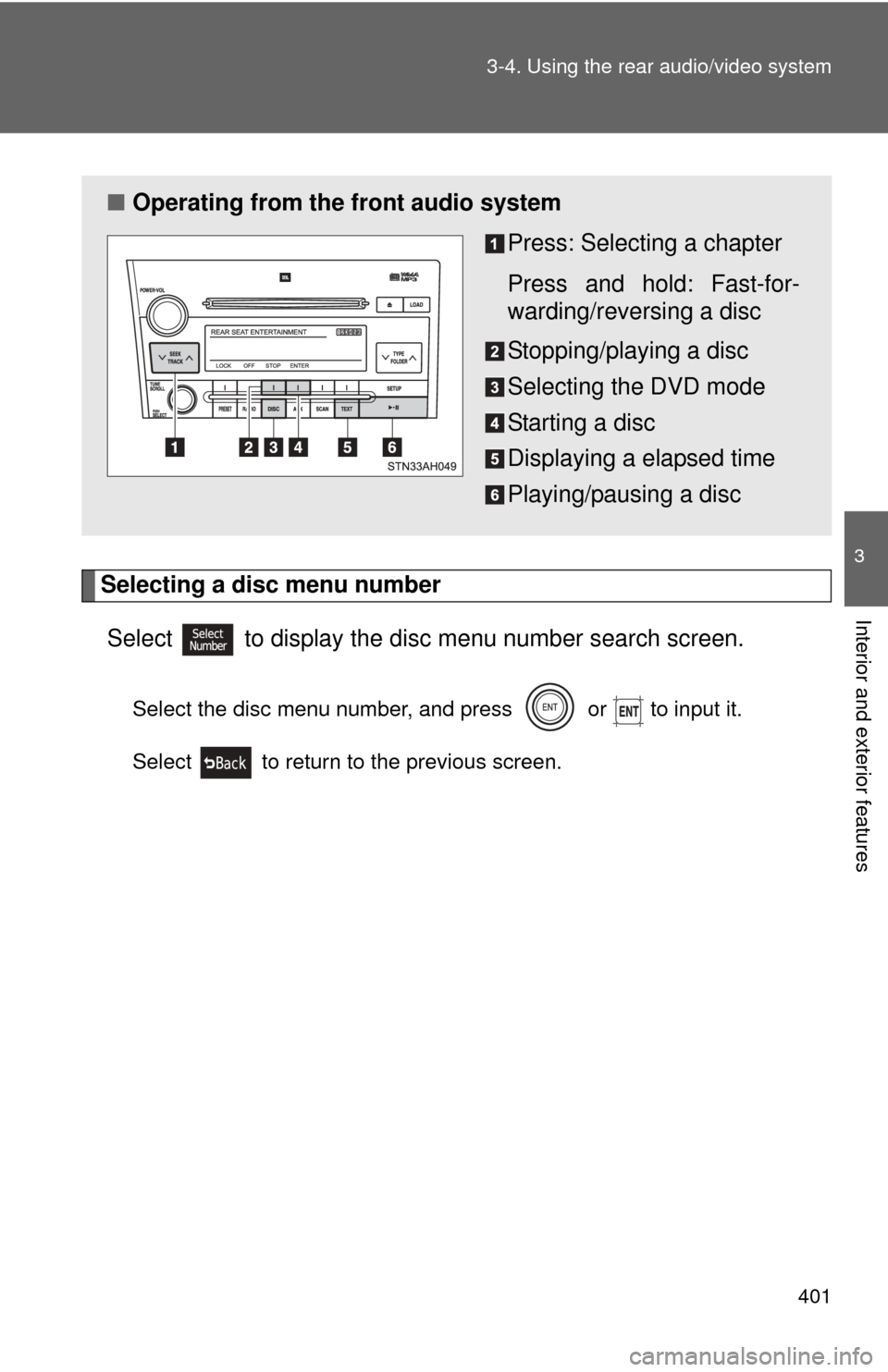
■ Operating from the front audio system
Press: Selecting a chapter
Press and hold: Fast-for-
warding/reversing a disc
Stopping/playing a disc
Selecting the DVD mode
Starting a disc
Displaying a elapsed time
Playing/pausing a disc