Page 211 of 732
211
2-2. Instrument cluster
2
When driving
■
The accessory meter can be operated when
The engine switch must be in the ON position.
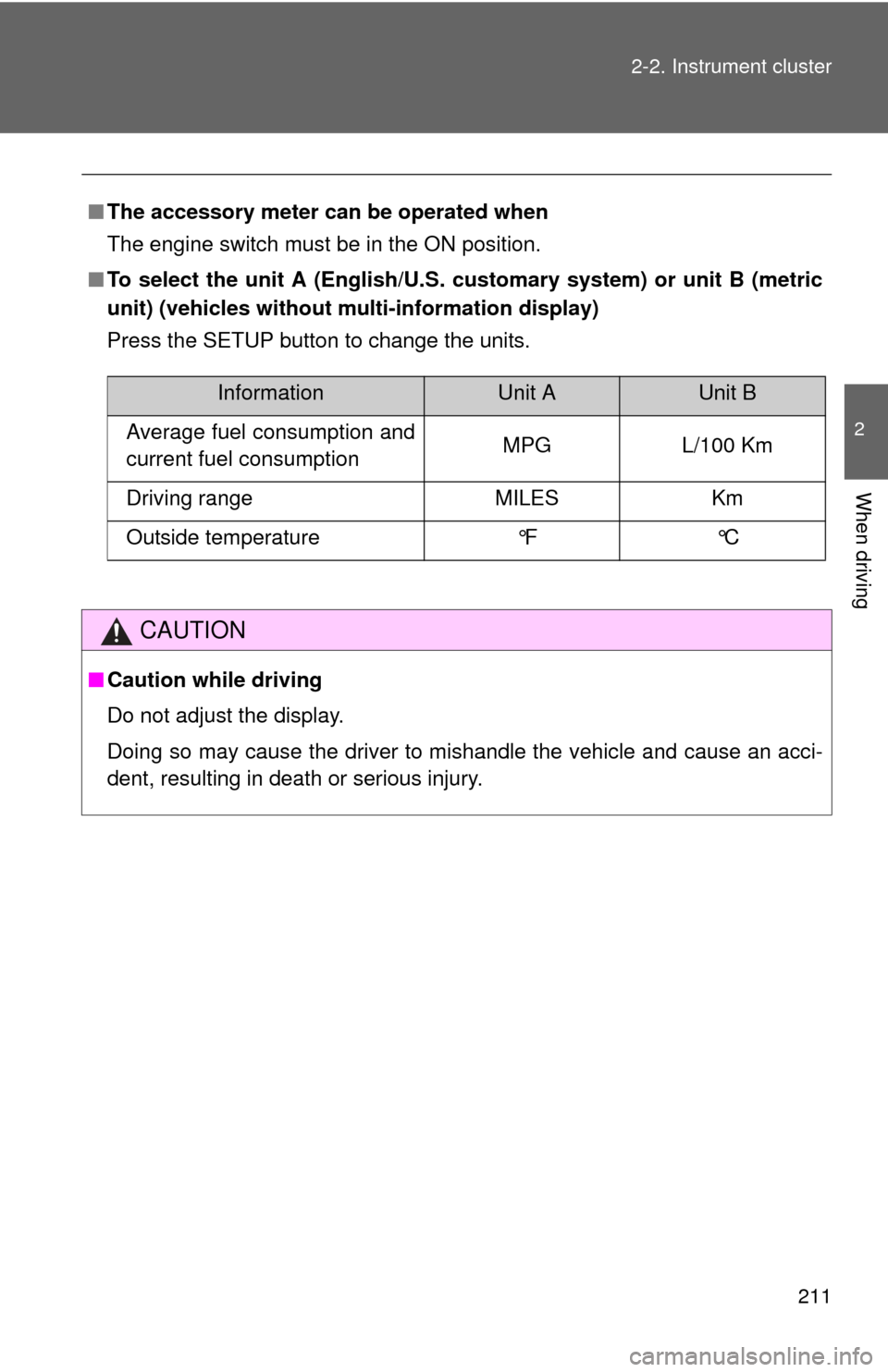
■ To select the unit A (English/U.S. customary system) or unit B (metric
unit) (vehicles without mu lti-information display)
Press the SETUP button to change the units.
CAUTION
■ Caution while driving
Do not adjust the display.
Doing so may cause the driver to mishandle the vehicle and cause an acci-
dent, resulting in death or serious injury.
InformationUnit AUnit B
Average fuel consumption and
current fuel consumption MPG L/100 Km
Driving range MILES Km
Outside temperature °F °C
Page 215 of 732
215
2-3. Operating the lights and wipers
2
When driving
■
Automatic light off system
●When the headlights come on: The headlights and tail lights automati-
cally turn off after 30 seconds when all doors are closed with the engine
switch turned to the ACC or LOCK position. (The lights turn off immedi-
ately if the button on the wireless remote control is pressed after all
doors are locked.)
● When only the tail lights come on: The tail lights turn off automatically
with the engine switch turned to the ACC or LOCK position and the
driver’s door is opened.
Vehicles with automatic light control system: If any of the doors is kept open,
the lights automatically turn off after 20 minutes.
To turn the lights on again, turn the engine switch to the ON position, or turn
the headlight switch off once and then back to the or position.
■ Customization
●That can be configured at Toyota dealer (vehicles without multi-informa-
tion display)
Settings (automatic light off system) can be changed. (Customizable
features P. 683)
● It is possible to change the settings (vehicles with multi-information dis-
play) (Feature customization P. 205)
NOTICE
■To prevent battery discharge
Do not leave the lights on longer than necessary when the engine is not run-
ning.
Page 284 of 732

284 2-5. Driving information
●The vehicle remains level when a loaded or unloaded trailer is hitched.
Do not drive if the vehicle is not level, and check for improper tongue
weight, overloading, worn suspension, or other possible causes.
● The trailer cargo is securely loaded.
● The rear view mirrors conform to all applicable federal, state/provincial or
local regulations. If they do not, install rear view mirrors appropriate for
towing purposes.
● Depress TOW/HAUL button (if equipped)
■ Break-in schedule
If your vehicle is new or equipped with any new power train components
(such as an engine, transmission, differential or wheel bearing), Toyota rec-
ommends that you do not tow a trailer until the vehicle has been driven \
for
over 500 miles (800 km).
After the vehicle has been driven for over 500 miles (800 km), you can s\
tart
towing. However, for the next 500 miles (800 km), drive the vehicle at a
speed of less than 50 mph (80 km/h) when towing a trailer, and avoid full
throttle acceleration.
■ Maintenance
●If you tow a trailer, your vehicle will require more frequent maintenance
due to the additional load. (See “Owner’s Warranty Information Booklet”
or “Scheduled Maintenance Guide” /“Owner’s Manual Supplement”.)
● Retighten the fixing bolts of the towing ball and bracket after approxi-
mately 600 miles (1000 km) of trailer towing.
■ If trailer sway occurs
One or more factors (crosswinds, passing vehicles, rough roads, etc.) can
adversely affect handling of your vehicle and trailer, causing instability.
●If trailer swaying occurs:
• Firmly grip the steering wheel. Steer straight ahead.
Do not try to control trailer swaying by turning the steering wheel.
• Begin releasing the accelerator pedal immediately but very gradually to reduce speed.
Do not increase speed. Do not apply vehicle brakes.
If you make no extreme correction with the steering or brakes, your vehicle
and trailer should stabilize. (if enabled, Trailer Sway Control can also help to
stabilize the vehicle and trailer.)
Page 481 of 732
481
3-8. Other interior features
3
Interior and exterior features
Outside temperature display
: If equipped
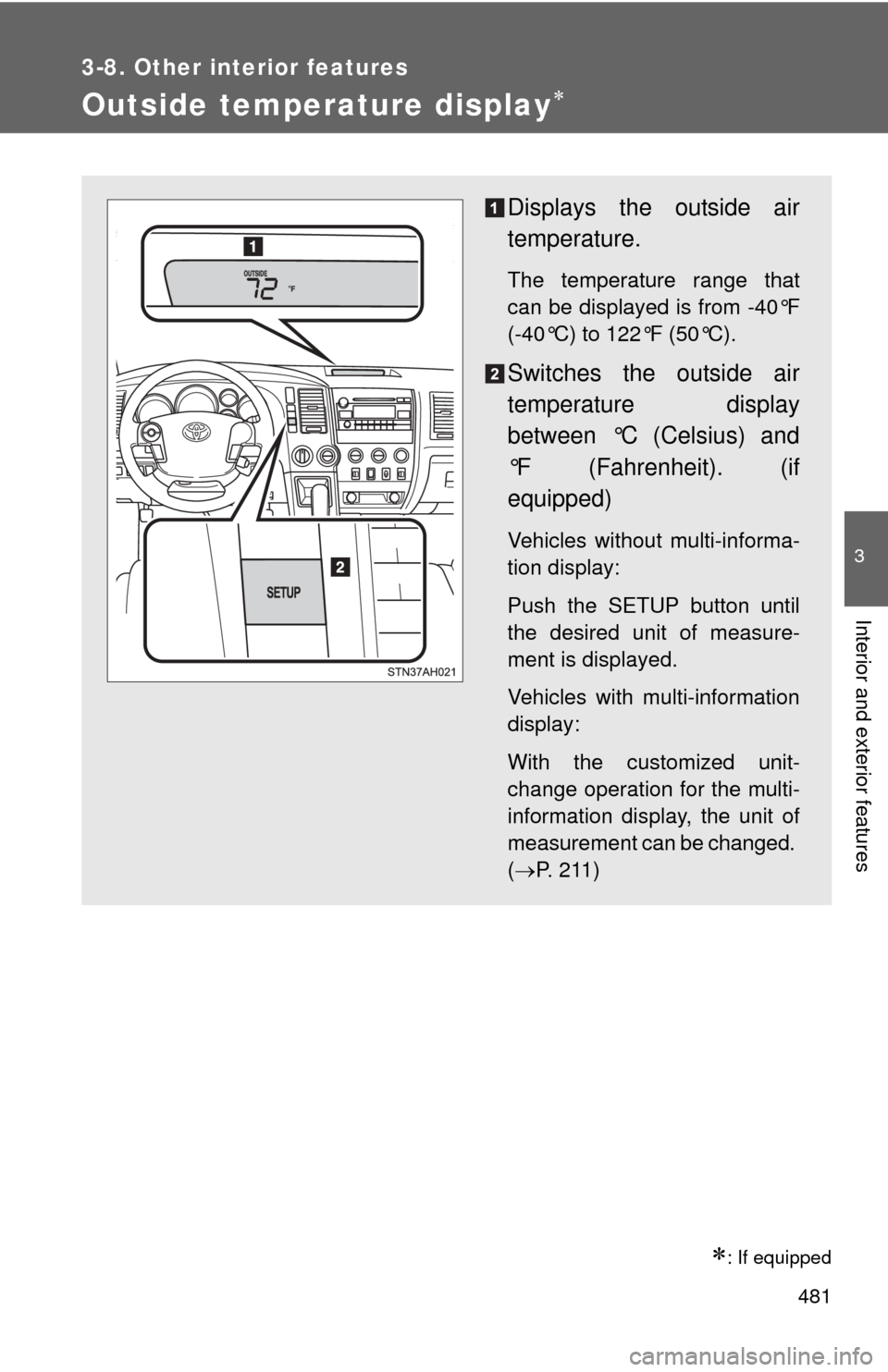
Displays the outside air
temperature.
The temperature range that
can be displayed is from -40°F
(-40°C) to 122°F (50°C).
Switches the outside air
temperature display
between °C (Celsius) and
°F (Fahrenheit). (if
equipped)
Vehicles without multi-informa-
tion display:
Push the SETUP button until
the desired unit of measure-
ment is displayed.
Vehicles with multi-information
display:
With the customized unit-
change operation for the multi-
information display, the unit of
measurement can be changed.
(P. 211)
Page 537 of 732
537
4-3. Do-it-yourself maintenance
4
Maintenance and care
Remove the oil filler cap, turning it counterclockwise.
Add engine oil slowly.
Checking the dipstick.
Reinstall the filler cap, turning it clockwise.
The approximate quantity of oil needed to raise the level between low and
full on the dipstick is indicated as follows:
1.6 qt. (1.5 L,
1.3 lmp. qt.)
■Engine oil consumption
●The amount of engine oil consumed depends on the oil viscosity, the
quality of the oil and the way the vehicle is driven.
● More oil is consumed under driving conditions such as high speeds and
frequent acceleration and deceleration.
● A new engine consumes more oil.
● When judging the amount of oil consumption, keep in mind that the oil
may have become diluted, making it difficult to judge the true level accu-
rately.
■ After changing the engine oil (U.S.A. only)
The oil change system should be reset. Perform the following procedures:
Turn the engine switch off with the trip meter A reading shown.
While pressing the trip meter reset button ( P. 192, 194), turn the
engine switch on.
Without multi-information display
Continue to press and hold the button until the trip meter displays
000000.
With multi-information display Continue to press and hold the button until “MAINT REQD RESET
MODE COMPLETE” appears on the multi-information display.