Page 3 of 608
1
2
3
4
5
6
7
3
L/C200_U (OM60F74U)
Rear window wiper and washer .............................. 185
Headlight cleaner switch ..... 186
2-4. Using other driving systems Cruise control ...................... 187
Intuitive parking assist......... 191
Four-wheel drive system ..... 200
Crawl Control ...................... 205
Driving assist systems ........ 209
Pre-Collision System........... 215
2-5. Driving information Off-road precautions ........... 216
Cargo and luggage ............. 221
Vehicle load limits ............... 228
Winter driving tips ............... 229
Trailer towing ...................... 234
Dinghy towing ..................... 252
3-1. Using the air conditioning system and defogger
Front air conditioning system .............................. 256
Rear air conditioning system .............................. 266
Rear window and outside rear view mirror
defoggers .......................... 270
Windshield wiper de-icer ..... 271 3-2. Using the audio system
Audio system type .............. 272
Using the radio ................... 275
Using the CD player ........... 284
Playing back MP3 and WMA discs ....................... 292
Operating an iPod .............. 299
Operating a USB memory ............................ 306
Optimal use of the audio system .............................. 314
Using the AUX port............. 316
Using the steering switches ........................... 317
3-3. Using the Bluetooth
® audio
system
Bluetooth
® audio system .... 321
Using the Bluetooth®
audio system .................... 324
Operating a Bluetooth
®
enabled portable player.... 330
Setting up a Bluetooth
®
enabled portable player.... 333
Bluetooth
® audio system
setup ................................ 340
3-4. Using the hands-free system (for cellular phone)
Hands-free system (for cellular phone) ........... 341
Using the hands-free system .............................. 345
Making a phone call ........... 353
Setting a cellular phone ...... 358
Security and system setup ................................ 364
Using the phone book ........ 370
3Interior features
Page 13 of 608
13
L/C200_U (OM60F74U)
A
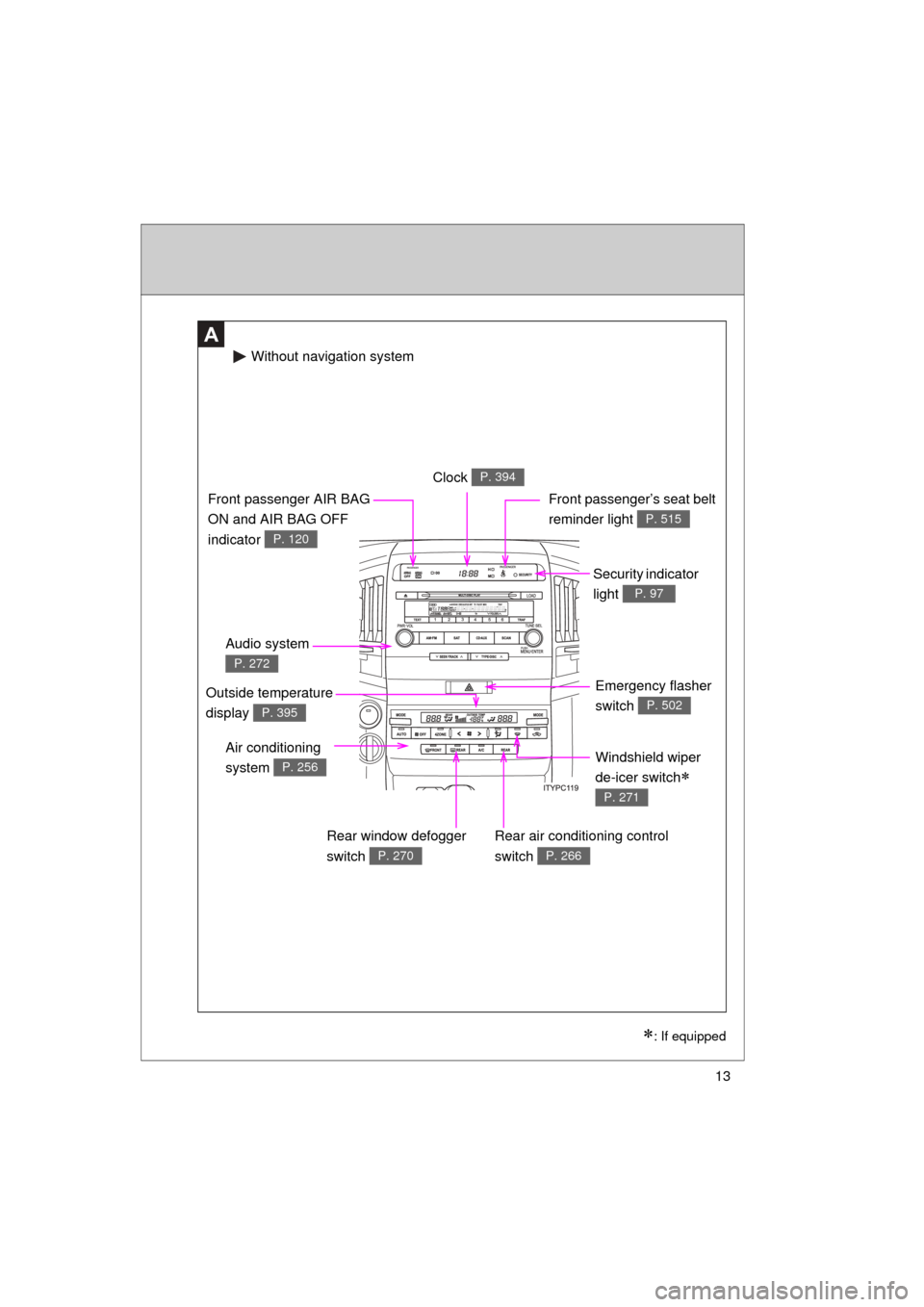
Windshield wiper
de-icer switch
P. 271
Clock P. 394
Security indicator
light
P. 97
Audio system
P. 272
Front passenger AIR BAG
ON and AIR BAG OFF
indicator
P. 120
Front passenger’s seat belt
reminder light
P. 515
Air conditioning
system
P. 256
Rear air conditioning control
switch
P. 266
Emergency flasher
switch
P. 502
Rear window defogger
switch
P. 270
Without navigation system
: If equipped
Outside temperature
display
P. 395
Page 14 of 608
14
L/C200_U (OM60F74U)
Pictorial indexInstrument panel
A
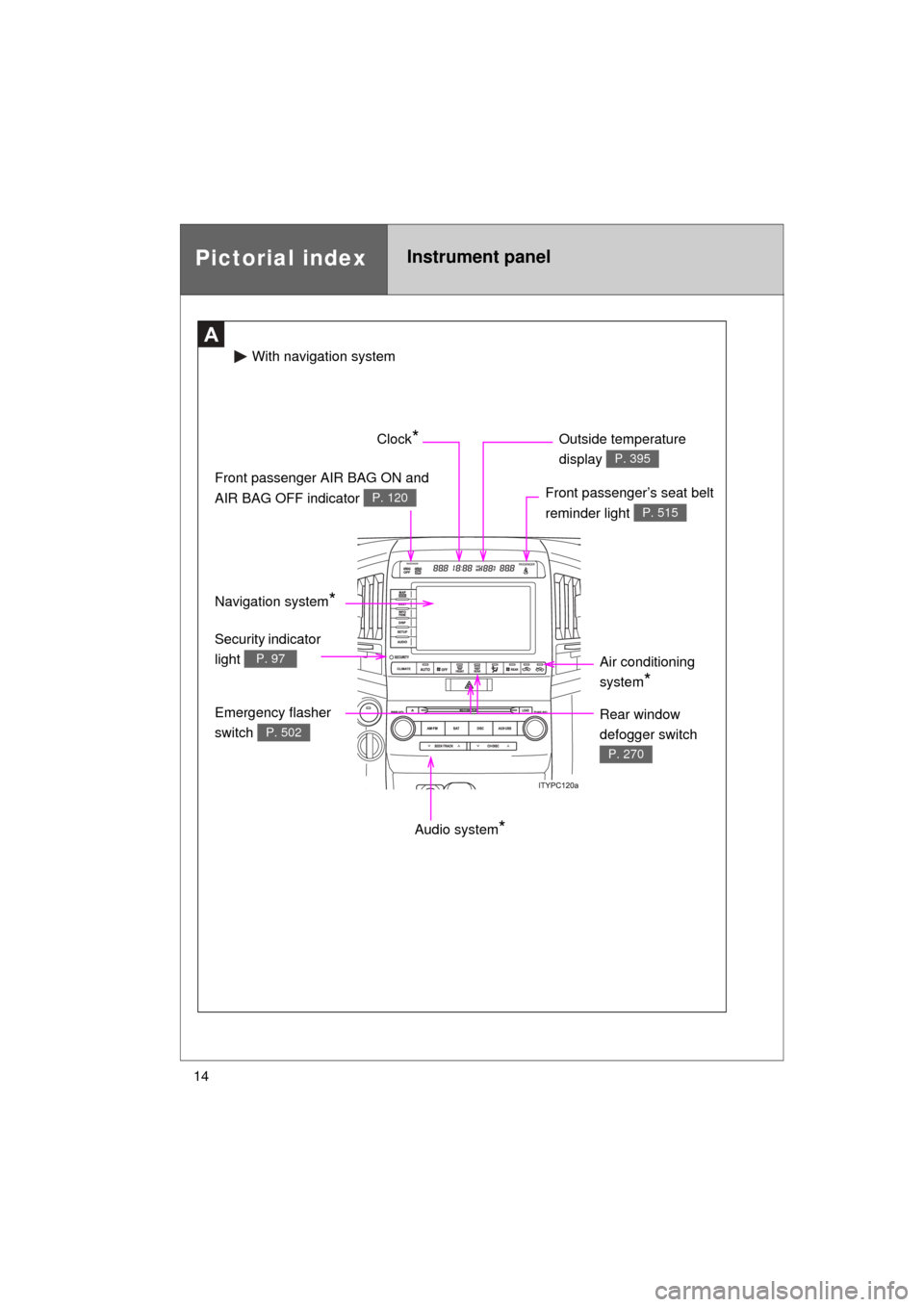
Audio system*
Front passenger’s seat belt
reminder light
P. 515
Front passenger AIR BAG ON and
AIR BAG OFF indicator
P. 120
Clock* Outside temperature
display
P. 395
Air conditioning
system
*
Emergency flasher
switch
P. 502
Security indicator
light
P. 97
With naviga tion system
Rear window
defogger switch
P. 270
Navigation system*
Page 33 of 608
33
1-2. Opening, closing and locking the doors
1
Before driving
L/C200_U (OM60F74U)
■
Note for the smart key system
● Even when the electronic key is within the effective range (detection
areas), the system may not operate properly in the following cases.
• The electronic key is too close to the window or outside door handle,
near the ground, or in a high place when the doors are locked or
unlocked.
• The electronic key is near the ground or in a high place, or too close to the rear bumper center when the back door is locked or unlocked.
• The electronic key is on the instrument panel, floor or in the glove box when the engine is started or “ENGINE START STOP” switch modes
are changed.
● As long as the electronic key is within the effective range, the doors may
be locked or unlocked by anyone.
● Even if the electronic key is not inside the vehicle, it may be possible to
start the engine if the electronic key is near the window.
● The doors may unlock if a large amount of water splashes on the door
handle, such as in the rain or in a car wash. (The doors will automatically
be locked after approximately 60 seconds if the doors are not opened
and closed.)
● Gripping the door handle when wearing a glove may not unlock the door.
● If the wireless remote control is used to lock the doors when the elec-
tronic key is near the vehicle, there is a possibility that the door may not
be unlocked by the smart key system. (Use the wireless remote control to
unlock the doors.)
● A sudden approach to the effective range or door handle operation may
prevent the doors from being unlocked. In this case, return the door han-
dle to the original position and check that the doors unlock before pulling
the door handle.
■ When the vehicle is not dr iven for extended periods
To prevent theft of the vehicle, do not leave the electronic key within 6 ft. (2
m) of the vehicle.
■ Security feature
If a door is not opened within approximately 60 seconds after the vehicle is
unlocked, the security feature automatically locks the vehicle again.
Page 39 of 608
39
1
1-2. Opening, closing and locking the doors
Before driving
L/C200_U (OM60F74U)
Wireless remote control
■Operation signals
● Doors: A buzzer sounds and the emergency flashers flash to indicate
that the doors have been locked/unlocked. (Locked: Once; Unlocked:
Tw i c e )
● Windows and moon roof: A buzzer sounds when the windows and moon
roof begin to open.
■ Door lock buzzer
If a door is not fully closed, a buzzer sounds continuously for 10 seconds if
an attempt to lock the door is made. Fully close the door to stop the buzzer,
and lock the vehicle once more.
■ Security feature
P. 3 3
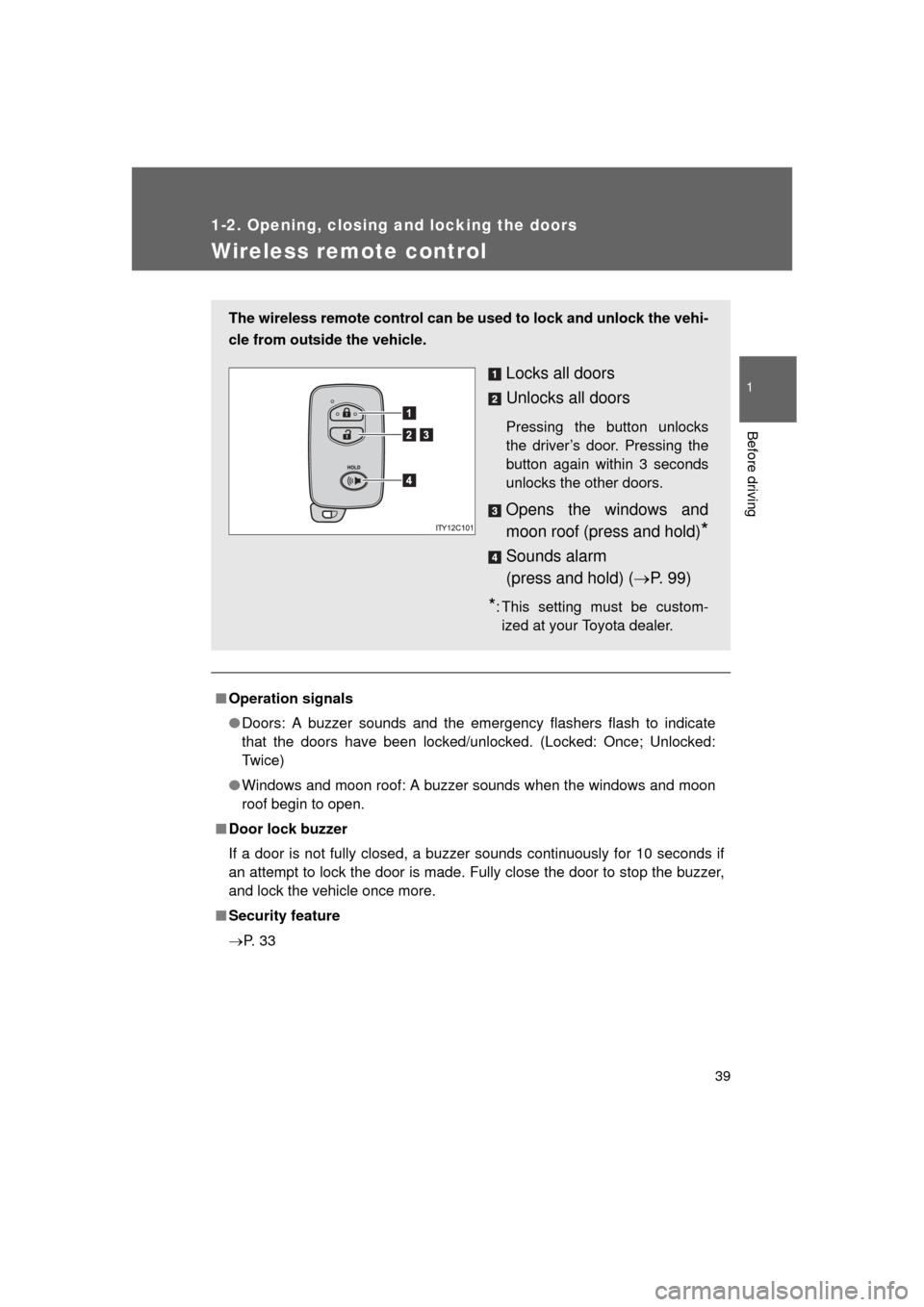
The wireless remote control can be used to lock and unlock the vehi-
cle from outside the vehicle.
Locks all doors
Unlocks all doors
Pressing the button unlocks
the driver’s door. Pressing the
button again within 3 seconds
unlocks the other doors.
Opens the windows and
moon roof (press and hold)
*
Sounds alarm
(press and hold) ( P. 9 9 )
*: This setting must be custom-
ized at your Toyota dealer.
Page 49 of 608
49
1-2. Opening, closing and locking the doors
1
Before driving
L/C200_U (OM60F74U)
CAUTION
■
Operating the back door
Observe the following precautions.
Failure to do so may cause parts of the body to be caught, resulting in death
or serious injury.
● Remove any heavy loads, such as snow and ice, from the back door
before opening it. Failure to do so may cause the back door fall closed
again after it is opened.
● When opening or closing the back door, thoroughly check to make sure
the surrounding area is safe.
● If anyone is in the vicinity, make sure they are safe and let them know that
the back door is about to open or close.
● Use caution when opening or closing the back door in windy weather as it
may move abruptly in strong wind.
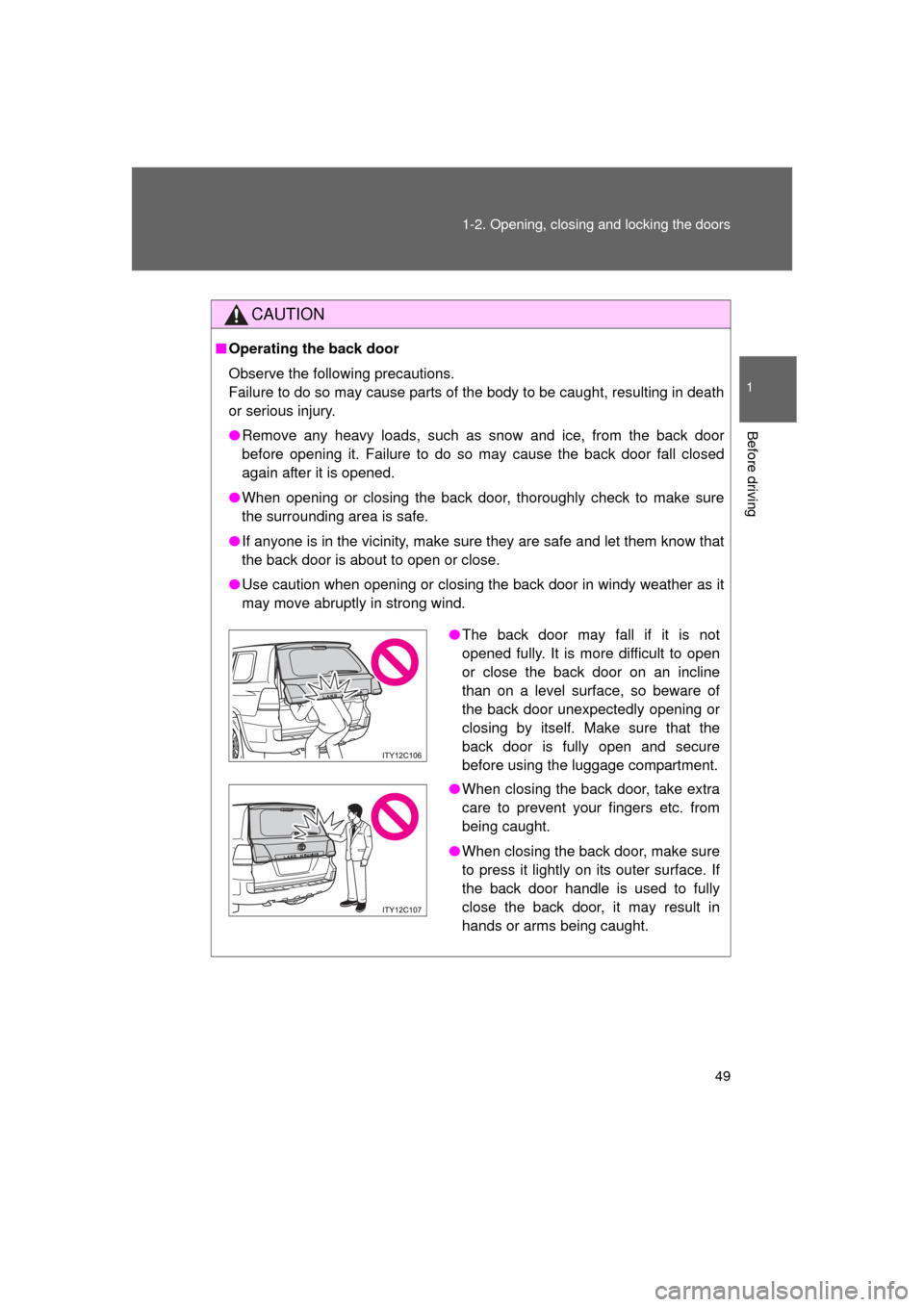
●The back door may fall if it is not
opened fully. It is more difficult to open
or close the back door on an incline
than on a level surface, so beware of
the back door unexpectedly opening or
closing by itself. Make sure that the
back door is fully open and secure
before using the luggage compartment.
● When closing the back door, take extra
care to prevent your fingers etc. from
being caught.
● When closing the back door, make sure
to press it lightly on its outer surface. If
the back door handle is used to fully
close the back door, it may result in
hands or arms being caught.
Page 54 of 608
54 1-3. Adjustable components (seats, mirrors, steering wheel)
L/C200_U (OM60F74U)
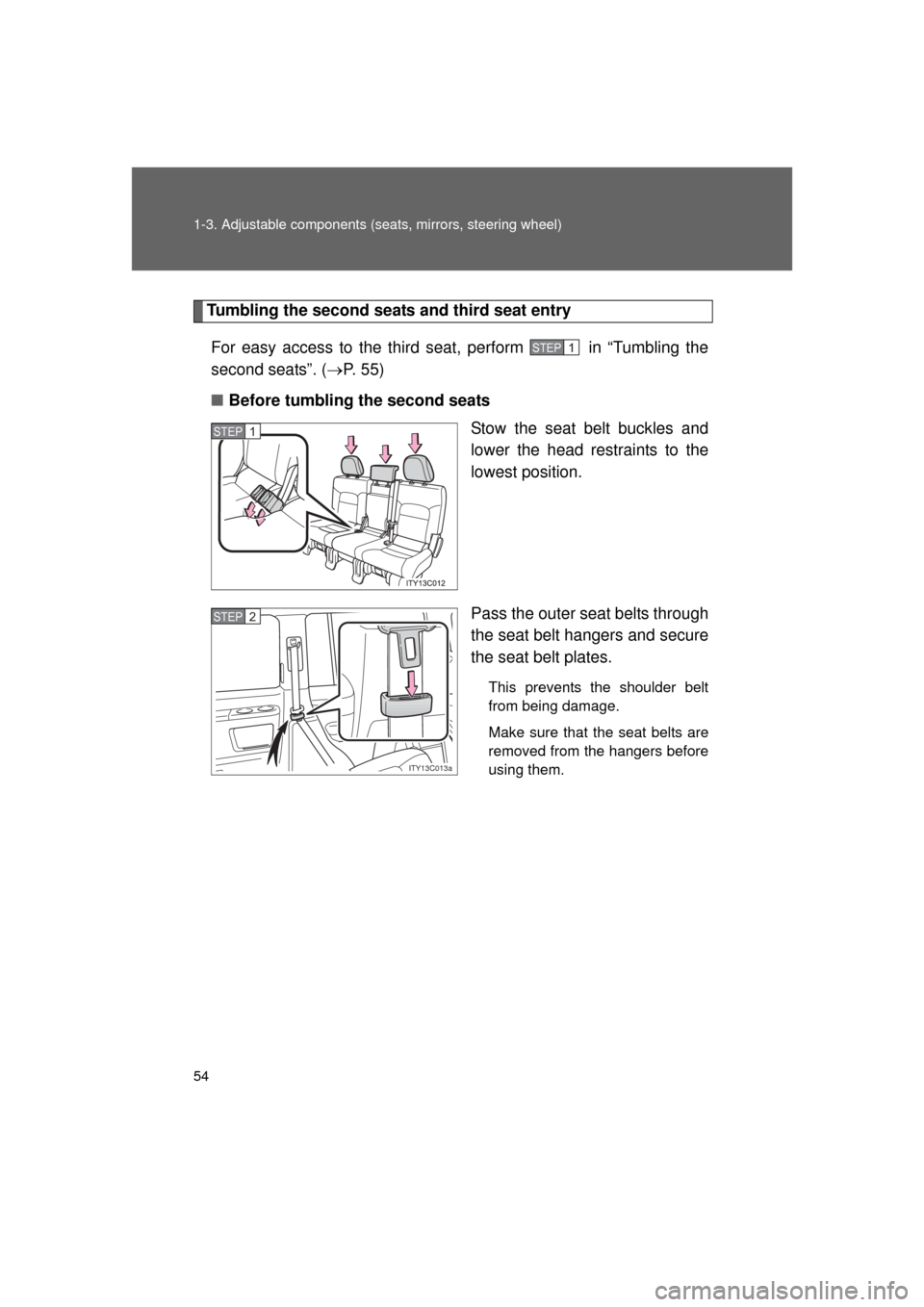
Tumbling the second seats and third seat entry
For easy access to the third seat, perform in “Tumbling the
second seats”. ( P. 5 5 )
■ Before tumbling the second seats
Stow the seat belt buckles and
lower the head restraints to the
lowest position.
Pass the outer seat belts through
the seat belt hangers and secure
the seat belt plates.
This prevents the shoulder belt
from being damage.
Make sure that the seat belts are
removed from the hangers before
using them.
STEP1
STEP1
ITY13C013a
STEP2
Page 55 of 608
55
1-3. Adjustable components (s
eats, mirrors, steering wheel)
1
Before driving
L/C200_U (OM60F74U)■
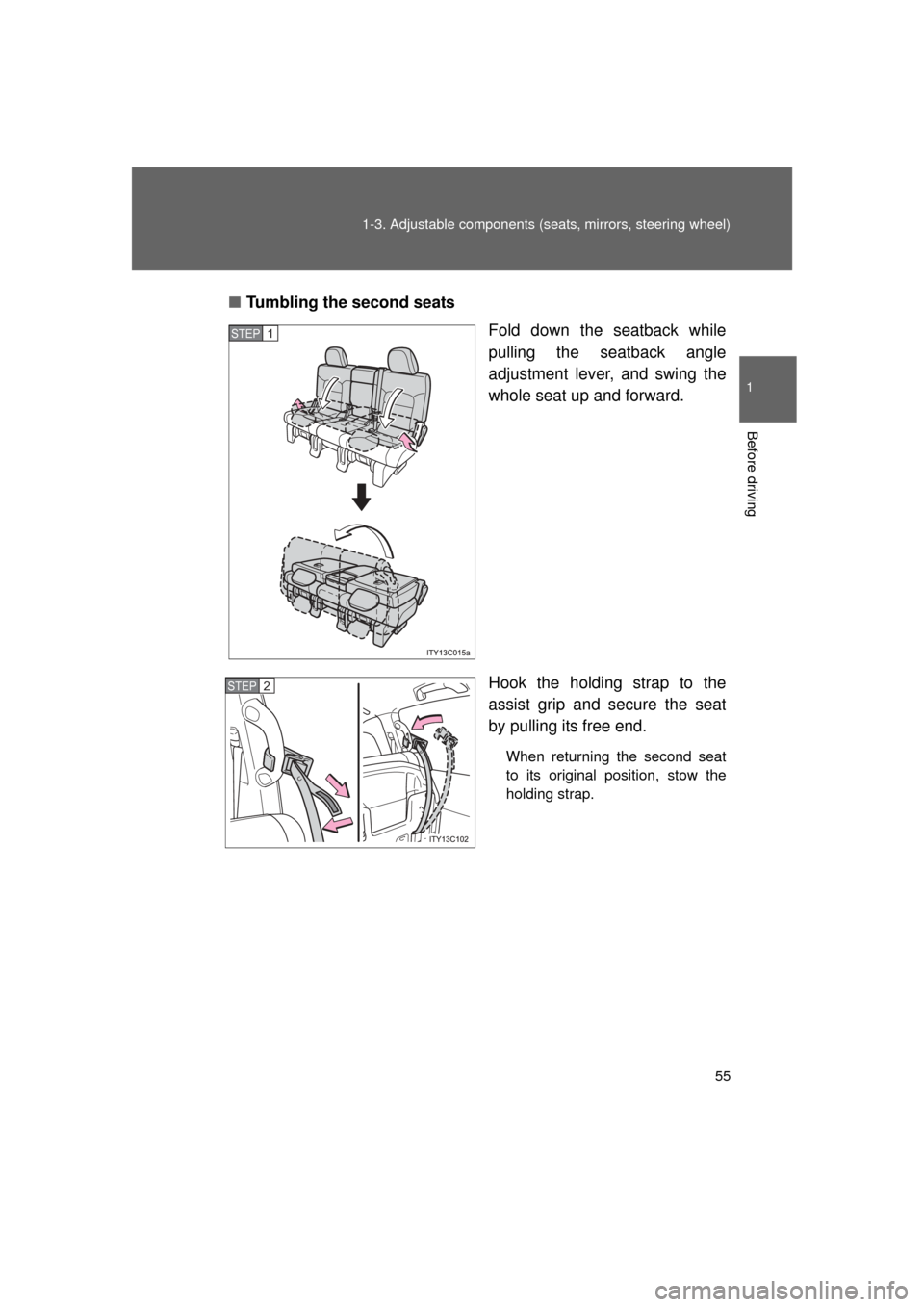
Tumbling the second seats
Fold down the seatback while
pulling the seatback angle
adjustment lever, and swing the
whole seat up and forward.
Hook the holding strap to the
assist grip and secure the seat
by pulling its free end.
When returning the second seat
to its original position, stow the
holding strap.
STEP1
STEP2