Page 40 of 349
BASIC FUNCTIONS
40
Depending on the conditions, certain
screen configuration buttons cannot be
selected.
:
To display the single map screen.
(See page 40.)
:
To display the dual map screen.
(See page 41.)
:
To display the compass mode
screen. (See page 41.)
:
To display the freeway screen.
(See page 78.)
:
To display the turn list screen.
(See page 80.)
:
To display the arrow screen. (See
page 80.)
:
To display the intersection guid-
ance screen or the guidance
screen on the freeway. (See page
79.)
�Screen configurations
SINGLE MAP
This is a regular map screen.
While on a different screen, touching
will display the single
map screen.
The screen shows the single map.
Page 53 of 349
DESTINATION SEARCH
53
U.S.A.
ButtonStates included in the search
region
“US1”
Idaho
Oregon
Washington
“US2”California
Nevada
“US3”
Arizona
Colorado
Montana
New Mexico
Utah
Wyoming
“US4”
Iowa
Kansas
Minnesota
Missouri
North Dakota
Nebraska
South Dakota
“US5”Oklahoma
Texas
“US6”
Illinois
Indiana
Kentucky
Michigan
Ohio
Wisconsin
“US7”
Arkansas
Alabama
Louisiana
Mississippi
Tennessee
“US8”
Connecticut
Massachusetts
Maine
New Hampshire
New Jersey
New York
Rhode Island
Vermont
“US9”
Washington, D.C.
Delaware
Maryland
New Jersey
Pennsylvania
Virginia
West Virginia
“US10”
Florida
Georgia
North Carolina
South Carolina
“HI”Hawaii
Canada
ButtonProvinces and regions in-
cluded in the search region
“CAN”All provinces and regions in
Canada included in this button.
Page 54 of 349

DESTINATION SEARCH
54
1. Push the “DEST” button.
2. Touch “Go Home”.
The screen changes and displays the map
location for home and the route prefer-
ence. (See “Starting route guidance” on
page 72.)
If home has not been registered, a mes-
sage will be displayed and the setting
screen will automatically appear.
To use this function, it is necessary to set
a “Home” address. (To register “Home”,
see page 103.)
INFORMATION
Guidance starts from the current ve-
hicle position to your home if “OK” is
touched even while driving.
1. Push the “DEST” button.
2. Touch any of the preset destination
touch screen buttons on the “Destina-
tion” screen.
The screen changes and displays the map
location of the preset destination point and
the route preference. (See “Starting route
guidance” on page 72.)
If a preset destination point has not been
registered, a message will be displayed
and the setting screen will automatically
appear.
To use this function, it is necessary to set
“Preset Destinations”. (T o register “Preset
Destinations”, see page 105.)
INFORMATION
Guidance starts from the current ve-
hicle position to the preset destina-
tion point if “Go to ” is touched
even while driving.
— Destination search by
Home
— Destination search by
Preset destinations
Page 86 of 349
ROUTE GUIDANCE
86
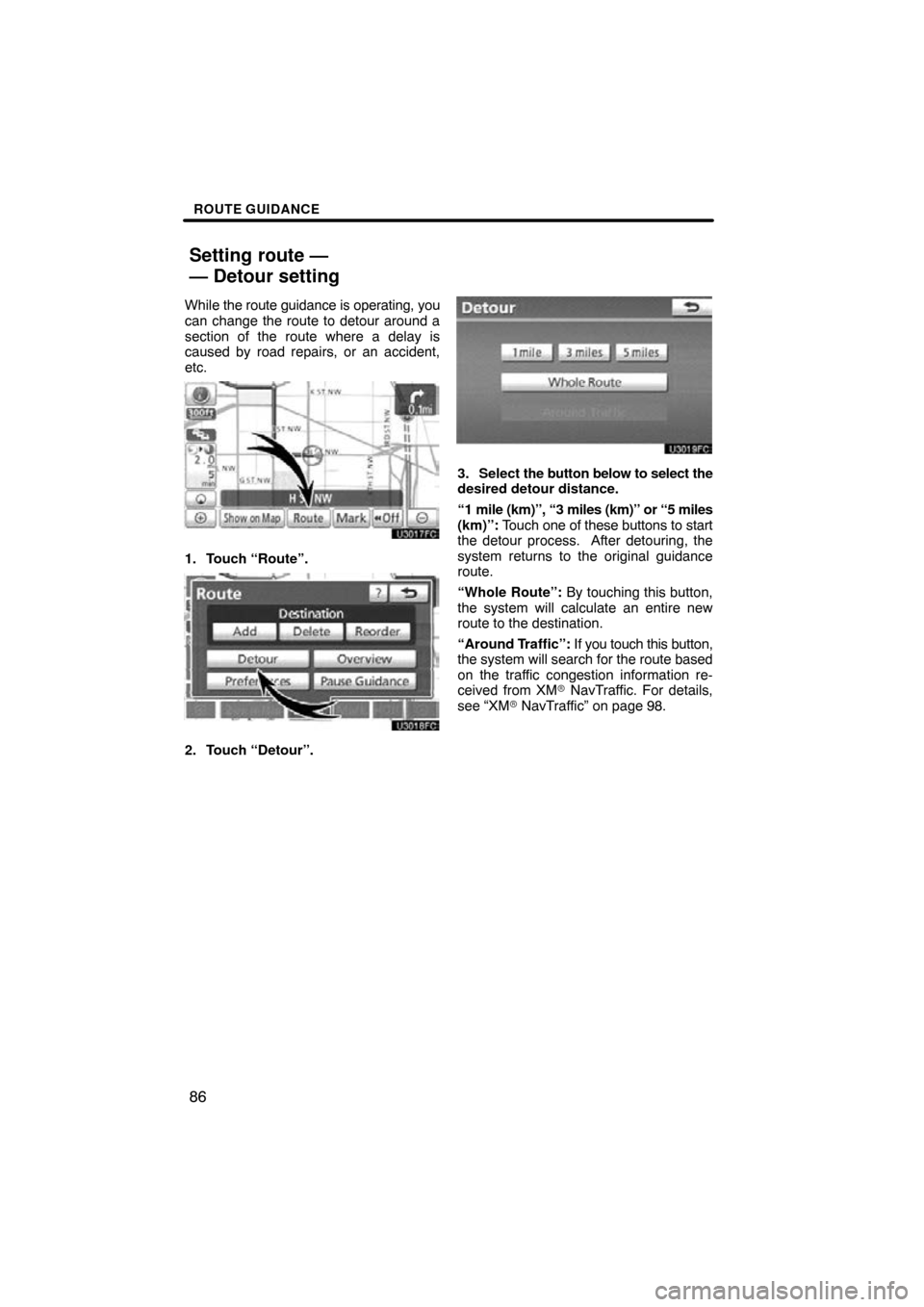
While the route guidance is operating, you
can change the route to detour around a
section of the route where a delay is
caused by road repairs, or an accident,
etc.
1. Touch “Route”.
2. Touch “Detour”.
3. Select the button below to select the
desired detour distance.
“1 mile (km)”, “3 miles (km)” or “5 miles
(km)”: Touch one of these buttons to start
the detour process. After detouring, the
system returns to the original guidance
route.
“Whole Route”: By touching this button,
the system will calculate an entire new
route to the destination.
“Around Traffic”: If you touch this button,
the system will search for the route based
on the traffic congestion information re-
ceived from XM� NavTraffic. For details,
see “XM� NavTraffic” on page 98.
Setting route —
— Detour setting
Page 113 of 349
MY PLACES
11 3
�
To change “Location”
1. Touch “Edit” of “Location”.
2. Touch
one of the 8 directional touch
screen buttons to move the cursor
to the desired point on the map.
3. Touch “OK”.
The previous screen will be displayed.
�To change “Phone #” (telephone
number)
1. Touch “Edit” of “Phone #”.
2. Enter the number using number
keys.
3. Touch “OK”.
The previous screen will be displayed.
Page 144 of 349

AUDIO/VIDEO SYSTEM
144
Operations such as selecting a preset station and adjusting the sound balance are c\
ar-
ried out on the touch screen. To display the audio screen, push the “TUNE/FILE”/“AU-
DIO” knob.
1Function menu display screen
To control the radio, CD changer,
DVD player*, Bluetooth � audio play-
er, AUX or USB memory/iPod, touch
the touch−screen buttons. For de-
tails, see page 148.
2Function menu tab
To control the radio, CD changer,
DVD player*, Bluetooth � audio play-
er, AUX or USB memory/iPod, touch
the touch−screen tabs. For details,
see page 147.
*: Vehicles with rear seat entertainment system
3“SEEK/TRACK” button
Push either side of this button to seek
up or down for a station, or to access
a desired track, file or chapter. For
details, see pages 155, 168, 172,
182, 187, 190 and 211.
4“TUNE/FILE”/“AUDIO” knob
Push this knob to display the audio
control screen, and turn this knob to
move the station band and files up or
down. For details, see pages 147,
154, 159, 172 and 211.
Quick reference
Page 147 of 349
AUDIO/VIDEO SYSTEM
147
(b) Turning the system on and off
“TUNE/FILE”/“AUDIO”: Push this knob
to display touch− screen buttons for audio/
video system (audio control mode).
“PWR/VOL”: Push this knob to turn the
audio/video system on and off. Turn this
knob to adjust the volume. The system
turns on in the last mode used.
You can select the function that enables
automatic return to the previous screen
from the audio screen. See page 256 for
details. (c) Switching between functions
Push the “DISC·AUX”, “FM 1·2”, “AM”
or “SAT” button to turn on the desired
mode.
U6080GS
Push the “TUNE/FILE”/“AUDIO” knob
and touch the “AM”, “FM”, “SAT”,
“CD”, “DVD*”, “BT”, “AUX” or “USB”
tab to turn on the desired mode.
*: Vehicles with rear seat entertainment
system
Page 148 of 349
AUDIO/VIDEO SYSTEM
148
Push these buttons or tabs if you want to
switch from one mode to another.
If the disc is not set, the CD changer/DVD
player* does not turn on.
You can turn off the CD changer/DVD play-
er* by ejecting all the discs. If the audio
system was previously off, then the entire
audio system will be turned off when you
eject all the discs. If the other function was
previously playing, it will come on again.
*: Vehicles with rear seat entertainment
system
U6081GS
U6080GS
U6082GS
U6083GS