Page 3 of 508

1
2
3
4
5
6
7
3
2-4. Using other driving systems
Cruise control ...................... 161
Driving assist systems ........ 165
2-5. Driving information Cargo and luggage ............. 169
Vehicle load limits ............... 172
Winter driving tips ............... 173
Trailer towing ...................... 177
Dinghy towing ..................... 178
3-1. Using the air conditioning system and defogger
Automatic air conditioning system .............................. 182
Rear window and outside rear view
mirror defoggers ............... 191
3-2. Using the audio system Audio system types ............. 192
Using the radio .................... 195
Using the CD player ............ 202
Playing MP3 and WMA discs.................................. 210
Operating an iPod ............... 218
Operating a USB memory ............................. 225
Optimal use of the audio system .............................. 232
Using the AUX port ............. 237
Using the steering wheel audio switches .................. 239 3-3. Using the Bluetooth®
audio system
Bluetooth
® audio system .... 242
Using the Bluetooth®
audio system .................... 245
Operating a Bluetooth
®
enabled portable player.... 250
Setting up a Bluetooth
®
enabled portable player.... 252
Bluetooth
® audio system
setup ................................ 257
3-4. Using the hands-free phone system
(for cellular phone)
Hands-free phone system (for cellular phone)
features ............................ 258
Using the hands-free phone system
(for cellular phone) ........... 262
Making a phone call ........... 270
Setting a cellular phone ...... 274
Security and system setup ................................ 279
Using the phone book ........ 283
3-5. Using the interior lights Interior lights list ................. 291
• Interior light ...................... 292
• Personal lights.................. 293
3-6. Using the storage features List of storage features ....... 294
• Glove box ......................... 295
• Console box ..................... 295
• Cup holders ...................... 297
• Auxiliary boxes ................. 298
3Interior features
Page 12 of 508
12
Gauges and meters
Multi-information display P. 144
P. 150
Tilt and telescopic steering control lever
P. 72Hood lock releaselever
P. 338
Pictorial index
Fuel filler door opener
P. 83
Headlight switch
Turn signal lever
Fog light switch
P. 154
P. 141
P. 158
Instrument panel
Audio system
Navigation system *1
P. 192
Windshield wiper and
washer switch
P. 159
Clock
Security indicator P. 303
P. 88Outside rear view
mirror switches
P. 75
Tire pressure warning reset switch
P. 355
Auxiliary box P. 298
Parking brake pedal P. 142
Trunk opener P. 55
“ECO HEAT/COOL” switch
P. 182
Emergency flashers P. 392
Shift lock override button
P. 431
Horn
P. 143
Page 35 of 508
35
1
Before driving
1-2. Key information
Keys
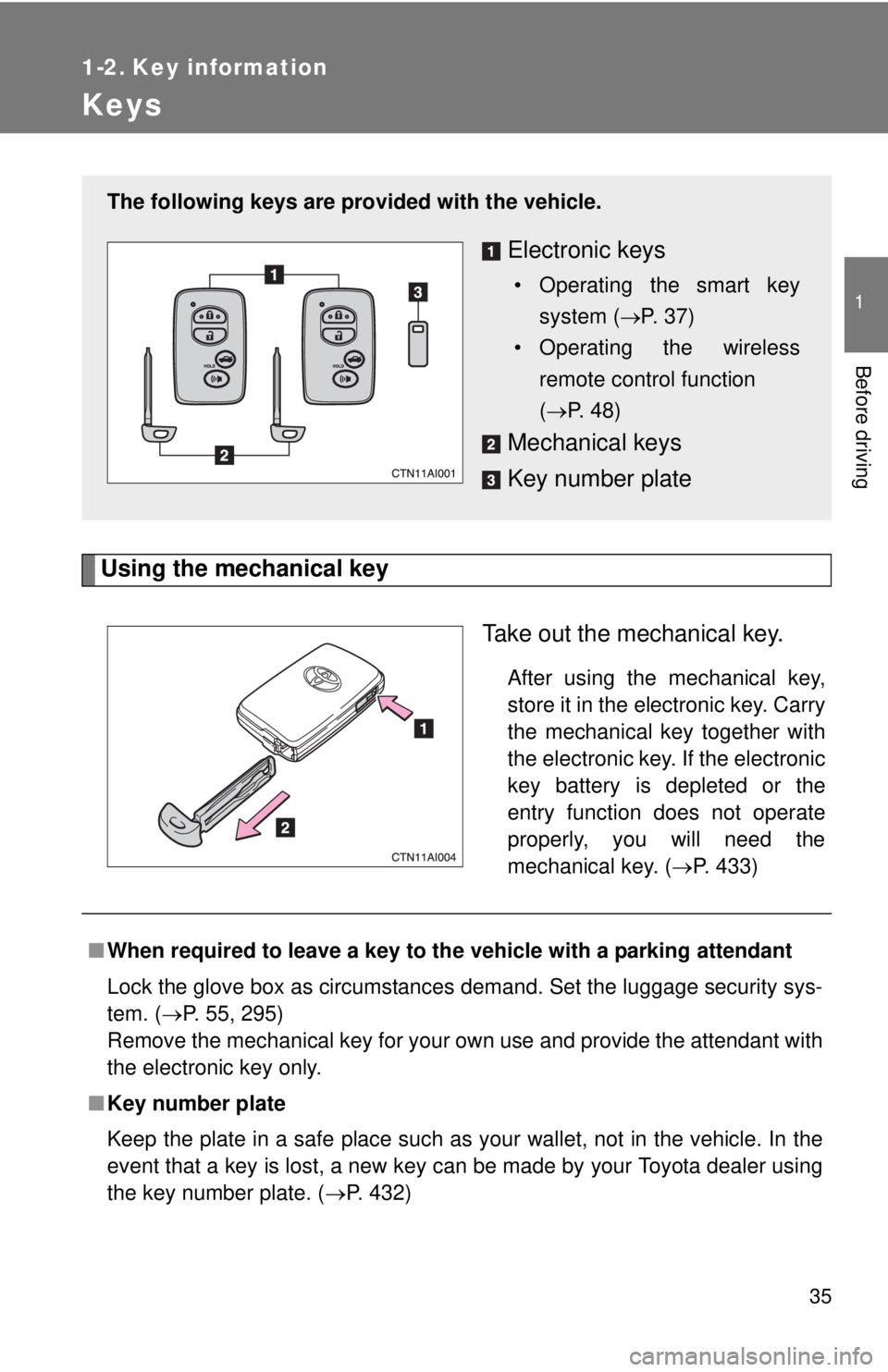
Using the mechanical keyTake out the mechanical key.
After using the mechanical key,
store it in the electronic key. Carry
the mechanical key together with
the electronic key. If the electronic
key battery is depleted or the
entry function does not operate
properly, you will need the
mechanical key. (P. 433)
The following keys are provid ed with the vehicle.
Electronic keys
• Operating the smart key
system ( P. 37)
• Operating the wireless remote control function
(P. 48)
Mechanical keys
Key number plate
■ When required to leave a key to th e vehicle with a parking attendant
Lock the glove box as circumstances demand. Set the luggage security sys-
tem. ( P. 55, 295)
Remove the mechanical key for your own use and provide the attendant with
the electronic key only.
■ Key number plate
Keep the plate in a safe place such as your wallet, not in the vehicle. In the
event that a key is lost, a new key can be made by your Toyota dealer using
the key number plate. ( P. 432)
Page 44 of 508

44 1-3. Opening, closing and locking the doors
●As long as the electronic key is within the effective range, the doors may
be locked or unlocked by anyone.
● Even if the electronic key is not inside the vehicle, it may be possible to
start the hybrid system if the electronic key is near the window.
● The doors may unlock if a large amount of water splashes on the door
handle, such as in the rain or in a car wash. (The doors will automatically
be locked after approximately 60 seconds if the doors are not opened
and closed.)
● Gripping the door handle when wearing a glove may not unlock the door.
● If the wireless remote control is used to lock the doors when the elec-
tronic key is near the vehicle, there is a possibility that the door may not
be unlocked by the entry function. (Use the wireless remote control to
unlock the doors.)
● A sudden approach to the effective range or door handle may prevent the
doors from being unlocked. In this case, return the door handle to the
original position and check that the doors unlock before pulling the door
handle again.
■ When the vehicle is not driven for extended periods
To prevent theft of the vehicle, do not leave the electronic key within 6 ft. (2
m) of the vehicle.
■ Security feature
If a door is not opened within approximately 60 seconds after the vehicle is
unlocked, the security feature automatically locks the vehicle again.
■ Alarms and warning indicators
A combination of exterior and interior alarms as well as warning messages
shown on the multi-information display are used to reduce the chance of
vehicle theft and accidents resulting from erroneous operation. Take appro-
priate measures according to the warning message on the multi-information
display. ( P. 408)
Page 49 of 508
49
1-3. Opening, closing and locking the doors
1
Before driving
■
Panic mode
■ Key battery depletion
P. 4 3
■ Security feature
P. 4 4
■ When the electronic key battery is fully depleted
P. 372
■ Conditions affecting operation
P. 4 1
■ Customization that can be co nfigured at Toyota dealer
Settings (e.g. trunk unlocking function) can be changed.
(Customizable features P. 474)
When is pressed for longer
than about one second, an alarm will
sound intermittently and the vehicle
lights will flash to deter any person from
trying to break into or damage your
vehicle.
To stop the alarm, press any button on
the wireless remote control.
Page 55 of 508
55
1
1-3. Opening, closing and locking the doors
Before driving
Trunk
Luggage security systemTo protect luggage stored in the trunk against theft, do the following
procedure. Turn the mechanical key coun-
terclockwise to lock the trunk
opener feature.
The trunk lid cannot be opened
even with the wireless remote
control or the entry function.
The trunk can be opened using th e key, trunk opener, entry function
or wireless remote control.
■ Opening the trunk from outside the vehicle
Entry function
P. 3 8
Wireless remote control
P. 4 8
Key
P. 433
■ Opening the trunk from inside the vehicle
Pull the lever to release the
trunk lid.
Page 56 of 508
56 1-3. Opening, closing and locking the doors
■Internal trunk release lever
■ Trunk light
The trunk light turns on when the trunk is opened.
■ Which key to the vehicle is to leave with a parking attendant after the
luggage security system is set
P. 3 5
The trunk lid can be opened by pulling up
the glow-in-the-dark lever located on the
inside of trunk lid.
The lever will continue to glow for some
time after the trunk lid is closed.
Page 58 of 508
58 1-3. Opening, closing and locking the doors
CAUTION
■Using the trunk
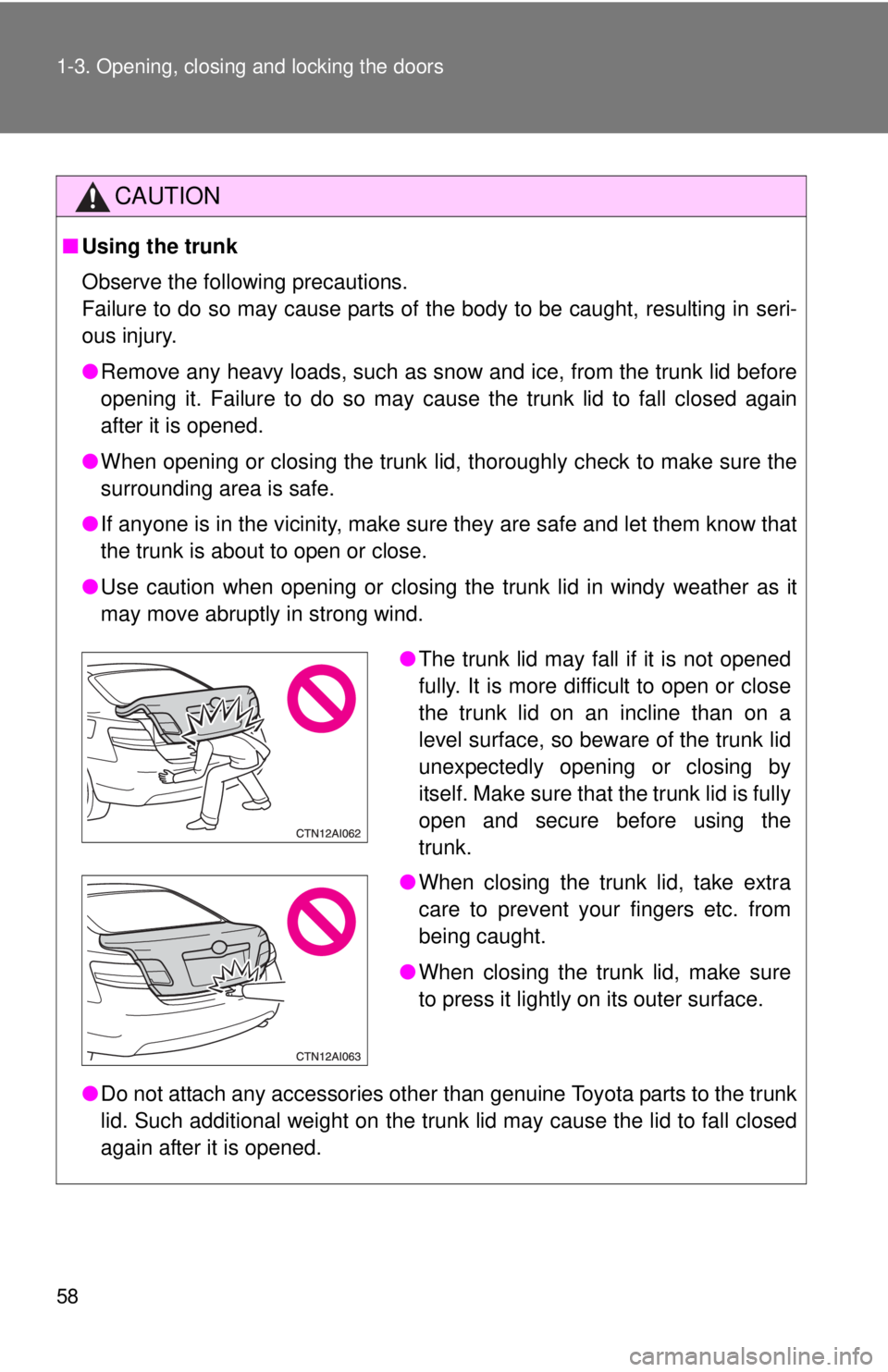
Observe the following precautions.
Failure to do so may cause parts of the body to be caught, resulting in seri-
ous injury.
●Remove any heavy loads, such as snow and ice, from the trunk lid before
opening it. Failure to do so may cause the trunk lid to fall closed again
after it is opened.
● When opening or closing the trunk lid, thoroughly check to make sure the
surrounding area is safe.
● If anyone is in the vicinity, make sure they are safe and let them know that
the trunk is about to open or close.
● Use caution when opening or closing the trunk lid in windy weather as it
may move abruptly in strong wind.
● Do not attach any accessories other than genuine Toyota parts to the trunk
lid. Such additional weight on the trunk lid may cause the lid to fall closed
again after it is opened.
●The trunk lid may fall if it is not opened
fully. It is more difficult to open or close
the trunk lid on an incline than on a
level surface, so beware of the trunk lid
unexpectedly opening or closing by
itself. Make sure that the trunk lid is fully
open and secure before using the
trunk.
● When closing the trunk lid, take extra
care to prevent your fingers etc. from
being caught.
● When closing the trunk lid, make sure
to press it lightly on its outer surface.


