Page 248 of 508
248 3-3. Using the Bluetooth
® audio system
If the portable player has a Bluetooth® phone, the phone can be reg-
istered at the same time. ( P. 264)
Menu list of the Bluetooth® audio system
■ Normal operation
“BT•A Setup” can be canceled by pres sing the on-hook switch or saying
the voice comm and, “Cancel”.
First menuSecond
menuThird menuOperation detail
“Setup” “BT
•A
Setup” “Pair Audio
Player”
Registering a portable player
“Select Audio
Player” Selecting a portable player to
be used
“Change Name” Changing the registered
name of a portable player
“List Audio Play-
ers” Listing the registered porta-
ble players
“Set Passkey” Changing the passkey
“Delete Audio” Deleting a registered porta-
ble player
“System
Setup” “Guidance Vol-
ume”
Setting voice guidance vol-
ume
“Device Name” Displaying the Bluetooth
®
device address and name
“Initialize” Initializing the system
Page 250 of 508
250
3-3. Using the Bluetooth® audio system
Operating a Bluetooth® enabled por table player
Selecting an albumPress “ ” or “ ” on .
Selecting tracks
Press “ ” or “ ” on .
Playing and pausing tracks
Press .
Vo lu m e
Power
Playback/pause
Displaying text messages Selector knob
Selecting an
album
Fast-forwarding and reversing
Playback
Page 251 of 508
251
3-3. Using the Bluetooth
® audio system
3
Interior features
Fast-forwarding and reversing tracks
Press and hold “
” or “ ” on .
Switching the display
Press the .
Each time is pressed, the display changes in the following order:
Track title Track title/Artist name Track title/Album name Track
title/Elapsed time
Using the steering wheel audio switches
P. 2 3 9
■Bluetooth® audio system functions
Depending on the portable player that is connected to the system, certain
functions may not be available.
■ Error messages
“BT AUDIO ERROR”: This indicates a problem in the system.
Page 252 of 508
252
3-3. Using the Bluetooth® audio system
Setting up a Bluetooth® enabled por table player
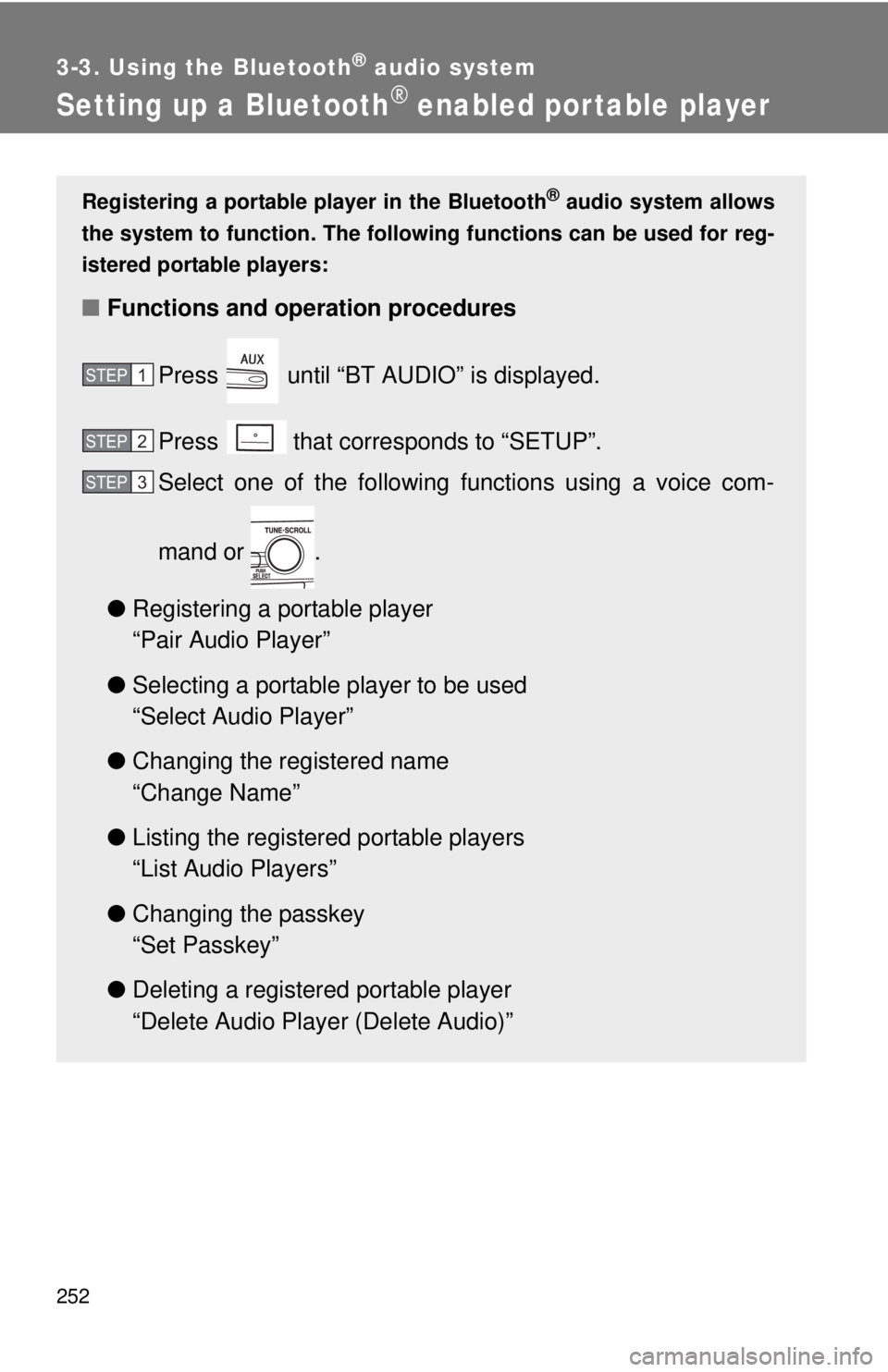
Registering a portable player in the Bluetooth® audio system allows
the system to function. The followin g functions can be used for reg-
istered portable players:
■ Functions and operation procedures
Press until “BT AUDIO” is displayed.
Press that corresponds to “SETUP”.
Select one of the following functions using a voice com-
mand or .
● Registering a portable player
“Pair Audio Player”
● Selecting a portable player to be used
“Select Audio Player”
● Changing the registered name
“Change Name”
● Listing the registered portable players
“List Audio Players”
● Changing the passkey
“Set Passkey”
● Deleting a registered portable player
“Delete Audio Player (Delete Audio)”
STEP1
STEP2
STEP3
Page 262 of 508
262
3-4. Using the hands-free phone system (for cellular phone)
Using the hands-free phone system (for cellular phone)
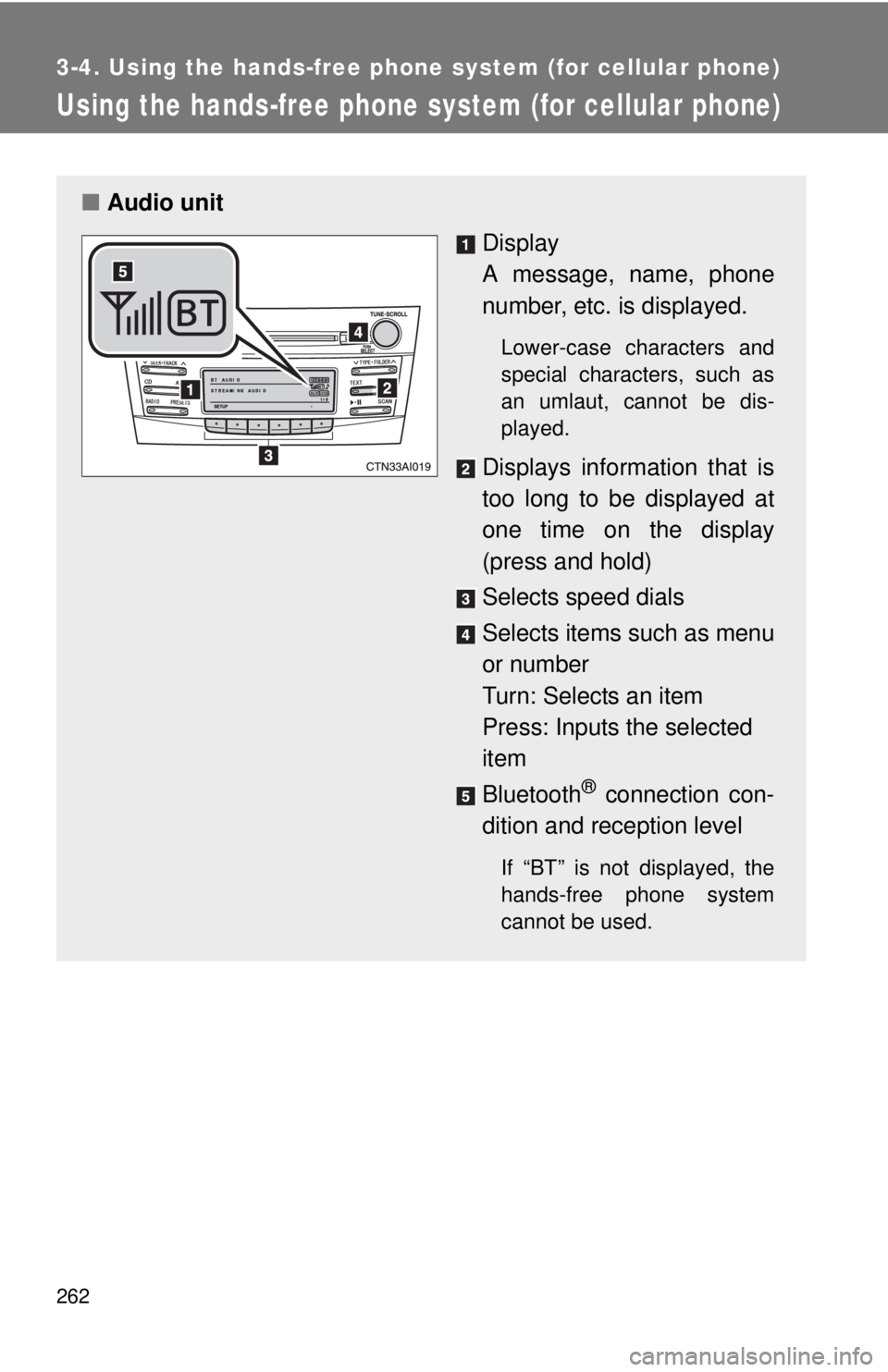
■Audio unit
Display
A message, name, phone
number, etc. is displayed.
Lower-case characters and
special characters, such as
an umlaut, cannot be dis-
played.
Displays information that is
too long to be displayed at
one time on the display
(press and hold)
Selects speed dials
Selects items such as menu
or number
Turn: Selects an item
Press: Inputs the selected
item
Bluetooth
® connection con-
dition and reception level
If “BT” is not displayed, the
hands-free phone system
cannot be used.
Page 264 of 508

264 3-4. Using the hands-free phone system (for cellular phone)
Operating the system by using a voice command
By following voice gui dance instructions output from the speaker,
voice commands enable to the operation of the hands-free phone
system without the need to check the display or operate .
■ Operation procedure when using a voice command
Press the talk switch and follo w voice guidance instructions.
■ Auxiliary commands when using a voice command
The following auxiliary commands can be used when operating the
system using a voice command:
Cancel: Exits the hands-free phone system
Repeat: Repeats the previous voice guidance instruction
Go back: Returns to the previous procedure
Help: Reads aloud the function summary if a help comment is
registered for the selected function
Using the hands-free phone system for the first time
Before using the hands-free phone system, it is necessary to register
a cellular phone in the system. Th e phone registration mode will be
entered automatically when starting the system with no cellular
phone registered. Follow the procedure below to register a cellular
phone:
Press the off-hook switch or the talk switch.
The introductory guidance and phone name registration instructions
are heard.
STEP1
Page 265 of 508

265
3-4. Using the hand
s-free phone system (for cellular phone)
3
Interior features
Select “Pair Phone” using a voice command or .
Register a phone name by either of the following methods.
a. Select “Record Name” by using , and say a name to
be registered.
b. Press the talk switch and say a name to be registered.
A voice guidance instruction to confirm the input is heard.
Select “Confirm” by using a voice command or .
Registration to the hans-free phone system only
Select “Phone Only” using a voice command or .
Registration to the hans-free phone system and Bluetooth
® audio
system at a same time
Select “Internal Audio (Int. Audio)” using a voice command or
.
Select “Confirm” by using a voice command or .
A passkey is displayed and heard, and a voice guidance instruction
for inputting the passkey into the cellular phone is heard. Input the passkey into the cellular phone.
Refer to the manual that comes with the cellular phone for the oper-
ation of the phone.
Guidance for registration completion is heard.
STEP2
STEP3
STEP4
STEP5
STEP5
STEP6
STEP7
Page 267 of 508
267
3-4. Using the hand
s-free phone system (for cellular phone)
3
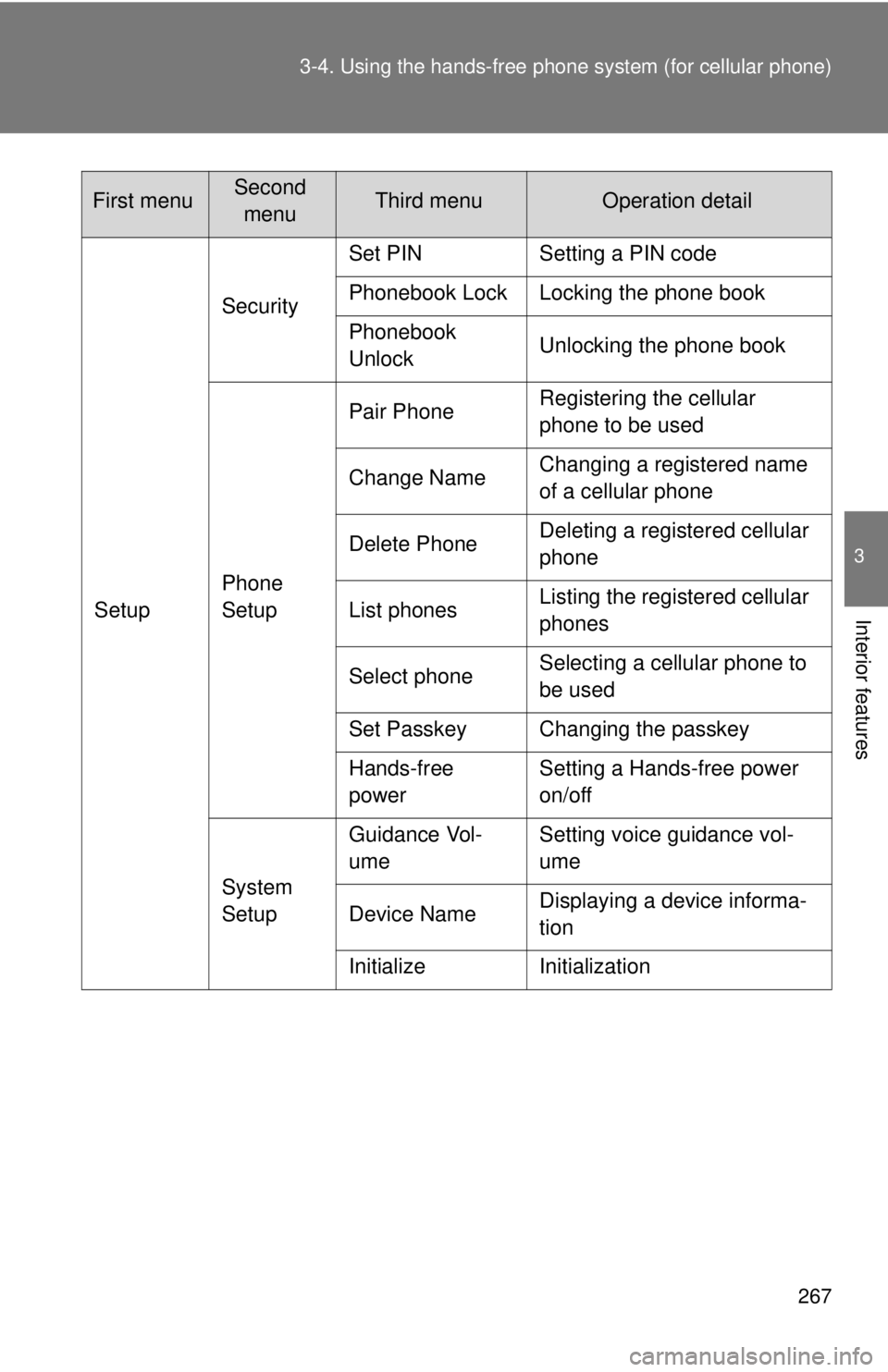
Interior featuresSetupSecurity
Set PIN Setting a PIN code
Phonebook Lock Locking the phone book
Phonebook
Unlock
Unlocking the phone book
Phone
Setup Pair Phone
Registering the cellular
phone to be used
Change Name Changing a registered name
of a cellular phone
Delete Phone Deleting a registered cellular
phone
List phones Listing the registered cellular
phones
Select phone Selecting a cellular phone to
be used
Set Passkey Changing the passkey
Hands-free
power Setting a Hands-free power
on/off
System
Setup Guidance Vol-
ume
Setting voice guidance vol-
ume
Device Name Displaying a device informa-
tion
Initialize Initialization
First menuSecond menuThird menuOperation detail