Page 123 of 508
When driving2
123
2-1. Driving proceduresDriving the vehicle............ 124
Power (ignition) switch ..... 135
Transmission.................... 139
Turn signal lever .............. 141
Parking brake ................... 142
Horn ................................. 143
2-2. Instrument cluster Gauges and meters ......... 144
Indicators and warning lights .............................. 147
Multi-information display............................ 150
2-3. Operating the lights and wipers
Headlight switch ............... 154
Fog light switch ................ 158
Windshield wipers and washer ........................... 159
2-4. Using other driving systems
Cruise control ................... 161
Driving assist systems ..... 165
2-5. Driving information Cargo and luggage .......... 169
Vehicle load limits ............ 172
Winter driving tips ............ 173
Trailer towing ................... 177
Dinghy towing .................. 178
Page 127 of 508

127
2-1. Driving procedures
2
When driving
■
Brake actuator
The brake actuator uses brake fluid pressurized by the pump to power-assist
the brakes. If the brake actuator fails during driving, the brake system warn-
ing light comes on and the buzzer sounds continuously. In this case, the
brakes may not work properly. If they do not work well, depress the brake
pedal firmly. If the brake system warning light comes on, immediately stop
your vehicle and contact your Toyota dealer.
In the following conditions, you may hear a sound in the engine compart-
ment. This is not a malfunction.
●The driver's door is opened with the hybrid system turned off.
● The brake pedal is depressed with the hybrid system turned off.
● After the hybrid system is turned on.
● The brake pedal is depressed repeatedly with the hybrid system turned
on.
● After the hybrid system is turned off.
The brake pedal may be hard to depress or the brake pedal stroke may be
short before turning the hybrid system on. This is not a malfunction.
■ When braking the vehicle
When applying brakes, you may hear a sound coming from the motor gener-
ator.
However, this does not indicate any trouble.
Page 147 of 508
147
2-2. Instrument cluster
2
When driving
Indicators and warning lights
The indicator and warning lights on the instrument cluster and cen-
ter panel inform the driver of the status of the vehicle’s various sys-
tems.
Instrument cluster
Center panel
Page 149 of 508
149
2-2. Instrument cluster
2
When driving
CAUTION
■
If a safety system warning light does not come on
Should a safety system light such as the ABS or the SRS warning light not
come on when you start the hybrid system, this could mean that these sys-
tems are not available to help protect you in an accident, which could result
in death or serious injury. Have the vehicle inspected by your Toyota dealer
immediately if this occurs.
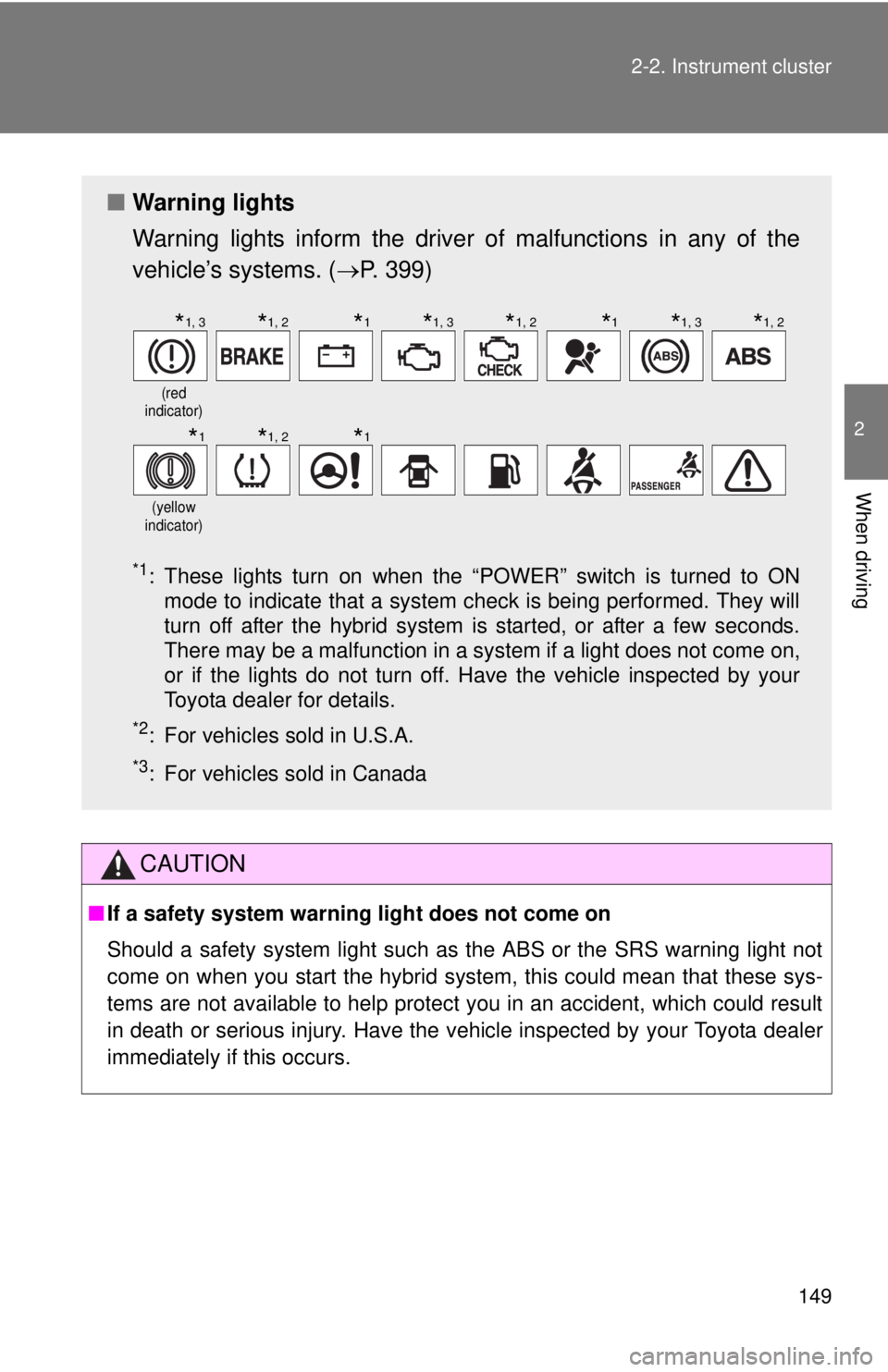
■ Warning lights
Warning lights inform the driver of malfunctions in any of the
vehicle’s systems. ( P. 399)
*1: These lights turn on when the “POWER” switch is turned to ON
mode to indicate that a system check is being performed. They will
turn off after the hybrid system is started, or after a few seconds.
There may be a malfunction in a system if a light does not come on,
or if the lights do not turn off. Have the vehicle inspected by your
Toyota dealer for details.
*2: For vehicles sold in U.S.A.
*3: For vehicles sold in Canada
(red
indicator)
(yellow
indicator)
*1, 3*1, 2*1*1, 3*1, 2*1*1, 3*1, 2
*1*1, 2*1
Page 150 of 508
150
2-2. Instrument cluster
Multi-information display
The multi-information display presents the driver with a variety of
driving-related data, includ ing the outside temperature.
●Outside temperature dis-
play ( P. 151)
Indicates the outside tempera-
ture.
● Trip information
( P. 151)
Displays driving range, fuel
consumption and other cruis-
ing-related information.
● Warning messages
( P. 408)
Automatically displayed when
a malfunction occurs in one of
the vehicle’s systems.
● Odometer and trip meter
display
Odometer: Displays the total
distance the vehicle has been
driven.
Trip meter: Displays the dis-
tance the vehicle has been
driven since the meter was last
reset. Trip meters A and B can
be used to record and display
different distances indepen-
dently.
Page 168 of 508
168 2-4. Using other driving systems
CAUTION
■When VSC is activated
The slip indicator light flashes and a warning buzzer sounds. Always drive
carefully. Reckless driving may cause an accident. Exercise particular care
when the indicator light flashes and a buzzer sounds.
■ Replacing tires
Make sure that all tires are of the same size, brand, tread pattern and total
load capacity. In addition, make sure that the tires are inflated to the recom-
mended tire pressure level.
The ABS and VSC system will not function correctly if different tires are fitted
on the vehicle.
Contact your Toyota dealer for further information when replacing tires or
wheels.
■ Handling of tires and suspension
Using tires with any kind of problem or modifying the suspension will affect
the driving assist systems, and may cause the system to malfunction.
Page 176 of 508
176 2-5. Driving information
NOTICE
■Repairing or replacing snow tires
Request repairs of and obtain replacement snow tires from Toyota dealers or
legitimate tire retailers.
This is because the removal and attachment of snow tires affects the opera-
tion of the tire pressure warning valves and transmitters.
■ Fitting tire chains
The tire pressure warning valves and transmitters may not function correctly\
when tire chains are fitted.
Page 194 of 508

194 3-2. Using the audio system
■Using cellular phones
Interference may be heard through the audio system's speakers if a cellular
phone is being used inside or close to the vehicle while the audio syste\
m is
operating.
CAUTION
■For vehicles sold in U.S.A. and Canada
●Part 15 of the FCC Rules
FCC Warning:
Any unauthorized changes or modifications to this equipment will void the
user’s authority to operate this device.
● Laser products
• Do not take this unit apart or attempt to make any changes yourself.
This is an intricate unit that uses a laser pickup to retrieve information
from the surface of compact discs. The laser is carefully shielded so
that its rays remain inside the cabinet. Therefore, never try to disas-
semble the player or alter any of its parts since you may be exposed to
laser rays and dangerous voltages.
• This product utilizes a laser. Use of controls or adjustments or performance of procedures other
than those specified herein may result in hazardous radiation expo-
sure.
NOTICE
■ To prevent battery discharge
Do not leave the audio system on longer than necessary with the engine o\
ff.
■ To avoid damaging the audio system
Take care not to spill drinks or other fluids over the audio system.