Page 46 of 508

46 1-3. Opening, closing and locking the doors
■If the smart key system does not operate properly
● Locking and unlocking the doors and trunk: Use the mechanical key.
( P. 433)
● Starting the hybrid system: P. 434
■ When the electronic key battery is fully depleted
P. 372
■ Customization that can be co nfigured at Toyota dealer
It is possible to deactivate the smart key system, etc.
(Customizable features P. 474)
■ Certification for the smart key system
For vehicles sold in the U.S.A.
FCC ID: NI4TMLF-2
FCC ID: HYQ14AAB
FCC ID: HYQ14AEM
FCC ID: HYQ13BZH
FCC ID: HYQ14ABK
FCC ID: HYQ13BZW
NOTE:
This device complies with Part 15 of the FCC Rules. Operation is subject to
the following two conditions: (1) This device may not cause harmful interfer-
ence, and (2) this device must accept any interference received, including
interference that may cause undesired operation.
FCC WARNING:
Changes or modifications not expressly approved by the party responsible
for compliance could void the user's authority to operate the equipment. For vehicles sold in Canada
NOTE:
Operation is subject to the following two conditions: (1) this device may not
cause interference, and (2) this device must accept any interference, includ-
ing interference that may cause undesired operation of the device.
Page 49 of 508
49
1-3. Opening, closing and locking the doors
1
Before driving
■
Panic mode
■ Key battery depletion
P. 4 3
■ Security feature
P. 4 4
■ When the electronic key battery is fully depleted
P. 372
■ Conditions affecting operation
P. 4 1
■ Customization that can be co nfigured at Toyota dealer
Settings (e.g. trunk unlocking function) can be changed.
(Customizable features P. 474)
When is pressed for longer
than about one second, an alarm will
sound intermittently and the vehicle
lights will flash to deter any person from
trying to break into or damage your
vehicle.
To stop the alarm, press any button on
the wireless remote control.
Page 126 of 508

126 2-1. Driving procedures
■For efficient use
●Put the shift lever into D when driving
In the N position, the gasoline engine operates but electricity cannot be
generated. The hybrid battery (traction battery) will be discharged requir-
ing unnecessary engine power to recharge.
● Drive your vehicle smoothly
Avoid abrupt acceleration and deceleration. Gradual acceleration and
deceleration will make more effective use of the electric motor (traction
motor) without having to use gasoline engine power.
● Avoid repeated acceleration
Repeated acceleration consumes hybrid battery (traction battery) power,
resulting in poor acceleration. Battery power can be restored by driving
with the accelerator pedal slightly released.
● Put the shift lever into P when parking
In the N position, the hybrid battery (traction battery) does not recharge.
Leaving the shift lever in N for an extended period of the time may dis-
charge the hybrid battery. The vehicle cannot run if the hybrid battery is
discharged.
Page 137 of 508

137
2-1. Driving procedures
2
When driving
■
Steering lock release
■ If the hybrid system does not start
The immobilizer system may not have been deactivated. ( P. 88)
■ When the “POWER” switch indicator flashes in amber
The system may be malfunctioning. Have the vehicle inspected by your
Toyota dealer immediately.
■ If the “READY” indicator does not come on
If the “READY” indicator does not come on when you press the “POWER”
switch with the shift lever in P and the brake pedal depressed, contact your
Toyota dealer immediately.
■ Auto power off function
If the vehicle is left in ACCESSORY mode for more than an hour with the
shift lever in P, the “POWER” switch will automatically turn off.
■ When the ambient temperature is low, such as during winter driving
conditions
It may take time until the “READY” indicator comes on.
■ Sounds and vibrations specific to a hybrid vehicle
P. 2 4
■ When the hybrid system is malfunctioning
P. 400
■ Electronic key battery depletion
P. 4 3
Make sure that the steering wheel lock is
released.
To release the steering wheel lock, gently
turn the wheel left or right while pressing
the “POWER” switch.
If the steering wheel lock does not
release, the “POWER” switch indicator
will flash green.
Page 138 of 508

138 2-1. Driving procedures
■When the electronic key battery is discharged
P. 372
■ Conditions affecting operation
P. 4 1
■ Note for the smart key system
P. 4 3
CAUTION
■When starting the hybrid system
Always start the hybrid system while sitting in the driver's seat. Do not
depress the accelerator pedal while starting the hybrid system under any cir-
cumstances.
Doing so may cause an accident resulting in death or serious injury.
■ Stopping the hybrid system in an emergency
If you want to stop the hybrid system in an emergency while driving the vehi-
cle, push and hold the “POWER” switch for more than 3 seconds.
However, do not touch the "POWER" switch while driving except in an emer-
gency. Turning the hybrid system off while driving will not cause loss of
steering or braking control, but the power assist to these systems will be lost.
This will make it more difficult to steer and brake, so you should pull over
and stop the vehicle as soon as it is safe to do so.
NOTICE
■To prevent the 12-volt battery from being discharged
Do not leave the “POWER” switch in ACCESSORY or ON mode for long
periods without the hybrid system on.
■ When starting the hybrid system
●Do not race a cold engine.
● If the hybrid system becomes difficult to start, have the hybrid system
checked immediately.
Page 140 of 508
140 2-1. Driving procedures
■When in heavy traffic
If the shift lever is in N, the hybrid battery (traction battery) will not be
charged. To help prevent the battery from discharging, avoid putting the shift
lever in N for an extended period of time.
■ If the shift lever cannot be shifted from P
P. 431
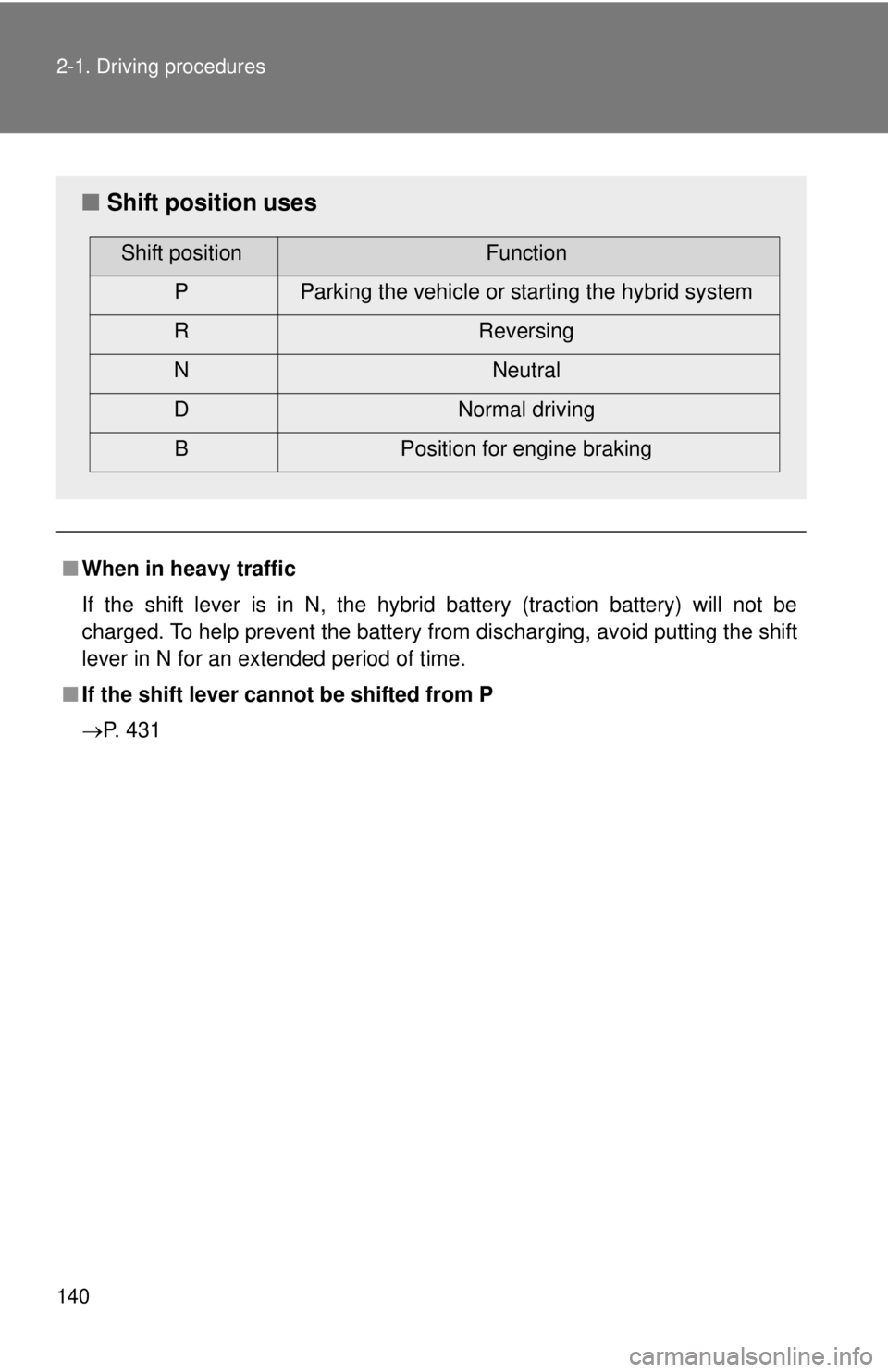
■ Shift position uses
Shift positionFunction
P Parking the vehicle or starting the hybrid system
R Reversing
N Neutral
D Normal driving B Position for engine braking
Page 157 of 508

157
2-3. Operating the lights and wipers
2
When driving
■
Automatic light off system
●When the headlights are on: The headlights and tail lights turn off 30 sec-
onds after all doors are closed with the “POWER” switch OFF. (The lights
turn off immediately if on the key is pressed after all doors are
locked.)
● When only the tail lights are on: The tail lights turn off automatically if the
“POWER” switch is turned to ACCESSORY mode or turned OFF and the
driver’s door is opened.
● If any of the doors or trunk lid is left open, the lights automatically turn off
after 20 minutes.
To turn the lights on again, turn the “POWER” switch to ON mode, or turn the
headlight switch off and then back to or position.
■ Customization that can be co nfigured at Toyota dealer
Settings of light sensor sensitivity can be changed.
(Customizable features P. 474)
NOTICE
■To prevent the 12-volt battery from being discharged
Do not leave the lights on longer than necessary when the hybrid system is
off.
Page 182 of 508
182
3-1. Using the air conditioning system and defogger
Automatic air conditioning system
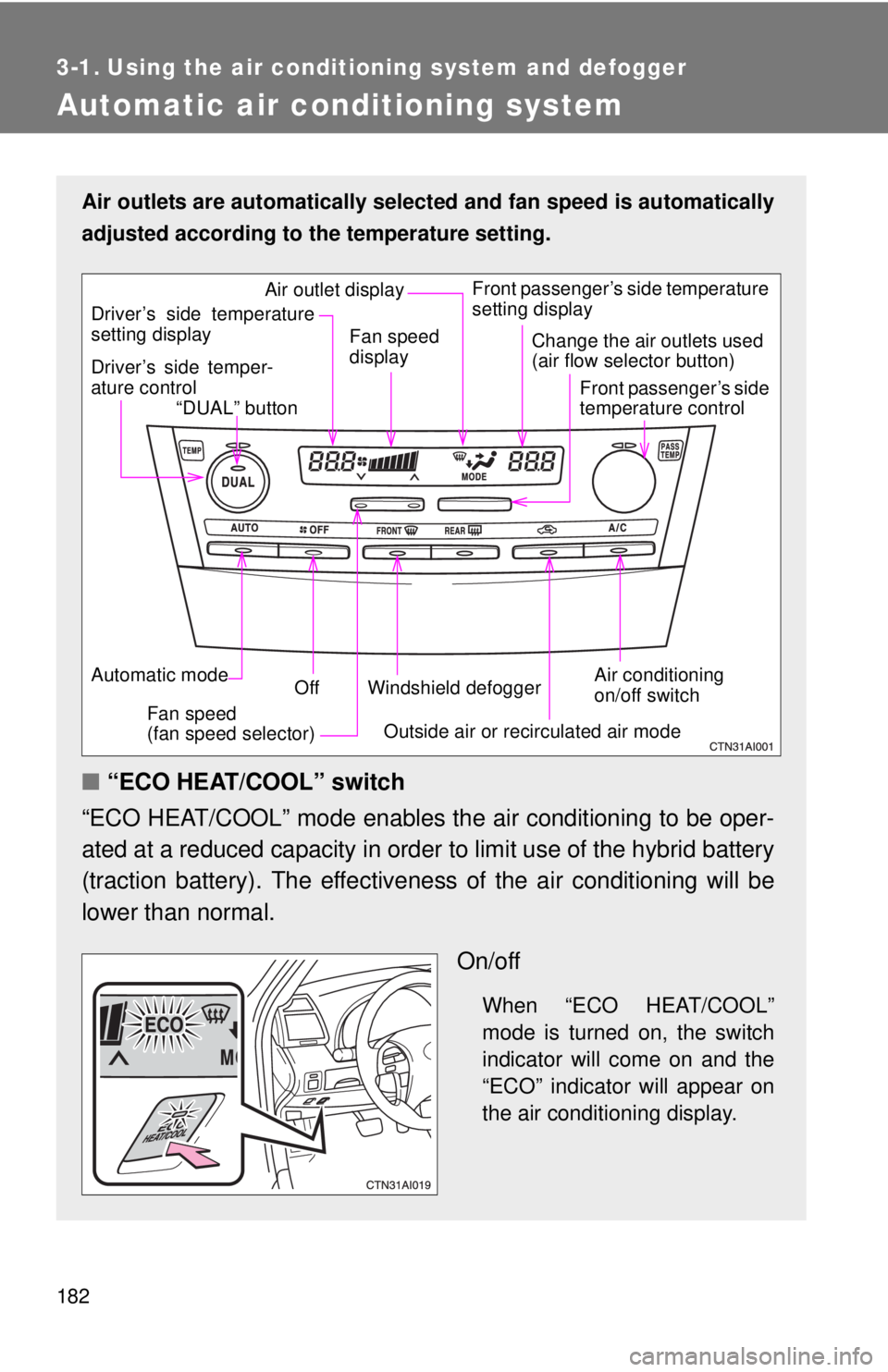
Air outlets are automatically selected and fan speed is automatically
adjusted according to the temperature setting.
■ “ECO HEAT/COOL” switch
“ECO HEAT/COOL” mode enables the air conditioning to be oper-
ated at a reduced capacity in order to limit use of the hybrid battery
(traction battery). The effectivene ss of the air conditioning will be
lower than normal.
On/off
When “ECO HEAT/COOL”
mode is turned on, the switch
indicator will come on and the
“ECO” indicator will appear on
the air conditioning display.
Air conditioning
on/off switch
Front passenger’s side temperature
setting display
Driver’s side temper-
ature control “DUAL” button
Automatic mode Off
Driver’s side temperature
setting display
Fan speed
(fan speed selector) Outside air or recirculated air mode
Fan speed
display
Change the air outlets used
(air flow selector button)
Front passenger’s side
temperature control
Windshield defogger
Air outlet display