Page 81 of 564

81 1-4. Opening and closing the windows and moon roof
1
Before driving
AVALON_U (OM41428U)
■The power windows can be operated when
Vehicles with smart key system
The “ENGINE START STOP” switch is in IGNITION ON mode.
Vehicles without smart key system
The engine switch is in the “ON” position.
■Operating the power windows after turning the engine off
Vehicles with smart key system
The power windows can be operated for approximately 45 seconds even
after the “ENGINE START STOP” switch is turned to ACCESSORY mode or
turned OFF. They cannot, however, be operated once the driver’s or front
passenger’s door is opened.
Vehicles without smart key system
The power windows can be operated for approximately 45 seconds even
after the engine switch is turned to the “ACC” or “LOCK” position. They can-
not, however, be operated once the driver’s or front passenger’s door is
opened.
■Jam protection function
If an object becomes caught between the window and the window frame,
window travel is stopped and the window is opened slightly.
■When the battery is disconnected
The power windows must be initialized in order to ensure proper operation.
(Perform for each window with the switch for each seat.)
Open the window halfway.
Fully close the window by pulling the switch up and continue hold-
ing the switch for 1 second.
The indicator on the switch changes from a flashing pattern to being on
when initial settings are complete.
Page 85 of 564
85 1-4. Opening and closing the windows and moon roof
1
Before driving
AVALON_U (OM41428U)
■To reduce moon roof wind noise
Drive with the moon roof opened automatically (just before fully opened
position).
■Sunshade
The sunshade can be opened and closed manually. However, the sunshade
will open automatically when the moon roof is opened.
■When the battery is disconnected
The moon roof must be initialized in order to ensure proper operation.
Open the window halfway.
Push and hold the switch on the “TILT UP” side until the moon roof
tilts all the way up and then tilts down a little automatically.
To ensure the initialization is complete, make sure automatic open-
ing and closing functions work properly.
Page 324 of 564
324 3-4. Using the hands-free system (for cellular phone)
AVALON_U (OM41428U)
■Initialization
●The following data in the system can be initialized:
• Phone book
• Outgoing and incoming call history
• Speed dials
• Registered cellular phone data
• Security code
●Once the initialization has been completed, the data cannot be restored
to its original state.
■When the phone book is locked
The following functions cannot be used:
●Dialing by inputting a name
●Speed dialing
●Dialing a number stored in the call history memory
●Using the phone book
Page 410 of 564
410 4-3. Do-it-yourself maintenance
AVALON_U (OM41428U)
Installing tire pressure warning valves and transmitters
When replacing tires or wheels, tire pressure warning valves and
transmitters must also be installed.
When new tire pressure warning valves and transmitters are
installed, new tire pressure warning valve and transmitter ID codes
must be registered in the tire pressure warning computer and tire
pressure warning system must be initialized. Have tire pressure
warning valve and transmitter ID codes registered by your Toyota
dealer.
Initializing the tire pressure warning system
■The tire pressure warning system must be initialized in the fol-
lowing circumstances:
●When rotating the tires on vehicles differing with front and rear
tire inflation pressures.
●When changing the tire inflation pressure by changing traveling
speed or load weight, etc.
●When changing the tire size.
When the tire pressure warning system is initialized, the current
tire inflation pressure is set as the pressure benchmark.
■The tire pressure warning system
Your Toyota is equipped with a tire pressure warning system that
uses tire pressure warning valves and transmitters to detect low
tire inflation pressure before serious problems arise. (P. 470)
Page 498 of 564
498 5-2. Steps to take in an emergency
AVALON_U (OM41428U)
■Starting the engine when the battery is discharged
The engine cannot be started by push-starting.
■To prevent battery discharge
●Turn off the headlights and the audio system while the “ENGINE START
STOP” switch or the engine is turned off.
●Turn off any unnecessary electrical components when the vehicle is run-
ning at a low speed for an extended period, such as in heavy traffic, etc.
■When the battery is removed or discharged
The following systems must be initialized.
●Power windows (
P. 80)
●Moon roof (
P. 85)
CAUTION
■Avoiding battery fires or explosions
Observe the following precautions to prevent accidentally igniting the flam-
mable gas that may be emitted from the battery.
●Make sure the jumper cable is connected to the correct terminal and that it
is not unintentionally in contact with any part other than the intended termi-
nal.
●Do not allow the jumper cables to come into contact with the “+” and “-” ter-
minals.
●Do not allow open flame or use matches, cigarette lighters or smoke near
the battery.
Page 536 of 564
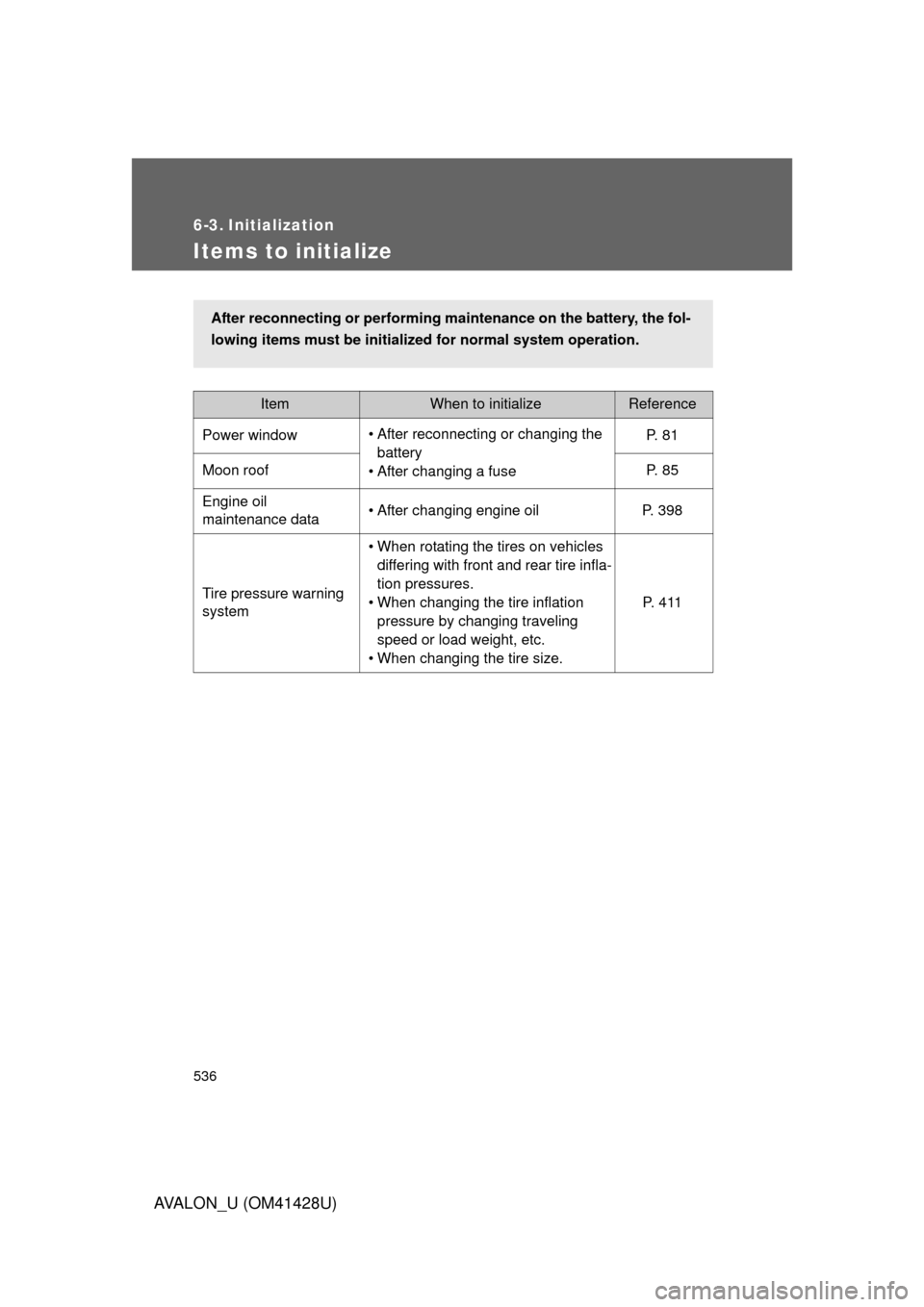
536
AVALON_U (OM41428U)
6-3. Initialization
Items to initialize
ItemWhen to initializeReference
Power window• After reconnecting or changing the
battery
• After changing a fuseP. 8 1
Moon roof P. 85
Engine oil
maintenance data• After changing engine oil P. 398
Tire pressure warning
system• When rotating the tires on vehicles
differing with front and rear tire infla-
tion pressures.
• When changing the tire inflation
pressure by changing traveling
speed or load weight, etc.
• When changing the tire size.P. 4 1 1
After reconnecting or performing maintenance on the battery, the fol-
lowing items must be initialized for normal system operation.