Page 128 of 680

128 1-7. Safety information
4RUNNER_U
Deactivating the curtain shield airbags in a vehicle rollover
On/off (hold for a few seconds)
Vehicles without a smart key sys-
tem: The “RSCA OFF” indicator
turns on. (only when the engine
switch is in the “ON” position).
The roll sensing function for the
curtain shield airbags and seat
belt pretensioners will turn back
on automatically each time the
engine switch is turned to the
“ON” position.
Vehicles with a smart key system:
The “RSCA OFF” indicator comes
on. (only when the “ENGINE
START STOP” switch is in IGNI-
TION ON mode).
The roll sensing function for the
curtain shield airbags and seat
belt pretensioners will turn back
on automatically each time the
“ENGINE START STOP” switch is
turned to IGNITION ON mode.
CTH17AS084
■This switch only should be used
In a situation where the inflation is not desired (such as during extreme off-
road driving).
■ Operating conditions when the “RSC A OFF” indicator is illuminated
● The curtain shield airbags and seat belt pretensioner will not activate in a
vehicle rollover.
● The curtain shield airbags will activate in a severe side impact.
Page 167 of 680
167
2-1. Driving procedures
2
When driving
4RUNNER_U
Engine (ignition) switch (vehicles with a smart key system)
Performing the following operations when carrying the electronic
key on your person starts the en gine or changes “ENGINE START
STOP” switch modes.
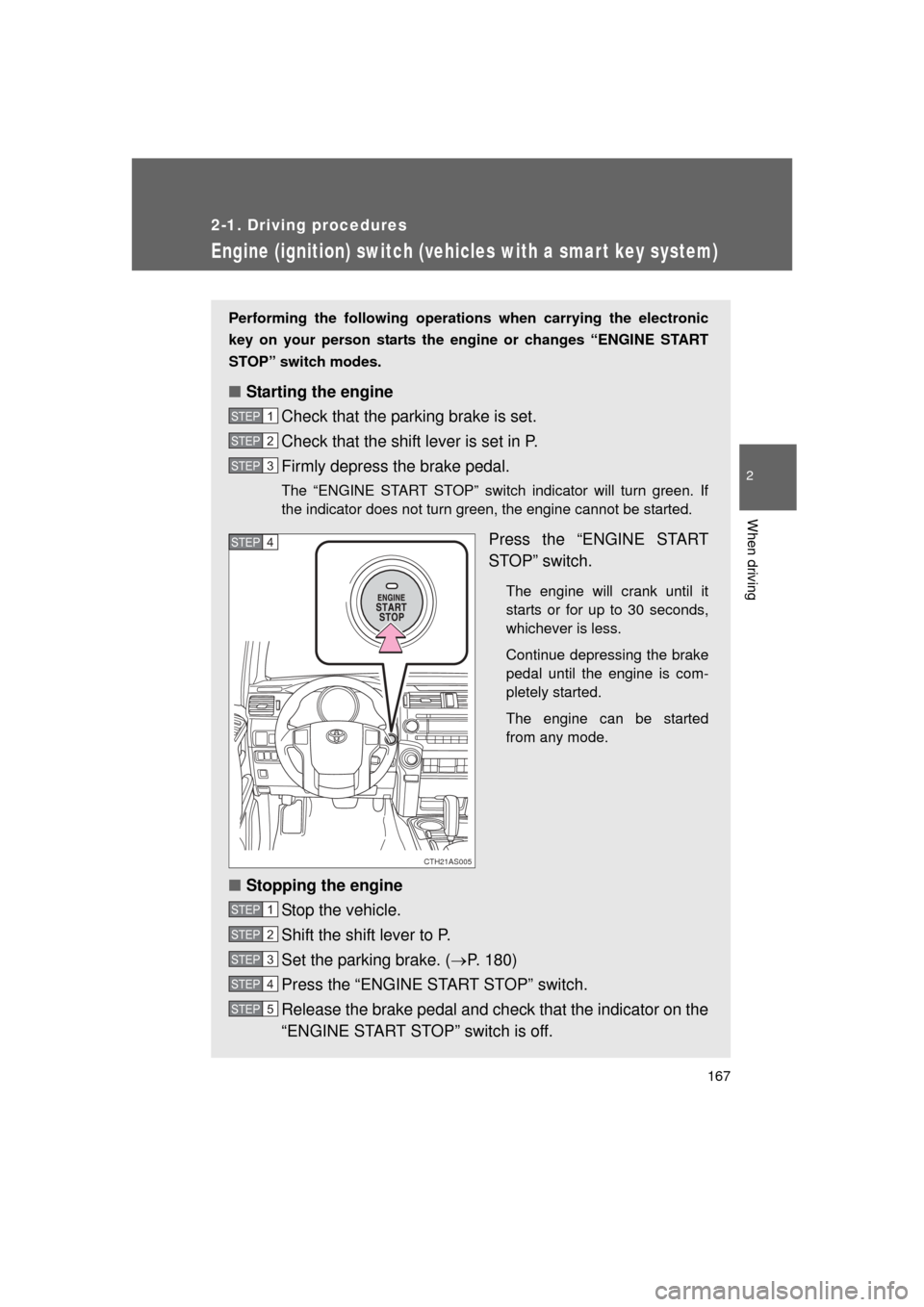
■ Starting the engine
Check that the parking brake is set.
Check that the shift lever is set in P.
Firmly depress the brake pedal.
The “ENGINE START STOP” switch indicator will turn green. If
the indicator does not turn green, the engine cannot be started.
Press the “ENGINE START
STOP” switch.
The engine will crank until it
starts or for up to 30 seconds,
whichever is less.
Continue depressing the brake
pedal until the engine is com-
pletely started.
The engine can be started
from any mode.
■Stopping the engine
Stop the vehicle.
Shift the shift lever to P.
Set the parking brake. ( P. 180)
Press the “ENGINE START STOP” switch.
Release the brake pedal and check that the indicator on the
“ENGINE START STOP” switch is off.
STEP 1
STEP 2
STEP 3
CTH21AS005
STEP 4
STEP 1
STEP 2
STEP 3
STEP 4
STEP 5
Page 172 of 680

172 2-1. Driving procedures
4RUNNER_U
NOTICE
■To prevent battery discharge
● Do not leave the “ENGINE START STOP” switch in ACCESSORY or IGNI-
TION ON mode for long periods of time without the engine running.
● If the indicator on the “ENGINE START STOP” switch is illuminated, the
“ENGINE START STOP” switch is not off. When exiting the vehicle,
always check that the “ENGINE START STOP” switch is off.
● Do not stop the engine when the shift lever is in a position other than P. If
the engine is stopped in another shift lever position, the “ENGINE START
STOP” switch will not be turned off but instead be turned to ACCESSORY
mode. If the vehicle is left in ACCESSORY mode, battery discharge may
occur.
■ When starting the engine
● Do not race a cold engine.
● If the engine becomes difficult to start or stalls frequently, have the engine
checked immediately.
■ Symptoms indicating a malfunction with the “ENGINE START STOP”
switch
If the “ENGINE START STOP” seems to be operating somewhat differently
than usual, such as the switch sticking slightly, there may be a malfunction.
Contact your Toyota dealer immediately.
Page 188 of 680

188 2-2. Instrument cluster
4RUNNER_U
■The meters and display illuminate when (Optitron type meter)
Vehicles without a smart key system:
The engine switch is in the “ON” position.
Vehicles with a smart key system:
The “ENGINE START STOP” switch is in IGNITION ON mode.
■ Eco Driving Indicator operates when
The vehicle is being driven with the shift lever in D.
■ When the average fuel consumption is reset
The average fuel consumption displayed on the accessory meter and “Past
Record” screen of the navigation system (if equipped) will be reset at the
same time.
■ The brightness of the instrument panel lights (Optitron type meter)
When the headlight switch is turned to on, the brightness will be reduced
slightly unless the control dial is turned fully upward.
NOTICE
■ To prevent damage to the engine and its components
● Do not let the indicator needle of the tachometer enter the red zone, which
indicates the maximum engine speed.
● The engine may be overheating if the engine coolant temperature gauge is
in the red zone (H). In this case, immediately stop the vehicle in a safe
place, and check the engine after it has cooled completely. ( P. 604)
■ While driving (Optitron type meter)
When the voltmeter indicates more than 19 V or less than 9 V, the battery
may be malfunctioning. Have your vehicle checked at your Toyota dealer.
Page 192 of 680
192 2-2. Instrument cluster
4RUNNER_U
*: These lights turn on when the “ENGINE START STOP” switch is turnedto IGNITION ON mode (vehicles with a smart key system) or the
engine switch is turned to the “ON” position (vehicles without a smart
key system) to indicate that a system check is being performed. They
will turn off after the engine is started, or after a few seconds. There
may be a malfunction in a system if a light does not come on, or if the
lights do not turn off. Have the vehicle inspected by your Toyota dealer.
(if equipped)
Crawl Control indicator
(P. 241) Security indicator
(P. 106, 109)
Eco Driving Indicator
Light ( P. 185)
(if equipped)
Intuitive parking assist
indicator ( P. 213)
SRS airbag on-off indi-
cator (P. 130)
*
*
*
Page 193 of 680

193
2-2. Instrument cluster
2
When driving
4RUNNER_U
CAUTION
■
If a safety system warning light does not come on
Should a safety system light such as the ABS or SRS warning light not come
on when you start the engine, this could mean that these systems are not
available to help protect you in an accident, which could result in death or
serious injury. Have the vehicle inspected by your Toyota dealer immediately
if this occurs.
■ Warning lights
Warning lights inform the driver of malfunctions in any of the
vehicle’s systems. ( P. 565)
*: These lights turn on when the “ENGINE START STOP” switch is
turned to IGNITION ON mode (vehicles with a smart key system) or
the engine switch is turned to the “ON” position (vehicles without a
smart key system) to indicate that a system check is being per-
formed. They will turn off after the engine is started, or after a few
seconds. There may be a malfunction in a system if a light does not
come on, or if the lights do not turn off. Have the vehicle inspected
by your Toyota dealer.
(if equipped)(if equipped)(if equipped)(U.S.A.)
(Canada)(U.S.A.)(Canada)(if equipped)
(if equipped)(if equipped)
********
*****
***
Page 197 of 680

197
2-2. Instrument cluster
2
When driving
4RUNNER_U
■
When the average fuel consumption is reset
The average fuel consumption display ed on the instrument cluster and “Past
Record” screen of the navigation system (if equipped) will be reset at the
same time.
■ Adjusting the brightness of the accessory meter
● If left idle for approximately 6 seconds or more while adjusting, the dis-
play will revert to the trip information display.
● When the parking lights are on, the brightness of the accessory meter
can be adjusted only with the instrument panel light control.
● If the “MODE/ ” button is pressed and held when the accessory meter
light control is displayed, the display will switch to compass calibration.
(P. 450)
■ Liquid crystal display
Small spots or light spots may appear on the display. This phenomenon is
characteristic of liquid crystal displays, and there is no problem with continu-
ing to use the display.
NOTICE
■The accessory meter at low temperatures
Allow the interior of the vehicle to warm up before using the liquid crystal dis-
play. At extremely low temperatures, the display monitor may respond
slowly, and display changes may be delayed.
Page 203 of 680
203
2-3. Operating the lights and wipers
2
When driving
4RUNNER_U
■
Automatic light off system
Vehicles without a smart key system
● When the headlights come on: The headlights and tail lights turn off 30
seconds after a door is opened and closed if the engine switch is turned
to the “ACC” or “LOCK” position. (The lights turn off immediately if
on the key is pressed after all the doors are locked.)
● When only the tail lights come on: The tail lights turn off automatically if
the engine switch is turned to the “ACC” or “LOCK” position and the
driver’s door is opened.
To turn the lights on again, turn the engine switch to the “ON” position, or
turn the lights off and then back to or .
Vehicles with a smart key system
● When the headlights come on: The headlights and tail lights turn off 30
seconds after a door is opened and closed if the “ENGINE START
STOP” switch is turned to ACCESSORY mode or turned off. (The lights
turn off immediately if on the key is pressed after all the doors are
locked.)
● When only the tail lights come on: The tail lights turn off automatically if
the “ENGINE START STOP” switch is turned off and the driver’s door is
opened.
To turn the lights on again, turn the “ENGINE START STOP” switch to IGNI-
TION ON mode, or turn the light switch off and then back to or
.
■ Customization that can be co nfigured at Toyota dealer
Settings (e.g. light sensor sensitivity) can be changed.
(Customizable features P. 640)
NOTICE
■To prevent battery discharge
Do not leave the lights on longer than necessary when the engine is not run-
ning.
