Page 170 of 680

170 2-1. Driving procedures
4RUNNER_U
■If the engine does not start
The engine immobilizer system may not have been deactivated. ( P. 106)
■ Steering lock
After turning the “ENGINE START STOP” switch off and opening and closing
the doors, the steering wheel will be locked due to the steering lock function.
Operating the “ENGINE START STOP” switch again automatically cancels
the steering lock.
■ When the steering lock cannot be released
■ Steering lock motor overheating prevention
To prevent the steering lock motor from overheating, the motor may be sus-
pended if the engine is turned on and off repeatedly in a short period of time.
In this case, refrain from operating the engine. After about 10 seconds, the
steering lock motor will resume functioning.
■ When the “ENGINE START STOP” switch indicator flashes in amber
The system may be malfunctioning. Have the vehicle inspected by your
Toyota dealer immediately.
■ If the electronic key battery is depleted
P. 528
The green indicator light on the “ENGINE
START STOP” switch will flash. Press the
“ENGINE START STOP” switch again
while turning the steering wheel left and
right.
CTH21AS019
Page 171 of 680
171
2-1. Driving procedures
2
When driving
4RUNNER_U
CAUTION
■
When starting the engine
Always start the engine while sitting in the driver’s seat. Do not depress the
accelerator pedal while starting the engine under any circumstances.
Doing so may cause an accident resulting in death or serious injury.
■ Caution while driving
If the vehicle begins to slide due to engine failure or other circumstances, do
not lock or open the doors until the vehicle reaches a safe and complete
stop. Activation of the steering lock in this circumstance may lead to an acci-
dent, resulting in death or serious injury.
■ Stopping the engine in an emergency
If you want to stop the engine in an emergency while driving the vehicle,
press and hold the “ENGINE START STOP” switch for more than 3 seconds.
However, do not touch the “ENGINE START STOP” switch while driving
unless in an emergency. If the engine stops while driving, this could lead to
an unexpected accident.
Page 181 of 680
181
2-1. Driving procedures
2
When driving
4RUNNER_U
Hor n
■After adjusting the steering wheel
Make sure that the steering wheel is securely locked.
The horn may not sound if the steering wheel is not securely locked.
(P. 86)
To sound the horn, press on or
close to the mark.
CTH21AS022
Page 191 of 680

191
2-2. Instrument cluster
2
When driving
4RUNNER_U
■
Indicators
The indicators inform the driver of the operating state of the
vehicle’s various systems.
Turn signal indicator
(P. 179)
(Canada)
“TRC OFF” indicator
(P. 255)
Headlight high beam
indicator ( P. 202)Roll sensing of curtain
shield airbags off indica-
tor (P. 128)
(U.S.A.)
Headlight indicator
(P. 198)
(if equipped)
Four-wheel drive indica-
tor ( P. 223)
(Canada)
Tail light indicator
(P. 198)
(if equipped)
Downhill assist control
system indicator
(P. 238)
(if equipped)
Front fog light indicator
(P. 204)
(if equipped)
Low speed four-wheel
drive indicator
(P. 223, 226)
Cruise control indicator
( P. 209)
(if equipped)
Rear differential lock
indicator ( P. 235)
Cruise control set indi-
cator (P. 209)
(if equipped)
Center differential lock
indicator ( P. 226)
Slip indicator ( P. 254)
(if equipped)
“A-TRAC” indicator
(P. 230)
VSC off indicator
(P. 255)
(if equipped)
“AUTO LSD” indicator
(P. 232)
(U.S.A.)
“TRAC OFF” indicator
(P. 255)
(if equipped)
Multi-terrain Select indi-
cator ( P. 245)
*
*
*
*
**
*
Page 194 of 680
194
2-2. Instrument cluster
4RUNNER_U
Accessor y meter
The accessory meter presents the driver with a variety of driving-
related data including the current outside air temperature.
“MODE/ ” button
“SET/ ” button
Trip information (P. 195)
Displays driving range and average fuel consumption
Outside temperature display ( P. 433)
Compass ( P. 450)
Clock ( P. 431)
H (Hour) button ( P. 431)
M (Minute) button ( P. 431)
Multi-terrain Select display ( P. 245)
Automatically displayed when using Multi-terrain Select
Page 202 of 680
202 2-3. Operating the lights and wipers
4RUNNER_U
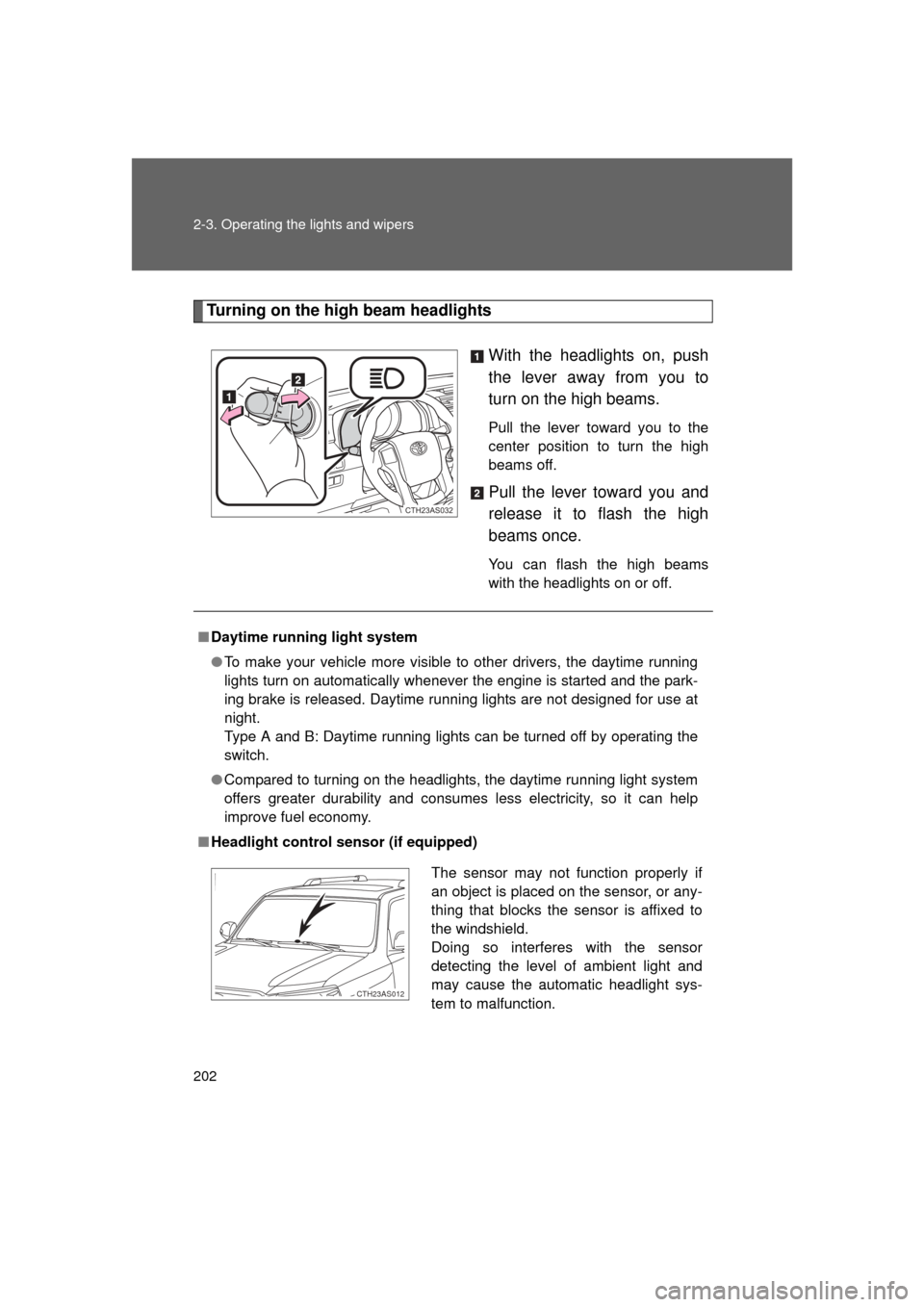
Turning on the high beam headlightsWith the headlights on, push
the lever away from you to
turn on the high beams.
Pull the lever toward you to the
center position to turn the high
beams off.
Pull the lever toward you and
release it to flash the high
beams once.
You can flash the high beams
with the headlights on or off.
CTH23AS032
■Daytime running light system
● To make your vehicle more visible to other drivers, the daytime running
lights turn on automatically whenever the engine is started and the park-
ing brake is released. Daytime running lights are not designed for use at
night.
Type A and B: Daytime running lights can be turned off by operating the
switch.
● Compared to turning on the headlights, the daytime running light system
offers greater durability and consumes less electricity, so it can help
improve fuel economy.
■ Headlight control sensor (if equipped)
The sensor may not function properly if
an object is placed on the sensor, or any-
thing that blocks the sensor is affixed to
the windshield.
Doing so interferes with the sensor
detecting the level of ambient light and
may cause the automatic headlight sys-
tem to malfunction.
CTH23AS012
Page 203 of 680
203
2-3. Operating the lights and wipers
2
When driving
4RUNNER_U
■
Automatic light off system
Vehicles without a smart key system
● When the headlights come on: The headlights and tail lights turn off 30
seconds after a door is opened and closed if the engine switch is turned
to the “ACC” or “LOCK” position. (The lights turn off immediately if
on the key is pressed after all the doors are locked.)
● When only the tail lights come on: The tail lights turn off automatically if
the engine switch is turned to the “ACC” or “LOCK” position and the
driver’s door is opened.
To turn the lights on again, turn the engine switch to the “ON” position, or
turn the lights off and then back to or .
Vehicles with a smart key system
● When the headlights come on: The headlights and tail lights turn off 30
seconds after a door is opened and closed if the “ENGINE START
STOP” switch is turned to ACCESSORY mode or turned off. (The lights
turn off immediately if on the key is pressed after all the doors are
locked.)
● When only the tail lights come on: The tail lights turn off automatically if
the “ENGINE START STOP” switch is turned off and the driver’s door is
opened.
To turn the lights on again, turn the “ENGINE START STOP” switch to IGNI-
TION ON mode, or turn the light switch off and then back to or
.
■ Customization that can be co nfigured at Toyota dealer
Settings (e.g. light sensor sensitivity) can be changed.
(Customizable features P. 640)
NOTICE
■To prevent battery discharge
Do not leave the lights on longer than necessary when the engine is not run-
ning.
Page 206 of 680
206 2-3. Operating the lights and wipers
4RUNNER_U
■The windshield wipers and washer can be operated when
Vehicles without a smart key system: The engine switch is in the “ON” posi-
tion.
Vehicles with a smart key system: The “ENGINE START STOP” switch is in
IGNITION ON mode.
■ If no windshield washer fluid sprays
Check that the washer nozzles are not blocked if there is washer fluid in the
windshield washer fluid reservoir.
NOTICE
■When the windshield is dry
Do not use the wipers, as they may damage the windshield.
■ When the washer fluid tank is empty
Do not operate the switch continually as the washer fluid pump may over-
heat.
■ When a nozzle becomes blocked
Do not try to clear it with a pin or other object. The nozzle will be damaged.
Washer/wiper dual opera-
tion
The wipers will automatically
operate a couple of times after
the washer squirts.
CTH23AS029


