2011 SUBARU IMPREZA light
[x] Cancel search: lightPage 94 of 458

1) Rotate the lock lever rearward.
2) Close the door.
To lock the door from the outside without
the key, rotate the lock lever rearward and
then close the door.
To lock the door from the outside using the
power door locking switch, push the front
side of the switch ( “LOCK ”side) and then
close the door. In this case, all closed
doors and the rear gate (for 5-door) are
locked at the same time.
Always make sure that all doors and the
rear gate (for 5-door) are locked before
leaving your vehicle. NOTE
Make sure that you do not leave the key
inside the vehicle when locking the doors from the outside without the key.
& Locking and unlocking from
the inside
1) Lock
2) Unlock
To lock the door from the inside, rotate the
lock lever rearward. To unlock the door
from the inside, rotate the lock leverforward.
The red mark on the lock lever appears
when the door is unlocked.
Pull the inside door handle to open an
unlocked door.
Always make sure that all doors and the
rear gate (for 5-door) are closed before
starting to drive.
WARNING
Keep all doors locked when you
drive, especially when small chil-
dren are in your vehicle.
Along with the proper use of seat-
belts and child restraints, locking
the doors reduces the chance of
being thrown out of the vehicle in anaccident.
It also helps prevent passengers
from falling out if a door is acciden-
tally opened, and intruders from
unexpectedly opening doors and
entering your vehicle.
& Battery drainage prevention function
If a door or the rear gate (5-door) is not
completely closed, the interior lights will
remain illuminated as a result. However,
several lights are automatically turned off
by the battery drainage prevention func-
tion to prevent the battery from dischar-
ging. The following interior lights are
affected by this function. Keys and doors
2-5
– CONTINUED –
Page 95 of 458

2-6Keys and doors
Item Switch
position Automatically turning
off
Map lights
*1OFF*1Approximately 30 seconds later
Dome light DOOR Approximately 20
minutes later
Ignition
switch light —Approximately 20
minutes later
Door steplights —
None
*2
Cargo arealightDOOR
None*2
*1: The battery drainage prevention function
affects only the map lights on models with the
moonroof, and only when the map light
switches are in the OFF position. The map
lights on models without the moonroof do not
turn off automatically, so push the light switches
manually to turn them off.
*2: The door step lights and the cargo area light
are not affected by the battery drainage
prevention function, so the lights do not turn
off automatically. To turn off the lights, it is
necessary that each door and the rear gate (5-
door) are completely closed.
The operational/non-operational setting of
this function can be changed by a
SUBARU dealer. Contact your SUBARU
dealer to change the setting. NOTE .
The factory setting (default setting)
for this function is set as “operational ”.
. When leaving the vehicle, please
make sure that all doors and the rear
gate (5-door) are completely closed.. The battery drainage prevention
function does not operate while the
key is in the ignition switch. Power door locking switches
Type A
Type B
1) Lock
2) Unlock
Page 98 of 458

NOTE .The turn signal lights will flash once/
twice under the following conditions.
–When locking the doors
– When unlocking the doors
– When opening the trunk lid (4-
door models) – When unlocking the rear gate (5-
door models)
. The setting of the turn signal light
operation can be changed by your
SUBARU dealer. Contact your SUBARU
dealer for details. Also, for models with
the genuine SUBARU navigation sys-
tem, the setting can be changed using
the navigation system. For details,
please refer to the Owner ’s Manual
supplement for the navigation system. &
Locking the doors
Press the “”button to lock all doors and
rear gate (5-door). An electronic chirp will
sound once and the turn signal lights will
flash once.
If any of the doors (or the rear gate/trunk
lid) is not fully closed, an electronic chirp
will sound five times and the turn signal
lights will flash five times to alert you that
the doors (or the rear gate/trunk lid) are
not properly closed. When you close the
door, it will automatically lock and then an
electronic chirp will sound once and the
turn signal lights will flash once. &
Unlocking the doorsPress the “”button to unlock the driver ’s
door. An electronic chirp will sound twice
and the turn signal lights will flash twice.
To unlock all doors and the rear gate (5-
door), briefly press the “
”button a
second time within 5 seconds. NOTE
If the interval between the first and
second presses of the “
”button (for
unlocking of all of the doors and the
rear gate) is extremely short, the sys-
tem may not respond. Keys and doors
2-9
– CONTINUED –
Page 99 of 458

2-10Keys and doors
& Opening the trunk lid/un-
locking rear gate
! 4-door models
The trunk lid opens when the “
”button
is pressed continuously for at least 2
seconds. An electronic chirp will sound
twice and the turn signal lights will flashtwice. ! 5-door models
Pressing the “
”button unlocks the rear
gate.
An electronic chirp will sound twice and
the turn signal lights will flash twice. &
Vehicle finder function
Use this function to find your vehicle
parked among many vehicles in a large
parking lot. Provided you are within 30 feet
(10 meters) of the vehicle, pressing the “
”
button three times in a 5-second period
will cause your vehicle ’s horn to sound
once and its turn signal lights to flash threetimes. NOTE
If the interval between presses is too
short when you press the “
”button
three times, the system may not re-
spond to the signals from the remote
transmitter. &
Sounding a panic alarm
A“PANIC ”button is located on the back of
the transmitter.
To activate the alarm, press the “PANIC ”
button once.
The horn will sound and the turn signal
lights will flash.
To deactivate the panic alarm, press any
button on the remote transmitter. Unless a
button on the remote transmitter is
pressed, the alarm will be deactivated
after approximately 30 seconds.
Page 100 of 458
&Selecting audible signal op- eration
Using an electronic chirp, the system will
give you an audible signal when the doors
lock and unlock. If desired, you may turn
the audible signal off.
Do the following to deactivate the audible
signal. You can also use the same steps
to restore the function.
1. Sit in the driver ’s seat and shut all
doors and the rear gate.
2. Hold down the REAR (UNLOCK) side
of the power door locking switch.
3. While holding down the REAR (UN-
LOCK) side of the power door locking
switch, pull the key out and re-insert it into
the ignition switch at least 6 times within
10 seconds after Step 2.
4. Open and close the driver ’s door once
within 10 seconds after Step 3.
5. The turn signal lights flash 3 times to
indicate completion of the setting.
You may have the above settings done by
your SUBARU dealer. Also, for models
with the genuine SUBARU navigation
system, the setting can be changed using
the navigation monitor. For details, please
refer to the Owner ’s Manual supplement
for the navigation system. &
Replacing the battery
CAUTION
. Do not let dust, oil or water get on
or in the transmitter when repla-
cing the battery.
. Be careful not to damage the
printed circuit board in the trans-
mitter when replacing the battery.
. Be careful not to allow children to
touch the battery and any re-
moved parts; children could
swallow them.
. There is a danger of explosion if
an incorrect replacement battery
is used. Replace only with the
same or equivalent type of bat-
tery.
. Batteries should not be exposed
to excessive heat such as sun-
shine, fire or the like.
When the transmitter battery begins to get
weak, transmitter range will begin to
decrease. Replace the battery as soon
as possible. To replace the battery:
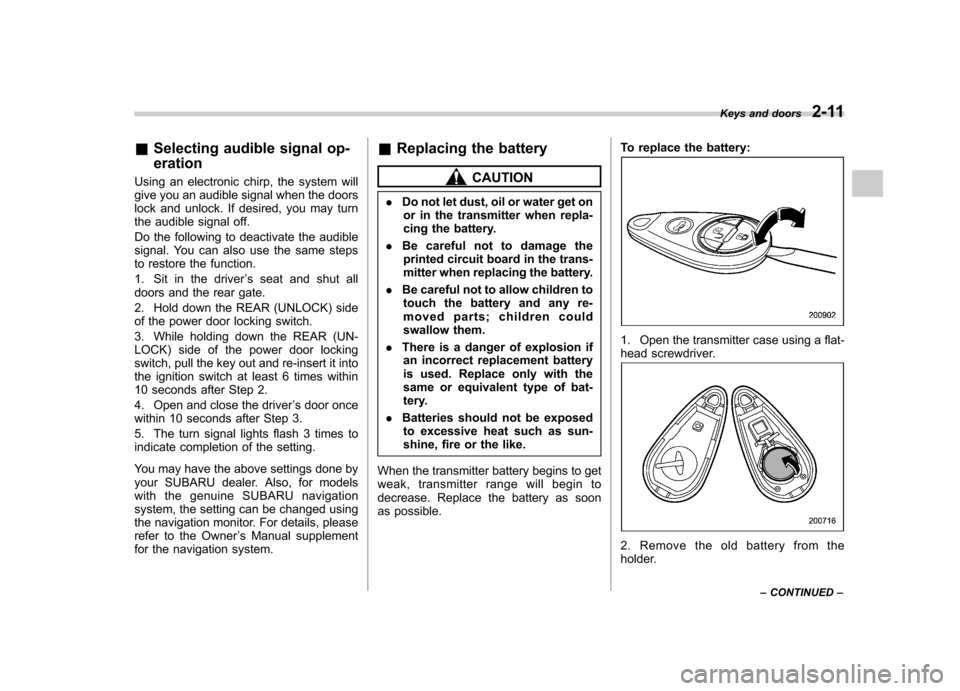
1. Open the transmitter case using a flat-
head screwdriver.
2. Remove the old battery from the
holder.Keys and doors
2-11
– CONTINUED –
Page 105 of 458

2-16Keys and doors
Alarm system
The alarm system helps to protect your
vehicle and valuables from theft. The horn
sounds and the turn signal lights flash if
someone attempts to break into your
vehicle. The starter motor is also inter-
rupted to prevent starting the vehicle
without a key.
The system can be armed and disarmed
with the remote transmitter.
The system does not operate when the
key is inserted into the ignition switch.
Your vehicle ’s alarm system has been set
for activation at the time of shipment from
the factory. You can set the system for
deactivation yourself or have it done by
your SUBARU dealer. & System operation
The alarm system will sound the following
alarms when triggered. . The vehicle ’s horn will sound for 30
seconds.. The turn signal lights will flash for 30
seconds.
If any of the doors or the rear gate/trunk lid
remains open after the 30-second period,
the horn will continue to sound for a
maximum of 3 minutes. If the door or the rear gate/trunk lid is closed while the horn
is sounding, the horn will stop sounding
with a delay of up to 30 seconds.
The alarm is triggered by: .
Opening any of the doors, the rear gate
or trunk lid. Physical impact to the vehicle, such as
forced entry (only models with shock
sensors (dealer option))
NOTE
The alarm system can be set to trigger
the illumination of the following interiorlights. . Dome light (illuminates only when
the dome light switch is in the “DOOR ”
position) . Map lights (models with moonroof)
The notifications regarding the dome
light and the map lights are deactivated
as the factory setting. A SUBARU
dealer can activate the system. Contact
your SUBARU dealer for details. & Activating and deactivating
the alarm system
To change the setting of your vehicle ’s
alarm system for activation or deactiva-
tion, do the following.
1. Disarm the alarm system. Refer to “
Disarming the system ”F 2-19.
2. Sit in the driver ’s seat and shut all
doors (and the rear gate if your vehicle is a 5-door).
3. Turn the ignition switch to the “ON ”
position.
4. Hold down the REAR (UNLOCK) side
of the driver ’s power door locking switch,
open the driver ’s door within the following
1 second, and wait 10 seconds without
releasing the switch. The setting will then
be changed as follows.
If the system was previously activated:
The odometer/trip meter screen displays “ AL oF ”and the horn sounds twice,
indicating that the system is now deacti-vated.
If the system was previously deacti- vated:
The odometer/trip meter screen displays “ AL on ”and the horn sounds once,
indicating that the system is now acti-vated.
NOTE
You may have the above setting
change done by your SUBARU dealer.
Page 106 of 458

&If you have accidentally trig-
gered the alarm system
! To stop the alarm
Do any of the following operations: . Press any button on the remote trans-
mitter.. Turn the ignition switch to the “ON ”
position. NOTE
Only registered keys will stop the
alarm. If the immobilizer transponder
is not registered, the alarm will notstop. & Arming the system
! To arm the system using remote transmitter
1. Close all windows.
2. Remove the key from the ignition switch.
3. Open the doors and get out of the vehicle.
4. Make sure that the engine hood (and
the trunk lid on the 4-door) are locked.
5. Close all doors (and the rear gate on
the 5-door).
: Press to Arm the system.: Press to Disarm the system.
Turbo models
Non-turbo models
6. Briefly press the “
”button (for less
than 2 seconds). All doors (and the rear
gate on the 5-door) will lock, an electronic
chirp will sound once, the turn signal lights
will flash once, and the security indicator
light will start flashing rapidly. After rapid
flashing for 30 seconds (standby time), the
indicator lights will then flash slowly (twice
approximately every 2 seconds), indicat-
ing that the system has been armed for surveillance.
If any of the doors, (rear gate or trunk lid)
is not fully closed, an electronic chirp
sounds five times, the turn signal lights
flash five times to alert you that the doors
(or the rear gate) are not properly closed.
When you close the door, the system will
automatically arm and doors will automa- Keys and doors
2-17
– CONTINUED –
Page 107 of 458

2-18Keys and doors
tically lock. ! To arm the system using power
door locking switches
1. Close all windows.
2. Remove the key from the ignition switch.
3. Open the doors and get out of the vehicle.
4. Make sure that the engine hood is locked.
5. Close the doors (and the rear gate on
the 5-door) but leave only the driver ’s door
or the front passenger ’s door open.
Type A
Type B
6. Push the front side ( “LOCK ”side) of
the power door locking switch to set the
door locks.
7. Close the door. An electronic chirp will
sound once, the turn signal lights will flash
once and the security indicator light will
start flashing rapidly. After rapid flashing
for 30 seconds (standby time), the indi-
cator lights will then flash slowly (twice
approximately every 2 seconds), indicat-
ing that the system has been armed for surveillance.
NOTE . The system can be armed even if the
engine hood and/or the windows are
opened. Always make sure that they are fully closed before arming thesystem..
The 30-second standby time can be
eliminated if you prefer. Have it per-
formed by your SUBARU dealer.. If your vehicle is a 4-door and you
unlock the trunk using the remote
transmitter ’s “
”button with the
alarm system armed, the system will
be temporarily placed in a standby
state. The system will go back to the
surveillance state upon locking thetrunk.. The system is in the standby mode
for a 30-second period after locking the
doors with the remote transmitter. The
security indicator light will flash at
short intervals during this period.. If any of the following actions are
done during the standby period, the
system will not switch to the surveil-
lance state.
–Doors are unlocked using the
remote transmitter. – Any door (including the rear gate
of a 5-door or the trunk of a 4-door)
is opened. – Ignition switch is turned to the
“ ON ”position.