2011 SUBARU FORESTER start stop button
[x] Cancel search: start stop buttonPage 101 of 446

2-16Keys and doors
NOTE
You may have the above setting
change done by your SUBARU dealer. & If you have accidentally trig-
gered the alarm system
! To stop the alarm
Do any of the following operations: . Press any button on the remote trans-
mitter.. Turn the ignition switch to the “ON ”
position. & Arming the system
! To arm the system using remote transmitter
1. Close all windows and the moonroof (ifequipped).
2. Remove the key from the ignition switch.
3. Open the doors and get out of the vehicle.
4. Make sure that the engine hood is locked.
5. Close all doors and the rear gate.
: Press to Arm the system.: Press to Disarm the system.
Type A
Type B
6. Briefly press the “
”button (for less
than 2 seconds). All doors and the rear
gate will lock, an electronic chirp will
sound once, the turn signal lights will flash
once, and the security indicator light will
start flashing rapidly. After rapid flashing
for 30 seconds (standby time), the security
indicator light will then flash slowly (twice
approximately every 2 seconds), indicat-
ing that the system has been armed for surveillance.
If any of the doors or the rear gate is not
fully closed, an electronic chirp sounds
five times, the turn signal lights flash five
times to alert you that the doors or the rear
gate are not properly closed. When you
close the door, the system will automati-
cally arm and the doors will be automati-
Page 192 of 446

FM/AM radio operation &FM/AM selection
Type A and B audio
Type C and D audio
Push the “FM/AM ”button when the radio
is off to turn on the radio.
Push the “FM/AM ”button when the radio
is on to select the reception.
Each brief press of the “FM/AM ”button
changes the radio in the following se-
quence starting from the last radio band
with you selected.
Type A, B and C audio:
Type D audio:
& Tuning
! Manual tuning
Type A and B audio
Type C and D audio
Turn the “TUNE/TRACK/CH ”dial clock-
wise to increase the tuning frequency and
turn the “TUNE/TRACK/CH ”dial counter-
clockwise to decrease it.
Each time the dial is turned, the frequency
interval can be changed between 10 kHz
in the AM mode and 0.2 MHz in the FMmode. ! Stereo indicator
The stereo indicator “ST ”(type A, B and C
audio)/ “STEREO ”(type D audio) will
illuminate when an FM stereo broadcast
is received. !
Seek tuning (SEEK)
Type A and B audio:
Seek up
Seek down
Type C audio:
Seek up
Seek down
Type D audio:Seek up
Seek down
If you press the “”or “”button briefly,
the radio will automatically search for a
receivable station and stop at the first one
it finds. This function may not be available, Audio
5-13
– CONTINUED –
Page 203 of 446

5-24Audio
! Inserting a disc in a desired posi- tion
1. Briefly press the
button. If the
magazine in the player has an idle
position where you can insert a disc, the
disc number indicator associated with the
idle position will blink.
The positions in the magazine the indica-
tor of which steadily lights up are already
loaded with discs.
2. Press the disc select button (from
to) at the position where you
want to insert a disc.
3. When the “LOAD ”indicator illumi-
nates, insert the disc. Once you have
inserted the disc, the “LOAD ”indicator will
turn off. The disc will then be automatically
drawn in, and the player will begin to play
the first track on the disc. . If you wish to insert another disc,
repeat the procedure beginning with step 1.
If you do not insert any disc in 15 seconds
after you have pressed the
button,
the player will begin to play back the first
track of the last disc you have inserted. . While the player is in the loading mode,
if you press
orbutton, the
player will enter standby mode. Press the
button to start playback. !
Loading all the magazine (full disc
loading mode)
1. If you continue to press the
button for more than 1.5 seconds, the
player will produce beep sound and will
enter the full disc loading mode.
2. When the disc number indicator
flashes and “ALL LOAD ”indicator illumi-
nates, insert a disc within 15 seconds. If a
disc is successfully loaded during this
period, the disc number indicator will stop
blinking and will steadily light.
3. When the loading of a disc is com-
plete, the next disc number indicator will
blink. Then repeat step 2.
4. When the magazine is filled with discs
by repeating steps 2 and 3, the player will
start playback of the discs, beginning with
the one inserted first.
If you fail to insert any disc during each 15
seconds interval, the full disc loading
mode will be canceled, and the player will
start playback of the disc inserted first. & How to play back a CD
! When there is no CD inserted
Properly insert a CD. Refer to “How to
insert a CD (type A, C and D) ”F 5-23 /
“ How to insert a CD(s) (type B) ”F 5-23.
When a CD is loaded, the player will start
playback of the CD, beginning with the first track. !
When CD is in the player (type A)
When thebutton is pressed, the
player will start playback. ! When there are CDs loaded (type B)
Press a desired one of the disc select
buttons (from
to) the disc
number indicator of which steadily lights
up. The player will then start playback of
the selected CD, beginning with the firsttrack.
If a disc that the player cannot read has
been loaded, the player will display themessage “CHECK DISC ”.
! When CD is in the player (type C
and D)
Each brief press of the
button
changes the modes in the following sequence.
*: For type C audio, “BT-A ”is displayed.
When the CD mode is selected, the player
will start playback.
Page 204 of 446

&To select a track from its beginning
Type A and B audio
Type C and D audio
Turn the “TUNE/TRACK/CH ”dial clock-
wise to skip to the beginning of the next
track/file. Each time the dial is turned, the
indicated track/file number will increase.
Turn the “TUNE/TRACK/CH ”dial counter-
clockwise to skip to the beginning of the
current track/file. Each time the dial is
turned, the indicated track/file number willdecrease.
NOTE
With an MP3, WMA or AAC (type C and
D audio): . Skipping past the last track/file will
take you back to the first track/file in
the folder.. Skipping past the first track/file will
take you to the last track/file in the
folder. &
Fast-forwarding and fast-re- versing
! Fast-forwarding
Type A and B audio
Type C audio
Type D audio
Press the “”button continuously to fast-
forward the disc/folder.
Release the button to stop fast-forwarding.
NOTE
If you fast-forward to the end of the last
track/file, fast-forwarding will stop and
the player will start playback beginning
with the first track/file. In an MP3, WMA
or AAC (type C and D audio) folder, the
player will start playback beginning
with the first track/file of the current
folder. !
Fast-reversing
Type A and B audio
Type C audio
Type D audio
Press the “”button continuously to fast-
reverse the disc/folder.
Release the button to stop fast-reversing. NOTE
If you fast-reverse to the beginning of
the first track/file, fast-reversing will
stop and the player will start playback.
In an MP3, WMA or AAC folder (type C
and D audio), the player will start
playback beginning with the first
track/file of the current folder. Audio
5-25
– CONTINUED –
Page 235 of 446

5-56Audio
Screensaver (type D audio)
If the following operations are not per-
formed for more than 30 seconds while
the audio is ON, the screensaver will bedisplayed. .Operate any button or dial
. Shift the shift lever/select lever to the
“ R ”position
. A cell phone registered in the Hands-
free system is called
If one of the following operations is
performed, the screensaver turns off and
the operation screen will be displayed. . A cell phone registered in the Hands-
free system is called. The update for satellite radio starts.
. The update for satellite radio stops.
If one of the following operations is
performed, the screensaver turns off.
However, the operation screen will not
be displayed. . Operate any button or any dial in a
condition other than the following condi- tions
–Pressing the
button while a
mode other than the CD mode is selected – Pressing the volume control buttons
of the audio control buttons –
Pressing the power switch
. Insert a CD (except reloading a CD)
. Connect a USB storage device or an
iPod
®
NOTE
The screensaver is not displayed under
the following conditions. . While the ignition switch is in the
“ LOCK ”position
. While the audio is OFF
. While the screen is OFF
. While talking on a cell phone regis-
tered in the Hands-free system . While setting the audio
. While seek tuning, PTY group tun-
ing, scan tuning or auto-storing while
the FM/AM radio is on.. While in the category search mode
of the satellite radio. While the rear view camera is being
used & Downloading picture
Perform the following procedure to down-
load a picture to be used as screensaver.
1. Connect a USB storage device. Refer to “ConnectingUSBstoragedevice/
iPod
®” F 5-34.
2. Select the “Picture Download ”menu
by operating the “TUNE/TRACK/CH ”dial. For details, refer to
“Audio settings (type D
audio) ”F 5-10.
3. Select the preferred JPEG file by
operating the “TUNE/TRACK/CH ”dial.
4. Select “Wide ”or “Normal ”by operating
the “TUNE/TRACK/CH ”dial.
NOTE . JPEG files that are 10 MB or less can
be saved. . If the file name is too long, the file
may not be saved.. Up to two JPEG files can be saved in
the in-vehicle equipment.. If the aspect ratio of the displayed
pictureis16:9, “Wide ”cannot be
selected.. If the aspect ratio of the displayed
picture is 4:3, “Normal ”cannot be
selected.
& Selecting picture
1. Select the “Picture Select ”menu by
operating the “TUNE/TRACK/CH ”dial. For
details, refer to “Audio settings (type D
audio) ”F 5-10. If no pictures are saved,
“ No Data ”is displayed. Press thebutton to return to the “Screen Saver ”
mode.
2. Select the preferred picture by operat-
ing the “TUNE/TRACK/CH ”dial.
Page 269 of 446

7-10Starting and operating
&Starting your vehicle
The remote control start system is acti-
vated by pressing the “
”button twice
within 3 seconds on your remote control
transmitter. The system will check certain
pre-conditions before starting, and if all
safety parameters are correct, the engine
will start within 5 seconds. While the
vehicle is operating via remote engine
start, the vehicle ’s power window features
will be disabled. Also, the system has a
timer and will shut down after 15 minutes if
you do not operate the vehicle. Press and
hold the “
”button for 2 seconds again to
turn the vehicle off. If the vehicle ’s starter
cranks but does not start or starts and
stalls, the remote engine start system will
power off then attempt to start the vehicle an additional four times. If the vehicle fails
to start after the additional attempts, the
remote engine start system will abort and
return to a non-activated state. &
Remote start safety features
For safety and security reasons, the
system will fail to start and beep the horn
twice or shut down the engine during
remote start operation if any of the
following conditions occur. . The brake pedal is pressed before the
vehicle ignition switch is turned “on ”.
. The key was already in the ignition
switch.. The engine hood is opened.
. The vehicle ’s engine idle speed has
reached a level over 3,000 rpm.. The alarm is triggered by opening a
door or the rear gate. NOTE . The security indicator light on the
dashboard will stop flashing while
under remote engine start operation,
but the vehicle is still protected.. If the vehicle is entered during
remote engine start operation, the
system will not record entry in the
alarm history. &
Entering the vehicle while it
is running via remote start
1. Unlock the vehicle doors using the
keyless entry system. If the vehicle ’s
doors are unlocked manually using the
key, the vehicle ’s alarm system will trigger
and the remote engine start system will
turn off. Inserting the key into the ignition
switch and turning it to the “ON ”position or
pressing the unlock button “
”on the
remote keyless entry transmitter will dis-
arm the alarm system. Refer to “Alarm
system ”F 2-15.
2. Enter the vehicle. Do not depress the
brake pedal.
3. Insert the key into the ignition switch
and turn to the “ON ”position. If the ignition
switch is accidentally turned to the“ START ”position, the system ’s “starter
anti-grind ”feature will prevent the starter
from re-cranking.
4. Depress the brake pedal. The remote
starter disengages, the vehicle ’s power
window features are re-enabled and the
vehicle will operate normally. & Entering the vehicle follow-
ing remote engine start shut-down
An alarm trigger may occur if the vehicle is
opened by the remote keyless entry
Page 277 of 446
7-18Starting and operating
. When the select lever cannot be
shifted from “N ” to “R ” or “P ”:
Within 60 seconds after placing the igni-
tion switch in the “Acc ”position, move the
select lever to the “R ”or “P ” position with
the brake pedal depressed.
If you must perform the above procedure,
the shift lock system (or the vehicle control
system) may be malfunctioning. Contact a
SUBARU dealer for an inspection as soon
as possible.
If the select lever does not move after
performing the above procedure, refer to“ Shift lock release using the shift lock
release button ”F 7-18.
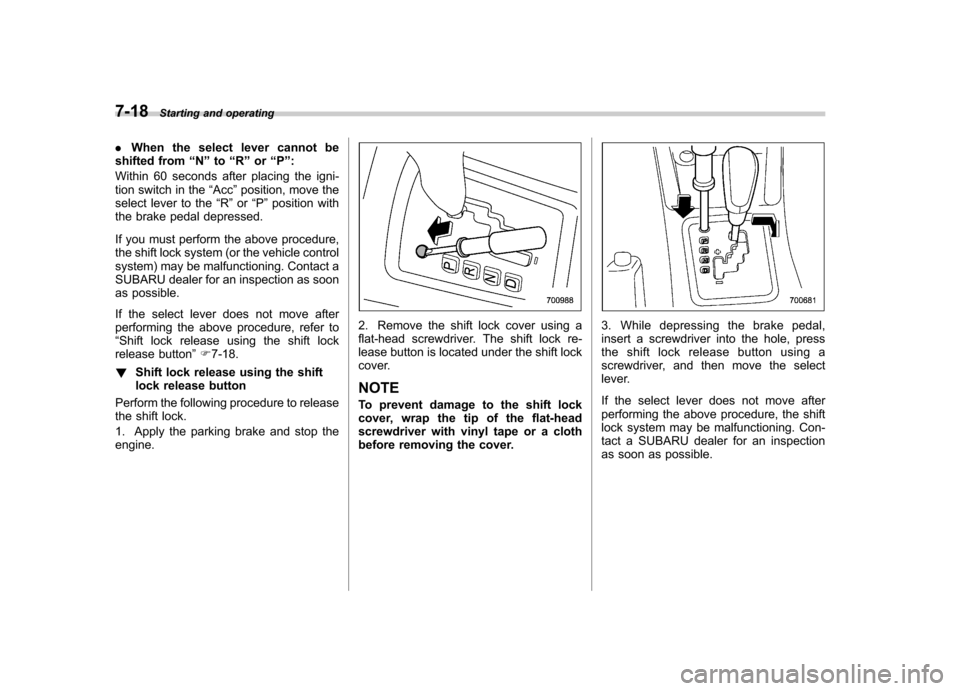
! Shift lock release using the shift
lock release button
Perform the following procedure to release
the shift lock.
1. Apply the parking brake and stop the engine.
2. Remove the shift lock cover using a
flat-head screwdriver. The shift lock re-
lease button is located under the shift lock
cover. NOTE
To prevent damage to the shift lock
cover, wrap the tip of the flat-head
screwdriver with vinyl tape or a cloth
before removing the cover.3. While depressing the brake pedal,
insert a screwdriver into the hole, press
the shift lock release button using a
screwdriver, and then move the select
lever.
If the select lever does not move after
performing the above procedure, the shift
lock system may be malfunctioning. Con-
tact a SUBARU dealer for an inspection
as soon as possible.
Page 293 of 446

7-34Starting and operating
Type B
At this time, the cruise control set indicator
light on the combination meter will illumi-nate.
The vehicle will maintain the desired speed.
Vehicle speed can be temporarily in-
creased while driving with the cruise
control activated. Simply depress the
accelerator pedal to accelerate the vehi-
cle. When the accelerator pedal is re-
leased, the vehicle will return to and
maintain the previous cruising speed. & To temporarily cancel the
cruise control
The cruise control can be temporarily
canceled in the following ways.. Push the “CANCEL ”button.
. Depress the brake pedal.
. Depress the clutch pedal (MT models
only). . Shift the select lever into the “N ”
position (AT models only).. Shift the shift lever into neutral position
(MT models only).
The cruise control set indicator light on the
combination meter turns off when the
cruise control is canceled.To resume the cruise control after it has
been temporarily canceled and with vehi-
cle speed of approximately 20 mph (32
km/h) or more, push the “RES/ACC ”
button to return to the original cruising
speed automatically.
The cruise control set indicator light on the
combination meter will automatically illu-
minate at this time. & To turn off the cruise control
There are two ways to turn off the cruise control: . Push the “CRUISE ”main switch button
again.. Turn the ignition switch to the “Acc ”or
“ LOCK ”position (but only when the
vehicle is completely stopped).