2011 SUBARU FORESTER display
[x] Cancel search: displayPage 191 of 446

5-12Audio
!Adjustable level of each mode
Mode Range of levels (displayed)DefaultsettingTurn counterclockwise Turn clockwise
Volume Volume control 0 to 40 15 For less volume For more volume AUX volume control* 0 to 40 15 For less volume For more volume
Tone and balance Bass control 8 to +8 0 For less bass sound For more bass sound
Midrange control 8 to +8 0 For less midrange sound For more midrange sound
Treble control 8 to +8 0 For less treble sound For more treble sound
Balance L9 to R9 0 Right channel attenuated Left channel attenuated
Fader R9 to F9 0 Front attenuated Rear attenuated
Other settings SPEED VOLUME OFF to 2 OFF For less auto volume change For more auto volume change
BEEP (Type A, B and C audio) OFF to ON ON OFF ON
CS Auto (Type B audio) OFF to ON OFF OFF ON
SRS Sound (Type D audio) OFF to ON ON OFF ON
Brightness (Type D audio) 0 to 15 8 For less brightness For more brightness
Contrast (Type D audio) 0 to 15 8 For less contrast For more contrast
Screen size (Type D audio) Normal to Wide Wide Normal Wide
HD ON/OFF (Type D audio) OFF to ON ON ON OFF
Initialize (Type D audio) Cancel to Initialize Cancel Initialize Cancel
*: For type A and B audio, AUX volume can be adjusted only when an AUX audio product is connected.
Page 193 of 446

5-14Audio
however, when radio signals are weak. In
such a situation, perform manual tuning to
select the desired station. !Scan tuning (SCAN)
Type A and B audio
Type C audio
Type D audio
If you press the “SCAN ”button briefly
(type A, B and C audio)/continuously (type
D audio), the radio will switch to the scan
mode. In this mode, the radio scans
through the radio band until a station is
found. The radio will stop at the station for
5 seconds (type A, B and C audio)/10
seconds (type D audio) while displaying
the frequency, after which scanning will
continue until the entire band has beenscanned.
Press the “SCAN ”button again to cancel
the SCAN mode and to stop at any
displayed channel.
Automatic tuning may not function prop-
erly if the station reception is weakened by
distance from the station or proximity to
tall buildings and hills. !
PTY (Program type) group tuning
(only FM reception)
Type A and B audio
Type C audio
Type D audio
Press the indicated button to change to
the PTY selection mode. At this time, the
PTY group that you are currently listening
to (type A, B and C audio)/that you
selected the last time (type D audio) will
be displayed for 10 seconds. In the PTY
selection mode, “PTY ”is displayed on the
screen. ! PTY (Program type) group selection
In the PTY selection mode, press the
following button to change the PTY group
by one step at a time.
Type A and B audio:
PTY group up by
one step
PTY group down by
one step
Type C audio:
PTY group up by
one step
PTY group down by
one step
This operation only changes the display. It
does not change the station that is
currently being received. ! Seek in PTY (Program type) group
(type A, B and C audio)
Type A and B audio:
Seek up
Seek down
Type C audio:
Seek up
Seek down
Page 195 of 446

5-16Audio
.The “LIVE ”indicator illuminates while
the “Ballgame ”is received.
. The “STEREO ”indicator illuminates
while the FM stereo broadcast is received. . The “PTY ”indicator illuminates during
the PTY selection mode. ! About HD Radio
NOTE . HD Radio Technology is a hybrid
broadcasting system that employs di-
gital and analog signals. . When the vehicle moves outside the
digital broadcasting area (that is nar-
rower than the analog broadcasting
area due to the FCC output require-
ments), the radio reception automati-
cally changes from the digital signal to
the analog signal. When the vehicle
reenters the digital broadcasting area
again, the radio reception automatically
changes from the analog signal to the
digital signal. When in a digital modethe
Logo will be in orange on the
radio display. . Depending on the broadcasting sta-
tion, a condition such as a sound delay,
echo effect or skipping sound may
occur. However, this does not indicate
a malfunction.. Depending on the broadcasting
area, the digital signal may not be received in an area where the analog
signal can be properly received, or the
system frequently switches the chan-
nels between the digital and analog
signals. However, this does not indi-
cate a malfunction. If this frequent
switching between digital and analog
causes annoyance, set the radio to the
analog mode (HD Radio off mode) that
provides the same radio broadcasting
quality as a conventional radio.
& Displaying radio PS (Pro-
gram Service Name) and RT
(Radio Text)
Type A and B audio
Type C and D audio
! Type A, B and C audio
If the PS (Program Service Name) and/or
RT (Radio Text) are available, pressingthe “TEXT ”button changes the display
among PS, RT and frequency. The default
setting is “PS ”. NOTE .
The maximum number of characters
that can be displayed for PS is 8. . The maximum number of characters
that can be displayed for RT is 64.. If RT is 13 characters or longer,
press and hold the “TEXT ”button for
0.5 second or longer in order to change
the page. ! Type D audio
Push the “TEXT ”button to show the next
page when the text is not fully displayed
while the PSD (Program Service Data) or
RT (Radio Text) service is received.
NOTE . When the HD Radio function is
turned on, PSD provides additional
information about the broadcast. Text
data such as “Title ”and “Artist ”is
displayed on the screen. . When the HD Radio function is
turned off (HD Radio off mode), the
radio text is displayed on the screen
while receiving the broadcasting sta-
tion with RBDS (Radio Broadcast DataSystem).
Page 196 of 446

&Station preset
! How to preset stations
1. Press the “FM/AM ”button to select
FM1, FM2, FM3 (type A, B and C audio)/
FM-AS (type D audio), AM or AM-AS (type
D audio) reception.
2. Select the preferred station.
3. Press one of the preset buttons (from
to) for more than 1.5 seconds
to store the frequency. If the button is
pressed for less than 1.5 seconds, the
preceding selection will remain in memory. NOTE . Up to six FM1, FM2, FM3 (type A, B
and C audio)/FM-AS (type D audio), AM
and AM-AS (type D audio) stations
each may be preset.. If the connection between the radio
and battery is broken for any reason
such as vehicle maintenance or radio
removal, all stations stored in the
preset buttons are cleared. If this
occurs, it is necessary to reset the
preset buttons.. If a cell phone is placed near the
radio, it may cause the radio to emit
noise when it receives calls. This noise
does not indicate a radio malfunction. !
Selecting preset stations
1. Press the “FM/AM ”button to select
FM1, FM2, FM3 (type A, B and C audio)/
FM-AS (type D audio), AM or AM-AS (type
D audio) reception.
2. Press the preferred preset button (from
to) briefly.
! Auto-store (type D audio)
Using the Auto-store function, you can
automatically store 6 stations on the
current waveband (FM-AS or AM-AS) by
pressing the
button for 1.5 seconds
or longer. Use Auto-store to quickly find
the strongest stations, for example when
traveling through different reception areas. NOTE . When the HD Radio function is
turned on, Auto-store cannot be used
while receiving the broadcasting sta-
tion with SPS (Supplemental ProgramService).. When you use Auto-store, the new
stations replace any stations pre-
viously stored.. Interrupting Auto-store: If you acci-
dentally press the
(Auto-store)
button, you can cancel the Auto-store
function before it has been completed
as follows.
–switching to the other source mode –
pressing the
button
– switching to the other band
– turning the “TUNE/TRACK/CH ”
dial – pressing the “SCAN ”button
! Displaying and selecting preset
stations (type D audio)
1. Press the
button for 1.5 seconds
or longer during AM/FM reception to
display the radio screen.
2. Operate the “TUNE/TRACK/CH ”dial
to select the stations. Audio
5-17
Page 198 of 446

signals can be blocked by objects such as
buildings, but the network of repeater
stations allows signal coverage within
urban areas such as cities.
You may experience problems in receiving XM
TMsatellite radio signals in the follow-
ing situations. . If you are driving northward in a coastal
area
Because the satellite radio antenna is
located on the windshield, the signal
comes from the south and may not be
able to reach the antenna in some
circumstances when you are driving north.
. If you are driving in a tunnel or a
covered parking area . If you are driving beneath the top level
of a multi-level freeway .
If you drive under a bridge
. If you are driving next to a tall vehicle
(such as a truck or a bus) that blocks the signal . If you are driving in a valley where the
surrounding hills or peaks block the signal
from the south . If you are driving on a mountain road
where the southern direction is blocked by mountains
. If you are driving in an area with tall
trees that block the signal (10 m or more),
for example on a road that goes through a
dense forest . The signal can become weak in some
areas that are not covered by the repeater
station network.
Please note that these may be other unforeseen circumstances when there
are problems with the reception of XM
TM
satellite radio signals. NOTE
The channel guide is not yet updated if
the update is done while receiving the XM
TMsatellite radio signal. To complete
the update, turn the ignition switch tothe “LOCK ”position and then to the
“ ACC ”or “ON ”position.
& Displaying satellite radio ID
of tuner
When you activate satellite radio, you
should have your satellite radio tuner ID
ready because each tuner is identified by
its unique satellite radio tuner ID.
The satellite radio ID will be needed when
you activate satellite radio and receive
satellite radio customer support.
The satellite radio ID can be found on the
audio display by tuning the channel to “0 ”.
Turn the “TUNE/TRACK/CH ”dial to select
the satellite radio channel.
NOTE
For Sirius, change the display to an
indication mode other than the channel
number after performing the aboveoperation. Audio
5-19
– CONTINUED –
Page 200 of 446

When in the category search mode, press
the following button to change the cate-
gory up or down.
Type A and B audio:Category up by one step
Category down by
one step
Type C audio:
Category up by one step
Category down by
one step
When a category is selected, turning the “ TUNE/TRACK/CH ”dial selects channels
only within the selected category.
The control function returns to the normal
mode after approximately 10 seconds. ! Type D audio
When in the SAT mode, press the
button to change the category search mode. When in the category search mode, press
the following button to change the cate-
gory up or down.
Category up by one step
Category down by
one step
When a category is selected, turning the “ TUNE/TRACK/CH ”dial selects channels
only within the selected category. The
control function returns to the normal
mode after approximately 10 seconds. ! Channel scan
Type A and B audio
Type C audio
Type D audio
Press the “SCAN ”button briefly (type A, B
and C audio)/for more than 1.5 seconds
(type D audio) to change the radio to the
SCAN mode. In this mode, under the
selected category, the radio scans through
the channel until a station is found. The radio will stop at the station for 5 seconds
while displaying the channel number, after
which scanning will continue until the
entire channel has been scanned from
the low end to the high end.
Press the
“SCAN ”button briefly (type A, B
and C audio)/for more than 1.5 seconds
(type D audio) again to cancel the SCAN
mode and to stop on any displayedchannel. & Channel preset
! How to preset channels
1. Press the “SAT ”button to select SAT1,
SAT2 or SAT3 reception.
2. Select the desired channel.
3. Press one of the preset buttons (from
to) for more than 1.5 seconds
to store the channel. If the button is
pressed for less than 1.5 seconds, the
preceding selection will remain in memory. NOTE . Up to six SAT1, SAT2 and SAT3
channels each may be preset. . If the connection between the radio
and battery is broken for any reason
such as vehicle maintenance or radio
removal, all channels stored in the
preset buttons are cleared. If this Audio
5-21
– CONTINUED –
Page 201 of 446
5-22Audio
occurs, it is necessary to reset the
preset buttons. !Selecting preset channels
1. Press the “SAT ”button to select SAT1,
SAT2 or SAT3 reception.
2. Press the preferred preset button
briefly. ! Displaying and selecting preset
stations (type D audio)
1. Press the
button for 1.5 seconds
or longer during satellite radio reception to
display the radio screen.
2. Operate the “TUNE/TRACK/CH ”dial
to select the stations.
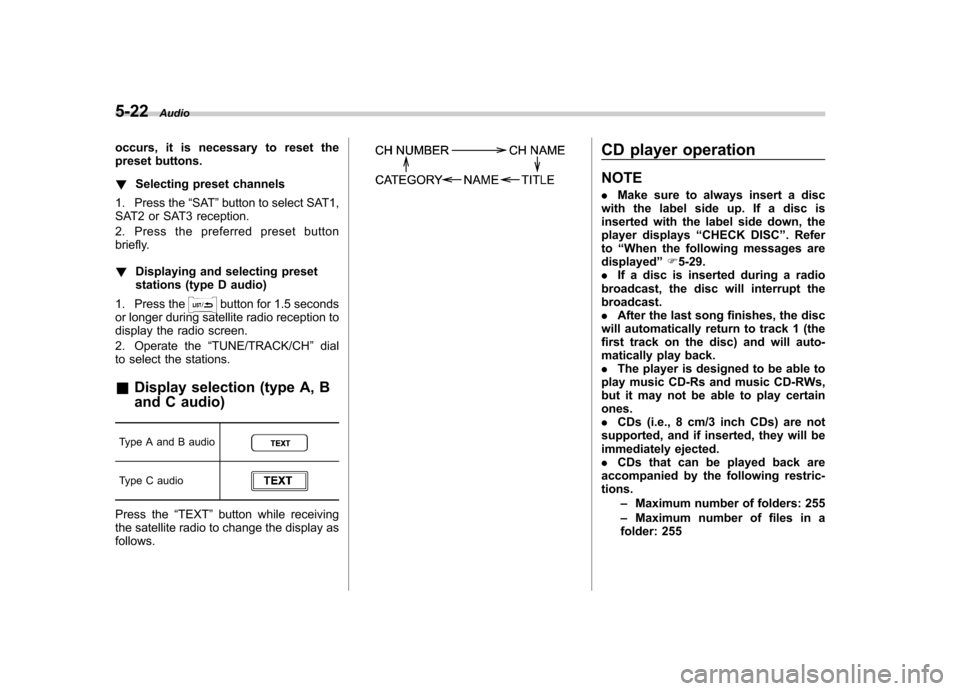
& Display selection (type A, B
and C audio)
Type A and B audio
Type C audio
Press the “TEXT ”button while receiving
the satellite radio to change the display as follows.
CD player operation NOTE . Make sure to always insert a disc
with the label side up. If a disc is
inserted with the label side down, the
player displays “CHECK DISC ”. Refer
to “When the following messages are
displayed ”F 5-29.
. If a disc is inserted during a radio
broadcast, the disc will interrupt thebroadcast.. After the last song finishes, the disc
will automatically return to track 1 (the
first track on the disc) and will auto-
matically play back. . The player is designed to be able to
play music CD-Rs and music CD-RWs,
but it may not be able to play certainones.. CDs (i.e., 8 cm/3 inch CDs) are not
supported, and if inserted, they will be
immediately ejected.. CDs that can be played back are
accompanied by the following restric-tions.
–Maximum number of folders: 255
– Maximum number of files in a
folder: 255
Page 203 of 446

5-24Audio
! Inserting a disc in a desired posi- tion
1. Briefly press the
button. If the
magazine in the player has an idle
position where you can insert a disc, the
disc number indicator associated with the
idle position will blink.
The positions in the magazine the indica-
tor of which steadily lights up are already
loaded with discs.
2. Press the disc select button (from
to) at the position where you
want to insert a disc.
3. When the “LOAD ”indicator illumi-
nates, insert the disc. Once you have
inserted the disc, the “LOAD ”indicator will
turn off. The disc will then be automatically
drawn in, and the player will begin to play
the first track on the disc. . If you wish to insert another disc,
repeat the procedure beginning with step 1.
If you do not insert any disc in 15 seconds
after you have pressed the
button,
the player will begin to play back the first
track of the last disc you have inserted. . While the player is in the loading mode,
if you press
orbutton, the
player will enter standby mode. Press the
button to start playback. !
Loading all the magazine (full disc
loading mode)
1. If you continue to press the
button for more than 1.5 seconds, the
player will produce beep sound and will
enter the full disc loading mode.
2. When the disc number indicator
flashes and “ALL LOAD ”indicator illumi-
nates, insert a disc within 15 seconds. If a
disc is successfully loaded during this
period, the disc number indicator will stop
blinking and will steadily light.
3. When the loading of a disc is com-
plete, the next disc number indicator will
blink. Then repeat step 2.
4. When the magazine is filled with discs
by repeating steps 2 and 3, the player will
start playback of the discs, beginning with
the one inserted first.
If you fail to insert any disc during each 15
seconds interval, the full disc loading
mode will be canceled, and the player will
start playback of the disc inserted first. & How to play back a CD
! When there is no CD inserted
Properly insert a CD. Refer to “How to
insert a CD (type A, C and D) ”F 5-23 /
“ How to insert a CD(s) (type B) ”F 5-23.
When a CD is loaded, the player will start
playback of the CD, beginning with the first track. !
When CD is in the player (type A)
When thebutton is pressed, the
player will start playback. ! When there are CDs loaded (type B)
Press a desired one of the disc select
buttons (from
to) the disc
number indicator of which steadily lights
up. The player will then start playback of
the selected CD, beginning with the firsttrack.
If a disc that the player cannot read has
been loaded, the player will display themessage “CHECK DISC ”.
! When CD is in the player (type C
and D)
Each brief press of the
button
changes the modes in the following sequence.
*: For type C audio, “BT-A ”is displayed.
When the CD mode is selected, the player
will start playback.