2011 SMART FORTWO COUPE steering
[x] Cancel search: steeringPage 87 of 228

manually using the gear selector lever or
the steering wheel gearshift control 10
.
! Allow the engine to warm up under low
load use. Do not place full load on the
engine until the operating temperature
has been reached.
Shift into reverse gear R or parking
position P only when the vehicle is
stopped.
Avoid spinning of a drive wheel for an
extended period when driving off on
slippery road surfaces. Otherwise, the
drivetrain could be damaged, which is
not covered by the smart Limited
Warranty.
Activating manual gearshifting
XMove the gear selector lever to drive
position D ( Y page 82).XPull one of the shift paddles ( Y page 85)
towards you.
or
XMove the gear selector lever to manual
gearshifting M (Y page 82).
System-controlled automatic
gearshifting is switched off.
You can upshift or downshift through the
gears in succession.
The currently engaged gear appears in the
multifunction display ( Y page 85).
UpshiftingXBriefly push the gear selector lever
forward in the + direction ( Y page 82).
or
XPull right shift paddle 0047 (Y page 85)
towards you.
The transmission shifts to the next
higher gear.
i With manual gearshifting M selected,
the transmission shifts up only to
prevent engine overrevving.
Downshifting
GWarning!
On slippery road surfaces, never downshift
in order to obtain braking action. This
could result in drive wheel slip and
reduced vehicle control. Your vehicle’s ABS
will not prevent this type of loss of control.
XBriefly pull the gear selector lever
backward in the - direction ( Y page 82).
or
XPull left shift paddle 0046 (Y page 85)
towards you.
The transmission shifts to the next lower
gear.
Kickdown
You can use kickdown when you want
maximum acceleration.
10 Model passion and BRABUS only.Transmission85>> Controls.BA 451 USA, CA Edition A 2011; 1; 4, en-UShereepeVersion: 3.0.3.62010-05-11T15:12:26+02:00 - Seite 85Z
Page 103 of 228
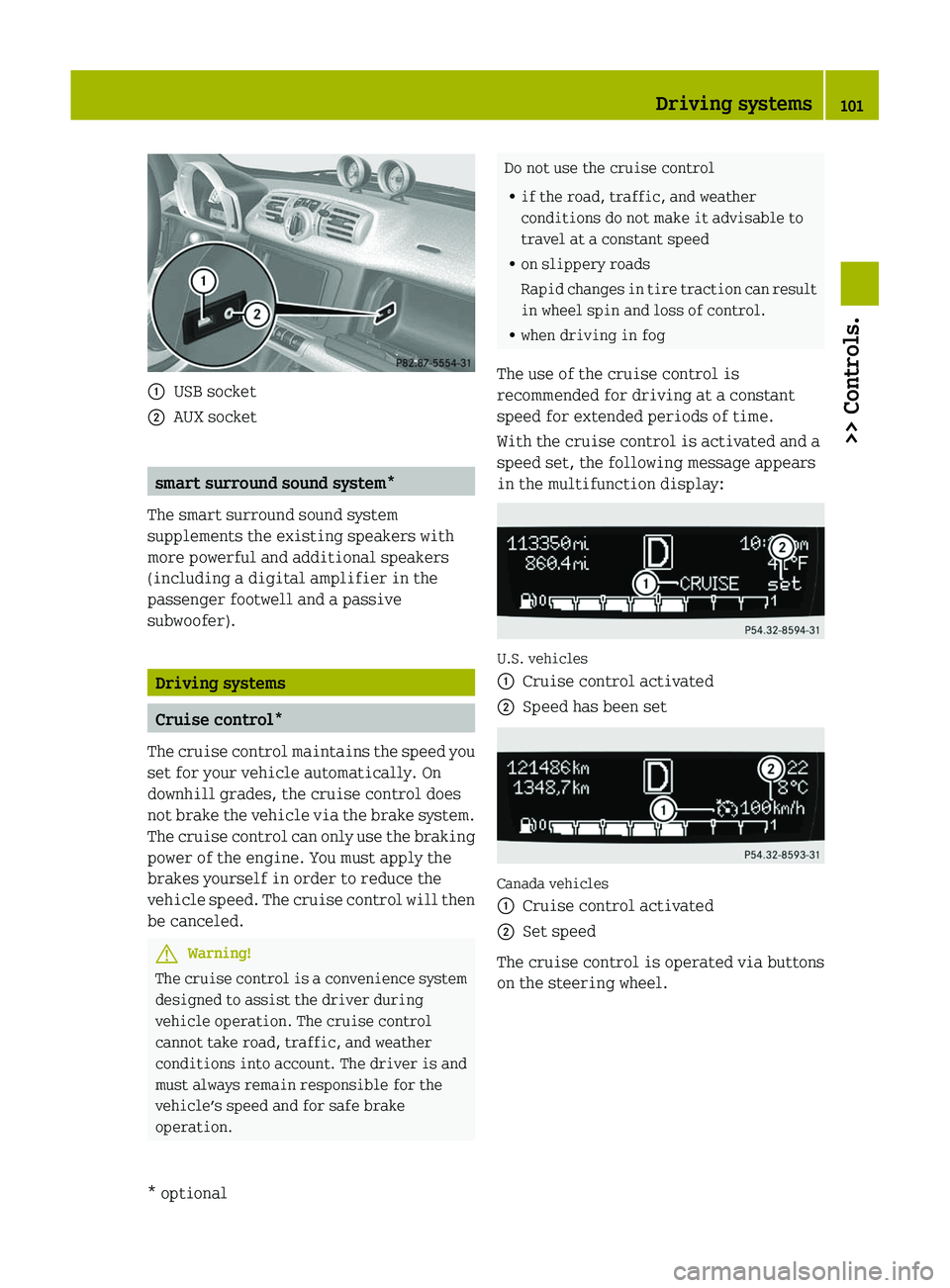
\000FUSB socket\000GAUX socket
smart surround sound system*
The smart surround sound system
supplements the existing speakers with
more powerful and additional speakers
(including a digital amplifier in the
passenger footwell and a passive
subwoofer).
Driving systems
Cruise control*
The cruise control maintains the speed you
set for your vehicle automatically. On
downhill grades, the cruise control does
not brake the vehicle via the brake system.
The cruise control can only use the braking
power of the engine. You must apply the
brakes yourself in order to reduce the
vehicle speed. The cruise control will then
be canceled.
GWarning!
The cruise control is a convenience system
designed to assist the driver during
vehicle operation. The cruise control
cannot take road, traffic, and weather
conditions into account. The driver is and
must always remain responsible for the
vehicle’s speed and for safe brake
operation.
Do not use the cruise control
Rif the road, traffic, and weather
conditions do not make it advisable to
travel at a constant speed
Ron slippery roads
Rapid changes in tire traction can result
in wheel spin and loss of control.
Rwhen driving in fog
The use of the cruise control is
recommended for driving at a constant
speed for extended periods of time.
With the cruise control is activated and a
speed set, the following message appears
in the multifunction display:
U.S. vehicles
\000FCruise control activated\000GSpeed has been set
Canada vehicles
\000FCruise control activated\000GSet speed
The cruise control is operated via buttons
on the steering wheel.
Driving systems101>> Controls.* optionalBA 451 USA, CA Edition A 2011; 1; 4, en-UShereepeVersion: 3.0.3.62010-05-11T15:12:26+02:00 - Seite 101Z
Page 113 of 228

the pedals. This could restrict your ability
to brake or accelerate and could lead to
accidents and injury.
Coin holder
The coin holder is located in front of the
gear selector lever.
Example illustration (coupé)
\000FCoin holder
Door pockets
The door pockets are located in the driver’s
and passenger door.
\000FDoor pocket
Storage trays next to the steering wheel
The storage trays are located to the left and
right of the steering wheel.
\000FStorage tray
Glove box
iA clamp rail for slips of paper is
located on the outside of the glove box
lid.
XOpening: Pull on glove box lid
release \000F and fold down the glove box
lid.
XClosing: Lift up the glove box lid with a
bit of force until it engages.
XLocking: Insert the key into the glove box
lock and turn it to position \000L.
XUnlocking: Insert the key into the glove
box lock and turn it to position \000K.
Loading and storing111>> Controls.BA 451 USA, CA Edition A 2011; 1; 4, en-UShereepeVersion: 3.0.3.62010-05-11T15:12:26+02:00 - Seite 111Z
Page 129 of 228

RIf vehicle is heavily loaded, check tire
inflation pressure and correct as
required.
R Do not allow your tires to wear down too
far. Adhesion properties on wet roads are
sharply reduced at tread depths of less
than 1
/ 8 in (3 mm).
Recommended tire inflation pressure
GWarning!
Follow recommended tire inflation
pressures.
Do not underinflate tires. Underinflated
tires wear excessively and/or unevenly,
adversely affect handling and fuel
economy, and are more likely to fail from
being overheated.
Do not overinflate tires. Overinflated
tires can adversely affect handling and
ride comfort, wear unevenly, increase
stopping distance, and result in sudden
deflation (blowout) because they are more
likely to become punctured or damaged by
road debris, potholes etc.
Do not overload the tires by exceeding the
specified load limit as indicated on the
Tire and Loading Information placard on
the driver’s door B‑pillar. Overloading the
tires can overheat them, possibly causing
a blowout. Overloading the tires can also
result in handling or steering problems, or
brake failure.
Your vehicle is equipped with the Tire and
Loading Information placard located on
the driver’s door B‑pillar ( Y page 132).
The tire inflation pressure should be
checked regularly. Only adjust the tire
inflation pressure on cold tires. The tires
can be considered cold if the vehicle has
been parked for at least 3 hours or driven
less than 1 mile (1.6 km). Depending on the
ambient temperature, the driving speed
and the tire load, the tire temperature
changes. When the tire temperature
changes by 18 ¦ (10 ¥), the tire inflation
pressure will change by approximately
10 kpa (0.1 bar, 1.5 psi). Keep this in mind
when checking tire inflation pressure on
warm tires and adjust the tire pressure
only if the tire inflation pressure is too
low for the current operating conditions.
If you check the tire inflation pressure
when the tires are warm, the reading will
be higher than the cold reading. This is
normal. Do not let air out to match the
specified cold tire inflation pressure.
Otherwise, the tire will be underinflated.
Follow recommended cold tire inflation
pressures listed on Tire and Loading
Information placard on the driver’s door
B‑pillar.
Keeping the tires properly inflated
provides the best handling, tread life and
riding comfort.
In addition to the Tire and Loading
Information placard on the driver’s door
B‑pillar, also consult the tire inflation
pressure label (if available) on the inside
of the filler flap for any additional
information pertaining to special driving
situations. For more information, see
“Important notes on tire inflation
pressure” ( Y page 128).
i Data shown on Tire and Loading
Information placard example are for
illustration purposes only. Tire data are
specific to each vehicle and may vary
from data shown in the following
illustration. Refer to Tire and Loading
Information placard on vehicle for
actual data specific to your vehicle.Tires and wheels127>> Operation.BA 451 USA, CA Edition A 2011; 1; 4, en-UShereepeVersion: 3.0.3.62010-05-11T15:12:26+02:00 - Seite 127Z
Page 131 of 228

stopping distance, and result in sudden
deflation (blowout) because they are more
likely to become punctured or damaged by
road debris, potholes etc.
Do not overload the tires by exceeding the
specified load limit as indicated on the
Tire and Loading Information placard on
the driver’s door B‑pillar. Overloading the
tires can overheat them, possibly causing
a blowout. Overloading the tires can also
result in handling or steering problems, or
brake failure.
Check the tire inflation pressure at least
once a month.
Check and adjust the tire inflation
pressure when the tires are cold
( Y page 127).
Checking tire inflation pressure
manually
Follow the steps below to achieve correct
tire inflation pressure:
XRemove the cap from the valve on one tire.XFirmly press a tire gauge onto the valve.XRead the tire inflation pressure on tire
gauge and check against the
recommended tire inflation pressure on
the Tire and Loading Information
placard on the driver’s door B‑pillar
( Y page 132). If necessary, add air to
achieve the recommended tire inflation
pressure.XIf you have overfilled the tire, release
tire inflation pressure by pushing the
metal stem of the valve with e.g. a tip of
a pen. Then recheck the tire inflation
pressure with the tire gauge.XInstall the valve cap.XRepeat this procedure for each tire.
Tire Pressure Monitoring System (TPMS)*
Your vehicle may be equipped with a Tire
P ressure Monitoring System (TPMS).
It monitors the tire inflation pressure in
all four tires. A warning is issued to alert
you to a decrease in pressure in one or more
of the tires.
The Tire Pressure Monitoring System
(TPMS) is equipped with a combination low
tire pressure/TPMS malfunction telltale in
the instrument cluster. Depending on how
the telltale illuminates, it indicates a low
tire pressure condition or a malfunction in
the TPMS system itself:
R If the telltale illuminates continuously,
one or more of your tires is significantly
underinflated. There is no malfunction
in the TPMS.
R If the telltale flashes for 60 seconds and
then stays illuminated, the TPMS system
itself is not operating properly.
The TPMS only functions on wheels that are
equipped with the proper electronic
sensors.GWarning!
The TPMS does not indicate a warning for
wrongly selected inflation pressures.
Always adjust tire inflation pressure
according to the Tire and Loading
Information placard on the driver’s door
B‑pillar.
The TPMS is not able to issue a warning due
to a sudden dramatic loss of pressure (e.g.
tire blowout caused by a foreign object). In
this case bring the vehicle to a halt by
carefully applying the brakes and avoiding
abrupt steering maneuvers.
GWarning!
Each tire should be checked monthly when
cold and inflated to the inflation pressure
recommended by the vehicle manufacturer
on the Tire and Loading Information
placard. If your vehicle has tires of a
different size than the size indicated on
the Tire and Loading Information placard,
you should determine the proper tire
inflation pressure for those tires.
Tires and wheels129>> Operation.* optionalBA 451 USA, CA Edition A 2011; 1; 4, en-UShereepeVersion: 3.0.3.62010-05-11T15:12:26+02:00 - Seite 129Z
Page 134 of 228

Always follow the recommended tire
inflation pressure ( Y page 127) for proper
tire inflation.
Loading the vehicle
Two labels on your vehicle show how much
weight it may properly carry.
1)The Tire and Loading Information
placard can be found on the driver’s
door B‑pillar. This placard tells you
important information about the
number of people that can be in the
vehicle and the total weight that can be
carried in the vehicle. It also contains
information on the proper size and
recommended tire inflation pressures
for the original equipment tires on
your vehicle.2)The certification label, also found on
the driver’s door B‑pillar, tells you
about the gross weight capacity of your
vehicle, called the Gross Vehicle
Weight Rating (GVWR). The GVWR
includes the weight of the vehicle, all
occupants, fuel and cargo. The
certification label also tells you about
the front and rear axle weight capacity,
called the Gross Axle Weight Rating
(GAWR). The GAWR is the total allowable
weight that can be carried by a single
axle (front or rear). Never exceed the
GVWR or GAWR for either the front axle
or rear axle.0046 Driver’s door B‑pillarFollowing is a discussion on how to work
with the information contained on the Tire
and Loading Information placard with
regards to loading your vehicle.
Tire and Loading InformationGWarning!
Do not overload the tires by exceeding the
specified load limit as indicated on the
Tire and Loading Information placard on
the driver’s door B‑pillar. Overloading the
tires can overheat them, possibly causing
a blowout. Overloading the tires can also
result in handling or steering problems, or
brake failure.
Tire and Loading Information placard
i Data shown on Tire and Loading
Information placard example are for
illustration purposes only. Load limit
data are specific to each vehicle and may
vary from data shown in the following
illustration. Refer to Tire and Loading
Information placard on vehicle for
actual data specific to your vehicle.
The Tire and Loading Information placard
showing load limit information 0046 is
located on the driver’s door B‑pillar
( Y page 132).
XLocate the statement “The combined
weight of occupants and cargo should
never exceed XXXX kg or XXXX lbs.” on the
Tire and Loading Information placard.132Tires and wheels>> Operation.
BA 451 USA, CA Edition A 2011; 1; 4, en-UShereepeVersion: 3.0.3.62010-05-11T15:12:26+02:00 - Seite 132
Page 137 of 228

Certification label
Even after careful determination of the
combined weight of all occupants and cargo
as to not exceed the permissible load
limit, you must make sure your vehicle
never exceeds the Gross Vehicle Weight
Rating (GVWR) and the Gross Axle Weight
Rating (GAWR) for either the front or rear
axle. You can obtain the GVWR and GAWR
from the certification label. The
certification label can be found on the
driver’s door B‑pillar, see “Technical
data” ( Y page 214).
Gross Vehicle Weight Rating (GVWR) means:
The total weight of the vehicle, all
occupants, and all cargo must never exceed
the GVWR.
Gross Axle Weight Rating (GAWR) means:
The total allowable weight that can be
carried by a single axle (front or rear).
To assure that your vehicle does not exceed
the maximum permissible weight limits
(GVWR and GAWR for front and rear axle),
have the loaded vehicle (including driver,
passenger, and all cargo) weighed on a
suitable commercial scale.
Maximum tire load
GWarning!
Do not overload the tires by exceeding the
specified load limit as indicated on the
Tire and Loading Information placard on
the driver’s door B‑pillar. Overloading the
tires can overheat them, possibly causing
a blowout. Overloading the tires can also
result in handling or steering problems, or
brake failure.
i For illustration purposes only. Actual
data on tires are specific to each vehicle
and may vary from data shown in above
illustration.
The maximum tire load 0046 is the maximum
weight the tires are designed to support.
For more information on tire load rating
( Y page 139).
For information on calculating total and
cargo load capacities ( Y page 134).
Direction of rotation
Unidirectional tires offer added
advantages, such as better hydroplaning
performance. To benefit, however, you must
make sure the tires rotate in the direction
specified.
An arrow on the sidewall indicates the
intended direction of rotation (spinning)
of the tire.
Tire care and maintenance
GWarning!
Regularly check the tires for damage.
Damaged tires can cause tire inflation
pressure loss. As a result, you could lose
control of your vehicle.
Worn, old tires can cause accidents. If the
tire tread is badly worn, or if the tires have
sustained damage, replace them.
Tires and wheels135>> Operation.BA 451 USA, CA Edition A 2011; 1; 4, en-UShereepeVersion: 3.0.3.62010-05-11T15:12:26+02:00 - Seite 135Z
Page 142 of 228

a blowout. Overloading the tires can also
result in handling or steering problems, or
brake failure.
Tire load rating 0086 is a numerical code
associated with the maximum load a tire
can support.
For example, a load rating of 91
corresponds to a maximum load of 1 356 lbs
(615 kg) the tire is designed to support.
See also “Maximum tire load” ( Y page 135)
where the maximum load associated with
the load index is indicated in kilograms
and lbs.
For additional information on tire load
rating, see “Load identification”
( Y page 141).
Tire speed rating GWarning!
Even when permitted by law, never operate
a vehicle at speeds greater than the
maximum speed rating of the tires.
Exceeding the maximum speed for which
tires are rated can lead to sudden tire
failure, causing loss of vehicle control and
possibly resulting in an accident and/or
personal injury and possible death, for you
and for others.
Regardless of the tire speed rating, local
speed limits should be obeyed. Use prudent
driving speeds appropriate to prevailing
conditions.
Tire speed rating 0087 indicates the
approved maximum speed for the tire.
Summer tires
IndexSpeed ratingQup to 100 mph (160 km/h)Rup to 106 mph (170 km/h)Sup to 112 mph (180 km/h)Tup to 118 mph (190 km/h)Hup to 130 mph (210 km/h)IndexSpeed ratingVup to 149 mph (240 km/h)Wup to 168 mph (270 km/h)Yup to 186 mph (300 km/h)ZR...Yabove 186 mph (300 km/h)ZR...(Y)above 186 mph (300 km/h)ZRabove 149 mph (240 km/h)
R At the tire manufacturer’s option, any
tire with a speed capability above
149 mph (240 km/h) can include a “ZR” in
the size designation (for example:
245/40 ZR18). To determine the maximum
speed capability of the tire, the service
description for the tire must be referred
to.
The service description is comprised of
tire load rating 0086 and tire speed rating
0087 .
If your tire includes “ZR” in the size
designation and no service description
is given, the tire manufacturer must be
consulted for the maximum speed
capability.
If a service description is given, the
speed capability is limited by the speed
symbol in the service description.
Example: 245/40 ZR18 97Y.
In this example, “97Y” is the service
description. The letter “Y” designates
the speed rating and the speed
capability of the tire is limited to
186 mph (300 km/h).
R Any tire with a speed capability above
186 mph (300 km/h) must include a “ZR” in
the size designation AND the service
description must be placed in
parenthesis. Example:
275/40 ZR 18 (99Y). The “(Y)” speed rating
in parenthesis designates the maximum
speed capability of the tire as being
above 186 mph (300 km/h). Consult the tire
140Tires and wheels>> Operation.
BA 451 USA, CA Edition A 2011; 1; 4, en-UShereepeVersion: 3.0.3.62010-05-11T15:12:26+02:00 - Seite 140