2011 SKODA OCTAVIA airbag
[x] Cancel search: airbagPage 54 of 248

The light comes on after the doors have been locked or on opening the boot lid.
The light goes out after switching on the ignition or up to 30 seconds after closing
all the doors and the boot lid.
If a door or the boot lid remains open, the light goes out within 2 minutes if the
ignition is switched off. WARNING
If the entry light comes on, do not touch its cover - risk of burns!
Luggage compartment light The lighting comes on automatically when the boot lid is opened. If the lid remains
open for more than about 10 minutes, the luggage compartment lighting switches
off automatically.
Visibility Rear window heater Fig. 34 Switch for rear window heater
– You can switch the rear window heater on or off by pressing the switch ⇒
fig. 34 - the indicator light in the switch comes on or goes out.
The rear window heater only operates when the engine is running.
The rear window heater switches off automatically after 10 minutes. For the sake of the environment
As soon as the window is de-iced or free from mist, the heating should be switch-
ed off. The reduced current consumption will have a favourable effect on fuel
economy ⇒ page 165, Saving electricity. Note
● If the on-board voltage drops, the rear window heater switches off automati-
cally, in order to provide sufficient electrical energy for the engine control
⇒
page 190, Automatic consumer shut-off.
● The position and the shape of the switch can differ depending on equipment
installed in the vehicle.
Sun visors Fig. 35 Sun visor: Swivelling out/double sun visor
You can pull the sun visor for the driver or front passenger out of the fixture and
swivel it toward the door in the direction of the arrow
1
⇒
fig. 35.
The vanity mirrors in the sun visors are provided with covers. Push the cover in di-
rection of arrow 2 .
On vehicles which are equipped with double sun visor, you can also unfold the
auxiliary visor in direction of arrow 3 after swivelling the sun visor.
WARNING
The sun visors must not be swivelled to the side windows into the deploy-
ment area of the head airbags if any objects, such as ball-point pens etc. are
attached to them. This might result in injuries to the occupants if the head air-
bag is deployed. 52
Lights and Visibility
Page 62 of 248

Seats and Stowage
Front seats
Basic information The front seats have a wide range of different settings and can thus be matched
to the physical characteristics of the driver and front passenger.
Correct adjustment of the seats is particularly important for:
● safely and quickly reaching the controls,
● a relaxed, fatigue-free body position,
● achieving the maximum protection offered by the seat belts and the airbag
system. WARNING
● Never transport more occupants than the maximum seating in the vehicle.
● Each occupant must correctly fasten the seat belt belonging to the seat.
Children must be fastened ⇒
page 147, Transporting children safely with a
suitable restraint system.
● The front seats and the head restraints must always be adjusted to match
the body size of the seat occupant as well as the seat belts must always be
correctly fastened in order to provide an optimal protection for you and your
occupants.
● Always keep your feet in the footwell when the car is being driven - never
place your feet on the instrument panel, out of the window or on the surfaces
of the seats. This is particularly important for the front seat passenger. You
will be exposed to increased risk of injury if it becomes necessary to apply the
brake or in the event of an accident. If an airbag is deployed, you may suffer
fatal injuries when adopting an incorrect seated position!
● It is important for the driver and front passenger to maintain a distance of
at least 25 cm from the steering wheel or dash panel. Not maintaining this
minimum distance will mean that the airbag system will not be able to proper-
ly protect you - hazard! The front seats and the head restraints must always
also be correctly adjusted to match the body size of the occupant. WARNING (Continued)
● Ensure that there are no objects in the footwell as any objects may get be-
hind the pedals during a driving or braking manoeuvre. You would then no
longer be able to operate the clutch, to brake or accelerate.
● Do not transport any objects on the front passenger seat except objects
(e.g. child safety seat) provided for this purpose - risk of accident!
Adjusting the front seats Fig. 42 Controls at seat
Adjusting a seat in a forward/back direction
– Pull the lever 1
⇒
fig. 42 up and push the seat into the desired position.
– Release the lever 1 and push the seat further until the lock is heard to en-
gage.
Adjusting height of seat
– Lift the seat if required by pulling or pumping lever 2 upwards.
– Lower the seat if required by pushing or pumping lever 2 downwards.
Adjust the angle of the seat backrest
– Relieve any pressure on the seat backrest (do not lean on it) and turn the
handwheel 3 to adjust the angle of the backrest.
Adjusting lumbar support
– Turn the wheel 4 until you have set the most comfortable curvature of the
seat upholstery in the area of your spine. £60
Seats and Stowage
Page 63 of 248

The driver's seat should be adjusted in such a way that the pedals can be fully
pressed to the floor with slightly bent legs.
The seat backrest on the driver's seat should be adjusted in such a way that the
upper point of the steering wheel can be easily reached with slightly bent arms.
WARNING
● Only adjust the driver seat when the vehicle is stationary - risk of injury!
● Take care when adjusting the seat! Adjusting the seat without care can
lead to bruises or injuries.
● The seat backrests must not be angled too far back when driving other-
wise this will affect proper operation of the seat belts and of the airbag sys-
tem - risk of injury!
Adjusting front seats electrically
Adjusting seats Fig. 43 Side view: Controls for adjusting the seat/seat setting switch
Adopt the correct seated position before setting ⇒ page 60
.
Adjusting a seat in a forward/back direction
– Press the switch A
⇒
fig. 43 forwards or backwards 1 .
Set the height of the seat cushion
– Press the switch A upwards or downwards. Adjust the angle of the seat cushion
–
Press the switch A at the front in the direction of arrow
2 or at the back in
the direction of arrow 3 .
Adjusting the seat backrest
– Press the switch B in the direction of the desired setting.
Adjusting lumbar support
– Press the switch C at the front in order to enlarge the curvature of the lum-
bar support.
– Press the switch C rear in order to reduce the curvature of the lumbar sup-
port.
– Press the switch C top in order to adjust the curvature of the lumbar support
higher.
– Press the switch C bottom in order to adjust the curvature of the lumbar sup-
port lower.
Switch A is operated in order to move the seat up/down and forward/back, while
switch B is operated in order to move the seat backrest forward or back.
WARNING
● Only adjust the driver seat when the vehicle is stationary - risk of injury!
● Caution when adjusting the seat! You may suffer injuries or bruises as a re-
sult of adjusting the seat without paying proper attention.
● In view of the fact that the seats can also be adjusted when the ignition is
switched off (even when ignition key withdrawn), you should never leave chil-
dren unattended in the car.
● The seat backrests must not be angled too far back when driving other-
wise this will affect proper operation of the seat belts and of the airbag sys-
tem - risk of injury! Note
If the movement of the seat is inadvertently interrupted during an adjustment,
once again press the switch in the appropriate direction and continue with the ad-
justment of the seat to the end. 61
Seats and Stowage Using the system Safety Driving Tips General Maintenance Breakdown assistance Technical data
Page 69 of 248

–
Distribute the items of luggage as evenly as possible.
– Place heavy objects as far forward as possible.
– Attach the items of luggage to the lashing eyes or the fixing net ⇒ page 67.
In the event of an accident, there is such a high kinetic energy which is produced
by small and light objects that they can cause severe injuries. The magnitude of
the kinetic energy depends on the speed at which the vehicle is travelling and on
the weight of the object. The speed at which the vehicle is travelling is in this case
the more significant factor.
Example: In the event of a frontal collision at a speed of 50 km/h, an unsecured
object with a weight of 4.5 kg produces an energy, which corresponds to 20 times
its own weight. This means that it results in a weight of approx. 90 kg. You can
imagine the injuries that can occur, if this
“bullet” is flying through the interior
compartment and hits an occupant. WARNING
● Store the objects in the luggage compartment and attach them to the
lashing eyes.
● Loose objects in the passenger compartment can be thrown forward dur-
ing a sudden manoeuvre or in case of an accident and can injure the occupants
or other oncoming traffic. This risk is still increased, if the objects which are
flying around are hit by a deployed airbag. In this case, the objects which are
thrown back can injure the occupants - hazard.
● Please note that the handling properties of your vehicle may be affected
when transporting heavy objects as a result of the displacement of the centre
of gravity. The speed and style of driving must be adjusted accordingly.
● The items carried in the luggage compartment should be stored in such a
way that no objects are able to slip forward if there are any sudden driving or
braking manoeuvres undertaken - risk of injury!
● Never drive with the boot lid fully opened or slightly ajar otherwise ex-
haust gases may get into the interior of the vehicle - risk of poisoning!
● On no account exceed the permissible axle loads and the permissible gross
weight of the vehicle - risk of accident!
● Never transport occupants in the luggage compartment! CAUTION
Make sure that transported objects with sharp edges do not damage the follow-
ing:
● heating elements in the rear window,
● elements of the aerial integrated in the rear window (Octavia),
● elements of the aerial integrated in the rear side windows (Estate car). Note
Tyre pressure must be adjusted to the load ⇒ page 192
.
Vehicles of category N1 On vehicles of the category N1, which are not fitted with a protective grille, a lash-
ing set which complies with the standard EN
12195 (1 - 4) must be used for fasten-
ing the load.
Lashing eyes Fig. 52 Luggage compartment: Lashing eyes Octavia/Estate car
Eyes are located on the sides of the luggage compartment for lashing the goods
to be loaded.
You can also attach a floor fixing net to these eyes for holding small objects.
The floor fixing net and the installation instruction are located in a container un-
der the floor covering of the luggage compartment behind the spare wheel. £ 67
Seats and Stowage Using the system Safety Driving Tips General Maintenance Breakdown assistance Technical data
Page 82 of 248
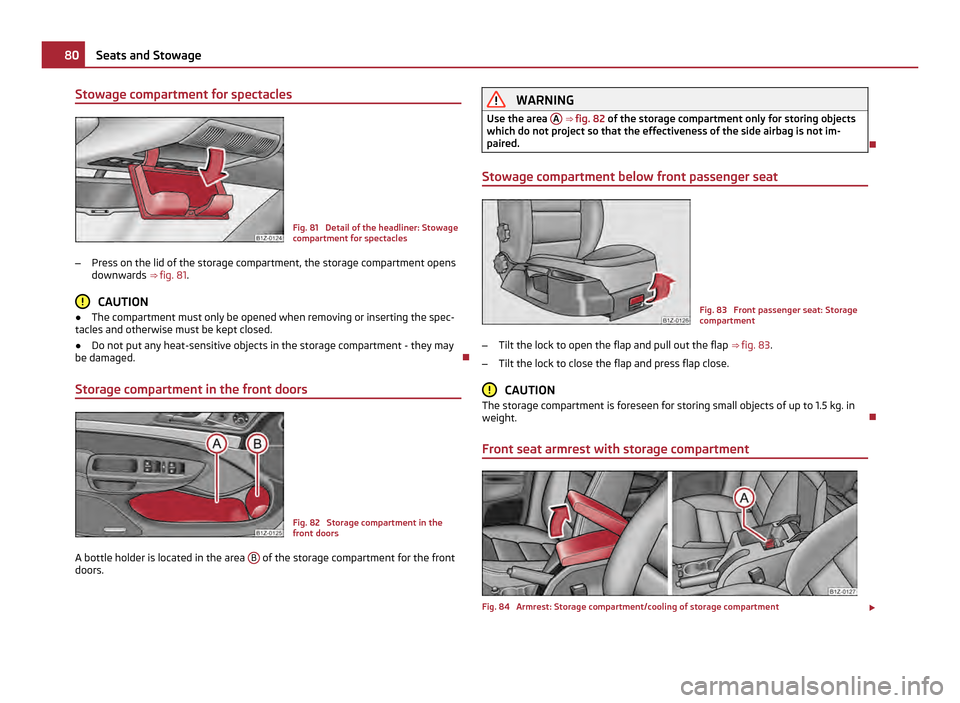
Stowage compartment for spectacles
Fig. 81 Detail of the headliner: Stowage
compartment for spectacles
– Press on the lid of the storage compartment, the storage compartment opens
downwards ⇒ fig. 81 . CAUTION
● The compartment must only be opened when removing or inserting the spec-
tacles and otherwise must be kept closed.
● Do not put any heat-sensitive objects in the storage compartment - they may
be damaged.
Storage compartment in the front doors Fig. 82 Storage compartment in the
front doors
A bottle holder is located in the area B of the storage compartment for the front
doors. WARNING
Use the area A ⇒ fig. 82 of the storage compartment only for storing objects
which do not project so that the effectiveness of the side airbag is not im-
paired.
Stowage compartment below front passenger seat Fig. 83 Front passenger seat: Storage
compartment
– Tilt the lock to open the flap and pull out the flap ⇒ fig. 83 .
– Tilt the lock to close the flap and press flap close. CAUTION
The storage compartment is foreseen for storing small objects of up to 1.5 kg. in
weight.
Front seat armrest with storage compartment Fig. 84 Armrest: Storage compartment/cooling of storage compartment
£80
Seats and Stowage
Page 86 of 248

WARNING
● Ensure that any clothes hanging from the hooks do not impair your vision
to the rear.
● Use the hooks for hanging only light items of clothing and ensure that
there are no heavy or sharp-edged objects in the pockets.
● The maximum permissible load of the hooks is 2 kg.
● Do not use clothes hangers for hanging up items of clothing otherwise this
will interfere with the protection offered by the head airbag. 84
Seats and Stowage
Page 100 of 248

Starting-off and Driving
Setting steering wheel position Fig. 98 Adjustable steering wheel: Lever below the steering wheel/safe distance to the
steering wheel
You can set the height and the forward/back position of the steering wheel to the
desired position.
– Adjust the driver seat ⇒ page 60, Adjusting the front seats.
– Pull the lever below the steering wheel down ⇒ fig. 98 - left ⇒
.
– Set the steering wheel to the desired position (concerning height and forward/
back position).
– Push the lever upwards as far as the stop. WARNING
● You must not adjust the steering wheel when the vehicle is moving!
● The driver must maintain a distance of at least 25 cm to the steering wheel
⇒ fig. 98 - right. Not maintaining this minimum distance will mean that the air-
bag system will not be able to properly protect you - hazard!
● For safety reasons the lever must always be firmly pushed up to avoid the
steering wheel altering its position unintentionally when driving - risk of acci-
dent! WARNING (Continued)
● If you adjust the steering wheel further towards the head, you will reduce
the protection offered by the driver airbag in the event of an accident. Check
that the steering wheel is aligned to the chest.
● When driving, hold the steering wheel with both hands firmly on the outer
edge in the 9 o'clock and 3 o'clock position. Never hold the steering wheel
firmly in the 12 o'clock position or in another way (e.g. in the middle of the
steering wheel or at the inner steering wheel edge). In such cases, injuries to
the arms, the hands and the head can occur when the driver airbag is de-
ployed.
Ignition lock Fig. 99 Ignition lock positions
Petrol engines 1 - ignition switched off, engine off, the steering can be locked.
2 - ignition switched on
3 - start engine
Diesel engines 1 - interruption of fuel supply, ignition switched off, engine off, the steering can
be locked.
2 - heating glow plugs on, ignition switched on
● You should not switch on any major electrical components during the heating
period otherwise the vehicle battery will be drained unnecessarily. £98
Starting-off and Driving
Page 118 of 248

for your mobile phone, use your mobile phone exclusively in the adapter so that
the radiation in the vehicle drops to a minimum. This also improves the quality of
the connection.
Operation of mobile phones or two-way radio systems may interfere with func-
tioning of the electronic systems of your vehicle. The reasons for this may be:
● no external aerial,
● external aerial incorrectly installed,
● transmission power greater than 10 watts. WARNING
● If a mobile phone or a two-way radio system is operated in the vehicle
without using an external aerial or an external aerial which has been incor-
rectly installed, this can increase the strength of the electromagnetic field in
the interior of the vehicle.
● Please concentrate fully at all times on your driving!
● You must not install two-way radio systems, mobile phones or mounts on
the covers of the airbags or within the immediate deployment range of air-
bags. This might result in injuries to the occupants in the event of an accident.
● Never leave a mobile phone on a seat, on the dash panel or in another
area, from which it can be thrown during a sudden braking manoeuvre, an ac-
cident or a collision. In this case, the occupants of the vehicle might be injured. Note
Observe the country-specific regulations for the use of mobile phones in vehicles.
Universal telephone preinstallation GSM II Introduction The universal telephone preinstallation GSM II is a built-in “hands-free system”, it
provides a voice operated convenience mode via the multifunction steering wheel or the radio navigation system.
All communication between a telephone and the hands-free system of your vehi-
cle can only be established with the help of the Bluetooth ®
technology. The
adapter serves only for charging the telephone and for transmitting the signal to
the external aerial of the vehicle. To ensure an optimum signal transmission, always leave the telephone with the
adapter in the telephone mount.
Furthermore the volume can be changed individually during the call at any time
with the button for setting the radio or radio navigation system or with the but-
tons on the multifunction steering wheel.
WARNING
Concentrate fully at all times on your steering! As the driver you are fully re-
sponsible for road safety. Use the telephone system only to such an extent, so
that you are in full control of your vehicle at any time. Note
● Please refer to the following guidelines ⇒ page 115, Mobile phones and two-
way radio systems.
● Should you have any questions, please contact an authorised ŠKODA Service
Partner.
Phone Phonebook A phone phonebook is part of the mobile phone preinstallation with voice control.
In the phone phonebook there are 2500 free memory locations available. Each
contact can contain up to 4 numbers. This phone phonebook can be used in line
with the mobile telephone.
On vehicles fitted with the radio navigation system Columbus, a maximum of 1200
telephone contacts are shown in the display of this appliance.
After the first connection of the telephone, the system begins to load the phone
book from the phone and the SIM card into the memory of the control unit.
Each time the telephone has established a new connection with the hands-free
system, an update of the relevant phone book is performed. The updating can
take a few minutes. During this time the phone book, which was stored after the
last update was completed, is available. Newly stored telephone numbers are only
shown after the updating has ended.
If the number of contacts loaded exceeds 2 500, the phone book is not complete.
If a telephone event (e.g. incoming or outgoing call, dialogue of the voice control)
occurs during the updating procedure, the updating is interrupted. After the tele-
phone event has ended, the updating starts anew. 116
Communication