2011 Seat Exeo ST roof
[x] Cancel search: roofPage 110 of 319

108Unlocking and locking
LED
When the vehicle is locked, the LED on the top of the driver door trim will
flash rapidly for about 30 seconds and then continue flashing slowly. This is
to indicate that the anti-theft alarm system (including the interior monitor-
ing and tow-away protection ) is operative. If the LED lights up continuously
for about 30 seconds when the vehicle is locked instead of flashing, this
means the alarm system is not working properly.
Note
● To make sure that the alarm is fully operative when leaving the vehicle,
briefly check that all the doors and windows and the sunroof* are closed.
● The alarm is triggered immediately if one of the battery cables is discon-
nected while the alarm system is enabled.
Interior monitoring*
The interior monitoring triggers an alarm if it detects move-
ment inside the vehicle.
Fig. 79 Interior monitor-
ing switch You should disable the interior monitoring if there is a possibility
that the alarm could be triggered, e.g. by a pet or by an object
moving inside the vehicle
⇒
. The tow-away protection feature,
which is integrated into the alarm system, should be disabled if
the vehicle is being towed or transported (e.g. by rail or ship).
Deactivating the interior monitoring
– Open the door and pull out the switch A
(with the symbol
)
to one side of the storage compartment, in the driver door
⇒ fig. 79.
– Then lock the vehicle.
Deactivating the tow-away protection
– Open the door and pull out switch B
(with the symbol
) to
one side of the storage compartment, in the driver door
⇒ fig. 79.
– Then lock the vehicle.
The LED on switch
will light up when the
interior monitoring is disabled.
The LED on the top of the driver door trim will also light up for about 3 sec-
onds. When the vehicle is locked, the LED on the top of the driver door trim
will flash rapidly for about 3 seconds. About 30 seconds later it starts flash-
ing slowly. The interior monitoring is automatically enabled again the next
time the vehicle is locked.
The LED on switch
will light up when the
tow-away protection function is
disabled. The LED on the top of the driver door trim will also light up for
about 3 seconds. When the vehicle is locked, the LED on the top of the driv-
er door trim will flash rapidly for about 3 seconds. The tow-away protection
is automatically enabled again the next time the vehicle is locked.
Page 113 of 319

111
Unlocking and locking
Note
The windows will work for about ten minutes after the ignition has been
switched off. The electric window switches are only disabled when one of
the front doors is opened.
Opening and closing the windows using the central locking
function
The windows can be opened or closed simultaneously when
the vehicle is unlocked or locked.
Opening the windows using the remote control
– Press and hold the unlock button
on the remote control until
the windows reach the desired position.
Opening the windows using the ignition key
– Unlock the driver door with the key and hold the key in the un-
lock position until all the windows are open.
Closing the windows using the remote control
– Press and hold the lock button
until all windows are closed
⇒ .
Closing the windows using the ignition key
– Lock the driver door with the key and hold the key in the lock
position until all the windows are closed ⇒
.
The windows will stop moving when you release the remote control button
or turn the key back to its initial position in the door lock.
WARNING
● Be careful when closing the windows to ensure nobody is hurt.
● For safety reasons, you should only use the remote control open and
close functions within about 2 metres of the vehicle. To avoid injuries, al-
ways keep an eye on the windows when pressing the button to close
them. The windows stop moving as soon as the button is released.
Possible malfunctions
Automatic open and close function not working
The automatic open and close function will not work if the battery has been
temporarily disconnected. The function can be restored as follows:
● Close the window as far as it will go by lifting and holding the window
switch.
● Release the switch and then lift it again for one second. This will re-ena-
ble the automatic function.
Sliding/tilting sunroof* Description
The sliding/tilting sunroof is operated using the rotary knob ⇒ fig. 82. The
rotary knob for sliding the roof open can be adjusted to several different
settings (with click stops). This knob only works when the ignition is switch-
ed on. The rotary knob must be in the 0
position if you want to tilt the roof
up at the rear.
Safety FirstOperating InstructionsPractical TipsTechnical Specifications
Page 114 of 319

112Unlocking and locking
The sunroof will work for about ten minutes after the ignition has been
switched off. However, it is immediately disabled when one of the front
doors is opened.
Opening/Tilting
The sunroof will create less wind noise if it is opened in the
convenience position.
Fig. 82 Detail of headlin-
er: Sliding/tilting sunroof
control
Convenience position
– Turn the control until it engages at position 1
⇒ fig. 82. The
sunroof will now only open as far as the convenience position
which means there is less wind noise.
Opening completely
– Turn the switch to position 2
and hold it until the sunroof rea-
ches the desired position. This position can cause more wind
noise. Tilting open
–
Turn the control to position 0
.
– With the control in position 0, press the control briefly to make
the roof tilt open all the way.
– To open the roof as far as an intermediate setting, press and
hold the control until the roof has moved to the desired posi-
tion.
When you release the switch it will automatically spring back from position 2
to position 1.
The sliding sun blind in the headliner automatically opens when the sunroof
is slid open. If required, it can be closed by hand when the sunroof is
closed.
It is advisable to close the sun blind when the vehicle is left standing in the
sun. It is important to remember to close the sunroof when parking the vehi-
cle or if it suddenly starts raining, especially when the sun blind is closed.
For further information on the automatic close function, see ⇒ page 113.
Closing
Closing
– Turn the control to position 0
⇒ fig. 82 to close the sunroof
⇒ .
Closing the sunroof from the tilt position
– Pull the specially formed rear end of the control and hold it until
the sunroof has moved down to the desired position.
Page 115 of 319

113
Unlocking and locking
– Pull the switch briefly to lower the sunroof automatically to the
fully closed position. If required, the sunroof can be stopped in
any position by briefly pulling the control again ⇒
.
WARNING
Take care when closing the sunroof. There is a risk of suffering injury. For
this reason, always take out the ignition key when leaving the vehicle.
Automatic close function
The sunroof can also be closed from outside the vehicle.
– Turn the key in the lock on the driver door and hold it in the lock
position or press the lock button on the remote control until the
sunroof has closed all the way ⇒
.
WARNING
Take care when closing the sunroof. There is a risk of suffering injury.
Solar sunroof*
The solar cells in the sunroof power the air conditioner fan.
The solar sunroof is operated in the same way as the normal sliding/tilting
sunroof.
The interior trim is fixed to the solar sunroof and cannot be opened and
closed separately. Emergency electrical activation
In an emergency it is possible to close the sunroof electroni-
cally.
The sliding sunroof mechanism is equipped with a safety cut-out. If
the roof should fail to close normally, it can be closed with the
emergency function.
– Turn the control to position 0
⇒ fig. 82.
– Pull on the control switch until the roof closes.
WARNING
Take care when closing the sunroof. There is a risk of suffering injury. For
this reason, always take out the ignition key when leaving the vehicle.
Safety FirstOperating InstructionsPractical TipsTechnical Specifications
Page 116 of 319

114Unlocking and locking
Closing the sunroof manually
The sunroof can be closed by hand if the electrical system
should fail to operate.
Fig. 83 Detail of headlin-
er: Points for applying
screwdriver
Fig. 84 Detail of headlin-
er: Crank handle for man-
ual operations –
Carefully insert the flat end of a screwdriver at the rear of the
glass cover on the interior light ⇒ fig. 83.
– Carefully lever off the glass cover.
– Take the crank handle from its mounting on the inside of the
fuse box cover ⇒ page 262.
– Insert the crank handle 1
all the way into the hexagonal socket
2 ⇒ fig. 84.
– Hold the crank handle in position and turn it to close the sun-
roof.
– Reinstall the glass cover: insert the plastic lugs first and then
press the cover upwards.
– Have the fault repaired.
Page 152 of 319

150Seats and storage compartments
Loading
–Open the tailgate.
– Press the release catch for the ski bag cover ⇒ fig. 128 -arrow-
and swivel the cover downwards.
– Pull down the centre rear armrest.
– From the passenger compartment, press down the release catch
for the ski bag cover and pull out the cover.
– Pull out and unfold the ski bag.
– The long items can now be loaded through the luggage com-
partment into the ski bag ⇒
.
Securing
– Insert the fastening belt A
⇒ fig. 129 of the ski bag into the
centre seat belt buckle B.
– Pull the free end of belt C
to tighten.
Storing
– Close the cover of the load-through hatch in the luggage com-
partment.
– Carefully fold away the ski bag.
– Close the inside cover of the load-through hatch from the pas-
senger compartment.
WARNING
The ski bag must be secured in place with the fastening belt after it has
been loaded.
Note
Do not fold away the ski bag after use if it is still damp.
Roof rack / roof rails* Description
Additional luggage can be carried on the roof rack.
Note the following points if you intend to carry loads on the roof:
● We recommend using the cross bars from the of SEAT Genuine Accesso-
ries range.
● These cross bars form the basic elements of a complete roof rack sys-
tem. For safety reasons, however, the corresponding additional fastenings
must be fitted to carry luggage, bicycles, surfboards, skis and boats. All the
components of this system are available from Authorised Service Centres.
CAUTION
Any damage to the vehicle caused by the use of other types of roof rack or
incorrect installation will not be covered by the factory warranty. The roof
rack system must therefore be installed exactly according to the instructions
provided.
Page 153 of 319
151
Seats and storage compartments
Attachment points
The roof rack must be attached at the marked points only.
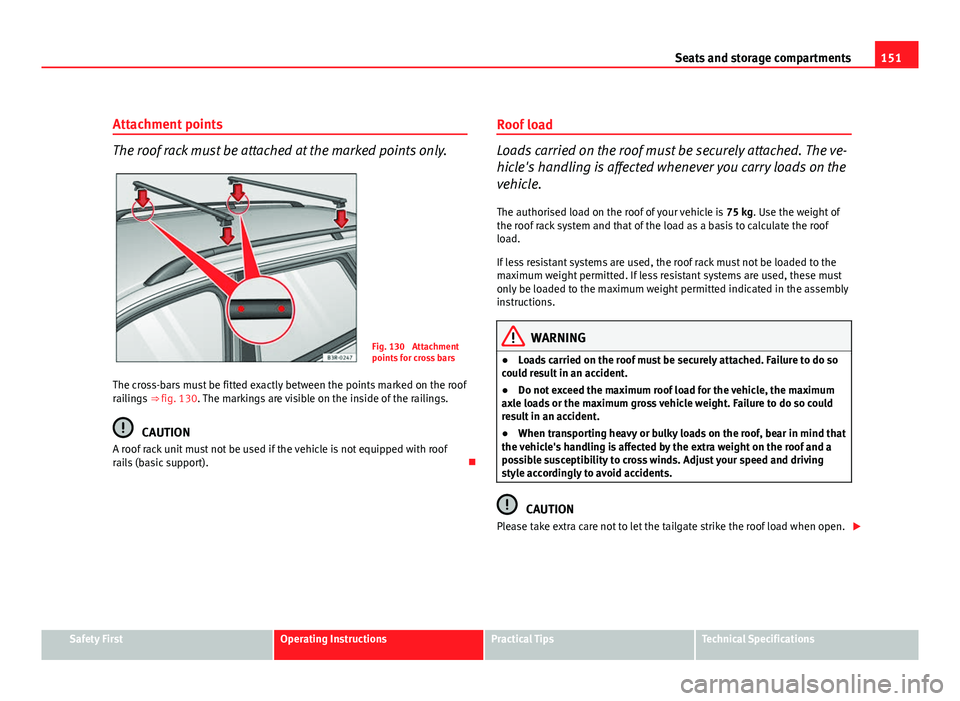
Fig. 130 Attachment
points for cross bars
The cross-bars must be fitted exactly between the points marked on the roof
railings ⇒ fig. 130. The markings are visible on the inside of the railings.
CAUTION
A roof rack unit must not be used if the vehicle is not equipped with roof
rails (basic support). Roof load
Loads carried on the roof must be securely attached. The ve-
hicle's handling is affected whenever you carry loads on the
vehicle.
The authorised load on the roof of your vehicle is 75 kg. Use the weight of
the roof rack system and that of the load as a basis to calculate the roof
load.
If less resistant systems are used, the roof rack must not be loaded to the
maximum weight permitted. If less resistant systems are used, these must
only be loaded to the maximum weight permitted indicated in the assembly
instructions.
WARNING
● Loads carried on the roof must be securely attached. Failure to do so
could result in an accident.
● Do not exceed the maximum roof load for the vehicle, the maximum
axle loads or the maximum gross vehicle weight. Failure to do so could
result in an accident.
● When transporting heavy or bulky loads on the roof, bear in mind that
the vehicle's handling is affected by the extra weight on the roof and a
possible susceptibility to cross winds. Adjust your speed and driving
style accordingly to avoid accidents.
CAUTION
Please take extra care not to let the tailgate strike the roof load when open.
Safety FirstOperating InstructionsPractical TipsTechnical Specifications
Page 154 of 319

152Seats and storage compartments
For the sake of the environment
Roof racks are often left attached for convenience, even when they are not
being used. However, the increased air resistance means that the vehicle
uses more fuel. For this reason you should always take off the roof rack
when it is not in use.
Drink holder
Front drink holder
Fig. 131 Detailed view of
the dash panel: Drink
holder
– To open the drink holder, press the symbol on the drink hold-
er lid ⇒ fig. 131
– To close the drink holder, press it in until it engages.
WARNING
● Do not put any hot drinks in the drink holder while the vehicle is mov-
ing. You can be scalded if the hot liquid is spilt.
● Do not use hard china cups or glasses. These could cause injury in the
event of an accident.
Drink holder in the rear armrest*
Fig. 132 Drink holder in
the rear armrest
Opening the drink holder
– Press the symbol A
⇒ fig. 132.
Adjusting the retainer arm
– To adjust one of the retainer arms B
, release it by pressing in
the direction indicated (arrow) and move it as required.