2011 Seat Alhambra instrument panel
[x] Cancel search: instrument panelPage 64 of 385

62
Cockpit
The service interval display is reset
If the ser v
ice was not carried out by a Technical Service, the display can be
reset as follows: In vehicles with text messages:
Select the
Settings
menu.In the submenu Serv
ic
e, select the option Reset.Confirm with
OK when requested to do so by the system.
In vehicles without text messages:
Switch the ignition off.
Press and hold the
0.0 / S
ET button.
Switch the ignition back on.
Release the
0.0 / S
ET button and, press
for the next 20 seconds.
Do not reset the indicator to zero between two intervals, otherwise the dis-
p l
ay will be incorrect.
If, while the LongLife service is valid, the service interval display is reset to
zero, the “service will be activated by time or mileage”. The service interval
is no longer calculated individually ⇒ Booklet Maintenance Programme.Note
● The service message disappears after a few seconds, when the engine is
s t
arted or when OK is pressed.
● In vehicles with the LongLife system in which the battery has been dis-
connect ed f
or a long period of time, it is not possible to calculate the date
of the next service. Therefore the service interval display may not be correct.
In this case, please check the maximum permitted service intervals ⇒ Book-
let Maintenance Programme. SEAT information system
Introduction With the ignition switched on, it is possible to read the different functions of
the dis
p
lay by scrolling through the menus.
In vehicles with a multifunction steering wheel, there are no buttons on the
windscreen wiper lever. The multifunction display can only be controlled
from the buttons on the multifunction steering wheel.
The number of menus displayed on the instrument panel will vary according
to the vehicle electronics and equipment.
A specialised dealer will be able to programme or modify additional func-
tions, according to the vehicle equipment. SEAT recommends visiting a
Technical Service.
Some menu options can only be read when the vehicle is at a standstill.
As long as a priority 1 warning is displayed, it will not be possible to read
the menus. To display the menus, confirm the warning by pressing OK .
Addition a
l information and warnings:
● Exterior mirrors ⇒ pag
e 110
● Auxiliary heating ⇒ pag
e 163 WARNING
Any distraction may lead to an accident, with the risk of injury.
● Do not read the instrument panel menus when driving.
Page 67 of 385

65
Cockpit
Using the menus on the instrument panel Fig. 37 In vehicles with-
out mu
ltif
unction steer-
ing wheel: On the wind-
screen washer lever: but-
ton A to confirm the
menu point and r oc
ker
switch B to change the
menu Fig. 38 Right side of
multif
u
nction steering
wheel: Buttons to access
the instrument panel me-
nus. Enabling the main menu
●
Switch the ignition on.
● If a message or vehicle symbol is displayed, press OK (⇒
fig. 37 A or
⇒ fig. 38).
● If managed from the windscreen wiper lever: the main menu lis
t is dis-
played.
● If managed from the multifunction steering wheel: the main menu lis
t is
not displayed. To scroll through the options of the main menu, press the ar-
row keys or
several times
⇒ pag
e 66.
Select a submenu
● Press the rocker switch ⇒ fig. 37 B upwards or downwards, or, on the
multif u
nction steering wheel, the arrow keys or
, until reaching the re-
quired menu option.
● The sel ect
ed option is displayed between two horizontal lines. In addi-
tion, a triangl
e is displayed on the right .
● To select the submenu, press OK .
Mak in
g changes according to the menu
● Use the rocker switch on the windscreen wiper lever or the arrow keys on
the multifu
nction steering wheel to make the required modifications. If the
switch or keys are held down, the scroll speed is faster (fast forward or re-
turn).
● Mark or confirm the selected option with OK .
Ret urnin
g to the main menu
● Via the menu: in the submenu, select
the option Return to exit the sub-
menu.
● If managed from the windscreen wiper lever: hold do
wn the rocker
switch.
● If managed from the multifunction steering wheel: pres
s button .
Safety First Operating instructions Practical tips Technical Data
Page 69 of 385

67
Cockpit Menu Function
Average fuel con-
sumption When the ignition is switched on, the average con-
sumption (in l/100 km or in mp
g) i
s displayed after
the vehicle has moved approximately 100 metres
(328 feet). Otherwise horizontal lines are displayed.
The value shown is updated approximately every 5
seconds. Distance to empty
(the dis
t
ance you
can travel with the
remaining fuel) Approximate distance in km (or miles) that can still
be trav
el
led with the fuel remaining in the tank, as-
suming the same style of driving is maintained. This
is calculated using the current fuel consumption. Distance covered Distance travelled, after ignition is switched on, in
km (or mil
e
s). Average speed After the ignition is switched on, the average speed
wi
l
l be shown after a distance of approximately 100
metres (328 feet) has been travelled. Otherwise hori-
zontal lines are displayed. The value shown is upda-
ted approximately every 5 seconds. Digital display of
speed Current speed displayed digitally.
Oil temperature digi-
ta
l
display Updated engine oil temperature digital display
Speed warning to ---
km/h If the stored speed is exceeded (between
30 - 250 km/h, or 18 - 155 mph), an audibl
e w
arning
is given together with a visual warning. Changing between display modes
●
In vehicles without multifunction steering wheel: pres
s the lever.
● Vehicles with a multifunction steering wheel: pres
s or
.
Storin g a s
peed for the speed warning
● Select the display Speed warnin
g at --- km/h.
● Press OK to store the current speed and switch off the warning. ●
In addition, set the required speed by pressing the rocker switch on the
w ind
screen wiper lever or buttons or
on the multifunction steering
wheel f or 5 sec
onds. Next, press OK again or wait a few seconds. The
speed i s
stored and the warning activated.
● To switch off , pres
s OK . The stored speed is deleted.
Manua l
ly erasing memory 1 or 2
● Select the memory to be erased.
● Press and hold OK for approximately two seconds.
Per son
alising the displays
It is possible to select which of the displays in the multifunction display you
wish to see on the instrument panel in the settings menu. The units of
measurement can also be modified ⇒ page 67.
Configuration Menu Configuration
Menu Function
Multifunction
dis
p
lay data Configuration of the multifunction display data which you
wi
sh t
o see on the instrument panel display ⇒ page 66. Compass Changing the magnetic region and calibration of the com-
pa
s
s. To calibrate the compass, please follow the instruc-
tions given on the instrument panel display. Convenience Changing vehicle convenience functions
⇒ page 68. Lights & visi-
bi
lity Configuration of vehicle lighting
⇒ page 69. Time Changing the hours and minutes of the clock and the navi-
gation sy
s
tem. The time can be set here and the choice
can be made between the 24 hour and 12 hour display.
The S in the upper part of the display indicates that the
clock is set to summer time. Safety First Operating instructions Practical tips Technical Data
Page 87 of 385
85
Unlocking and locking
Warning indicator lights up Possible cause Solution
The tailgate is open or not
corr
ectly
shut.
Stop driving immediately!
Open the t ai
lgate and close it
again. Several warning and control lamps should light up for a few seconds when
the ignition is
sw
itched. This signals that the lamp is working properly. They
will switch off after a few seconds.
A warning appears on the instrument panel if the tailgate is open or not
properly closed.
Depending on the vehicle equipment, a symbol may be displayed on the in-
strument panel screen instead of the warning lamp. The indication is also
visible when the ignition is switched off. The indication disappears around
15 seconds after the vehicle has been locked. WARNING
If the tailgate is not correctly closed, it could open unexpectedly when
drivin g and c
ause serious injuries.
● Always stop immediately and close the tailgate.
● Ensure that the tailgate has been locked into place by the element on
the lock c
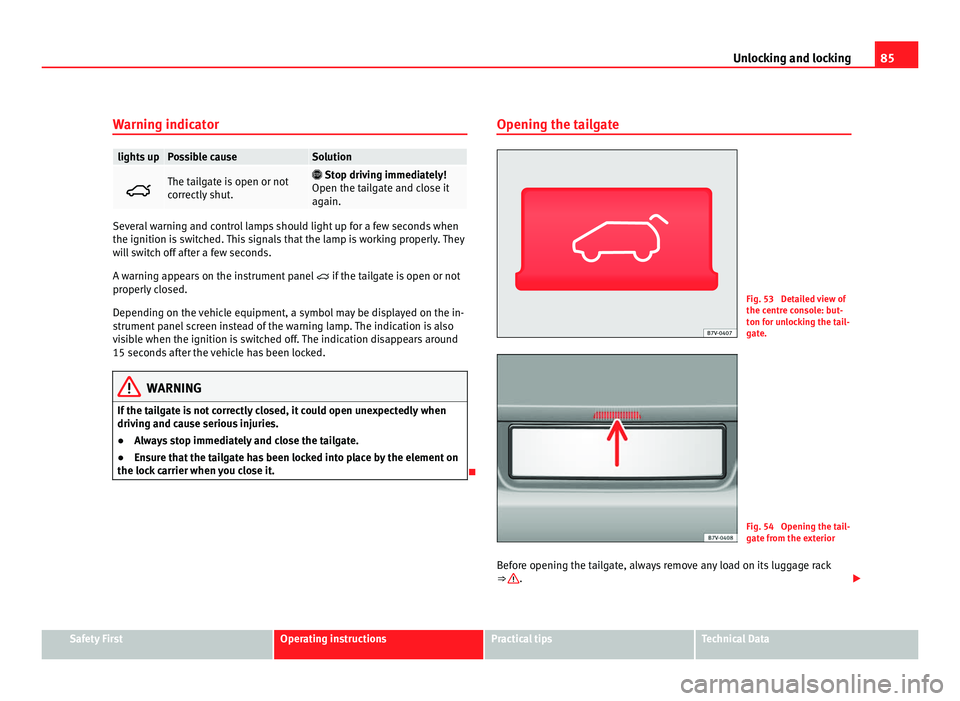
arrier when you close it. Opening the tailgate Fig. 53 Detailed view of
the centr
e c
onsole: but-
ton for unlocking the tail-
gate. Fig. 54 Opening the tail-
gat
e fr
om the exterior
Before opening the tailgate, always remove any load on its luggage rack
⇒ .
Safety First Operating instructions Practical tips Technical Data
Page 98 of 385

96
Lights and visibility WARNING
If the warning lamps and messages are ignored, the vehicle may stall in
traffic, or m a
y cause accidents and severe injuries.
● Never ignore the warning lamps or text messages.
● Stop the vehicle safely as soon as possible.
● Park the vehicle at a suitable distance away from the traffic ensuring
that the e
xhaust system is not in contact with inflammable material, for
example, dry grass, fuel, oil, etc.
● A faulty vehicle represents a risk of accident for the driver and for oth-
er roa
d users. If necessary, switch on the hazard warning lamps and put
out the warning triangle to advise other drivers. CAUTION
Failure to heed the warning lamps and text messages when they appear
ma y
result in faults in the vehicle. Turn signal and main beam lever Fig. 61 Turn signal and
main be
am l
ever.
Move the lever to the required position: Right turn s
ignal. Right-hand parking light (ignition switched off)
⇒ page 98.
Left turn signal. Left-hand parking light (ignition switched off)
⇒ page 98.
Main beam switched on ⇒ . The indicator lamp
wil
l light up on the
instrument panel.
Flashing the headlamps. The flashed beam comes on if the lever is
pressed. The indicator lamp will light up.
Push the lever all the way down to turn off the corresponding function.
Convenience indicators
For the convenience turn signals, move the lever as far as possible upwards
or downwards and release the lever. The turn signal will flash three times.
1 2
3
4
Page 99 of 385

97
Lights and visibility
The control turn signals are switched on and off from the menu Lights & Visi-
bility on the instrument panel display ⇒ page 62. This function can be dis-
connected at a specialised workshop for those vehicles which do not have
the menu Lights & Visibility .WARNING
Incorrect use of the headlamps may cause accidents and serious injury,
as the m
ain beam may distract or dazzle other drivers. Note
● The turn signal only works when the ignition is switched on. The hazard
w arnin
g lights also work when the ignition is switched off ⇒ page 312.
● If a turn signal on the vehicle or trailer is faulty, the warning lamp flash-
es tw
ice as fast as usual.
● The main beam headligh
ts can only be switched on if the dipped beam
headlights are already on.
Turning lights on and off Fig. 62 Next to the steering wheel: diagram of some of
the type
s
of light switch.
The legal requirements regarding the use of vehicle lights in each country
mus t
be observed.
In vehicles with tow bar fitted as standard: If the trailer is connected electri-
cally and is fitted with a rear fog light, this is automatically switched off on
the vehicle. Turn the light switch to the required position
⇒ fig. 62:Safety First Operating instructions Practical tips Technical Data
Page 102 of 385

100
Lights and visibility
The automatic headlight adjustment automatically switches on the main
beam dependin g on the
vehicles travelling in front and in the opposite di-
rection, and of other environmental and traffic conditions from an approxi-
mate speed of 60 km/h (37 mph) and turns them off again at speeds below
approximately 30 km/h (18 mph).
When the dynamic adaptive light system is deactivated ⇒ page 99 or the
headlight adjustment is activated, only the main beam is turned on and off
automatically. This happens depending on the vehicles travelling in front
and in the opposite direction, and on the road lighting.
Switching on and off How it works
Switching
on: – With the ignition on, turn the lights control to the position
and p
ut the turn signal and main beam lever in the
main beam position ⇒ page 96. When the headlight adjust-
ment (automatic also) is activated, the warning lamp lights
up in the instrument panel display .Switching
off: – Switch the ignition off.
– ALTERNA
TIVEL
Y: Turn the light switch to a position other
than ⇒ page 97.
– ALTERNATIVELY: place the turn signal and main beam lev-
er in the headlight flasher or main beam position
⇒ page 96. The following conditions can cause the headlight adjustment to fail to turn
off the m
ain be
am or fail to do so in time:
● On roads with insufficient lighting with very reflective signs
● If road users are insufficiently lit up, e.g. pedestrians or cyclists
● On closed curves, when the traffic in the opposite direction is partially
hidden, on pronou
nced slopes
● On roads with traffic in the opposite direction and with a central reserva-
tion barrier when the driver c
an see through gaps or over it e.g. lorry drivers
● If the camera is damaged or if the power supply has been cut off
● In the event of fog, snow or heavy rain ●
In the event of
dust or sand storms
● If the windscreen is damaged by the impact from a stone in the camera's
field of
vision
● If the camera's field of vision is misted up, dirty or covered by a sticker,
snow or ic
e. WARNING
The greater comfort that the headlight adjustment provides (automatic
al so) mu
st not cause you to take risks. The system is not a replacement
for driver awareness.
● Always monitor the lights yourself and adjust them depending on the
light, vi
sibility and traffic conditions.
● The headlight adjustment (automatic also) may not correctly detect
all
situations and in certain situations may only provide limited function.
● If the windscreen is damaged or modifications are made to the vehi-
cle lightin
g, this may harm the functioning of the headlight adjustment
(automatic also), for example, if additional headlight are fitted. Note
Main beam and flashed headlights can be turned on and off manually at
any time w
ith the turn signal and main beam lever ⇒ page 96.
Adhesive strips for headlights or adjusting headlights In those countries where vehicles drive on the other side of the road to the
home cou
ntr
y, the asymmetric dipped beam may dazzle drivers of oncom-
ing vehicles. Therefore, when driving abroad, adhesive strips should be at-
tached to the headlights or the headlights should be adjusted accordingly.
The direction of the headlights can be adjusted from the instrument panel,
in the Tourist light submenu of the Settings menu
⇒ page 67.
Page 143 of 385

141
Seats and storage compartments
Storage compartments
Introduction Storage compartments must only be used to store light or small objects.
The front
c
entral armrest compartment houses the factory-fitted AUX-IN or
multimedia (MEDIA-IN) connection sockets.
The factory-fitted CD changer is located in the left-hand storage compart-
ment of the luggage compartment.
Additional information and warnings:
● Child seats (accessories) ⇒ page 39
● L
uggage compartment ⇒ page 125
● C
are and cleaning of the vehicle interior ⇒ page 249
● ⇒
Bookl et Radio or ⇒ Booklet navigation system WARNING
In the event of sudden braking movements or turns, loose objects may be
thro wn ar
ound the vehicle interior. This could cause serious injuries to
passengers and cause the driver to lose control of the vehicle.
● Do not transport animals or place hard, heavy or sharp objects inside
the vehic
le in: open storage compartments, instrument panel, storage
tray, items of clothing or bags.
● While driving, always keep object compartments closed. WARNING
Objects falling into the driver's footwell could prevent use of the pedals.
This c
ould lead the driver to lose control of the vehicle, increasing the
risk of a serious accident.
● Make sure the pedals can be used at all times, with no objects rolling
underneath them.
● The floor m
at should always be secured to the floor.
● Never place other mats or rugs on top of the original mat supplied by
the factor
y.
● Make sure that no objects can fall into the driver's footwell while the
vehicl
e is in motion. CAUTION
● Objects on the shelf could chafe against the wires of the heating ele-
ment in the r
ear window and cause damage.
● Do not keep heat-sensitive objects, food or medicines inside the vehi-
cle. He
at and cold could damage them or render them useless.
● Light-transparent objects placed inside the vehicle, such as lenses,
magnify
ing glasses or transparent suction caps on the windows, could con-
centrate the sun's rays and cause damage to the vehicle. Note
The ventilating slits between the heated rear window and the shelf must not
be co v
ered so that used air can escape from the vehicle. Safety First Operating instructions Practical tips Technical Data