2011 Seat Alhambra seat adjustment
[x] Cancel search: seat adjustmentPage 45 of 385

43
Child safety
Suitable child seats
The chi l
d seat must be authorised by the manufacturer especially for use on
a front passenger seat with a frontal or side airbag.
If the front passenger seat is equipped with retaining rings, the child seat
can be secured using the approved retaining system provided it is approved
for this type of vehicle in accordance with current regulations in the country
in question.
Universal seats for children in groups 0, 0+, 1, 2 or 3 according to the ECE-
R 44 regulation. WARNING
If a child seat is mounted on the front passenger seat, the risk of the
chi l
d sustaining severe or fatal injuries in the event of an accident increa-
ses. Rear-facing child seats must never be mounted on the front passen-
ger seat when the front passenger airbag is enabled. This is life-threaten-
ing to the child should the frontal airbag deploy, as the child seat would
be struck by the inflated airbag and thrown against the backrest. WARNING
If, in exceptional circumstances, a child must be transported in a rear-fac-
ing c hi
ld seat on the front passenger seat, strictly observe the following:
● Always disable the front passenger airbag and leave it disabled.
● The child seat must be approved by the manufacturer for use on a
front p
assenger seat with frontal and side airbag.
● Follow the installation instructions of the child seat manufacturer and
obser
ve the warnings.
● Move the front passenger seat as far back as possible and adjust it to
its highe
st position to keep as far away as possible from the frontal air-
bag. WARNING (Continued)
● Move the backrest to the upright position.
● The se
at
belt height adjustment must be as high as possible.
● Children must always be protected with an approved child restraint
syst
em suited to their height and weight.
Use of the child seat on the rear seat If a child seat is mounted on the rear seat, adapt the position of the front
pa
s
senger seat so that the child has enough space. Therefore, adapt the
front passenger seat to the size of the child seat and the height of the child.
Ensure the passenger is in the correct position ⇒ page 10.
Move the second and third row of seats fully back and lock them. Place the
seat backs in a vertical position and fold the armrests down.
ISOFIX child seats approved for rear seats
The rear seats are suitable for child seats with the ISOFIX system specially
designed for this type of vehicle in accordance with regulation ECE-R 44.
ISOFIX child seats are divided into “specific categories for the vehicle”,
“limited” or “semi-universal”.
Child seat manufacturers supply a list of vehicles with each ISOFIX seat,
which includes the models for which the ISOFIX child seat in question is ap-
proved. If the vehicle is included in the manufacturer's list and the ISOFIX
child seat belongs to a seat category included in the list, then it can be
used in your vehicle. If necessary, contact the child seat manufacturer for an
updated list of vehicles. Safety First Operating instructions Practical tips Technical Data
Page 46 of 385

44
Child safety Group (weight
cat e
gory) ISOFIX child seat cate-
gory Seat position on the rear seats
Group 0: chil-
dr en up t
o 10 kg E IUF
a) Group 0+: chil-
dr en up t
o 13 kg E IUF
a) D IUF
a) C IUF
a) Group 1: 9 to 18
kg D IUF
a) C IUF
a) B IUF
a) B1 IUF
a) A IUF
a) a)
IUF: suitable for “universal” ISOFIX child seats authorised for use in this group. WARNING
If child seats are fitted to all the seats in the second row then it is possi-
bl e th
at the seats of this row cannot be folded down from the third row of
seats in case of an accident. In case of an emergency, passengers in the
third row of seats will not be able to leave the vehicle or to help them-
selves.
● Child seats should not occupy all the seats of the second row if other
pas
sengers are to occupy the third row of seats.
Securing child seats with the seat belt Securing the child seat using the seat belt
●
Please read and observe the child seat manufacturer's handling instruc-
tions.
● Po
sitioning the child seat on the seat according to the manufacturer's
instruction
s. ●
The seat belt height adjustment must be as high as possible.
● Fa
sten the seat belt or pass it around the child seat structure in the man-
ner desc
ribed in the manufacturer's instructions.
● Make sure the seat belt is not twisted.
● Insert the latch plate into the buckle for the appropriate seat and push it
down unti
l it is securely locked with an audible click.
● Ensure that the upper belt web lies tightly on the child seat.
● Pull the belt (it must be no longer possible to pull the lower belt web-
bing out).
R
emoving the child seat
The seat belt must not be unfastened until the vehicle has come to a stand-
still ⇒ .
● Press the red button on the buckle. The latch plate is released from the
buc k
le.
● Guide the belt back by hand so that it rolls up easily and the trim will not
be damag
ed.
● Remove the child seat from the vehicle. WARNING
Unbuckling the seat belt while the vehicle is in motion can cause severe
or fat a
l injuries in the event of an accident or sudden braking.
● The seat belt must not be unfastened until the vehicle has come to a
stand
still.
Page 47 of 385

45
Child safety
Securing the child seat using the lower anchor points
(ISOFIX, LAT CH*) Fig. 27 Version 2: identi-
fication of
the anc
hor
points for the child seat
on the vehicle seat.
There are two r
etaining rings, the so-called lower anchor points, on each
rear seat or, where applicable, on the front passenger seat. The retaining
rings are attached to the seat frames.
Child seats with rigid mounting
● Observe the manufacturer's instructions when installing and removing
the chil
d seat ⇒ .
● Press the child seat onto the retaining rings ⇒ fig. 27 in the direction of
the arr o
w. The child seat must be safely engaged and click audibly into
place.
● Pull on both sides of the child seat to ensure that it is secure.
Child se
at with adjustable retaining straps
● Observe the manufacturer's instructions when installing and removing
the chil
d seat ⇒ .
● Place the child seat on the seat cushion and attach the retaining strap
hooks t
o the retaining rings ⇒ fig. 27. ●
Tighten the straps evenly using the corresponding adjustment device.
The chi
ld seat must sit flush against the vehicle seat.
● Pull on both sides of the child seat to ensure that it is secure. WARNING
The lower anchor points for child seats do not include rings. Only secure
boos t
er seats to lower anchor points.
Securing a child seat using a Top Tether retaining strap Fig. 28 Upper retaining
str
ap hook
ed in the lug-
gage compartment
● Observe the manufacturer's instructions when installing and removing
the chil
d seat ⇒ .
● Raise the head restraint behind the child seat until it engages.
● Secure the child seat to the lower anchor points ⇒ page 45.
● P
ull the upper child seat retaining strap back to the backrest of the rear
seat, belo
w or on both sides of the head restraint (depending on the child
seat model). Safety First Operating instructions Practical tips Technical Data
Page 55 of 385

53
Cockpit
Operating instructions Coc kpit
Ov
erview
Overv
iew of the dash panel This overview will help you to familiarise yourself with the
con
tr
ols and displays.
Door release lever . . . . . . . . . . . . . . . . . . . . . . . . . . . . . . . . . . . . . . . . . 80
Central locking button . . . . . . . . . . . . . . . . . . . . . . . . . . . . . . . 74
Switch for adjusting the exterior mirrors . . . . . . . . . . . . . . . . . . . .110
– Exterior mirror adjustment
– Heat
ed exterior mirrors
– Folding exterior mirrors
Instrument panel controls and lighting control . . . . . . . . . . . 95
Headlamp range adjustment . . . . . . . . . . . . . . . . . . . . . . . . . . . . 95
Light switch . . . . . . . . . . . . . . . . . . . . . . . . . . . . . . . . . . . . . . . . . . . . 95
– Light off - -
– Autom
atic headlight control - -
– Side/dipped lights
– Fog lights
Controls on the multi-function steering wheel . . . . . . . . . . . . . . .62
– Volume control for radio, navigation system and phone
con
versations –
– Radio mute or voice control activation
1 2
3
4
5
6
7 –
Activate telephone main menu or accept an incoming call
– SEA
T information system control buttons , , OK,
Lever for . . . . . . . . . . . . . . . . . . . . . . . . . . . . . . . . . . . . . . . . . . . . . . . . . . 95
– Main beam headlights
– Hea
dlight flasher
– Turn signals
– Parking lights
Instrument panel:
– Instruments . . . . . . . . . . . . . . . . . . . . . . . . . . . . . . . . . . . . . . . . . . . . 57
– Digital display . . . . . . . . . . . . . . . . . . . . . . . . . . . . . . . . . . . . . . . . . . 57
– Indicator lamps . . . . . . . . . . . . . . . . . . . . . . . . . . . . . . . . . . . . . . . . . 54
Horn (work
s only when the ignition is on)/Front driver airbag 31
Windscreen wiper/ windscreen wash lever . . . . . . . . . . . . . . . . . .105
– Windscreen wipers –
– Int
ermittent wipe
– “Brief wipe” x
– Windscreen wipers
– Automatic windscreen wash/wipe
– Rear window wiper
– Automatic rear window wash/wipe
– Lever with buttons for controlling the SEAT information
system - , / . . . . . . . . . . . . . . . . . . . . . . . . . . . . . . . . . . . . 62
Left seat heating controls . . . . . . . . . . . . . . . . . . . . . . . . . . . . . . . . 117
8
9
10
11
12
Safety First Operating instructions Practical tips Technical Data
Page 58 of 385

56
Cockpit flashes: Engine oil sensor faulty.
⇒ page 279
lights: Insufficient engine oil.
Fault in airbag system and seat belt tensioners. ⇒ page 31
Passenger front airbag is off (
PASSENGER AIR-
BAG ). ⇒ page 31
Top up "AdBlue", or there is a fault in the "AdBl-
ue" system.
⇒ page 271
Fuel tank not closed correctly. ⇒ page 264
Lane Assist is connected, but not active. ⇒ page 216
Green symbols
Symbol Meaning ⇒ See
Left or right turn signal. ⇒ page 95
Hazard warning lights on. ⇒ page 312
Use the foot brake! Change
⇒ page 174
Br ak
e
⇒ page 183 Cruise control operating. ⇒ page 212
Lane Assist is connected and active. ⇒ page 216 Blue symbols
Symbol Meaning
⇒ See
Headlight on or flasher on.
⇒
page 95 Headlight adjustment (Light Assist) on.
Colourless symbols
Symbol Meaning ⇒ See
Electronic immobiliser active. ⇒ page 170
Service interval display ⇒ page 61
WARNING
If the warning lamps and messages are ignored, the vehicle may stall in
traffic, or may cause accidents and severe injuries.
● Never ignore the warning lamps or text messages.
● Stop the vehicle safely as soon as possible.
● Park the vehicle away from the traffic, ensuring that there are no easi-
ly inflammable materials under the vehicle which could come into contact
with the exhaust system (e.g. dry grass, fuel).
● A faulty vehicle represents a risk of accident for the driver and for oth-
er road users. If necessary, switch on the hazard warning lamps and put
out the warning triangle to advise other drivers.
● Before opening the bonnet, switch off the engine and allow it to cool.
● In any vehicle, the engine compartment is a hazardous area and could
cause severe injury ⇒ page 275. CAUTION
Failure to heed the warning lamps and text messages when they appear
may result in faults in the vehicle.
Page 71 of 385

69
Cockpit Convenience menu Function
Handling windows Adjusting the electric windows: This permits the windows to be opened or closed when the vehicle is unlocked or locked
re
s
pectively. The open function can only be activated from the driver's door ⇒ page 89.Rear-view mirror adjustment Tilts passenger mirror downwards when reverse gear is engaged. This enables the driver to see the edge of the pavement,
for e
x
ample ⇒ page 110. Exterior mirror adjust. If
synchronised adjustment is selected, when the driver side exterior mirror is adjusted, the passenger exterior mirror is also
mo v
ed. Manufacturer's settings Some functions of the
Conv
enience submenu will be reset to the factory value.Back The Configuration menu is displayed again.
Lights & visibility submenuLights & visi-
bi
lity
menu Function
Coming Home This permits the adjustment of the time the headlamps
st
a
y on after locking or unlocking the vehicle, the function
can also be connected or disconnected here ⇒ page 101. Leaving Home
Footwell light This permits the adjustment of the brightness of the foot-
wel
l
lighting when the doors are open, the function can al-
so be connected or disconnected here Convenience
indicat
or
s Switching convenience indicators on and off When the
con
v
enience indicators are connected, when the indicator
is switched on, these flash at least three times
⇒ page 95. Manufacturer's
setting
s All the configurations in the submenu
Lights &
visibility are
reset to the predefined factory values. Back The Configuration menu is displayed again. Personal convenience settings When two people use a vehicle, SEAT recommends that each person always
use
s
“their” own remote control key. When the ignition is switched off, or
the vehicle is locked, the personal convenience settings are stored and au-
tomatically allocated to the vehicle key ⇒ page 62.
The values of the personalised convenience settings of the following menu
options are allocated to the vehicle key: ■ Parking heating menu
■ Configuration Menu
■ Time
■ Settings: Language
■ Units
■ Convenience settings menu
■Door unlock (individual opening, Auto Lock)
■ Convenience handling of windows
■ Rear-view mirror adjustment Safety First Operating instructions Practical tips Technical Data
Page 73 of 385

71
Unlocking and locking
Unlocking and locking
Vehicle key set
Introduction Additional information and warnings:
●
Adjustments to the SEAT information system ⇒ page 62
● C
entral locking and locking system ⇒ page 74
● St
art and stop the engine ⇒ page 170
● Not
es for the user ⇒ page 255
● Emer
gency locking and unlocking ⇒ page 314WARNING
Careless or incorrect use of vehicle keys may result in severe injury and
acc ident
.
● Always take all the keys with you whenever you leave the vehicle.
Childr
en and unauthorised individuals could lock the doors or the tail-
gate, start the engine or turn the ignition on activating electrical sys-
tems, for example: the electric windows.
● Never leave children or disabled people alone in the car. They could
be trapped in the c
ar in an emergency and will not be able to get them-
selves to safety. For example, depending on the time of the year, temper-
atures inside a locked and closed vehicle can be extremely high or ex-
tremely low resulting in serious injuries and illness or even death, partic-
ularly for young children.
● Never remove the key from the ignition if the vehicle is in motion. The
steerin
g may lock and it will not be possible to turn the steering wheel. Vehicle key
Fig. 39 Vehicle keys.
Fig. 40 Vehicle key for
vehic
l
es with electric
sliding doors. Safety First Operating instructions Practical tips Technical Data
Page 97 of 385
95
Lights and visibility
Lights and visibility
Lights Introduction The legal requirements regarding the use of vehicle lights in each country
mus
t
be observed.
The driver is personally responsible for the correct use and adjustment of
the lights in all situations.
Additional information and warnings:
● SEAT information system ⇒ page 62
● Ch
anging bulbs ⇒ page 326 WARNING
If the headlights are set too high and the main beam is not used correct-
ly, ther e i
s a risk of dazzling or distracting other road users. This could
result in serious accident.
● Always make sure that the headlamps are correctly adjusted.
● Never use the main beam or flashed headlamps as this could dazzle
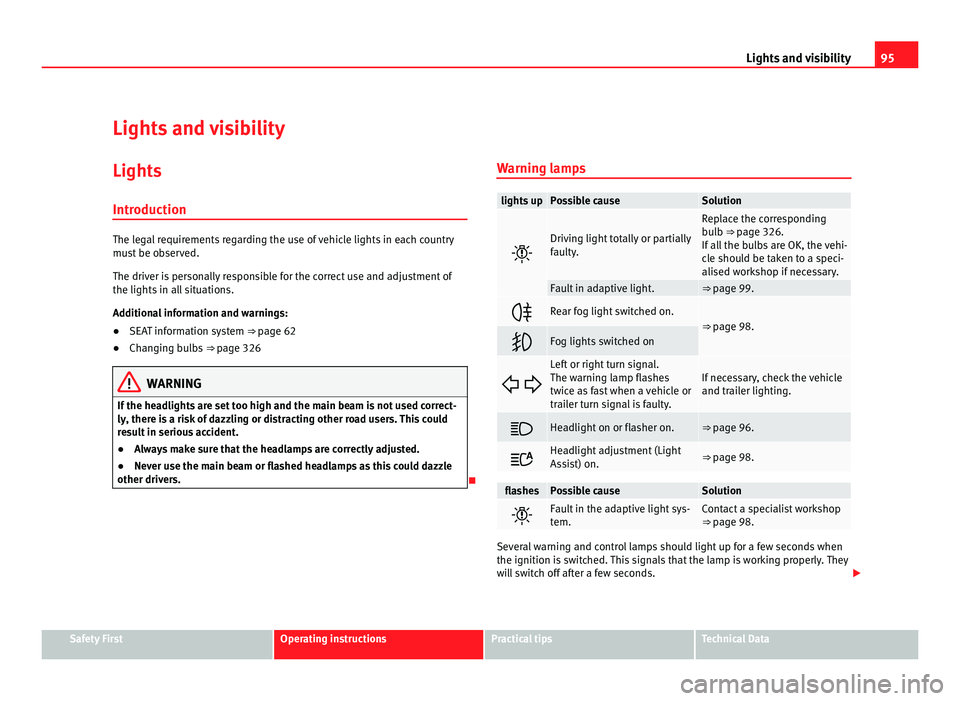
other drivers. Warning lamps lights up Possible cause Solution
Driving light totally or partially
fau
lty
. Replace the corresponding
bu
l
b ⇒ page 326.
If all the bulbs are OK, the vehi-
cle should be taken to a speci-
alised workshop if necessary. Fault in adaptive light. ⇒ page 99.
Rear fog light switched on.
⇒ page 98.
Fog lights switched on
Left or right turn signal.
The warnin
g l
amp flashes
twice as fast when a vehicle or
trailer turn signal is faulty. If necessary, check the vehicle
and trai
l
er lighting. Headlight on or flasher on. ⇒ page 96.
Headlight adjustment (Light
Ass
i
st) on. ⇒ page 98.
flashes Possible cause Solution
Fault in the adaptive light sys-
tem. Contact a specialist workshop
⇒ pag
e 98. Several warning and control lamps should light up for a few seconds when
the ignition is
sw
itched. This signals that the lamp is working properly. They
will switch off after a few seconds. Safety First Operating instructions Practical tips Technical Data