Page 91 of 636

▫Daytime Running Lights (DRL) — If
Equipped .......................... 127
▫ Multifunction Lever .................. 127
� Windshield Wipers And Washers .......... 129
▫ Windshield Wipers ................... 129
▫ Windshield Washers .................. 130
▫ Mist Feature ........................ 131
� Tilt Steering Column ................... 131
� Heated Steering Wheel — If Equipped ...... 132
� Driver Adjustable Pedals — If Equipped ..... 133
� Electronic Speed Control — If Equipped ..... 134
▫ To Activate ......................... 135
▫ To Set A Desired Speed ................ 136 ▫
Deactivating Electronic Speed Control ...... 136
▫ To Resume Speed .................... 136
▫ Varying The Speed Setting .............. 136
▫ To Accelerate For Passing .............. 137
� Parksense� Rear Park Assist — If Equipped . . . 138
▫ Parksense� Sensors................... 138
▫ Parksense� Warning Display ............ 138
▫ Parksense� Display................... 139
▫ Enabling And Disabling Parksense� ....... 142
▫ Service The Parksense� Rear Park Assist
System ............................ 143
▫ Cleaning The Parksense� System......... 144
▫ Parksense� System Usage Precautions ...... 144
3
UNDERSTANDING THE FEATURES OF YOUR VEHICLE 89
Page 103 of 636
NOTE:Fold the trailer towing mirrors rearward prior to
entering an automated car wash.
A small blindspot mirror is located next to main mirror
and can be adjusted separately.Uconnect™ Phone — IF EQUIPPED
Uconnect™ Phone is a hands-free system that allows you
to use voice commands to dial a phone number stored in
your mobile phone. Press the Uconnect™ Phone button
on the radio or steering wheel controls (if equipped)
and follow the instructions to pair the mobile phone.
Refer to “Uconnect™ Phone” in the Uconnect™ User
Manual located on the DVD for further details.
VOICE COMMAND — IF EQUIPPED
Voice Commands can be initiated by pressing the VR
button
located on the radio or steering wheel
controls (if equipped).
Refer to “Voice Command” in the Uconnect™ User
Manual located on the DVD for further details.
SEATS
Seats are a part of the Occupant Restraint System of the
vehicle.
Blindspot Mirror
3
UNDERSTANDING THE FEATURES OF YOUR VEHICLE 101
Page 122 of 636
Driver Easy Exit And Easy Entry Control
This additional feature provides automatic driver’s seat
positioning which will enhance driver mobility into and
out of the vehicle. The seat cushion will move rearward
approximately 2.5 in (60 mm) when the key is removed
from the ignition switch. The seat will move forward
approximately 2.5 in (60 mm) when the key is placed into
the ignition and turned out of the LOCK position. Each
stored memory setting will have an associated Easy Exit
and Easy Entry position. The Easy Exit and Easy Entry
feature may be automatically disabled if the seat is
positioned rearward enough and there is no benefit in
moving the seat any farther rearward.
NOTE:The Easy Entry/Easy Exit feature can be en-
abled or disabled through the programmable features in
the Electronic Vehicle Information Center (EVIC). Refer
to “Electronic Vehicle Information Center (EVIC)/
Customer-Programmable Features” in “Understanding
Your Instrument Panel” for further information.
TO OPEN AND CLOSE THE HOOD
To open the hood, two latches must be released.
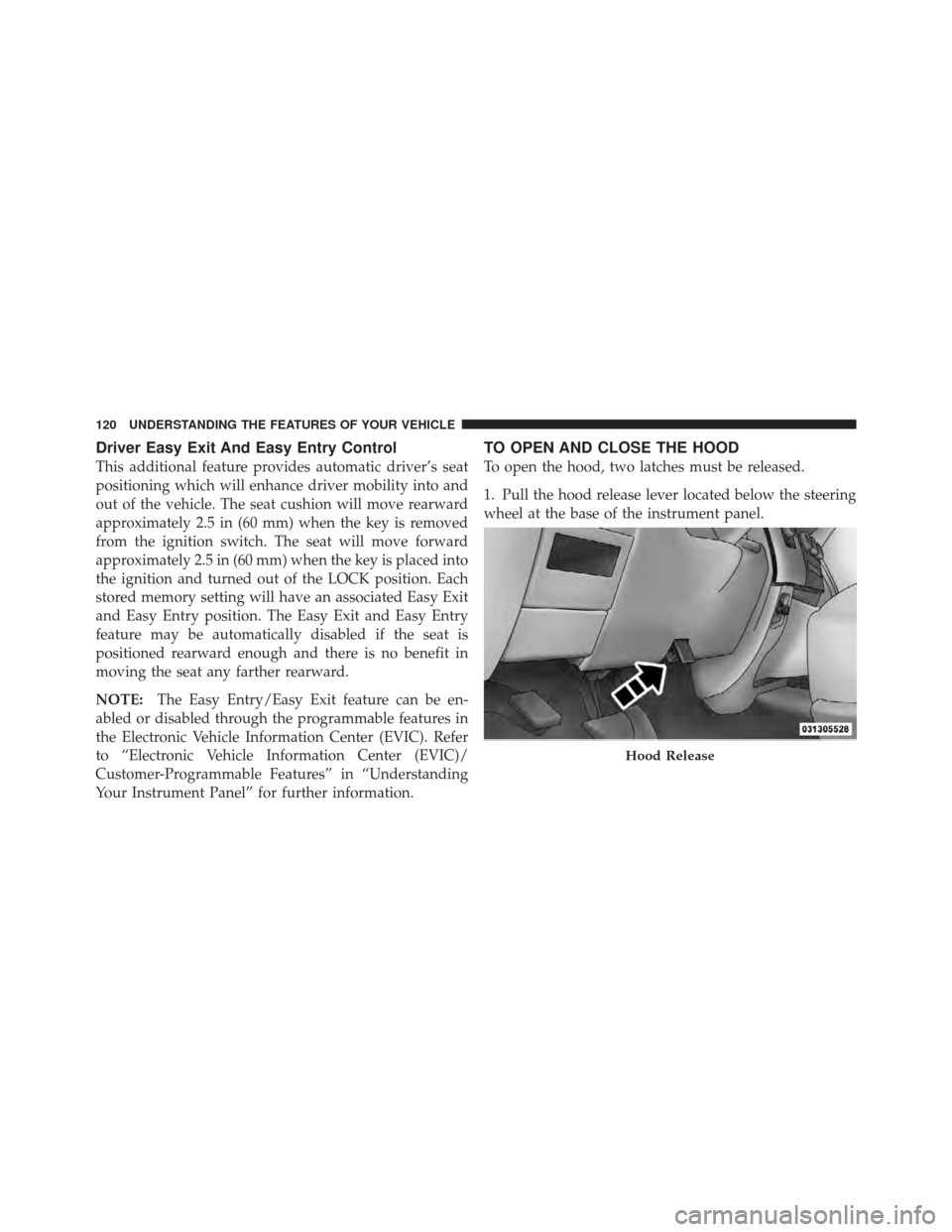
1. Pull the hood release lever located below the steering
wheel at the base of the instrument panel.
Hood Release
120 UNDERSTANDING THE FEATURES OF YOUR VEHICLE
Page 123 of 636
2. Reach into the opening beneath the center of the hood
and push the safety latch lever from right to left to release
it, before raising the hood.CAUTION!
To prevent possible damage, do not slam the hood to
close it. Use a firm downward push at the front center
of the hood to ensure that both latches engage.
WARNING!
Be sure the hood is fully latched before driving your
vehicle. If the hood is not fully latched, it could open
when the vehicle is in motion and block your vision.
Failure to follow this warning could result in serious
injury or death.
LIGHTS
The headlight switch is located on the left side of the
instrument panel, next to the steering wheel. The head-
light switch controls the operation of the headlights,Safety Latch (1500 Series Shown)
3
UNDERSTANDING THE FEATURES OF YOUR VEHICLE 121
Page 131 of 636
High/Low Beam Switch
Push the multifunction lever toward the instrument
panel to switch the headlights to high beam. Pulling the
multifunction back toward the steering wheel will turn
the low beams back on, or shut the high beams off.
WINDSHIELD WIPERS AND WASHERS
Windshield Wipers
The wipers and washers are operated by a switch in the
multifunction lever. Turn the end of the handle to select
the desired wiper speed.
High/Low Beam SwitchWindshield Wiper/Washer Switch
3
UNDERSTANDING THE FEATURES OF YOUR VEHICLE 129
Page 133 of 636
WARNING!
Sudden loss of visibility through the windshield
could lead to a collision. You might not see other
vehicles or other obstacles. To avoid sudden icing of
the windshield during freezing weather, warm the
windshield with the defroster before and during
windshield washer use.
Mist Feature
Push the washer knob, located on the end of the multi-
function lever, inward to the first detent. The wipers will
cycle one time and automatically shut off to clear road
mist or spray from a passing vehicle.
TILT STEERING COLUMN
This feature allows you to tilt the steering column
upward or downward. The tilt lever is located on the
steering column, below the multifunction lever.Pull the lever toward the steering wheel to unlock the
steering column. With one hand firmly on the steering
wheel, move the steering column up or down, as desired.
Release the lever to lock the steering column firmly in
place.
Tilt Steering Lever
3
UNDERSTANDING THE FEATURES OF YOUR VEHICLE 131
Page 134 of 636

WARNING!
Do not adjust the steering column while driving.
Adjusting the steering column while driving or driv-
ing with the steering column unlocked, could cause
the driver to lose control of the vehicle. Be sure the
steering column is locked before driving your ve-
hicle. Failure to follow this warning may result in
serious injury or death.
HEATED STEERING WHEEL — IF EQUIPPED
The steering wheel contains a heating element that helps
warm your hands in cold weather. The heated steering
wheel has only one temperature setting. Once the heated
steering wheel has been turned on it will operate for
approximately 58 to 70 minutes before automatically
shutting off. The heated steering wheel can shut off early
or may not turn on when the steering wheel is already
warm.The heated steering wheel switch is located on the switch
bank below the climate controls.
Press the switch to turn on the heated
steering wheel. The light on the switch
will illuminate to indicate the steering
wheel heater is on. Pressing the switch
a second time will turn off the heated
steering wheel and light indicator.
NOTE: The engine must be running for the heated
steering wheel to operate.
Vehicles Equipped With Remote Start
On models that are equipped with remote start, the
heated steering wheel seat can be programmed to come
on during a remote start. Refer to “Remote Starting
System — If Equipped” in “Things to Know Before
Starting Your Vehicle” for further information.
132 UNDERSTANDING THE FEATURES OF YOUR VEHICLE
Page 135 of 636
WARNING!
•Persons who are unable to feel pain to the skin
because of advanced age, chronic illness, diabetes,
spinal cord injury, medication, alcohol use, ex-
haustion, or other physical conditions must exer-
cise care when using the steering wheel heater. It
may cause burns even at low temperatures, espe-
cially if used for long periods.
•Do not place anything on the steering wheel that
insulates against heat, such as a blanket or cush-
ion. This may cause the steering wheel heater to
overheat.
DRIVER ADJUSTABLE PEDALS — IF EQUIPPED
The adjustable pedals system is designed to allow a
greater range of driver comfort for steering wheel tilt and
seat position. This feature allows the brake, accelerator,
and clutch pedals (if equipped) to move toward or awayfrom the driver to provide improved position with the
steering wheel.
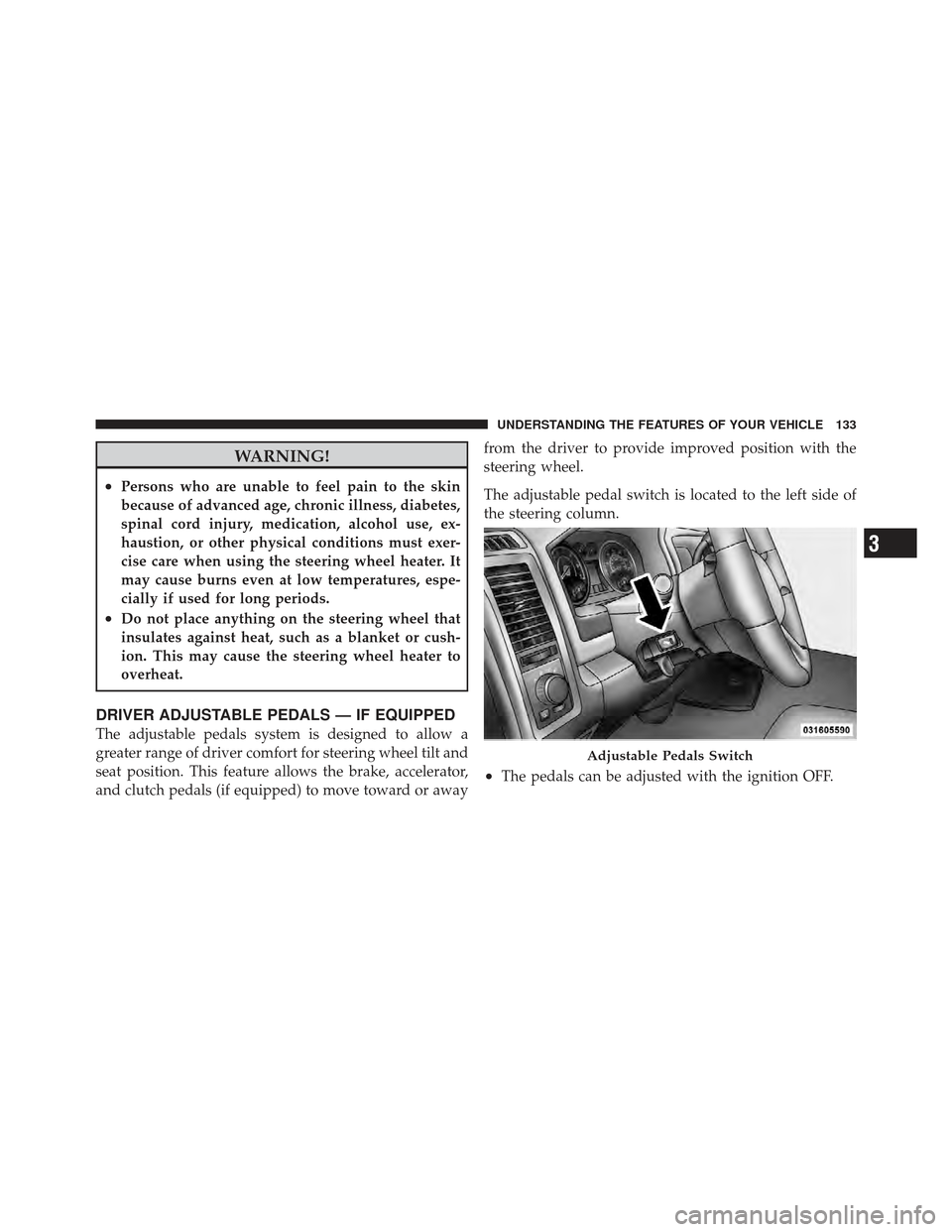
The adjustable pedal switch is located to the left side of
the steering column.
•The pedals can be adjusted with the ignition OFF.
Adjustable Pedals Switch
3
UNDERSTANDING THE FEATURES OF YOUR VEHICLE 133


