Page 129 of 260

12
7
Changing a fuse
QUICK HELP
7
RIGHT-HAND SIDE DASHBOARD
FUSES
- Tilt the storage compartment then
pull it firmly to access the fuses.
Fuses
A (amps)
Allocation
1
15
Rear wiper
2
-
Free
3
5
Airbag control unit
4
10
Steering wheel angle sensor, Diagnostic socket, ESP
sensor, Manual ventilation, Clutch switch, Headlamp beam
height, Particle emission filter pump
5
30
Electric mirrors, Passenger electric window motor
6
30
Front electric windows supply
7
5
Courtesy lamps and glove box lamp
8
20
Multifunction screen, Anti-theft alarm siren, Audio
equipment, Compact disc changer, Audio/telephone, Trailer
fusebox (accessory), Coachbuilder/vehicle converter unit
(platform cab)
9
10
Load space accessory socket
10
30
Rear ride height corrector, Steering wheel switching,
Instrument panel
11
15
Diagnostic socket, Ignition switch
12
15
Hands-free kit, Airbag control unit, Parking sensors
control unit
13
5
Engine fusebox, Trailer fusebox
14
15
Rain sensor, Digital air conditioning, Instrument panel
15
30
Locking/unlocking/deadlocking
16
-
Free
17
40 Heated rear screen, Heated mirrors
17
10
Heated mirrors only
Page 132 of 260
130
Changing a fuse
TOWING/TOWBAR/
COACHBUILDERS/PLATFORM
CAB FUSES
The descriptions communicated are an
indication only as this additional box
relates to other information which depends
on the coachbuilder/vehicle convertor for
which this document cannot act
as a technical support.
Fuses
A (amps)
Allocation
1
15
Free
2
15
Ignition relay and optional generator
3
15
Trailer 12 V supply
4
15
Permanent supply for vehicle convertors
5
10
Hazard warning lamps
Page 133 of 260
131
Changing a wiper blade
QUICK HELP
7
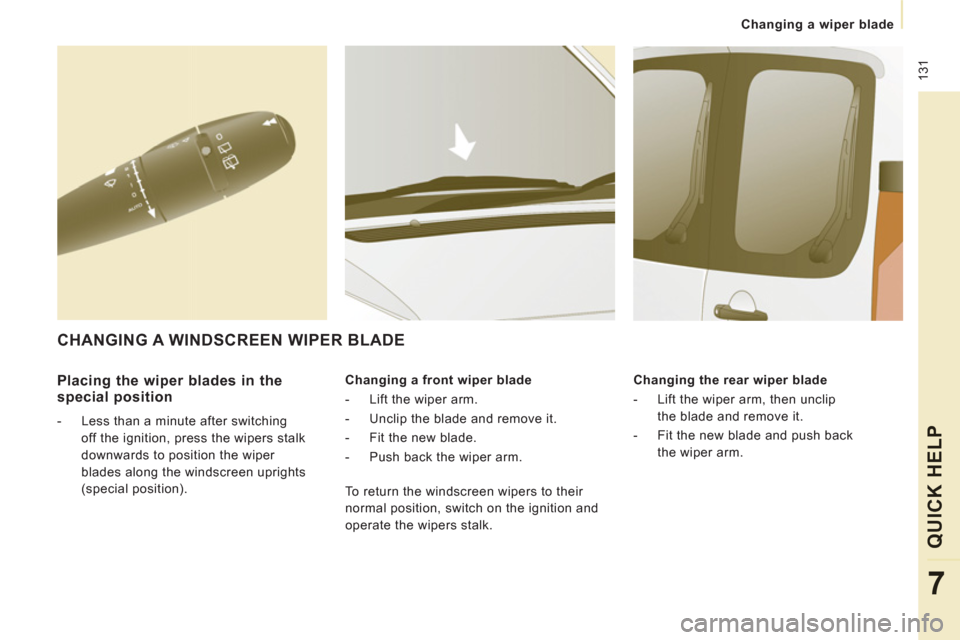
Placing the wiper blades in the
special position
- Less than a minute after switching
off the ignition, press the wipers stalk
downwards to position the wiper
blades along the windscreen uprights
(special position).
Changing a front wiper blade
- Lift the wiper arm.
- Unclip the blade and remove it.
- Fit the new blade.
- Push back the wiper arm.
Changing the rear wiper blade
- Lift the wiper arm, then unclip
the blade and remove it.
- Fit the new blade and push back
the wiper arm.
CHANGING A WINDSCREEN WIPER BLADE
To return the windscreen wipers to their
normal position, switch on the ignition and
operate the wipers stalk.
Page 176 of 260
9.32
07
1
2
1
2
3
INTERNAL TELEPHONE
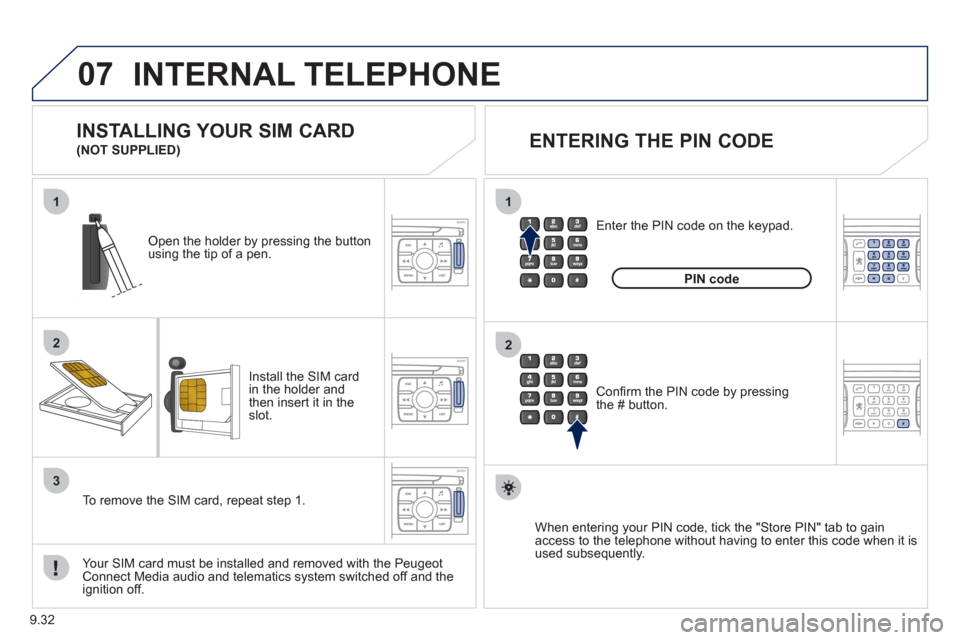
Install the SIM card
in the holder andthen insert it in theslot.
Open the holder by pressing the buttonusing the tip of a pen.
Your
SIM card must be installed and removed with the Peugeot Connect Media audio and telematics system switched off and the
ignition off.
To remove the
SIM card, repeat step 1.
Confi rm the PIN code by pressingthe # button.
Enter the PIN code on the ke
ypad.
When enterin
g your PIN code, tick the "Store PIN" tab to gain
access to the telephone without having to enter this code when it is
used subsequently.
INSTALLING YOUR SIM CARD
(NOT SUPPLIED)
ENTERING THE PIN CODE
PINcode
Page 180 of 260

9.36
08
- The "vehicle" tab: the range, the current
fuel consumption and the distance
remaining to the destination.
- Tab "1"
(route 1) with: the average speed,
the average fuel consumption and the distance travelled calculated over route "1".
- Tab "2"
(route 2) with the same functions for a second route.
A FEW DEFINITIONS
Range:
displays the distance which can travelled with the remaining fuel
detected in the tank, basd on the average consumption over the last few
miles (kilometres).
This displayed value may vary signi
fi cantly following a change in the
vehicle speed or the relief of the route.
When the ran
ge falls below 20 miles (30 km), dashes are displayed.
After fi lling with at least 10 litres of fuel, the range is recalculated and is
displayed when it exceeds 60 miles (100 km).
If, whilst drivin
g, dashes are displayed continuously in place of the digits,contact a PEUGEOT dealer.
Current fuel consumption:only calculated and displayed above 20 mph (30 km/h).
Average fuel consumption: this is the average fuel consumption since
the last trip computer zero reset.
Distance travelled: calculated since the last trip computer zero reset.
Distance remaining to the destination:calculated with reference to
the fi nal destination, entered by the user. If guidance is activated, the
navigation system calculates it as a current value.
Average speed: this is the average speed calculated since the last trip computer zero reset (ignition on).
On-board computer
Route
Distance km
km/h l/100
740
6.5
31
Page 213 of 260

9.69
08
1
2
3
4
BLUETOOTH TELEPHONE
*
The services available depend on the network, the SIM card and thecompatibility of the Bluetooth telephone used. Check the telephone
manual and with your network provider for details of the servicesavailable to you.
PAIRING A TELEPHONE
FIRST CONNECTION
For reasons of safety and because they require prolonged attentionon the part of the driver, the operations for pairing the Bluetooth mobile telephone to the hands-free system of the Peugeot ConnectNavigation must be carried out with the vehicle stationary. Theignition must be on.
Activate the telephone’s Bluetooth
function
and ensure that it is "visible to all" (refer to the
telephone instructions). Enter the authentication code on the tele
phone.
The code to be entered is displayed on the screen
of the system.
Some telephones offer automatic reconnection o
f
the telephone every time the ignition is switched on.
A messa
ge confi rms the pairing.
To change the telephone connected, press the PHONE button, then select Phone Menu and press the dial toconfi rm.
Once the telephone has been connected, Peugeot Connect
Navigation can synchronise the address book and the call list.
This synchronisation may take a few minutes * . Pairin
g can also be started from the telephone (refer to the
telephone instructions). Visit www.peu
geot.co.uk for more information (compatibility, more
help, ...).
Press the PH
ONE button.
For a
fi rst connection, select"Search phone" and press the dial to confi rm. Then select the name of thetelephone.
Search
phone
Page 214 of 260

9.70
08
1
2
2
1
*
The services available depend on the network, the SIM card and the compatibility of the Bluetooth telephone used. Check the telephone manual and with your network provider for details of the services
available to you.
BLUETOOTH TELEPHONE
CONNECTING A TELEPHONE
For reasons of safety and because they require prolonged attention
on the part of the driver, the operations for pairing the Bluetooth
mobile telephone to the hands-free system of the Peugeot Connect
Navigation must be carried out with the vehicle stationary.
The ignition must be on.
Activate the tele
phone’s Bluetooth functionand ensure that it is "visible to all" (refer to the
telephone instructions).
The last telephone connected is reconnected automatically.
A messa
ge confi rms the connection. When a telephone is alread
yconnected, to change it press the
PHONE button, then select PhoneMenu and press the dial to confi rm.
Once the telephone has been connected, Peugeot Connect Navigation can synchronise the address book and the call list. This synchronisation may take a few minutes *
.
The list o
f telephones connected previously (4 maximum) appearson the multifunction screen. Select the telephone required for a
new connection. Visit www.peu
geot.co.uk for more information (compatibility, more
help, ...).
Press the PH
ONE button.Select "Connect
phone". Select the
telephone and press to confi rm.
Connect
phone
Page 217 of 260

9.73
10
1
TRIP COMPUTER
Press the MODE button several
times in succession until the tripcomputer is displayed.
Range: displays the distance which can travelled with the
remaining fuel detected in the tank, basd on the average consumption over the last few miles (kilometres).
This displa
yed value may vary signifi cantly following a change in
the vehicle speed or the relief of the route.
When the range
falls below 20 miles (30 km), dashes are
displayed. After fi lling with at least 10 litres of fuel, the range is
recalculated and is displayed when it exceeds 60 miles (100 km).
If, whilst drivin
g, dashes are displayed continuously in place of the
digits, contact a PEUGEOT dealer.
Each press o
f the button at the end of the wiper stalk displays
the different trip computer information in succession, according to
the screen.
A FEW DEFINITIONS
- The "vehicle" tab:
The ran
ge, the current fuel consumption and the distance
remaining.
- The "1"
(trip 1) tab with:
The average speed, the average fuel consumption and thedistance travelled calculated over route "1".
- The "2"
(trip 2) tab with the same
functions for a second route.Current fuel consum
ption:only calculated and displayed above
20 mph (30 km/h).
Average fuel consumption: this is the average fuel consumption
since the last trip computer zero reset.
Distance travelled: calculated since the last trip computer zero reset.
Distance remaining to the destination:calculated with referenceto the fi nal destination, entered by the user. If guidance is activated,
the navigation system calculates it as a current value.
Average speed:this is the average speed calculated since the last
trip computer zero reset (ignition on).