Page 150 of 260

9.6
02
1
2
VOICE COMMANDS
VOICE COMMANDS AND STEERING MOUNTED CONTROLS
DISPLAYING THE LIST AND USING THEM
To display the list o
f available voice commands, press the voice recognition control to start the voice recognition,
then say HELP or the voice recognition command.
For the same operation, press and
hold the MENU button and select the"Voice commands list" function.
Press the voice recognition control tostart the voice recognition.
Say the words one by one and wait for the audible confi rmation signal between each word.
Th
e list which follows is exhaustive.
LEVEL 1LEVEL 2
LEVEL 3
radiomemory autostoreprevious/next
list 1 to
6/*
cd pla
yer
Jukebox (if activated)
USB previous/next track
track number/trackscan
random play
directory (CD-MP3 inserted)list 1 to 250/*
previous
/next
repeat
help/what can I sa
y/cancel
call/
guide to "Pre-recorded description"
telephone l
ast number
voice box
voice mail directory "Pre-recorded description"
messagedisplayreaddirectory "Pre-recorded description"
nav
igation stop/resume
zoom in/out
vi
ew *
destination
vehicle
tr
affi c info displayread
displa
yaudio
telephone
trip computer
Navigation
air conditioning
previous/next
s
top
delete yes/no f
or all level 1 and 2
* help/what can I say/cancel for all level 1, 2 or *
Voice commands list
Page 151 of 260
9.7
03
°
SCREEN AND MAIN MENU
The system uses the complete and detailed NAVTEQ maps installed directly on the equipment's hard disk.
Updates of the maps of the UK and of the other European countries, supplied by our partner NAVTEQ, are available from the PEUGEOT network.
This displa
ys the following information, via the audio control panel:
- time,
- date,
- ambient temperature
(if there is a risk of ice, you are warned by amessage),
- audio source displa
ys (radio, CD, jukebox, ...),
- telematic system displays
(telephone, services, ...),
- check o
f openings (doors, boot, ...),
- warnin
g messages (e.g.: "Fuel level low") and vehicle function statusmessages (e.g.: "Auto lighting activated") displayed temporarily,
- trip computer information,
- GPS
(Europe) satellite navigation system information.
> COLOUR SCREEN
Telephone
Orange
Time:
Date:
Screen confi guration: refer to the section - Screen menu map.
Page 152 of 260
9.8
03SCREEN AND MAIN MENU
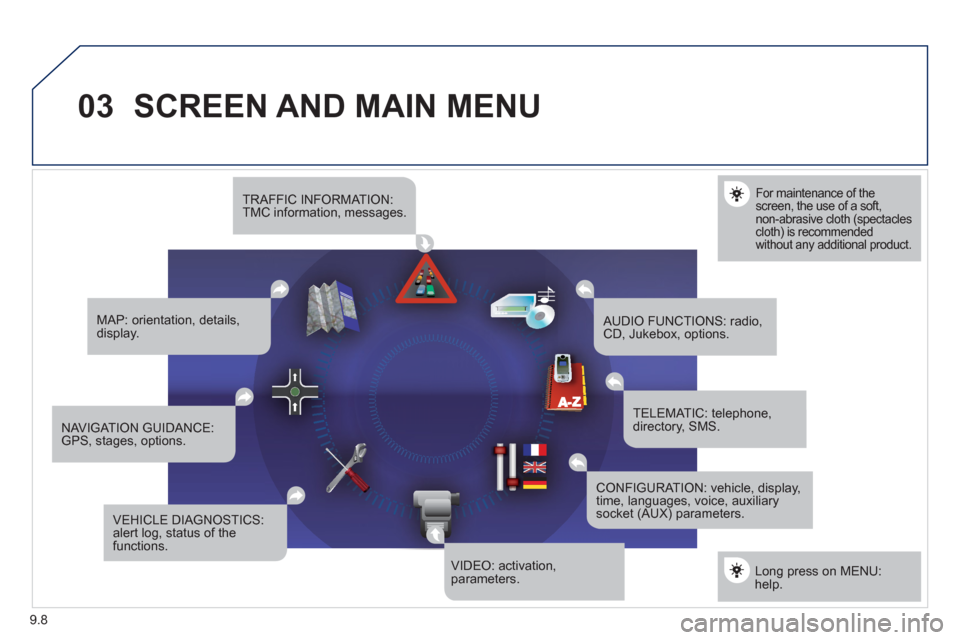
For maintenance of the screen, the use of a soft, non-abrasive cloth (spectacles cloth) is recommended without any additional product.
TRAFFIC INFORMATION:TMC information, messages.
MAP: orientation, details,display.
NAVIGAT ION GUIDANCE:GPS, stages, options.
VEHICLE DIAGNOSTICS:alert log, status of the functions.
VIDEO: activation,parameters.
CONFIGURATION: vehicle, display,time, languages, voice, auxiliarysocket (AUX) parameters.
TELEMATIC: telephone,directory, SMS.
AUDIO FUNCTIONS: radio,CD, Jukebox, options.
Long press on MENU:help.
Page 154 of 260
9.10
03 SCREEN AND MAIN MENU
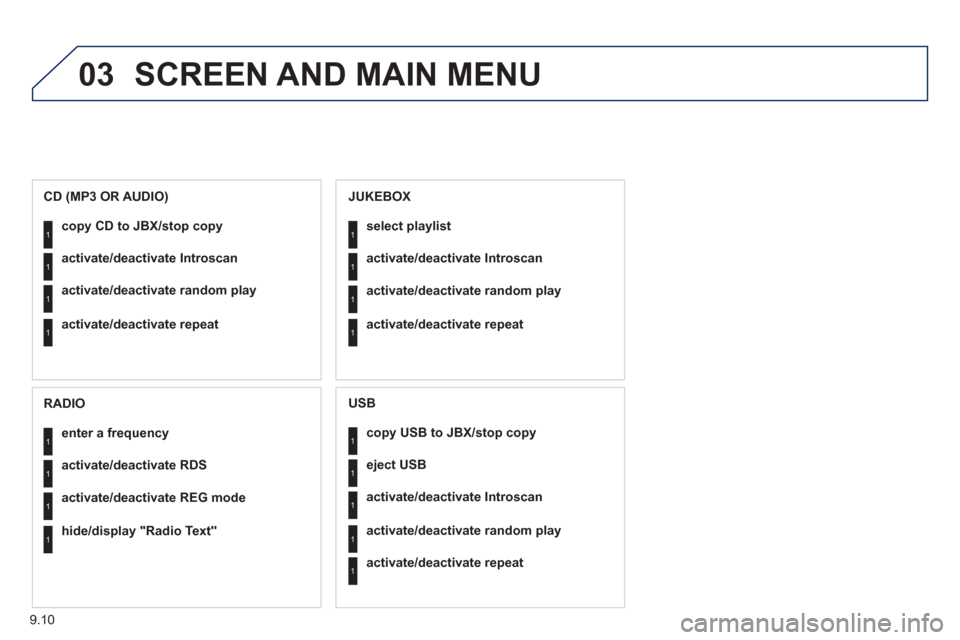
copy USB to JBX/stop copy1
1
1
1
eject USB
activate/deactivate Introscan
activate/deactivate random play
1activate/deactivate repeat
USB
copy CD to JBX/stop copy1
1
1
1
activate/deactivate Introscan
activate/deactivate random play
activate/deactivate repeat
CD (MP3 OR AUDIO)
se
lect playlist1
1
1
1
activate/deactivate Introscan
activate/deactivate random play
activate/deactivate repeat
JUKEBOX
enter a frequency1
1
1
1
activate/deactivate RDS
activate/deactivate REG mode
hide/display "Radio Text"
RADIO
Page 167 of 260
9.23
06
1
2
4
3
1
2
4
3
AUDIO/VIDEO
RADIO
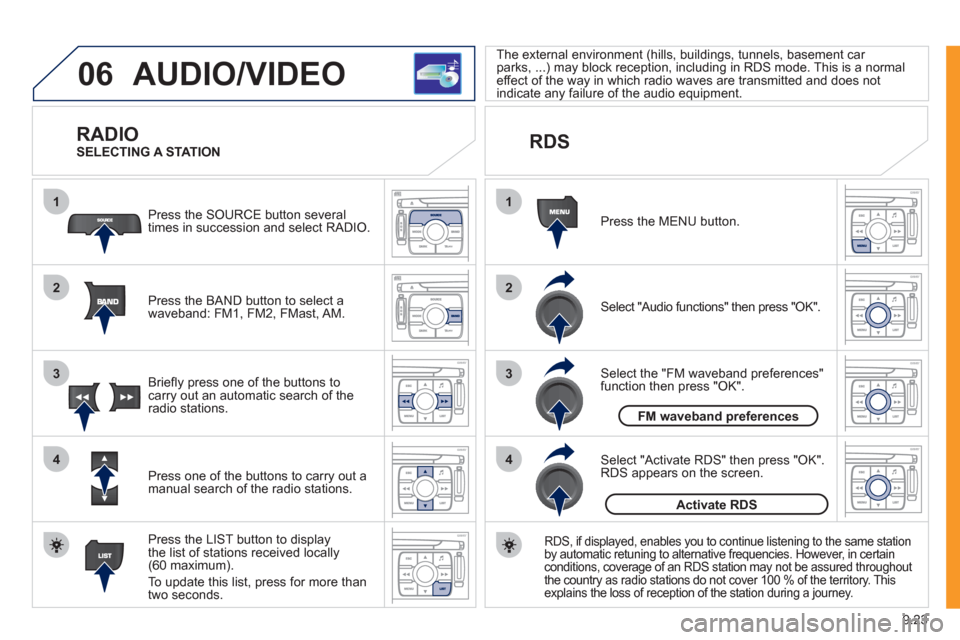
Press the BAND button to select awaveband: FM1, FM2, FMast, AM. Pr
ess the SOURCE button several
times in succession and select RADIO.
Press the LIST button to displa
ythe list of stations received locally(60 maximum).
To update this list, press for more than
tw
o seconds.
Press one of the buttons to carr
y out a
manual search of the radio stations. Brie
fl y press one of the buttons tocarry out an automatic search of the radio stations.
RDS
Select "Audio functions" then press "OK".
Press the MENU button.
RDS, if displayed, enables you to continue listening to the same station
by automatic retuning to alternative frequencies. However, in certain conditions, coverage of an RDS station may not be assured throughout
the country as radio stations do not cover 100 % of the territory. This explains the loss of reception of the station during a journey.
Select "Activate RDS" then press "OK". RDS appears on the screen.
Select the "FM waveband preferences" function then press "OK". The external environment
(hills, buildings, tunnels, basement car parks, ...) may block reception, including in RDS mode. This is a normaleffect of the way in which radio waves are transmitted and does notindicate any failure of the audio equipment.
SELECTING A STATION
FM waveband preferences
Activate RDS
Page 168 of 260
9.24
06
1
2
MP3 CD
The MP3 format, an abbreviation of MPEG 1.2 & 2.5 Audio
Layer 3, is an audio compression standard which permits the recording of several tens of music fi les on a single disc. Empt
y CDs are not recognised and may damage the system.
It is advisable to restrict
fi le names to 20 characters without usingspecial characters (e.g. " ? ; ˘) to avoid any playing or displaying problems. The audio s
ystem will only play fi les with the extension ".mp3" with
a sampling rate of 22.05 KHz or 44.1 KHz. No other type of fi le(.wma, .mp4, .m3u...) can be played.
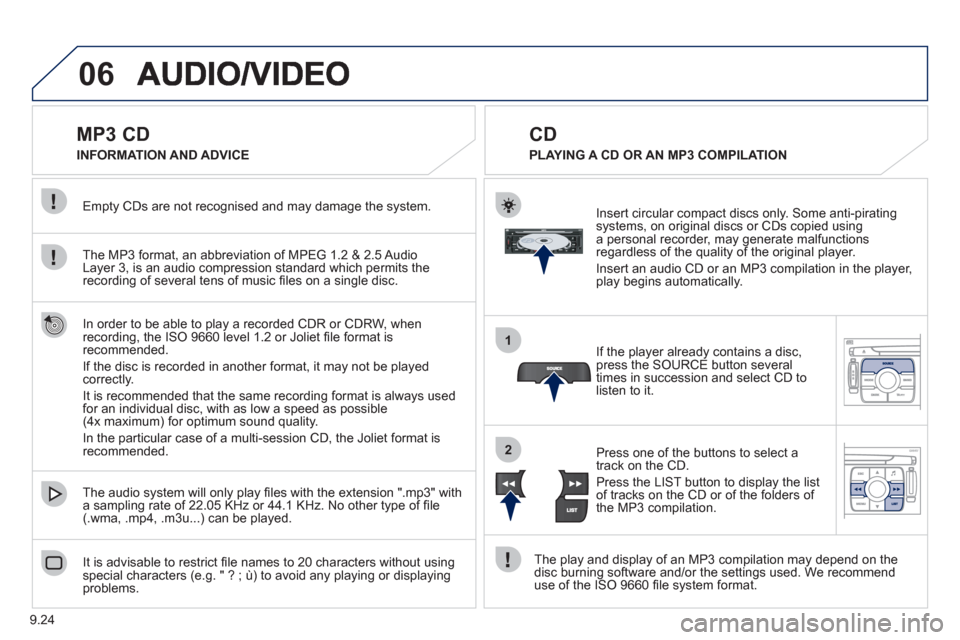
If the pla
yer already contains a disc, press the SOURCE button several
times in succession and select CD to listen to it.
Insert circular compact discs onl
y. Some anti-piratingsystems, on original discs or CDs copied usinga personal recorder, may generate malfunctionsregardless of the quality of the original player.
Insert an audio
CD or an MP3 compilation in the player,play begins automatically.
The pla
y and display of an MP3 compilation may depend on the
disc burning software and/or the settings used. We recommend use of the ISO 9660 fi le system format.
Pr
ess one of the buttons to select atrack on the CD.
Press the LI
ST button to display the list
of tracks on the CD or of the folders of
the MP3 compilation.
CD
PLAYING A CD OR AN MP3 COMPILATION INFORMATION AND ADVICE
In order to be able to pla
y a recorded CDR or CDRW, when recording, the ISO 9660 level 1.2 or Joliet fi le format isrecommended.
I
f the disc is recorded in another format, it may not be playedcorrectly.
It is recommended that the same recordin
g format is always used
for an individual disc, with as low a speed as possible(4x maximum) for optimum sound quality.
In the particular case o
f a multi-session CD, the Joliet format is recommended.
Page 169 of 260
9.25
06
1
2
1
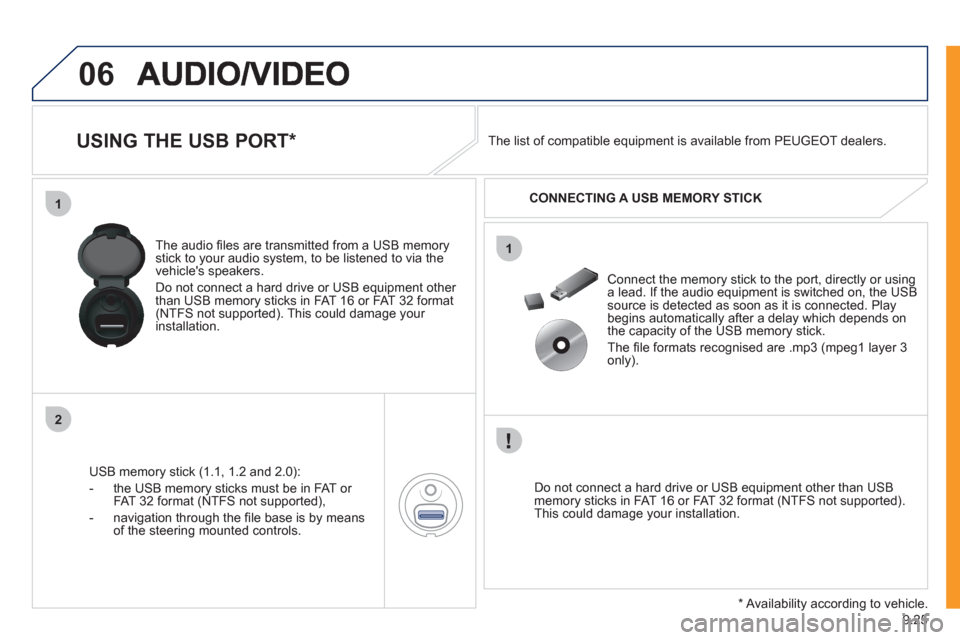
USING THE USB PORT *
USB memory stick (1.1, 1.2 and 2.0):
- the U
SB memory sticks must be in FAT or
FAT 32 format (NTFS not supported),
- navi
gation through the fi le base is by means of the steering mounted controls. The audio
fi les are transmitted from a USB memorystick to your audio system, to be listened to via the
vehicle's speakers.
Do not connect a hard drive or USB e
quipment other
than USB memory sticks in FAT 16 or FAT 32 format (NTFS not supported). This could damage your installation.
Do not connect a hard drive or USB e
quipment other than USB memory sticks in FAT 16 or FAT 32 format (NTFS not supported).This could damage your installation.
Connect the memory stick to the port, directly or using a lead. If the audio equipment is switched on, the USB source is detected as soon as it is connected. Play
begins automatically after a delay which depends on
the capacity of the USB memory stick.
The fi le formats reco
gnised are .mp3 (mpeg1 layer 3
only). The list of compatible equipment is available from PEUGE
OT dealers.
CONNECTING A U
SB MEMORY STICK
* Availability according to vehicle.
Page 170 of 260
9.26
06
1
2
4
3
5
1
2
3
AUDIO/VIDEO
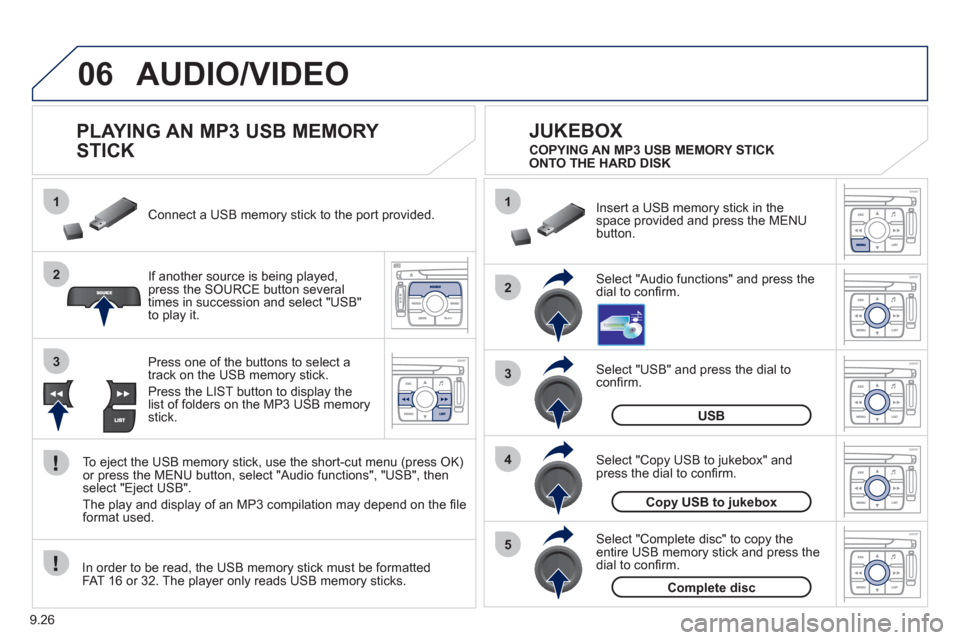
PLAYING AN MP3 USB MEMORY
STICK
If another source is being played,press the SOURCE button several
times in succession and select "USB"
to play it. Connect a USB memor
y stick to the port provided.
To e
ject the USB memory stick, use the short-cut menu (press OK)or press the MENU button, select "Audio functions", "USB", then
select "Eject USB".
The pla
y and display of an MP3 compilation may depend on the fi le
format used.
Select "USB" and press the dial toconfi rm.
Insert a U
SB memory stick in thespace provided and press the MENUbutton.
JUKEBOX
USB
Select "Complete disc" to copy theentire USB memory stick and press thedial to confi rm.
Complete disc
Select "Copy USB to jukebox" andpress the dial to confi rm.
Copy USB to jukebox
Select "Audio functions" and press the dial to confi rm.
Pr
ess one of the buttons to select atrack on the USB memory stick.
Press the LIST button to displa
y the list of folders on the MP3 USB memorystick. COPYING AN MP3 USB MEMORY STICK
ONTO THE HARD DISK
In order to be read, the USB memor
y stick must be formatted
FAT 16 or 32. The player only reads USB memory sticks.