Page 163 of 268
9.11
04
1
2
3
4
5
6
7
8
NAVIGATION - GUIDANCE
Press the MENU button.
Turn the dial and select the Navigation Guidance function.
Pr
ess the dial to confi rm the selection.
T
urn the dial and select the
"Destination choice" function.When the country has been selected,
turn the dial and select the "Town"
function. Pr
ess the dial to confi rm the selection.
Turn the dial and select the "Enter anaddress" function. Pr
ess the dial to confi rm the selection. Tip: for a detailed
global view of the menus available, refer to the "Screen menu map" part of this section.
SELECTING A DESTINATION
Destination choiceTown
Enter an address
Page 164 of 268
9.12
04
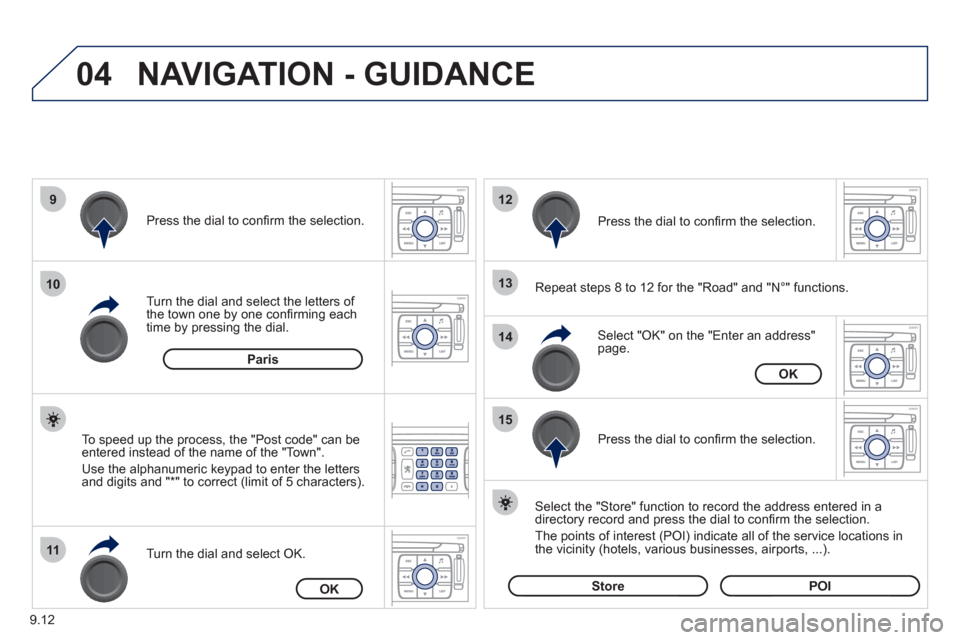
9
10
11
12
13
14
15
NAVIGATION - GUIDANCE
Repeat steps 8 to 12 for the "Road" and "N°" functions.
Turn the dial and select the letters of
the town one by one confi rming each
time by pressing the dial.
Select the "Store" function to record the address entered in a
directory record and press the dial to confi rm the selection.
The points o
f interest (POI) indicate all of the service locations in
the vicinity (hotels, various businesses, airports, ...).
Select "OK" on the "Enter an address" page. Pr
ess the dial to confi rm the selection.
Turn the dial and select
OK.
To speed up the process, the "Post code" can beentered instead of the name of the "Town".
Use the alphanumeric ke
ypad to enter the letters
and digits and "*" to correct (limit of 5 characters).
Pr
ess the dial to confi rm the selection.
Pr
ess the dial to confi rm the selection.
Paris
OK
OK
StorePOI
Page 192 of 268
9.40
10SCREEN MENU MAP
MAP
vehicle direction MAP ORIENTATION
1
2
3
supermarkets, shopping
culture, tourism and shows
4
3
north direction3
3D view3
administration and safety
MAP DETAILS
town halls, town centre
universities, colleges
hospitals
hotels, restaurants and shops
4
3
2
4
4
3
hotels
r
estaurants
vineyards
business centres
4
4
4
4
culture and museums
casinos and ni
ghtlife
cinemas and theatres
tourism
shows and exhibitions
4
4
4
4
4
sports and open air centres
sports centres
theme parks
golf courses
s
kating rinks, bowling alleys
winter sports resorts
parks, gardens
3
4
4
4
4
4
4
transport and automobile
airports, ports
3
4
stations, bus stations 4
full screen map
DISPLAY MAP2
3
map in window3
MOVE THE MAP/FOLLOW VEHICLE 2
MAP DATABASE DESCRIPTION2
vehicle rental
lay bys, car parks
serv
ice stations, garages
4
4
4
TRAFFIC INFORMATION
READ MESSAGES
1
2
geographic fi lter3
store all messages3
store messages3
FILTER TRAFFIC INFORMATION 2
Page 207 of 268

9.55
04
1
2
3
5
6
4
NAVIGATION - GUIDANCE
SELECTING A DESTINATION
Press the NAV button again or select
the Navigation Menu function and
press the dial to confi rm.
Select the "Destination in
put"
function and press the dial to
confi rm. Pr
ess the NAV button.
Select the letters of the town one
by one confi rming each time by pressing the dial.
Once the country has been selected,
turn the dial and select the townfunction. Press the dial to confi rm. Insert the
SD card in the front panel reader and leave it there to use the
Navigation functions.
The navi
gation SD card data must not be modifi ed.
Map data updates are available
from PEUGEOT dealers.
A pre-set list (by entering the fi rst few letters) of the towns in thecountry selected can be accessed via the LIST button on the virtual
keypad.
Select the "Address input" function
and press the dial to confi rm.
The list o
f the last 20 destinations appears under the NavigationMenu function.
Navigation Menu
Destination input
Address input
Page 209 of 268
9.57
04
1
2
3
5
4
NAVIGATION - GUIDANCE
SETTING AND NAVIGATING TO MY
"HOME ADDRESS"
Press the NAV button twice to display
the Navigation Menu.
To be set as the "Home address"
, an address must fi rst be entered in the address book, for example from "Destination
input"/"Address input" then "Save to address book".
Select "Address book" and confi rm.
Then select "Search entry (complete address book)" and confi rm. Select "Destination in
put" and confi rm.
Then select "Choose from addressbook" and confi rm.
Select "Set as home address" andconfi rm to save.
Select
your home address and confi rm.
Then select "Edit entry" and confi rm.
To start navi
gation towards "Home address", press NAV twice
to display the Navigation Menu, select "Destination input" and confi rm.
Then select "Navi
gate HOME" and confi rm to start guidance.
Navigation Menu
Destination input
Address book
Edit entry
Set as "Home address"
Page 257 of 268

15
1
Exterior
VISUAL SEARCH
10
EXTERIOR
Filler cap, fuel tank 120-121
Fuel cut-off,
Diesel priming 121-122
Wiper blade 140
Door mirrors 87
Side repeater 133
Front lamps, foglamps,
direction indicators 42-44, 131
Headlamp beam height adjustment 44
Changing
front bulbs 131-133
Headlamp wash 45, 116
Snow shield 130
Front doors 22-23
Sliding side door 23-24
Key 20
Opening the bonnet 112
Electric child lock 24
Brakes, pads 90, 117
Emergency braking 92
ABS, EBFD 92
ASR, ESP 93
Tyres, pressures 150
Rear suspension 84-86
Doors, tailgate 22-25
Emergency control 25
Accessories 111
Number plate lamp 135
Dimensions 144-147
Temporary puncture repair kit 124
Spare wheel, jack,
changing a wheel, tools 126-130
Inflation, pressures 150
Remote control 19-20
Changing the battery, reinitialisation 20
Key 20
Starting 41
Central locking/
unlocking 19, 23
Alarm 21-22
Towing, lifting 141
Towbar 109-110
Parking sensors 91
Rear lamps, direction indicators 42-43, 133
3rd brake lamp 135
Changing
rear bulbs 131, 134
Page 260 of 268
154
Interior
Seating area fittings 81-83
- stowing rings,
- load space cover,
- coat hook and net fixing,
- bench net,
- grab handle,
- cup holder,
- 12 volt socket,
- storage compartment.
Temporary puncture repair kit 124
Spare wheel, jack,
changing a wheel, tools 126-130
Rear suspension 84-86
Front, side, curtain
airbags 97-100
Passenger's airbag deactivation 100
Parking brake,
handbrake 90
Opening the bonnet 112
Battery, charging, starting 123
Passenger compartment fuses 138
Front seats, adjustments, head
restraint 65-66
2-seat front bench 67-68
Seat belts 94-95
Rear ventilation 61
Child seats 101-108
Isofix mountings 103-105
Rear side windows 88
INTERIOR
Rear seats, rear
benches 69-75
Seat
configuration 76
Rear courtesy lamp 80
Changing courtesy
lamp bulbs 133
Accessories 111
Rear view mirror 88
Toll cards, car park tickets 81
Front courtesy lamp 80
Changing courtesy
lamp bulbs 133
Page 261 of 268
155
Technical data - Maintenance
VISUAL SEARCH
10
TECHNICAL DATA - MAINTENANCE
Identification markings,
serial number, paint code, tyres 150
Engine fuses 139
Windscreen/headlamp wash, levels 116
Bulbs, lighting,
changing bulbs 131-135
Checks 117-118
- battery,
- gearbox,
-
carbon fi lter, passenger compartment fi lter,
- oil filter,
- particle emission filter,
- parking brake,
- brake pads,
- brake drums, discs.
Emissions controls (EOBD) 35
Water bleeding, Diesel filter 118
Under the bonnet
- Diesel 113
- petrol 114
Fuel cut-off,
Diesel priming 121-122
Engine technical data 149
Dimensions 144-147
Weights 148
Model code 156
Opening the bonnet, stay 112
Levels 115-116
- Diesel additive,
- dipstick,
- power steering fluid,
- brake fluid,
- coolant.
- screen and headlamp wash fluid.
Towing, lifting 141
Towed loads 148
Warning lamps 28-33
Changing a wiper blade 140