Page 194 of 340

192
i
!
Practical information
Changing a fuse
Procedure for replacing a failed fuse with a new fuse to rectify a failure of the corresponding function.
The extraction tweezer and spare fuses are
located in the glove box.
Access to the tools
Before changing a fuse, the cause of the failure
must be identified and rectified.
)
Identify the failed fuse by checking the
condition of its filament.
Changing a fuse
Good
Failed
)
Use the special tweezer to extract the fuse
from its housing.
)
Always replace the faulty fuse with a fuse
of the same rating.
)
Check that the number marked on the
fusebox, the rating marked on the fuse and
the following tables all agree. PEUGEOT will not accept responsibility
for the cost incurred in repairing your
vehicle or for rectifying malfunctions
resulting from the installation of
accessories not supplied and not
recommended by PEUGEOT and
not installed in accordance with its
instructions, in par ticular when the
combined consumption of all of the
additional equipment connected
exceeds 10 milliamperes.
Installing electrical
accessories
Your vehicle's electrical system is
designed to operate with standard or
optional equipment.
Before installing other electrical
equipment or accessories on your
vehicle, contact a PEUGEOT dealer or
a qualified workshop.
Page 204 of 340
202
i
Practical information
Towing a trailer, a caravan, etc.
We recommend the use of genuine
PEUGEOT towbars and their harnesses
that have been tested and approved
from the design stage of your vehicle,
and that the fitting of the towbar is
entrusted to a PEUGEOT dealer or a
qualified workshop.
If the trailer is not fitted by a PEUGEOT
dealer, it is imperative that it is fitted
using the vehicle's electrical pre-
equipment, in accordance with the
manufacturer's instructions.
Towbar suitable for the attachment of a
trailer or caravan with additional lighting and
signalling.
Your vehicle is primarily designed for
transpor ting people and luggage, but it may
also be used for towing a trailer.
Driving with a trailer places greater demands
on the towing vehicle and the driver must take
particular care.
Blanking cover
When towing, you must remove the blanking
cover in the front bumper if your vehicle has
one.
Contact a PEUGEOT dealer or a qualified
workshop for this.
Page 208 of 340

206
i
!i
Practical information
The fitting of electrical equipment
or accessories which are not
recommended by PEUGEOT may result
in a failure of your vehicle's electronic
system and excessive electrical
consumption.
Please note this precaution. You
are advised to contact a PEUGEOT
representative to be shown the range
of recommended equipment and
accessories.
Installation of radio
communication
transmitters
Before installing any after-market radio
communication transmitter, you can
contact a PEUGEOT dealer for the
specification of transmitters which can
be fitted (frequency, maximum power,
aerial position, specific installation
requirements), in line with the Vehicle
Electromagnetic Compatibility Directive
(2004/104/EC).
Depending on the legislation in force
in the country, it may be compulsory
to have a high visibility safety vest,
warning triangle and spare bulbs and
fuses available in the vehicle.
You can also obtain products for cleaning and
maintenance (exterior and interior) and topping
up fluids (screenwash, ...), as well as refills
(car tridge for temporary tyre repair kit...) from
PEUGEOT dealers.
"Multimedia":
audio systems, por table navigation system,
Takara/Sony por table video screen, Bluetooth
system, speakers, DVD player, Wi-Fi, speed
camera aler t, video suppor t, microwave unit...
Page 233 of 340
231
JBL EQUIPMENT
The HiFi system is a 5.1 system developed jointly by PSA and JBL.
4 two-way speaker kits, separated by an active fi lter, are fi tted at front and
rear.
These are based on a fabric dome tweeter delivering stable and balanced
treble reproduction and a 50W RMS neodymium magnet inverted motor
medium-woofer possessing a very high output of bass frequencies.
The central line in the dashboard improves reproduction of the musical
scene, putting the listener in a situation that realistically reproduces the
original musical recording.
The bass unit located in the boot carries a 150 W triple-coil true
subwoofer in an optimised space, giving depth and impact to the bass
ranges.
This set of speakers is controlled by a 10-way 500 W RMS 2 ohm
amplifi er, using advanced surround sound and sound distribution
handling, so as to deliver optimum performance both for the driver and for
the passengers in the vehicle.
Page 273 of 340

271
09 MUSIC MEDIA PLAYERS
CD, MP3 CD/USB PLAYER
The audio equipment will only play audio fi les with ".m4a, .m4b, .aac,
.fl ac, .ogg and.mp3" fi le extensions and with a bit rate of between
32 Kbps and 320 Kbps.
It also supports the VBR (Variable Bit Rate) mode.
No other type of fi le (.wma, .mp4, .m3u...) can be played.
The sampling rates supported are 11, 22, 44 and 48 KHz.
It is advisable to restrict fi le names to 20 characters, without using of
special characters (e.g.: " " ? ; ù) to avoid any playing and displaying
problems.
In order to be able to play a recorded CDR or CDRW, when recording
it is preferable to select the ISO 9660 level 1, 2 or Joliet standard.
If the disc is recorded in another format it may not be played correctly.
It is recommended that the same recording standard is always used
for an individual disc, with as low a speed as possible (4x maximum)
for optimum sound quality.
In the particular case of a multi-session CD, the Joliet standard is
recommended.
INFORMATION AND ADVICE
The system supports USB mass storage or IPod
devices via the USB port (suitable cable not supplied).
Control of the peripheral device is with the audio
system controls.
Other peripherals, not recognised on connection, must
be connected to the auxiliary socket using a Jack cable
(not supplied).
In order to be read, a USB memory stick must be formatted FAT 16 or 32.
Page 274 of 340

272
09
1
2
3
MUSIC MEDIA PLAYERS
CD, MP3 CD, USB PLAYER
Insert the CD in the player, insert the USB memory
stick in the USB player or connect the USB
peripheral to the USB port using a suitable cable
(not supplied).
The system builds playlists (in temporary memory),
an operation which can take from a few seconds to
several minutes.
Reduce the number of non-music fi les and the
number of folders to reduce the waiting time.
The playlists are updated every time the ignition is
switched off or connection of a USB memory stick.
Play starts automatically after a period which
depends on the capacity of the USB memory stick.
SELECTION OF SOURCE
The SOURCE
button on the steering mounted controls allows a
direct change to the next media source.
" CD/CD MP3
"
" USB, IPod
"
" AUX
"
" STREAMING
" " RADIO
"
Press MEDIA
to display the " MEDIA
"
menu.
Select " Following media source
" and
confi rm.
Repeat the operation as many times as necessary to obtain the
desired media source (except for radio which is accessible either
with SOURCE
or RADIO
).
Page 276 of 340

274
1
2
1
2
09
AUDIO STREAMING
Streaming allows audio fi les on your telephone to be played via the
vehicle's speakers.
Connect the telephone: see "USING THE TELEPHONE".
Select " Audio
" or " All
" profi le.
If play does not start automatically, it may be necessary to start the
audio playback from the telephone.
Control is from the peripheral device only.
Once connected in streaming mode, the telephone is considered to be
a media source.
It is recommended that you activate " Repeat
" on the Bluetooth
peripheral.
MUSIC MEDIA PLAYERS
IPOD/IPHONE
Connect the IPod or IPhone to the USB port using a suitable cable
(not supplied).
Play starts automatically.
Control is via the audio system.
The classifi cations available are those of the portable device
connected (artists/albums/genres/playlists/audiobooks/podcasts).
The default classifi cation used is by artist. To modify the classifi cation
used, return to the fi rst level of the menu then select the desired
classifi cation (playlists for example) and confi rm to go down through
the menu to the desired track.
Page 277 of 340
275
09
12
3
MUSIC MEDIA PLAYERS
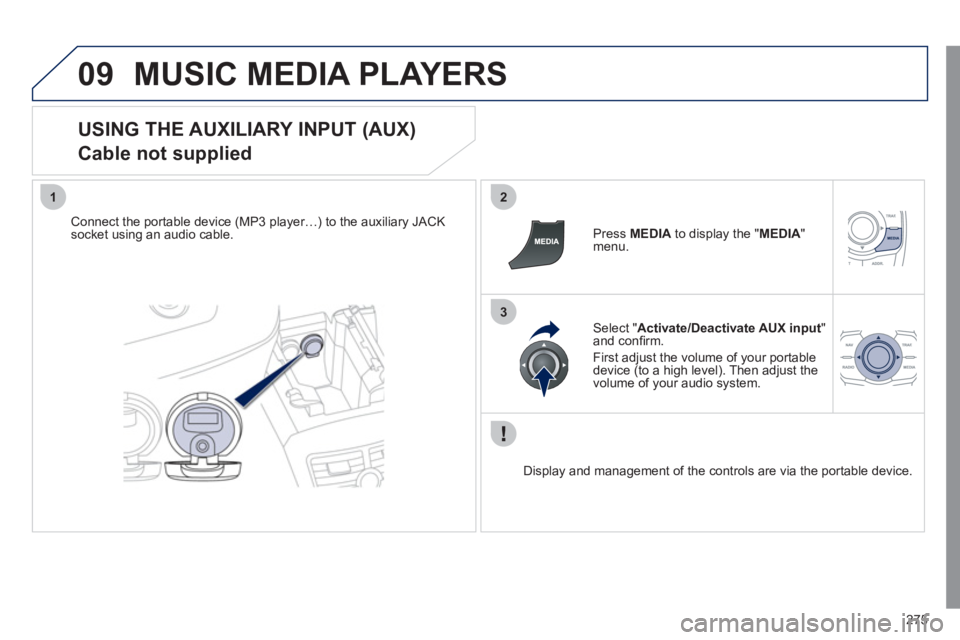
USING THE AUXILIARY INPUT (AUX)
Cable not supplied
Connect the portable device (MP3 player…) to the auxiliary JACK
socket using an audio cable.
Press MEDIA
to display the " MEDIA
"
menu.
Select " Activate/Deactivate AUX input
"
and confi rm.
First adjust the volume of your portable
device (to a high level). Then adjust the
volume of your audio system.
Display and management of the controls are via the portable device.