2011 Peugeot 308 SW BL ad blue
[x] Cancel search: ad bluePage 321 of 356
319
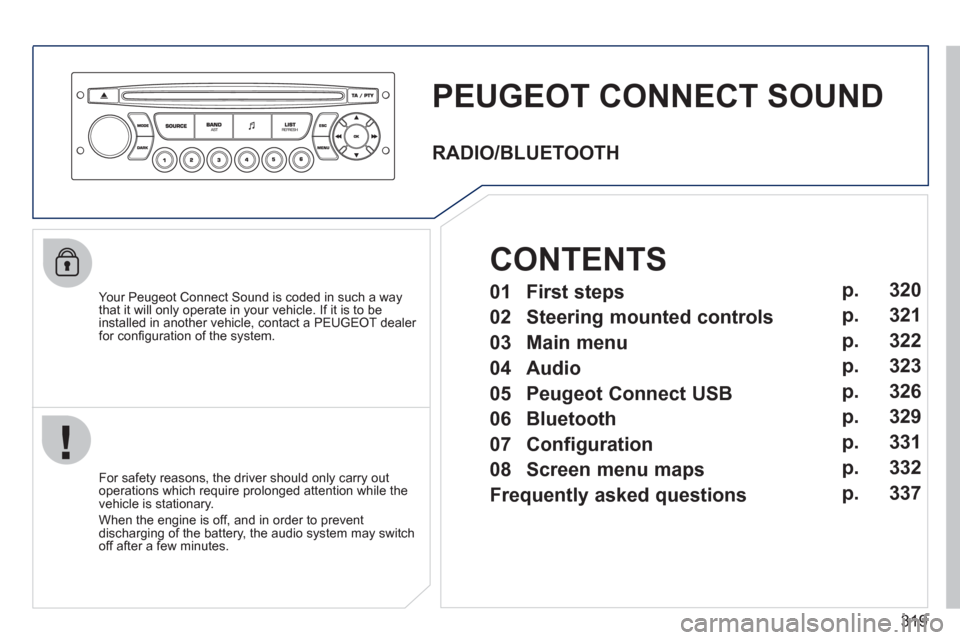
PEUGEOT CONNECT SOUND
Your Peugeot Connect Sound is coded in such a way
that it will only operate in your vehicle. If it is to be
installed in another vehicle, contact a PEUGEOT dealer
for confi guration of the system.
For safety reasons, the driver should only carry out
operations which require prolonged attention while the
vehicle is stationary.
When the engine is off, and in order to prevent
discharging of the battery, the audio system may switch
off after a few minutes.
RADIO/BLUETOOTH
01 First steps
02 Steering mounted controls
03 Main menu
04 Audio
05 Peugeot Connect USB
06 Bluetooth
07 Configuration
08 Screen menu maps
Frequently asked questionsp.
p.
p.
p.
p.
p.
p.
p.
p. 320
321
322
323
326
329
331
332
337
CONTENTS
Page 331 of 356
329
06
1
2
3
4
5
6
7
8
9
10
BLUETOOTH
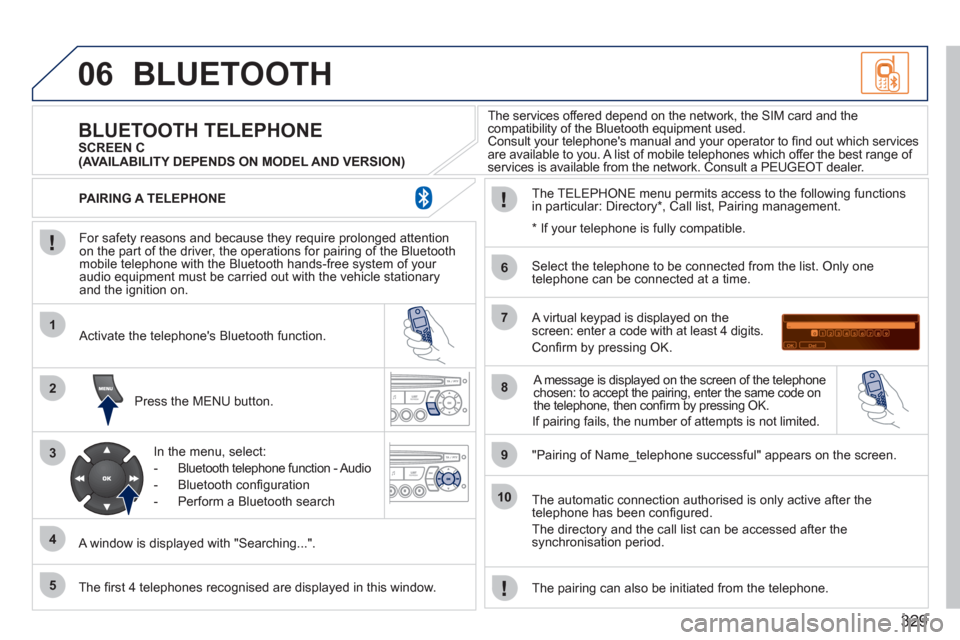
For safety reasons and because they require prolonged attention
on the part of the driver, the operations for pairing of the Bluetooth
mobile telephone with the Bluetooth hands-free system of your
audio equipment must be carried out with the vehicle stationary
and the ignition on.
Press the MENU button.
A window is displayed with "Searching...".
Activate the telephone's Bluetooth function.
In the menu, select:
- Bluetooth telephone function - Audio
- Bluetooth confi guration
- Perform a Bluetooth search
The services offered depend on the network, the SIM card and the
compatibility of the Bluetooth equipment used.
Consult your telephone's manual and your operator to fi nd out which services
are available to you. A list of mobile telephones which offer the best range of
services is available from the network. Consult a PEUGEOT dealer.
BLUETOOTH TELEPHONE
SCREEN C
The TELEPHONE menu permits access to the following functions
in particular: Directory * , Call list, Pairing management.
The fi rst 4 telephones recognised are displayed in this window.
A virtual keypad is displayed on the
screen: enter a code with at least 4 digits.
Confi rm by pressing OK.
"Pairing of Name_telephone successful" appears on the screen.
Select the telephone to be connected from the list. Only one
telephone can be connected at a time.
A message is displayed on the screen of the telephone
chosen: to accept the pairing, enter the same code on
the telephone, then confi rm by pressing OK.
The automatic connection authorised is only active after the
telephone has been confi gured.
The directory and the call list can be accessed after the
synchronisation period.
PAIRING A TELEPHONE
The pairing can also be initiated from the telephone.
(AVAILABILITY DEPENDS ON MODEL AND VERSION)
*
If your telephone is fully compatible.
If pairing fails, the number of attempts is not limited.
Page 332 of 356
330
06
1
2
1
2
1
2
3
RECEIVING A CALL
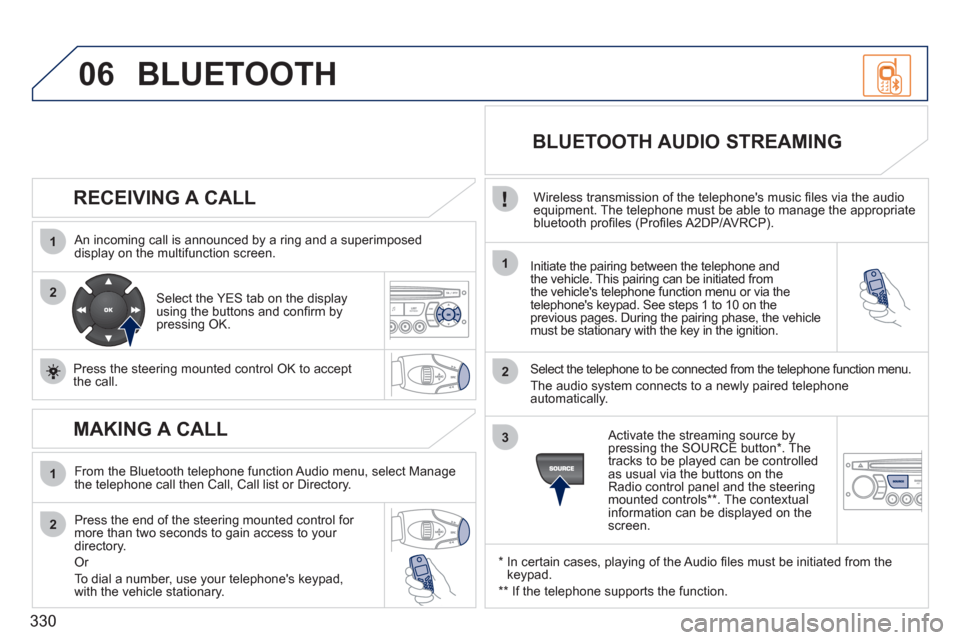
An incoming call is announced by a ring and a superimposed
display on the multifunction screen.
Initiate the pairing between the telephone and
the vehicle. This pairing can be initiated from
the vehicle's telephone function menu or via the
telephone's keypad. See steps 1 to 10 on the
previous pages. During the pairing phase, the vehicle
must be stationary with the key in the ignition.
Select the telephone to be connected from the telephone function menu.
The audio system connects to a newly paired telephone
automatically.
Select the YES tab on the display
using the buttons and confi rm by
pressing OK.
Press the steering mounted control OK to accept
the call.
BLUETOOTH AUDIO STREAMING
Wireless transmission of the telephone's music fi les via the audio
equipment. The telephone must be able to manage the appropriate
bluetooth profi les (Profi les A2DP/AVRCP).
*
In certain cases, playing of the Audio fi les must be initiated from the
keypad.
**
If the telephone supports the function.
Activate the streaming source by
pressing the SOURCE button * . The
tracks to be played can be controlled
as usual via the buttons on the
Radio control panel and the steering
mounted controls ** . The contextual
information can be displayed on the
screen.
BLUETOOTH
MAKING A CALL
From the Bluetooth telephone function Audio menu, select Manage
the telephone call then Call, Call list or Directory.
Press the end of the steering mounted control for
more than two seconds to gain access to your
directory.
Or
To dial a number, use your telephone's keypad,
with the vehicle stationary.
Page 338 of 356
336
08SCREEN MENU MAP
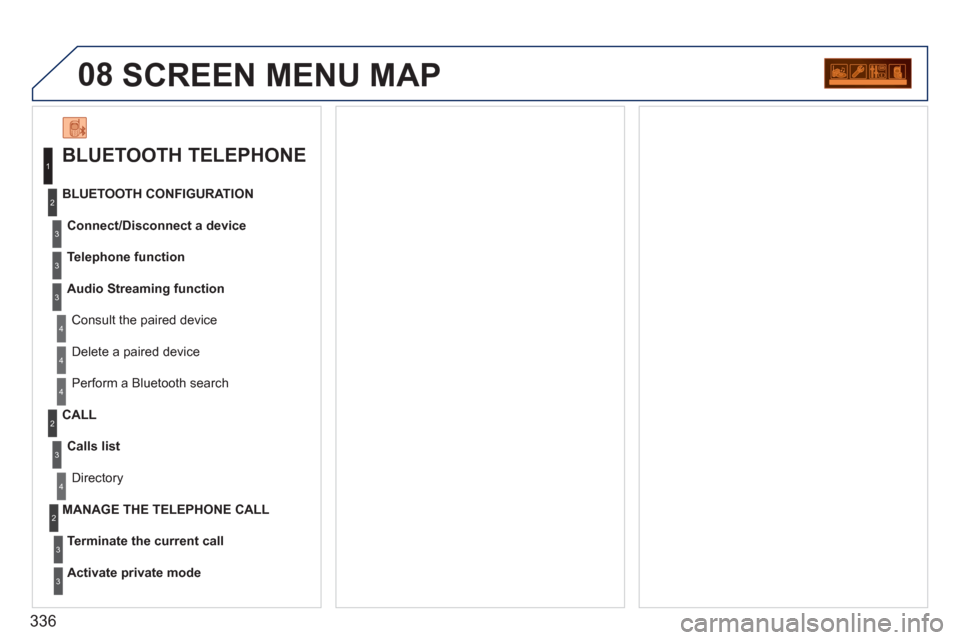
BLUETOOTH TELEPHONE
Connect/Disconnect a device
Consult the paired device
BLUETOOTH CONFIGURATION
Telephone function
Audio Streaming function
Delete a paired device
Perform a Bluetooth search
Calls list
CALL
Directory
Terminate the current call
MANAGE THE TELEPHONE CALL
Activate private mode
1
2
3
3
3
4
4
4
2
3
4
2
3
3
Page 339 of 356
337
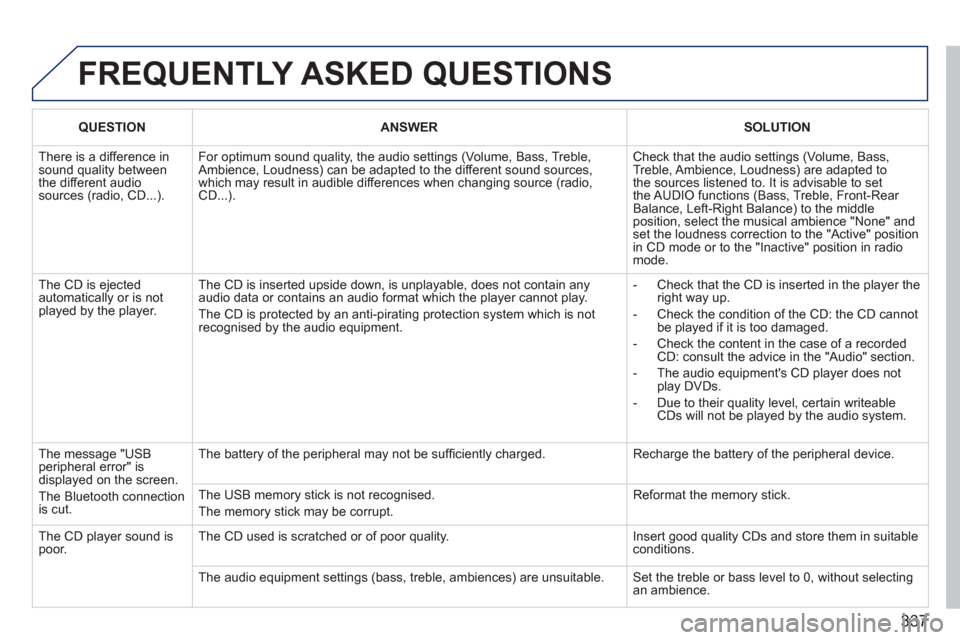
FREQUENTLY ASKED QUESTIONS
QUESTION
ANSWER
SOLUTION
There is a difference in
sound quality between
the different audio
sources (radio, CD...). For optimum sound quality, the audio settings (Volume, Bass, Treble,
Ambience, Loudness) can be adapted to the different sound sources,
which may result in audible differences when changing source (radio,
CD...). Check that the audio settings (Volume, Bass,
Treble, Ambience, Loudness) are adapted to
the sources listened to. It is advisable to set
the AUDIO functions (Bass, Treble, Front-Rear
Balance, Left-Right Balance) to the middle
position, select the musical ambience "None" and
set the loudness correction to the "Active" position
in CD mode or to the "Inactive" position in radio
mode.
The CD is ejected
automatically or is not
played by the player. The CD is inserted upside down, is unplayable, does not contain any
audio data or contains an audio format which the player cannot play.
The CD is protected by an anti-pirating protection system which is not
recognised by the audio equipment.
- Check that the CD is inserted in the player the
right way up.
- Check the condition of the CD: the CD cannot
be played if it is too damaged.
- Check the content in the case of a recorded
CD: consult the advice in the "Audio" section.
- The audio equipment's CD player does not
play DVDs.
- Due to their quality level, certain writeable
CDs will not be played by the audio system.
The message "USB
peripheral error" is
displayed on the screen.
The Bluetooth connection
is cut. The battery of the peripheral may not be suffi ciently charged. Recharge the battery of the peripheral device.
The USB memory stick is not recognised.
The memory stick may be corrupt. Reformat the memory stick.
The CD player sound is
poor. The CD used is scratched or of poor quality. Insert good quality CDs and store them in suitable
conditions.
The audio equipment settings (bass, treble, ambiences) are unsuitable. Set the treble or bass level to 0, without selecting
an ambience.
Page 348 of 356
346
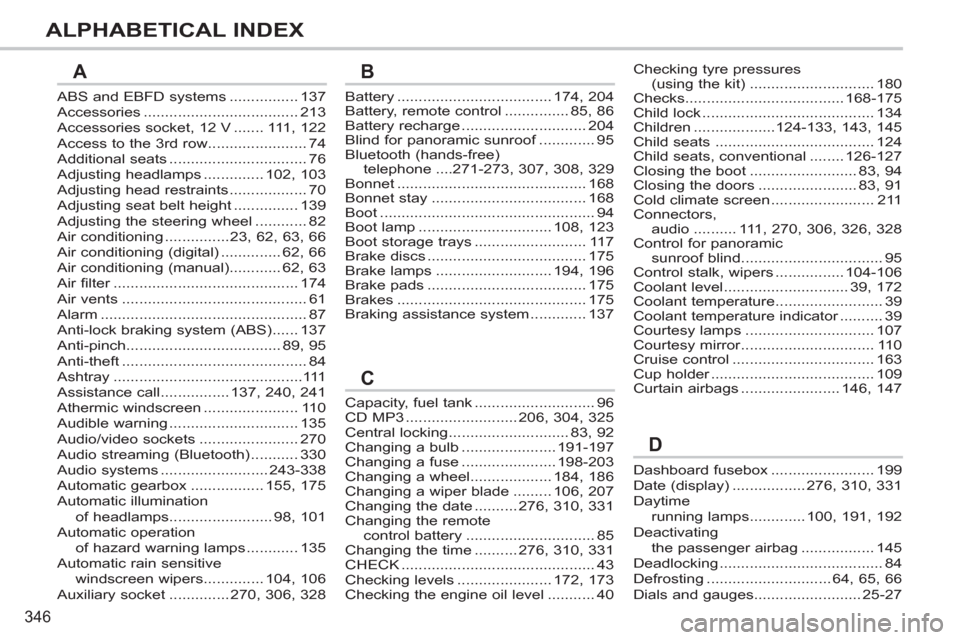
ALPHABETICAL INDEX
ABS and EBFD systems ................ 137
Accessories .................................... 213
Accessories socket, 12 V ....... 111, 122
Access to the 3rd row....................... 74
Additional seats ................................ 76
Adjusting headlamps .............. 102, 103
Adjusting head restraints .................. 70
Adjusting seat belt height ............... 139
Adjusting the steering wheel ............ 82
Air conditioning ...............23, 62, 63, 66
Air conditioning (digital) .............. 62, 66
Air conditioning (manual)............ 62, 63
Air filter ........................................... 174
Air vents ........................................... 61
Alarm ................................................ 87
Anti-lock braking system (ABS) ...... 137
Anti-pinch.................................... 89, 95
Anti-theft ........................................... 84
Ashtray ............................................111
Assistance call ................ 137, 240, 241
Athermic windscreen ...................... 110
Audible warning .............................. 135
Audio/video sockets ....................... 270
Audio streaming (Bluetooth) ........... 330
Audio systems ......................... 243-338
Automatic gearbox ................. 155, 175
Automatic illumination
of headlamps ........................ 98, 101
Automatic operation
of hazard warning lamps ............ 135
Automatic rain sensitive
windscreen wipers .............. 104, 106
Auxiliary socket .............. 270, 306, 328Battery .................................... 174, 204
Battery, remote control ............... 85, 86
Battery recharge ............................. 204
Blind for panoramic sunroof ............. 95
Bluetooth (hands-free)
telephone ....271-273, 307, 308, 329
Bonnet ............................................ 168
Bonnet stay .................................... 168
Boot .................................................. 94
Boot lamp ............................... 108, 123
Boot storage trays .......................... 117
Brake discs ..................................... 175
Brake lamps ........................... 194, 196
Brake pads ..................................... 175
Brakes ............................................ 175
Braking assistance system ............. 137
Dashboard fusebox ........................ 199
Date (display) ................. 276, 310, 331
Daytime
running lamps ............. 100, 191, 192
Deactivating
the passenger airbag ................. 145
Deadlocking ...................................... 84
Defrosting ............................. 64, 65, 66
Dials and gauges......................... 25-27
AB
D
Checking tyre pressures
(using the kit) ............................. 180
Checks..................................... 168-175
Child lock ........................................ 134
Children ...................124-133, 143, 145
Child seats ..................................... 124
Child seats, conventional ........ 126-127
Closing the boot ......................... 83, 94
Closing the doors ....................... 83, 91
Cold climate screen ........................ 211
Connectors,
audio .......... 111, 270, 306, 326, 328
Control for panoramic
sunroof blind ................................. 95
Control stalk, wipers ................ 104-106
Coolant level ............................. 39, 172
Coolant temperature ......................... 39
Coolant temperature indicator .......... 39
Courtesy lamps .............................. 107
Courtesy mirror ............................... 110
Cruise control ................................. 163
Cup holder ...................................... 109
Curtain airbags ....................... 146, 147
Capacity, fuel tank ............................ 96
CD MP3 .......................... 206, 304, 325
Central locking ............................ 83, 92
Changing a bulb ...................... 191-197
Changing a fuse ...................... 198-203
Changing a wheel................... 184, 186
Changing a wiper blade ......... 106, 207
Changing the date .......... 276, 310, 331
Changing the remote
control battery .............................. 85
Changing the time .......... 276, 310, 331
CHECK ............................................. 43
Checking levels ...................... 172, 173
Checking the engine oil level ........... 40
C