2011 PEUGEOT 308 display
[x] Cancel search: displayPage 162 of 328
160
DRIVING
Stopping the vehicle
Before switching off the engine, you
can engage position P
or N
to place the
gearbox in neutral.
In both cases, apply the parking brake
to immobilise the vehicle, unless it is
programmed to automatic mode.
Operating fault
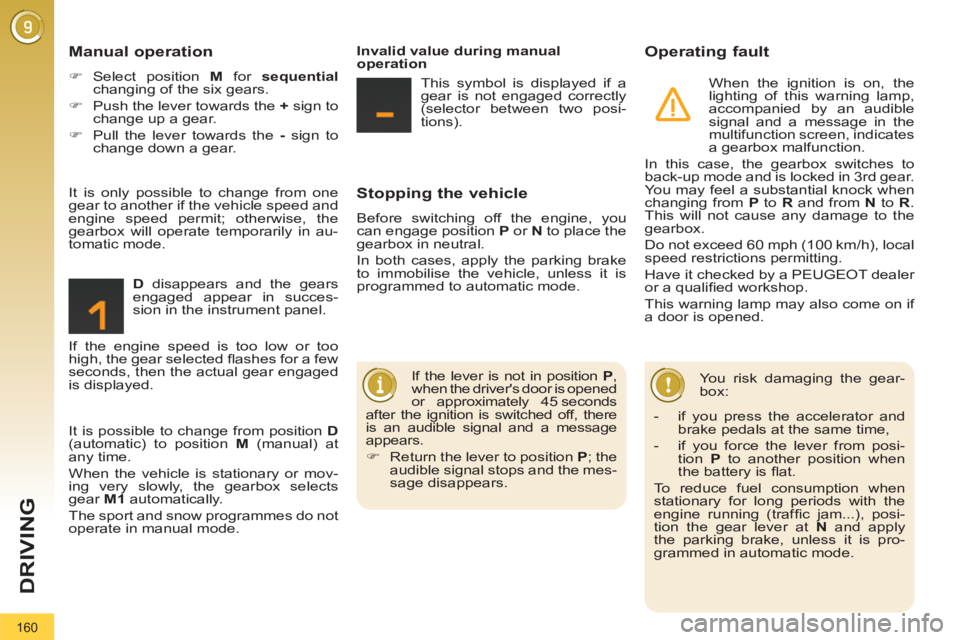
When the ignition is on, the
lighting of this warning lamp,
accompanied by an audible
signal and a message in the
multifunction screen, indicates
a gearbox malfunction.
In this case, the gearbox switches to
back-up mode and is locked in 3rd gear.
You may feel a substantial knock when
changing from P
to R
and from N
to R
.
This will not cause any damage to the
gearbox.
Do not exceed 60 mph (100 km/h), local
speed restrictions permitting.
Have it checked by a PEUGEOT dealer
or a qualifi ed workshop.
This warning lamp may also come on if
a door is opened.
You risk damaging the gear-
box:
Manual operation
)
Select position M
for sequential
changing of the six gears.
)
Push the lever towards the +
sign to
change up a gear.
)
Pull the lever towards the -
sign to
change down a gear.
D
disappears and the gears
engaged appear in succes-
sion in the instrument panel.
If the lever is not in position P
,
when the driver's door is opened
or approximately 45 seconds
after the ignition is switched off, there
is an audible signal and a message
appears.
)
Return the lever to position P
; the
audible signal stops and the mes-
sage disappears.
It is only possible to change from one
gear to another if the vehicle speed and
engine speed permit; otherwise, the
gearbox will operate temporarily in au-
tomatic mode.
Invalid value during manual
operation
This symbol is displayed if a
gear is not engaged correctly
(selector between two posi-
tions).
It is possible to change from position D
(automatic) to position M
(manual) at
any time.
When the vehicle is stationary or mov-
ing very slowly, the gearbox selects
gear M1
automatically.
The sport and snow programmes do not
operate in manual mode. If the engine speed is too low or too
high, the gear selected fl ashes for a few
seconds, then the actual gear engaged
is displayed.
- if you press the accelerator and
brake pedals at the same time,
- if you force the lever from posi-
tion P
to another position when
the battery is fl at.
To reduce fuel consumption when
stationary for long periods with the
engine running (traffi c jam...), posi-
tion the gear lever at N
and apply
the parking brake, unless it is pro-
grammed in automatic mode.
Page 166 of 328

164
DRIVING
VISUAL AND AUDIBLE FRONT
AND/OR REAR PARKING
SENSORS
System consisting of four proximity sen-
sors, installed in the front and/or rear
bumper.
It detects any obstacle (person, vehicle,
tree, barrier...) located behind the vehi-
cle, however, it will not be able to detect
obstacles located immediately below
the bumper. The parking sensors are switched on
:
- by engaging reverse gear,
- at a speed below 6 mph (10 km/h) in
forward gear.
This is accompanied by an audible
signal and display of the vehicle in the
multifunction screen.
An object, such as a stake, a
roadworks cone or any other
similar object may be detected
at the start of the manoeuvre but may
no longer be detected when the ve-
hicle moves nearer to it. The proximity information is indicated by:
- an audible signal which becomes
more rapid as the vehicle approach-
es the obstacle,
- a graphic in the multifunction screen,
with blocks which move closer to the
vehicle.
The obstacle is located in relation to the
emission of the audible signal by the
speakers; front or rear and right or left.
When the distance between the vehicle
and the obstacle is less than approxi-
mately thirty centimetres, the audible
signal becomes continuous and/or the
"Danger" symbol appears, depending
on the multifunction screen version.
Page 167 of 328

165
DRIVING
The parking sensor system
cannot, in any circumstances,
replace the need for vigilance
and responsibility on the part
of the driver. The parking sensors are switched off
:
- when you exit reverse gear,
- when the speed is higher than 6 mph
(10 km/h) in forward gear,
- when the vehicle has been station-
ary for more than three seconds in
forward gear.
Deactivation
Operating fault
The system will be deacti-
vated automatically when a
trailer is being towed or when
a bicycle carrier is fi tted (vehicle fi t-
ted with a towbar or bicycle carrier
recommended by PEUGEOT).
Reactivation
)
Press button A
again, the warning
lamp switches off, the system is re-
activated.
)
Press button A
, the warning lamp
comes on, the system is fully deacti-
vated. In bad weather or in winter, en-
sure that the sensors are not
covered with mud, ice or snow.
When reverse gear is engaged, an
audible signal (long beep) indicates
that the sensors may be dirty.
When the vehicle is being driven at
a speed below approximately 6 mph
(10 km/h), certain sources of noise
(motorcycles, lorries, pneumatic
drills, ...) may trigger the parking sen-
sor audible signals.
If an operating fault occurs,
this warning lamp is displayed
in the instrument panel and/
or a message appears in
the multifunction screen, ac-
companied by an audible signal (short
beep), when reverse gear is engaged.
Contact a PEUGEOT dealer or a quali-
fi ed workshop.
Page 195 of 328

193
PRACTICAL INFORMATION
Fuse
N°
Rating
(A)
Functions
F29
-
Nor used.
F30
5
Heated door mirrors.
F31
30
Boot 12 V socket.
F32
5
Electronic gear control gearbox gear lever.
F33
10
Head-up display, Bluetooth system, air
conditioning.
F34
5
Seat belt warning lamp display.
F35
10
Parking sensors, Hi-Fi amplifi er authorisation.
F36
10
Trailer fusebox control unit, driver's door control
pad.
F37
20
Hi-Fi amplifi er.
F38
30
Driver's electric seat.
F39
20
Panoramic sunroof blind.
F40
-
Not used.
Page 217 of 328

215
2ABC3DEF5JKL4GHI6MNO8TUV7PQRS9WXYZ0*#
1RADIO MEDIANAV ESC TRAFFIC
SETUPADDR
BOOK
2ABC3DEF5JKL4GHI6MNO8TUV7PQRS9WXYZ0*#
1RADIO MEDIANAV ESC TRAFFIC
SETUPADDR
BOOK
EMERGENCY OR ASSISTANCE CALL USING
PEUGEOT CONNECT MEDIA
In an emergency, press the SOS button until an audible
signal is heard and a "Confi rmation/Cancellation"
screen is displayed (if valid SIM card inserted).
A call is made to the PEUGEOT Emergency team
which receives locating information from the vehicle
and can send a detailed alert to the relevant emergency
services.
In countries in which the team is not operational, or
when the locating service has been expressly declined,
the call is sent to the emergency services (112).
Warning - the emergency call and the services are only active
if the internal telephone is used with a valid SIM card. With a
Bluetooth telephone and without a SIM card, these services are not
operational.
Press this button for access to PEUGEOT services.
Customer call
Select "Customer call" to request
any information about the PEUGEOT
marque.
Select "PEUGEOT Assistance" to
make a roadside assistance call.
PEUGEOT Assistance
This service is subject to conditions and availability. Consult a
PEUGEOT dealer. If you have purchased your vehicle outside the
PEUGEOT dealer network, we invite you to have a dealer check the
confi guration of these services and, if desired, modifi ed to suit your
wishes.
If an impact is detected by the airbag control unit, and independently
of the deployment of any airbags, an emergency call is made
automatically.
The message "Deteriorated emergency call" associated with
fl ashing of the orange indicator lamp indicates a malfunction.
Contact a PEUGEOT dealer.
Page 220 of 328
218
01 FIRST STEPS
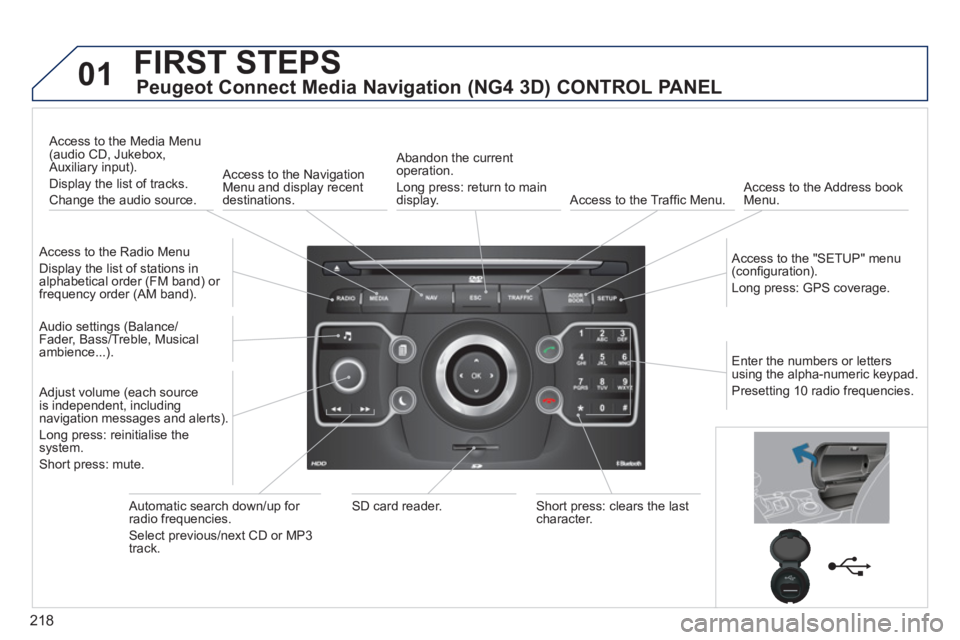
Peugeot Connect Media Navigation (NG4 3D) CONTROL PANEL
Access to the Radio Menu
Display the list of stations in
alphabetical order (FM band) or
frequency order (AM band).
Access to the Media Menu
(audio CD, Jukebox,
Auxiliary input).
Display the list of tracks.
Change the audio source.
Access to the Navigation
Menu and display recent
destinations.
Abandon the current
operation.
Long press: return to main
display.
Access to the Traffi c Menu.
Access to the Address book
Menu.
Access to the "SETUP" menu
(confi guration).
Long press: GPS coverage.
Audio settings (Balance/
Fader, Bass/Treble, Musical
ambience...).
Adjust volume (each source
is independent, including
navigation messages and alerts).
Long press: reinitialise the
system.
Short press: mute.
Automatic search down/up for
radio frequencies.
Select previous/next CD or MP3
track.
SD card reader.
Short press: clears the last
character.
Enter the numbers or letters
using the alpha-numeric keypad.
Presetting 10 radio frequencies.
Page 221 of 328
219
01 FIRST STEPS
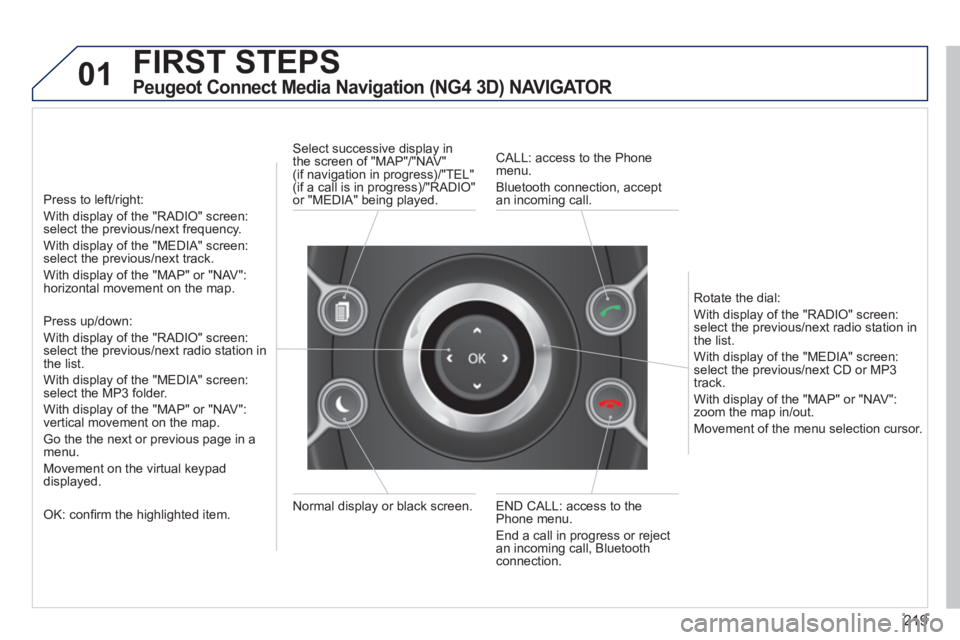
Peugeot Connect Media Navigation (NG4 3D) NAVIGATOR
Press to left/right:
With display of the "RADIO" screen:
select the previous/next frequency.
With display of the "MEDIA" screen:
select the previous/next track.
With display of the "MAP" or "NAV":
horizontal movement on the map.
Press up/down:
With display of the "RADIO" screen:
select the previous/next radio station in
the list.
With display of the "MEDIA" screen:
select the MP3 folder.
With display of the "MAP" or "NAV":
vertical movement on the map.
Go the the next or previous page in a
menu.
Movement on the virtual keypad
displayed.
OK: confi rm the highlighted item.
END CALL: access to the
Phone menu.
End a call in progress or reject
an incoming call, Bluetooth
connection.
Normal display or black screen.
Select successive display in
the screen of "MAP"/"NAV"
(if navigation in progress)/"TEL"
(if a call is in progress)/"RADIO"
or "MEDIA" being played.
CALL: access to the Phone
menu.
Bluetooth connection, accept
an incoming call.
Rotate the dial:
With display of the "RADIO" screen:
select the previous/next radio station in
the list.
With display of the "MEDIA" screen:
select the previous/next CD or MP3
track.
With display of the "MAP" or "NAV":
zoom the map in/out.
Movement of the menu selection cursor.
Page 224 of 328
222
02 VOICE COMMANDS AND STEERING MOUNTED CONTROLS
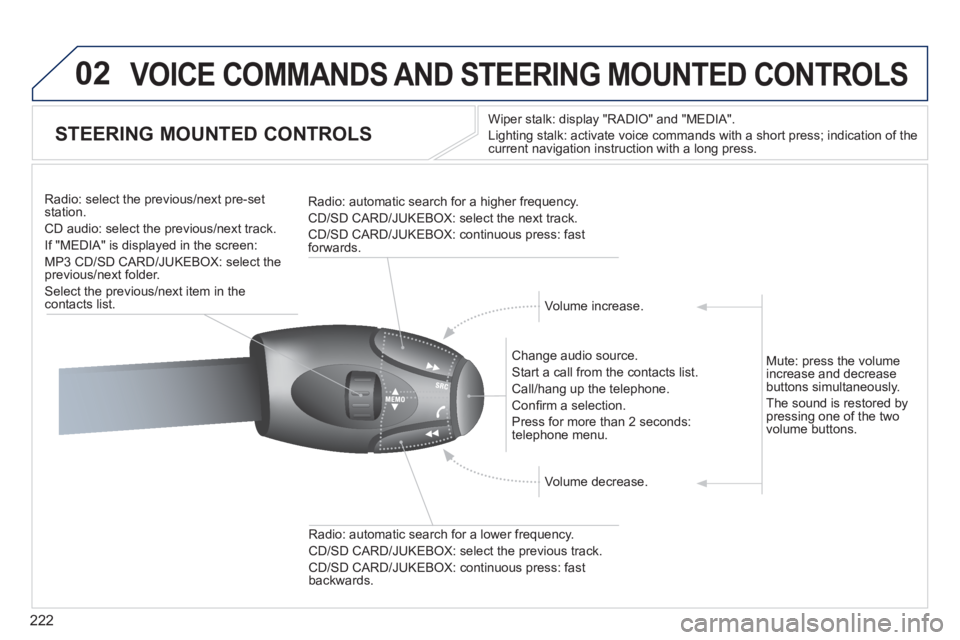
STEERING MOUNTED CONTROLS
Wiper stalk: display "RADIO" and "MEDIA".
Lighting stalk: activate voice commands with a short press; indication of the
current navigation instruction with a long press.
Change audio source.
Start a call from the contacts list.
Call/hang up the telephone.
Confi rm a selection.
Press for more than 2 seconds:
telephone menu.
Radio: automatic search for a lower frequency.
CD/SD CARD/JUKEBOX: select the previous track.
CD/SD CARD/JUKEBOX: continuous press: fast
backwards.
Radio: select the previous/next pre-set
station.
CD audio: select the previous/next track .
If "MEDIA" is displayed in the screen:
MP3 CD/SD CARD/JUKEBOX: select the
previous/next folder.
Select the previous/next item in the
contacts list.
Radio: automatic search for a higher frequency.
CD/SD CARD/JUKEBOX: select the next track.
CD/SD CARD/JUKEBOX: continuous press: fast
forwards.
Volume increase.
Volume decrease.
Mute: press the volume
increase and decrease
buttons simultaneously.
The sound is restored by
pressing one of the two
volume buttons.