Page 193 of 292
191
03
SETUP
TRAFFIC
MEDIA
GENERAL OPERATION
For a detailed global view of the menus available, refer to the
"Screen menu map" section of this handbook.
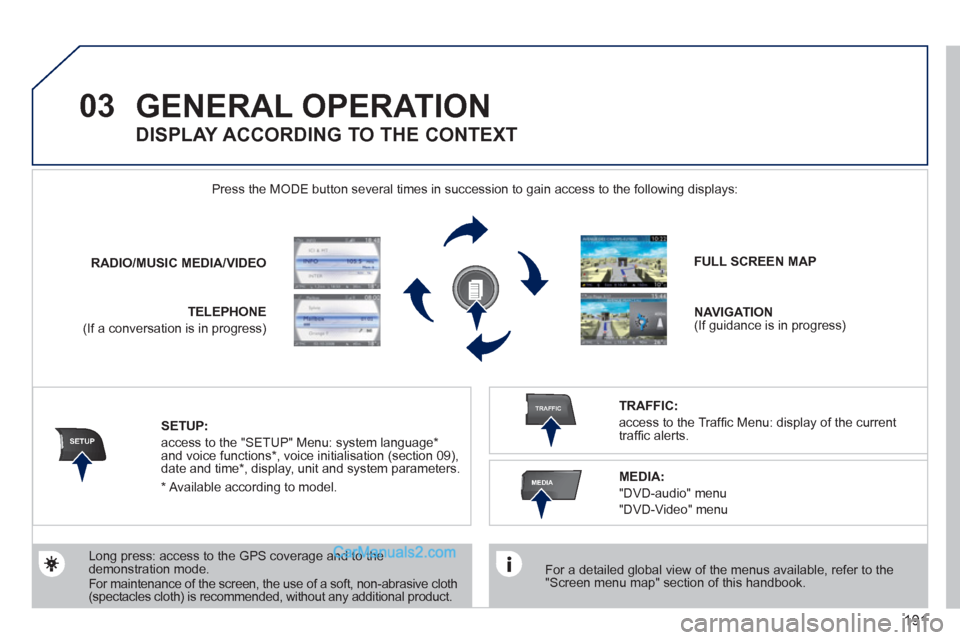
Press the MODE button several times in succession to gain access to the following displays:
Long press: access to the GPS coverage and to the
demonstration mode.
For maintenance of the screen, the use of a soft, non-abrasive cloth
(spectacles cloth) is recommended, without any additional product.
RADIO
/
MUSIC
MEDIA/VIDEO
TELEPHONE
(If a conversation is in progress)
FULL SCREEN MAP
NAVIGATION
(If guidance is in progress)
SETUP:
access to the "SETUP" Menu: system language *
and voice functions * , voice initialisation (section 09),
date and time * , display, unit and system parameters.
TRAFFIC:
access to the Traffi c Menu: display of the current
traffi c alerts.
DISPLAY ACCORDING TO THE CONTEXT
MEDIA:
"DVD-audio" menu
"DVD-Video" menu
*
Available according to model.
Page 221 of 292
219
10
MEDIA
TRAFFIC
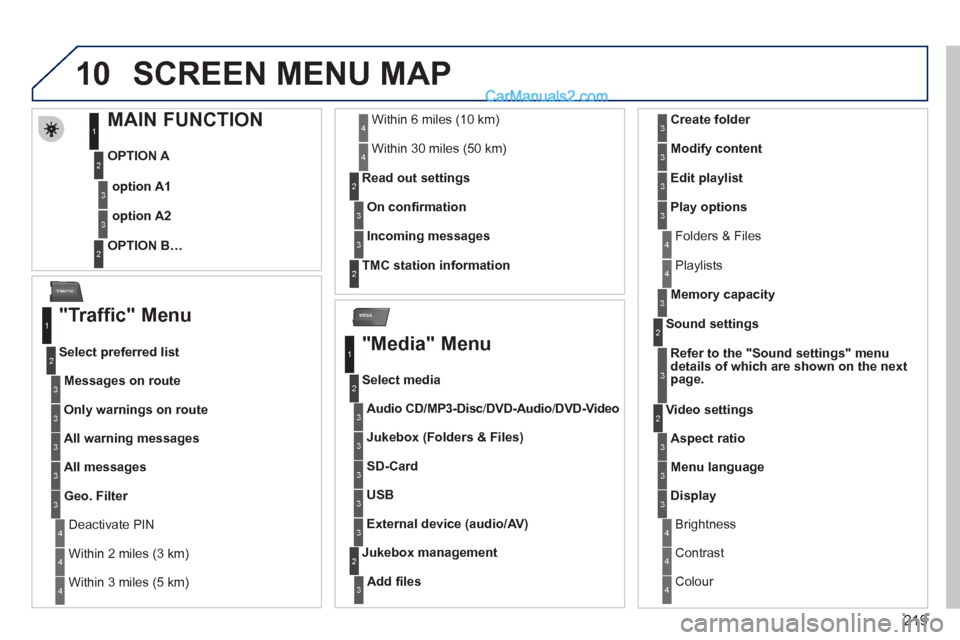
SCREEN MENU MAP
MAIN FUNCTION
OPTION A
OPTION B…
option A1
option A2
1
2
3
2
3
"Traffic" Menu
Messages on route
Select preferred list
1
2
3
Deactivate PIN 4
Only warnings on route
3
All warning messages
3
All messages
3
Geo. Filter
3
Within 2 miles (3 km) 4
Within 3 miles (5 km) 4
Within 6 miles (10 km) 4
Within 30 miles (50 km) 4
On confi rmation
Read out settings
2
3
Incoming messages
3
TMC station information
2
"Media" Menu
Audio CD/MP3-Disc
/
DVD-Audio
/ DVD-Video
Select media
1
2
3
Jukebox (Folders & Files)
3
SD-Card
3
USB
3
External device (audio/AV)
3
Add fi les
Jukebox management
2
3
Folders & Files 4
Create folder
3
Modify content
3
Edit playlist
3
Play options
3
Playlists 4
Memory capacity
3
Refer to the "
Sound settings
"
menu
details of which are shown on the next
page.
Sound settings
2
3
Aspect ratio
Video settings
2
3
Menu language 3
Display 3
Brightness 4
Contrast 4
Colour 4
Page 224 of 292
222
SETUP
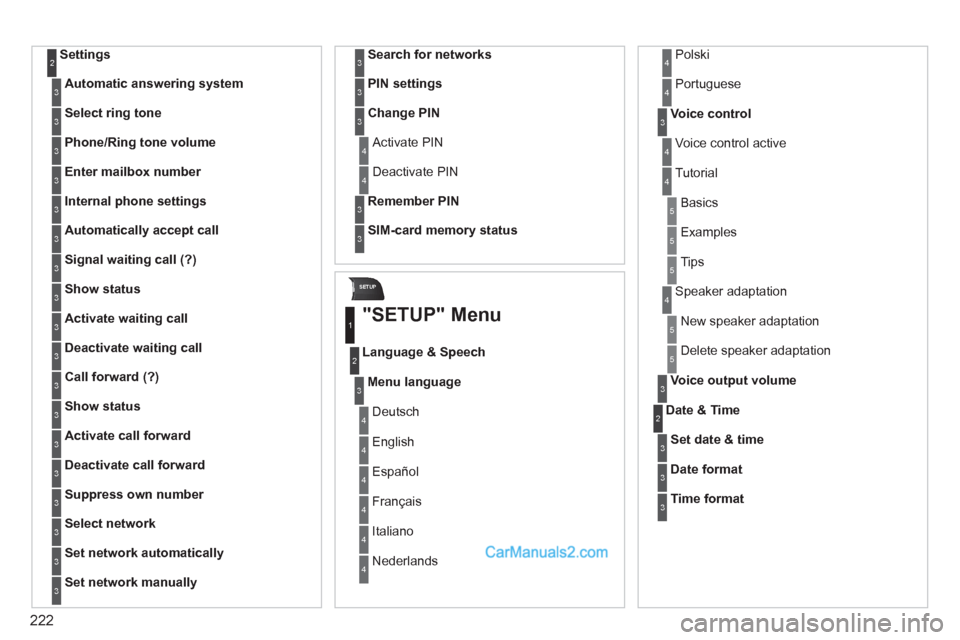
Settings 2
Automatic answering system
3
Select ring tone
3
Phone/Ring tone volume
3
Enter mailbox number
3
Internal phone settings
3
Automatically accept call
3
Signal waiting call (?)
3
Show status
3
Activate waiting call
3
Deactivate waiting call
3
Call forward (?)
3
Show status
3
Activate call forward
3
Deactivate call forward
3
Suppress own number
3
Select network
3
Set network automatically
3
Set network manually
3
Search for networks
3
PIN settings
3
Change PIN
3
Activate PIN 4
Deactivate PIN 4
Remember PIN
3
SIM-card memory status
3
"SETUP" Menu
Menu language
Language & Speech
1
2
3
Deutsch 4
English 4
Español 4
Français 4
Italiano 4
Nederlands 4
Polski 4
Voice control
3
Voice control active 4
Tutorial 4
Portuguese 4
Basics 5
Examples 5
Tips 5
Speaker adaptation 4
New speaker adaptation 5
Delete speaker adaptation 5
Voice output volume
3
Date & Time 2
Set date & time
3
Date format
3
Time format
3
Page 234 of 292
232
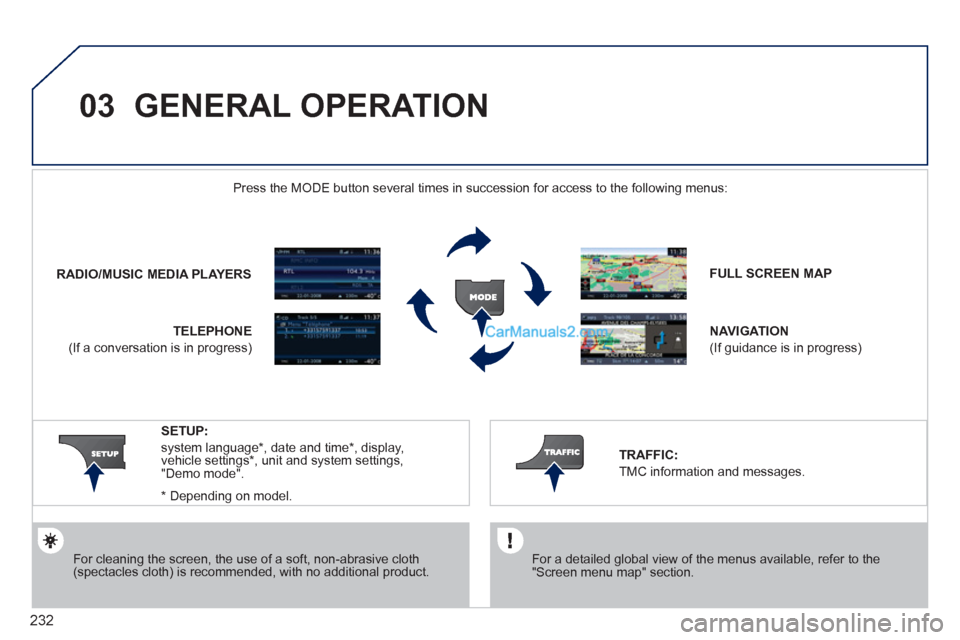
03 GENERAL OPERATION
For cleaning the screen, the use of a soft, non-abrasive cloth
(spectacles cloth) is recommended, with no additional product.
FULL SCREEN MAP
NAVIGATION
(If guidance is in progress)
SETUP:
system language*
, date and time*
, display,
vehicle settings*
, unit and system settings,
"Demo mode".
*
Depending on model.
RADIO
/
MUSIC MEDIA PLAYERS
Press the MODE button several times in succession for access to the following menus:
TELEPHONE
(If a conversation is in progress)
TRAFFIC:
TMC information and messages.
For a detailed global view of the menus available, refer to the
"Screen menu map" section.
Page 254 of 292
252
09
4 3 2 1
65
CONFIGURATION
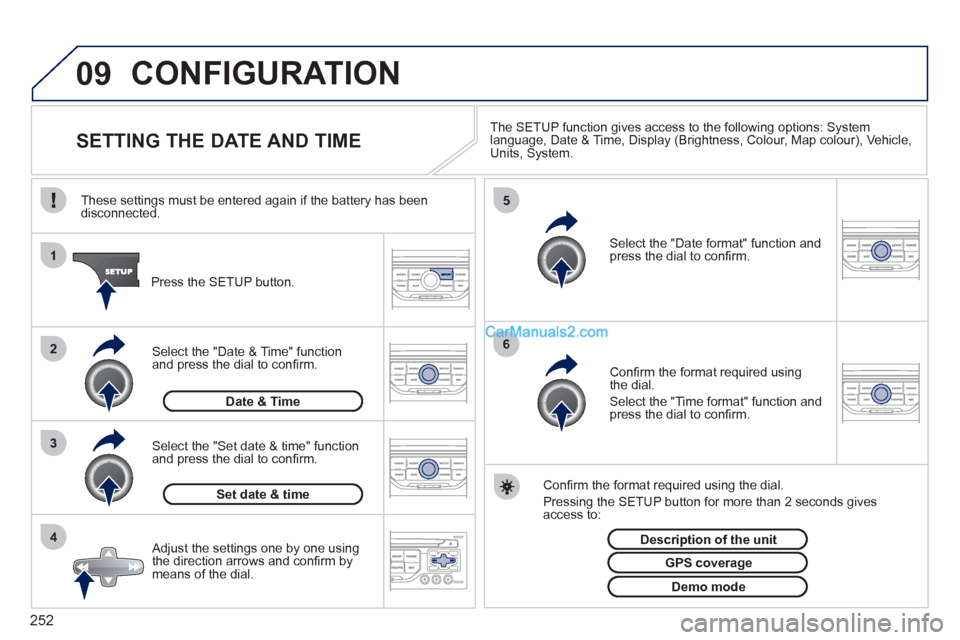
SETTING THE DATE AND TIME
The SETUP function gives access to the following options: System
language, Date & Time, Display (Brightness, Colour, Map colour), Vehicle,
Units, System.
Adjust the settings one by one using
the direction arrows and confi rm by
means of the dial.
Select the "Date format" function and
press the dial to confi rm.
Select the "Set date & time" function
and press the dial to confi rm.
Confi rm the format required using the dial.
Pressing the SETUP button for more than 2 seconds gives
access to:
These settings must be entered again if the battery has been
disconnected.
Press the SETUP button.
Confi rm the format required using
the dial.
Select the "Time format" function and
press the dial to confi rm.
Set date & time
Select the "Date & Time" function
and press the dial to confi rm.
Demo mode
GPS coverage
Description of the unit
Date & Time
Page 257 of 292
255
Avoid ferries
Recalculate
Settings
Navi volume
POI categories on Map
Set parameters for risk areas
Display on Map
Visual alert
Sound alert
3
2
4
3
3
3
4
4
4
Dial number
Dial from address book
"Phone" Menu
Search phone
Call lists
Connect phone
Select ring tone
Phone/Ring tone volume
Phones connected
Enter mailbox number
Settings Disconnect phone
Rename phone
Delete pairing
Delete all pairings
Show details
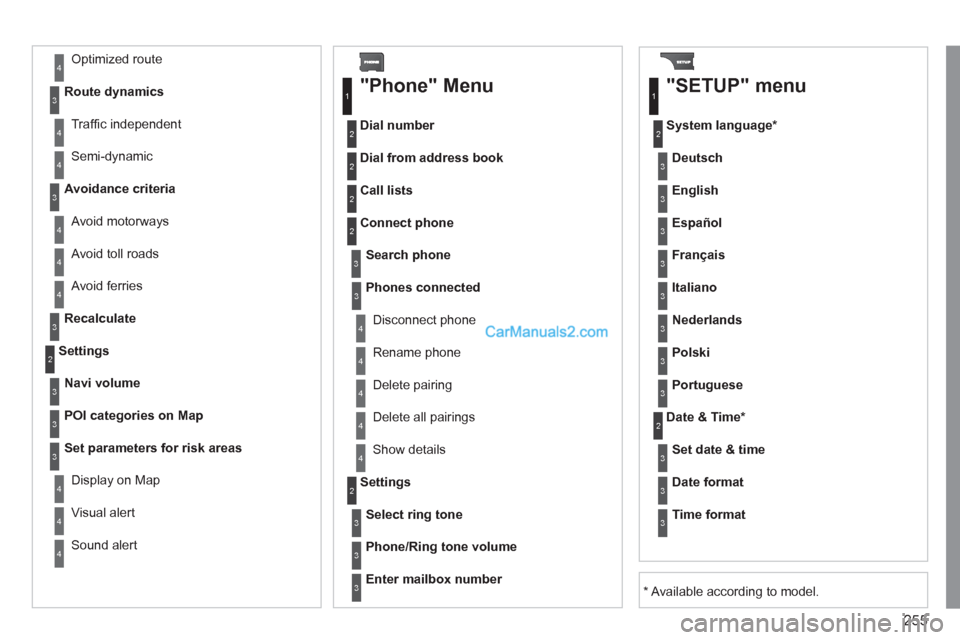
"SETUP" menu
System language *
English
Español
Deutsch
Italiano
Français
Nederlands
Polski
Portuguese
Date & Time *
Set date & time
Date format
Time format
1
2
2
2
2
3
3
4
4
4
4
4
2
3
3
3
1
2
3
3
3
3
3
3
3
3
3
3
3
2
Avoid motorways
Route dynamics
Traffi c independent
Semi-dynamic
Avoidance criteria
Avoid toll roads Optimized route
3
3
4
4
4
4
4
* Available according to model.
Page 266 of 292
264
03 MAIN MENU
AUDIO FUNCTIONS
: radio,
CD, USB, options.
> MONOCHROME SCREEN C
For a detailed global view of the
menus available, refer to the
"Screen menu map" section of
this chapter.
TELEPHONE
: hands-free kit,
pairing, management of a call.
VEHICLE DIAGNOSTICS
: alerts log.
PERSONALISATION-
CONFIGURATION
: vehicle
parameters, display, languages.
Page 277 of 292
275
08
MONOCHROME C SCREEN MENU MAP
AUDIO FUNCTIONS
alternative frequencies (RDS)
activate/deactivate
FM BAND PREFERENCES
regional mode (REG)
activate/deactivate
radio-text information (RDTXT)
activate/deactivate
1
2
3
4
3
4
3
4
PLAY MODES
album repeat (RPT)
activate/deactivate
track random play (RDM)
activate/deactivate
2
3
4
3
4
VEHICLE DIAGNOSTICS
ALERT LOG
1
2
1
2
4
3
2
4
4
3
3
4
4
2
3
4
4
Pressing the MENU button displays:
* The parameters vary according to vehicle.
video brightness adjustment
DISPLAY CONFIGURATION
DEFINE THE VEHICLE PARAMETERS *
PERSONALISATION-CONFIGURATION
normal video
inverse video
brightness (- +) adjustment
date and time adjustment
day/month/year adjustment
hour/minute adjustment
choice of 12 h/24 h mode
choice of units
l/100 km - mpg - km/l
°Celsius/°Fahrenheit
CHOICE OF LANGUAGE