2011 NISSAN TIIDA Set time
[x] Cancel search: Set timePage 728 of 3787
BL-218
< SERVICE INFORMATION >
VEHICLE SECURITY (THEFT WARNING) SYSTEM
System Description
INFOID:0000000005929412
DESCRIPTION
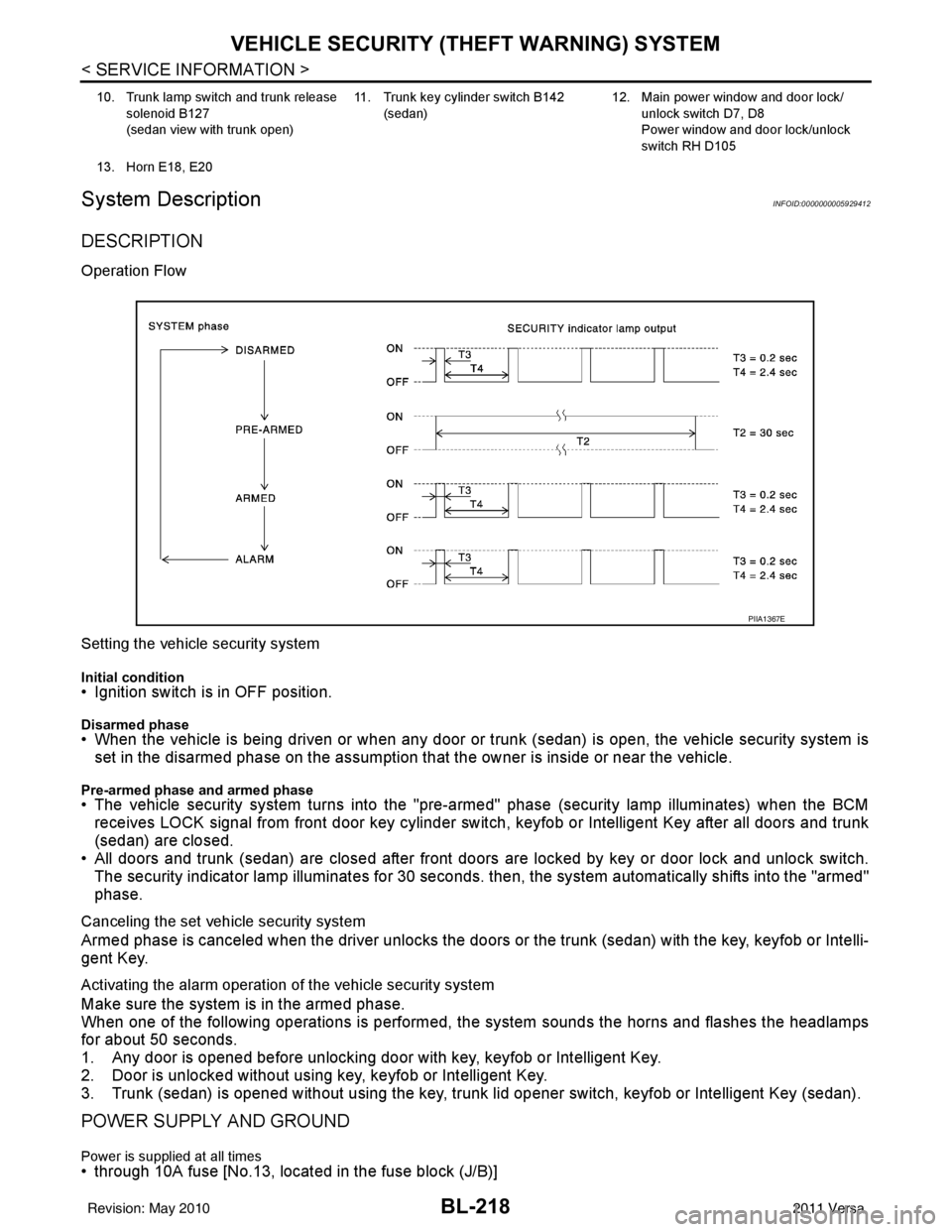
Operation Flow
Setting the vehicle security system
Initial condition• Ignition switch is in OFF position.
Disarmed phase• When the vehicle is being driven or when any door or trunk (sedan) is open, the vehicle security system is
set in the disarmed phase on the assumption that the owner is inside or near the vehicle.
Pre-armed phase and armed phase• The vehicle security system turns into the "pre-armed" phase (security lamp illuminates) when the BCM receives LOCK signal from front door key cylinder switch, keyfob or Intelligent Key after all doors and trunk
(sedan) are closed.
• All doors and trunk (sedan) are closed after front doors are locked by key or door lock and unlock switch.
The security indicator lamp illuminates for 30 seconds. then, the system automatically shifts into the "armed"
phase.
Canceling the set vehicle security system
Armed phase is canceled when the driver unlocks the doors or the trunk (sedan) with the key, keyfob or Intelli-
gent Key.
Activating the alarm operation of the vehicle security system
Make sure the system is in the armed phase.
When one of the following operations is performed, the system sounds the horns and flashes the headlamps
for about 50 seconds.
1. Any door is opened before unlocking door with key, keyfob or Intelligent Key.
2. Door is unlocked without using key, keyfob or Intelligent Key.
3. Trunk (sedan) is opened without using the key, trunk lid opener switch, keyfob or Intelligent Key (sedan).
POWER SUPPLY AND GROUND
Power is supplied at all times• through 10A fuse [No.13, located in the fuse block (J/B)]
10. Trunk lamp switch and trunk release
solenoid B127
(sedan view with trunk open) 11. Trunk key cylinder switch B142
(sedan) 12. Main power window and door lock/
unlock switch D7, D8
Power window and door lock/unlock
switch RH D105
13. Horn E18, E20
PIIA1367E
Revision: May 2010 2011 Versa
Page 742 of 3787
BL-232
< SERVICE INFORMATION >
VEHICLE SECURITY (THEFT WARNING) SYSTEM
*1: With continuously variable transmissi on (CVT) or automatic transmission (A/T).
*2: With manual transmission (M/T).
CONSULT-III Function (BCM)INFOID:0000000005929418
CONSULT-III can display each diagnostic item us ing the diagnostic test modes shown following.
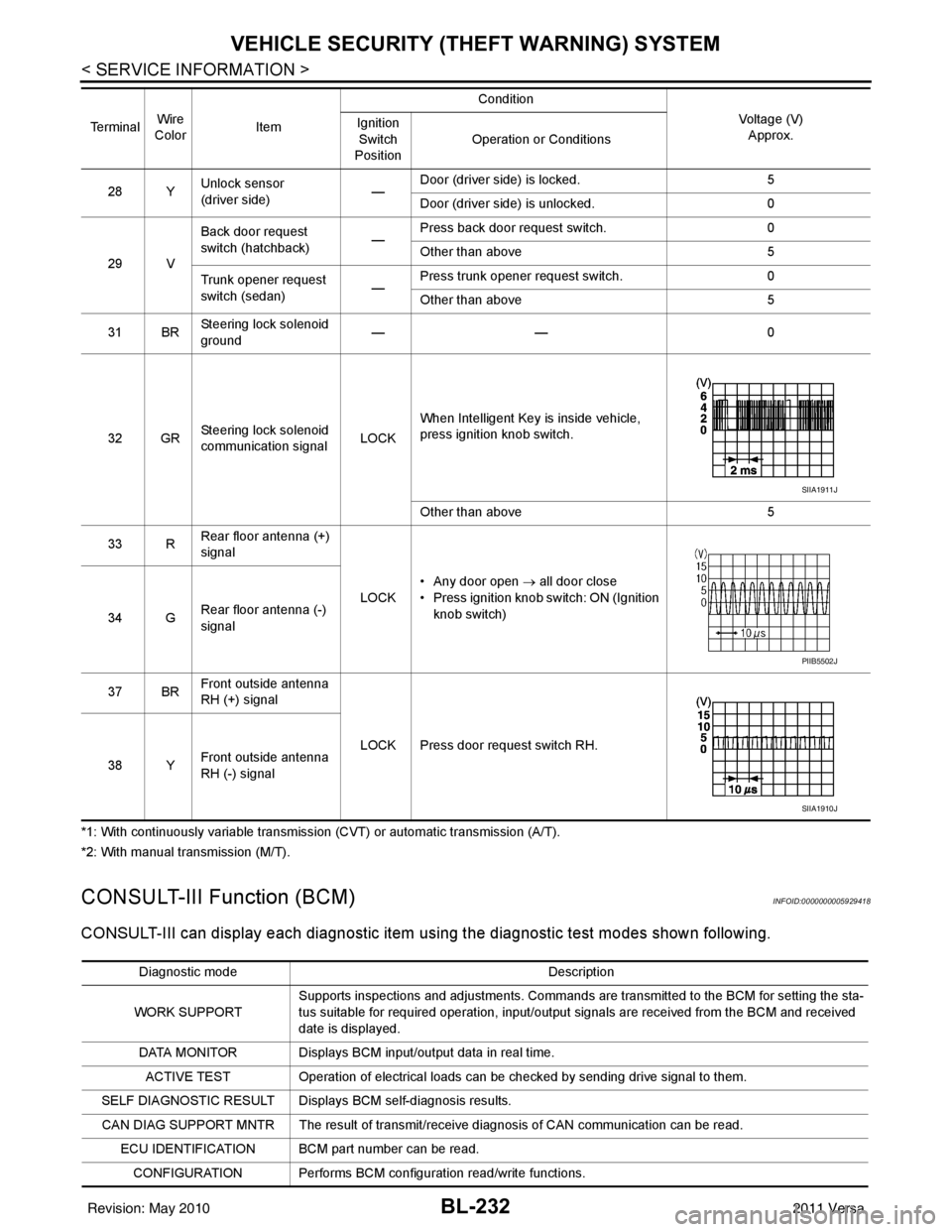
28 YUnlock sensor
(driver side) —Door (driver si
de) is locked. 5
Door (driver side ) is unlocked. 0
29 V Back door request
switch (hatchback)
—Press back door request switch.
0
Other than above 5
Trunk opener request
switch (sedan) —Press trunk opener request switch.
0
Other than above 5
31 BR Steering lock solenoid
ground ——
0
32 GR Steering lock solenoid
communication signal LOCKWhen Intelligent Key is inside vehicle,
press ignition knob switch.
Other than above
5
33 R Rear floor antenna (+)
signal
LOCK• Any door open
→ all door close
• Press ignition knob switch: ON (Ignition
knob switch)
34 G Rear floor antenna (-)
signal
37 BR Front outside antenna
RH (+) signal
LOCK Press door request switch RH.
38 Y Front outside antenna
RH (-) signal
Te r m i n a l
Wire
Color Item Condition
Voltage (V)Approx.
Ignition
Switch
Position Operation or Conditions
SIIA1911J
PIIB5502J
SIIA1910J
Diagnostic mode
Description
WORK SUPPORT Supports inspections and adjustments. Commands are transmitted to the BCM for setting the sta-
tus suitable for required operation, input/output signals are received from the BCM and received
date is displayed.
DATA MONITOR Displays BCM input/output data in real time. ACTIVE TEST Operation of electrical loads can be checked by sending drive signal to them.
SELF DIAGNOSTIC RESULT Displays BCM self-diagnosis results.
CAN DIAG SUPPORT MNTR The result of transmit/receive diagnosis of CAN communication can be read. ECU IDENTIFICATION BCM part number can be read.CONFIGURATION Performs BCM configuration read/write functions.
Revision: May 2010 2011 Versa
Page 812 of 3787

BL-302
< SERVICE INFORMATION >
BODY REPAIR
1. When repairing and painting a portion of the body adjacent to plastic parts, consider their characteristics
(influence of heat and solvent) and remove them if neces sary or take suitable measures to protect them.
2. Plastic parts should be repaired and painted using methods suiting the materials
, characteristics.
LOCATION OF PLASTIC PARTS
Abbre- viation Material name Heat resisting
temperature °C ( °F) Resistance to gasoline and
solvents Other cautions
PE Polyethylene 60 (140)Gasoline and most solvents are
harmless if applied for a very
short time (wipe up quickly). Flammable
PVC Polyvinyl Chloride 80 (176) Same as above. Poison gas is emitted
when burned.
EPM/
EPDM Ethylene Propylene (Diene) rub-
ber
80 (176) Same as above.
Flammable
TPO/
TPR Thermoplastic Olefine/
Thermoplastic Rubber
80 (176) Same as above.
Flammable
PP Polypropylene 90 (194) Same as above. Flammable, avoid bat-
tery acid.
UP Polyester thermoset 90 (194) Same as above. Flammable
PS Polystyrene 80 (176) Avoid solvents. Flammable
ABS Acrylonitrile Butadiene Styrene
resin
80 (176) Avoid gasoline and solvents.
AES Acrylonitrile Ethylene Styrene 80 (176) Same as above.
PMMA Polymethyl Methacrylate 85 (185) Same as above.
AAS Acrylonitrile Acrylic Styrene 85 (185) Same as above.
AS Acrylonitrile Styrene 85 (185) Same as above.
EVA Polyvinyl Ethyl Acetate 90 (194) Same as above.
ASA Acrylonitrile Styrene Acrylate 100 (222) Same as above. Flammable
PPO/
PPE Polyphenylene Oxide/
Polyphenylene Ether
110 (230) Same as above.
PC Polycarbonate 120 (248) Same as above.
PAR Polyacrylate 180 (356) Same as above.
L-
LDPE Lenear Low Density PE
45 (100)Gasoline and most solvents are
harmless. Flammable
PUR Polyurethane 90 (194) Same as above.
TPU Thermoplastic Urethane 110 (230) Same as above.
PPC Polypropylene Composite 115 (239) Same as above. Flammable
POM Polyacetal 120 (248) Same as above. Avoid battery acid.
PBT+P
C Polybutylene Terephtha-
late+Polycarbonate
120 (248) Same as above.
Flammable
PA Polyamide (Nylon) 140 (284) Same as above. Avoid immersing in wa-
ter.
PBT Polybutylene Terephthalate 140 (284) Same as above.
FRP Fiber Reinforced Plastics 170 (338) Same as above. Avoid battery acid.
PET Polyethylene Terephthalate 180 (356) Same as above.
PEI Polyetherimide 200 (392) Same as above.
Revision: May 2010 2011 Versa
Page 949 of 3787
![NISSAN TIIDA 2011 Service Repair Manual BRC-60
< SERVICE INFORMATION >[VDC/TCS/ABS]
TROUBLE DIAGNOSIS
Note 1: Confirm tire pressure is normal.
Note 2: On and Off timing for warning lamp and indicator lamp.
CONSULT-III Function (ABS)INFOID:0](/manual-img/5/57396/w960_57396-948.png "NISSAN TIIDA 2011 Service Repair Manual BRC-60
< SERVICE INFORMATION >[VDC/TCS/ABS]
TROUBLE DIAGNOSIS
Note 1: Confirm tire pressure is normal.
Note 2: On and Off timing for warning lamp and indicator lamp.
CONSULT-III Function (ABS)INFOID:0")
BRC-60
< SERVICE INFORMATION >[VDC/TCS/ABS]
TROUBLE DIAGNOSIS
Note 1: Confirm tire pressure is normal.
Note 2: On and Off timing for warning lamp and indicator lamp.
CONSULT-III Function (ABS)INFOID:0000000005928483
CONSULT-III can display each diagnostic item us
ing the diagnostic test modes shown following.
SELF-DIAGNOSIS
Description
If an error is detected in the system, the ABS warning lamp will turn on. In this case, perform self-diagnosis as
follows:
Operation Procedure
1. Turn ignition switch OFF.
2. Connect CONSULT-III To the data link connector.
3. Turn ignition switch ON.
4. Start engine and drive at approximately 30 km/h (19 MPH) for approximately 1 minute.
5. After stopping the vehicle, with the engine running, t ouch “ABS”, “SELF-DIAG RESULTS” in order on the
CONSULT-III screen.
USV[FL-RR]
USV[FR-RL]
HSV[FL-RR]
HSV[FR-RL] VDC switch-over valve
statusWhen actuator (switch-over
valve) is active (“ACTIVE
TEST” with CONSULT-III) or
actuator relay is inactive (when
in fail-safe mode).
On
BRC-72, "
Solenoid and
VDC Change-Over Valve
System Inspection"
When actuator (switch-over
valve) is not active and actua-
tor relay is active (ignition
switch ON). Off
V/R OUTPUT Solenoid valve relay
activatedWhen solenoid valve relay is
active (ignition switch OFF)
On
When solenoid valve relay is
not active (in fail-safe mode) Off
M/R OUTPUT Actuator motor and mo-
tor relay activatedWhen actuator motor and mo-
tor relay are active (“ACTIVE
TEST” with CONSULT-III)
On
BRC-73, "
Actuator Motor,
Motor Relay, and Circuit
Inspection"When actuator motor and mo-
tor relay are inactive Off
ENGINE RPM With engine running With engine stopped
0 rpm
BRC-68, "
Engine System
Inspection"Engine running Almost in accor-
dance with ta-
chometer display
Monitor item
Display content Data monitor
Note: Error inspection
checklist
Condition Reference value in
normal operation
ABS diagnostic mo de Description
WORK SUPPORT Supports inspection and adjustment
s. Commands are transmitted to the ABS actuator and electric unit
(control unit) for setting the status suitable for required operation, input/output signals are received from
the ABS actuator and electric unit (control unit) and received data is displayed.
SELF DIAGNOSTIC RESULT Displays ABS ac tuator and electric unit (control unit) self-diagnosis results.
DATA MONITOR Displays ABS actuator and electric unit (control unit) input/output data in real time.
CAN DIAG SUPPORT MNTR The result of transmit/receive diagnosis of CAN communication can be read. ACTIVE TEST Operation of electrical loads can be checked by sending drive signal to them.
FUNCTION TEST Conducted by CONS ULT-III instead of a technician to determine whether each system is "OK" or "NG".
ECU IDENTIFICATION ABS actuator and electric unit (control unit) part number can be read.
Revision: May 2010 2011 Versa
Page 1083 of 3787
![NISSAN TIIDA 2011 Service Repair Manual CVT-28
< SERVICE INFORMATION >[RE0F08B]
ON BOARD DIAGNOSTIC (OBD) SYSTEM
The ECM has a memory function, which stores the driv
ing condition such as fuel system status, calculated
load value, engine co](/manual-img/5/57396/w960_57396-1082.png "NISSAN TIIDA 2011 Service Repair Manual CVT-28
< SERVICE INFORMATION >[RE0F08B]
ON BOARD DIAGNOSTIC (OBD) SYSTEM
The ECM has a memory function, which stores the driv
ing condition such as fuel system status, calculated
load value, engine co")
CVT-28
< SERVICE INFORMATION >[RE0F08B]
ON BOARD DIAGNOSTIC (OBD) SYSTEM
The ECM has a memory function, which stores the driv
ing condition such as fuel system status, calculated
load value, engine coolant temperatur e, short term fuel trim, long term fuel trim, engine speed and vehicle
speed at the moment the ECM detects a malfunction.
Data which are stored in the ECM memory, along with the 1st trip DTC, are called 1st trip freeze frame data,
and the data, stored together with the DTC data, are called freeze frame data and displayed on CONSULT-III
or GST. The 1st trip freeze frame data can only be disp layed on the CONSULT-III screen, not on the GST. For
details, refer to EC-612, "
CONSULT-III Function (ENGINE)".
Only one set of freeze frame data (either 1st trip freez e frame data or freeze frame data) can be stored in the
ECM. 1st trip freeze frame data is stored in the ECM memory along with the 1st trip DTC. There is no priority
for 1st trip freeze frame data, and it is updated each time a different 1st trip DTC is detected. However, once
freeze frame data (2nd trip detection/MIL on) is stored in the ECM memory, 1st trip freeze frame data is no
longer stored. Remember, only one set of freeze frame data can be stored in the ECM. The ECM has the fol-
lowing priorities to update the data.
Both 1st trip freeze frame data and freeze frame dat a (along with the DTC) are cleared when the ECM mem-
ory is erased.
HOW TO ERASE DTC
The diagnostic trouble code can be erased by CONSULT- III, GST or ECM DIAGNOSTIC TEST MODE as
described following.
• If the battery cable is disconnected, the diagnosti c trouble code will be lost within 24 hours.
• When you erase the DTC, using CONSULT-III or GS T is easier and quicker than switching the mode
selector on the ECM.
The following emission-related diagnostic information is cleared from the ECM memory when erasing DTC
related to OBD-II. For details, refer to EC-542, "
Emission-related Diagnostic Information".
• Diagnostic trouble codes (DTC)
• 1st trip diagnostic trou ble codes (1st trip DTC)
• Freeze frame data
• 1st trip freeze frame data
• System readiness test (SRT) codes
• Test values
HOW TO ERASE DTC (WITH CONSULT-III)
•If a DTC is displayed for both ECM and TCM, it is necessary to be erased for both ECM and TCM.
1. If the ignition switch stays ON after repair work, be sure to turn ignition switch OFF once. Wait at least 10 seconds and then turn it ON (engine stopped) again.
2. Turn CONSULT-III ON and touch “TRANSMISSION”.
3. Touch “SELF-DIAG RESULTS”.
4. Touch “ERASE”. (The DTC in the TCM will be erased.) Then touch “BACK” twice.
5. Touch “ENGINE”.
6. Touch “SELF-DIAG RESULTS”.
7. Touch “ERASE”. (The DTC in the ECM will be erased.)
HOW TO ERASE DTC (WITH GST)
1. If the ignition switch stays ON after repair work, be sure to turn ignition switch OFF once. Wait at least 10 seconds and then turn it ON (engine stopped) again.
2. Select Mode 4 with GST (Generic Scan Tool). For details, refer to EC-618, "
Generic Scan Tool (GST)
Function".
Malfunction Indicator Lamp (MIL)INFOID:0000000005928747
DESCRIPTION
PriorityItems
1 Freeze frame data Misfire — DTC: P0300 - P0306
Fuel Injection System Function — DTC: P0171, P0172, P0174, P0175
2 Except the above items (Includes CVT related items)
3 1st trip freeze frame data
Revision: May 2010 2011 Versa
Page 1085 of 3787
![NISSAN TIIDA 2011 Service Repair Manual CVT-30
< SERVICE INFORMATION >[RE0F08B]
TROUBLE DIAGNOSIS
TROUBLE DIAGNOSIS
DTC Inspection Priority ChartINFOID:0000000005928748
If some DTCs are displayed at the same time, perform inspections one by](/manual-img/5/57396/w960_57396-1084.png "NISSAN TIIDA 2011 Service Repair Manual CVT-30
< SERVICE INFORMATION >[RE0F08B]
TROUBLE DIAGNOSIS
TROUBLE DIAGNOSIS
DTC Inspection Priority ChartINFOID:0000000005928748
If some DTCs are displayed at the same time, perform inspections one by")
CVT-30
< SERVICE INFORMATION >[RE0F08B]
TROUBLE DIAGNOSIS
TROUBLE DIAGNOSIS
DTC Inspection Priority ChartINFOID:0000000005928748
If some DTCs are displayed at the same time, perform inspections one by one based on the following priority
chart.
NOTE:
If DTC “U1000” is displayed with other DTCs, first perform the trouble diagnosis for DTC “U1000”.
Refer to
CVT-56
.
Fail-SafeINFOID:0000000005928749
The TCM has an electrical fail-safe mode. This mode make s it possible to operate even if there is an error in a
main electronic control input/output signal circuit.
FAIL-SAFE FUNCTION
If any malfunction occurs in a sensor or solenoid, this function controls the CVT to make driving possible.
Secondary Speed Sensor
The shift pattern is changed in accordance with thrott le position when an unexpected signal is sent from the
secondary speed sensor to the TCM. T he overdrive-off mode is inhibited, and the transaxle is put in “D”.
Primary Speed Sensor
The shift pattern is changed in accordance with thro ttle position and secondary speed (vehicle speed) when
an unexpected signal is sent from the primary speed sensor to the TCM. The overdrive-off mode is inhibited,
and the transaxle is put in “D”.
Transmission Range Switch
If an unexpected signal is sent from the transmission range switch to the TCM, the transaxle is put in “D”.
CVT Fluid Temperature Sensor
If an unexpected signal is sent from the CVT fluid temperature sensor to the TCM, the gear ratio in use before
receiving the unexpected signal is maintained or t he gear ratio is controlled to keep engine speed under 3500
rpm.
Secondary Pressure Sensor
• If an unexpected signal is sent from the secondary pressure sensor to the TCM, the secondary pressure
feedback control is stopped and the offset value obtai ned before the non-standard condition occurs is used
to control line pressure.
• If secondary pressure sensor error signal is input to TCM, secondary pressure feedback control stops, but line pressure is controlled normally.
Line Pressure Solenoid
If an unexpected signal is sent from the solenoid to the TCM, the line pressure solenoid is turned OFF to
achieve the maximum fluid pressure.
Secondary Pressure Solenoid
If an unexpected signal is sent from the solenoid to t he TCM, the secondary pressure solenoid is turned OFF
to achieve the maximum fluid pressure.
Torque Converter Clutch Solenoid
If an unexpected signal is sent from the solenoid to t he TCM, the torque converter clutch solenoid is turned
OFF to cancel the lock-up.
Step Motor
If an unexpected signal is sent from the step motor to the TCM, the step motor coil phases “A” through “D” are
all turned OFF to hold the gear ratio used right before the non-standard condition occurred.
CVT Lock-up Select Solenoid
If an unexpected signal is sent from the solenoid to the TCM, the CVT lock-up select solenoid is turned OFF to
cancel the lock-up.
Priority Detected items (DTC)
1 U1000
2 Except above
Revision: May 2010 2011 Versa
Page 1287 of 3787
![NISSAN TIIDA 2011 Service Repair Manual DI-48
< SERVICE INFORMATION >
WARNING CHIME
DATA MONITOR
Display Item List
ACTIVE TEST
Display Item List
SELF-DIAG RESULTS
Display Item List
NOTE:
If “CAN communication [U1000]” is indicated, afte](/manual-img/5/57396/w960_57396-1286.png "NISSAN TIIDA 2011 Service Repair Manual DI-48
< SERVICE INFORMATION >
WARNING CHIME
DATA MONITOR
Display Item List
ACTIVE TEST
Display Item List
SELF-DIAG RESULTS
Display Item List
NOTE:
If “CAN communication [U1000]” is indicated, afte")
DI-48
< SERVICE INFORMATION >
WARNING CHIME
DATA MONITOR
Display Item List
ACTIVE TEST
Display Item List
SELF-DIAG RESULTS
Display Item List
NOTE:
If “CAN communication [U1000]” is indicated, after printing the monitor item, go to “LAN system”. Refer to
LAN-17, "
Trouble Diagnosis Flow Chart".
Trouble DiagnosisINFOID:0000000005929196
HOW TO PERFORM TROUBLE DIAGNOSIS
1. Confirm the symptom and customer complaint.
2. Understand the outline of system. Refer to DI-43, "
System Description".
3. Perform the preliminary inspection. Refer to "PRELIMINARY INSPECTION".
4. According to symptom chart, repair or replac e the cause of the malfunction. Refer to "SYMPTOM
CHART".
5. Does warning chime system operate normally? If it operates normally, GO TO 6. If not, GO TO 4.
6. Inspection End.
PRELIMINARY INSPECTION
BCM diagnostic test item Diagnostic mode
Description
Inspection by part WORK SUPPORT
Supports inspections and adjustments. Commands are transmitted to the BCM for
setting the status suitable for required operation, input/output signals are received
from the BCM and received data is displayed.
DATA MONITOR Displays BCM input/output data in real time. ACTIVE TEST Operation of electrical loads can be checked by sending drive signal to them.
SELF-DIAG RESULTS Displays BCM self-diagnosis results.
CAN DIAG SUPPORT MNTR The result of transmit/receive diagnosis of CAN communication can be read. ECU PART NUMBER BCM part number can be read.CONFIGURATION Performs BCM configuration read/write functions.
Monitored item ALL SIGNALS SELECTION
FROM MENU Contents
IGN ON SW XX Indicates [ON/OFF] condition of ignition switch.
KEY ON SW XX Indicates [ON/OFF] condition of key switch.
DOOR SW-DR XX Indicates [ON/OFF] condition of front door switch LH.
LIGHT SW 1ST XX Indicates [ON/OFF] condition of lighting switch.
BUCKLE SW XX Indicates [ON/OFF] condition of seat belt buckle switch LH.
Test item Malfunction is detected when···
IGN KEY WARN ALM This test is able to check key warning chime operation.
LIGHT WARN ALM This test is able to check light warning chime operation.
SEAT BELT WARN TEST This test is able to check seat belt warning chime operation.
Display item [Code] Malfunction is detected when...
CAN communication [U1000] Malfunction is detected in CAN communication.
Revision: May 2010 2011 Versa
Page 1323 of 3787
![NISSAN TIIDA 2011 Service Repair Manual HOW TO SET SRT CODEEC-29
< BASIC INSPECTION > [HR16DE]
C
D
E
F
G H
I
J
K L
M A
EC
NP
O
HOW TO SET SRT CODE
DescriptionINFOID:0000000006314657
OUTLINE
In order to set all SRTs, the self-diagnoses as in](/manual-img/5/57396/w960_57396-1322.png "NISSAN TIIDA 2011 Service Repair Manual HOW TO SET SRT CODEEC-29
< BASIC INSPECTION > [HR16DE]
C
D
E
F
G H
I
J
K L
M A
EC
NP
O
HOW TO SET SRT CODE
DescriptionINFOID:0000000006314657
OUTLINE
In order to set all SRTs, the self-diagnoses as in")
HOW TO SET SRT CODEEC-29
< BASIC INSPECTION > [HR16DE]
C
D
E
F
G H
I
J
K L
M A
EC
NP
O
HOW TO SET SRT CODE
DescriptionINFOID:0000000006314657
OUTLINE
In order to set all SRTs, the self-diagnoses as in
the “SRT ITEM” table must have been performed at least
once. Each diagnosis may require actual driving for a long period of time under various conditions.
SRT ITEM
The table below shows required self-diagnostic items to set the SRT to “CMPLT”.
• *1: Though displayed on the CONSULT-III screen, “HO2S HTR” is not SRT item.
• *2: If completion of several SRTs is required, per form driving patterns (DTC confirmation procedure), one by
one based on the priority for models with CONSULT-III.
SRT SERVICE PROCEDURE
If a vehicle has failed the state emissions inspection due to one or more SRT items indicating “INCMP”, review
the flowchart diagnostic sequence, referring to the following flowchart.
SRT item*1
(CONSULT-III indication) Performance
Priority*2Required self-diagnostic items to set the SRT to “CMPLT” Corresponding
DTC No.
CATALYST 2 Three way catalyst function P0420
EVAP SYSTEM 2 EVAP control system purge flow monitoring P0441
1 EVAP control system P0442
2 EVAP control system P0456
HO2S 2 Air fuel ratio (A/F) sensor 1 P0133
Heated oxygen sensor 2 P0137
Heated oxygen sensor 2 P0138
Heated oxygen sensor 2 P0139
EGR/VVT SYSTEM 3 Intake value timing control function P0011
Revision: May 2010 2011 Versa