Page 140 of 452

Opening the trunk lid
1. Push the trunk opener request switch�Afor
more than 1 second while carrying the Intel-
ligent Key with you.
2. The trunk will unlatch. A chime will sound 4 times.
3. Raise the trunk lid to open the trunk.
Lockout protection
To prevent the Intelligent Key from being acci-
dentally locked in the trunk, lockout protection is
equipped with the Intelligent Key. When all doors are locked and the trunk lid is
closed with the Intelligent Key inside the trunk,
the outside buzzer will sound and the trunk will
open.
HOW TO USE THE REMOTE
KEYLESS ENTRY FUNCTION
The remote keyless entry function can operate all
door locks using the remote keyless function of
the Intelligent Key. The remote keyless function
can operate at a distance of 33 ft (10 m) away
from the vehicle. The operating distance de-
pends upon the conditions around the vehicle.
The remote keyless entry function will not func-
tion under the following conditions:
● When the Intelligent Key is not within the
operational range.
● When the doors or the trunk are open or not
closed securely.
● When the Intelligent Key battery is dis-
charged.
CAUTION
When locking the doors using the Intelli-
gent Key, be sure not to leave the key in
the vehicle.
Locking doors
1. Place the ignition switch in the LOCK posi-
tion.
2. Close all doors.
3. Press the
button on the Intelligent
Key.
4. The hazard warning lights flash twice and the horn beeps once.
5. All doors will be locked.
LPD0478WPD0359
Pre-driving checks and adjustments3-13
Page 141 of 452
CAUTION
After locking the doors using the Intelli-
gent Key, be sure that the doors have been
securely locked by operating the door
handles.
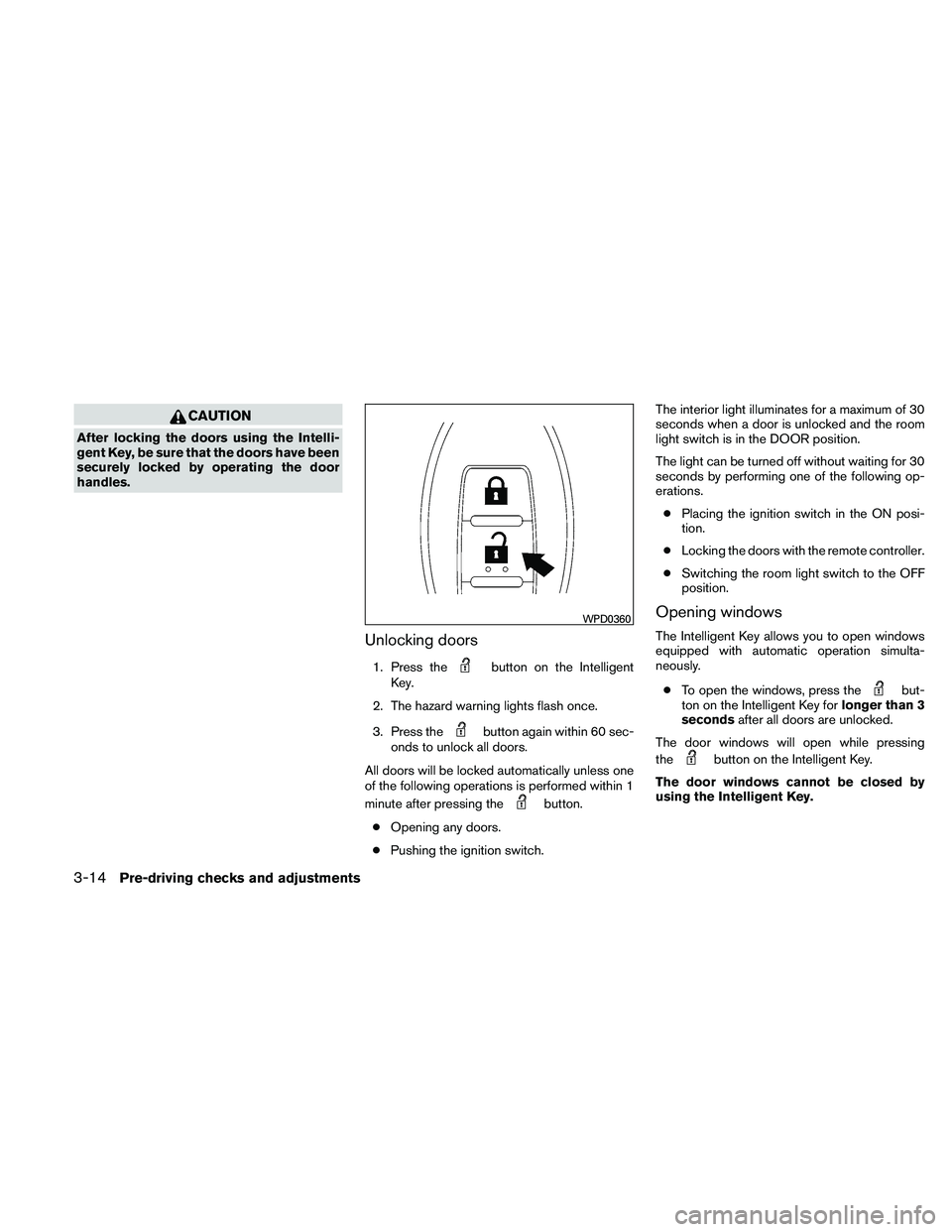
Unlocking doors
1. Press thebutton on the Intelligent
Key.
2. The hazard warning lights flash once.
3. Press the
button again within 60 sec-
onds to unlock all doors.
All doors will be locked automatically unless one
of the following operations is performed within 1
minute after pressing the
button.
● Opening any doors.
● Pushing the ignition switch. The interior light illuminates for a maximum of 30
seconds when a door is unlocked and the room
light switch is in the DOOR position.
The light can be turned off without waiting for 30
seconds by performing one of the following op-
erations.
● Placing the ignition switch in the ON posi-
tion.
● Locking the doors with the remote controller.
● Switching the room light switch to the OFF
position.
Opening windows
The Intelligent Key allows you to open windows
equipped with automatic operation simulta-
neously.
● To open the windows, press the
but-
ton on the Intelligent Key for longer than 3
seconds after all doors are unlocked.
The door windows will open while pressing
the
button on the Intelligent Key.
The door windows cannot be closed by
using the Intelligent Key.
WPD0360
3-14Pre-driving checks and adjustments
Page 142 of 452
Releasing the trunk lid
Press thebutton for longer than 0.5 sec-
onds to open the trunk lid. The trunk release
button will not operate when the ignition switch is
in the ON position or when the trunk cancel
switch is in the OFF position. See “Cancel
switch” in this section.
Using the panic alarm
If you are near your vehicle and feel threatened,
you may activate the panic alarm to call attention
by pressing and holding the
button on the
Intelligent Key for longer than 0.5 seconds.
The panic alarm and headlights will stay on for 25
seconds.
The panic alarm stops when: ● It has run for 25 seconds, or ●
Any button is pressed on the Intelligent Key.
● Pushing the request switch on the driver or
passenger door with the Intelligent Key in
range of the door handle.
WPD0364WPD0361
Pre-driving checks and adjustments3-15
Page 144 of 452
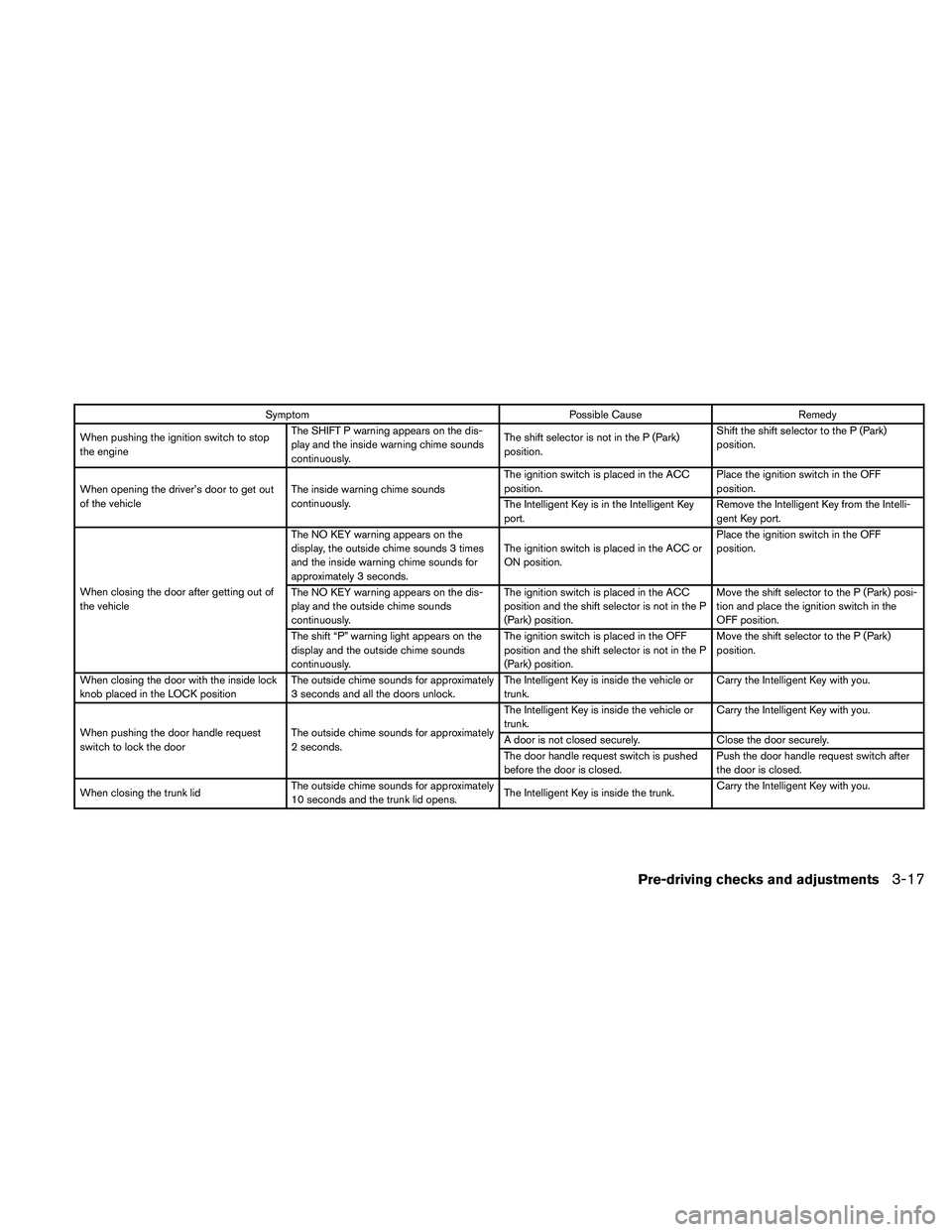
SymptomPossible CauseRemedy
When pushing the ignition switch to stop
the engine The SHIFT P warning appears on the dis-
play and the inside warning chime sounds
continuously. The shift selector is not in the P (Park)
position.Shift the shift selector to the P (Park)
position.
When opening the driver’s door to get out
of the vehicle The inside warning chime sounds
continuously. The ignition switch is placed in the ACC
position.
Place the ignition switch in the OFF
position.
The Intelligent Key is in the Intelligent Key
port. Remove the Intelligent Key from the Intelli-
gent Key port.
When closing the door after getting out of
the vehicle The NO KEY warning appears on the
display, the outside chime sounds 3 times
and the inside warning chime sounds for
approximately 3 seconds.
The ignition switch is placed in the ACC or
ON position.Place the ignition switch in the OFF
position.
The NO KEY warning appears on the dis-
play and the outside chime sounds
continuously. The ignition switch is placed in the ACC
position and the shift selector is not in the P
(Park) position.Move the shift selector to the P (Park) posi-
tion and place the ignition switch in the
OFF position.
The shift “P” warning light appears on the
display and the outside chime sounds
continuously. The ignition switch is placed in the OFF
position and the shift selector is not in the P
(Park) position.Move the shift selector to the P (Park)
position.
When closing the door with the inside lock
knob placed in the LOCK position The outside chime sounds for approximately
3 seconds and all the doors unlock. The Intelligent Key is inside the vehicle or
trunk.Carry the Intelligent Key with you.
When pushing the door handle request
switch to lock the door The outside chime sounds for approximately
2 seconds. The Intelligent Key is inside the vehicle or
trunk.
Carry the Intelligent Key with you.
A door is not closed securely. Close the door securely.
The door handle request switch is pushed
before the door is closed. Push the door handle request switch after
the door is closed.
When closing the trunk lid The outside chime sounds for approximately
10 seconds and the trunk lid opens. The Intelligent Key is inside the trunk.Carry the Intelligent Key with you.
Pre-driving checks and adjustments3-17
Page 151 of 452
WARNING
Do not adjust the steering wheel while
driving. You could lose control of your
vehicle and cause an accident.
AUTOMATIC OPERATION (if so
equipped)
Tilt operation
Push the switch�1up or down to adjust the
steering wheel to the desired position.
Telescopic operation
Push the switch�1forward or backward to ad-
just the steering wheel to the desired position.
Entry/Exit function
The automatic drive positioner system will make
the steering wheel move up automatically when
the driver’s door is opened and the ignition
switch is in the LOCK position. This lets the driver
get into and out of the seat more easily. The
steering wheel moves back into position when
the driver’s door is closed and the ignition switch
is pushed.
For more information, see “Automatic drive posi-
tioner” in this section.
LPD0458
3-24Pre-driving checks and adjustments
Page 153 of 452

AUTOMATIC ANTI-GLARE
REARVIEW MIRROR
The inside mirror is designed so that it automati-
cally dims during night time conditions and ac-
cording to the intensity of the headlights of the
vehicle following you. The automatic anti-glare
feature is activated when the ignition switch is
placed in the ON position.
NOTE:
Do not hang any objects over the sensors
�1or apply glass cleaner to the sensors.
Doing so will reduce the sensitivity of the
sensors, resulting in improper operation.
Type A
The indicator light�2will illuminate when the
automatic anti-glare feature is operating.
With the ignition switch placed in the ON posi-
tion, press the
button as described:
● To turn off the anti-glare feature, press
the
button for 8 seconds. The indica-
tor light will turn off.
● To turn on the anti-glare feature, press
the
button again for 8 seconds. The
indicator light will turn on. For information on the compass display (if so
equipped) , see “Compass display” in the “Instru-
ments and controls” section of this manual.
Type A
WPD0446
MIRRORS
3-26Pre-driving checks and adjustments
Page 155 of 452

OUTSIDE MIRRORS
The outside mirror remote control will operate
only when the ignition switch is in the ACC or ON
position.
Move the small switch
�1to select the right or left
mirror. Adjust each mirror to the desired position
using the large switch
�2.
WARNING
● Objects viewed in the outside mirror on
the passenger side are closer than they
appear. Be careful when moving to the
right. Using only this mirror could cause
an accident. Use the inside mirror or
glance over your shoulder to properly
judge distances to other objects.
● Do not adjust the mirrors while driving.
You could lose control of your vehicle
and cause an accident.
Automatic anti-glare outside mirror
(Driver’s side only) (if so equipped)
The driver’s outside mirror will automatically dim
during nighttime conditions to reduce the glare
from the headlights of trailing vehicles. The auto-
matic anti-glare feature operates only when the
ignition switch is placed in the ON position.
The automatic anti-glare feature will be on when
starting the vehicle. The indicator light on the
automatic anti-glare rearview mirror will illuminate
when the automatic anti-glare feature is on. To turn off the automatic anti-glare feature, press:
● the O button on rearview mirror without
compass (Type B) .
● the
button on rearview mirror with
compass (Type C) .
The indicator light will turn off.
To turn on the automatic anti-glare feature again,
press: ● the | button on rearview mirror without
compass (Type B) .
● the
button on rearview mirror
equipped with compass (Type C) .
The indicator light will turn on.
For information on the automatic anti-glare rear-
view mirror, see “Automatic anti-glare rearview
mirror” in this section.
Reverse tilt-down feature (if so
equipped)
The reverse tilt-down feature will turn both out-
side mirror surfaces downward to provide better
rear visibility close to the vehicle when the small
switch is in either the L or R position.
LPD0237
3-28Pre-driving checks and adjustments
Page 156 of 452
NOTE:
If the outside mirror control switch is in the
neutral position, neither mirror will turn
downward when the shift selector is moved
to R (Reverse) .
Move the shift selector to R (Reverse) . Both
mirrors will turn downward.
The mirror surfaces will return to their original
position when any of the following have occurred:● The shift selector is moved to any position
other than R (Reverse) .
● The outside mirror control switch is set to the
neutral or center position.
● The ignition switch is placed in the OFF
position.
Heated mirrors (if so equipped)
The electric control type outside mirrors can be
heated to defrost, defog, or de-ice for improved
visibility. Push the rear window defogger switch
to activate the heating function. Push the switch
again to deactivate, or the heating function will
automatically turn off after approximately 15 min-
utes.
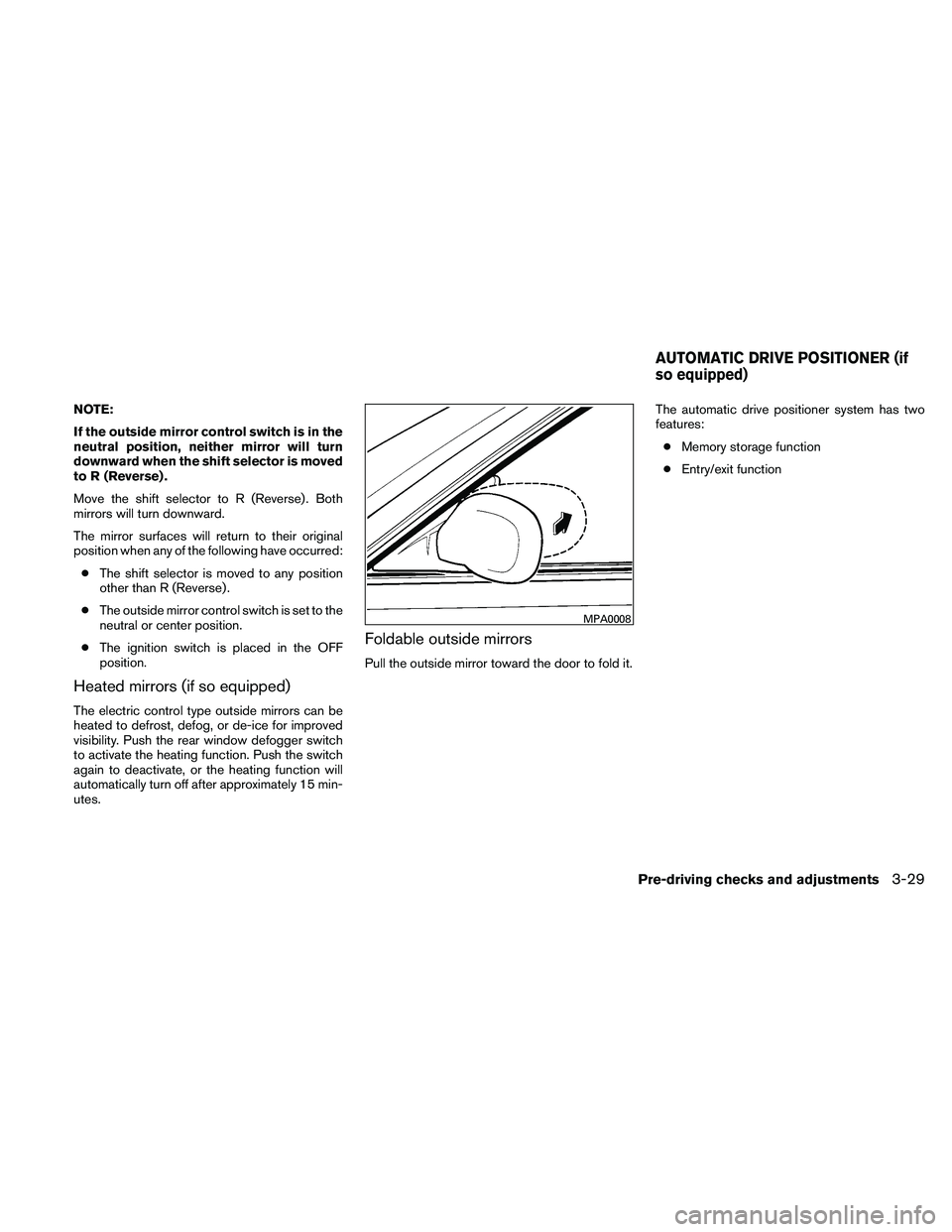
Foldable outside mirrors
Pull the outside mirror toward the door to fold it. The automatic drive positioner system has two
features:
● Memory storage function
● Entry/exit function
MPA0008
AUTOMATIC DRIVE POSITIONER (if
so equipped)
Pre-driving checks and adjustments3-29

