2011 NISSAN LATIO ESP
[x] Cancel search: ESPPage 592 of 3787
BL-82
< SERVICE INFORMATION >
REMOTE KEYLESS ENTRY SYSTEM
OK or NG
OK >> Replace BCM. Refer to BCS-19, "Removal and Installa-
tion of BCM" .
NG >> Repair or replace the harness.
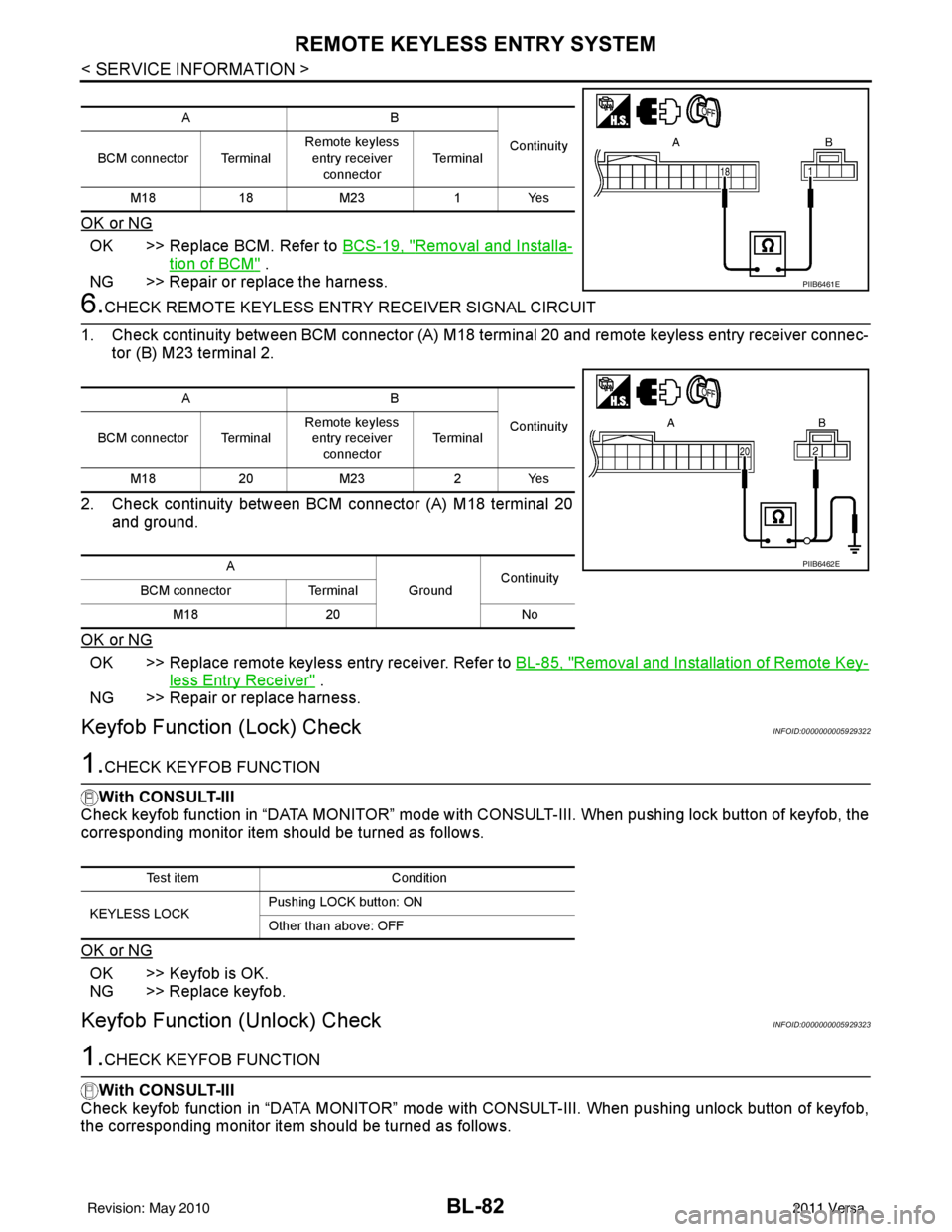
6.CHECK REMOTE KEYL ESS ENTRY RECEIVER SIGNAL CIRCUIT
1. Check continuity between BCM connector (A) M18 terminal 20 and remote keyless entry receiver connec- tor (B) M23 terminal 2.
2. Check continuity between BCM connector (A) M18 terminal 20 and ground.
OK or NG
OK >> Replace remote keyless entry receiver. Refer to BL-85, "Removal and Installation of Remote Key-
less Entry Receiver" .
NG >> Repair or replace harness.
Keyfob Function (Lock) CheckINFOID:0000000005929322
1.CHECK KEYFOB FUNCTION
With CONSULT-III
Check keyfob function in “DATA MONITOR” mode with CO NSULT-III. When pushing lock button of keyfob, the
corresponding monitor item should be turned as follows.
OK or NG
OK >> Keyfob is OK.
NG >> Replace keyfob.
Keyfob Function (Unlock) CheckINFOID:0000000005929323
1.CHECK KEYFOB FUNCTION
With CONSULT-III
Check keyfob function in “DATA MONITOR” mode with CONSULT-III. When pushing unlock button of keyfob,
the corresponding monitor item should be turned as follows.
AB
Continuity
BCM connector Terminal Remote keyless
entry receiver
connector Te r m i n a l
M18 18M23 1Yes
PIIB6461E
AB
Continuity
BCM connector Terminal Remote keyless
entry receiver
connector Te r m i n a l
M18 20M23 2Yes
A GroundContinuity
BCM connector Terminal
M18 20 No
PIIB6462E
Test item Condition
KEYLESS LOCK Pushing LOCK button: ON
Other than above: OFF
Revision: May 2010
2011 Versa
Page 599 of 3787
INTELLIGENT KEY SYSTEMBL-89
< SERVICE INFORMATION >
C
DE
F
G H
J
K L
M A
B
BL
N
O P
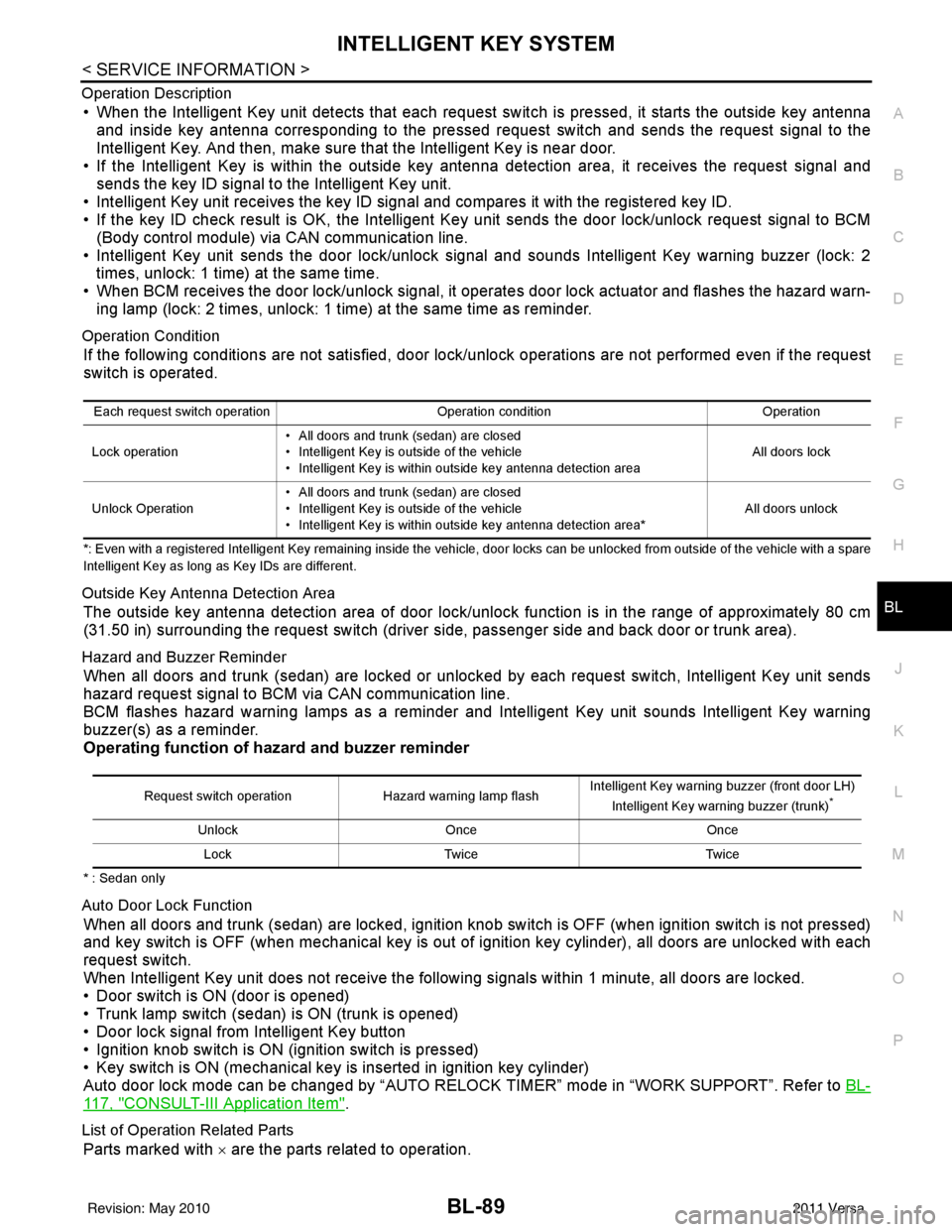
Operation Description
• When the Intelligent Key unit detects that each request sw
itch is pressed, it starts the outside key antenna
and inside key antenna corresponding to the pressed request switch and sends the request signal to the
Intelligent Key. And then, make sure that the Intelligent Key is near door.
• If the Intelligent Key is within the outside key antenna detection area, it receives the request signal and sends the key ID signal to the Intelligent Key unit.
• Intelligent Key unit receives the key ID signal and compares it with the registered key ID.
• If the key ID check result is OK, the Intelligent Ke y unit sends the door lock/unlock request signal to BCM
(Body control module) via CAN communication line.
• Intelligent Key unit sends the door lock/unlock signal and sounds Intelligent Key warning buzzer (lock: 2 times, unlock: 1 time) at the same time.
• When BCM receives the door lock/unlock signal, it oper ates door lock actuator and flashes the hazard warn-
ing lamp (lock: 2 times, unlock: 1 time) at the same time as reminder.
Operation Condition
If the following conditions are not satisfied, door lock/unlock operations are not performed even if the request
switch is operated.
*: Even with a registered Intelligent Key remaining inside the vehicle, door locks can be unlocked from outside of the vehicle with a spare
Intelligent Key as long as Key IDs are different.
Outside Key Antenna Detection Area
The outside key antenna detection area of door lock/unloc k function is in the range of approximately 80 cm
(31.50 in) surrounding the request switch (driver side, passenger side and back door or trunk area).
Hazard and Buzzer Reminder
When all doors and trunk (sedan) are locked or unlocked by each request switch, Intelligent Key\
unit sends
hazard request signal to BCM via CAN communication line.
BCM flashes hazard warning lamps as a reminder and Intelligent Key unit sounds Intelligent Key warning
buzzer(s) as a reminder.
Operating function of hazard and buzzer reminder
* : Sedan only
Auto Door Lock Function
When all doors and trunk (sedan) are locked, ignition knob sw itch is OFF (when ignition switch is not pressed)
and key switch is OFF (when mechanical key is out of ignition key cylinder), all doors are unlocked with each
request switch.
When Intelligent Key unit does not receive the following signals within 1 minute, all doors are locked.
• Door switch is ON (door is opened)
• Trunk lamp switch (sedan) is ON (trunk is opened)
• Door lock signal from Intelligent Key button
• Ignition knob switch is ON (ignition switch is pressed)
• Key switch is ON (mechanical key is inserted in ignition key cylinder)
Auto door lock mode can be changed by “AUTO RELOCK TIMER” mode in “WORK SUPPORT”. Refer to BL-
117, "CONSULT-III Application Item".
List of Operation Related Parts
Parts marked with × are the parts related to operation.
Each request switch operation Operation conditionOperation
Lock operation • All doors and trunk (sedan) are closed
• Intelligent Key is outside of the vehicle
• Intelligent Key is within outside key antenna detection area All doors lock
Unlock Operation • All doors and trunk (sedan) are closed
• Intelligent Key is outside of the vehicle
• Intelligent Key is within outside key antenna detection area*
All doors unlock
Request switch operation
Hazard warning lamp flashIntelligent Key warning buzzer (front door LH)
Intelligent Key warning buzzer (trunk)*
Unlock Once Once
Lock Twice Twice
Revision: May 2010 2011 Versa
Page 626 of 3787
BL-116
< SERVICE INFORMATION >
INTELLIGENT KEY SYSTEM
The engine cannot be started by some Intelligent Keys>>Intelligent Key is low battery or malfunction. Refer
to BL-158, "
Intelligent Key Battery Replacement".
The engine cannot be started by all Intelligent Keys >> GO TO 4
The engine can be started by all Intelligent Keys >> GO TO 5
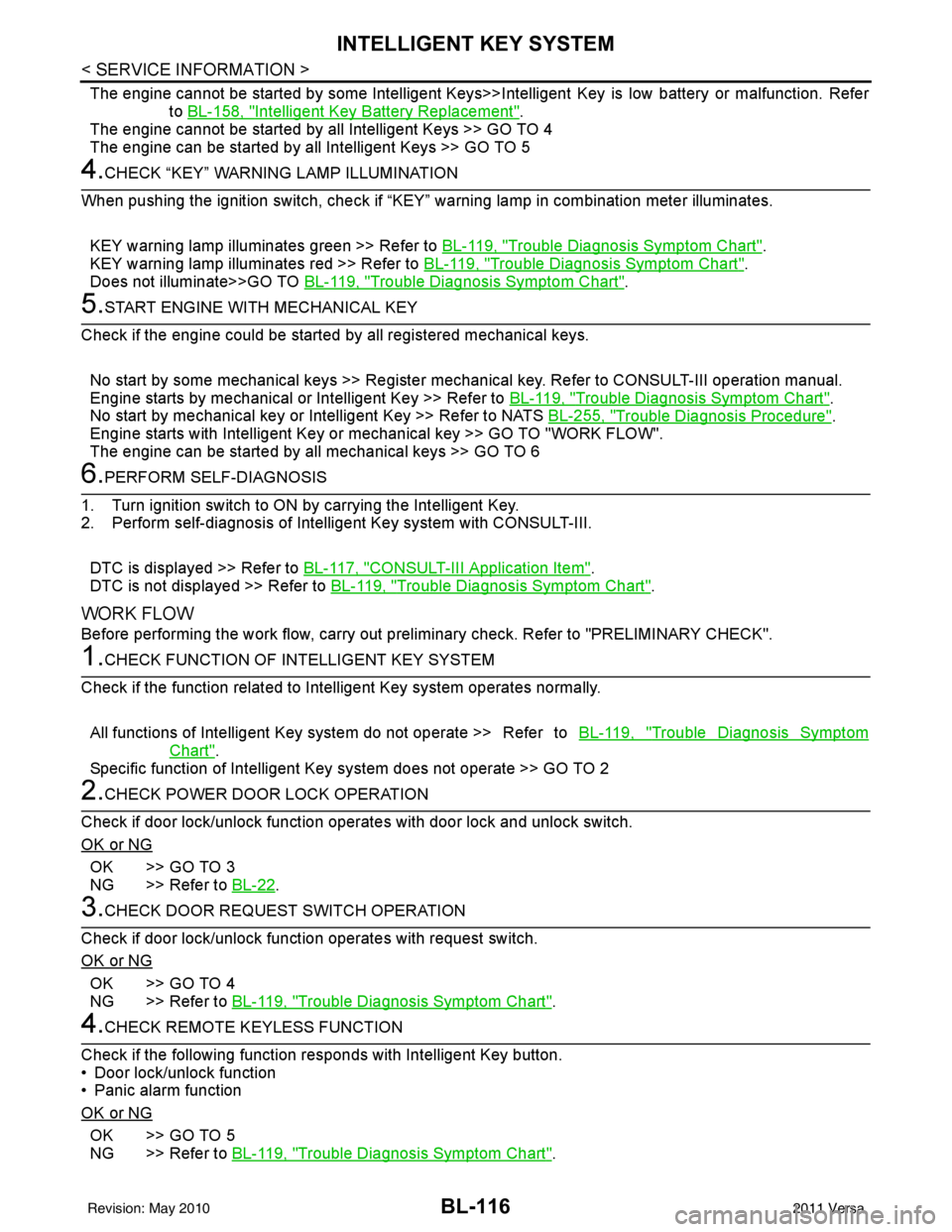
4.CHECK “KEY” WARNING LAMP ILLUMINATION
When pushing the ignition switch, check if “KEY” warning lamp in combination meter illuminates.
KEY warning lamp illuminates green >> Refer to BL-119, "
Trouble Diagnosis Symptom Chart".
KEY warning lamp illuminates red >> Refer to BL-119, "
Trouble Diagnosis Symptom Chart".
Does not illuminate>>GO TO BL-119, "
Trouble Diagnosis Symptom Chart".
5.START ENGINE WITH MECHANICAL KEY
Check if the engine could be started by all registered mechanical keys.
No start by some mechanical keys >> Register mechanical key. Refer to CONSULT-III operation manual.
Engine starts by mechanical or Intelligent Key >> Refer to BL-119, "
Trouble Diagnosis Symptom Chart".
No start by mechanical key or Intelligent Key >> Refer to NATS BL-255, "
Trouble Diagnosis Procedure".
Engine starts with Intelligent Key or mechanical key >> GO TO "WORK FLOW".
The engine can be started by all mechanical keys >> GO TO 6
6.PERFORM SELF-DIAGNOSIS
1. Turn ignition switch to ON by carrying the Intelligent Key.
2. Perform self-diagnosis of Intel ligent Key system with CONSULT-III.
DTC is displayed >> Refer to BL-117, "
CONSULT-III Application Item".
DTC is not displayed >> Refer to BL-119, "
Trouble Diagnosis Symptom Chart".
WORK FLOW
Before performing the work flow, carry out prel iminary check. Refer to "PRELIMINARY CHECK".
1.CHECK FUNCTION OF INTELLIGENT KEY SYSTEM
Check if the function related to Intelligent Key system operates normally.
All functions of Intelligent Key system do not operate >> Refer to BL-119, "
Trouble Diagnosis Symptom
Chart".
Specific function of Intelligent Ke y system does not operate >> GO TO 2
2.CHECK POWER DOOR LOCK OPERATION
Check if door lock/unlock function operates with door lock and unlock switch.
OK or NG
OK >> GO TO 3
NG >> Refer to BL-22
.
3.CHECK DOOR REQUEST SWITCH OPERATION
Check if door lock/unlock function operates with request switch.
OK or NG
OK >> GO TO 4
NG >> Refer to BL-119, "
Trouble Diagnosis Symptom Chart".
4.CHECK REMOTE K EYLESS FUNCTION
Check if the following function responds with Intelligent Key button.
• Door lock/unlock function
• Panic alarm function
OK or NG
OK >> GO TO 5
NG >> Refer to BL-119, "
Trouble Diagnosis Symptom Chart".
Revision: May 2010 2011 Versa
Page 627 of 3787
INTELLIGENT KEY SYSTEMBL-117
< SERVICE INFORMATION >
C
DE
F
G H
J
K L
M A
B
BL
N
O P
5.CHECK HAZARD AND BUZZER REMINDER FUNCTION
Check if hazard and buzzer reminder function responds with the following switches.
• Door request switch
• Intelligent Key button
OK or NG
OK >> GO TO 6
NG >> Refer to BL-119, "
Trouble Diagnosis Symptom Chart".
6.CHECK WARNING CHIME FUNCTION
Check if warning chime function operates normally according to system description. Refer to BL-88, "
System
Description".
OK or NG
OK >> GO TO 7
NG >> Refer to BL-119, "
Trouble Diagnosis Symptom Chart".
7.CHECK WARNING LAMP FUNCTION
Check if warning lamp could be turn on normally according to system description. Refer to BL-88, "
System
Description".
OK or NG
OK >> Inspection End.
NG >> Refer to BL-119, "
Trouble Diagnosis Symptom Chart".
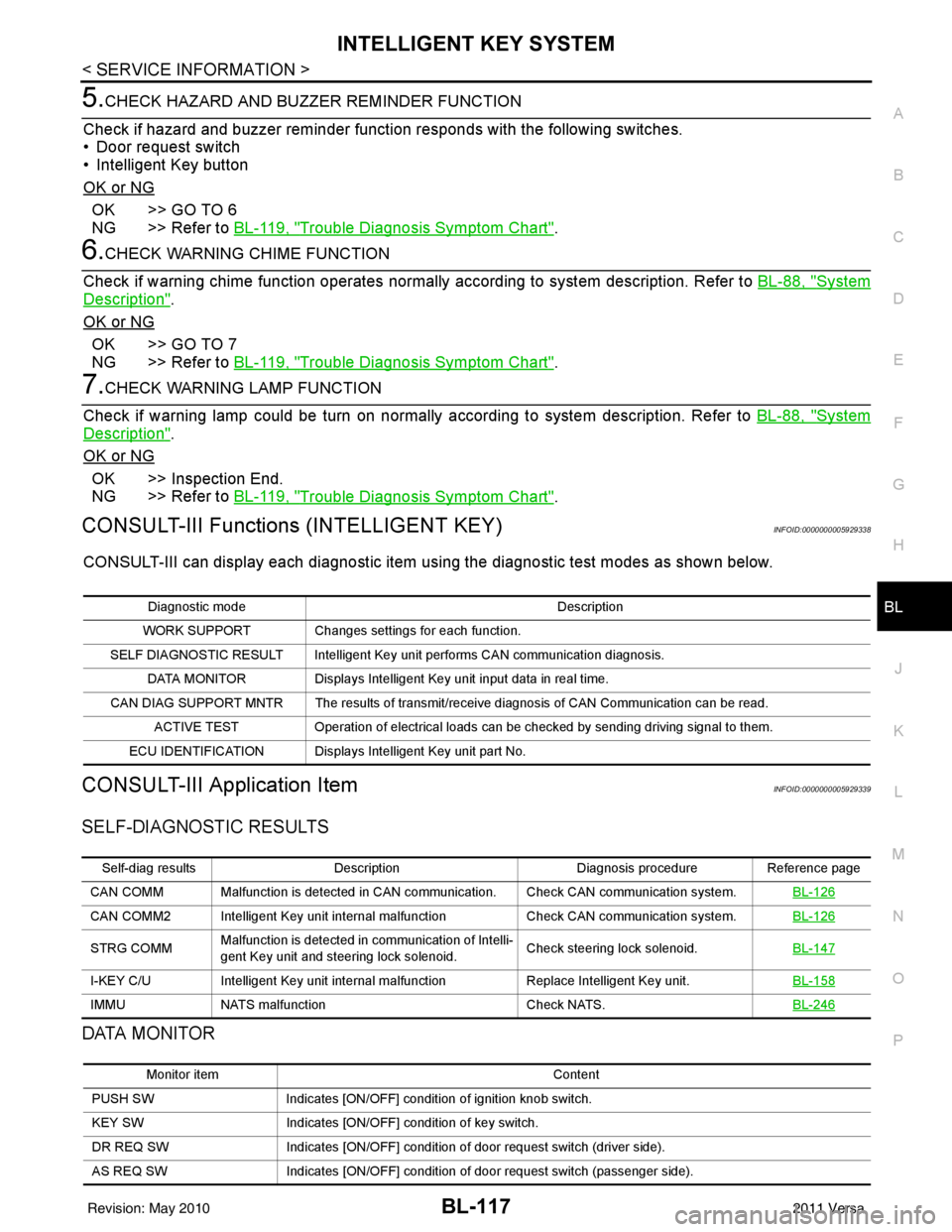
CONSULT-III Functions (INTELLIGENT KEY)INFOID:0000000005929338
CONSULT-III can display each diagnostic item using the diagnostic test modes as shown below.
CONSULT-III Application ItemINFOID:0000000005929339
SELF-DIAGNOSTIC RESULTS
DATA MONITOR
Diagnostic mode Description
WORK SUPPORT Changes settings for each function.
SELF DIAGNOSTIC RESULT Intelligent Key unit performs CAN communication diagnosis. DATA MONITOR Displays Intelligent Key unit input data in real time.
CAN DIAG SUPPORT MNTR The results of transmit/receive diagnosis of CAN Communication can be read. ACTIVE TEST Operation of electrical loads can be checked by sending driving signal to them.
ECU IDENTIFICATION Displays In telligent Key unit part No.
Self-diag resultsDescription Diagnosis procedureReference page
CAN COMM Malfunction is detected in CAN co mmunication. Check CAN communication system. BL-126
CAN COMM2 Intelligent Key unit internal malfunction Check CAN communication system.BL-126
STRG COMMMalfunction is detected in communication of Intelli-
gent Key unit and steering lock solenoid.
Check steering lock solenoid.
BL-147
I-KEY C/UIntelligent Key unit internal ma lfunctionReplace Intelligent Key unit. BL-158
IMMUNATS malfunction Check NATS.BL-246
Monitor item Content
PUSH SW Indicates [ON/OFF] condition of ignition knob switch.
KEY SW Indicates [ON/OFF] condition of key switch.
DR REQ SW Indicates [ON/OFF] condition of door request switch (driver side).
AS REQ SW Indicates [ON/OFF] condition of door request switch (passenger side).
Revision: May 2010 2011 Versa
Page 653 of 3787
INTELLIGENT KEY SYSTEMBL-143
< SERVICE INFORMATION >
C
DE
F
G H
J
K L
M A
B
BL
N
O P
OK or NG
OK >> Intelligent Key warning buzzer is OK.
NG >> Replace inoperative Intelligent Key warning buzzer.
Outside Key Antenna (Driver Si de and Passenger Side) CheckINFOID:0000000005929353
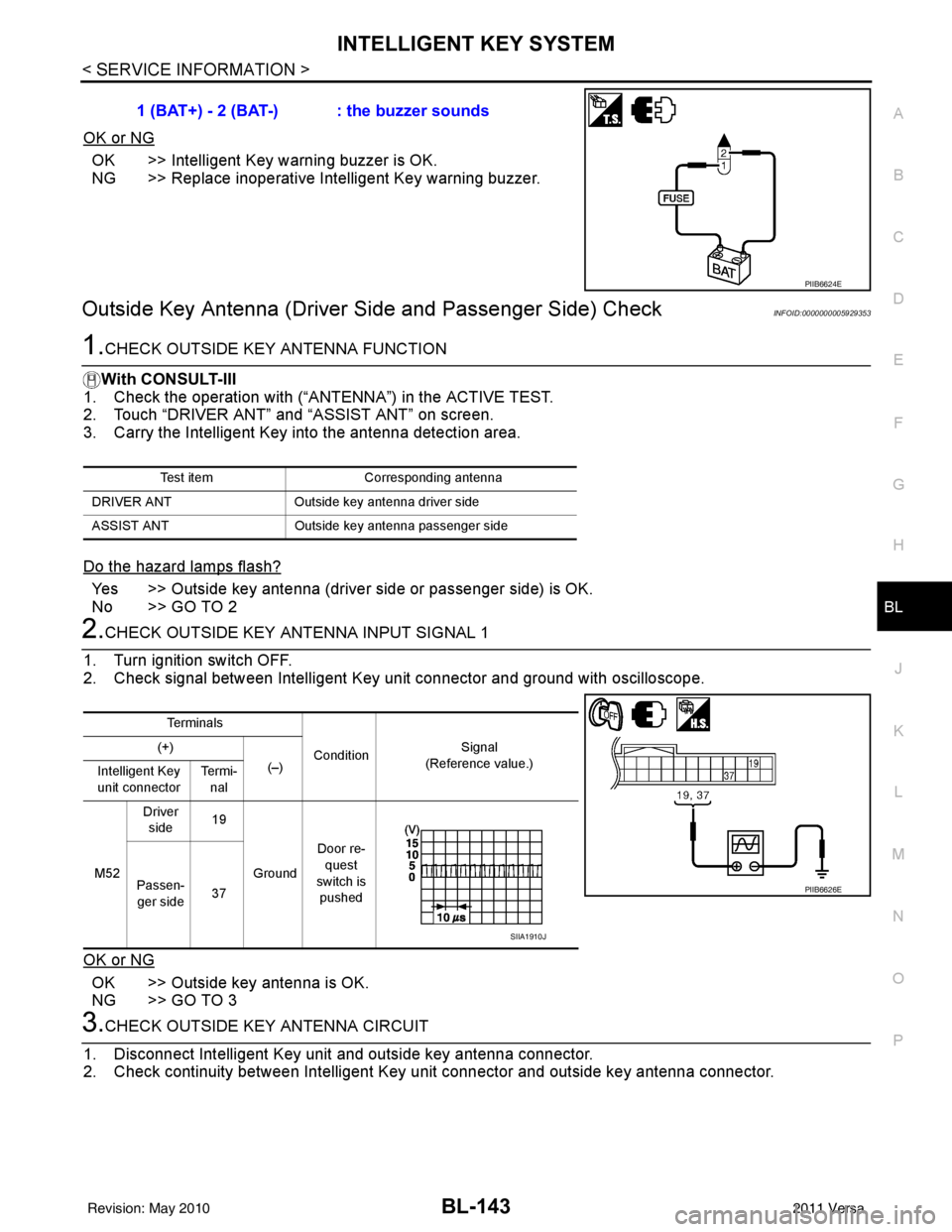
1.CHECK OUTSIDE KEY ANTENNA FUNCTION
With CONSULT-III
1. Check the operation with (“ANT ENNA”) in the ACTIVE TEST.
2. Touch “DRIVER ANT” and “ASSIST ANT” on screen.
3. Carry the Intelligent Key into the antenna detection area.
Do the hazard lamps flash?
Yes >> Outside key antenna (driver side or passenger side) is OK.
No >> GO TO 2
2.CHECK OUTSIDE KEY ANTENNA INPUT SIGNAL 1
1. Turn ignition switch OFF.
2. Check signal between Intelligent Key unit connector and ground with oscilloscope.
OK or NG
OK >> Outside key antenna is OK.
NG >> GO TO 3
3.CHECK OUTSIDE KEY ANTENNA CIRCUIT
1. Disconnect Intelligent Key unit and outside key antenna connector.
2. Check continuity between Intelligent Key unit connector and outside key antenna connector. 1 (BAT+) - 2 (BAT-) : the buzzer sounds
PIIB6624E
Test item
Corresponding antenna
DRIVER ANT Outside key antenna driver side
ASSIST ANT Outside key antenna pass enger side
Te r m i n a l s
Condition Signal
(Reference value.)
(+)
(–)
Intelligent Key
unit connector Te r m i -
nal
M52 Driver
side 19
Ground Door re-
quest
switch is pushed
Passen-
ger side 37
PIIB6626E
SIIA1910J
Revision: May 2010
2011 Versa
Page 655 of 3787
INTELLIGENT KEY SYSTEMBL-145
< SERVICE INFORMATION >
C
DE
F
G H
J
K L
M A
B
BL
N
O P
Do the hazard lamps flash?
Yes >> Rear bumper antenna is OK.
No >> GO TO 2
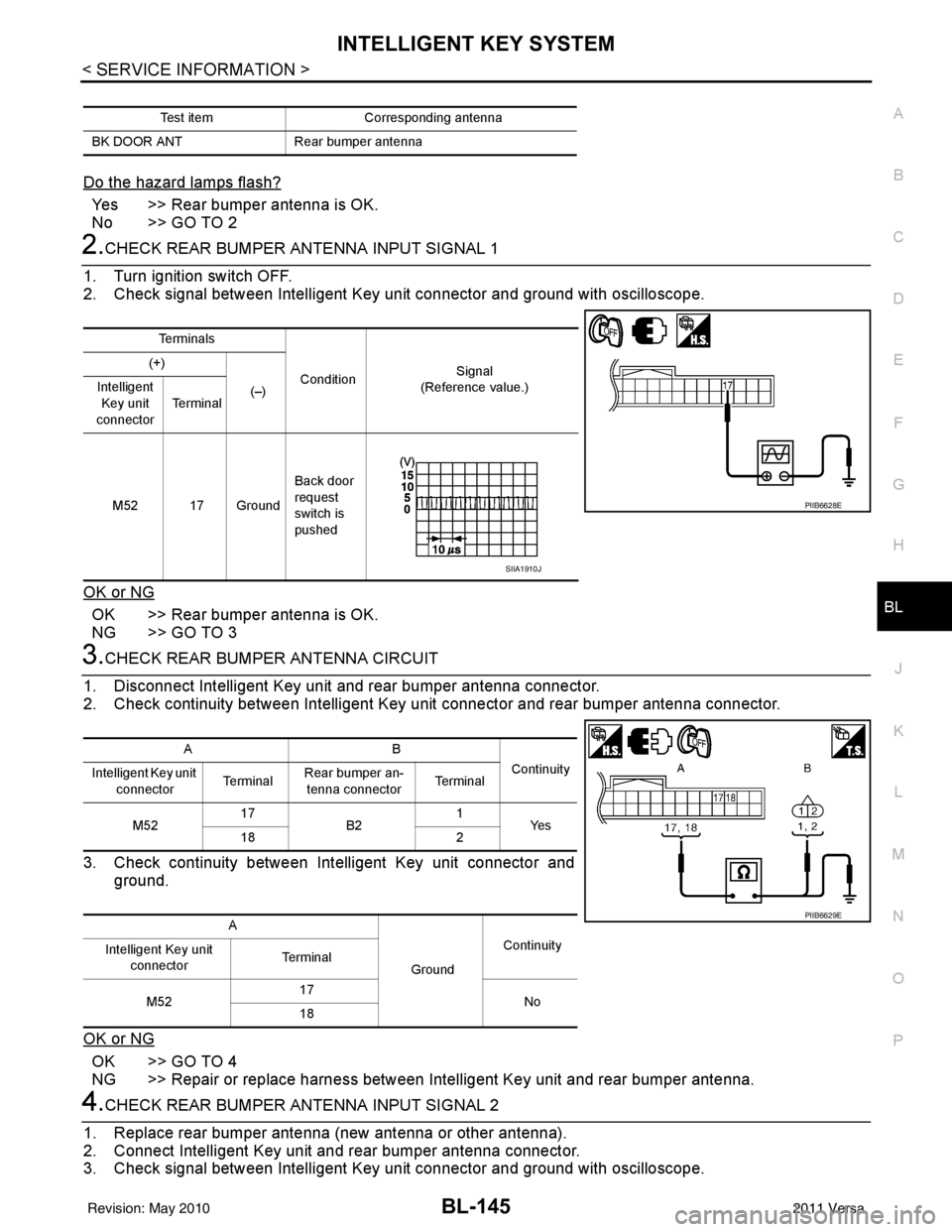
2.CHECK REAR BUMPER ANTENNA INPUT SIGNAL 1
1. Turn ignition switch OFF.
2. Check signal between Intelligent Key unit connector and ground with oscilloscope.
OK or NG
OK >> Rear bumper antenna is OK.
NG >> GO TO 3
3.CHECK REAR BUMPER ANTENNA CIRCUIT
1. Disconnect Intelligent Key unit and rear bumper antenna connector.
2. Check continuity between Intelligent Key unit connector and rear bumper antenna connector.
3. Check continuity between Intelligent Key unit connector and ground.
OK or NG
OK >> GO TO 4
NG >> Repair or replace harness between Intelligent Key unit and rear bumper antenna.
4.CHECK REAR BUMPER ANTENNA INPUT SIGNAL 2
1. Replace rear bumper antenna (new antenna or other antenna).
2. Connect Intelligent Key unit and rear bumper antenna connector.
3. Check signal between Intelligent Key unit connector and ground with oscilloscope.
Test item Corresponding antenna
BK DOOR ANT Rear bumper antenna
Te r m i n a l s
Condition Signal
(Reference value.)
(+)
(–)
Intelligent
Key unit
connector Te r m i n a l
M52 17 Ground Back door
request
switch is
pushed
PIIB6628E
SIIA1910J
AB
Continuity
Intelligent Key unit
connector Te r m i n a l
Rear bumper an-
tenna connector Te r m i n a l
M52 17
B2 1
Ye s
18 2
A GroundContinuity
Intelligent Key unit
connector Te r m i n a l
M52 17
No
18
PIIB6629E
Revision: May 2010 2011 Versa
Page 898 of 3787
![NISSAN LATIO 2011 Service Repair Manual TROUBLE DIAGNOSISBRC-9
< SERVICE INFORMATION > [ABS]
C
D
E
G H
I
J
K L
M A
B
BRC
N
O P
TROUBLE DIAGNOSIS
How to Perform Trouble Diagnosis for Quick and Accurate RepairINFOID:0000000005928438
INTRODUCT](/manual-img/5/57357/w960_57357-897.png "NISSAN LATIO 2011 Service Repair Manual TROUBLE DIAGNOSISBRC-9
< SERVICE INFORMATION > [ABS]
C
D
E
G H
I
J
K L
M A
B
BRC
N
O P
TROUBLE DIAGNOSIS
How to Perform Trouble Diagnosis for Quick and Accurate RepairINFOID:0000000005928438
INTRODUCT")
TROUBLE DIAGNOSISBRC-9
< SERVICE INFORMATION > [ABS]
C
D
E
G H
I
J
K L
M A
B
BRC
N
O P
TROUBLE DIAGNOSIS
How to Perform Trouble Diagnosis for Quick and Accurate RepairINFOID:0000000005928438
INTRODUCTION
The ABS system has an electronic control unit to control major func-
tions. The control unit accepts i nput signals from sensors and con-
trols actuator operation. It is also important to check for air leaks in
the booster or brake and vacuum lines, lack of brake fluid, or other
malfunctions in the brake system.
It is much more difficult to diagnose a malfunction that occurs inter-
mittently rather than continuously. Most intermittent conditions are
caused by poor electrical connec tions or damaged wiring. In this
case, careful checking of suspicious circuits may help prevent the
replacement of good parts.
A visual check only may not find t he cause of the malfunction, so a
road test should be performed.
Before undertaking actual checks, take just a few minutes to talk with
a customer who approaches with an ABS complaint. The customer
is a very good source of information, especially for intermittent condi-
tions. Through the talks with the cu stomer, find out what symptoms
are present and under what conditions they occur.
Start your diagnosis by looking fo r “conventional” malfunctions first.
This is one of the best ways to troubleshoot brake malfunctions on
an ABS equipped vehicle. Also check related Service Bulletins for
information.
SEF233G
SEF234G
Revision: May 2010 2011 Versa
Page 935 of 3787
![NISSAN LATIO 2011 Service Repair Manual BRC-46
< SERVICE INFORMATION >[VDC/TCS/ABS]
TROUBLE DIAGNOSIS
TROUBLE DIAGNOSIS
How to Perform Trouble Diagnosis
for Quick and Accurate RepairINFOID:0000000005928476
INTRODUCTION
The ABS/TCS/VDC syst](/manual-img/5/57357/w960_57357-934.png "NISSAN LATIO 2011 Service Repair Manual BRC-46
< SERVICE INFORMATION >[VDC/TCS/ABS]
TROUBLE DIAGNOSIS
TROUBLE DIAGNOSIS
How to Perform Trouble Diagnosis
for Quick and Accurate RepairINFOID:0000000005928476
INTRODUCTION
The ABS/TCS/VDC syst")
BRC-46
< SERVICE INFORMATION >[VDC/TCS/ABS]
TROUBLE DIAGNOSIS
TROUBLE DIAGNOSIS
How to Perform Trouble Diagnosis
for Quick and Accurate RepairINFOID:0000000005928476
INTRODUCTION
The ABS/TCS/VDC system has an elec tronic control unit to control
major functions. The control unit accepts input signals from sensors
and controls actuator operation. It is also important to check for con-
ventional malfunctions such as air leaks in the booster or lines, lack
of brake fluid, or other malfunctions with the brake system.
It is much more difficult to diagnose a malfunction that occurs inter-
mittently rather than continuously. Mo st intermittent malfunctions are
caused by poor electrical connections or wiring. In this case, careful
checking of suspicious circuits may help prevent the replacement of
good parts.
A visual check only may not find t he cause of the malfunction, so a
road test should be performed.
Before undertaking actual checks, take just a few minutes to talk with
a customer who approaches with an ABS/TCS/VDC complaint. The
customer is a very good source of information, especially for inter-
mittent malfunctions. Through the talks with the customer, find out
what symptoms are present and under what conditions they occur.
Start your diagnosis by looking for “conventional” malfunctions first.
This is one of the best ways to troubleshoot brake malfunctions on
an ABS/TCS/VDC equipped vehicle. Al so check related Service Bul-
letins for information.
SEF233G
SEF234G
Revision: May 2010 2011 Versa