2011 NISSAN LATIO ABS
[x] Cancel search: ABSPage 3562 of 3787
SHOCK ABSORBERRSU-9
< SERVICE INFORMATION >
C
DF
G H
I
J
K L
M A
B
RSU
N
O P
SHOCK ABSORBER
Removal and InstallationINFOID:0000000005931087
REMOVAL
1. Remove wheel and tire using power tool.
2. Remove wheel sensor from wheel hub and bearing assembly and rear suspension beam. Refer to BRC-
33 .
CAUTION:
Do not pull on wheel sensor harness.
3. Remove shock absorber mask from trunk side fini sher using a flat-bladed screwdriver. Refer to EI-56
.
CAUTION:
Wrap the tip of a screwdriver with cl oth to avoid damaging components.
4. Set jack under rear suspension beam.
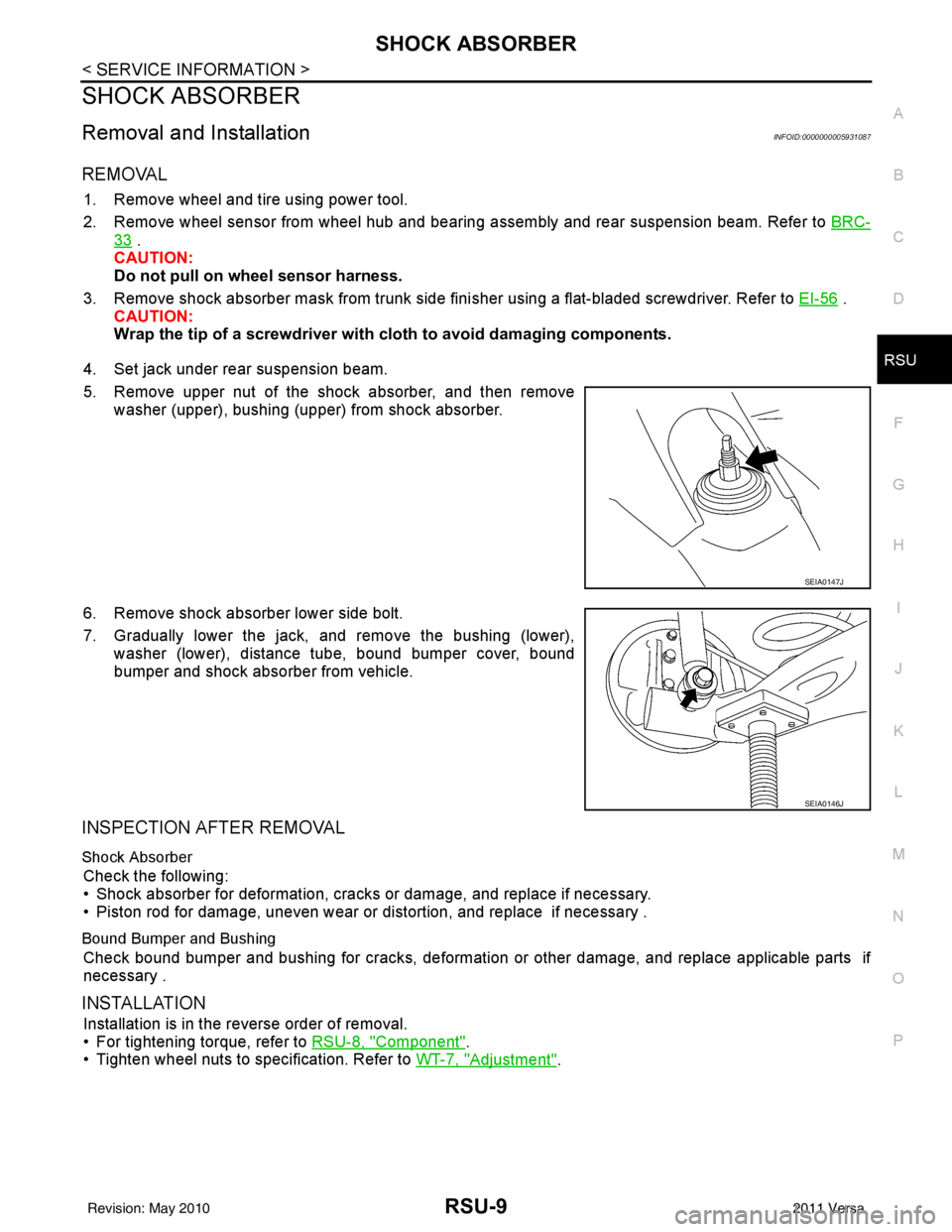
5. Remove upper nut of the shock absorber, and then remove washer (upper), bushing (upper) from shock absorber.
6. Remove shock absorber lower side bolt.
7. Gradually lower the jack, and remove the bushing (lower), washer (lower), distance tube, bound bumper cover, bound
bumper and shock absorber from vehicle.
INSPECTION AFTER REMOVAL
Shock Absorber
Check the following:
• Shock absorber for deformation, cracks or damage, and replace if necessary.
• Piston rod for damage, uneven wear or distortion, and replace if necessary .
Bound Bumper and Bushing
Check bound bumper and bushing for cracks, deformation or other damage, and replace applicable parts if
necessary .
INSTALLATION
Installation is in the reverse order of removal.
• For tightening torque, refer to RSU-8, "
Component".
• Tighten wheel nuts to specification. Refer to WT-7, "
Adjustment".
SEIA0147J
SEIA0146J
Revision: May 2010 2011 Versa
Page 3563 of 3787
RSU-10
< SERVICE INFORMATION >
SHOCK ABSORBER
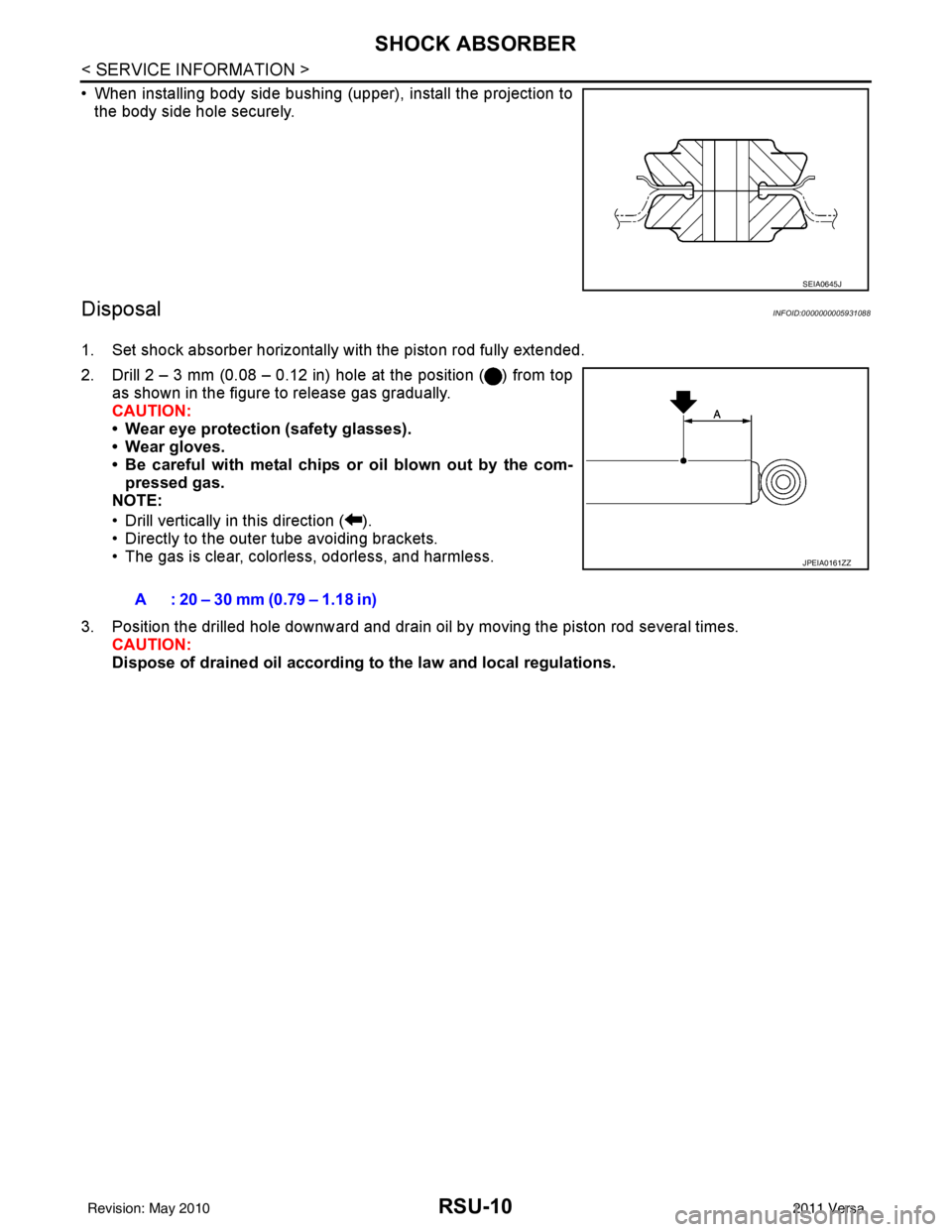
• When installing body side bushing (upper), install the projection tothe body side hole securely.
DisposalINFOID:0000000005931088
1. Set shock absorber horizontally with the piston rod fully extended.
2. Drill 2 – 3 mm (0.08 – 0.12 in) hole at the position ( ) from top as shown in the figure to release gas gradually.
CAUTION:
• Wear eye protection (safety glasses).
• Wear gloves.
• Be careful with metal chips or oil blown out by the com-pressed gas.
NOTE:
• Drill vertically in this direction ( ).
• Directly to the outer tube avoiding brackets.
• The gas is clear, colorless, odorless, and harmless.
3. Position the drilled hole downward and drain oil by moving the piston rod several times. CAUTION:
Dispose of drained oil according to the law and local regulations.
SEIA0645J
A : 20 – 30 mm (0.79 – 1.18 in)
JPEIA0161ZZ
Revision: May 2010 2011 Versa
Page 3564 of 3787
COIL SPRINGRSU-11
< SERVICE INFORMATION >
C
DF
G H
I
J
K L
M A
B
RSU
N
O P
COIL SPRING
Removal and InstallationINFOID:0000000005931089
REMOVAL
1. Remove wheel and tire using power tool.
2. Remove wheel sensor from wheel hub and bearing assembly. Refer to BRC-33, "
Removal and Installa-
tion".
CAUTION:
Do not pull on wheel sensor harness.
3. Set jack under rear suspension beam.
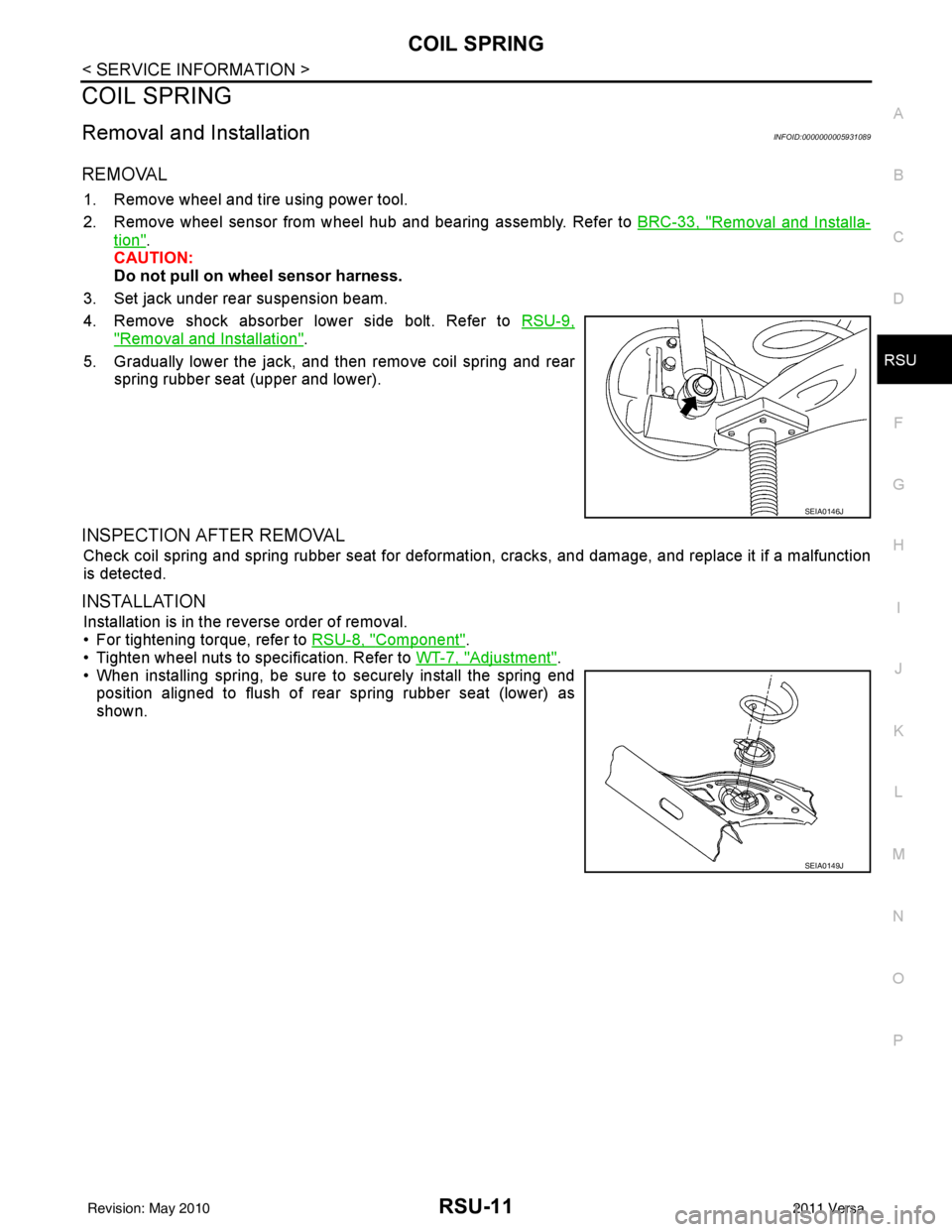
4. Remove shock absorber lower side bolt. Refer to RSU-9,
"Removal and Installation".
5. Gradually lower the jack, and then remove coil spring and rear spring rubber seat (upper and lower).
INSPECTION AFTER REMOVAL
Check coil spring and spring rubber seat for deformation, cracks, and damage, and replace it if a malfunction
is detected.
INSTALLATION
Installation is in the reverse order of removal.
• For tightening torque, refer to RSU-8, "
Component".
• Tighten wheel nuts to specification. Refer to WT-7, "
Adjustment".
• When installing spring, be sure to securely install the spring end position aligned to flush of rear spring rubber seat (lower) as
shown.
SEIA0146J
SEIA0149J
Revision: May 2010 2011 Versa
Page 3671 of 3787
SPIRAL CABLESRS-37
< ON-VEHICLE REPAIR >
C
DE
F
G
I
J
K L
M A
B
SRS
N
O P
SPIRAL CABLE
Removal and InstallationINFOID:0000000005931212
REMOVAL
WARNING:
When servicing the SRS, do not work from directly in front of air bag module.
CAUTION:
• Before servicing the SRS, turn ignition switch OFF, disconnect both battery terminals and wait at
least three minutes.
• Do not tap or bump the steering wheel.
• Do not disassemble the spiral cable.
• Do not allow oil, grease or water to co me in contact with the spiral cable.
• Replace the spiral cable if it has b een dropped or sustained an impact.
• With the steering linkage disconn ected, the spiral cable may snap by turning the steering wheel
beyond the limited number of turns. The spiral cable can be turned counterclockwise about 2.5 turns
from the neutral position.
1. Set the front wheels to the straight-ahead/neutral position.
2. Disconnect the negative and positive battery term inals, then wait at least three minutes.
3. Remove the steering wheel. Refer to PS-7, "
Removal and Installation".
4. Remove the column cover upper and lower.
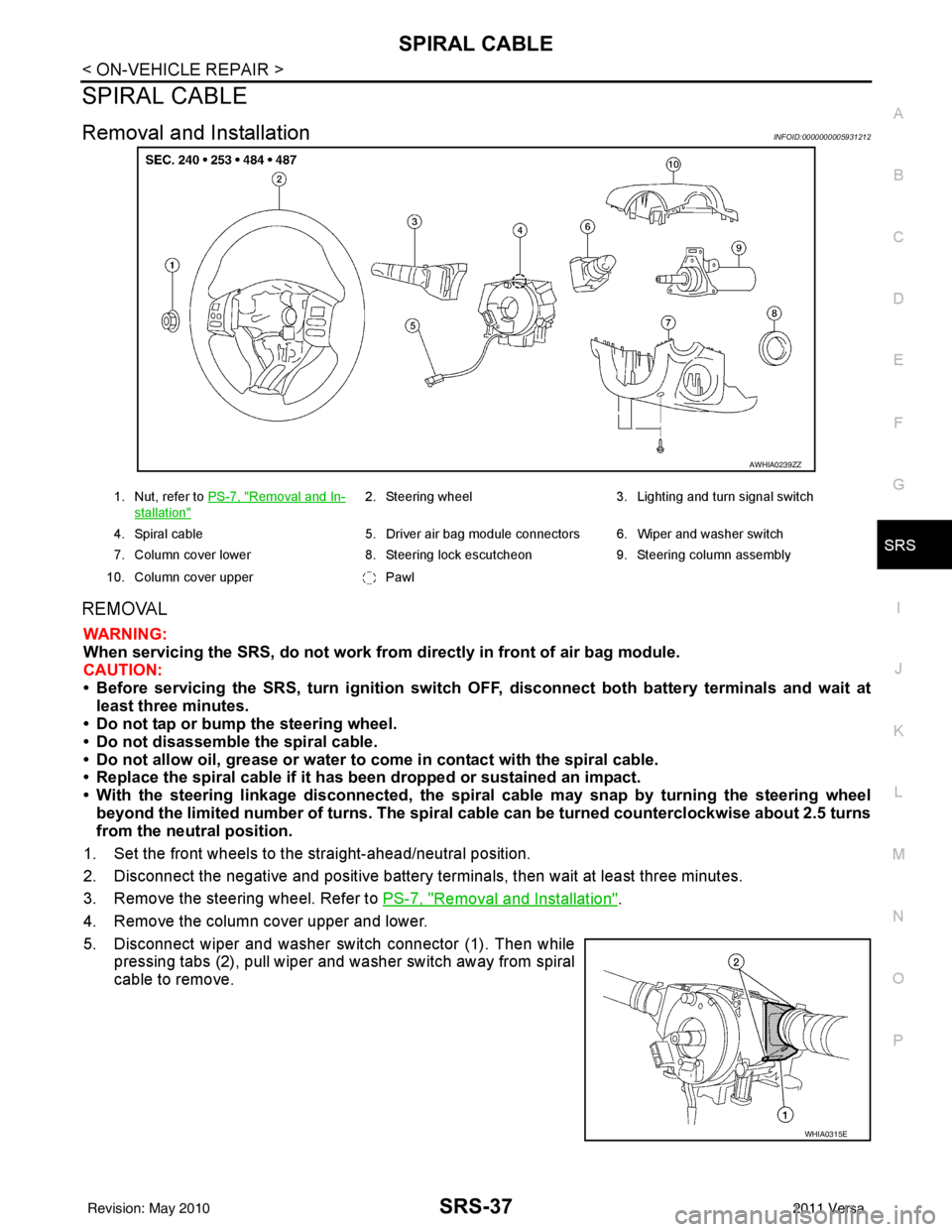
5. Disconnect wiper and washer switch connector (1). Then while pressing tabs (2), pull wiper and washer switch away from spiral
cable to remove.
AWHIA0239ZZ
1. Nut, refer to PS-7, "Removal and In-
stallation"
2. Steering wheel 3. Lighting and turn signal switch
4. Spiral cable 5. Driver air bag module connectors 6. Wiper and washer switch
7. Column cover lower 8. Steering lock escutcheon 9. Steering column assembly
10. Column cover upper Pawl
WHIA0315E
Revision: May 2010 2011 Versa
Page 3672 of 3787
SRS-38
< ON-VEHICLE REPAIR >
SPIRAL CABLE
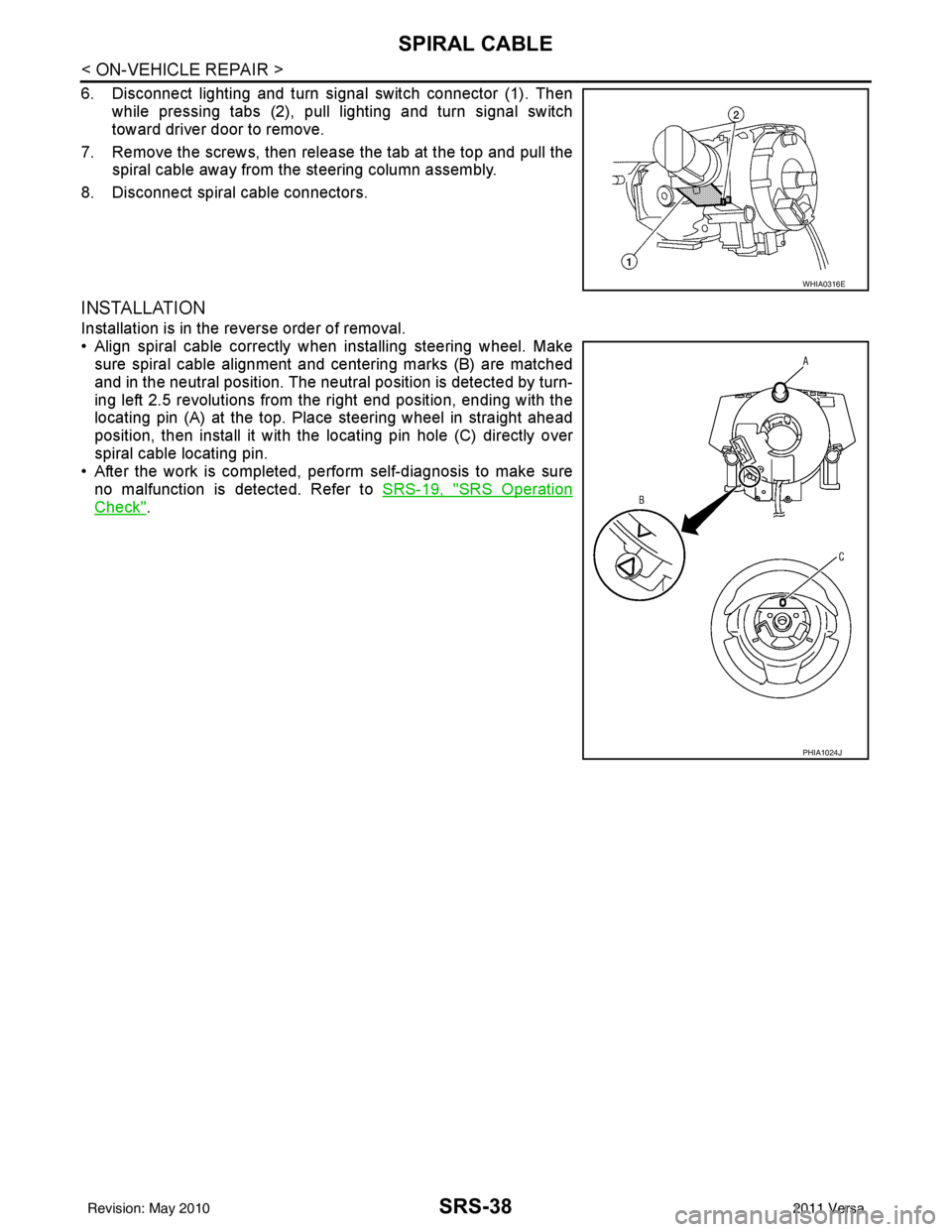
6. Disconnect lighting and turn signal switch connector (1). Thenwhile pressing tabs (2), pull lighting and turn signal switch
toward driver door to remove.
7. Remove the screws, then release the tab at the top and pull the spiral cable away from the steering column assembly.
8. Disconnect spiral cable connectors.
INSTALLATION
Installation is in the reverse order of removal.
• Align spiral cable correctly when installing steering wheel. Make sure spiral cable alignment and centering marks (B) are matched
and in the neutral position. The neutra l position is detected by turn-
ing left 2.5 revolutions from the right end position, ending with the
locating pin (A) at the top. Place steering wheel in straight ahead
position, then install it with the locating pin hole (C) directly over
spiral cable locating pin.
• After the work is completed, perform self-diagnosis to make sure
no malfunction is detected. Refer to SRS-19, "
SRS Operation
Check".
WHIA0316E
PHIA1024J
Revision: May 2010 2011 Versa
Page 3692 of 3787
![NISSAN LATIO 2011 Service Repair Manual EPS SYSTEMSTC-5
< SYSTEM DESCRIPTION > [EPS]
C
D
E
F
H I
J
K L
M A
B
STC
N
O P
SYSTEM DESCRIPTION
EPS SYSTEM
System DiagramINFOID:0000000005931224
System DescriptionINFOID:0000000005931225
• EPS con](/manual-img/5/57357/w960_57357-3691.png "NISSAN LATIO 2011 Service Repair Manual EPS SYSTEMSTC-5
< SYSTEM DESCRIPTION > [EPS]
C
D
E
F
H I
J
K L
M A
B
STC
N
O P
SYSTEM DESCRIPTION
EPS SYSTEM
System DiagramINFOID:0000000005931224
System DescriptionINFOID:0000000005931225
• EPS con")
EPS SYSTEMSTC-5
< SYSTEM DESCRIPTION > [EPS]
C
D
E
F
H I
J
K L
M A
B
STC
N
O P
SYSTEM DESCRIPTION
EPS SYSTEM
System DiagramINFOID:0000000005931224
System DescriptionINFOID:0000000005931225
• EPS control unit performs an arithmetical operation on data, such as steering wheel turning force (sensor
signal) from the torque sensor, vehicle speed signal, etc. Then it generates an optimum assist torque signal
to the EPS motor according to the driving condition.
• EPS control unit decreases the output signal to EPS mo tor while extremely using the power steering func-
tion (e.g., full steering) consecutively for protec ting EPS motor and EPS control unit (Overload protection
control). While activating overload protection control, the assist torque gradually decreases, and the steering
wheel turning force becomes heavy. The normal assist torque reactivates by no steering.
• In case of an error in the electrical system, the fail- safe function stops output signals to the EPS motor. Then
the previous state is changed to the manual steering state.
• Self-diagnosis can be done with CONSULT-III.
• EPS control unit will decrease assistance under the following 2 conditions.
- Extensive steering at low speed will cause the ECU and MOTOR to heat up, once temperature reaches crit-
ical point ECU will reduce current to reduce heat up. System will recover as temperature lowers (reduced or
no assistance).
- Holding steering on rack-end (full lock) for 1 second will cause the system to engage rack-end protection. This reduces assistance down to 50% in order to prevent heat up. Assistance is immediately returned to
100% when steering released or turned away from rack-end.
- Communicates the signal from each control unit via CAN communication.
WGIA0187E
Control unit Signal status
ECM Transmits mainly the follow
ing signals to EPS control uni t via CAN communication.
Engine status signal
ABS actuator and electric unit
(control unit) Transmits mainly the follow
ing signals to EPS control uni t via CAN communication.
Vehicle speed signal
Revision: May 2010 2011 Versa
Page 3693 of 3787
![NISSAN LATIO 2011 Service Repair Manual STC-6
< SYSTEM DESCRIPTION >[EPS]
EPS SYSTEM
Component Parts Location
INFOID:0000000005931226
Component DescriptionINFOID:0000000005931227
Combination meter • Transmits mainly the following signals](/manual-img/5/57357/w960_57357-3692.png "NISSAN LATIO 2011 Service Repair Manual STC-6
< SYSTEM DESCRIPTION >[EPS]
EPS SYSTEM
Component Parts Location
INFOID:0000000005931226
Component DescriptionINFOID:0000000005931227
Combination meter • Transmits mainly the following signals")
STC-6
< SYSTEM DESCRIPTION >[EPS]
EPS SYSTEM
Component Parts Location
INFOID:0000000005931226
Component DescriptionINFOID:0000000005931227
Combination meter • Transmits mainly the following signals to EPS control unit via CAN communication.
Vehicle speed signal
• EPS warning lamp si gnal is received from the EPS co ntrol unit via CAN communication.
TCM (Without ABS) Transmits the following si
gnals via CAN communicatio n to EPS control until.
Engine status signal
• Vehicle speed signal
Control unit
Signal status
SGIA1623E
Components parts Reference
EPS control unit STC-15, "
Description"
EPS motorSTC-13, "Description"
Torque sensor STC-11, "Description"
Revision: May 2010 2011 Versa
Page 3703 of 3787
![NISSAN LATIO 2011 Service Repair Manual STC-16
< DTC/CIRCUIT DIAGNOSIS >[EPS]
C1609 VEHICLE SPEED SIGNAL
C1609 VEHICLE SPEED SIGNAL
DescriptionINFOID:0000000005931242
EPS control unit receives the vehicle speed signal from ABS actuator and](/manual-img/5/57357/w960_57357-3702.png "NISSAN LATIO 2011 Service Repair Manual STC-16
< DTC/CIRCUIT DIAGNOSIS >[EPS]
C1609 VEHICLE SPEED SIGNAL
C1609 VEHICLE SPEED SIGNAL
DescriptionINFOID:0000000005931242
EPS control unit receives the vehicle speed signal from ABS actuator and")
STC-16
< DTC/CIRCUIT DIAGNOSIS >[EPS]
C1609 VEHICLE SPEED SIGNAL
C1609 VEHICLE SPEED SIGNAL
DescriptionINFOID:0000000005931242
EPS control unit receives the vehicle speed signal from ABS actuator and electric unit (control unit) via CAN
communication line.
DTC LogicINFOID:0000000005931243
DTC DETECTION LOGIC
DTC CONFIRMATION PROCEDURE
1.DTC REPRODUCTION PROCEDURE
With CONSULT-III
1. Turn the ignition switch OFF to ON.
2. Perform EPS control unit self-diagnosis.
Is DTC
“C1609” detected?
YES >> Proceed to diagnosis procedure. Refer to STC-16, "Diagnosis Procedure".
NO >> Inspection End.
Diagnosis ProcedureINFOID:0000000005931244
1.PERFORM ABS ACTUATOR AND ELECTRIC UNIT (CONTROL UNIT) SELF-DIAGNOSIS
With CONSULT-III
1. Turn the ignition switch OFF to ON.
2. Perform ABS actuator and electrical uni t (control unit) self-diagnosis. Refer to BRC-19, "
CONSULT-III
Function (ABS)".
Is any DTC detected?
YES >> Check the DTC. Refer to BRC-19, "CONSULT-III Function (ABS)".
NO >> GO TO 2.
2.PERFORM SELF-DIAGNOSIS
With CONSULT-III
Perform EPS control unit self-diagnosis.
Is DTC
“C1609” detected?
YES >> Replace EPS control unit. Refer to PS-10, "Removal and Installation".
NO >> Check EPS control unit pin terminals for damage or loose connection with harness connector. If
any item are damaged, repair or replace error-detected parts.
DTC Display item Malfunction detected condition Possible cause
C1609 CAN VHCL SPEED • Malfunction is detected in vehicle speed signal that
is output from ABS actuator and electric unit (con-
trol unit) via CAN communication.
• ABS actuator and electric unit (control unit) input signal error is detected. • Harness or connector
• CAN communication line
• EPS control unit
• ABS malfunction
- Vehicle speed signal error
Revision: May 2010
2011 Versa