2011 NISSAN GT-R reset
[x] Cancel search: resetPage 262 of 312
Black plate (268,1)
Model "R35-N" EDITED: 2009/ 10/ 30
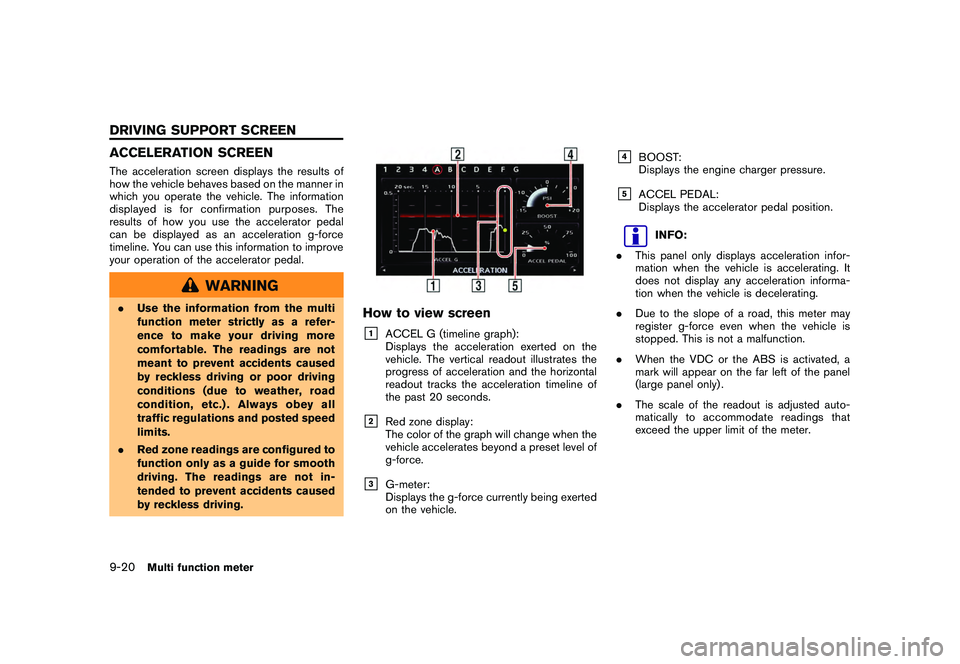
ACCELERATION SCREENThe acceleration screen displays the results of
how the vehicle behaves based on the manner in
which you operate the vehicle. The information
displayed is for confirmation purposes. The
results of how you use the accelerator pedal
can be displayed as an acceleration g-force
timeline. You can use this information to improve
your operation of the accelerator pedal.
WARNING
.Use the information from the multi
function meter strictly as a refer-
ence to make your driving more
comfortable. The readings are not
meant to prevent accidents caused
by reckless driving or poor driving
conditions (due to weather, road
condition, etc.) . Always obey all
traffic regulations and posted speed
limits.
. Red zone readings are configured to
function only as a guide for smooth
driving. The readings are not in-
tended to prevent accidents caused
by reckless driving.
How to view screen&1
ACCEL G (timeline graph):
Displays the acceleration exerted on the
vehicle. The vertical readout illustrates the
progress of acceleration and the horizontal
readout tracks the acceleration timeline of
the past 20 seconds.
&2
Red zone display:
The color of the graph will change when the
vehicle accelerates beyond a preset level of
g-force.
&3
G-meter:
Displays the g-force currently being exerted
on the vehicle.
&4
BOOST:
Displays the engine charger pressure.
&5
ACCEL PEDAL:
Displays the accelerator pedal position.
INFO:
. This panel only displays acceleration infor-
mation when the vehicle is accelerating. It
does not display any acceleration informa-
tion when the vehicle is decelerating.
. Due to the slope of a road, this meter may
register g-force even when the vehicle is
stopped. This is not a malfunction.
. When the VDC or the ABS is activated, a
mark will appear on the far left of the panel
(large panel only) .
. The scale of the readout is adjusted auto-
matically to accommodate readings that
exceed the upper limit of the meter.
9-20
Multi function meter
DRIVING SUPPORT SCREEN
Page 264 of 312

Black plate (270,1)
Model "R35-N" EDITED: 2009/ 10/ 30
BRAKING SCREENThe braking screen displays the results of how
the vehicle behaves based on the manner in
which the driver operates the vehicle. The
information displayed is for confirmation pur-
poses. The results of how the brake pedal is
used are displayed as a timeline of g-force
exerted on the vehicle during deceleration. Use
the information to improve your operation of the
brake pedal.
WARNING
.Use the information from the multi
function meter strictly as a refer-
ence to make your driving more
comfortable. The readings are not
meant to prevent accidents caused
by reckless driving or poor driving
conditions (due to weather, road
condition, etc.) . Always obey all
traffic regulations and posted speed
limits.
. Red zone readings are configured to
function only as a guide for smooth
driving. The readings are not in-
tended to prevent accidents caused
by reckless driving.
How to view the screen&1
BRAKE G (timeline graph):
Displays the deceleration of the g-force
being exerted on the vehicle. The vertical
readout illustrates the progress of accel-
eration and the horizontal readout tracks the
deceleration timeline of the past 20 sec-
onds.
&2
Red zone display:
The color of the graph will change when the
level of g-force exerted on the vehicle while
decelerating exceeds a preset level.
&3
G-meter:
Displays the g-force currently being exerted
due on the vehicle due to deceleration.
&4
SPEED:
Displays the current driving speed.
&5
BRAKE PEDAL:
Displays the brake pedal position.
INFO:
. The reading that the brake meter displays
when the pedal is being depressed may
vary, depending on the vehicle speed and
road conditions. The brake meter may not
display a reading of “100%” even when the
brake is being fully depressed. This is not a
malfunction.
. This panel only displays acceleration infor-
mation when the vehicle is decelerating. It
does not display any acceleration informa-
tion when the vehicle is accelerating.
. Due to the slope of a road, this meter may
register g-force even when the vehicle is
stopped. This is not a malfunction.
. When the VDC or the ABS is activated, a
mark will appear on the far left side of the
panel (large panel only) .
. The scale of the readout is adjusted auto-
matically to accommodate readings that
exceed the upper limit of the meter.
9-22
Multi function meter
Page 266 of 312

Black plate (272,1)
Model "R35-N" EDITED: 2009/ 10/ 30
STEERING SCREENThe steering screen allows you to confirm how
the vehicle responds to your driving by display-
ing the results of how you operate the vehicle.
The results of your driving are displayed as a
timeline of the g-force exerted on the vehicle.
Use the displayed information to improve your
steering smoothness.
WARNING
.Use the information from the multi
function meter strictly as a refer-
ence to make your driving more
comfortable. The readings are not
meant to prevent accidents caused
by reckless driving or poor driving
conditions (due to weather, road
condition, etc.) . Always obey all
traffic regulations and posted speed
limits.
. Red zone readings are configured to
function only as a guide for smooth
driving. The readings are not in-
tended to prevent accidents caused
by reckless driving.
How to view screen&1
CORNERING G (timeline graph of lateral g-
force):
Displays the lateral g-force exerted on the
vehicle. The horizontal readout displays
lateral g-force while the vertical readout
displays a timeline of the past 20 seconds
of driving. G-force exerted on the vehicle
when turning left is displayed on the right
side of the screen. G-force exerted on the
vehicle when turning right is displayed on
the left side of the screen. The g-force
timeline will begin to scroll down automa-
tically after a short period of time.
&2
Red zone display:
The color of the graph will change when the
level of g-force exerted on the vehicle while
decelerating exceeds a preset level.
&3
G-meter:
Displays the g-force currently being exerted
on the vehicle due to deceleration.
&4
SPEED:
Displays the current driving speed.
&5
STEERING:
Displays the angle of the steering wheel.
INFO:
. The extent to which the steering of the
vehicle is displayed on the meter may vary
depending on the vehicle speed.
. Due to the slope of a road, this meter may
register g-force even when the vehicle is
stopped. This is not a malfunction
. When the VDC or the ABS is activated, a
mark will appear on the far left side of the
panel (large panel only) .
. The scale of the readout is adjusted auto-
matically to accommodate readings that
exceed the upper limit of the meter.
9-24
Multi function meter
Page 271 of 312

Black plate (277,1)
Model "R35-N" EDITED: 2009/ 10/ 30
&3
SPEED:
Displays the vehicle speed while driving.
&4
ELAPSED TIME:
Displays the total elapsed time measured
since the stopwatch function was started.
Measuring timed distanceTo measure the timed distance, use
push
dicator will flash when the stopwatch func-
tion is active.
2. Each time you push
time will be recorded into the system and
will be viewable in the list.3. Push
function will stop timing.
INFO:
. The STOP WATCH function can only be
used when the clock is activated. .
If using the driver’s notes, the STOP
WATCH function is unavailable. To use the
STOP WATCH function, first finish using the
driver’s notes.
. If the ignition is in the OFF position, you will
not be able to use the STOP WATCH
function.
. If the ignition is put into the ACC or the OFF
position while using the timer, timing will
end.
. The timer will continue timing while you
display other screens until you push
. The maximum time that the system timer can
display is a recorded time of up to 9 hours
59 minutes and 59.99 seconds.
. When timing has finished, the upper timer
will reset to 00:00.0
. When the recorded time and the finished
recording time are displayed, they tempora-
rily interrupt the time recorder display and
are displayed in large numbers. The re-
corded time will disappear automatically
after 5-10 seconds.
. When screens other than the multi function
meter are displayed, the STOP WATCH
screen will not interrupt the display.
Multi function meter
9-29
Page 276 of 312

Black plate (282,1)
Model "R35-N" EDITED: 2009/ 10/ 30
INFO:
. The STOP WATCH function can only be
used when the clock is activated.
. When the STOP WATCH function is acti-
vated, you cannot use the waypoint timer.
This is the waypoint timer after use of the
STOP WATCH function is completed.
. Even if you stop the engine, when RESUME
is set to ON, the timer will not reset and you
will be able to continue timing your travel.
. If a roadway with a long name has been
recorded as a waypoint, the city and state/
province names may not be displayed.
. If a place name that is not contained in the
map data is recorded as a waypoint, the
waypoint will be displayed by longitude and
latitude.
. Town/city/state/province names configured
in region settings will only be displayed on
the Destination screen for regions in which
the vehicle is located.
About Driver’s notes icon:
: Ordinary road
When your vehicle enters a road, the name of
the road is recorded.: Toll road
When your vehicle enters a toll road, the name
of the road is recorded.: U.S. highways
When your vehicle enters a U.S. highways, the
name of the road is recorded.: Freeway
When your vehicle enters a freeway, the name of
the freeway is recorded.: Parking
When the shift lever is put into the P position,
the vehicle’s current location is recorded.: Check point
When
location is recorded.: Start point
When
Drivers Notes function, the vehicle’s current
location is recorded.
: Destination
When
Drivers Notes function, the vehicle’s current
location is recorded.
Confirming list of waypointsYou can review the list of past trips you have
made.1. Select [MARK LIST]. The list screen will be displayed.2. Select the record you would like to display.
9-34
Multi function meter
Page 285 of 312

Black plate (291,1)
Model "R35-N" EDITED: 2009/ 10/ 30
— If a part of the route is included in the“Avoid Area”.
. The following may occur when the route is
displayed.
— If you calculate a route on a main road, the starting point of the route may not
exactly match the current vehicle loca-
tion.
— The endpoint of the route may not exactly match the destination.
— If you calculate a route on a main road, the system may display a route from
another main road. This may be because
the position of the vehicle icon is not
accurate. In this case, park the vehicle in
a safe location and reset the vehicle
icon, or continue driving to see if the
position of the vehicle icon is automati-
cally adjusted before recalculating the
route.
— There are cases in which the system shows an indirect route to reach the
destination or waypoints, if you set them
from stored or facility information. In
order to correct this, you must be careful
about the traffic direction, especially
when lanes with different travel direc-
tions are shown separately, such as
interchanges and service areas.
— This system makes no distinction be- tween limited traffic control and total
control (blockage) . It may show an
indirect route even if the road is usable.
— Even if the freeway preference is set to OFF, a route that uses the freeway may
be suggested.
— Even if the ferry preference is set to OFF, a route that uses a ferry line may be
suggested.
— Ferry lines, excluding those that are only for pedestrians, bicycles and motor-
cycles, are stored in this system. Take
into consideration the travel time re-
quired and operational condition before
deciding whether to use them or not.
INFO:
The system will only announce street names
when the system language is set to English.
Street names are not announced when the
system is set to Franc¸ ais (French) .
BASICS OF VOICE GUIDANCEVoice guidance announces which direction to
turn when approaching an intersection in which
a turn is necessary.
NOTICE
. There may be some cases in which
voice guidance and actual road
conditions do not correspond. This
may occur because of discrepancies
between the actual road and the
information on the map data, or it is
due to the vehicle’s speed.
. In case voice guidance does not
correspond to the actual road con-
ditions, follow the information ob-
tained from traffic signs or notices
on the road.
General system information
10-7
ROUTE GUIDANCE
Page 302 of 312

Black plate (308,1)
Model "R35-N" EDITED: 2009/ 10/ 30
ROUTE CALCULATION AND VISUAL
GUIDANCE
SymptomPossible cause Possible solution
Waypoints are not included in the auto
reroute calculation. Waypoints that have been already passed are not included in the auto
reroute calculation. To go to that waypoint again, edit the route.
Route information is not displayed. Route calculation has not yet been performed. Set the destination and perform route calculation.
The vehicle is not on the suggested route. Drive on the suggested route.
Route guidance is set to off. Turn on route guidance.
Route information is not provided for certain types of roads (roads
displayed in gray) . This is not a malfunction.
The auto reroute calculation (or detour
calculation) suggests the same route as
the one previously suggested. Route calculations took priority conditions into consideration, but the
same route was calculated.
This is not a malfunction.
A waypoint cannot be added. Five waypoints are already set on the route, including ones that the
vehicle has already passed. A maximum of 5 waypoints can be set on the route. To
go to 6 or more waypoints, perform route calculations
multiple times as necessary.
[Calculate] must be selected for route calculation after Waypoints are
selected from the “Edit/Add to Route” screen. Highlight [Calculate] and push
ing waypoints.
The suggested route is not displayed. Roads near the destination cannot be calculated. Reset the destination to a main or ordinary road, and
recalculate the route.
The starting point and destination are too close. Set a more distant destination.
The starting point and destination are too far away. Divide the trip by selecting one or two intermediate
destinations, and perform route calculations multiple
times.
There are time restricted roads (by the day of the week, by time) near
the current vehicle location or destination. Set [Use Time Restricted Roads] to off.
“Setting conditions for route calculation” page 2-
65
A part of the route is not displayed. The suggested route includes narrow streets (roads displayed in gray) . This is not a malfunction.
11-6
Troubleshooting guide
Page 303 of 312

Black plate (309,1)
Model "R35-N" EDITED: 2009/ 10/ 30
SymptomPossible cause Possible solution
The part of the route that the vehicle has
already passed is deleted. A route is managed by sections between waypoints. If the vehicle
passed the first waypoint, the section between the starting point and the
waypoint is deleted (it may not be deleted depending on the area) . This is not a malfunction.
An indirect route is suggested. If there are restrictions (such as one-way streets) on roads close to the starting point or destination, the system may suggest an indirect route. Adjust the location of the starting point or destination.
The system may suggest an indirect route because route calculation
does not take into consideration some areas such as narrow streets
(gray roads) . Reset the destination to a main or ordinary road, and
recalculate the route.
The landmark information does not
correspond to the actual information. This may be caused by insufficient or incorrect map data.
Updated information will be included in the next version
of the map data.
The suggested route does not exactly
connect to the starting point, waypoints,
or destination. There is no data for route calculation closer to these locations. Set the starting point, waypoints and destination on a
main road, and perform route calculation.
Troubleshooting guide
11-7