2011 NISSAN CUBE phone
[x] Cancel search: phonePage 135 of 345
Black plate (133,1)
Model "Z12-D" EDITED: 2010/ 9/ 27
HOW TO USE REMOTE KEYLESS
ENTRY FUNCTION
WARNING
.Radio waves could adversely affect
electric medical equipment. Those
who use a pacemaker should con-
tact the electric medical equipment
manufacturer for the possible influ-
ences before use.
. The Intelligent Key transmits radio
waves when the buttons are
pushed. The FAA advises that the
radio waves may affect aircraft na-
vigation and communication sys-
tems. Do not operate the
Intelligent Key while on an airplane.
Makesurethebuttonsarenot
operated unintentionally when the
unit is stored during a flight.
CAUTION
.Do not allow the Intelligent Key,
which contains electrical compo-
nents, to come into contact with
water or salt water. This could affect
the system function. .
Do not drop the Intelligent Key.
. Do not strike the Intelligent Key
sharply against another object.
. Do not change or modify the Intel-
ligent Key.
. Wetting may damage the Intelligent
Key. If the Intelligent Key gets wet,
immediately wipe until it is comple-
tely dry.
. If the outside temperature is below
148F( 10 8C) degrees, the battery of
the Intelligent key may not function
properly.
. Do not place the Intelligent Key for
an extended period in an area where
temperatures exceed 140 8F (60 8C) .
. Do not attach the Intelligent Key
with a key holder that contains a
magnet.
. Do not place the Intelligent Key near
equipment that produces a mag-
netic field, such as a TV, audio
equipment, personal computers or
cellular phone.
The remote keyless entry function can operate
all door locks using the remote keyless entry
function of the Intelligent Key. The remote keyless entry function can operate at a distance
of approximately 33 ft (10 m) from the vehicle.
(The operating distance depends upon the
conditions around the vehicle.)
The remote keyless entry function will not
operate:
.
When the Intelligent Key is not within the
operational range.
. When the doors are open or not closed
securely.
. When the Intelligent Key battery is dis-
charged.
The remote keyless entry function can also
operate the vehicle alarm.
Pre-driving checks and adjustments
3-17
Page 149 of 345
Black plate (13,1)
4 Heater, air conditioner, audio and phonesystems
Model "Z12-D" EDITED: 2010/ 9/ 27
Safety note ....................................................... 4-2
Control panel buttons — color screen with
navigation system (if so equipped) ......................... 4-2
How to use touch screen ................................. 4-3
How to use the BACK button ........................... 4-5
How to use brightness control and display ON/
OFF button ................................................... 4-5
How to use the setup button ............................ 4-5
RearView monitor (if so equipped) ......................... 4-9
How to read the displayed lines ......................... 4-9
Difference between predicted and actual
distances ................................................... 4-10
How to adjust the screen ............................... 4-12
Operating tips ............................................. 4-12
Ventilators ...................................................... 4-13
Center ventilators ......................................... 4-13
Side ventilators ............................................ 4-13
Heater and air conditioner .................................. 4-13
Manual air conditioner ................................... 4-14
Automatic air conditioner (if so equipped) .......... 4-17
Operating tips ............................................. 4-19
In-cabin microfilter ........................................ 4-19
Servicing air conditioner ................................ 4-20 Audio system
.................................................. 4-20
Audio operation precautions ........................... 4-20
FM-AM radio with Compact Disc (CD) player
(Type A)..................................................... 4-34
FM-AM radio with Compact Disc (CD) player
(Type B)..................................................... 4-38
FM-AM-SAT radio with Compact Disc (CD)
player (Type C) ............................................ 4-45
CD care and cleaning ................................... 4-52
Steering wheel switch for audio control
(if so equipped) ........................................... 4-53
Antenna ..................................................... 4-54
Car phone or CB radio ...................................... 4-54
Bluetooth
®Hands-Free Phone System
(if so equipped) ............................................... 4-55
Regulatory information ................................... 4-57
Using the system ......................................... 4-57
Control buttons ........................................... 4-59
Getting started ............................................ 4-60
List of voice commands ................................. 4-61
Speaker Adaptation (SA) mode ....................... 4-65
Troubleshooting guide ................................... 4-67
Page 150 of 345
Black plate (148,1)
Model "Z12-D" EDITED: 2010/ 9/ 27
WARNING
.Do not disassemble or modify this
system. If you do, it may result in
accidents, fire, or electric shock.
. In case you notice any foreign
object in the system hardware, spill
liquid on it, or notice smoke or smell
coming from it, stop using the
system immediately and contact
your nearest NISSAN dealer. Ignor-
ing such conditions may lead to
accidents, fire, or electric shock.
CAUTION
Do not use this system if you notice any
abnormality, such as a frozen screen or
lack of sound. Continued use of the
system may result in an accident, fire or
electric shock.
Do not attempt to operate the system in
extreme temperature conditions [below
48F( 208 C) and above 158 8F(70 8C)].
Operating this system under these condi-
tions may result in system malfunctions.
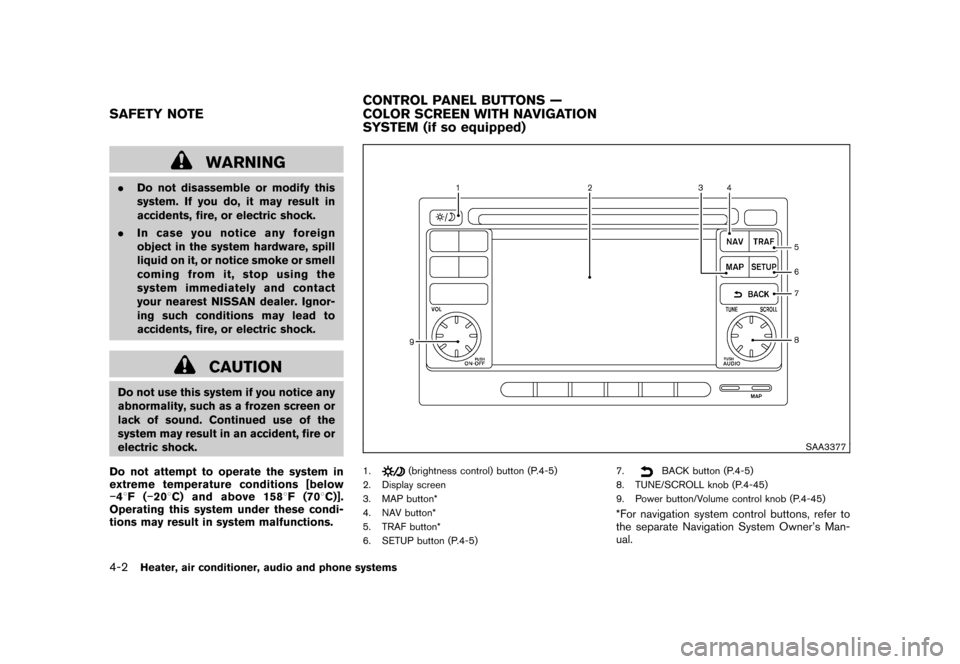
SAA3377
1.
(brightness control) button (P.4-5)
2. Display screen
3. MAP button*
4. NAV button*
5. TRAF button*
6. SETUP button (P.4-5) 7.
BACK button (P.4-5)
8. TUNE/SCROLL knob (P.4-45)
9. Power button/Volume control knob (P.4-45)
*For navigation system control buttons, refer to
the separate Navigation System Owner’s Man-
ual.
SAFETY NOTE CONTROL PANEL BUTTONS —
COLOR SCREEN WITH NAVIGATION
SYSTEM (if so equipped)4-2
Heater, air conditioner, audio and phone systems
Page 151 of 345
Black plate (149,1)
Model "Z12-D" EDITED: 2010/ 9/ 27
When you use this system, make sure the
engine is running.
If you use the system with the engine not
running (ignition ON or ACC) for a long
time, it will discharge the battery, and the
engine will not start.
Reference symbols:
“Example” — Words marked in quotes refer to a
key shown only on the display. These keys can
be selected by touching the screen.HOW TO USE TOUCH SCREEN
CAUTION
.The glass screen on the liquid
crystal display may break if it is hit
with a hard or sharp object. If the
glass screen breaks, do not touch it.
Doing so could result in an injury.
. To clean the display, never use a
rough cloth, alcohol, benzine, thin-
ner or any kind of solvent or paper
towel with a chemical cleaning
agent. They will scratch or deterio-
rate the panel.
. Do not splash any liquid such as
water or car fragrance on the dis- play. Contact with liquid will cause
the system to malfunction.
To help ensure safe driving, some functions
cannot be operated while driving.
The on-screen functions that are not available
while driving will be “grayed out” or muted.
Park the vehicle in a safe location and then
operate the navigation system.
WARNING
. ALWAYS give your full attention to
driving.
. Avoid using vehicle features that
coulddistractyou.Ifdistracted,
you could lose control of your
vehicle and cause an accident.
SAA3422
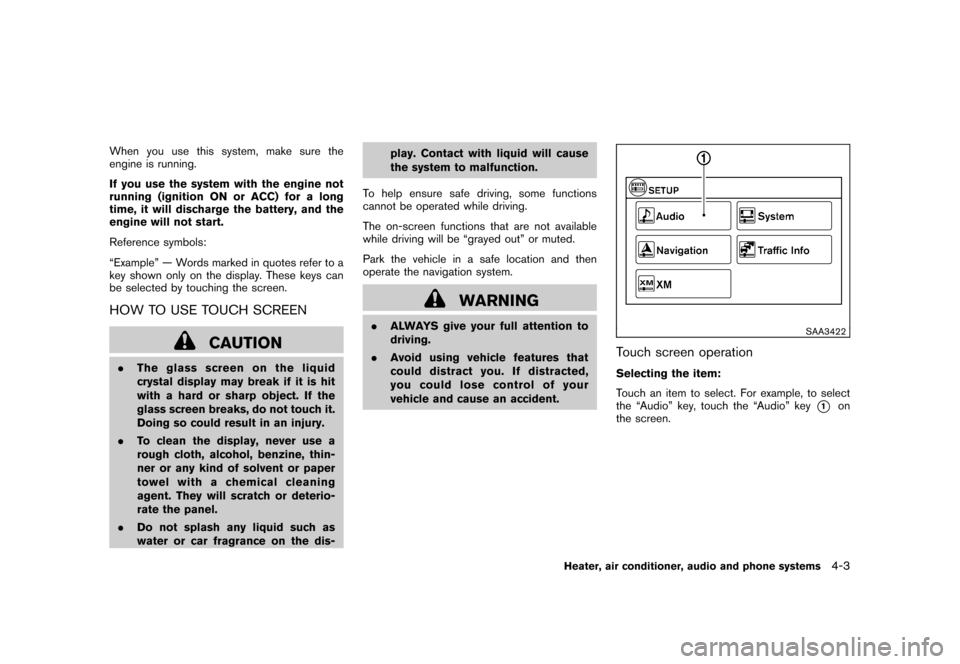
Touch screen operationSelecting the item:
Touch an item to select. For example, to select
the “Audio” key, touch the “Audio” key
*1
on
the screen.
Heater, air conditioner, audio and phone systems
4-3
Page 152 of 345
Black plate (150,1)
Model "Z12-D" EDITED: 2010/ 9/ 27
SAA3387
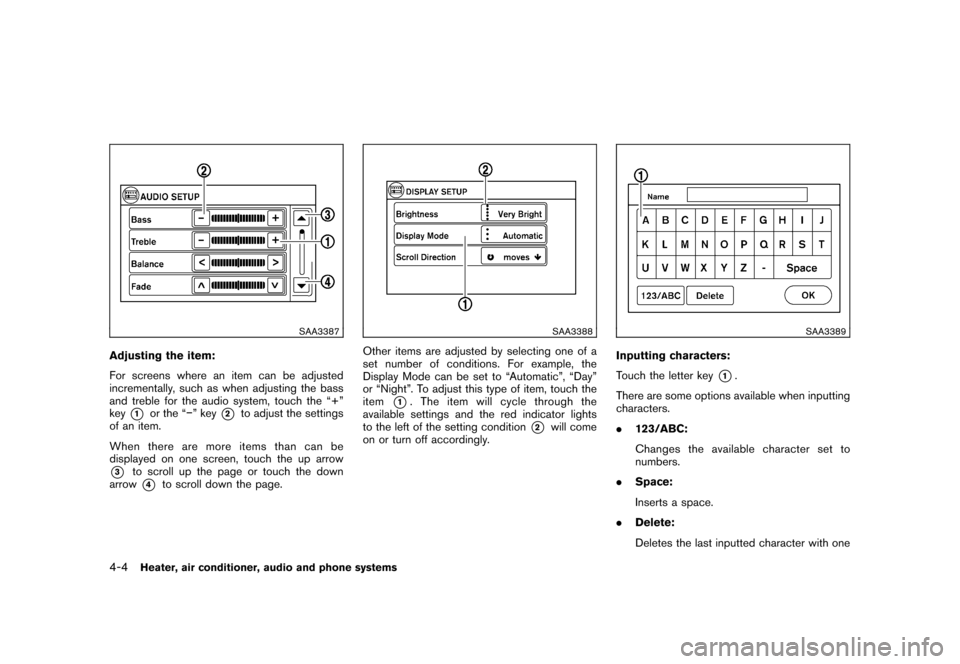
Adjusting the item:
For screens where an item can be adjusted
incrementally, such as when adjusting the bass
and treble for the audio system, touch the “+”
key
*1
or the “” key
*2
to adjust the settings
of an item.
When there are more items than can be
displayed on one screen, touch the up arrow
*3
to scroll up the page or touch the down
arrow*4
to scroll down the page.
SAA3388
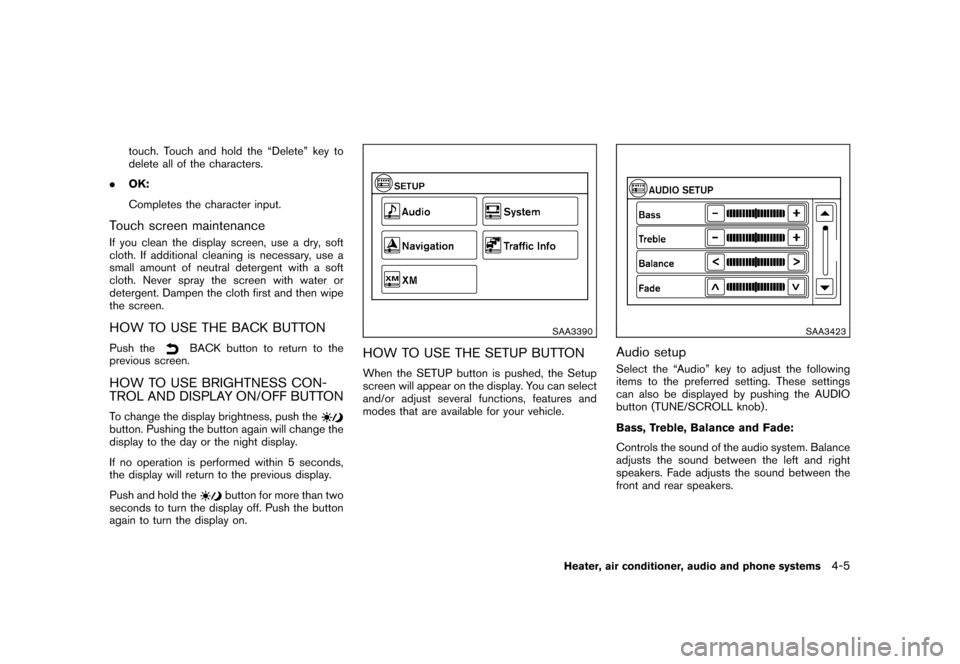
Other items are adjusted by selecting one of a
set number of conditions. For example, the
Display Mode can be set to “Automatic”, “Day”
or “Night”. To adjust this type of item, touch the
item
*1. The item will cycle through the
available settings and the red indicator lights
to the left of the setting condition
*2
will come
on or turn off accordingly.
SAA3389
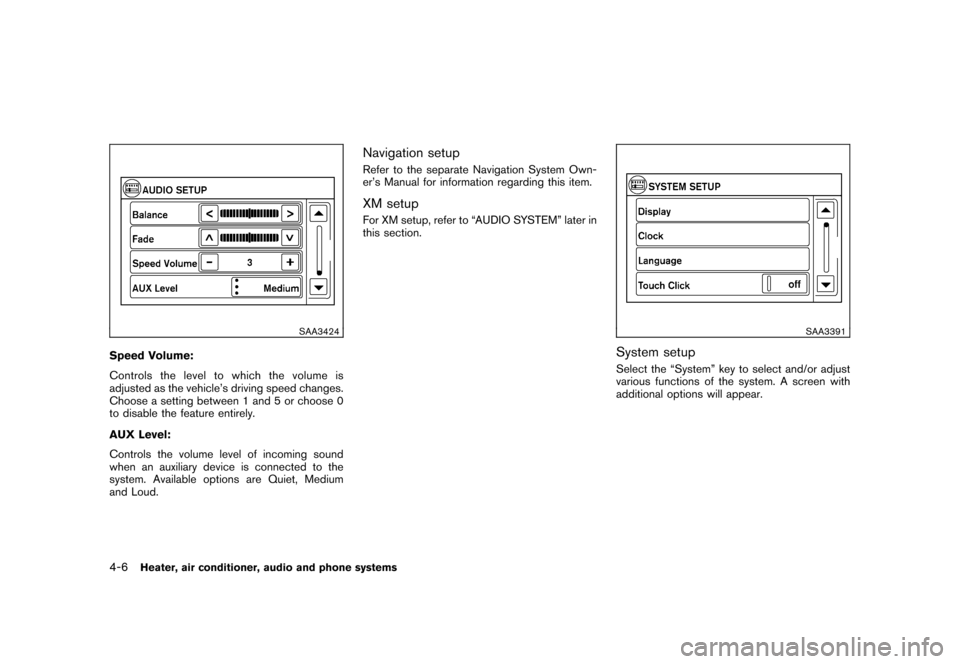
Inputting characters:
Touch the letter key
*1.
There are some options available when inputting
characters.
. 123/ABC:
Changes the available character set to
numbers.
. Space:
Inserts a space.
. Delete:
Deletes the last inputted character with one
4-4
Heater, air conditioner, audio and phone systems
Page 153 of 345
Black plate (151,1)
Model "Z12-D" EDITED: 2010/ 9/ 27
touch. Touch and hold the “Delete” key to
delete all of the characters.
. OK:
Completes the character input.
Touch screen maintenanceIf you clean the display screen, use a dry, soft
cloth. If additional cleaning is necessary, use a
small amount of neutral detergent with a soft
cloth. Never spray the screen with water or
detergent. Dampen the cloth first and then wipe
the screen.HOW TO USE THE BACK BUTTONPush the
BACK button to return to the
previous screen.
HOW TO USE BRIGHTNESS CON-
TROL AND DISPLAY ON/OFF BUTTONTo change the display brightness, push thebutton. Pushing the button again will change the
display to the day or the night display.
If no operation is performed within 5 seconds,
the display will return to the previous display.
Push and hold the
button for more than two
seconds to turn the display off. Push the button
again to turn the display on.
SAA3390
HOW TO USE THE SETUP BUTTONWhen the SETUP button is pushed, the Setup
screen will appear on the display. You can select
and/or adjust several functions, features and
modes that are available for your vehicle.
SAA3423
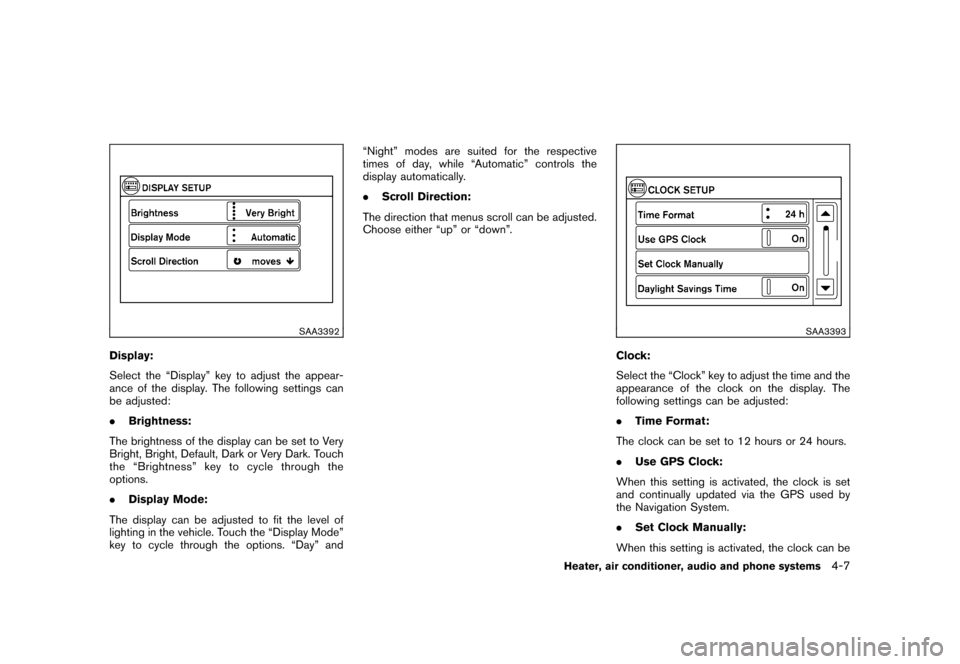
Audio setupSelect the “Audio” key to adjust the following
items to the preferred setting. These settings
can also be displayed by pushing the AUDIO
button (TUNE/SCROLL knob) .
Bass, Treble, Balance and Fade:
Controls the sound of the audio system. Balance
adjusts the sound between the left and right
speakers. Fade adjusts the sound between the
front and rear speakers.
Heater, air conditioner, audio and phone systems
4-5
Page 154 of 345
Black plate (152,1)
Model "Z12-D" EDITED: 2010/ 9/ 27
SAA3424
Speed Volume:
Controls the level to which the volume is
adjusted as the vehicle’s driving speed changes.
Choose a setting between 1 and 5 or choose 0
to disable the feature entirely.
AUX Level:
Controls the volume level of incoming sound
when an auxiliary device is connected to the
system. Available options are Quiet, Medium
and Loud.
Navigation setupRefer to the separate Navigation System Own-
er’s Manual for information regarding this item.XM setupFor XM setup, refer to “AUDIO SYSTEM” later in
this section.
SAA3391
System setupSelect the “System” key to select and/or adjust
various functions of the system. A screen with
additional options will appear.
4-6
Heater, air conditioner, audio and phone systems
Page 155 of 345
Black plate (153,1)
Model "Z12-D" EDITED: 2010/ 9/ 27
SAA3392
Display:
Select the “Display” key to adjust the appear-
ance of the display. The following settings can
be adjusted:
.Brightness:
The brightness of the display can be set to Very
Bright, Bright, Default, Dark or Very Dark. Touch
the “Brightness” key to cycle through the
options.
. Display Mode:
The display can be adjusted to fit the level of
lighting in the vehicle. Touch the “Display Mode”
key to cycle through the options. “Day” and “Night” modes are suited for the respective
times of day, while “Automatic” controls the
display automatically.
.
Scroll Direction:
The direction that menus scroll can be adjusted.
Choose either “up” or “down”.
SAA3393
Clock:
Select the “Clock” key to adjust the time and the
appearance of the clock on the display. The
following settings can be adjusted:
. Time Format:
The clock can be set to 12 hours or 24 hours.
. Use GPS Clock:
When this setting is activated, the clock is set
and continually updated via the GPS used by
the Navigation System.
. Set Clock Manually:
When this setting is activated, the clock can be
Heater, air conditioner, audio and phone systems
4-7