2011 NISSAN CUBE air condition
[x] Cancel search: air conditionPage 211 of 345
Black plate (209,1)
Model "Z12-D" EDITED: 2010/ 9/ 27
the cellular phone when privacy is desired.
The system announces, “Transfer call. Call
transferred to privacy mode.” The system
then ends the VR session.
To reconnect a call from the cellular phone
to the Bluetooth
®Hands-Free Phone sys-
tem, push thebutton.
. “Mute” — Use the Mute command to mute
your voice so the other party cannot hear it.
Use the mute command again to unmute
your voice.
NOTE:
If a call is ended or the cellular phone
network connection is lost while the Mute
feature is on, the Mute feature will be reset
to “off” for the next call so the other party
can hear your voice.
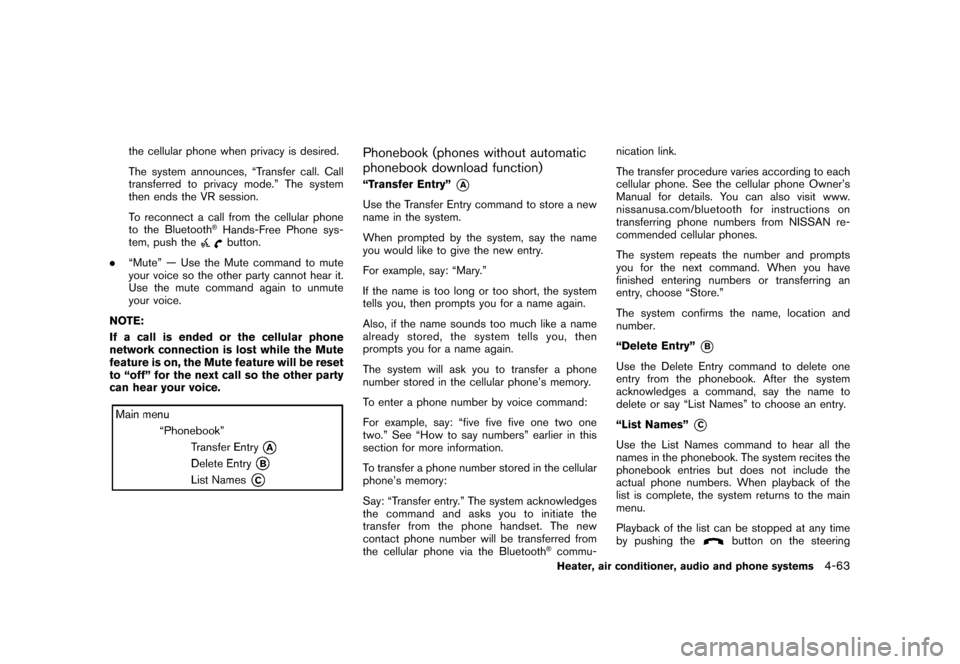
Phonebook (phones without automatic
phonebook download function)“Transfer Entry”
*A
Use the Transfer Entry command to store a new
name in the system.
When prompted by the system, say the name
you would like to give the new entry.
For example, say: “Mary.”
If the name is too long or too short, the system
tells you, then prompts you for a name again.
Also, if the name sounds too much like a name
already stored, the system tells you, then
prompts you for a name again.
The system will ask you to transfer a phone
number stored in the cellular phone’s memory.
To enter a phone number by voice command:
For example, say: “five five five one two one
two.” See “How to say numbers” earlier in this
section for more information.
To transfer a phone number stored in the cellular
phone’s memory:
Say: “Transfer entry.” The system acknowledges
the command and asks you to initiate the
transfer from the phone handset. The new
contact phone number will be transferred from
the cellular phone via the Bluetooth
®commu- nication link.
The transfer procedure varies according to each
cellular phone. See the cellular phone Owner’s
Manual for details. You can also visit www.
nissanusa.com/bluetooth for instructions on
transferring phone numbers from NISSAN re-
commended cellular phones.
The system repeats the number and prompts
you for the next command. When you have
finished entering numbers or transferring an
entry, choose “Store.”
The system confirms the name, location and
number.
“Delete Entry”
*B
Use the Delete Entry command to delete one
entry from the phonebook. After the system
acknowledges a command, say the name to
delete or say “List Names” to choose an entry.
“List Names”
*C
Use the List Names command to hear all the
names in the phonebook. The system recites the
phonebook entries but does not include the
actual phone numbers. When playback of the
list is complete, the system returns to the main
menu.
Playback of the list can be stopped at any time
by pushing the
button on the steering
Heater, air conditioner, audio and phone systems
4-63
Page 212 of 345
Black plate (210,1)
Model "Z12-D" EDITED: 2010/ 9/ 27
wheel. The system ends the VR session.Phonebook (phones with automatic
phonebook download function)NOTE:
Phonebook commands are not available
when the vehicle is moving.For phones that support automatic download of
the phonebook (PBAP Bluetooth
®profile) , the
“Phonebook” command is used to manage
entries to the vehicle phonebook. You can say
the name of an entry at this menu to initiate
dialing of that entry.
The phonebook stores up to 1000 names for
each phone paired with the system. Each name
can have up to 4 locations/phone numbers
associated with it.
When a phone is connected to the system, the
phonebook is automatically downloaded to the
vehicle. This feature allows you to access your
phonebook from the Bluetooth system and call
contacts by name. You can record a custom
voice tag for contact names that the system has
difficulty recognizing. For more information see
“Record Name” in this section. NOTE:
Each phone has its own separate phone-
book. You cannot access Phone A’s phone-
book if you are currently connected with
Phone B.
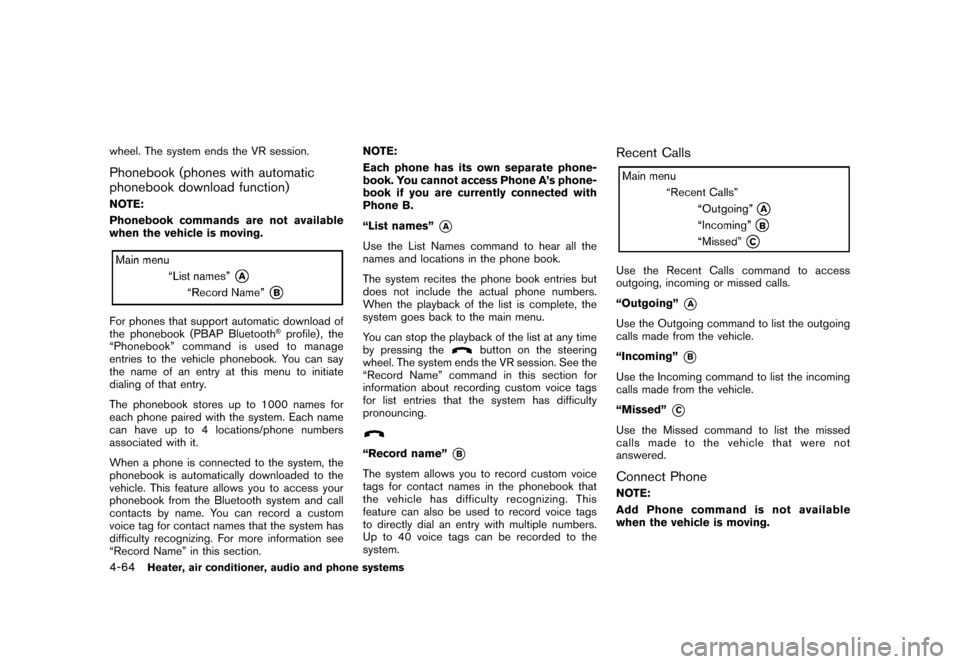
“List names”
*A
Use the List Names command to hear all the
names and locations in the phone book.
The system recites the phone book entries but
does not include the actual phone numbers.
When the playback of the list is complete, the
system goes back to the main menu.
You can stop the playback of the list at any time
by pressing the
button on the steering
wheel. The system ends the VR session. See the
“Record Name” command in this section for
information about recording custom voice tags
for list entries that the system has difficulty
pronouncing.
“Record name”
*B
The system allows you to record custom voice
tags for contact names in the phonebook that
the vehicle has difficulty recognizing. This
feature can also be used to record voice tags
to directly dial an entry with multiple numbers.
Up to 40 voice tags can be recorded to the
system.
Recent CallsUse the Recent Calls command to access
outgoing, incoming or missed calls.
“Outgoing”
*A
Use the Outgoing command to list the outgoing
calls made from the vehicle.
“Incoming”
*B
Use the Incoming command to list the incoming
calls made from the vehicle.
“Missed”
*C
Use the Missed command to list the missed
calls made to the vehicle that were not
answered.Connect PhoneNOTE:
Add Phone command is not available
when the vehicle is moving.
4-64
Heater, air conditioner, audio and phone systems
Page 213 of 345
Black plate (211,1)
Model "Z12-D" EDITED: 2010/ 9/ 27
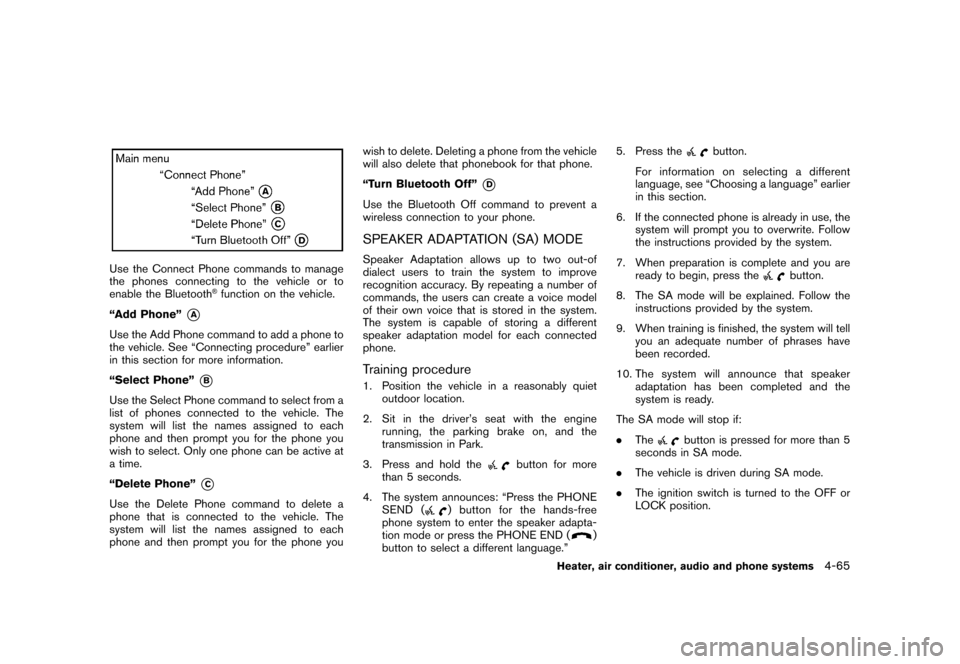
Use the Connect Phone commands to manage
the phones connecting to the vehicle or to
enable the Bluetooth
®function on the vehicle.
“Add Phone”
*A
Use the Add Phone command to add a phone to
the vehicle. See “Connecting procedure” earlier
in this section for more information.
“Select Phone”
*B
Use the Select Phone command to select from a
list of phones connected to the vehicle. The
system will list the names assigned to each
phone and then prompt you for the phone you
wish to select. Only one phone can be active at
a time.
“Delete Phone”
*C
Use the Delete Phone command to delete a
phone that is connected to the vehicle. The
system will list the names assigned to each
phone and then prompt you for the phone you wish to delete. Deleting a phone from the vehicle
will also delete that phonebook for that phone.
“Turn Bluetooth Off”
*D
Use the Bluetooth Off command to prevent a
wireless connection to your phone.SPEAKER ADAPTATION (SA) MODESpeaker Adaptation allows up to two out-of
dialect users to train the system to improve
recognition accuracy. By repeating a number of
commands, the users can create a voice model
of their own voice that is stored in the system.
The system is capable of storing a different
speaker adaptation model for each connected
phone.Training procedure1. Position the vehicle in a reasonably quiet
outdoor location.
2. Sit in the driver’s seat with the engine running, the parking brake on, and the
transmission in Park.
3. Press and hold the
button for more
than 5 seconds.
4. The system announces: “Press the PHONE SEND (
) button for the hands-free
phone system to enter the speaker adapta-
tion mode or press the PHONE END (
)
button to select a different language.” 5. Press the
button.
For information on selecting a different
language, see “Choosing a language” earlier
in this section.
6. If the connected phone is already in use, the system will prompt you to overwrite. Follow
the instructions provided by the system.
7. When preparation is complete and you are ready to begin, press the
button.
8. The SA mode will be explained. Follow the instructions provided by the system.
9. When training is finished, the system will tell you an adequate number of phrases have
been recorded.
10. The system will announce that speaker adaptation has been completed and the
system is ready.
The SA mode will stop if:
. The
button is pressed for more than 5
seconds in SA mode.
. The vehicle is driven during SA mode.
. The ignition switch is turned to the OFF or
LOCK position.
Heater, air conditioner, audio and phone systems
4-65
Page 214 of 345
Black plate (212,1)
Model "Z12-D" EDITED: 2010/ 9/ 27
Training phrasesDuring the SA mode, the system instructs you to
say the following phrases.
(The system will prompt you for each phrase.)
.phonebook new entry
. dial 30429
. delete call back number
. setup pair phone
. memo pad play
. 8 pause 9 3 2 pause 7
. delete all entries
. call 7 2409
. phonebook delete entry
. memo pad record
. dial star 2170
. yes
. no
. select ring tone
. Setup change priority
. dial 85692
. Bluetooth on .
Home
. call 3 1902
. 9 7 pause pause 3 0 8
. cancel
. call back number
. call star 2095
. delete phone
. dial 83051
. setup change ring tone
. 4 3 pause 2 9 pause 0
. delete redial number
. phonebook list names
. call 8 0541
. correction
. setup main menu
. dial 74018
. memo pad delete
. delete
. dial 97266
. call 7 6301 .
go back
. call 5 6280
. dial 664374-66
Heater, air conditioner, audio and phone systems
Page 215 of 345
Black plate (213,1)
Model "Z12-D" EDITED: 2010/ 9/ 27
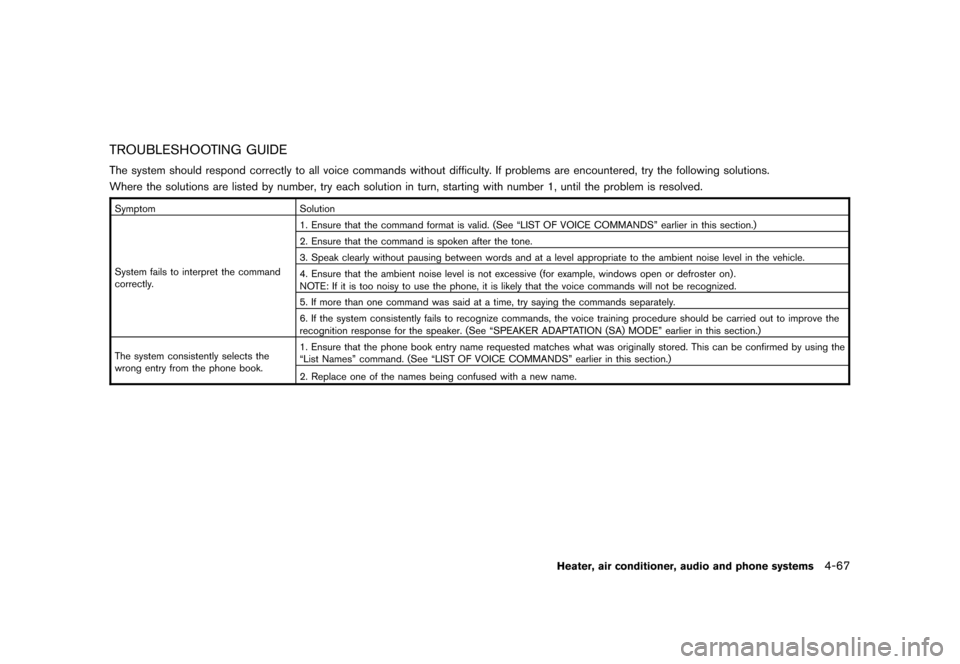
TROUBLESHOOTING GUIDEThe system should respond correctly to all voice commands without difficulty. If problems are encountered, try the following solutions.
Where the solutions are listed by number, try each solution in turn, starting with number 1, until the problem is resolved.SymptomSolution
System fails to interpret the command
correctly. 1. Ensure that the command format is valid. (See “LIST OF VOICE COMMANDS” earlier in this section.)
2. Ensure that the command is spoken after the tone.
3. Speak clearly without pausing between words and at a level appropriate to the ambient noise level in the vehicle.
4. Ensure that the ambient noise level is not excessive (for example, windows open or defroster on) .
NOTE: If it is too noisy to use the phone, it is likely that the voice commands will not be recognized.
5. If more than one command was said at a time, try saying the commands separately.
6. If the system consistently fails to recognize commands, the voice training procedure should be carried out to improve the
recognition response for the speaker. (See “SPEAKER ADAPTATION (SA) MODE” earlier in this section.)
The system consistently selects the
wrong entry from the phone book. 1. Ensure that the phone book entry name requested matches what was originally stored. This can be confirmed by using the
“List Names” command. (See “LIST OF VOICE COMMANDS” earlier in this section.)
2. Replace one of the names being confused with a new name.
Heater, air conditioner, audio and phone systems
4-67
Page 216 of 345

Black plate (214,1)
Model "Z12-D" EDITED: 2010/ 9/ 27
MEMO4-68
Heater, air conditioner, audio and phone systems
Page 222 of 345
Black plate (220,1)
Model "Z12-D" EDITED: 2010/ 9/ 27
erator pedal to gradually slow the vehicle.
5. If there is nothing in the way, steer the vehicle to follow the road while the vehicle
speed is reduced. Do not attempt to drive
the vehicle back onto the road surface until
vehicle speed is reduced.
6. When it is safe to do so, gradually turn the steering wheel until both tires return to the
road surface. When all tires are on the road
surface, steer the vehicle to stay in the
appropriate driving lane.
— If you decide that it is not safe to returnthe vehicle to the road surface based on
vehicle, road or traffic conditions, gra-
dually slow the vehicle to a stop in a safe
place off the road.
RAPID AIR PRESSURE LOSSRapid air pressure loss or a “blow-out” can
occur if the tire is punctured or is damaged due
to hitting a curb or pothole. Rapid air pressure
loss can also be caused by driving on under-
inflated tires.
Rapid air pressure loss can affect the handling
and stability of the vehicle, especially at highway
speeds.
Help prevent rapid air pressure loss by main-
taining the correct air pressure and visually
inspect the tires for wear and damage. See “WHEELS AND TIRES” in the “8. Maintenance
and do-it-yourself” section of this manual.
If a tire rapidly loses air pressure or “blows-out”
while driving maintain control of the vehicle by
following the procedure below. Please note that
this procedure is only a general guide. The
vehicle must be driven as appropriate based on
the conditions of the vehicle, road and traffic.
WARNING
The following actions can increase the
chance of losing control of the vehicle if
there is a sudden loss of tire air
pressure. Losing control of the vehicle
may cause a collision and result in
personal injury.
.
The vehicle generally moves or pulls
in the direction of the flat tire.
. Do not rapidly apply the brakes.
. Do not rapidly release the accelera-
tor pedal.
. Do not rapidly turn the steering
wheel.
1. Remain calm and do not overreact.
2. Maintain a firm grip on the steering wheel with both hands and try to hold a straight
course. 3. When appropriate, slowly release the accel-
erator pedal to gradually slow the vehicle.
4. Gradually steer the vehicle to a safe location off the road and away from traffic if possible.
5. Lightly apply the brake pedal to gradually stop the vehicle.
6. Turn on the hazard warning flashers and either contact a roadside emergency service
to change the tire or see “CHANGING A
FLAT TIRE” in the “6. In case of emergency”
section of this Owner’s Manual.
DRINKING ALCOHOL/DRUGS AND
DRIVING
WARNING
Never drive under the influence of
alcohol or drugs. Alcohol in the blood-
stream reduces coordination, delays
reaction time and impairs judgement.
Driving after drinking alcohol increases
the likelihood of being involved in an
accident injuring yourself and others.
Additionally, if you are injured in an
accident, alcohol can increase the se-
verity of the injury.
NISSAN is committed to safe driving. However,
5-6
Starting and driving
Page 223 of 345
Black plate (221,1)
Model "Z12-D" EDITED: 2010/ 9/ 27
you must choose not to drive under the influence
of alcohol. Every year thousands of people are
injured or killed in alcohol-related accidents.
Although the local laws vary on what is
considered to be legally intoxicated, the fact is
that alcohol affects all people differently and
most people underestimate the effects of
alcohol.
Remember, drinking and driving don’t mix! And
that is true for drugs, too (over-the-counter,
prescription, and illegal drugs) . Don’t drive if
your ability to operate your vehicle is impaired by
alcohol, drugs, or some other physical condition.
WARNING
Never remove or turn the key to the
LOCK position while driving. This may
cause the driver to lose control of the
vehicle and could result in serious
vehicle damage or personal injury.
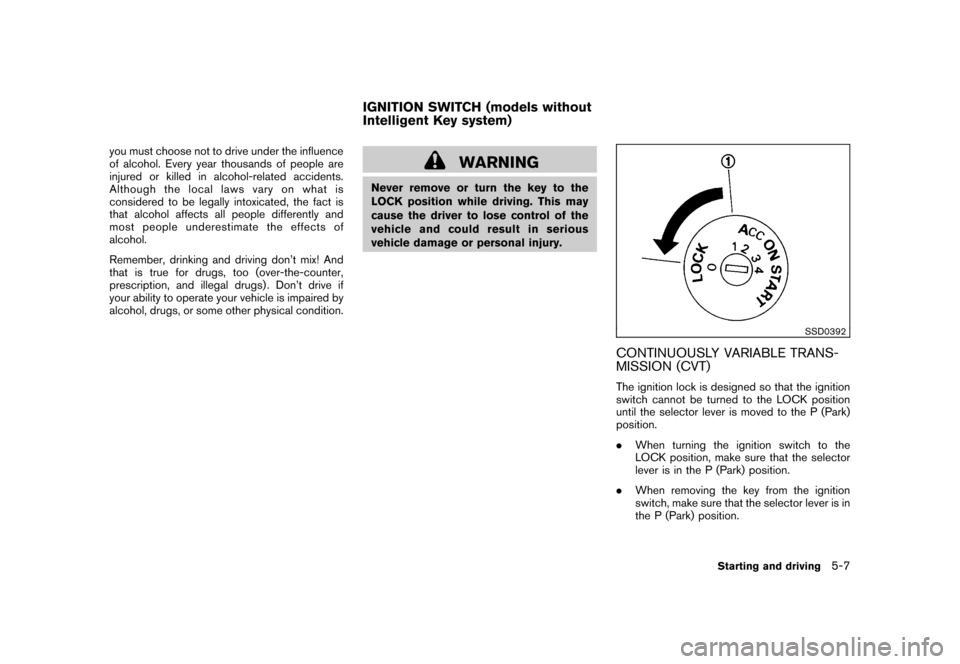
SSD0392
CONTINUOUSLY VARIABLE TRANS-
MISSION (CVT)The ignition lock is designed so that the ignition
switch cannot be turned to the LOCK position
until the selector lever is moved to the P (Park)
position.
.When turning the ignition switch to the
LOCK position, make sure that the selector
lever is in the P (Park) position.
. When removing the key from the ignition
switch, make sure that the selector lever is in
the P (Park) position.
IGNITION SWITCH (models without
Intelligent Key system)
Starting and driving
5-7