Page 17 of 446
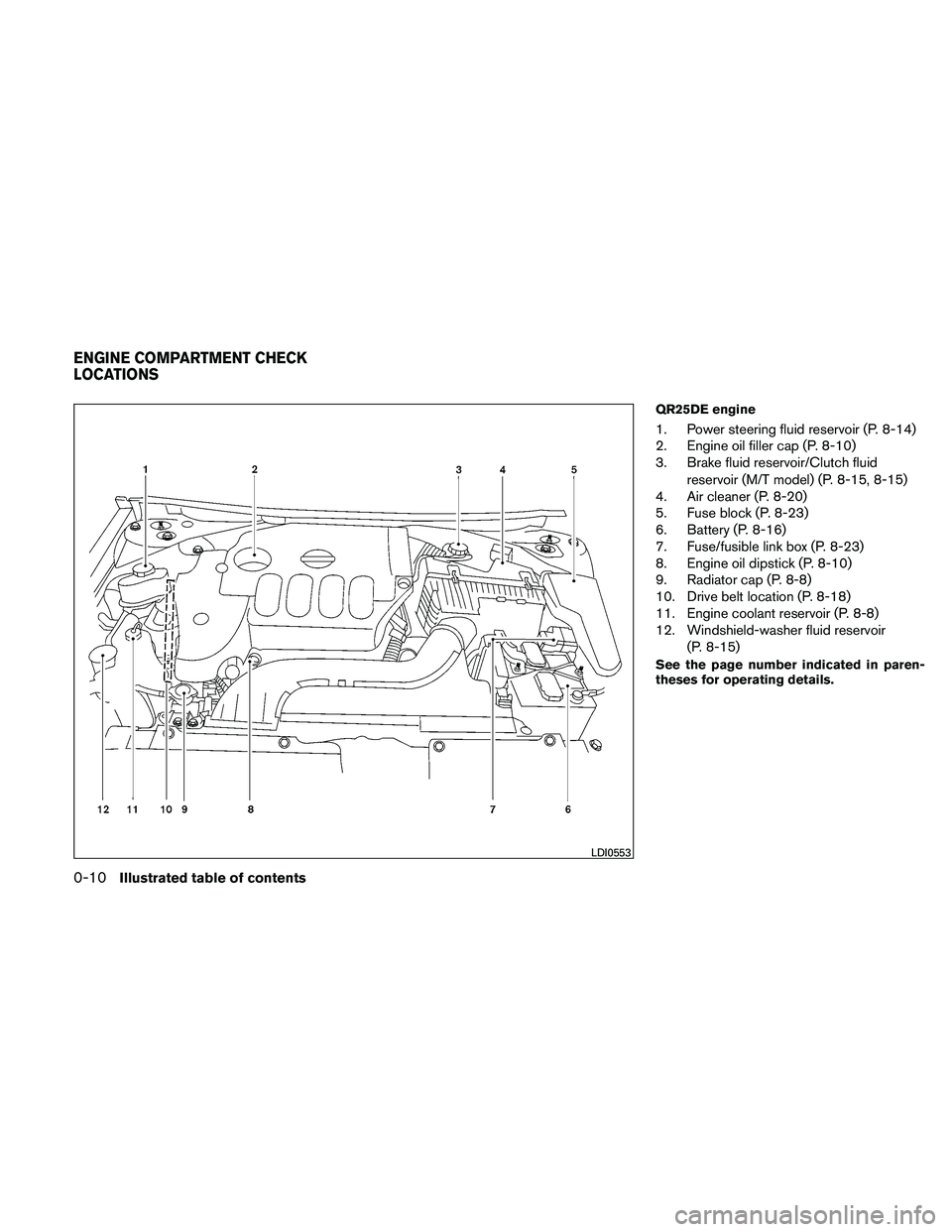
QR25DE engine
1. Power steering fluid reservoir (P. 8-14)
2. Engine oil filler cap (P. 8-10)
3. Brake fluid reservoir/Clutch fluidreservoir (M/T model) (P. 8-15, 8-15)
4. Air cleaner (P. 8-20)
5. Fuse block (P. 8-23)
6. Battery (P. 8-16)
7. Fuse/fusible link box (P. 8-23)
8. Engine oil dipstick (P. 8-10)
9. Radiator cap (P. 8-8)
10. Drive belt location (P. 8-18)
11. Engine coolant reservoir (P. 8-8)
12. Windshield-washer fluid reservoir
(P. 8-15)
See the page number indicated in paren-
theses for operating details.
Page 18 of 446
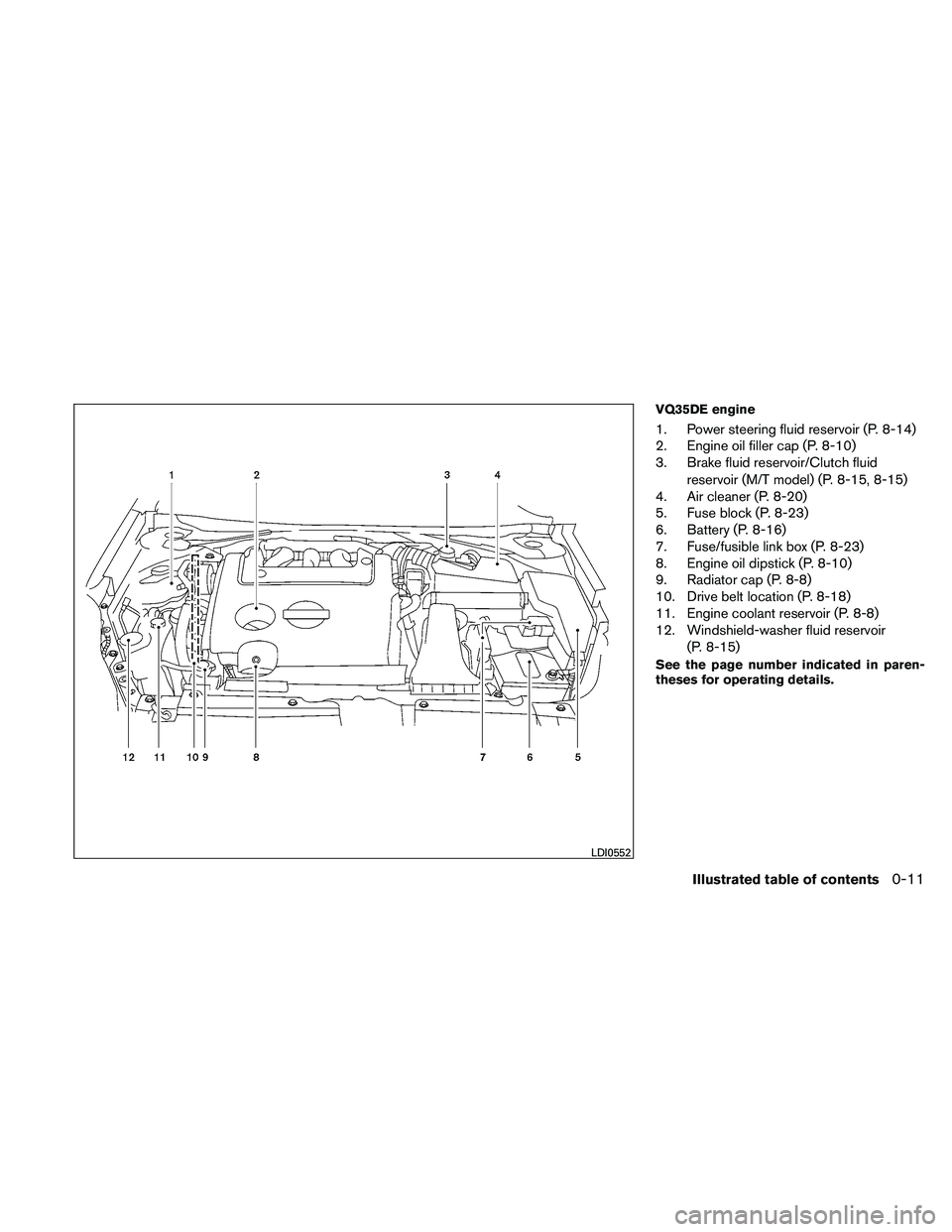
VQ35DE engine
1. Power steering fluid reservoir (P. 8-14)
2. Engine oil filler cap (P. 8-10)
3. Brake fluid reservoir/Clutch fluidreservoir (M/T model) (P. 8-15, 8-15)
4. Air cleaner (P. 8-20)
5. Fuse block (P. 8-23)
6. Battery (P. 8-16)
7. Fuse/fusible link box (P. 8-23)
8. Engine oil dipstick (P. 8-10)
9. Radiator cap (P. 8-8)
10. Drive belt location (P. 8-18)
11. Engine coolant reservoir (P. 8-8)
12. Windshield-washer fluid reservoir
(P. 8-15)
See the page number indicated in paren-
theses for operating details.
Page 142 of 446

CAUTION
●Be sure to carry the Intelligent Key with
you when operating the vehicle.
● Never leave the Intelligent Key in the
vehicle when you leave the vehicle.
The Intelligent Key is always communicating with
the vehicle as it receives radio waves. The Intel-
ligent Key transmits weak radio waves. Environ-
mental conditions may interfere with the opera-
tion of the Intelligent Key under the following
operating conditions: ● When operating near a location where
strong radio waves are transmitted, such as
a TV tower, power station and broadcasting
station.
● When in possession of wireless equipment,
such as a cellular telephone, transceiver,
and CB radio.
● When the Intelligent Key is in contact with or
covered by metallic materials.
● When any type of radio wave remote control
is used nearby.
● When the Intelligent Key is placed near an
electric appliance such as a personal com-
puter. ●
When the vehicle is parked near a parking
meter.
In such cases, correct the operating conditions
before using the Intelligent Key function or use
the mechanical key.
Although the life of the battery varies depending
on the operating conditions, the battery’s life is
approximately 2 years. If the battery is dis-
charged, replace it with a new one.
When the Intelligent Key battery is almost dis-
charged, insert the Intelligent Key into the Intelli-
gent Key port to start the engine. Replace the
discharged battery with a new one as soon as
possible. For more details, see “Push-button ig-
nition switch” in the “Starting and driving” sec-
tion.
Since the Intelligent Key is continuously receiving
radio waves, if the key is left near equipment
which transmits strong radio waves, such as sig-
nals from a TV and personal computer, the bat-
tery life may become shorter.
For information regarding replacement of a bat-
tery, see “Battery replacement” in the “Mainte-
nance and do-it-yourself” section.
As many as 4 Intelligent Keys can be registered
and used with one vehicle. For information about
the purchase and use of additional Intelligent
Keys, contact a NISSAN dealer.
Page 143 of 446
If an Intelligent Key is lost or stolen, NISSAN
recommends erasing the ID code of that Intelli-
gent Key from the vehicle. This may prevent the
unauthorized use of the Intelligent Key to operate
the vehicle. For information regarding the erasing
procedure, contact a NISSAN dealer.
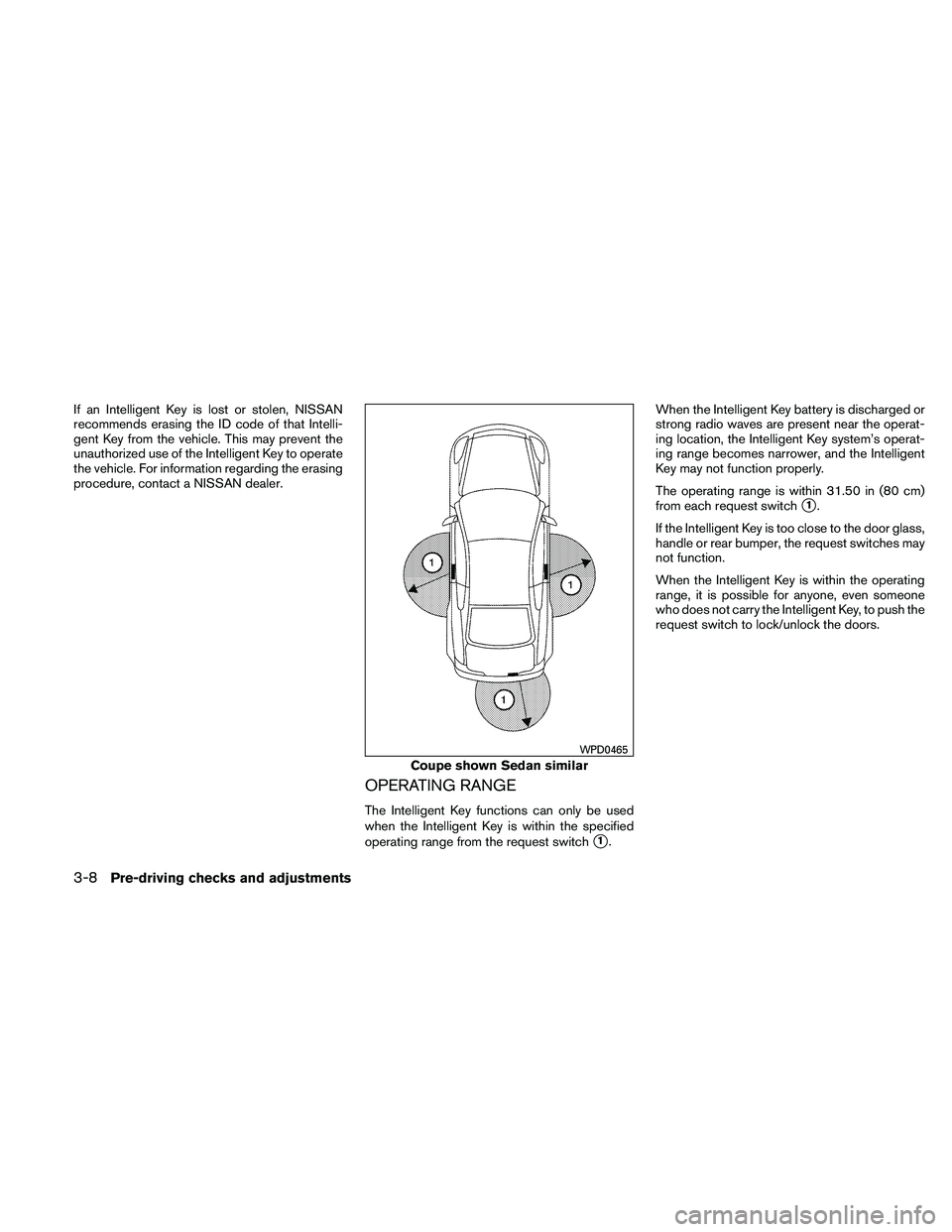
OPERATING RANGE
The Intelligent Key functions can only be used
when the Intelligent Key is within the specified
operating range from the request switch
�1.When the Intelligent Key battery is discharged or
strong radio waves are present near the operat-
ing location, the Intelligent Key system’s operat-
ing range becomes narrower, and the Intelligent
Key may not function properly.
The operating range is within 31.50 in (80 cm)
from each request switch
�1.
If the Intelligent Key is too close to the door glass,
handle or rear bumper, the request switches may
not function.
When the Intelligent Key is within the operating
range, it is possible for anyone, even someone
who does not carry the Intelligent Key, to push the
request switch to lock/unlock the doors.
Page 153 of 446

CAUTION
Listed below are conditions or occur-
rences which will damage the Intelligent
Key:
●Do not allow the Intelligent Key, which
contains electrical components, to
come into contact with water or salt
water. This could affect the system
function.
● Do not drop the Intelligent Key.
● Do not strike the Intelligent Key sharply
against another object.
● Do not change or modify the Intelligent
Key.
● Wetting may damage the Intelligent
Key. If the Intelligent Key gets wet, im-
mediately wipe until it is completely dry.
● Do not place the Intelligent Key for an
extended period in an area where tem-
peratures exceed 140°F (60°C) .
● Do not attach the Intelligent Key with a
key holder that contains a magnet.
● Do not place the Intelligent Key near
equipment that produces a magnetic
field, such as a TV, audio equipment and
personal computers. If an Intelligent Key is lost or stolen, NISSAN
recommends erasing the ID code of that Intelli-
gent Key from the vehicle. This may prevent the
unauthorized use of the Intelligent Key to operate
the vehicle. For information regarding the erasing
procedure, contact a NISSAN dealer.
OPERATING RANGE
The Intelligent Key functions can only be used
when the Intelligent Key is within the specified
operating range.
When the Intelligent Key battery is discharged or
strong radio waves are present near the operat-
ing location, the Intelligent Key system’s operat-
ing range becomes narrower, and the Intelligent
Key may not function properly.
The operating range is within 33 ft (10 m) of the
vehicle.
HOW TO USE THE REMOTE
KEYLESS ENTRY FUNCTION
The remote keyless entry function can operate all
door locks using the remote keyless function of
the Intelligent Key. The remote keyless function
can operate at a distance of 33 ft (10 m) away
from the vehicle. The operating distance de-
pends upon the conditions around the vehicle.
The remote keyless entry function will not func-
tion under the following conditions:
● When the Intelligent Key is not within the
operational range.
● When the doors or the trunk are open or not
closed securely.
● When the Intelligent Key battery is dis-
charged.
Page 359 of 446
8 Maintenance and do-it-yourself
Maintenance requirements..........................8-2
General maintenance ..............................8-2
Explanation of general maintenance items .........8-2
Maintenance precautions . . .........................8-5
Engine compartment check locations ................8-6
Engine cooling system .............................8-8
Checking engine coolant level ...................8-9
Changing engine coolant ........................8-9
Engine oil ........................................ 8-10
Checking engine oil level .......................8-10
Changing engine oil ........................... 8-11
Changing engine oil filter .......................8-12
Continuously Variable Transmission (CVT) fluid
(if so equipped) .................................. 8-13
Power steering fluid ............................... 8-14
Brake and clutch (if so equipped) fluid ..............8-14
Brake fluid .................................... 8-15
Clutch fluid (if so equipped) ....................8-15
Windshield-washer fluid ........................... 8-15
Windshield-washer fluid reservoir ...............8-15
Battery .......................................... 8-16
Jump starting ................................. 8-17
Variable voltage control system .....................8-18Drive belt
........................................ 8-18
Spark plugs . ..................................... 8-19
Replacing spark plugs ......................... 8-19
Air cleaner ....................................... 8-20
In-cabin microfilter ............................. 8-21
Windshield wiper blades .......................... 8-21
Cleaning ..................................... 8-21
Replacing .................................... 8-21
Brakes .......................................... 8-22
Self-adjusting brakes .......................... 8-22
Brake pad wear indicators ......................8-22
Fuses ........................................... 8-23
Engine compartment ........................... 8-24
Passenger compartment .......................8-25
Battery replacement .............................. 8-27
NISSAN
Intelligent Key™ ....................... 8-27
Lights ........................................... 8-28
Headlights .................................... 8-28
Front park/turn/sidemarker light .................8-29
Exterior and interior lights .......................8-30
Upper tether anchor/key cylinder covers ............8-36
Removing covers from rear parcel shelf ..........8-37
Installing covers to rear parcel shelf ..............8-37
Page 365 of 446
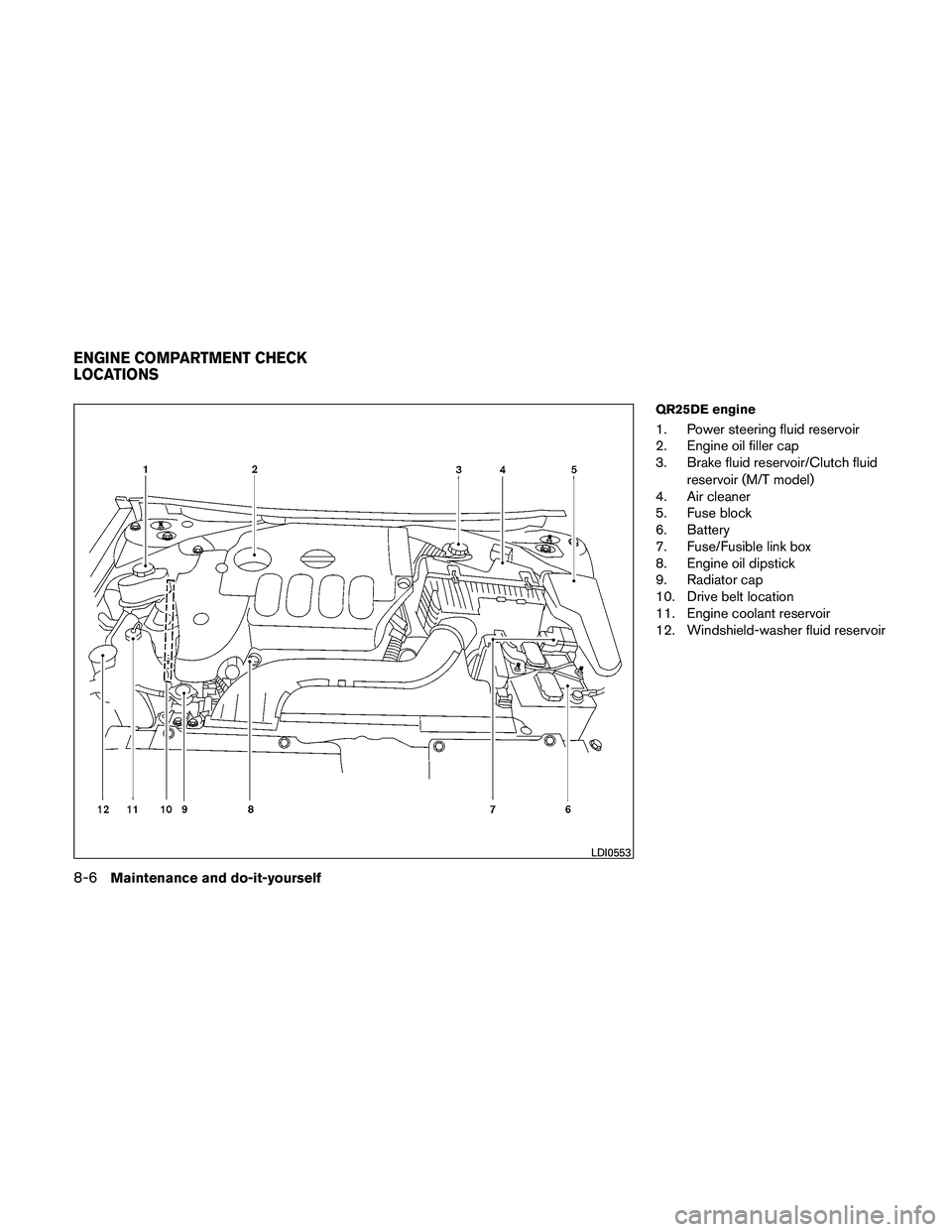
QR25DE engine
1. Power steering fluid reservoir
2. Engine oil filler cap
3. Brake fluid reservoir/Clutch fluidreservoir (M/T model)
4. Air cleaner
5. Fuse block
6. Battery
7. Fuse/Fusible link box
8. Engine oil dipstick
9. Radiator cap
10. Drive belt location
11. Engine coolant reservoir
12. Windshield-washer fluid reservoir
Page 366 of 446
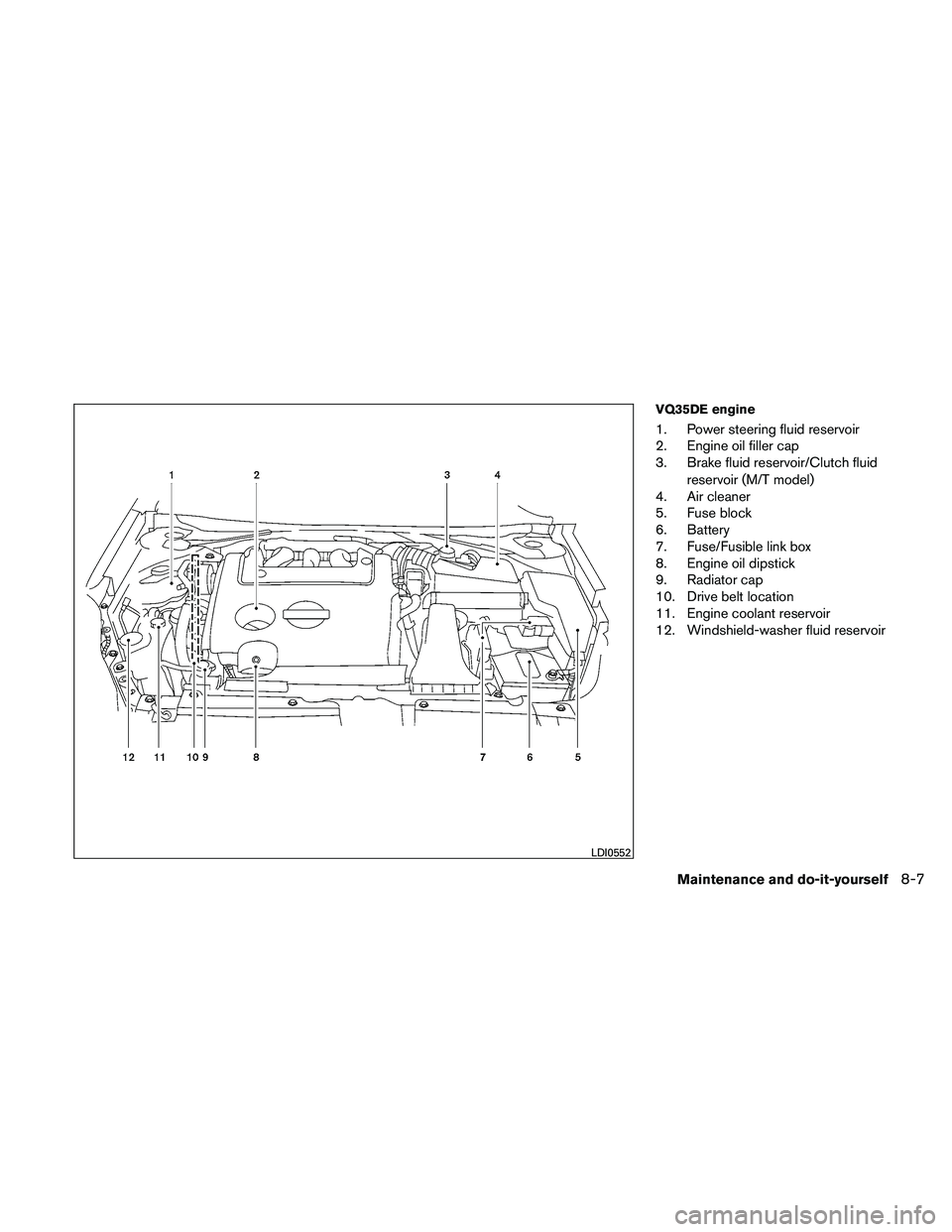
VQ35DE engine
1. Power steering fluid reservoir
2. Engine oil filler cap
3. Brake fluid reservoir/Clutch fluidreservoir (M/T model)
4. Air cleaner
5. Fuse block
6. Battery
7. Fuse/Fusible link box
8. Engine oil dipstick
9. Radiator cap
10. Drive belt location
11. Engine coolant reservoir
12. Windshield-washer fluid reservoir