Page 35 of 69
DVD video
36
DVD videoDVD video
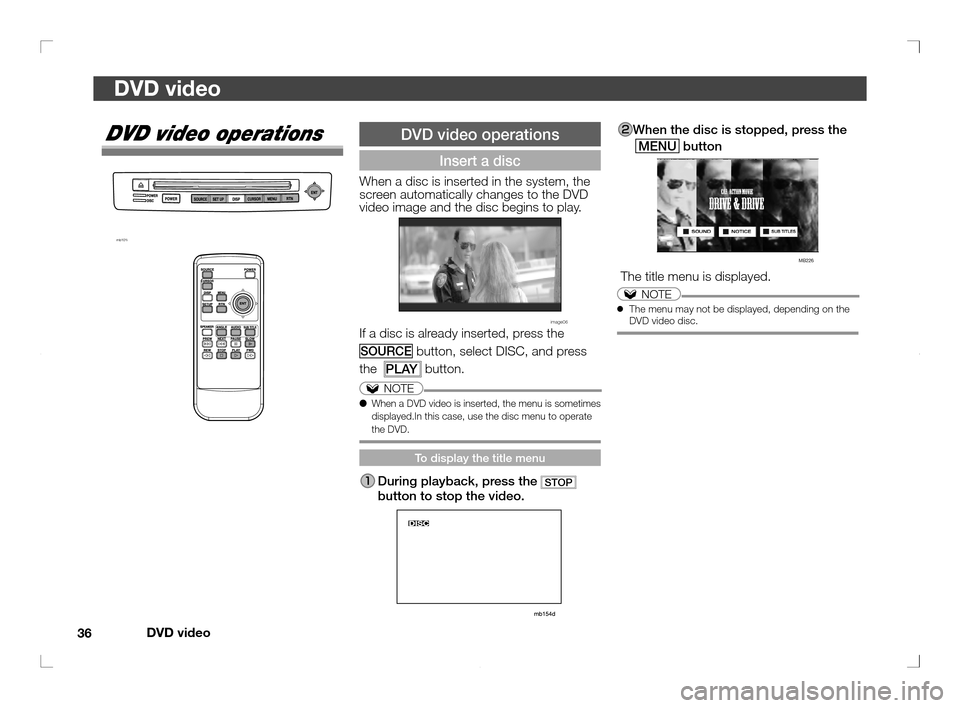
When the disc is stopped, press the
MENU
button
MB226
The title menu is displayed.
NOTE● The menu may not be displayed, depending on the
DVD video disc.
DVD video operations
mb101i
DVD video operations
Insert a disc
When a disc is inserted in the system, the
screen automatically changes to the DVD
video image and the disc begins to play.
image06If a disc is already inserted, press the
SOURCE button, select DISC, and press
the
PLAY button.
NOTE
● When a DVD video is inserted, the menu is sometimes
displayed.In this case, use the disc menu to operate
the DVD.
To display the title menu
During playback, press the STOP
button to stop the video.
�������
���
��� �������� �� ��
��
Page 36 of 69
DVD video
37
DVD video
To change the subtitle language
Each time the
SUB TITLE button is
pressed, the next available subtitle
language can be displayed in turn.
NOTE
● The CURSOR menu can also be used to change the
screen angle, audio language, or subtitle language.
→ “To change the angle, audio language, or subtitle
language” (P39)
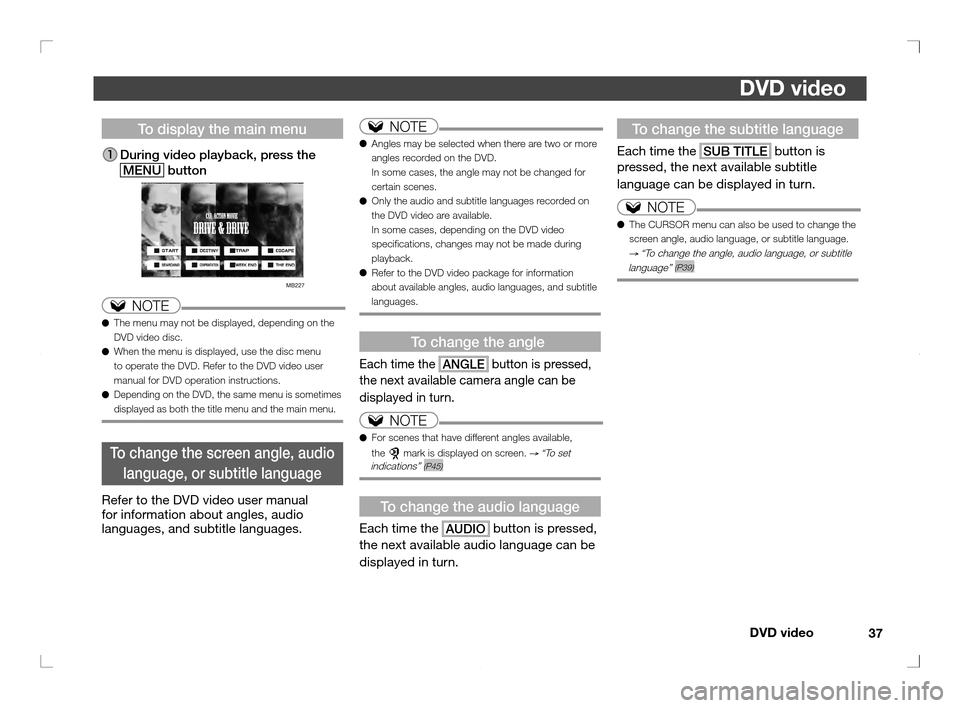
To display the main menu
During video playback, press the
MENU
button
MB227
NOTE
● The menu may not be displayed, depending on the
DVD video disc.
● When the menu is displayed, use the disc menu
to operate the DVD. Refer to the DVD video user
manual for DVD operation instructions.
● Depending on the DVD, the same menu is sometimes
displayed as both the title menu and the main menu.
To change the screen angle, audio
language, or subtitle language
Refer to the DVD video user manual
for information about angles, audio
languages, and subtitle languages.
NOTE
● Angles may be selected when there are two or more
angles recorded on the DVD.
In some cases, the angle may not be changed for
certain scenes.
● Only the audio and subtitle languages recorded on
the DVD video are available.
In some cases, depending on the DVD video
speci cations, changes may not be made during
playback.
● Refer to the DVD video package for information
about available angles, audio languages, and subtitle
languages.
To change the angle
Each time the
ANGLE button is pressed,
the next available camera angle can be
displayed in turn.
NOTE
● For scenes that have different angles available,
the
mark is displayed on screen. → “To set
indications” (P45)
To change the audio language
Each time the
AUDIO button is pressed,
the next available audio language can be
displayed in turn.
�������
���
��� �������� �� ���
�
Page 38 of 69
DVD video
39
DVD video
CURSOR menu (2)
■ Operating status symbol
Operating status symbol “Operating status
symbols” (P34)
CURSOR menu (3)
■ Changing the speaker output
Changing
the speaker
output
Each time the ENTbutton is pressed,the
speaker output
changes between the
video entertainment
system and the
MMCS or the front
audio system.
■
Adjusting the volume
Adjusting
the volumeRaises the volumeLowers the volume
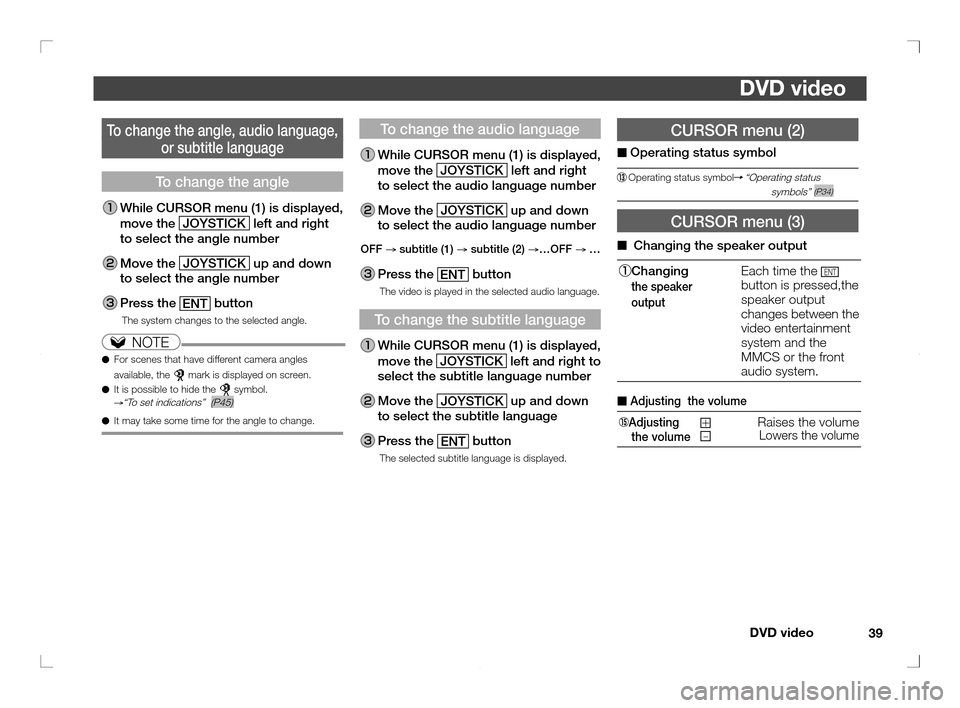
To change the angle, audio language,
or subtitle language
To change the angle
While CURSOR menu (1) is displayed,
move the JOYSTICK
left and right
to select the angle number
Move the
JOYSTICK up and down
to select the angle number
Press the
ENT button
The system changes to the selected angle.
NOTE
● For scenes that have different camera angles
available, the
mark is displayed on screen.
● It is possible to hide the symbol.→“To set indications” (P45)
● It may take some time for the angle to change.
To change the audio language
While CURSOR menu (1) is displayed,
move the JOYSTICK
left and right
to select the audio language number
Move the
JOYSTICK up and down
to select the audio language number
OFF
→ subtitle (1)
→ subtitle (2)
→…OFF
→ …
Press the
ENT button
The video is played in the selected audio language.
To change the subtitle language
While CURSOR menu (1) is displayed,
move the JOYSTICK
left and right to
select the subtitle language number
Move the
JOYSTICK up and down
to select the subtitle language
Press the
ENT button
The selected subtitle language is displayed.
�������
���
��� �������� �� ��
�
Page 51 of 69
Music CD/MP3/WMA
52
Music CD/MP3/WMA
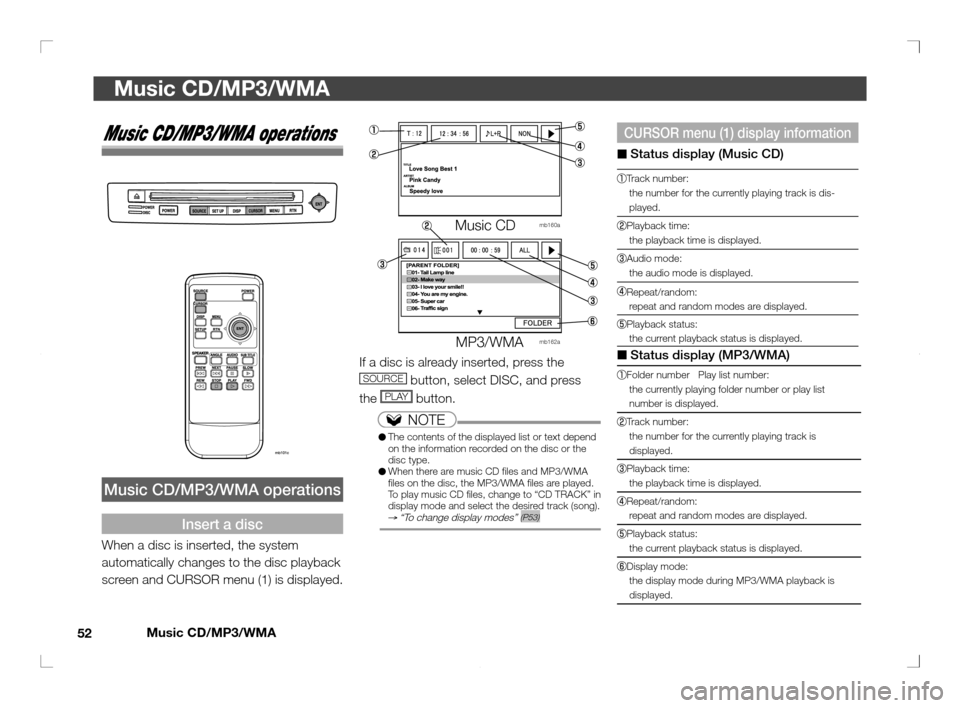
CURSOR menu (1) display information
■ Status display (Music CD)
Track number:
the number for the currently playing track is dis-
played.
Playback time:
the playback time is displayed.
Audio mode:
the audio mode is displayed.
Repeat/random:
repeat and random modes are displayed.
Playback status:
the current playback status is displayed.
■ Status display (MP3/WMA)
Folder number Play list number:
the currently playing folder number or play list
number is displayed.
Track number:
the number for the currently playing track is
displayed.
Playback time:
the playback time is displayed.
Repeat/random:
repeat and random modes are displayed.
Playback status:
the current playback status is displayed.
Display mode:
the display mode during MP3/WMA playback is
displayed.
Music CD/MP3/WMA operations
Music CD/MP3/WMA operations
Insert a disc
When a disc is inserted, the system
automatically changes to the disc playback
screen and CURSOR menu (1) is displayed.
Music CD mb160a
MMMMM
M
MP3/WMA mb162a
If a disc is already inserted, press the
SOURCE button, select DISC, and press
the
PLAY button.
NOTE
● The contents of the displayed list or text depend
on the information recorded on the disc or the
disc type.
● When there are music CD les and MP3/WMA
les on the disc, the MP3/WMA les are played.
To play music CD les, change to “CD TRACK” in
display mode and select the desired track (song).
→ “To change display modes” (P53)
�������
���
��� �������� �� �
��
Page 55 of 69
Video CD
56
Video CD
mb159
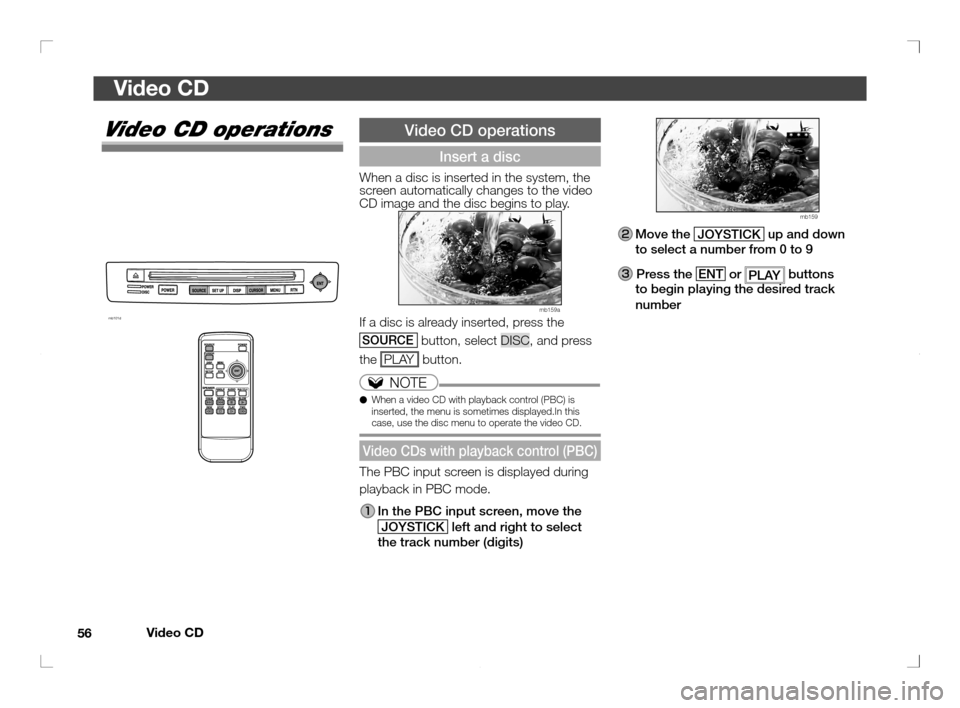
Move the JOYSTICK up and down
to select a number from 0 to 9
Press the
ENT or
PLAY buttons
to begin playing the desired track
number
Video CD operations
mb101d
Video CD operations
Insert a disc
When a disc is inserted in the system, the
screen automatically changes to the video
CD image and the disc begins to play.
mb159a
If a disc is already inserted, press the
SOURCE button, select DISC, and press
the PLAY button.
NOTE
● When a video CD with playback control (PBC) is
inserted, the menu is sometimes displayed.In this
case, use the disc menu to operate the video CD.
Video CDs with playback control (PBC)
The PBC input screen is displayed during
playback in PBC mode.
In the PBC input screen, move the
JOYSTICK left and right to select
the track number (digits)
�������
���
��� �������� �� �
��
Page 58 of 69
Using the system to operate the MMCS and the front audio
59
Using the system to operate the MMCS and the front audio
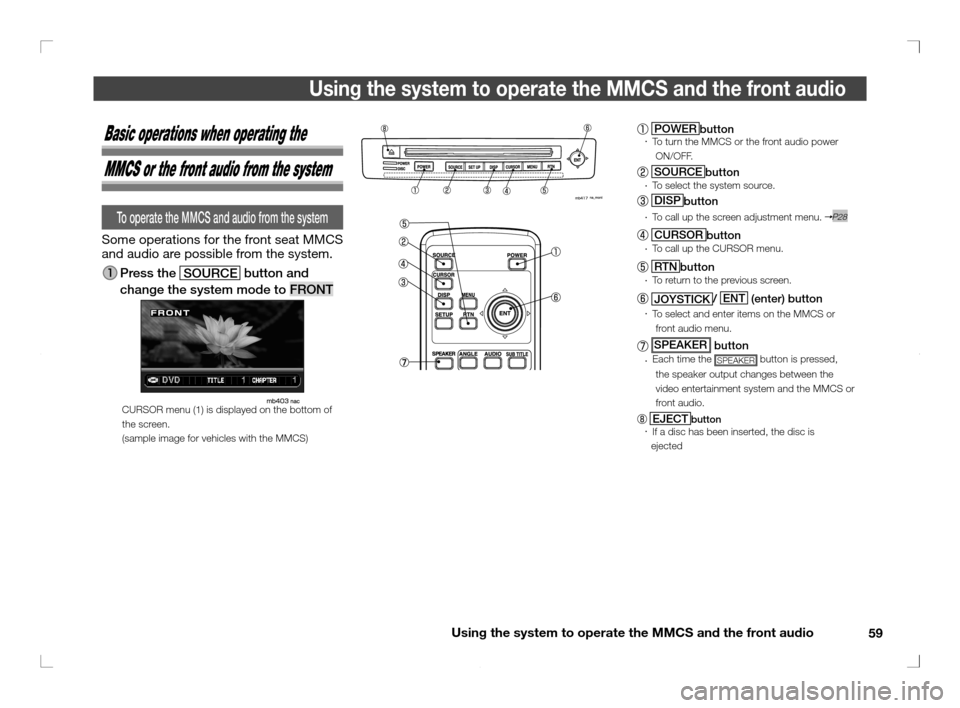
POWER
button To turn the MMCS or the front audio power
�yON/OFF.
SOURCE
button To select the system source.
DISP
button
To call up the screen adjustment menu. P28
CURSOR
button
To call up the CURSOR menu.
RTN
button
To return to the previous screen.
JOYSTICK/ ENT
(enter) button
To select and enter items on the MMCS or
front audio menu.
SPEAKER button Each time the SPEAKER button is pressed,
the speaker output changes between the
video entertainment system and the MMCS or
front audio.
EJECTbutton
If a disc has been inserted, the disc is
��ejected
Basic operations when operating the
MMCS or the front audio from the system
To operate the MMCS and audio from the system
Some operations for the front seat MMCS
and audio are possible from the system.
Press the
SOURCE button and
change the system mode to FRONT
CURSOR menu (1) is displayed on the bottom of
the screen.
(sample image for vehicles with the MMCS)
�������
���
��� �������� �� ��
�
Page 61 of 69
Using the system to operate the MMCS and the front audio
62
Using the system to operate the MMCS and the front audio
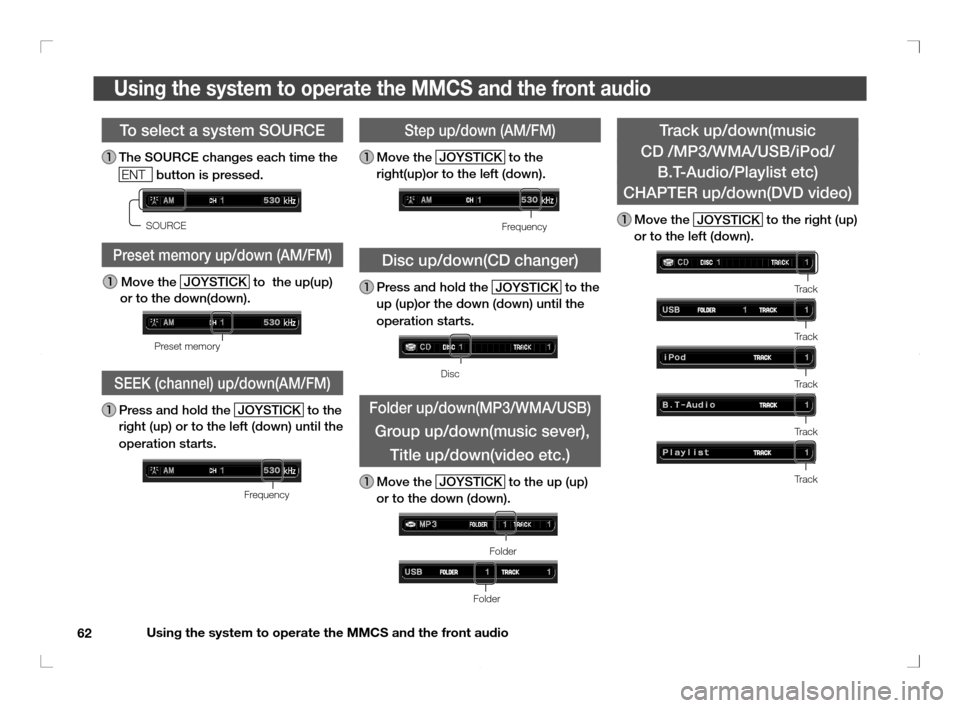
Track up/down(music
CD /MP3/WMA/USB/iPod/
B.T-Audio/Playlist etc)
CHAPTER up/down(DVD video)
Move the
JOYSTICK to the right (up)
or to the left (down).
Tr a c k
Tr a c k
Tr a c k
Tr a c k
Tr a c k
To select a system SOURCE
The SOURCE changes each time the
ENT
button is pressed.
�
SOURCE
Preset memory up/down (AM/FM)
Move the
JOYSTICK to the up(up)
or to the down(down).
�
Preset memory
SEEK (channel) up/down(AM/FM)
Press and hold the
JOYSTICK to the
right (up) or to the left (down) until the
operation starts.
�
Frequency
Step up/down (AM/FM)
Move the
JOYSTICK to the
right(up)or to the left (down).
Frequency
Disc up/down(CD changer)
Press and hold the
JOYSTICK to the
up (up)or the down (down) until the
operation starts.
Disc
Folder up/down(MP3/WMA/USB)
Group up/down(music sever),
Title up/down(video etc.)
Move the
JOYSTICK to the up (up)
or to the down (down).
Folder
Folder
�������
���
��� �������� �� ���
�
Page 64 of 69
Troubleshooting
65
Troubleshooting
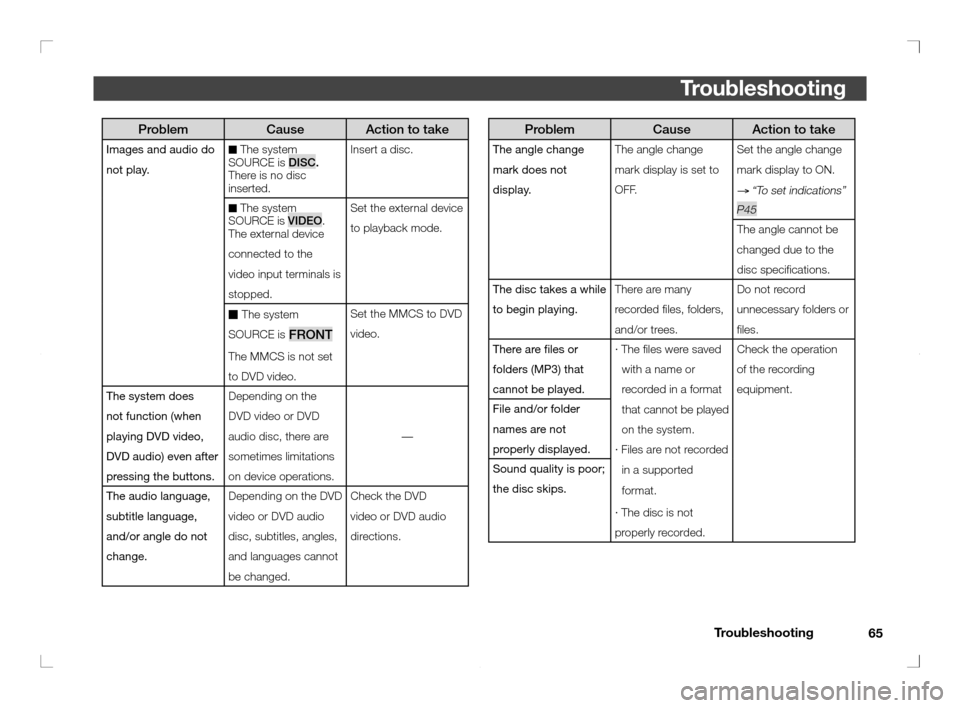
Problem Cause Action to take
The angle change
mark does not
display.The angle change
mark display is set to
OFF.Set the angle change
mark display to ON.
→ “To set indications”
P45
The angle cannot be
changed due to the
disc speci cations.
The disc takes a while
to begin playing.There are many
recorded les, folders,
and/or trees.Do not record
unnecessary folders or
les.
There are les or
folders (MP3) that
cannot be played.· The les were saved
with a name or
recorded in a format
that cannot be played
on the system.
· Files are not recorded
in a supported
format.
· The disc is not
properly recorded.Check the operation
of the recording
equipment.
File and/or folder
names are not
properly displayed.
Sound quality is poor;
the disc skips.
Problem Cause Action to take
Images and audio do
not play.■ The system
SOURCE is DISC.
There is no disc
inserted.Insert a disc.
■ The system
SOURCE is VIDEO.
The external device
connected to the
video input terminals is
stopped.Set the external device
to playback mode.
■ The system
SOURCE is
FRONT
The MMCS is not set
to DVD video.Set the MMCS to DVD
video.
The system does
not function (when
playing DVD video,
DVD audio) even after
pressing the buttons.Depending on the
DVD video or DVD
audio disc, there are
sometimes limitations
on device operations.—
The audio language,
subtitle language,
and/or angle do not
change.Depending on the DVD
video or DVD audio
disc, subtitles, angles,
and languages cannot
be changed.Check the DVD
video or DVD audio
directions.
�������
���
��� �������� �� ��
��