Page 185 of 714

3-70 Features and controls
3
NOTE�The function will be activated again if the following oper-
ation is performed.
• If the doors and the tailgate are unlocked using the key-
less entry system or the F.A.S.T.-key operation.
• If the ignition switch is turned to the “ON” or “ACC”
position.Disarmed stageThe system will be disarmed if the following operation is per-
formed.
�The ignition switch is turned to the “ON” position.
�All doors and the tailgate are unlocked by using the key-
less entry system or the F.A.S.T.-key operation.
NOTE�If the UNLOCK button on the remote control transmitter,
or the driver’s or front passenger’s door lock/unlock
switch is pressed when all doors and the tailgate are
closed and no door is opened within approximately 30
seconds, re-arming will automatically occur.
�The amount of time after unlocking until the vehicle
relocks automatically can be adjusted. See an authorized
Mitsubishi Motors dealer for details.
On a vehicle equipped with a Mitsubishi Multi-Communi-
cation System, the functions can be adjusted on the
screen. For details, refer to a separate operation manual.
�Once the system has been disarmed, it cannot be rearmed
except by repeating the arming procedure.Testing the theft-alarm systemUse the following procedure to test the system:
1. Lower the driver’s window.
2. Arm the system as explained in “Armed stage”.
3. Make sure that the theft-alarm indicator comes on and
flashes for approximately 20 seconds.
4. Wait a few seconds and then unlock the driver’s side door
by using the inside door lock knob. Open the door.
5. Make sure that the horn (the siren for vehicles equipped
with the interior alarm sensor) sounds intermittently and
the headlights blink when a door is opened.
6. Disarm the system by unlocking all doors and the tailgate
by using the keyless entry system or the F.A.S.T.-key
operation.
Disarm...by using the keyless entry system or F.A.S.T.-key
operationBK0122500US.book 70 ページ 2010年5月12日 水曜日 午前11時11分
Page 270 of 714
Features and controls
3-155
3 Rear-view camera
(if so equipped)
N00546200072
When the selector lever is in the “R” (REVERSE) position
with the ignition switch in the “ON” position, the rear-view
image will be displayed on the screen of the Mitsubishi Multi-
communication System in the center panel.
When the selector lever is shifted out of the “R” (REVERSE)
position, the screen will return to the previous display.
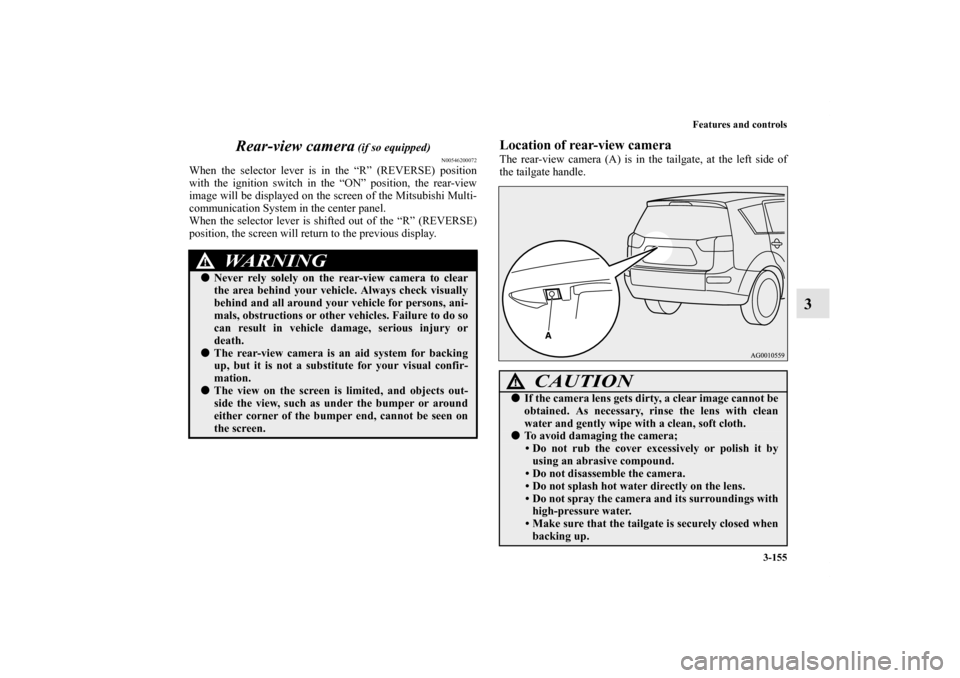
Location of rear-view cameraThe rear-view camera (A) is in the tailgate, at the left side of
the tailgate handle.
WA R N I N G
!�Never rely solely on the rear-view camera to clear
the area behind your vehicle. Always check visually
behind and all around your vehicle for persons, ani-
mals, obstructions or other vehicles. Failure to do so
can result in vehicle damage, serious injury or
death.�The rear-view camera is an aid system for backing
up, but it is not a substitute for your visual confir-
mation.�The view on the screen is limited, and objects out-
side the view, such as under the bumper or around
either corner of the bumper end, cannot be seen on
the screen.
CAUTION
!�If the camera lens gets dirty, a clear image cannot be
obtained. As necessary, rinse the lens with clean
water and gently wipe with a clean, soft cloth.�To avoid damaging the camera;
• Do not rub the cover excessively or polish it by
using an abrasive compound.
• Do not disassemble the camera.
• Do not splash hot water directly on the lens.
• Do not spray the camera and its surroundings with
high-pressure water.
• Make sure that the tailgate is securely closed when
backing up.
BK0122500US.book 155 ページ 2010年5月12日 水曜日 午前11時11分
Page 281 of 714
3-166 Features and controls
3
Door ajar warning display screen (With ignition
switch in the “OFF” position)
N00559700127
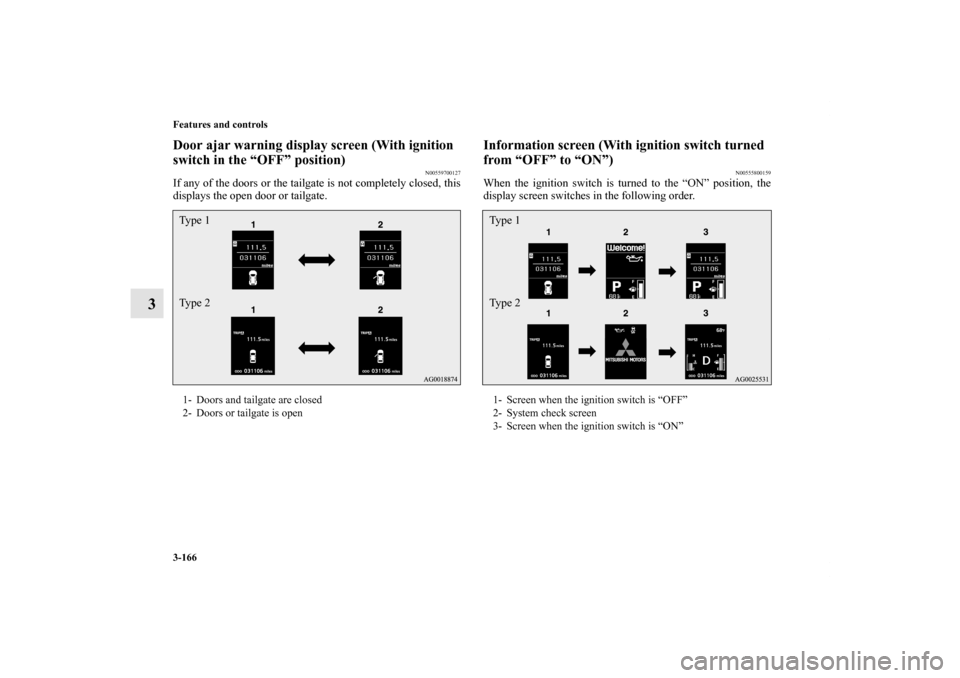
If any of the doors or the tailgate is not completely closed, this
displays the open door or tailgate.
Information screen (With ignition switch turned
from “OFF” to “ON”)
N00555800159
When the ignition switch is turned to the “ON” position, the
display screen switches in the following order.
1- Doors and tailgate are closed
2- Doors or tailgate is openTy p e 1
Ty p e 2
1- Screen when the ignition switch is “OFF”
2- System check screen
3- Screen when the ignition switch is “ON”Type 1
Type 2
BK0122500US.book 166 ページ 2010年5月12日 水曜日 午前11時11分
Page 293 of 714
3-178 Features and controls
3
Door ajar warning display screen (With ignition
switch in the “ON” position)
N00555700129
Ty p e 1
Ty p e 2
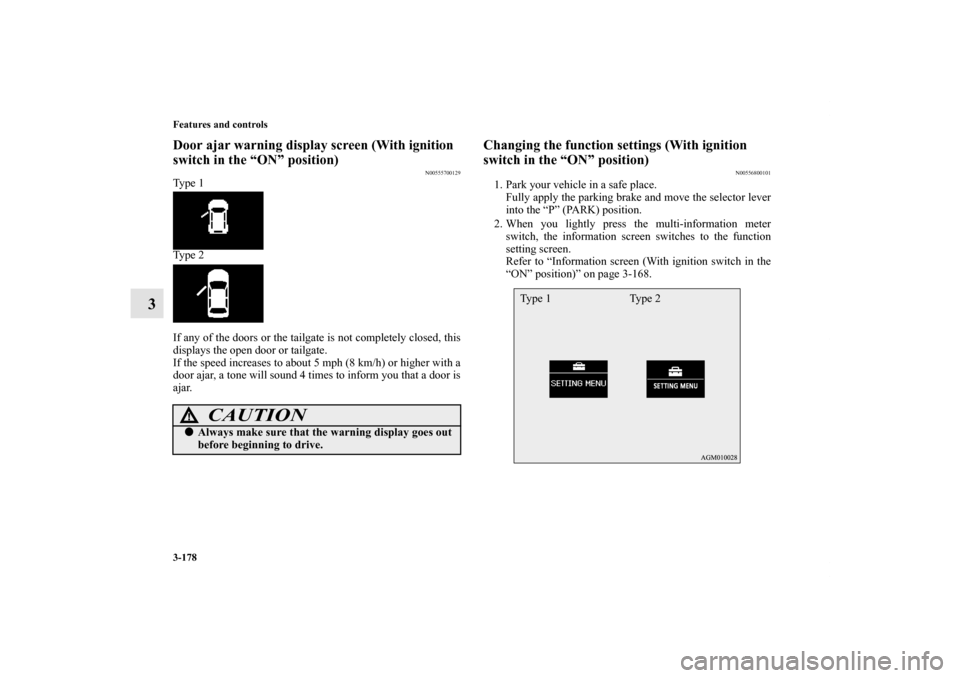
If any of the doors or the tailgate is not completely closed, this
displays the open door or tailgate.
If the speed increases to about 5 mph (8 km/h) or higher with a
door ajar, a tone will sound 4 times to inform you that a door is
ajar.
Changing the function settings (With ignition
switch in the “ON” position)
N00556800101
1. Park your vehicle in a safe place.
Fully apply the parking brake and move the selector lever
into the “P” (PARK) position.
2. When you lightly press the multi-information meter
switch, the information screen switches to the function
setting screen.
Refer to “Information screen (With ignition switch in the
“ON” position)” on page 3-168.
CAUTION
!�Always make sure that the warning display goes out
before beginning to drive.
Ty p e 1 Ty p e 2
BK0122500US.book 178 ページ 2010年5月12日 水曜日 午前11時11分
Page 311 of 714
3-196 Features and controls
3
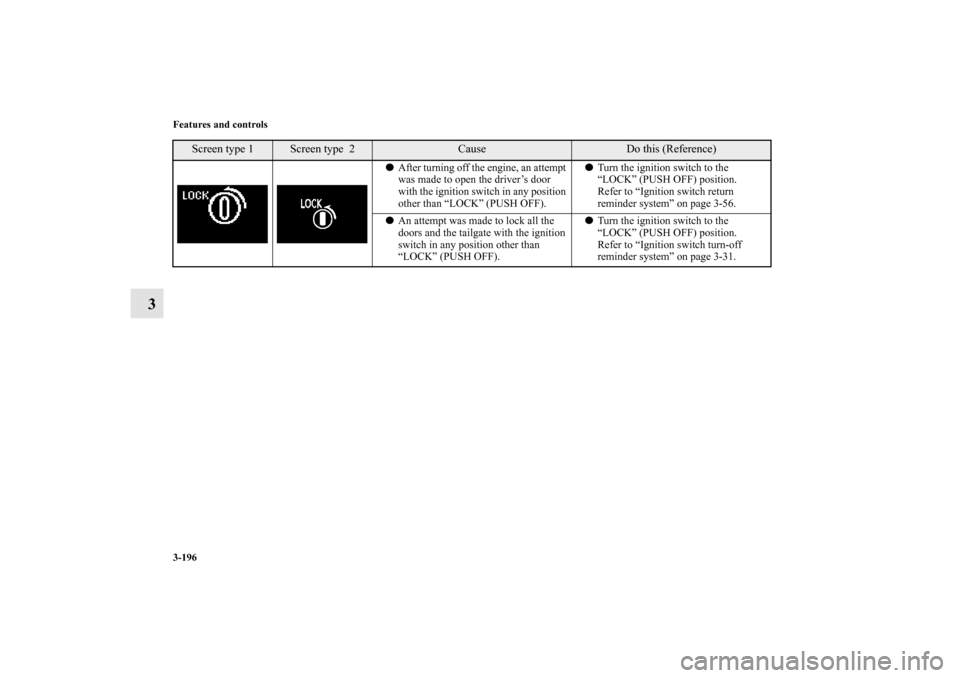
�After turning off the engine, an attempt
was made to open the driver’s door
with the ignition switch in any position
other than “LOCK” (PUSH OFF).�Turn the ignition switch to the
“LOCK” (PUSH OFF) position.
Refer to “Ignition switch return
reminder system” on page 3-56.
�An attempt was made to lock all the
doors and the tailgate with the ignition
switch in any position other than
“LOCK” (PUSH OFF).�Turn the ignition switch to the
“LOCK” (PUSH OFF) position.
Refer to “Ignition switch turn-off
reminder system” on page 3-31.
Screen type 1
Screen type 2
Cause
Do this (Reference)
BK0122500US.book 196 ページ 2010年5月12日 水曜日 午前11時11分
Page 315 of 714
3-200 Features and controls
3
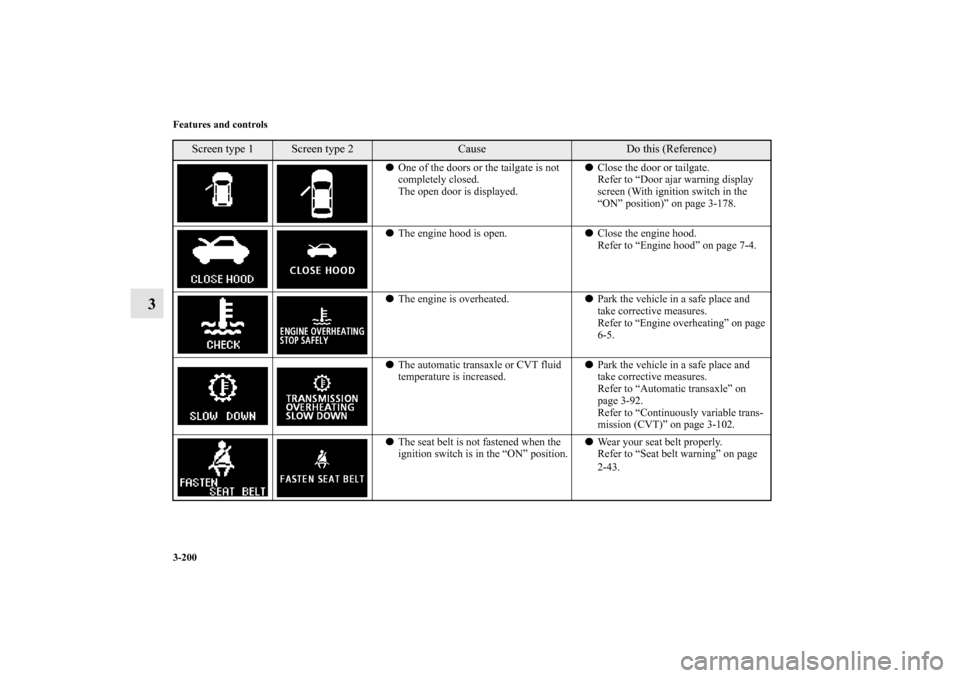
�One of the doors or the tailgate is not
completely closed.
The open door is displayed.�Close the door or tailgate.
Refer to “Door ajar warning display
screen (With ignition switch in the
“ON” position)” on page 3-178.
�The engine hood is open.�Close the engine hood.
Refer to “Engine hood” on page 7-4.
�The engine is overheated.�Park the vehicle in a safe place and
take corrective measures.
Refer to “Engine overheating” on page
6-5.
�The automatic transaxle or CVT fluid
temperature is increased.�Park the vehicle in a safe place and
take corrective measures.
Refer to “Automatic transaxle” on
page 3-92.
Refer to “Continuously variable trans-
mission (CVT)” on page 3-102.
�The seat belt is not fastened when the
ignition switch is in the “ON” position.�Wear your seat belt properly.
Refer to “Seat belt warning” on page
2-43.
Screen type 1
Screen type 2
Cause
Do this (Reference)
BK0122500US.book 200 ページ 2010年5月12日 水曜日 午前11時11分
Page 384 of 714
Features and controls
3-269
3
Dome light (front)/Reading lights
N00525400404
Dome light (front)
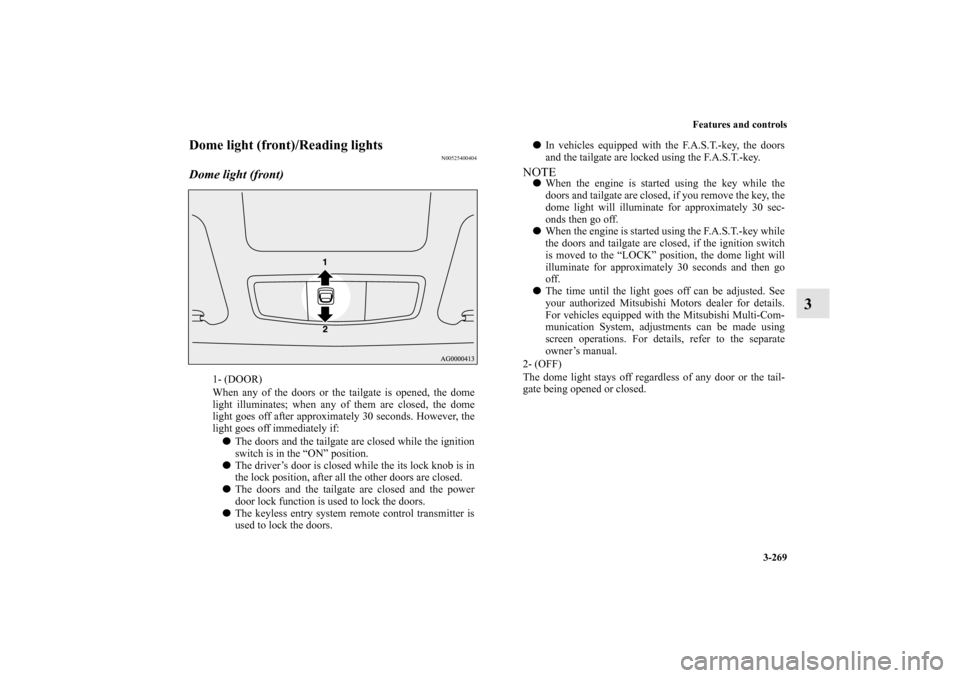
1- (DOOR)
When any of the doors or the tailgate is opened, the dome
light illuminates; when any of them are closed, the dome
light goes off after approximately 30 seconds. However, the
light goes off immediately if:
�The doors and the tailgate are closed while the ignition
switch is in the “ON” position.
�The driver’s door is closed while the its lock knob is in
the lock position, after all the other doors are closed.
�The doors and the tailgate are closed and the power
door lock function is used to lock the doors.
�The keyless entry system remote control transmitter is
used to lock the doors.
�In vehicles equipped with the F.A.S.T.-key, the doors
and the tailgate are locked using the F.A.S.T.-key.NOTE�When the engine is started using the key while the
doors and tailgate are closed, if you remove the key, the
dome light will illuminate for approximately 30 sec-
onds then go off.
�When the engine is started using the F.A.S.T.-key while
the doors and tailgate are closed, if the ignition switch
is moved to the “LOCK” position, the dome light will
illuminate for approximately 30 seconds and then go
off.
�The time until the light goes off can be adjusted. See
your authorized Mitsubishi Motors dealer for details.
For vehicles equipped with the Mitsubishi Multi-Com-
munication System, adjustments can be made using
screen operations. For details, refer to the separate
owner’s manual.
2- (OFF)
The dome light stays off regardless of any door or the tail-
gate being opened or closed.
BK0122500US.book 269 ページ 2010年5月12日 水曜日 午前11時11分
Page 385 of 714
3-270 Features and controls
3
Reading lights
N00537600139
Regardless of the dome light switch position, when you press
the lens (A), the light on the side that is pressed illuminates;
when you press the lens (A) again, the light goes out.
Dome light (rear)
N00525800176
1- (ON)
The dome light illuminates regardless of any door or the tail-
gate being opened or closed.
2- (�)
When any of the doors or the tailgate is opened, the dome
light illuminates; when any of them are closed, the dome
light goes off after approximately 30 seconds. However, the
light goes off immediately if:
�The door and the tailgate are closed while the ignition
switch is in the “ON” position.
�The driver’s door is closed while the its lock knob is in
the lock position, after all the other doors are closed.
�The door and the tailgate are closed and the power door
lock function is used to lock the doors.
BK0122500US.book 270 ページ 2010年5月12日 水曜日 午前11時11分