Page 286 of 714
Features and controls
3-171
3
Average fuel consumption displayThis displays the average fuel consumption from the last reset
to the present.
There are 2 types of mode settings as follows.
For details on how to change the average fuel consumption dis-
play setting, refer to “Changing the function settings (With
ignition switch in the “ON” position)” on page 3-178.
The “ ” mark in the momentary fuel gauge shows the average
fuel consumption. (Type 2)
Manual reset mode
�When the average fuel consumption is being displayed, if
you hold down the multi-information meter switch, these
calculations will be reset to zero.
�When the ignition switch is turned to the “ON” position
from the “ACC” or “LOCK” position, the mode setting
changes automatically from manual to auto.
Auto reset mode
�When the average fuel consumption is being displayed, if
you hold down the multi-information meter switch, these
calculations will be reset to zero.
�When the ignition switch has been set to the “ACC” or
“LOCK” position for about 4 hours or more, the average
fuel consumption display will automatically reset. NOTE�The average speed display and the average fuel consump-
tion display can be reset separately in both auto reset
mode and manual reset mode.
�“---” is displayed when the average fuel consumption can-
not be measured.
�The initial (default) setting is “Auto reset mode”.�Average fuel consumption may vary depend on the driv-
ing conditions (road conditions, how you drive, etc.) The
actual fuel consumption may differ from the fuel con-
sumption displayed, so treat the fuel consumption dis-
played as just a rough guideline.
�Disconnecting the battery cable will erase from memory
the manual reset mode or auto reset mode setting for the
average fuel consumption display.
�The display setting can be changed to the preferred units
{mpg(US), mpg(UK), L/100km or km/L}.
Refer to “Changing the function settings (With ignition
switch in the “ON” position)” on page 3-178.
Momentary fuel consumption displayWhile driving, the momentary fuel consumption is shown with
a bar graph.
When the momentary fuel consumption surpasses the average
fuel consumption, the momentary fuel consumption is dis-
played with a green bar graph. (Type 2)
Be conscious of maintaining the momentary fuel consumption
above the average fuel consumption, it can help you drive with
the better fuel consumption.
BK0122500US.book 171 ページ 2010年5月12日 水曜日 午前11時11分
Page 296 of 714
Features and controls
3-181
3
Manual reset mode
�If you press and hold the multi-information meter switch
when the average fuel consumption and average speed are
displayed, these calculations will be reset to zero.
�When the ignition switch is turned to the “ON” position
from the “ACC” or “LOCK” position, the mode setting
changes automatically from manual to auto.
Auto reset mode
�When the average fuel consumption and average speed
are being displayed, if you hold down the multi-informa-
tion meter switch, these calculations will be reset to zero.
�When the ignition switch has been set to the “ACC” or
“LOCK” position for about 4 hours or more, the average
fuel consumption display and the average speed display
will automatically reset.NOTE�Disconnecting the battery cable will erase from memory
the manual reset mode or auto reset mode setting for the
average speed display and average fuel consumption dis-
play.
�The initial (default) setting is “Auto reset mode”.
Changing the fuel consumption display unit
N00557100127
The fuel consumption display unit can be changed. The dis-
tance, speed, and amount units are also changed to match the
selected fuel consumption unit.
1. Press and hold the multi-information meter switch (for
about 2 seconds or more) to change from the setting mode
screen to the menu screen.
Refer to “Changing the function settings (With ignition
switch in the “ON” position)” on page 3-178.
BK0122500US.book 181 ページ 2010年5月12日 水曜日 午前11時11分
Page 298 of 714
Features and controls
3-183
3
NOTE�The display units for the driving range, the average fuel
consumption, the average speed and the momentary fuel
consumption are changed, but the units for the indicating
needle (speedometer), the odometer and the trip odometer
will remain unchanged.
�If the battery is disconnected, the memory of the unit set-
ting is erased and is automatically set to {mpg (US) or
L/100 km}.
The distance and speed units are also changed in the following
combinations to match the selected fuel consumption unit.
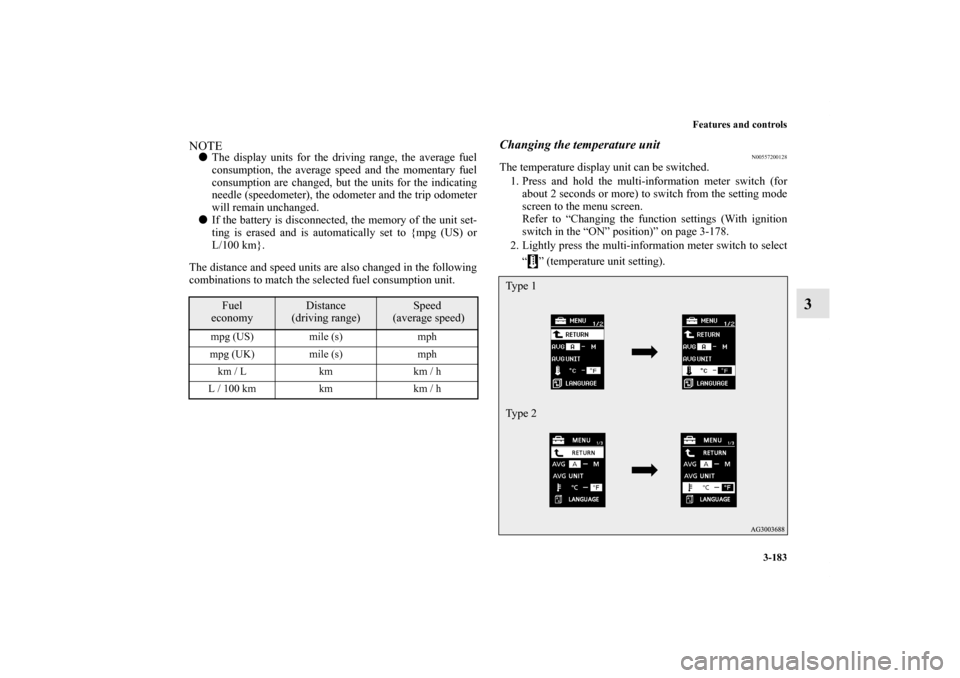
Changing the temperature unit
N00557200128
The temperature display unit can be switched.
1. Press and hold the multi-information meter switch (for
about 2 seconds or more) to switch from the setting mode
screen to the menu screen.
Refer to “Changing the function settings (With ignition
switch in the “ON” position)” on page 3-178.
2. Lightly press the multi-information meter switch to select
“ ” (temperature unit setting).
Fuel
economy
Distance
(driving range)
Speed
(average speed)
mpg (US) mile (s) mph
mpg (UK) mile (s) mph
km / L km km / h
L / 100 km km km / h
Type 1
Type 2
BK0122500US.book 183 ページ 2010年5月12日 水曜日 午前11時11分
Page 299 of 714
3-184 Features and controls
3
3. Press and hold the multi-information meter switch (for
about 2 seconds or more) to change in sequence from °F
→ °C → °F.
The setting is changed to the selected temperature unit.NOTE�If the battery is disconnected, the memory of the unit set-
ting is erased and is automatically set to °F (°C).
Changing the display language
N00557300129
The language of the multi-information display can be changed.
1. Press and hold the multi-information meter switch (for
about 2 seconds or more) to change from the setting mode
screen to the menu screen.
Refer to “Changing the function settings (With ignition
switch in the “ON” position)” on page 3-178.
2. Lightly press the multi-information meter switch to select
“LANGUAGE” (language setting).Type 1
Type 2
BK0122500US.book 184 ページ 2010年5月12日 水曜日 午前11時11分
Page 300 of 714

Features and controls
3-185
3
3. Press and hold the multi-information meter switch (for
about 2 seconds or more) to display “LANGUAGE” (lan-
guage setting).
4. Lightly press the multi-information meter switch to
change in sequence from JAPANESE → ENGLISH →
GERMAN→ FRENCH → SPANISH → ITALIAN → ---
(do not display warning message) → RETURN → JAPA-
NESE.5. Press and hold the multi-information meter switch (for
about 2 seconds or more) to change the setting to the
selected language.
NOTE�If the battery is disconnected, the memory of the language
setting is erased and is automatically set to ENGLISH.
�If “---” is selected in the language setting, a warning mes-
sage is not displayed when there is a warning display or
interrupt display.Changing the language on Mitsubishi Multi-Communi-
cation System or Bluetooth
® 2.0 interface to match the
multi-information display
(if so equipped)
N00529800174
The language used in Mitsubishi Multi-Communication Sys-
tem (if so equipped) or Bluetooth
® 2.0 interface (if so
equipped) can be changed automatically to the same language
as that shown in the multi-information display.
1. Press and hold the multi-information meter switch (for
about 2 seconds or more) to switch from the setting mode
screen to the menu screen. Refer to “Changing the func-
tion settings (With ignition switch in the “ON” position)”
on page 3-178.
Ty p e 1
Ty p e 2
BK0122500US.book 185 ページ 2010年5月12日 水曜日 午前11時11分
Page 301 of 714

3-186 Features and controls
3
2. Lightly press the multi-information meter switch to select
“ ” (language cooperative control).
3. Every time the multi-information meter switch is pressed
for a long time, the setting will change as follows: A
(language cooperation: enabled)→ M (language coopera-
tion: disabled)→ A (language cooperation: enabled). The
setting is changed to the selected condition.
NOTE�If the battery is disconnected, the memory of the language
cooperative control is erased and is automatically set to
“A” (language cooperation: enabled).
�The language display modified with the language setting
can be switched in the following manner.
• When “A” (language cooperation: enabled) has been
selected with the language cooperative control, the lan-
guage for Mitsubishi Multi-Communication System (if
so equipped) or Bluetooth
® 2.0 interface (if so
equipped) is automatically changed to the language
selected for the multi-information display.
• When “M” (language cooperation: disabled) has been
selected with the language cooperative control, the lan-
guage for Mitsubishi Multi-Communication System (if
so equipped) or Bluetooth® 2.0 interface (if so
equipped) is not automatically changed to the language
selected for the multi-information display.
Type 1
Type 2BK0122500US.book 186 ページ 2010年5月12日 水曜日 午前11時11分
Page 303 of 714
3-188 Features and controls
3
NOTE�If the battery is disconnected, the memory of the operation
sound setting is erased and is automatically set to “ON”
(operation sound on).
�The operation sound setting only deactivates the operation
sound of the multi-information meter switch and rheostat
meter illumination button. The warning display and other
sounds cannot be deactivated.
Changing the time until “REST REMINDER” is dis-
played
N00557500147
The time until the display appears can be changed.
1. Press and hold the multi-information meter switch (for
about 2 seconds or more) to switch from the setting mode
screen to the menu screen.
Refer to “Changing the function settings (With ignition
switch in the “ON” position)” on page 3-178.
2. Lightly press the multi-information meter switch to select
“ALARM” (rest time setting).Type 1
Type 2
BK0122500US.book 188 ページ 2010年5月12日 水曜日 午前11時11分
Page 304 of 714

Features and controls
3-189
3
3. Press and hold the multi-information meter switch (for
about 2 seconds or more) to display “ALARM” (rest time
setting).
4. Lightly press the multi-information meter switch to select
the time until the display appears.
5. Press and hold the multi-information meter switch (for
about 2 seconds or more) to change the setting to the
selected time.NOTE�If the battery is disconnected, the memory of the unit set-
ting is erased and is automatically set to the “OFF”.
�The drive time is reset when the ignition switch is in the
“OFF” position.
Changing the turn signal sound
N00563500054
It is possible to change the turn signal sound.
1. Press and hold the multi-information meter switch for
about 2 seconds or more to switch from the setting mode
screen to the menu screen.
Refer to “Changing the function settings (With ignition
switch in the “ON” position)” on page 3-178.
2. Lightly press the multi-information meter switch to select
. (changing the turn signal sound)
Ty p e 1 Ty p e 2
Ty p e 1
Ty p e 2
BK0122500US.book 189 ページ 2010年5月12日 水曜日 午前11時11分