Page 351 of 714
3-236 Features and controls
3
Volume up buttonPress this button to increase the volume. Volume down buttonPress this button to decrease the volume.SPEECH button�Press this button to change to voice recognition mode.
While the system is in voice recognition mode, “Listen-
ing” will appear on the audio display.
�If you press the button briefly while in voice recognition
mode, it will interrupt prompting and allow voice com-
mand input.
Pressing the button longer will deactivate the voice recog-
nition mode.
�Pressing this button briefly during a call will enable voice
recognition and allow voice command input.PICK-UP button�Press this button when an incoming call is received to
answer the telephone.
�When another call is received during a call, press this but-
ton to put the first caller on hold and talk to the new caller.
• In such circumstances, you can press the button briefly
to switch between callers. You will switch to the first
caller and the other caller will be put on hold.
• To establish a three-way call in such situations, press the
SPEECH button to enter voice recognition mode and
then say “Join calls.”
HANG-UP button�Press this button when an incoming call is received to
refuse the call.
�Press this button during a call to end the current call.
When another call is on hold, you will switch to that call.
�If this button is pressed in the voice recognition mode, the
voice recognition mode will be deactivated.NOTE�When you press the SPEECH button to enter voice recog-
nition mode with a cellular phone paired to the system,
current information on the cellular phone, such as
“remaining battery life,” “signal strength” or “roaming,”
will be displayed on the audio display.*
*: Some cellular phones will not send this information to
the Bluetooth
® 2.0 interface.
�Call waiting and three-way calls can be used by the Blue-
tooth
® 2.0 interface, only if it is possible to use those ser-
vices with your cellular phone.
BK0122500US.book 236 ページ 2010年5月12日 水曜日 午前11時11分
Page 406 of 714
Driving safety
4-3
4 Driving, alcohol and drugs
N00628900049
Drunk driving is one of the most frequent causes of accidents.
Your driving ability can be seriously impaired even with blood
alcohol levels far below the legal minimum. If you have been
drinking, don’t drive. Ride with a designated non-drinking
driver, call a cab or a friend, or use public transportation.
Drinking coffee or taking a cold shower will not make you
sober.
Similarly, prescription and nonprescription drugs affect your
alertness, perception and reaction time. Consult with your doc-
tor or pharmacist before driving while under the influence of
any of these medications.
Vehicle preparation before driving
N00629000584
For a safer and more enjoyable trip, always check for the fol-
lowing:Seat belts and seats�Before starting the vehicle, make certain that you and all
passengers are seated and wearing their seat belts properly
(with children in the rear seat, in appropriate restraints),
and that all the doors and flap-fold tailgate are locked.
�Move the driver’s seat as far backward as possible, while
still keeping good visibility, and good control of the steer-
ing wheel, brakes, accelerator, and controls. Check the
instrument panel indicators and multi-information display
for any possible problem.
�In the same way, the front passenger seat should also be
moved as far back as possible.
�Make sure that infants and small children are properly
restrained in accordance with all laws and regulations.Floor matAlways properly position floor mat and assure it does not inter-
fere with operation of the pedals.
Always use retaining clip on the driver’s floorboard to secure
the Mitsubishi genuine floor mat. When used, this clip will
help prevent the floor mat from moving forward and possibly
interfering with the operation of the pedals.
To prevent the floor mat from moving forward and possibly
interfering with the operation of the pedals, Mitsubishi genuine
floor mats are recommended.
WA R N I N G
!�NEVER DRINK AND DRIVE.
Your perceptions are less accurate, your reflexes are
slower and your judgment is impaired.
BK0122500US.book 3 ページ 2010年5月12日 水曜日 午前11時11分
Page 424 of 714

Driving safety
4-21
4
When towing at high altitudes, engine coolant and automatic
transaxle oil will overheat at a lower temperature than at nor-
mal altitudes.
If you turn your engine off immediately after towing at high
altitude on steep uphill grades, your vehicle may show signs
similar to overheating. To avoid this, let the engine run while
parked (preferably on level ground) with the automatic tran-
saxle in the “P” (PARK) position for a few minutes before turn-
ing the engine off.
�If the engine coolant temperature indicator flashes on
the information screen in the multi-information display or
the engine power drops suddenly, refer to “Engine over-
heating” on page 6-5.
�If the warning display or warning display illumi-
nates, refer to “Warning display” on page 3-96.Driving on hillsReduce speed and downshift before you start down a long or
steep downgrade. If you don’t shift down, over using the
brakes can cause reduced brake efficiency.
You can tow in “D” (DRIVE) position. You may want to shift
the selector lever to the 3rd or a lower position, under heavy
loads or hilly conditions.
ParkingAlways place chocks or blocks under both the vehicle and
trailer wheels when parking. Be sure that the parking brake is
firmly set and that the selector lever is in the “P” (PARK) posi-
tion. Avoid parking on a hill with a trailer, but if it cannot be
avoided, do so only after performing the following:
1. Apply the brakes and keep them applied.
2. Have someone place chocks or blocks under both the
vehicle and trailer wheels.
3. When the chocks or blocks are in place, release your
brakes slowly until the chocks or blocks absorb the load.
4. Apply the parking brake firmly.
5. Set the selector lever to the “P” (PARK) position and turn
off the engine.
BK0122500US.book 21 ページ 2010年5月12日 水曜日 午前11時11分
Page 428 of 714
5
Comfort controls
Vents. . . . . . . . . . . . . . . . . . . . . . . . . . . . . . . . . . . .5- 2
Manual air conditioning-Type 1
(if so equipped) . . . . . . . . . . . . . . . . . . . . . . . . . .5- 6
Manual air conditioning-Type 2
(if so equipped) . . . . . . . . . . . . . . . . . . . . . . . . . .5- 16
Automatic air conditioning-Type1
(if so equipped) . . . . . . . . . . . . . . . . . . . . . . . . . .5- 25
Automatic air conditioning-Type2
(if so equipped) . . . . . . . . . . . . . . . . . . . . . . . . . .5- 35
Important air conditioning operating tips . . . . . . .5- 45
Air purifier . . . . . . . . . . . . . . . . . . . . . . . . . . . . . . .5- 46
AM/FM electronically tuned radio with CD player
(RBDS and MP3 compatible)
(if so equipped) . . . . . . . . . . . . . . . . . . . . . . . . . .5- 46
AM/FM electronically tuned radio with 6 CD
autochanger (RBDS and MP3 compatible)
(if so equipped) . . . . . . . . . . . . . . . . . . . . . . . . . .5- 66
To play tracks from USB device
(if so equipped) . . . . . . . . . . . . . . . . . . . . . . . . . .5- 97
To play tracks from a Bluetooth® device
(vehicles with Bluetooth® 2.0 interface) . . . . . .5- 114To use the external audio input function
(if so equipped) . . . . . . . . . . . . . . . . . . . . . . . . . 5- 118
To listen to a disc in the rear-seat display
(vehicles with rear-seat display) . . . . . . . . . . . . 5- 119
Steering wheel audio remote control switch
(if so equipped) . . . . . . . . . . . . . . . . . . . . . . . . . 5- 120
Error codes . . . . . . . . . . . . . . . . . . . . . . . . . . . . . . 5- 123
Error codes (SIRIUS Satellite Radio)
(if so equipped) . . . . . . . . . . . . . . . . . . . . . . . . . 5- 125
Error codes (iPod) . . . . . . . . . . . . . . . . . . . . . . . . . 5- 127
Error codes (USB memory device) . . . . . . . . . . . . 5- 129
Handling of compact discs . . . . . . . . . . . . . . . . . . 5- 131
Antenna . . . . . . . . . . . . . . . . . . . . . . . . . . . . . . . . . 5- 134
Clock (if so equipped) . . . . . . . . . . . . . . . . . . . . . . 5- 136
General information about your radio . . . . . . . . . . 5- 137
BK0122500US.book 1 ページ 2010年5月12日 水曜日 午前11時11分
Page 474 of 714
Comfort controls
5-47
5
Volume and tone control panel
N00711900631
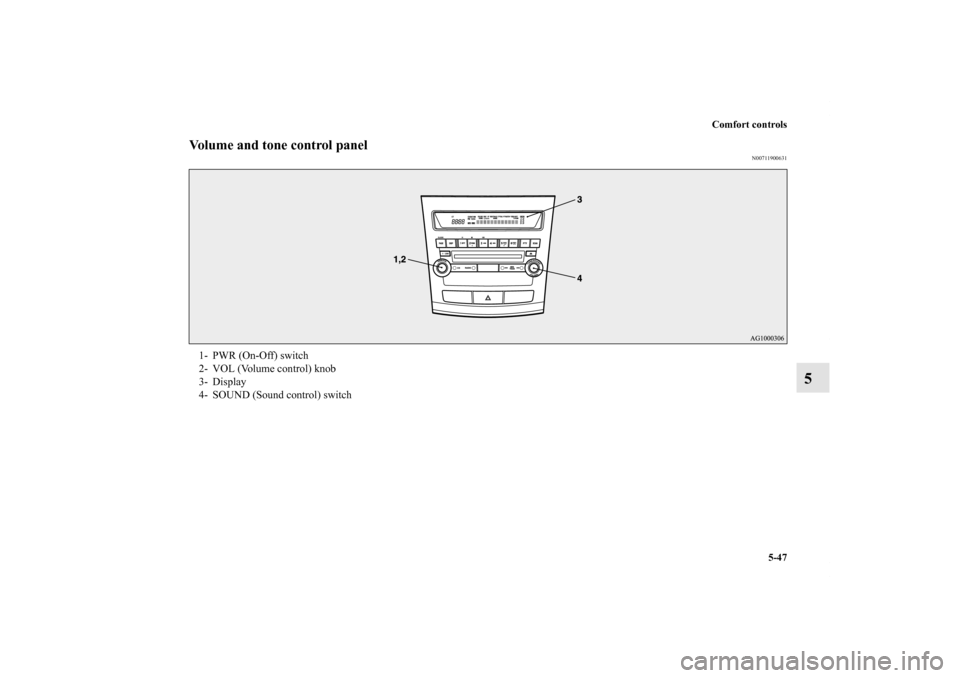
1- PWR (On-Off) switch
2- VOL (Volume control) knob
3- Display
4- SOUND (Sound control) switch
BK0122500US.book 47 ページ 2010年5月12日 水曜日 午前11時11分
Page 475 of 714
5-48 Comfort controls
5
To adjust the volume
N00712000310
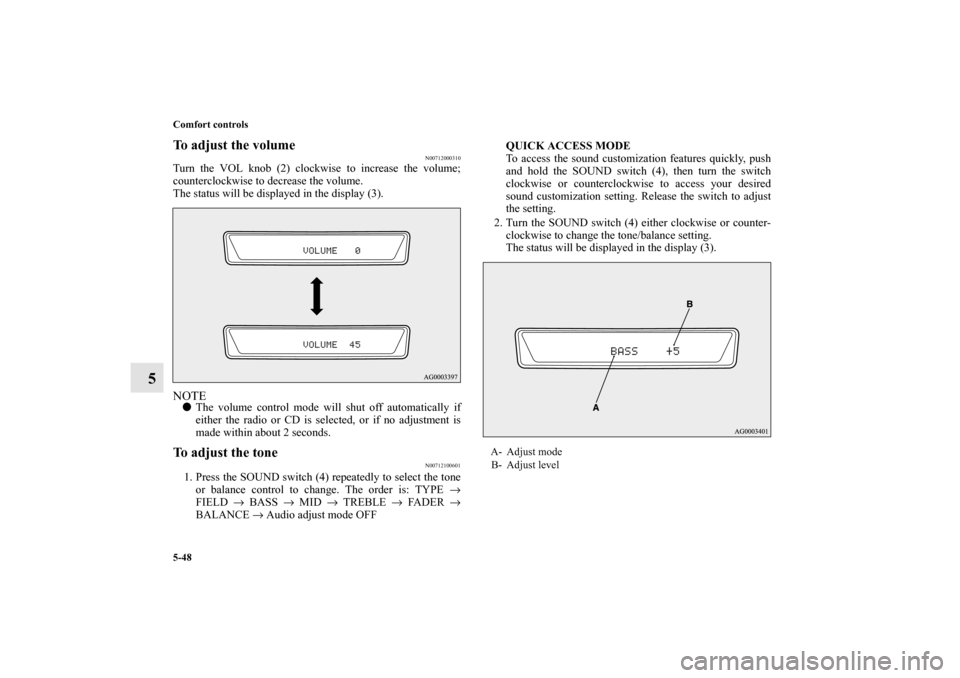
Turn the VOL knob (2) clockwise to increase the volume;
counterclockwise to decrease the volume.
The status will be displayed in the display (3).NOTE�The volume control mode will shut off automatically if
either the radio or CD is selected, or if no adjustment is
made within about 2 seconds.To adjust the tone
N00712100601
1. Press the SOUND switch (4) repeatedly to select the tone
or balance control to change. The order is: TYPE →
FIELD → BASS → MID → TREBLE → FADER →
BALANCE → Audio adjust mode OFFQUICK ACCESS MODE
To access the sound customization features quickly, push
and hold the SOUND switch (4), then turn the switch
clockwise or counterclockwise to access your desired
sound customization setting. Release the switch to adjust
the setting.
2. Turn the SOUND switch (4) either clockwise or counter-
clockwise to change the tone/balance setting.
The status will be displayed in the display (3).
A- Adjust mode
B- Adjust level
BK0122500US.book 48 ページ 2010年5月12日 水曜日 午前11時11分
Page 478 of 714
Comfort controls
5-51
5
Speed Compensated Volume function
N00752200200
Speed Compensated Volume function is a feature that automat-
ically adjusts the VOLUME, BASS, MID, and TREBLE set-
tings in accordance with the vehicle speed. It is possible to turn
this function ON-OFF using the following methods:
1. If you are presently pushing the SOUND switch (4) and
making a tone adjustment, finish making the tone adjust-
ment.
2. Push the SOUND switch (4) for at least about 2 seconds.
The system will switch to MENU mode and the characters
“SCV ON” will be shown on the display.
3. Turn the SOUND switch (4) clockwise to turn the func-
tion ON. Turn it counterclockwise to turn the function
OFF.NOTE�The factory setting for the Speed Compensated Volume
function is ON.
�The MENU mode will automatically shut off when either
the radio or CD is selected or the user does not move any
of the switches for 10 seconds.
BK0122500US.book 51 ページ 2010年5月12日 水曜日 午前11時11分
Page 479 of 714
5-52 Comfort controls
5
Radio control panel and display
N00734900742
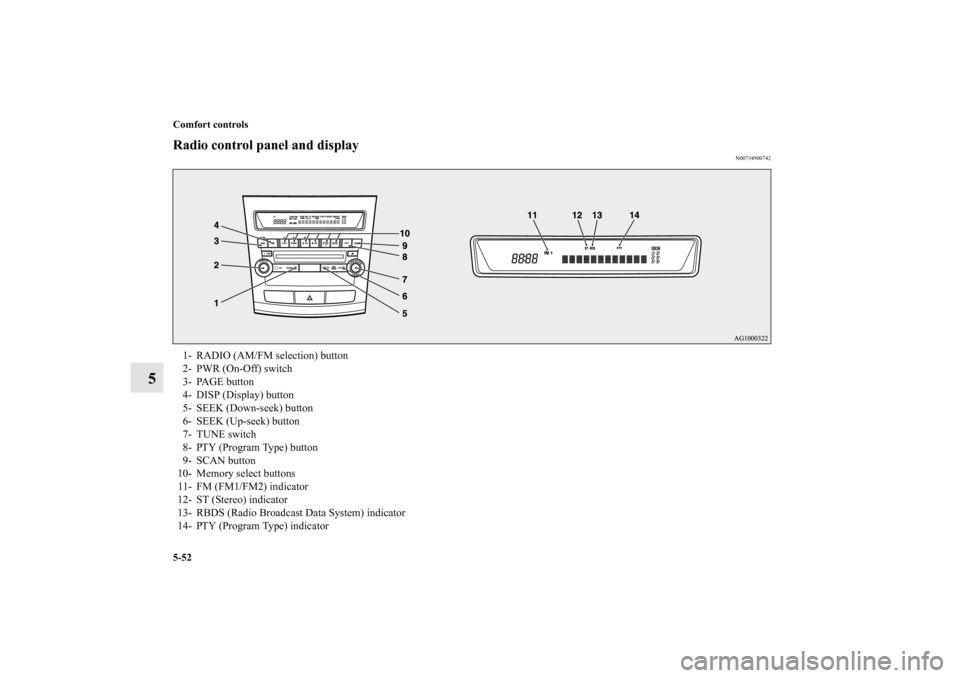
1- RADIO (AM/FM selection) button
2- PWR (On-Off) switch
3- PAGE button
4- DISP (Display) button
5- SEEK (Down-seek) button
6- SEEK (Up-seek) button
7- TUNE switch
8- PTY (Program Type) button
9- SCAN button
10- Memory select buttons
11- FM (FM1/FM2) indicator
12- ST (Stereo) indicator
13- RBDS (Radio Broadcast Data System) indicator
14- PTY (Program Type) indicator
BK0122500US.book 52 ページ 2010年5月12日 水曜日 午前11時11分