Page 236 of 706
Features and controls
3-141
3
If the warning light/display comes on while driv-
ing
N00531700545
If only the anti-lock braking system warning light/dis-
play comes on�Avoid hard braking and high-speed driving. Stop the vehi-
cle in a safe place.
Test the system by restarting the engine and driving at a
speed of about 12 mph (20 km/h) or higher.
If the warning light/display then remain off during driv-
ing, there is no problem.
However, if the warning light/display do not disappear, or
if they come on again when the vehicle is driven, have the
vehicle checked by an authorized Mitsubishi Motors
dealer or repair facility of your choice as soon as possible.
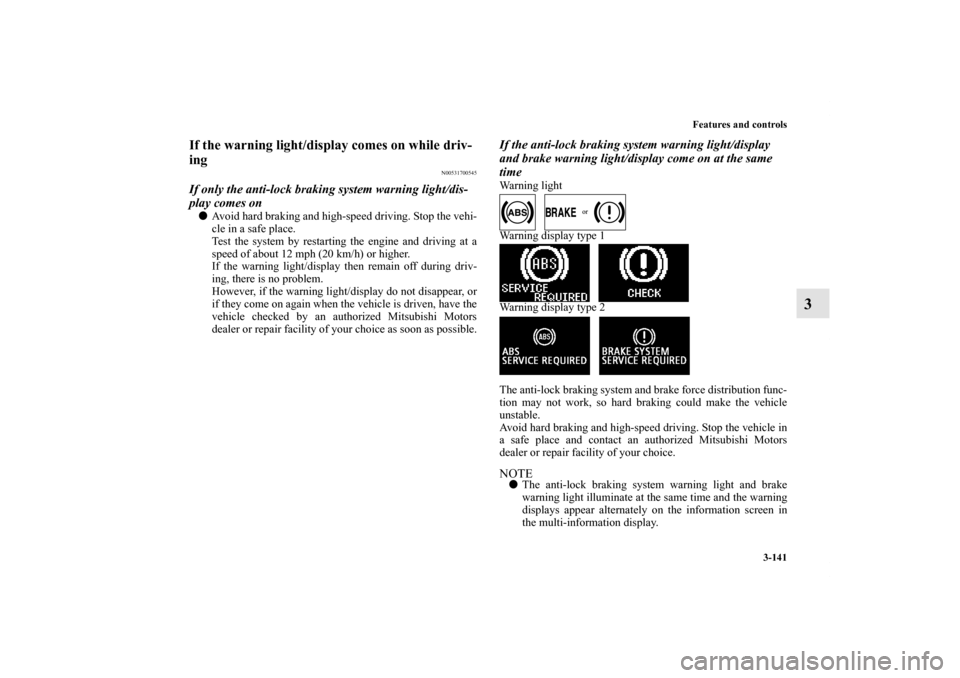
If the anti-lock braking system warning light/display
and brake warning light/display come on at the same
timeWarning light
Warning display type 1
Warning display type 2
The anti-lock braking system and brake force distribution func-
tion may not work, so hard braking could make the vehicle
unstable.
Avoid hard braking and high-speed driving. Stop the vehicle in
a safe place and contact an authorized Mitsubishi Motors
dealer or repair facility of your choice.NOTE�The anti-lock braking system warning light and brake
warning light illuminate at the same time and the warning
displays appear alternately on the information screen in
the multi-information display.
BK0125300US.book 141 ページ 2010年5月18日 火曜日 午後1時53分
Page 238 of 706
Features and controls
3-143
3 Power steering system
N00518000277
The power steering system operates while the engine is run-
ning. It helps reduce the effort needed to turn the steering
wheel.
The power steering system has mechanical steering capability
in case the power assist is lost. If the power assist is lost for
some reason, you will still be able to steer your vehicle. If the
power assist is lost, you will notice it takes much more effort to
steer and that there is much more “free play” in the steering
wheel. If this happens, take your vehicle to an authorized Mit-
subishi Motors dealer or a repair facility of your choice.
Hydraulic power steering system (HPS)
(if so
equipped)
N00547100049
The hydraulic power steering system (HPS) uses a hydraulic
pressure pump to assist the turning of the steering wheel.Electric power steering system (EPS)
(if so
equipped)
N00547200040
The electric power steering system (EPS) uses an electric
motor to assist the turning of the steering wheel.NOTE�During repeated full-lock turning of the steering wheel
(for example, while you are manoeuvring the vehicle into
a parking space), a protection function may be activated to
prevent overheating of the power steering system. This
function will make the steering wheel gradually harder to
turn. In this event, limit your turning of the steering wheel
for a while. When the system has cooled down, the steer-
ing action will return to normal.
�If you turn the steering wheel while the vehicle is station-
ary with the headlights on, the headlights may become
dim. This behaviour is not abnormal. The headlights will
return to their original brightness after a short while.
WA R N I N G
!�Do not stop the engine while the vehicle is moving.
Stopping the engine would make the steering wheel
extremely hard to turn, possibly resulting in an acci-
dent.
CAUTION
!�Do not leave the steering wheel turned all the way in
one direction. This can cause damage to the power
steering system.
BK0125300US.book 143 ページ 2010年5月18日 火曜日 午後1時53分
Page 240 of 706
Features and controls
3-145
3
NOTE�An operation noise may be emitted from the engine com-
partment in the following situations. The sound is associ-
ated with checking the operations of the ASC. At this
time, you may feel a shock from the brake pedal if you
depress it. These do not indicate a malfunction.
• When the ignition switch is set to the “ON” position.
• When the vehicle is driven for a while after the engine is
turned on.
�When the ASC is activated, you may feel a vibration in
the vehicle body or hear a whining sound from the engine
compartment.
This indicates that the system is operating normally. It
does not indicate a malfunction.
�When the anti-lock braking system warning light is illu-
minated, the ASC is not active.
Traction control function
N00559200047
On slippery surfaces, the traction control function prevents the
drive wheels from spinning excessive, thus helping the vehicle
to start moving from a stopped condition. It also provides suffi-
cient driving force and steering performance as the vehicle
turns while pressing the acceleration pedal.Skid control function
N00546800023
The skid control function is designed to help the driver main-
tain control of the vehicle on slippery roads or during rapid
steering maneuvers. It works by controlling the engine output
and the brake on each wheel.NOTE�The skid control function operates at speeds of about 9
mph (15 km/h) or higher.
CAUTION
!�When driving a vehicle on a snowy or icy road, be
sure to install snow tires and drive the vehicle at
moderate speeds.
BK0125300US.book 145 ページ 2010年5月18日 火曜日 午後1時53分
Page 245 of 706
3-150 Features and controls
3
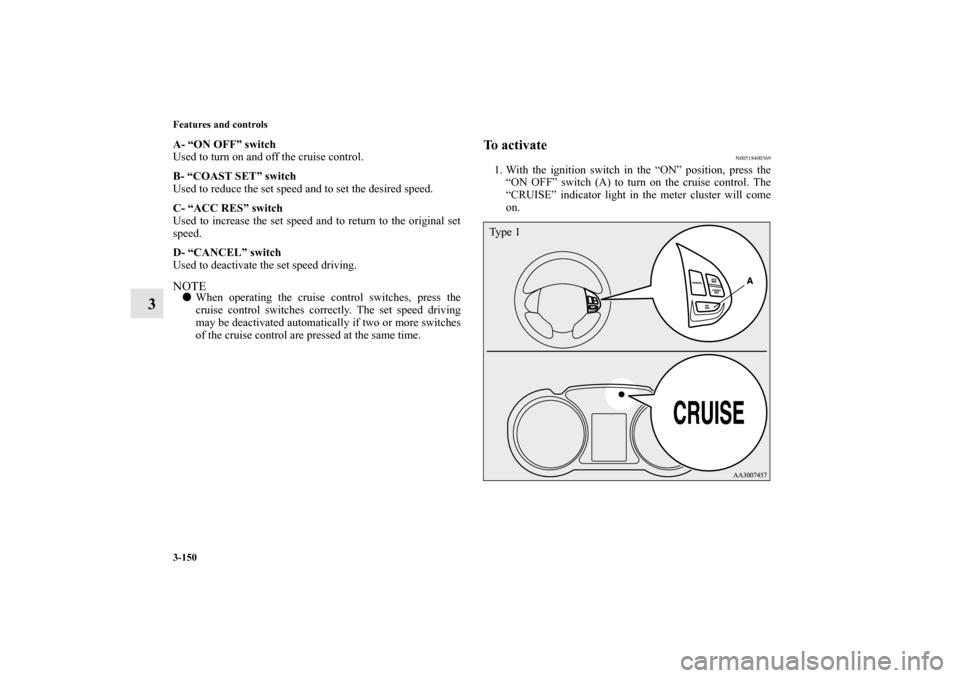
A- “ON OFF” switch
Used to turn on and off the cruise control.
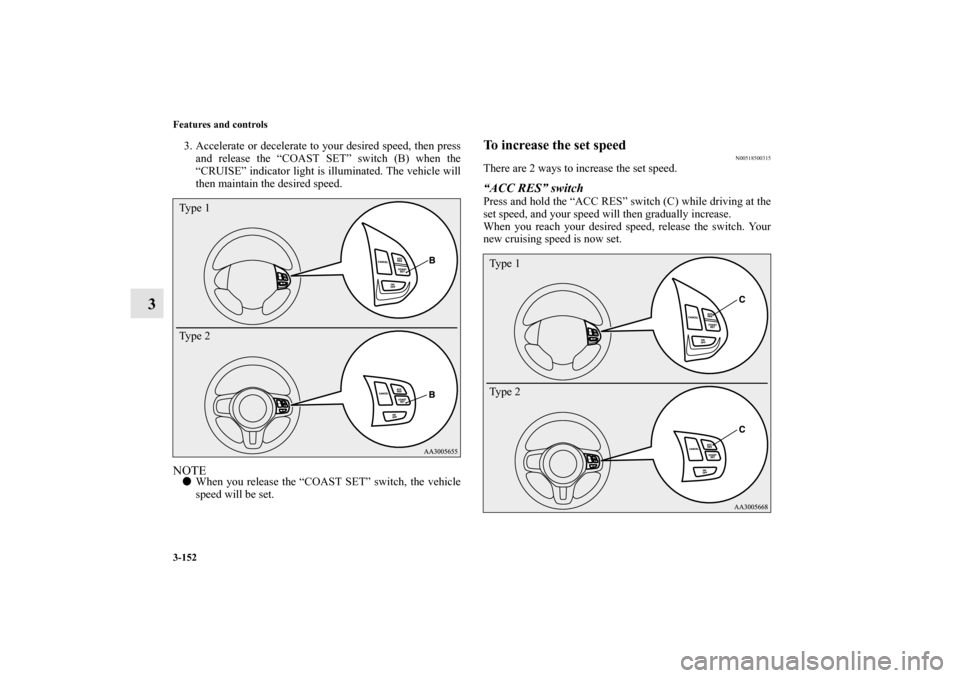
B- “COAST SET” switch
Used to reduce the set speed and to set the desired speed.
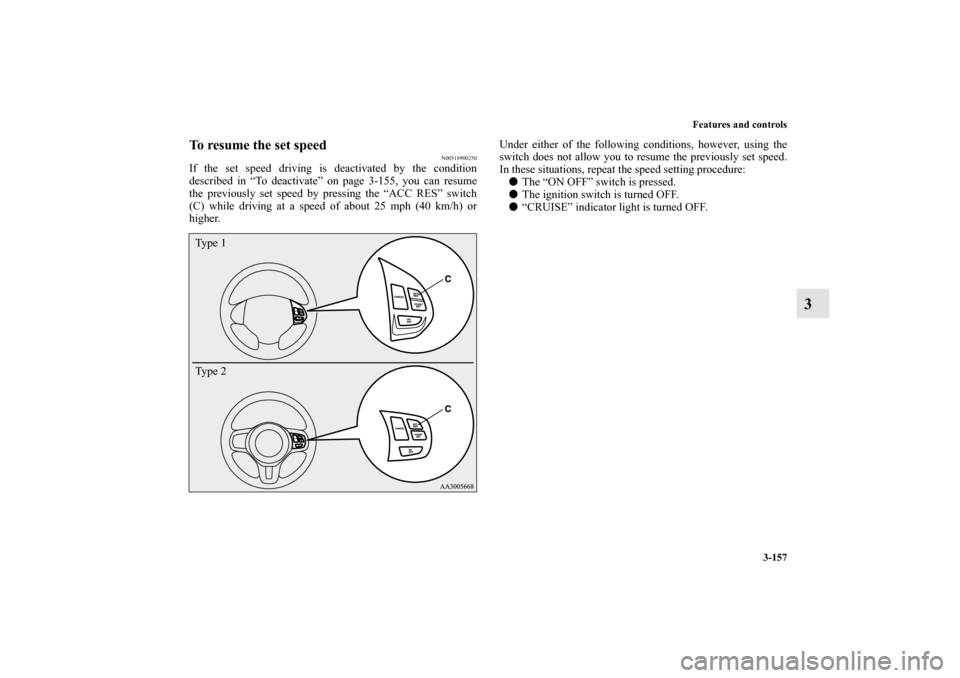
C- “ACC RES” switch
Used to increase the set speed and to return to the original set
speed.
D- “CANCEL” switch
Used to deactivate the set speed driving.NOTE�When operating the cruise control switches, press the
cruise control switches correctly. The set speed driving
may be deactivated automatically if two or more switches
of the cruise control are pressed at the same time.
To activate
N00518400369
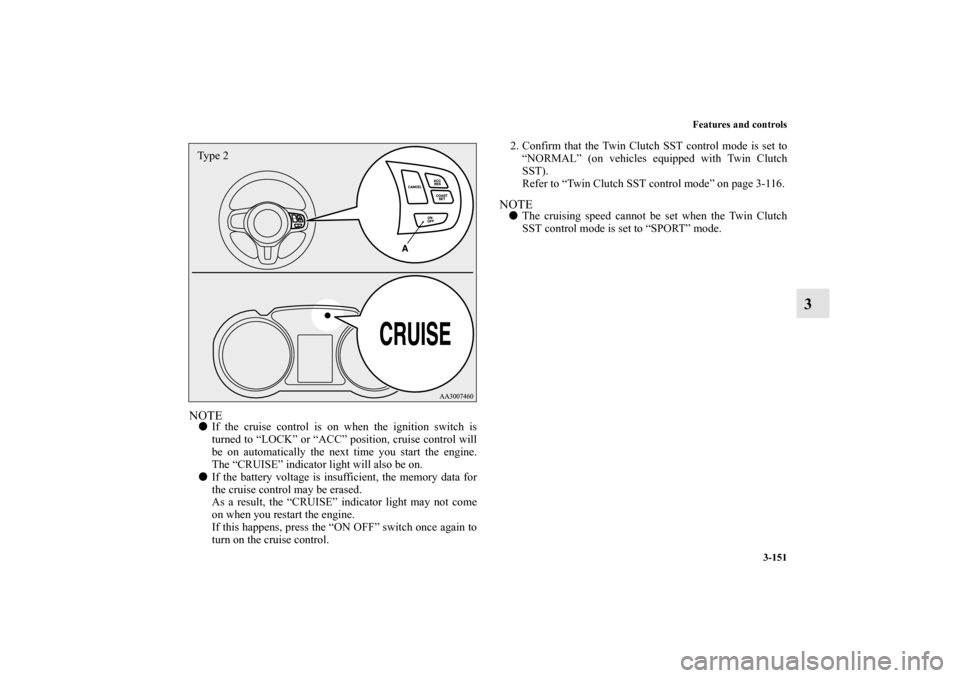
1. With the ignition switch in the “ON” position, press the
“ON OFF” switch (A) to turn on the cruise control. The
“CRUISE” indicator light in the meter cluster will come
on.Ty p e 1
BK0125300US.book 150 ページ 2010年5月18日 火曜日 午後1時53分
Page 246 of 706
Features and controls
3-151
3
NOTE�If the cruise control is on when the ignition switch is
turned to “LOCK” or “ACC” position, cruise control will
be on automatically the next time you start the engine.
The “CRUISE” indicator light will also be on.
�If the battery voltage is insufficient, the memory data for
the cruise control may be erased.
As a result, the “CRUISE” indicator light may not come
on when you restart the engine.
If this happens, press the “ON OFF” switch once again to
turn on the cruise control.2. Confirm that the Twin Clutch SST control mode is set to
“NORMAL” (on vehicles equipped with Twin Clutch
SST).
Refer to “Twin Clutch SST control mode” on page 3-116.
NOTE�The cruising speed cannot be set when the Twin Clutch
SST control mode is set to “SPORT” mode.
Type 2
BK0125300US.book 151 ページ 2010年5月18日 火曜日 午後1時53分
Page 247 of 706
3-152 Features and controls
3
3. Accelerate or decelerate to your desired speed, then press
and release the “COAST SET” switch (B) when the
“CRUISE” indicator light is illuminated. The vehicle will
then maintain the desired speed.NOTE�When you release the “COAST SET” switch, the vehicle
speed will be set.
To increase the set speed
N00518500315
There are 2 ways to increase the set speed.“ACC RES” switchPress and hold the “ACC RES” switch (C) while driving at the
set speed, and your speed will then gradually increase.
When you reach your desired speed, release the switch. Your
new cruising speed is now set.
Ty p e 1
Ty p e 2
Ty p e 1
Ty p e 2
BK0125300US.book 152 ページ 2010年5月18日 火曜日 午後1時53分
Page 252 of 706
Features and controls
3-157
3
To resume the set speed
N00518900250
If the set speed driving is deactivated by the condition
described in “To deactivate” on page 3-155, you can resume
the previously set speed by pressing the “ACC RES” switch
(C) while driving at a speed of about 25 mph (40 km/h) or
higher.Under either of the following conditions, however, using the
switch does not allow you to resume the previously set speed.
In these situations, repeat the speed setting procedure:
�The “ON OFF” switch is pressed.
�The ignition switch is turned OFF.
�“CRUISE” indicator light is turned OFF.Ty p e 1
Ty p e 2
BK0125300US.book 157 ページ 2010年5月18日 火曜日 午後1時53分
Page 254 of 706
Features and controls
3-159
3
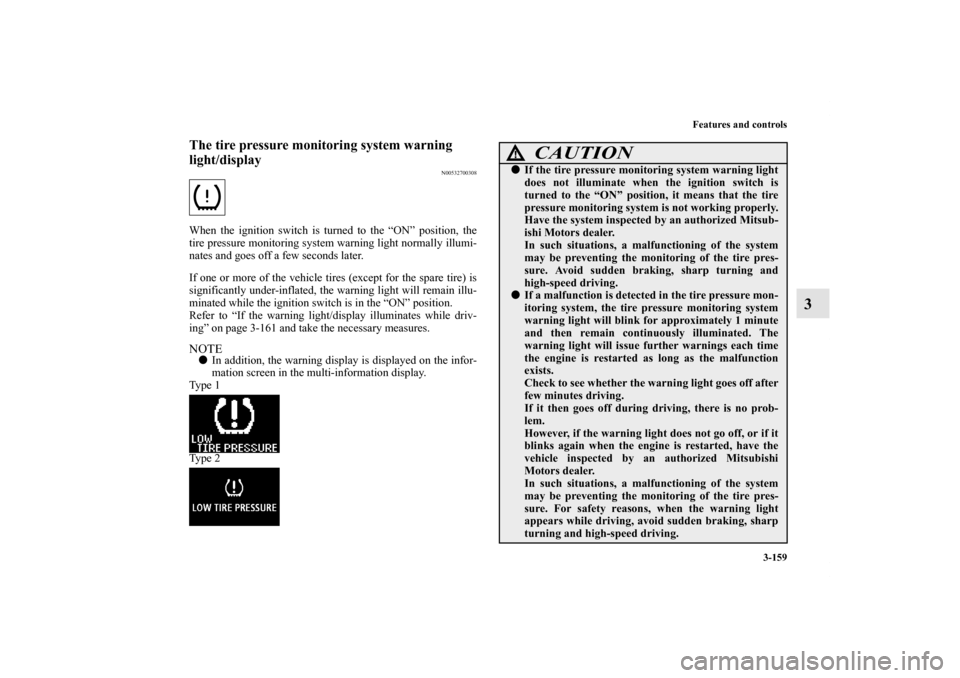
The tire pressure monitoring system warning
light/display
N00532700308
When the ignition switch is turned to the “ON” position, the
tire pressure monitoring system warning light normally illumi-
nates and goes off a few seconds later.
If one or more of the vehicle tires (except for the spare tire) is
significantly under-inflated, the warning light will remain illu-
minated while the ignition switch is in the “ON” position.
Refer to “If the warning light/display illuminates while driv-
ing” on page 3-161 and take the necessary measures.NOTE�In addition, the warning display is displayed on the infor-
mation screen in the multi-information display.
Ty p e 1
Ty p e 2
CAUTION
!�If the tire pressure monitoring system warning light
does not illuminate when the ignition switch is
turned to the “ON” position, it means that the tire
pressure monitoring system is not working properly.
Have the system inspected by an authorized Mitsub-
ishi Motors dealer.
In such situations, a malfunctioning of the system
may be preventing the monitoring of the tire pres-
sure. Avoid sudden braking, sharp turning and
high-speed driving.�If a malfunction is detected in the tire pressure mon-
itoring system, the tire pressure monitoring system
warning light will blink for approximately 1 minute
and then remain continuously illuminated. The
warning light will issue further warnings each time
the engine is restarted as long as the malfunction
exists.
Check to see whether the warning light goes off after
few minutes driving.
If it then goes off during driving, there is no prob-
lem.
However, if the warning light does not go off, or if it
blinks again when the engine is restarted, have the
vehicle inspected by an authorized Mitsubishi
Motors dealer.
In such situations, a malfunctioning of the system
may be preventing the monitoring of the tire pres-
sure. For safety reasons, when the warning light
appears while driving, avoid sudden braking, sharp
turning and high-speed driving.
BK0125300US.book 159 ページ 2010年5月18日 火曜日 午後1時53分